
GX-Speed - Uncategorized GENIUS - Free user manual and instructions
Find the device manual for free GX-Speed GENIUS in PDF.


| Product Type | Wired Optical Mouse |
| Model | GX-Speed |
| Brand | Genius |
| Connection | USB 2.0 |
| Sensor Technology | Optical LED |
| Resolution | 1000 DPI (fixed) |
| Number of Buttons | 3 (Left, Right, Scroll wheel) |
| Scroll Wheel | Yes, with click function |
| Cable Length | 1.5 m |
| Dimensions (L x W x H) | 120 x 65 x 35 mm |
| Weight | 95 g (including cable) |
| Power Source | USB bus-powered (5V DC, 100 mA) |
| Operating System Compatibility | Windows 7/8/10, macOS, Linux |
| Plug and Play | Yes, no driver required |
| Key Features | Ergonomic design, smooth cursor control, durable switches |
| Cleaning Instructions | Wipe with a soft dry cloth; avoid liquids |
| Safety Precautions | Keep away from water and extreme temperatures |
| Spare Parts Availability | Contact Genius support for replacement cable or feet |
| Repairability | User-serviceable only for cleaning; internal repairs by professional |
| Warranty | 1 year limited |
Frequently Asked Questions - GX-Speed GENIUS
User questions about GX-Speed GENIUS
0 question about this device. Answer the ones you know or ask your own.
Ask a new question about this device
Download the instructions for your Uncategorized in PDF format for free! Find your manual GX-Speed - GENIUS and take your electronic device back in hand. On this page are published all the documents necessary for the use of your device. GX-Speed by GENIUS.
USER MANUAL GX-Speed GENIUS
DeathTaker/ Imperator Pro/GX-Speed- White Edition Gaming Enthusiast's Special Collection

White Edition is a collector's best choice for GX-Gaming. Deathtaker, Imperator Pro and the GX-Speed mousepad in WHITE creates a true gaming spirit for gamers who play MMO and RTS games. It is unique and quality-oriented as the finish will bring attention around. The white edition will conquer any challenge in a MMO/RTS game and become an explosive game performer with this special equipment.
DeathTaker White Edition has nine buttons and a precision gaming engine for up 5700 dpi, so gamers can easily shift around the battle field, plus the X/Y axis dpi adjustment enables for a more flexible battle. Plus the weight adjustment system enhances the mouse control ability at high speed.
Imperator Pro White Edition has 17 key anti-ghosting systems to keep gamers away from ghost keys occurring during gaming sessions. Easy and simple; six independent macro keys can be set to be used at any time. Plus two USB ports are available for other USB devices for immediate activation.
GX-Speed White Edition is a new soft gaming mouse pad designed for the Deathatker White Edition. It is now with thinner thickness and the natural rubber base renders a stronger surface grip during fierce gaming sessions. Plus the enlarged pad size of 385 x 272 mm allows comfortable and unrestricted gaming movement.
Both the DeathTaker and Imperator Pro White Edition are equipped with a full speed CPU with built-in memory to prevent macro settings from game block and this gives gamers 1-ms (8X quicker) in response time, plus a braided cable with gold-plated USB connector provides a stable and smooth signal connection during battle engagement. Plus the most fantastic feature for both is the 16 million RGB backlight system, it renders a unique identity for gamers who look to differentiate themselves from other gaming competitors.
DeathTaker and Imperator Pro White Edition use the Scorpion user interface, so gamers can setup "Button Assignment", "Macro Management", "Advanced Setting" to customize mouse performance and "Light Option" can select up to 16 million fascinating backlight colors.
MMO/RTS game oriented, comfortable design and a superb hand grip, outstanding performance in all games, Deathtaker, Imperator Pro and GX-Speed Mousepad White Edition is the ONLY choice for game addicts. Be comea Pro GX Gamer now.
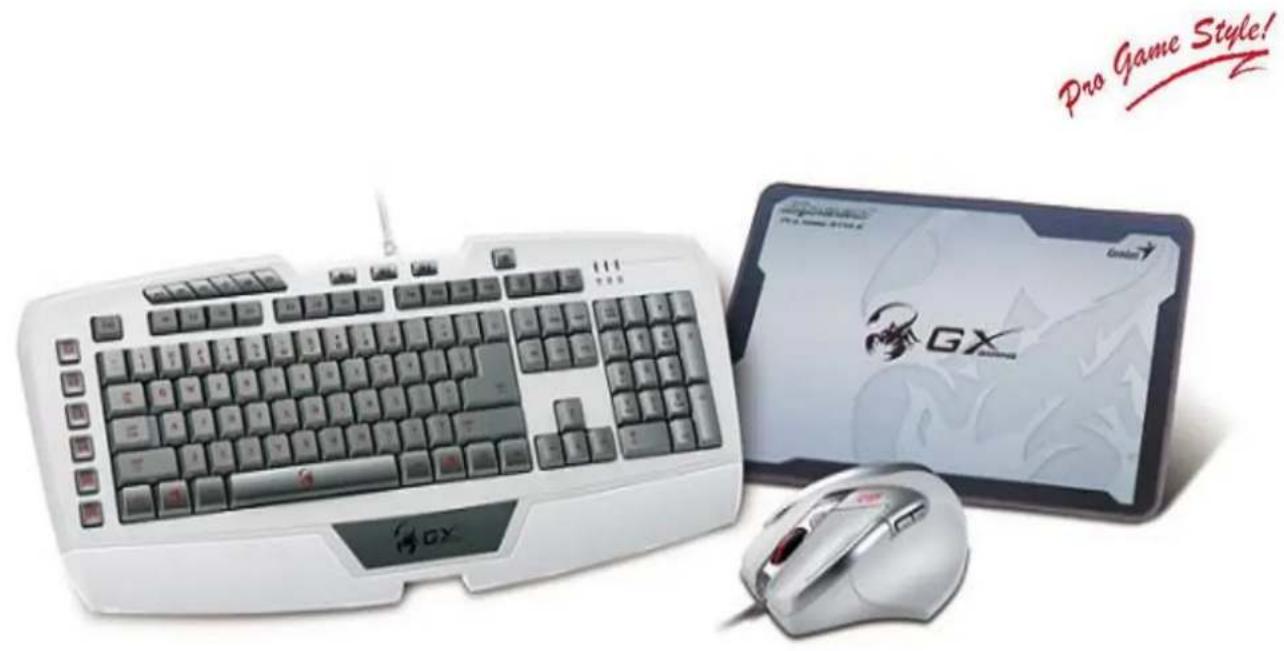
DeathTaker/ Imperator Pro/GX-Speed- White Edition
Gaming Enthusiast's Special Collection

▼ Key Features
Imperator Pro White Edition
• Full speed professional gaming keyboard
- Brightness switch: Four levels of light brightness 33%/66%/100%/ OFF.
• Full color 16M RGB for backlight
- Two USB ports for USB peripherals
- Six programmable macro keys - assign up to 18 macros
- On board memory chip prevents command bottleneck
• Palm rest for superb gaming comfort
DeathTaker White Edition
• Professional 9-button MMO/RTS gaming mouse
• Over-clocking SGCii: 100 dpi to 5700 dpi
• Scorpion gaming UI for shortcuts
• 16 million RGB backlight system
- Adjustable metal weight 4.5g x 6
- Onboard memory to prevent game block
• 1.8 meter braided cable with gold-plated USB connector
• Rubber coating finished to receive total control
▼ System Requirements
- Windows 8/7 / Vista/XP
• Available USB port - At least 100MB of hard disk space
▼ Package Contents
Imperator Pro White Edition
• Wired keyboard with 1.8m cable
• Imperator Pro White Edition CD driver
• Multi-language quick guide
DeathTaker White Edition
• DeathTaker gaming mouse
- DeathTaker UI Driver
• Metal weight 4.5g x 6
• Multi-language quick installation
▼ Recommended Products

Mordax

Cavimanus
SP-G2.1 1250
SW-G2.1 3000

Lychas

| Model Name | Imperator Pro White Edition |
| Package | |
| Keyboard features | |
| -Media keys | 6 |
| - Backlight key | 1 |
| - Profile keys | 3 |
| - Programmable macro keys | 6 |
| WEEE Information | |
| Body Weight (g) | 875g |
| Body Size (L x W x H) cm | 50 x 20.45 x 3.35 |
| Gift Box Size (L x W x H) cm | 55 x 26.8 x 3.7 |
| Shipping Information | |
| PCS/CTN | 5 |
| CUFT/CTN | 1.2245 |
| PCS/20"Container | 4,000 |
| PCS/40"Container | 8,400 |
| US-P/N | 31310062101 |
| EAN | TBD |
| UPC | TBD |
| Model Name | DeathTaker White Edition |
| Package | |
| Keyboard features | |
| -Interface support | Full Speed USB |
| -Target Game Category | FPS |
| -Number of buttons | Nine (left, right, middle button with scroll, last /Next page/X dpi/Y dpi/DPI level/Macro) |
| -Resolution (dpi) | 100-5700 dpi |
| Sensor Engine | Scorpion laser |
| Body Size (L x W x H) cm | 11.2 x 8.0 x 4.0 |
| Body weight | 145g |
| Gift Box Size (L x W x H) cm | 23.0 x 14.5 x 6.3 |
| Shipping Information | |
| PCS/CTN | 20 |
| CUFT/CTN | 2.17 |
| PCS/20"Container | 8,800 pcs |
| US-P/N | 31040001101 |
| EAN | 4710268 24432 5 |
| UPC | 091163 24432 5 |
| Model Name | GX-Speed White Edition |
| Package | |
| WEEE Information | |
| Body Weight (g) | 195 g |
| Body Size (L x W x H) cm | 38.5 x 27.2 |
| Gift Box Size (L x W x H) cm | 55 x 26.8 x 3.7 |
| Shipping Information | |
| PCS/CTN | 50 |
| US-P/N | 31250001102 |
| EAN | 4810268 243694 |
| UPC | 091163 243694 |
- DeathTaker/ Imperator Pro/GX-Speed- White Edition Gaming Enthusiast's Special Collection
- DeathTaker/ Imperator Pro/GX-Speed- White Edition
- Gaming Enthusiast's Special Collection
- ▼ Key Features
- Imperator Pro White Edition
- DeathTaker White Edition
- ▼ System Requirements
- ▼ Package Contents
- ▼ Recommended Products
Brand : GENIUS
Model : GX-Speed
Category : Uncategorized