
Scoutbark 100 - Pet electronic collar MOTOROLA - Free user manual and instructions
Find the device manual for free Scoutbark 100 MOTOROLA in PDF.


| Product Type | Baby Monitor |
| Brand | Motorola |
| Model | Scoutbark 100 |
| Dimensions (Parent Unit) | Approx. 5.0 x 3.0 x 1.5 inches |
| Dimensions (Baby Unit) | Approx. 4.5 x 4.0 x 3.0 inches |
| Weight (Parent Unit) | Approx. 0.3 lbs |
| Weight (Baby Unit) | Approx. 0.5 lbs |
| Power Source | AC adapter (included) or rechargeable battery |
| Battery Life (Parent Unit) | Up to 4 hours |
| Battery Life (Baby Unit) | Up to 8 hours |
| Range | Up to 1000 feet (open air) |
| Display | 2.0-inch color LCD |
| Camera | Fixed with night vision |
| Audio | Two-way talk |
| Temperature Sensor | Yes, room temperature display |
| Lullabies | Built-in lullabies |
| Vibration Alert | Yes |
| Cleaning Instructions | Wipe with dry cloth; do not immerse in water |
| Safety Certifications | FCC, CE compliant |
| Spare Parts Availability | Replacement adapters and batteries available online |
| Warranty | 1 year limited |
Frequently Asked Questions - Scoutbark 100 MOTOROLA
User questions about Scoutbark 100 MOTOROLA
0 question about this device. Answer the ones you know or ask your own.
Ask a new question about this device
Download the instructions for your Pet electronic collar in PDF format for free! Find your manual Scoutbark 100 - MOTOROLA and take your electronic device back in hand. On this page are published all the documents necessary for the use of your device. Scoutbark 100 by MOTOROLA.
USER MANUAL Scoutbark 100 MOTOROLA
natural_image
Abstract black circular logo with white stylized letter M (no text or symbols)motorola
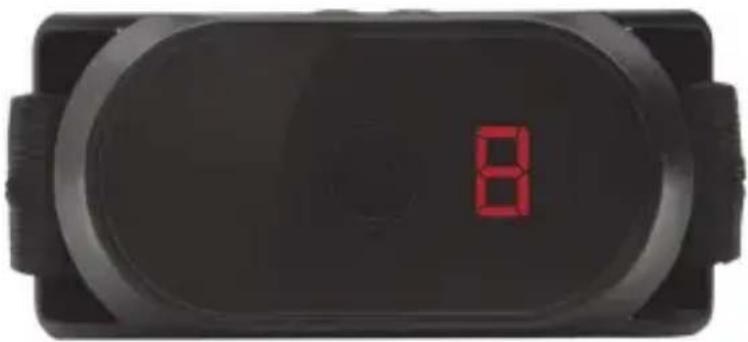
natural_image
Close-up of a black electronic device displaying a red LED display with the number 8 on its surface (no visible text or symbols beyond the display)User's Guide
BARK CONTROL COLLAR
Model: SCOUTBARK100
The features described in this User's Guide are subject to modifications without prior notice.
Welcome...
to your new SCOUTBARK100!
Thank you for purchasing the SCOUTBARK100. Your new bark control collar utilizes smart bark sensing technology that allows for a short period of 'free' barking time, issues a warning beep prior to any static correction and offers you nine levels of static correction - from gentle to firm to match your dog's personality.
Please retain your original dated sales receipt for your records.
For warranty service of your Motorola product, you will need to provide a copy of your dated sales receipt to confirm warranty status. Registration is not required for warranty coverage.
For product related questions, please call:
US and Canada 1-888-331-3383
Email: support@motorolamonitors.com
This User's Guide provides you with all the information you need to get the most from the product.
Please read and follow the instructions in this User's Guide along with the Safety Instructions on page 6 before you using this product.
Got everything?
- 1 x Pet Collar Unit (with CR2450 button battery installed)
- 1 x Collar Strap
• 1 x Tightening Tool for Metal Contacts
• 2 pairs of Collar Metal Contacts (Short and Long)
Overview of the Pet Collar Unit


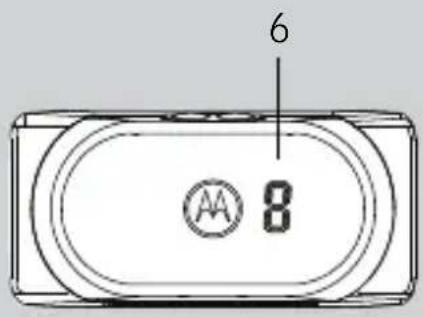
5
1. Static Correction Key
2. Indicator LED
Lights up in green for 3 seconds when the unit is powered on and flashes slowly during standby.
Lights up in red when battery is low.
Flashes quickly in green and red when delivering static correction.
3. Power Key
Press once to show the current level of static correction.
Press and hold to power the unit On/Off.
Indicator LED lights up in green for 3
seconds when the unit is powered on.
4. Battery Cover
5. Metal Contacts
6. Static Correction Level Indicator
Indicates current level of static correction (from 0 to 9).
When the static correction level is set to 0, the Pet Collar Unit emits beep tone and vibration only.
How the SCOUTBARK100 works
Motorola's SCOUTBARK100 is a quick, easy and fair way to reduce excessive barking behavior. Through Motorola's unique bark detection technology, your dog is allowed five seconds of free barking time after which a warning beep and vibration will trigger. Should your dog continue to bark, the Pet Collar Unit will administer a brief level of static correction that you have selected. Choose from nine levels, from very gentle to firm to match your dog's personality. If your dog is quiet for two minutes, once again it is offered five more seconds of "free" barking followed by a warning beep and vibration prior to any static correction. Our goal is to limit excessive barking, not to attempt to eliminate or suppress all barking.
Important guidelines when using the SCOUTBARK100
- Included in your SCOUTBARK100 are Metal Contacts in three different lengths (short, medium and long) that deliver static correction to your dog. Choose the appropriate length for your dog's hair coat. The SCOUTBARK100 was shipped with medium Metal Contacts that are suitable for dogs with medium hair coats. If your dog has dense coat or undercoat, use one of the longer Metal Contacts included with the product.
- Proper fit is critical to the performance and effectiveness of the SCOUTBARK100. If the fit is too loose, the Pet Collar Unit will not be able to get sufficient contact with the skin to detect barking and deliver static correction. If the fit is too tight, it will irritate your dog's skin.
- Tighten the Pet Collar Unit high on your dog's neck, tight enough that you can get two fingers between the collar strap and your dog. It should not be able to rotate around the neck.
- Do not make your dog wear the Pet Collar Unit for more than 12 hours continuously to avoid skin irritation.
- Do not connect a leash to the Pet Collar Unit as this might pull the Metal Contacts too tight against your dog's neck.
- When connecting a separate collar for the leash, make sure that it does not add pressure on the Pet Collar Unit.
- Check the contact area on your dog's neck for signs of irritation. If there is a rash or sore, discontinue use until the skin is completely healed. See a veterinarian if the condition persists.
Table of contents
- Safety Instructions....6
- Getting Started.... 7
2.1 Attach the Adjustable Strap to the Pet Collar Unit ....7
2.2 Insert and Remove Battery on the Pet Collar Unit ....7
2.3 Fit the Pet Collar Unit on your Dog's Neck 8
2.4 Trim Away Excess Strap Length 9
2.5 Change Metal Contacts ....10
- Using the SCOUTBARK100.... 12
3.1 Powering On/Off the Pet Collar Unit 12
3.2 Select Level of Static Correction 12
3.3 "Free" Bark Duration 13
- When Using the SCOUTBARK100 the First Few Times .... 14
- Disposal of the Device (Environment) 15
- Cleaning and Care ....16
- Frequently Asked Questions 17
- Troubleshooting 18
- General Information 19
1. Safety Instructions

WARNING:
DO NOT USE ON AGGRESSIVE DOGS - This product is not for use on aggressive dogs. If you are not sure if this product is suitable for your dog, please consult a certified trainer or your veterinarian.
RISK OF SKIN DAMAGE
- Determine a proper fit of the Pet Collar Unit on your dog's neck. If worn for too long or the fit is too tight, it may cause skin damage.
- Check your dog's neck area daily for signs of skin irritation.
- Discontinue use immediately if a rash or sore is found on the neck area.
- AVOID wearing for more than 12 continuous hours a day.
- Clean your dog's neck area and the Metal Contacts on the Pet Collar Unit with a soft damp cloth weekly.
WARNING
The SCOUTBARK100 is suitable for use on healthy, non-aggressive dogs to control excessive barking when used as described in this User's Guide.
Therefore, always read the instructions in this User's Guide carefully before using the product.
• This product is not a toy. Do not allow children to play with it.
• This product is not a substitute for responsible supervision of your dog.
- Test this product and all its functions so that you are familiar with it prior to actual use.
- Only use a battery of the same type. This product uses a replaceable battery (CR2450).
- Keep this User's Guide for future reference.
CAUTION
There is danger of explosion if the battery is replaced by an incorrect type.
Dispose of used batteries according to their instructions.
2. Getting Started
2.1 Attach the Adjustable Strap to the Pet Collar Unit
- Set the Pet Collar Unit facing down with the Metal Contacts facing up.
- With the front side of the buckle facing down, thread the strap through the first slot, moving it towards the second slot.
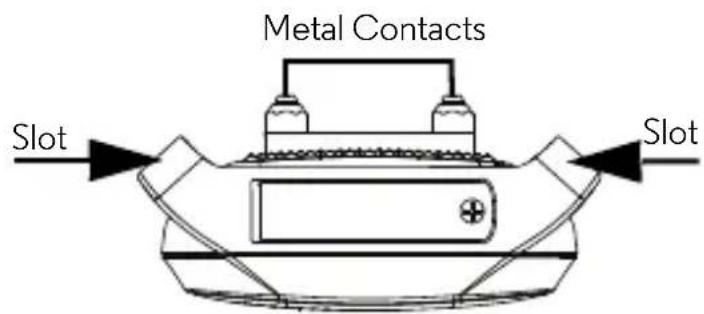
- Continue to thread through the second slot.
2.2 Insert and Remove Battery on the Pet Collar Unit
IMPORTANT
Do not install the battery while the Pet Collar Unit is strapped to your dog. The Pet Collar Unit uses a replaceable battery (CR2450).
Small cross-head or Flat end screwdriver.

-
Use a small cross-head or flat end screwdriver to unscrew the battery compartment cover as shown above.
-
Place the battery with negative pole (-) facing upwards in the compartment.
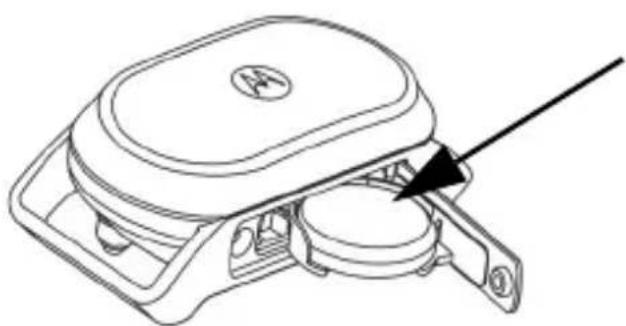
natural_image
Line drawing of a car front bumper with a black arrow pointing to the handle (no text or symbols)Negative pole (-) of the CR2450 battery should be facing upwards.
- Close the battery compartment cover and gently tighten the screw in a clockwise direction using a small cross-head or flat end screwdriver.
Battery Life
The average battery life is up to 3 months, depending on how often your dog barks. The Indicator LED lights up in red when battery is low. To conserve battery life, press and hold the POWER KEY ⏻ to power off the Pet Collar Unit when it is not in use.
2.3 Fit the Pet Collar Unit on your Dog's Neck
IMPORTANT
For effective and reliable operation of the SCOUTBARK100, the Pet Collar Unit must be properly placed and fitted on your dog's neck with suitable Metal Contacts that are long enough to touch the dog's skin on the underside of its neck (not its hair).
- Make sure that the Pet Collar Unit is powered off. Press and hold the POWER KEY to power it off.
- Have your dog stand in a balanced position on a flat, even surface.
- Put the strap over your dog's neck, centering the Pet Collar Unit underneath its neck and making sure that the Motorola logo is upright facing you.
- String the end of the strap through the strap buckle.
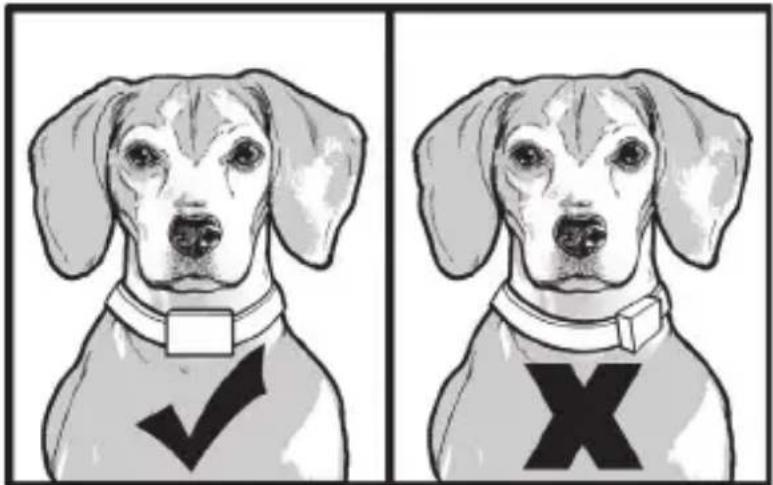
- Pull the end of the strap until the desired level of tightness is reached and push the retainer bar through the nearest strap hole and insert the strap through the remaining strap buckle to secure it.

- Check to ensure that the Pet Collar Unit is in the center underneath the neck of your dog.
natural_image
Illustration of a dog wearing a collar with a checkmark and an X symbol (no text or labels)- Check the fit again after your dog has worn the Pet Collar Unit for several minutes or as your dog gets more comfortable with it.
NOTE
The Pet Collar Unit should fit snugly on your dog's neck such that you can only fit two fingers underneath it. It should not be able to rotate around the neck. If necessary, trim some of your dog's hair where the Pet Collar Unit makes contact with the skin to allow for consistent performance.
2.4 Trim Away Excess Strap Length
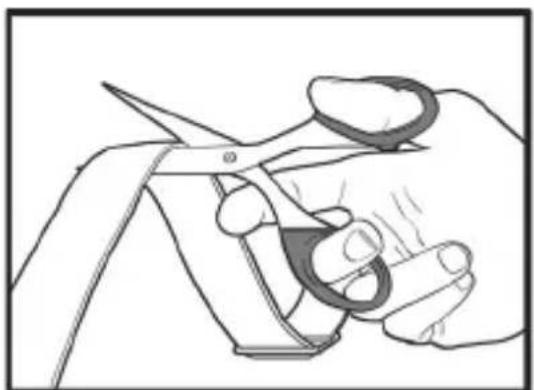
After you are satisfied with the fit of the Pet Collar Unit, you may want to trim away some of the excess nylon strap.
-
Mark the desired strap length with a pen. However, you may want to allow for growth especially when your dog is young or may grow a thicker winter coat.
-
Remove the Pet Collar Unit from your dog and trim away excess strap length.
-
To seal the end of the strap, hold it about 1/4 inch away from a candle flame or lighter until the edge melts away.
natural_image
Illustration of hands cutting a piece of scissors (no text or symbols present)
natural_image
Illustration of a hand holding a lit cigarette being heated by a tool (no text or symbols present)PLEASE USE CAUTION.
2.5 Change Metal Contacts
Included with the SCOUTBARK100 are Metal Contacts in three different lengths (short, medium and long) that deliver static correction to your dog.
Choose the appropriate length for your dog's hair coat. If your dog has dense coats or undercoats, use one of the longer Metal Contacts included with your SCOUTBARK100.
- Using your fingers or with the help of the Metal Contacts tightening tool (supplied with your SCOUTBARK100), twist the Metal Contacts counterclockwise to loosen and remove them.
Metal Contacts

natural_image
Line drawing of a mechanical component with no visible text or symbolsFit the tightening tool over the Metal Contact and twist counterclockwise to loosen it.

-
Insert another pair of Metal Contacts of the appropriate length and gently twist clockwise with your fingers to tighten them.
-
To ensure that the Metal Contacts are securely fastened, fit the tightening tool over the Metal Contacts and twist clock-wise to tighten them securely as shown below.

Twist clockwise to tighten the Metal Contacts securely.
IMPORTANT
Make sure that the Metal Contacts are securely fastened. Do not over tighten.
3. Using the SCOUTBARK100
3.1 Powering On/Off the Pet Collar Unit
Press and hold the POWER KEY ⏻ on the Pet Collar Unit to power it on or off. When powered on, the Indicator LED lights up in green for 3 seconds to indicate that the unit is starting normal operation and is ready to be placed on your dog.
NOTE
After powering off the Pet Collar Unit, the smart system retains the last level of static correction that your dog responded to, and use that correction level the next time the Pet Collar Unit is powered on.
3.2 Select Level of Static Correction
Your SCOUTBARK100 is a smart bark detection device. If there is a bark from your dog, it delivers static correction to discourage or stop your dog from barking (see “"Free" Bark Duration” on page 13).
The Indicator LED flashes quickly in green and red when delivering static correction.
- Press and hold the STATIC CORRECTION KEY ⏻ on the Pet Collar Unit for 3 seconds. The static correction level indicator will blink.
- Press the STATIC CORRECTION KEY ⏻ again to increase or decrease the level.
- Press and hold the STATIC CORRECTION KEY ⏻ for another 3 seconds to confirm the level that you have selected on step 2 above.
- Press the POWER KEY ⏻ once to check the current level of correction. The Static Correction Level Indicator on the Pet Collar Unit shows the current level of correction (from 0 to 9).
| Level Dog's | Temperament |
| 0 | For Initial Training (delivers beep tone and vibration only) |
| 1 | For Initial Training |
| 2 | Mild |
| 3 | Mild to Average |
| 4 | Average |
| 5 | Average to High |
| 6 | Medium High |
| 7 | High |
| 8 | Strong |
| 9 | Super Strong |
3.3 "Free" Bark Duration
Your dog is allowed five seconds of "free" barking time, after which a warning beep and vibration will trigger. Should your dog continue to bark, the Pet Collar Unit will administer a static correction at the level that you have selected.
4. When Using the SCOUTBARK100 the First Few Times
Dogs learn and adapt at different speeds. It may take several times for your dog to understand the purpose of the Pet Collar Unit. After a couple of days wearing the Pet Collar Unit, your dog will learn to relax and reduce its barking behavior. However, please remain consistent in your use of the Pet Collar Unit even after you noticed a reduction in your dog's barking.
Do not leave your dog alone when using the SCOUTBARK100 the first few times.
As the static correction from the Pet Collar Unit may be startling to some dogs, stay around your dog after placing the Pet Collar Unit on its neck for the first few times.
Reward your dog with treats, play and praise when it is not barking.
5. Disposal of the Device (Environment)
At the end of the product lifecycle, you should not dispose of this product with normal household waste. Take this product to a collection point for the recycling of electrical and electronic equipment. The symbol on the product, user's guide and/or box indicates this.

Some of the product materials can be reused if you take them to a recycling point. By reusing some parts or raw materials from used products you make an important contribution to the protection of the environment.
Please contact your local authorities in case you need more information on the collection points in your area.
Dispose of the battery pack in an environmentally-friendly manner according to your local regulations.
6. Cleaning and Care
NOTE
Remove the battery and discharge the Pet Collar Unit before touching the Metal Contacts.
Cleaning and care
- Check Metal Contacts for tightness weekly.
- Clean Metal Contacts with alcohol weekly.
- Check your dog's neck area for irritation and wash neck weekly.
- Every effort has been made to ensure high standards of reliability of your SCOUTBARK100. However, if something does go wrong, please do not try to repair it yourself – contact Customer Service for assistance.
7. Frequently Asked Questions
Will the SCOUTBARK100 be effective on my dog?
- There are many reasons for excessive barking - your dog may be lonely, hungry, cold or hot or simply alerting you to people or animals on your property. The SCOUTBARK100 is best used on dogs whose needs are well fulfilled and bark excessively at everything that moves.
Will the barking from another dog trigger the sensor on the SCOUTBARK100?
- No. The sensor will trigger only when the vibration of the vocal chords matches the barking sound.
Is the SCOUTBARK100 appropriate and humane?
- Yes. The SCOUTBARK100 is designed to get your dog's attention, not to punish it. However, the initial correction may startle your dog.
What is meant by static correction?
- We have all received a static shock at some point in our lives, such as when we walk barefoot across a carpeted floor and feel a small shock after touching a doorknob. Static shock does not hurt, but it does startle us. As such, the static correction delivered to your dog through our SCOUTBARK100 is totally harmless and does not cause any pain or damaging effect.
Will my dog stop barking completely?
- No. The SCOUTBARK100 was specifically designed to reduce or discourage excessive barking behavior, but not eliminate barking all together.
My SCOUTBARK100 beeps, but my dog keeps barking (does not seem to respond to the static correction).
- Tighten the Pet Collar Unit and/or trim your dog's hair where the Metal Contacts touch its neck to ensure good skin contact.
- Replace the battery.
- If your dog still does not respond, contact Customer Service at 1-888-331-3383.
8. Troubleshooting
When your dog does not seem to respond to the Static Correction
- Make sure that the Pet Collar Unit is properly fitted on your dog. Loosely fitted collar will affect performance. For proper fit, the collar should be snug, yet loose enough to allow two fingers to fit between the strap and your dog's neck.
- Make sure that there is good skin contact where the Metal Contacts touch the neck area. If necessary, trim your dog's hair to ensure good contact.
- Check if the battery has drained out.
- If you are certain that your dog is feeling the static correction, however is still not responding, try the next level higher (see “Select Level of Static Correction” page 12).
- If your dog still does not respond, contact Customer Service at 1-888-331-3383.
9. General Information
If your product is not working properly....
- Read this User's Guide.
- Contact Customer Service:
US and Canada 1-888-331-3383
Email: support@motorolamonitors.com
Consumer Products and Accessories Limited Warranty
Thank you for purchasing this Motorola branded product manufactured under license by Binatone Electronics International LTD ("BINATONE").
What Does this Warranty Cover?
Subject to the exclusions contained below, BINATONE warrants that this Motorola branded product ("Product") or certified accessory ("Accessory") sold for use with this product that it manufactured to be free from defects in materials and workmanship under normal consumer usage for the period outlined below. This Warranty is your exclusive warranty and is not transferable.
Who is covered?
This Warranty extends only to the first consumer purchaser, and is not transferable.
What will BINATONE do?
BINATONE or its authorised distributor at its option and within a commercially reasonable time, will at no charge repair or replace any Products or Accessories that does not conform to this Warranty. We may use functionally equivalent reconditioned/ refurbished/ pre-owned or new Products, Accessories or parts.
What Other Limitations Are There?
ANY IMPLIED WARRANTIES, INCLUDING WITHOUT LIMITATION THE IMPLIED WARRANTIES OF MERCHANTABILITY AND FITNESS FOR A PARTICULAR PURPOSE, SHALL BE LIMITED TO THE DURATION OF THIS LIMITED WARRANTY, OTHERWISE THE REPAIR OR REPLACEMENT PROVIDED UNDER THIS EXPRESS LIMITED WARRANTY IS THE EXCLUSIVE REMEDY OF THE CONSUMER, AND IS PROVIDED IN LIEU OF ALL OTHER WARRANTIES, EXPRESS OR IMPLIED. IN NO EVENT SHALL MOTOROLA OR BINATONE BE LIABLE, WHETHER IN CONTRACT OR TORT (INCLUDING NEGLIGENCE) FOR DAMAGES IN EXCESS OF THE PURCHASE PRICE OF THE PRODUCT OR ACCESSORY, OR FOR ANY INDIRECT, INCIDENTAL, SPECIAL OR CONSEQUENTIAL DAMAGES OF ANY KIND, OR LOSS OF REVENUE OR PROFITS, LOSS OF BUSINESS, LOSS OF INFORMATION OR OTHER FINANCIAL LOSS ARISING OUT OF OR IN CONNECTION WITH THE ABILITY OR INABILITY TO USE THE PRODUCTS OR ACCESSORIES TO THE FULL EXTENT THESE DAMAGES MAY BE DISCLAIMED BY LAW.
Some jurisdictions do not allow the limitation or exclusion of incidental or consequential damages, or limitation on the length of an implied warranty, so the above limitations or exclusions may not apply to you. This Warranty gives you specific legal rights, and you may also have other rights that vary from one jurisdiction to another.
| Products Covered Length of Coverage | |
| Consumer Products One (1) year from | the date of the products original purchase by the first consumer purchaser of the product. |
| Consumer Accessories | Ninety (90) days from the date of the accessories original purchase by the first consumer purchaser of the product. |
| Consumer Products and Accessories that are Repaired or Replaced | The balance of the original warranty or for Ninety (90) days from the date returned to the consumer, whichever is longer. |
Exclusions
Normal Wear and Tear. Periodic maintenance, repair and replacement of parts due to normal wear and tear are excluded from coverage.
Batteries. Only batteries whose fully charged capacity falls below 80% of their rated capacity and batteries that leak are covered by this Warranty.
Abuse & Misuse. Defects or damage that result from: (a) improper operation, storage, misuse or abuse, accident or neglect, such as physical damage (cracks, scratches, etc.) to the surface of the product resulting from misuse; (b) contact with liquid, water, rain, extreme humidity or heavy perspiration, sand, dirt or the like, extreme heat, or food; (c) use of the Products or Accessories for commercial purposes or subjecting the Product or Accessory to abnormal usage or conditions; or (d) other acts which are not the fault of MOTOROLA or BINATONE, are excluded from coverage.
Use of Non-Motorola branded Products and Accessories. Defects or damage that result from the use of Non-Motorola branded or certified Products or Accessories or other peripheral equipment are excluded from coverage.
Unauthorised Service or Modification. Defects or damages resulting from service, testing, adjustment, installation, maintenance, alteration, or modification in any way by someone other than MOTOROLA, BINATONE or its authorized service centers, are excluded from coverage.
Altered Products. Products or Accessories with (a) serial numbers or date tags that have been removed, altered or obliterated; (b) broken seals or that show evidence of tampering; (c) mismatched board serial numbers; or (d) nonconforming or non-Motorola branded housings, or parts, are excluded from coverage.
Communication Services. Defects, damages, or the failure of Products or Accessories due to any communication service or signal you may subscribe to or use with the Products or Accessories is excluded from coverage.
How to Obtain Warranty Service or Other Information?
To obtain service or information, please call:
US and Canada 1-888-331-3383
Email: support@motorolamonitors.com
You will receive instructions on how to ship the Products or Accessories at your expense and risk, to a BINATONE Authorized Repair Centre.
To obtain service, you must include: (a) the Product or Accessory; (b) the original proof of purchase (receipt) which includes the date, place and seller of the Product; (c) if a warranty card was included in your box, a completed warranty card showing the serial number of the Product; (d) a written description of the problem; and, most importantly; (e) your address and telephone number.
These terms and conditions constitute the complete warranty agreement between you and BINATONE regarding the Products or Accessories purchased by you, and supersede any prior agreement or representations, including representations made in any literature publications or promotional materials issued by BINATONE or representations made by any agent employee or staff of BINATONE, that may have been made in connection with the said purchase.
Manufacture Date: as the serial number (please open the battery cover, it is shown on the inside of the device.)
FCC, ACTA and Industry Canada (IC) regulations
WARNING
Changes or modifications to this equipment not expressly approved by the party responsible for compliance could void the user's authority to operate the equipment.
NOTE
This equipment has been tested and found to comply with the limits for a Class B digital device, pursuant to Part 15 of the Federal Communications Commission (FCC) rules. These limits are designed to provide reasonable protection against harmful interference in a residential installation. This equipment generates, uses and can radiate radio frequency energy and, if not installed and used in accordance with the instructions, may cause harmful interference to radio communications. However, there is no guarantee that interference will not occur in a particular installation. If this equipment does cause harmful interference to radio or television reception, which can be determined by turning the equipment off and on, the user is encouraged to try to correct the interference by one or more of the following measures:
- Reorient or relocate the receiving antenna.
- Increase the separation between the equipment and receiver.
- Connect the equipment into an outlet on a circuit different from that to which the receiver is connected.
- Consult the dealer or an experienced radio/TV technician for help.
This device complies with part 15 of the FCC Rules. Operation is subject to the following two conditions: (1) This device may not cause harmful interference, and (2) this device must accept any interference received, including interference that may cause undesired operation. This device complies with Industry Canada licence-exempt RSS standard(s). Operation is subject to the following two conditions: (1) this device may not cause interference, and (2) this device must accept any interference, including interference that may cause undesired operation of the device. This Class B digital apparatus complies with Canadian ICES-003.
Technical Specifications
Power CR2450 Lithium Battery 3.0V
Compliance FCC Part 15V, ICES-003
Water resistance IP54

motorola
Manufactured, distributed or sold by Binatone Electronics International LTD., official licensee for this product. MOTOROLA and the Stylized M Logo, are trademarks or registered trademarks of Motorola Trademark Holdings, LLC. and are used under license. All other trademarks are the property of their respective owners.
© 2014 Motorola Mobility LLC. All rights reserved.

Version 7.0
Printed in China
- motorola
- User's Guide
- Welcome...
- to your new SCOUTBARK100!
- Got everything?
- Overview of the Pet Collar Unit
- Static Correction Key
- Indicator LED
- Power Key
- Battery Cover
- Metal Contacts
- Static Correction Level Indicator
- How the SCOUTBARK100 works
- Important guidelines when using the SCOUTBARK100
- Table of contents
- Safety Instructions
- WARNING:
- RISK OF SKIN DAMAGE
- WARNING
- CAUTION
- Getting Started
- Attach the Adjustable Strap to the Pet Collar Unit
- Insert and Remove Battery on the Pet Collar Unit
- IMPORTANT
- Battery Life
- Fit the Pet Collar Unit on your Dog's Neck
- NOTE
- Trim Away Excess Strap Length
- Change Metal Contacts
- Using the SCOUTBARK100
- Powering On/Off the Pet Collar Unit
- Select Level of Static Correction
- "Free" Bark Duration
- When Using the SCOUTBARK100 the First Few Times
- Do not leave your dog alone when using the SCOUTBARK100 the first few times.
- Disposal of the Device (Environment)
- Cleaning and Care
- Cleaning and care
- Frequently Asked Questions
- Will the SCOUTBARK100 be effective on my dog?
- Will the barking from another dog trigger the sensor on the SCOUTBARK100?
- Is the SCOUTBARK100 appropriate and humane?
- What is meant by static correction?
- Will my dog stop barking completely?
- My SCOUTBARK100 beeps, but my dog keeps barking (does not seem to respond to the static correction).
- Troubleshooting
- When your dog does not seem to respond to the Static Correction
- General Information
- Consumer Products and Accessories Limited Warranty
- What Does this Warranty Cover?
- Who is covered?
- What will BINATONE do?
- What Other Limitations Are There?
- Exclusions
- How to Obtain Warranty Service or Other Information?
- FCC, ACTA and Industry Canada (IC) regulations
- Technical Specifications
Brand : MOTOROLA
Model : Scoutbark 100
Category : Pet electronic collar