
Li-Ning Smart Shoes - Smart Shoes Xiaomi - Free user manual and instructions
Find the device manual for free Li-Ning Smart Shoes Xiaomi in PDF.


| Product Type | Smart Shoes |
| Brand | Xiaomi |
| Model | Li-Ning Smart Shoes |
| Category | Connected Footwear |
| Connectivity | Bluetooth 4.2 or higher |
| Battery Type | Rechargeable lithium-ion |
| Battery Life | Up to 30 days (typical usage) |
| Charging Method | USB magnetic charging cable |
| Water Resistance | IPX5 (sweat and light rain resistant) |
| Weight (per shoe) | Approximately 300 g |
| Sole Material | Rubber |
| Upper Material | Breathable knit fabric |
| Sensors | Step counter, distance, calorie tracking |
| Compatible App | Xiaomi Wear or Mi Fit |
| App Functions | Activity tracking, shoe pairing, firmware updates |
| Cleaning | Wipe with a damp cloth and air dry |
| Storage | Keep in a dry, cool place away from direct sunlight |
| Safety | Do not immerse in water; remove battery before prolonged storage |
| Repairability | Not user-serviceable; contact Xiaomi support for issues |
| Warranty | Standard 1-year limited warranty |
Frequently Asked Questions - Li-Ning Smart Shoes Xiaomi
User questions about Li-Ning Smart Shoes Xiaomi
0 question about this device. Answer the ones you know or ask your own.
Ask a new question about this device
Download the instructions for your Smart Shoes in PDF format for free! Find your manual Li-Ning Smart Shoes - Xiaomi and take your electronic device back in hand. On this page are published all the documents necessary for the use of your device. Li-Ning Smart Shoes by Xiaomi.
USER MANUAL Li-Ning Smart Shoes Xiaomi
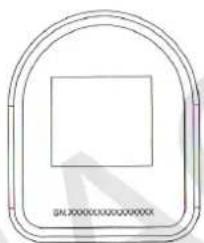
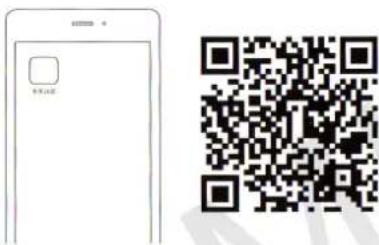
Then scan a QR-code which placed on the back side of the chip.
natural_image
Simple line drawing of a rounded rectangular frame with a central square (no text or symbols)How long the chip works?
Under normal conditions, battery of the chip designed for 1 year of use
Install "Mi Fit" app
Find «Mi Fit» app at Play market or App store and install the app, or scan a QR-code for download and install Mi Fit app.
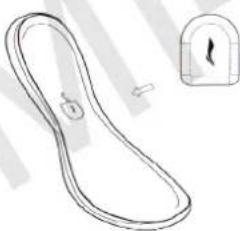
Installing chip in the shoes
natural_image
Simple line drawing of a curved object with a small inset showing a hand holding a padlock (no text or symbols)A) Open the insole of the right shoe and you will find a special hole for the chip.
B) Set the chip in the hole. Logo must be on top.
Log in Mi Fit App, select a Run mode and make synchronization of shoes. After you wear shoes, you can Iget a statistics to track your movement and activity.
Connection to smartphone
Open «Mi Fit» app, in «My device» list, choose an appropriate model of sneakers

Li-Ning Smart Shoes junior model

Li-Ning Smart Shoes senior model
Main characteristic
Connection type: Bluetooth 4.0
Requirements: system Android 4.4 and higher, support Bluetooth 4.0 on Android, system iOS 7.0 and higher, system iPhone 4s/5/5c/5s/6/6Plus
Warning!
- Mi chip has a waterproof and water-repellent function.
- Don't immerse Mi chip in water. You must remove Mi chip before washing shoes.
xiaomi-mi.com
Brand : Xiaomi
Model : Li-Ning Smart Shoes
Category : Smart Shoes