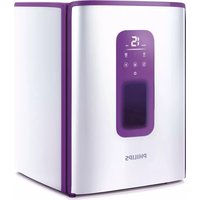
PerfectCare Azur GC910 - Steam cleaner PHILIPS - Free user manual and instructions
Find the device manual for free PerfectCare Azur GC910 PHILIPS in PDF.


| Product Type | Steam Generator Iron / Steam Cleaner |
| Brand | Philips |
| Model | PerfectCare Azur GC910 |
| Dimensions (L x W x H) | Approx. 30 x 15 x 25 cm |
| Weight | Approx. 3 kg |
| Power Supply | 220-240 V, 50-60 Hz |
| Power Consumption | 2400 W |
| Water Tank Capacity | 1.5 L (removable) |
| Max Steam Pressure | 7 bar |
| Continuous Steam Output | Up to 150 g/min |
| Steam Boost | Up to 400 g/min (horizontal) |
| Vertical Steam | Yes, for hanging garments and curtains |
| Soleplate Type | Optimal Temp with Teflon Elite coating |
| Auto Shut-Off | Yes, after 10 minutes of inactivity |
| Safety Features | Thermal fuse, pressure relief valve, automatic shut-off |
| Maintenance | Descale regularly using the Easy Calc Clean system |
| Spare Parts Availability | Replacement soleplates, water tanks, and seals available |
| Repairability | Modular design with accessible components |
| Warranty | 2 years (subject to country) |
Frequently Asked Questions - PerfectCare Azur GC910 PHILIPS
User questions about PerfectCare Azur GC910 PHILIPS
0 question about this device. Answer the ones you know or ask your own.
Ask a new question about this device
Download the instructions for your Steam cleaner in PDF format for free! Find your manual PerfectCare Azur GC910 - PHILIPS and take your electronic device back in hand. On this page are published all the documents necessary for the use of your device. PerfectCare Azur GC910 by PHILIPS.
USER MANUAL PerfectCare Azur GC910 PHILIPS
Always there to help you
始终如一地为您提供帮助
Register your product and get support at
请登录以下网址并得到相应的帮助
www.philips.com/welcome
Baby Garment Sanitizer
宝宝衣物除菌机
GC910
User manual
用户手册
PHILIPS


3
6
10
11
12
13
14





16
17
21
21
23
26

EN Congratulations on your purchase and welcome to Philips! To fully benefit from the support that Philips offers, register your product at www.philips.com/ welcome.
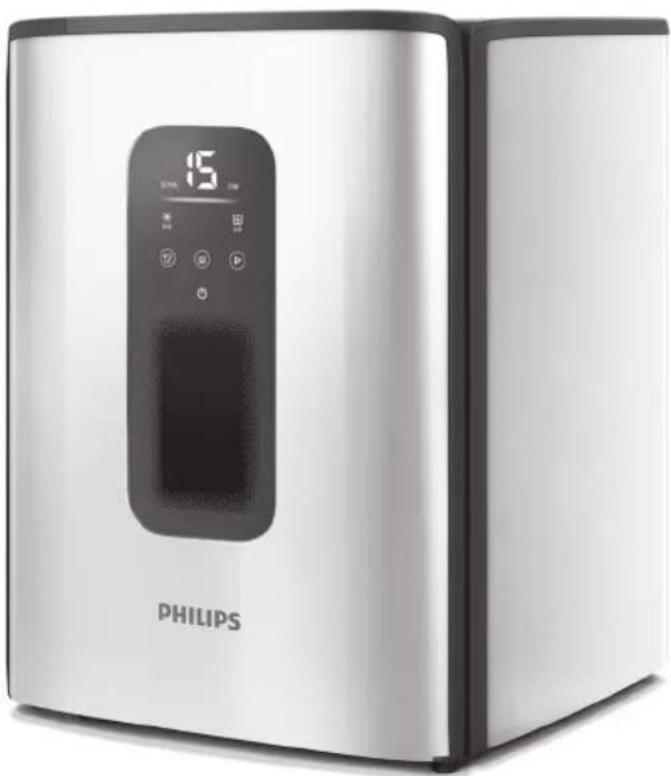
Your new Baby Garment Sanitizer will enable you to sanitize your baby's garments while gently dry them at the same time. The combination of 3600 UV light disinfection & Optimal Air Technology will eliminate 99.9% of bacteria from your baby's clothes and dry them safely all year round without the use of ozone or chemical disinfectants.
The specially designed top rack are easy to use and will ensure maximum capacity of your daily laundry load, while the 3-step light indicator will inform you when your garments are sanitized and ready to wear.
ZH-S
* Tested by independent 3rd party Test Houses in 2014 in China, effective to Escherichia coli, Staphylococcus aureus, Candida albicans, Salmonella, Klebsiella pneumonia only.
*
Congratulations on your purchase and welcome to Philips! To fully benefit from the support that Philips offers, register your product at www.philips.com/welcome.
Important
Read this important information carefully before you use the appliance and save it for future reference.
Danger
- Always unplug this appliance from the electrical outlet after using and before cleaning it.
- Never immerse the appliance in water or any other liquid, nor rinse it under the tap.
- Do not cover the air outlet opening while the appliance is under operation.
- Do not place other accessories (e.g.hangers and clips) that not supplied with the appliance.
- Never touch the panel inside of the appliance when it is still hot.
- Do not sit and place things on top of the appliance.
Warning
- Do not use the appliance if the UV emitter remains on when the door is opened or if the window in the door is broken or missing because UV light can be harmful to the human eye and skin.
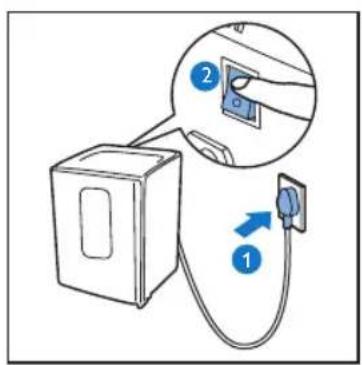
- Check if the voltage indicated on the type plate corresponds to the local mains voltage before you connect the appliance.
- Do not use the appliance if the plug, the mains cord or the appliance itself shows visible damage, or if the appliance has been dropped or leaks.
- If the mains cord is damaged, you must have it replaced by Philips, a service centre authorised by Philips or similarly qualified persons in order to avoid a hazard.
- This appliance is not intended for use by persons (including children) with reduced physical, sensory or mental capabilities, or lack of experience and knowledge, unless they have been given supervision or instruction concerning use of the appliance by a person responsible for their safety.
- Children should be supervised to ensure that they do not play with the appliance.
- Cleaning and user maintenance shall not be made by children without supervision.
- Keep the appliance and its mains cord out of the reach of children.
- Keep the main cord away from hot and wet surfaces.
- Do not take out the removable rack from the appliance when the appliance is still hot .
- Do not place the appliance against a wall or against other appliances. Leave at least 10 cm space around the appliance.
- This appliance contains a UV emitter. Do not stare at the light source.
- Precautions to be taken when replacing UV emitter.
CAUTION: Hot surface (Fig. 1)
The accessible surfaces may become hot during use. During transportation, handle the appliance with care.
Caution
- This appliance is intended to sanitize and dry garments only. For items that are not suitable for the appliance, do refer to the section.
- This appliance is intended only for sanitizing and drying wearable garments washed in water.
- Place the appliance on a horizontal, even and stable surface.
- Do not place the appliance on or near combustible materials such as a tablecloth or curtain.
- Only connect the appliance to an earthed wall socket.
- Check the mains cord regularly for possible damage.
- Do not use vinegar and other chemicals to clean the appliance.
- This appliance is intended for household use and indoor environment only.
- Let the appliance cool down before cleaning.
- During the operation, hot air is released through the air outlet openings (on top cover). Keep your hands and face at a safe distance from the steam and from the air outlet openings.
Electromagnetic fields (EMF)
This Philips appliance complies with all applicable standards and regulations regarding exposure to electromagnetic fields..
Environment
- The UV light bulb contains mercury and may be harmful to the environment. Do not crush, break or attempt to disassemble the bulb. Do not throw away the UV light bulb with the normal household waste when you replace it, but hand it in at an official collection point for recycling.
- Do not throw away the appliance with the normal household waste at the end of its life, but hand it in at an official collection point for recycling. By doing this, you help to preserve the environment (Fig. 2). If you have any recycling questions, contact your local waste management office.
Guarantee and support
If you need information or support, please visit www.philips.com/support or read the separate worldwide guarantee leaflet.
WARRANTY EXCLUSIONS:
What is not covered under warranty:
- UV light bulb

ZH-S
产品简介
EN
Note: do not use other accessories (e.g. hangers and clips) which are not supplied with the appliance.
ZH-S
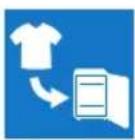
EN Hang garments on the top rack*.
ZH-S
把衣物挂于上搁架上 * 。
* Refer to the section for more information. * 有关更多信息,请参阅章节。


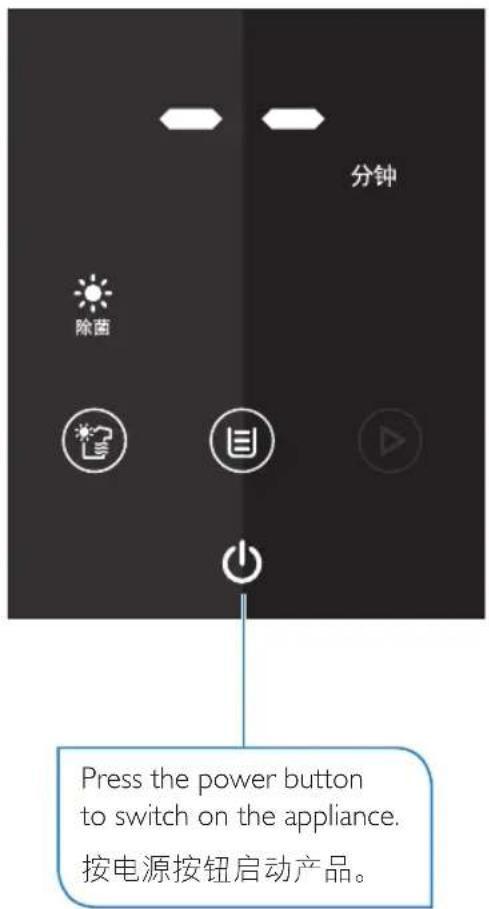
Drying icon lights up in addition to the sanitizing icon to indicate sanitizing and drying mode.
Press the mode button to select sanitizing and drying mode.
按模式按钮选择除菌加烘干模式。
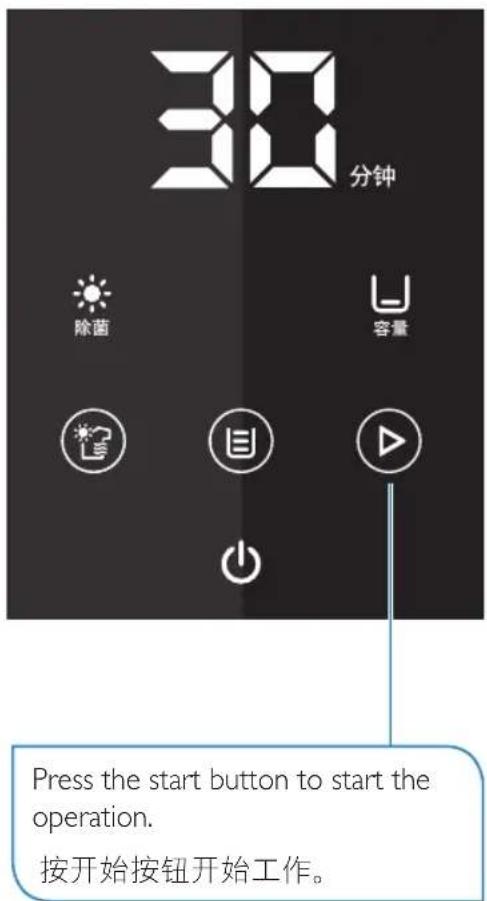
Time display lights up to indicate the pre-set operating time for the selected mode and load.
Press the load button to select the desired load.
按下容量按钮选择所要的容量。
Load icon lights up to indicate the load selected.
容量图标亮起,表示所选的容量。

EN Always keep the door closed during operation.
The door is designed to prevent UV light from leaking from the product during the cycle. UV light used in the product is tested to be within radiation safety range by international standard.
For the maximum safety of you and your family, all internal components including UV light bulb will be automatically shut off when the door is opened during the cycle.
EN Now it is safe to open the door and remove your garments.
ZH-S 现在您可以打开门并取出衣物了。


EN Carefully pull out the rack to remove the garments.
Note: avoid touching the internal surface as it may still be hot.
ZH-S 小心拉出搁架,以便取出衣物。
Note: These settings are only guidelines. You may adjust the setting according to the type, size, fabric and initial moisture content of your garments. For drying function, if the garments are not fully dried after the set time has elapsed, add extra time.
ZH-S
EN
Tip: The top rack is only used for hanging garments. It is specially designed to optimize hot air penetration. Drape garments over the rack. Overlapping of garments should be avoided in order to achieve desired result in a shorter time.
ZH-S
EN The bottom tray is non-removable.
Do not place any garment below the bottom tray.
ZH-S
EN
Tip: For long garment, spread it out on the rack for faster result.
ZH-S
EN The bottom tray is only intended for small items such as baby socks or mittens. Spread them out for faster result. Do not place other garments on the bottom tray, otherwise sanitizing or drying function may not be effective.
ZH-S
EN Always remove extra water from the garments before putting into the appliance.
Do not put dripping wet garments into the appliance, as excess water may collect at the bottom or leaks from the appliance.
Note: This appliance is not suitable for the following items:
ZH-S
注意:本产品不适合以下物品:
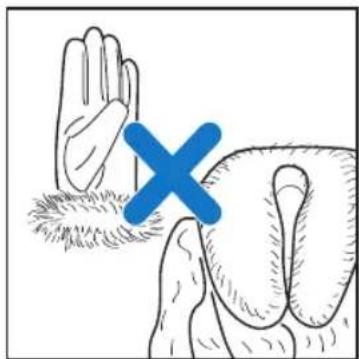
EN
Fabrics with low resistance to heat, e.gEN leather, fur, plastic, silk or similar fabrics.
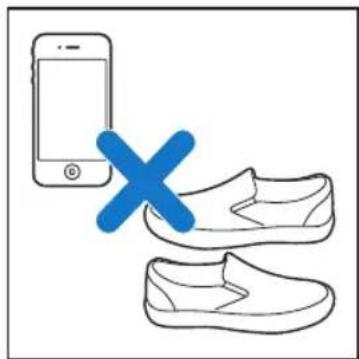
ZH-S
Shoes, books, electronic appliances.
鞋子、书本、电子设备。
ZH-S
EN Toys, milk bottles, soother.
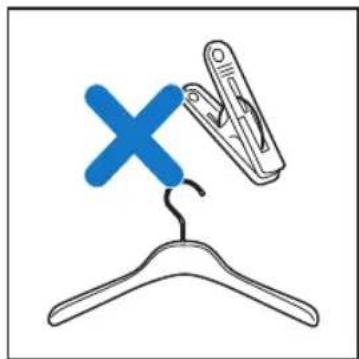
EN
Hangers, clips and other accessories which are not supplied with the appliance.
ZH-S
玩具、奶瓶、橡皮奶头。
ZH-S
衣架、夹子以及不随产品提供的其他附件。
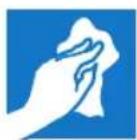
EN You can wipe the internal and external surface of the appliance with a dry cloth. Do not use chemicals or abrasive cleaning materials, as they may damage the surface.
EN Note: Use only the UV light bulb (UV-C, 4W) supplied or a replacement UV light bulb ordered from Philips or Philips Authorized Service Centers.
EN Make sure the appliance is unplugged before your replace the bulb.
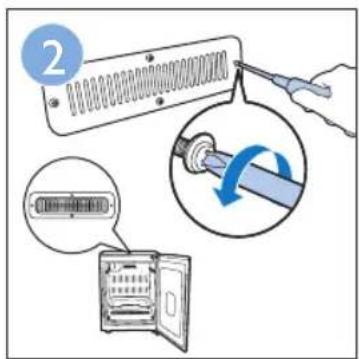
EN Use a screw driver to remove the screws and the metal cover.
EN Rotate the bulb until the pins on both sides align with the openings of the bulb holder. Pull out the bulb.
EN Align the pins of the new bulb with the openings of the bulb holder and push the bulb in. Rotate the bulb upwards to tighten it.
ZH-S 将新灯管的插芯与灯座的开口对齐,然后推入灯管。向上旋转灯管将其拧紧。
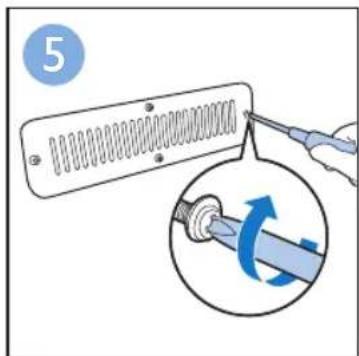
EN Put back the metal cover. Insert the rings onto the screws. Tighten the screws on the metal cover.
| Problem Possible cause Solution | ||
| Water is collected at the bottom of the appliance, or leaks from the appliance during operation. | You have put in dripping wet garments. | Turn off the appliance and wait for it to cool down. Remove the garments, and wipe off the water collected with a dry cloth.Always remove extra water from the garments before putting into the appliance. |
| Garments are not dried. | You have put in too many garments or the set time is too short. | Put fewer garments or select longer time. See the section for recommendation.As garments differ in type, size, fabric and initial moisture content, you may need to try different time settings. For drying function, if the garments are not fully dried after the set time has elapsed, add extra time. |
| You have put the wet garments on the bottom tray. | Only use the top rack to hang the garments. | |
| Air outlet opening is covered. Do not cover the air outlet opening during operation. | ||
| Operation does not start after pressing the start button. | You have not selected the garment load. | Press the load button to select the appropriate garment load. |
| The door is not closed properly. Close the door properly and press the start button again. | ||
| Touchscreen is unresponsive or insensitive. | You are wearing gloves or using other object to touch the screen. | Use only your finger to touch the screen. |
| There are substances (e.g. dirt) on the screen which cause it to be unresponsive. | Wipe the substances off the screen with a dry cloth. | |
| You have pressed the mode, load or start button during operation. | These buttons are designed to be unresponsive during operation. This is to prevent accidentally pressing of the buttons and causing interruption to the operation. | |
| You have pressed any of the buttons when door is open or not closed properly. | These buttons are designed to be unresponsive when door is open to ensure your safety. Close the door properly. | |
| Problem Possible cause Solution | ||
| An error message “E1” is displayed and there is a beeping sound. | A component is not working. Switch off the main switch. Let the appliance cool down for 5 minutes. Switch on the appliance again to check if the error message disappears. If it does not, contact Philips Service Center. | |
| An error message “E2” is displayed and there is a beeping sound. | Air ventilations are blocked by garments or fan is not working. | Switch off the main switch. Remove all garments. Let the appliance cool down for 5 minutes. Switch on the appliance again. The error message should disappear. If it does not, contact Philips Service Center.Refer to section on tips on how to arrange garments inside the appliance to prevent blocking of the air ventilations. |

ZH-S
PHILIPS
产品:飞利浦衣物除菌机
型号: GC910
额定电压:220V\~
额定频率:50 Hz
额定输入功率:640 W
生产日期: 请见产品本体
产地:中国广东佛山
飞利浦(中国)投资有限公司
Specifications are subject to change without notice.
All rights reserved.
保留所有权力。
4239 000 95082
- ALWAYS THERE TO HELP YOU
- 始终如一地为您提供帮助
- ZH-S
- IMPORTANT
- DANGER
- WARNING
- CAUTION: HOT SURFACE (FIG. 1)
- THE ACCESSIBLE SURFACES MAY BECOME HOT DURING USE. DURING TRANSPORTATION, HANDLE THE APPLIANCE WITH CARE
- CAUTION
- ELECTROMAGNETIC FIELDS (EMF)
- ENVIRONMENT
- GUARANTEE AND SUPPORT
- WARRANTY EXCLUSIONS
- 产品简介
- EN
- PHILIPS
Brand : PHILIPS
Model : PerfectCare Azur GC910
Category : Steam cleaner