
HBH-602 - Hi-Fi System SONY ERICSSON - Free user manual and instructions
Find the device manual for free HBH-602 SONY ERICSSON in PDF.


| Product Type | Bluetooth Headset |
| Brand | Sony Ericsson |
| Model | HBH-602 |
| Dimensions | 4.5 x 2.0 x 1.5 cm (1.8 x 0.8 x 0.6 in) |
| Weight | 23 g (0.81 oz) |
| Battery Type | Rechargeable Lithium-Ion |
| Talk Time | Up to 10 hours |
| Standby Time | Up to 300 hours |
| Charging Time | About 2 hours |
| Bluetooth Version | 2.0 with EDR |
| Wireless Range | Up to 10 meters (33 ft) |
| Supported Profiles | HSP, HFP |
| Controls | Answer/End button, Volume rocker |
| Indicator | Multi-color LED (charging, paired, standby) |
| Compatibility | Bluetooth-enabled phones and devices |
| Earhook | Included, adjustable |
| Charger Connector | Proprietary connector |
| Operating Temperature | -20°C to 60°C (-4°F to 140°F) |
| Warranty | 1 year limited |
Frequently Asked Questions - HBH-602 SONY ERICSSON
User questions about HBH-602 SONY ERICSSON
0 question about this device. Answer the ones you know or ask your own.
Ask a new question about this device
Download the instructions for your Hi-Fi System in PDF format for free! Find your manual HBH-602 - SONY ERICSSON and take your electronic device back in hand. On this page are published all the documents necessary for the use of your device. HBH-602 by SONY ERICSSON.
USER MANUAL HBH-602 SONY ERICSSON
natural_image
Abstract 3D glossy sphere with smooth curved surface and highlights (no text or symbols)Akono™ Headset
HBH-600
HBH-602
日本語
English
Español
Português do Brasil
Sony Ericsson
This is the Internet version of the user's guide © Print only for private use.
Akono™ Headset HBH-600/HBH-602

取扱説明書
User Guide
Guía del usuario
Guia do usuário
FCC statement
This device complies with part 15 of the FCC rules. Operation is subject to the following two conditions: (1) This device may not cause harmful interference, and (2) This device must accept any interference received, including interference that may cause undesired operation.
Sony Ericsson HBH-600/HBH-602
Second edition (October 2004)
This manual is published by Sony Ericsson Mobile Communications AB, without any warranty. Improvements and changes to this manual necessitated by typographical errors, inaccuracies of current information, or improvements to programs and/or equipment, may be made by Sony Ericsson Mobile Communications AB at any time and without notice. Such changes will, however, be incorporated into new editions of this manual. All rights reserved.
©Sony Ericsson Mobile Communications AB, 2004
Publication number: LZT 108 6820/5 R2B
Some of the services in this manual are not supported by all networks. This also applies to the GSM International Emergency Number 112. Contact your network operator or service provider if you are in doubt whether you can use a particular service or not.
The Bluetooth word mark and logos are owned by the Bluetooth SIG, Inc. and any use of such marks by Sony Ericsson is under license.
Akono™ Headset HBH-600/HBH-602
Akono™ Headset HBH-600/HBH-602
The Akono™ Headset HBH-600/HBH-602 can be connected to any device with Bluetooth wireless technology that supports the handsfree or headset profile. This user guide focuses on usage with a Sony Ericsson mobile phone.
Auricular Akono™ HBH-600/HBH-602
Call handling button and indicator light
着せ替えカバー
Exchangeable cover
Carcasa intercambiable
Tampa substituível
記号の説明
User Guide symbols
natural_image
Solid black downward arrow symbol on white background (no text or labels)押して離す
Press and release
Pulsar y soltar
Pressione e solte
natural_image
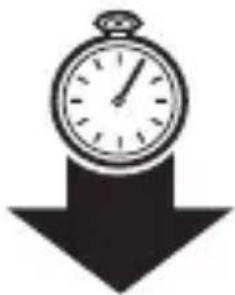
Simple black-and-white illustration of a stopwatch with a downward arrow (no text or symbols)長く(5秒以上)押す
Press and hold
Mantener pulsado
Pressione e segure

緑の点灯
Steady green light
Luz verde fija
Luz verde acesa

natural_image
Simple gray horizontal bar with a circular end, no text or symbols present赤の点灯
Steady red light
Luz roja fija
Luz vermelha acesa

緑の点滅(長めの間隔)
Long green flash
Flash verde prolongado
Luz verde - piscada longa

緑の点滅
Green flash
Flash verde
Luz verde piscando

赤の点滅
Red flash
Flash rojo
natural_image
Line drawing of a mechanical clamp or connector with a cable inserted (no text or symbols)2


充電器
Chargers
Cargadores
Carregadores

natural_image
Line drawing of a CLA-11 connector with coiled cable and connector (no text or symbols on the diagram itself)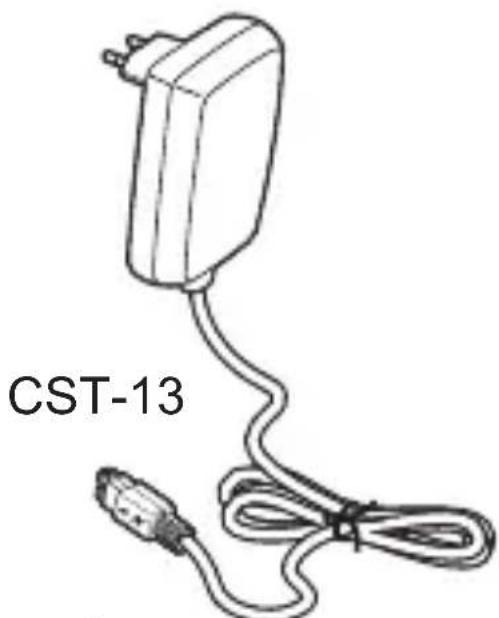
natural_image
Line drawing of a CST-13 electrical plug with cable and connector (no text or symbols on the diagram itself)(日本のみ CST-20)
イヤホンマイクを携帯電話に接続する
Adding the headset to the phone
Prepare your phone according to the phone's user guide on adding a Bluetooth device. The headset passkey is 0000.
When you add the headset to the list of devices in the phone, the headset will recognize the phone automatically when it is turned on.
You only need to add the headset to the phone once. If you want to use the headset with a new phone, you need to add it to that phone. (See page 26.)
Headset indicator light when successfully added
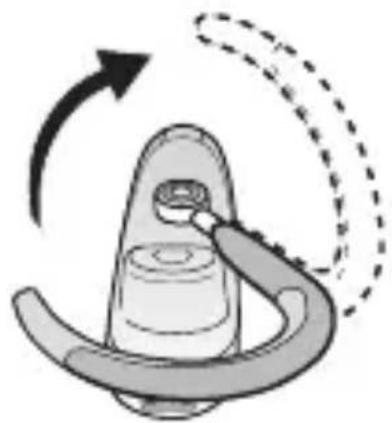
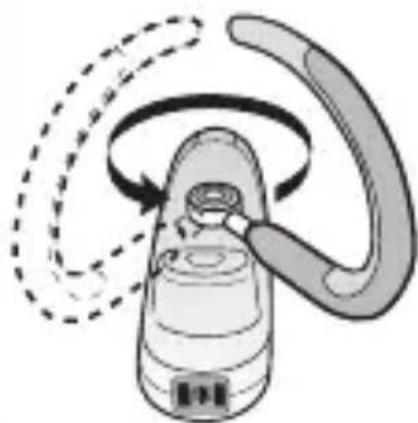
Putting the headset on
natural_image
Line drawing of a person with earphones and a curved arrow indicating rotation (no text or symbols)1
natural_image
Illustration of a medical device with a curved handle and arrow indicating rotation (no text or symbols)2
natural_image
Diagram of a hand holding a bottle with a curved handle, showing motion arrows (no text or symbols)3

natural_image
Diagram of a mechanical device with curved arm and dashed base, no visible text or symbols電源を ON(OFF)にする
Turning the headset on (and off)
Encender el auricular (y apagar)
natural_image
Simple gray oval shape with radiating triangular arrows around it (no text or symbols)
natural_image
Simple gray oval shape with radiating triangular elements (no text or symbols)
natural_image
Simple graphic with a sun-like shape and three dots below (no text or symbols)Indicator light with headset on
flowchart
graph TD
    A["ear ear with musical notes"] --> B["ear ear with bandage"]
    B --> C["ear person with microphone"]
電話をかける
Making a call
natural_image
Side profile illustration of a person wearing a headset, with a speech bubble indicating sound (no text or symbols present)音声コマンドの使用 Using voice commands Utilizar comandos de voz Usar comandos de voz
Voice commands, such as dial, redial, answer and reject, can be very useful when you are using the headset. For more information on voice commands, refer to the phone's user guide.
Making a call using voice commands
音声の転送 Transferring sound Transferir sonidos Som de transferência

flowchart
graph TD
    A["Person speaking into ear"] --> B["An ear receiving earpiece"]
    B --> C["An ear receiving ear device with musical note"]
    C --> D["Person receiving ear with earphones"]

To transfer from headset to phone, refer to the phone's user guide.
着信を拒否する
Rejecting a call
電池レベル(待受中)
Battery status (in standby mode)
着信音量を調整する(待受中)
Adjusting ring volume (in standby mode)
Adjusting speaker volume (during a call)
Refer to pages 7-10, and continue according to the phone's user guide.
ストラップを装着する
Attaching strap
Colocar el cordón
Fixar correia

natural_image
Diagram showing a cable being inserted into a device, with no visible text or symbols
natural_image
Line drawing of a person wearing a necklaces (no text or symbols)
natural_image
Illustration of a cable being inserted into a device, showing cable attachment and cable disassembly (no text or symbols)本体につながらない
No connection to phone
Make sure that the headset is charged and within range of the phone. The settings in the phone may not be correct. Check or redo the settings in the phone for adding a Bluetooth device.
The headset is automatically switched off
- The battery is too low. The indicator light on the headset flashes red and you hear a low beep.
- The headset switches off if you do not add it to the phone within 10 minutes.
Ready to add (Ready to reset)
Battery needs charging
Battery status - high
Battery status - medium
Declaration of conformity
We, Sony Ericsson Mobile Communications AB of Nya Vattentornet 221 88 Lund, Sweden
declare under our sole responsibility that our product
Sony Ericsson type DDA-0 001002
to which this declaration relates is in conformity with the appropriate standards EN 300 328, EN 301 489-17, EN 301 489-7 and EN 60950 following the provisions of Radio Equipment and Telecommunication Equipment directive 1999/5/EC with requirements covering EMC directive 89/336/EEC and Low Voltage directive 73/23/EEC.
Lund, March 2004

CE 0682
Ulf Persson, Head of Product Business Unit Accessories
www.SonyEricsson.com

Sony Ericsson
Sony Ericsson Mobile Communications AB SE-221 88 Lund, Sweden
LZT 108 6820/5 R2B
Printed in Hungary
This is the Internet version of the user's guide © Print only for private use.

- Akono™ Headset
- HBH-600
- HBH-602
- Sony Ericsson
- Akono™ Headset HBH-600/HBH-602
- 取扱説明書
- User Guide
- Guía del usuario
- Guia do usuário
- FCC statement
- Sony Ericsson HBH-600/HBH-602
- ©Sony Ericsson Mobile Communications AB, 2004
- Auricular Akono™ HBH-600/HBH-602
- 記号の説明
- User Guide symbols
- イヤホンマイクを携帯電話に接続する
- Adding the headset to the phone
- Putting the headset on
- 電話をかける
- Making a call
- 音声コマンドの使用 Using voice commands Utilizar comandos de voz Usar comandos de voz
- Making a call using voice commands
- 音声の転送 Transferring sound Transferir sonidos Som de transferência
- 着信を拒否する
- Rejecting a call
- 電池レベル(待受中)
- 着信音量を調整する(待受中)
- Adjusting ring volume (in standby mode)
- Adjusting speaker volume (during a call)
- ストラップを装着する
- Attaching strap
- Colocar el cordón
- Fixar correia
- 本体につながらない
- No connection to phone
- The headset is automatically switched off
- Declaration of conformity
- Sony Ericsson type DDA-0 001002
Brand : SONY ERICSSON
Model : HBH-602
Category : Hi-Fi System