
Compasseo 620 - Browser PACKARD BELL - Free user manual and instructions
Find the device manual for free Compasseo 620 PACKARD BELL in PDF.


| Product Type | Portable GPS Navigator |
| Brand | Packard Bell |
| Model | Compasseo 620 |
| Dimensions (approx.) | 4.5 x 3.0 x 0.8 inches (114 x 76 x 20 mm) |
| Weight (approx.) | 5.3 oz (150 g) |
| Display | 4.3-inch color touchscreen |
| Power Supply | Rechargeable lithium-ion battery, 12V car charger, USB cable |
| Battery Life | Up to 3 hours continuous use |
| Navigation Features | Turn-by-turn directions, voice guidance, points of interest, route planning |
| Maps | Pre-loaded with detailed street maps |
| Connectivity | USB 2.0, microSD card slot (optional) |
| Care and Cleaning | Wipe with a soft, dry cloth; avoid moisture and abrasives |
| Safety Warnings | Do not disassemble, expose to heat, or use damaged charger |
| Spare Parts and Repairability | Battery replacement by authorized service only; no user-serviceable parts |
| General Information | Manufacturer: Packard Bell; Model: Compasseo 620; Category: GPS Browser |
Frequently Asked Questions - Compasseo 620 PACKARD BELL
User questions about Compasseo 620 PACKARD BELL
0 question about this device. Answer the ones you know or ask your own.
Ask a new question about this device
Download the instructions for your Browser in PDF format for free! Find your manual Compasseo 620 - PACKARD BELL and take your electronic device back in hand. On this page are published all the documents necessary for the use of your device. Compasseo 620 by PACKARD BELL.
USER MANUAL Compasseo 620 PACKARD BELL
PACKARD BELL COMPASSEO
USER'S GUIDE


Notices & Disclaimers
Copyright Notice
Packard Bell Compasseo User's Guide. Copyright © 2006 Packard Bell B.V. All Rights Reserved. No part of this manual may be reproduced or transmitted, in any form or by any means, whether electronic, chemical, manual or otherwise, including but not limited to photocopying, recording, or information storage and retrieval systems, for any purpose without prior written permission of Packard Bell B.V.
Disclaimer
All Packard Bell GPS products and accessories are to be used only as travel aids. THEY MUST NOT BE USED FOR ANY PURPOSE REQUIRING PRECISE MEASUREMENT OF DIRECTION, DISTANCE, LOCATION, OR TOPOGRAPHY. It is the user's responsibility to use the product prudently.
IN NO EVENT WILL PACKARD BELL BE LIABLE TO ANY PARTY FOR ANY DIRECT, INDIRECT, INCIDENTAL, SPECIAL OR OTHER CONSEQUENTIAL DAMAGES WHETHER RESULTING FROM THE USE, MISUSE, OR INABILITY TO USE THE PACKARD BELL GPS PRODUCTS, OR FROM DEFECTS IN THE PRODUCTS.
Any information supplied to PACKARD BELL by third parties such as, but not limited to, Navteq Corp., ALERTEGPS SARL or Destinator Europe GmbH (hereinafter "third party information") and contained in the Packard Bell GPS product is provided to end-users on an "as is" basis, without warranties of any kind, implied, express or statutory. PACKARD BELL does not warrant the accuracy, adequacy or completeness of any third party information contained in the GPS and expressly disclaims liability for errors or omissions in this information and materials. In no event will PACKARD BELL be liable for any damages, including without limitation, direct or indirect, special, incidental, punitive, or consequential damages, losses or expenses arising in connection with such third party information or use thereof or the inability to use by any party, or in connection with any failure or performance, error, omission, interruption, defect, delay in operation or transmission, computer virus or line or system failure, even if PACKARD BELL or its affiliates, are advised of the possibility of such damages, losses or expenses. The access by any user to any hyperlinks to internet resources mentioned in the present documentation are at the user's own risk and the content, accuracy, opinions expressed and other links provided by these resources are not investigated, verified, monitored or endorsed by PACKARD BELL.
Updates to software and hardware components are made regularly. Therefore some of the instructions, specifications and pictures in this documentation may differ slightly from your particular situation. All items described in this guide are for illustration purposes only and may not apply to your particular situation. No legal rights or entitlements may be obtained from descriptions made in this manual. Packard Bell B.V. reserves the right to revise or make changes or improvements to this product or documentation at any time without obligation to notify any person of such revisions or improvements.
IF THE FOREGOING LIMITATION IS HELD TO BE UNENFORCEABLE BY SOME JURISDICTIONS, THE MAXIMUM LIABILITY OF PACKARD BELL TO THE-END USER SHALL NOT EXCEED THE AMOUNT OF FEES PAID BY THE END-USER FOR THE PRODUCTS.
Trademark
Packard Bell is a registered trademark of Packard Bell B.V. Destinator Navigates is a trademark of Destinator Technologies Inc. (DTI). All other company or product names are trademarks, registered trademarks or service marks of their respective owners.
Caution
Do not leave the device in your car. Exposure to sunlight may cause damage.
Do not incinerate or disassemble; the unit may explode or release toxic materials. Do not short circuit as this may cause burns.
Product Disposal
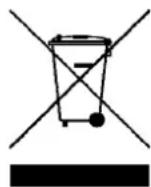
The Waste Electrical and Electronic Equipment (WEEE) Directive requires that used electrical and electronic products must be disposed of separately from normal household waste in order to promote reuse, recycling, other forms of recovery and to reduce the quantity of waste to be eliminated with a view to reducing landfill. This concerns your computer and all its accessories, such as a keyboard, mouse, remote control, speakers, etc. When you dispose of such products, please follow the guidance of your municipal authority and/or ask your retailer when purchasing a new product.
Battery notice
DO NOT REPLACE THE BATTERY BY YOURSELF. RISK OF EXPLOSION IF BATTERY IS REPLACED BY INCORRECT MODEL. DISPOSE OF USED BATTERIES ACCORDING TO INSTRUCTIONS.
Ultimate disposal of the batteries should be handled according to all national laws and regulations. Do not place used batteries in your regular waste: the incineration, landfilling or mixing of batteries with the municipal solid waste stream is prohibited by law in most countries. Contact your local waste management officials for other information regarding the environmentally sound collection, recycling, and disposal of the batteries.
Note:
Some smaller (sub-) municipalities may not contain street data. In such cases, please choose the larger (super-) municipality displayed in parentheses to search for these streets. Alternatively, you can change the search order to Street>City or ZIP/Postal Code>Street to find street data for the smaller municipality.
Important Information
If you install the Packard Bell Compasseo in your car, make sure you position the car holder kit in a suitable location on your windscreen so that the driver's visibility is not obstructed and the operation of safety systems is not hindered.
For your own safety and that of others it is recommended that you handle the Compasseo only when your vehicle is stationary. You should not watch the screen while driving, except when you can do so without danger. If you need to make adjustments or enter a new destination, make sure you stop at a suitable place before doing so.
You must drive normally and in accordance with road safety rules. The guidance instructions do not relieve the driver of personal responsibility for security. Please note that the guidance instructions given by the Compasseo are only suggestions and are not guaranteed to correspond to the actual road conditions. The driver must therefore always verify that it is safe to follow the instructions. If there is a discrepancy between the road conditions and the guidance instructions, the road safety rules always take precedence over the route guidance instructions provided by your Compasseo.
Pay particular attention to road signs as they may change and no longer correspond to the information on the map. Your Compasseo may fail to recognise a no-entry way, a one-way street, or a no left/right/U-turn.
Note: It is also highly recommended that you follow these guidelines when using the Compasseo in Pedestrian Mode.
Table of Contents
Chapter 1 - Introducing the Packard Bell Compasseo....5
1.1 Contents of the box 5
1.2 Features 5
1.3 Controls 5
Chapter 2 - Getting Started ...... 7
2.1 Powering ON/OFF 7
2.2 Connecting to your computer 7
2.3 Disconnecting from your Computer 8
2.4 Charging the Battery 8
Chapter 3 - Troubleshooting & Upgrading the Compasseo 10
3.1 Resetting the device 10
3.2 Technical Support.... 10
Chapter 4 - Installing the Packard Bell Compasseo in your car ....11
Setting up the device 11
Specifications....14
Chapter 1 - Introducing the Packard Bell Compasseo
1.1 Contents of the box
- Compasseo
• 12V cigarette lighter adapter - Car holder kit
- USB cable
• SD/MMC card (with country map)
• Companion CD/DVD (documentation & software) - Quick Start Guide
1.2 Features
- Plug and drive GPS device
• 3.5' TFT-LCD colour to uch screen
• SD/MMC card reader
• 256/512 MB MMC card provide d, with country map
• MP3 player and Photo viewe r
• High-quality loudspeaker
• GPS Module: SiRF Star III - Processor: 266MHz
• Memory: 32MB (flash) / 64 MB (DRAM) + 256/512 M B SD/MMC card - Battery: Integrated recharg eable Li-Ion 1, 100 mAh
• Upgradeable firmware
• Supports Windows 2000/XP
1.3 Controls


1 Power Switch
2 External GPS antenna connector (MMCX type)
3 Battery charging LED
4 Touch screen
5 SD/MMC card slot
6 Volume up/down
7 Car holder slots
8 USB / Power connector
9 Earphone Jack
10 Battery lock switch
11 Reset button
12 Speaker
Slide to power on or off the device.
If your car has a heat reflective/thermal windscreen, you may need to use an external antenna to get better GPS reception.
Indicates the status of battery.
Read status and information on the screen. Tap the screen to enter information
and navigate through the applications.
Insert an SD/MMC card to read maps, music, photos.
Adjust the volume.
Use to position your device in the car holder kit.
Use the supplied USB cable to connect the Compasseo to your computer and exchange files or charge the battery, or connect the supplied car adapter cable and plug the other end into the cigarette lighter to charge the battery.
Connect earphones.
Use this switch to cut all power to the device. Note that this also resets the device's memory. You will have to perform the first start process again (calibrate screen, settings, acquire GPS connection, etc.).
Restart your device in case it stops responding or becomes unstable.
Listen to route guidance instructions or enjoy your music.
To make the most of your Packard Bell Compasseo, download extra maps, get the latest firmware and purchase accessories, make sure you visit the Packard Bell Website regularly on www.packardbell.com!
Chapter 2 - Getting Started
2.1 Powering ON/OFF
Simply slide the Power Switch up or down to power on or off the Packard Bell Compasseo.
2.2 Connecting to your computer
You will need to connect to your computer to get the latest maps, points of interest or software updates (Internet connection required).
Note: you will only need to go through the installation process once.
- Connect the small end of the supplied USB cable to your Compasseo and the other to one of your computer's USB ports.
- Insert the Companion CD/DVD into your computer and click on the Installation button
- Click on the Driver button to install the Compasseo driver.
- Click on the Microsoft ActiveSync button to install Microsoft ActiveSync 4.1.
- Follow the onscreen instructions and select "Files" in the Synchronisation Settings window.

- You can now transfer files to and from the SD/MMC card in the Compasseo using Windows Explorer.
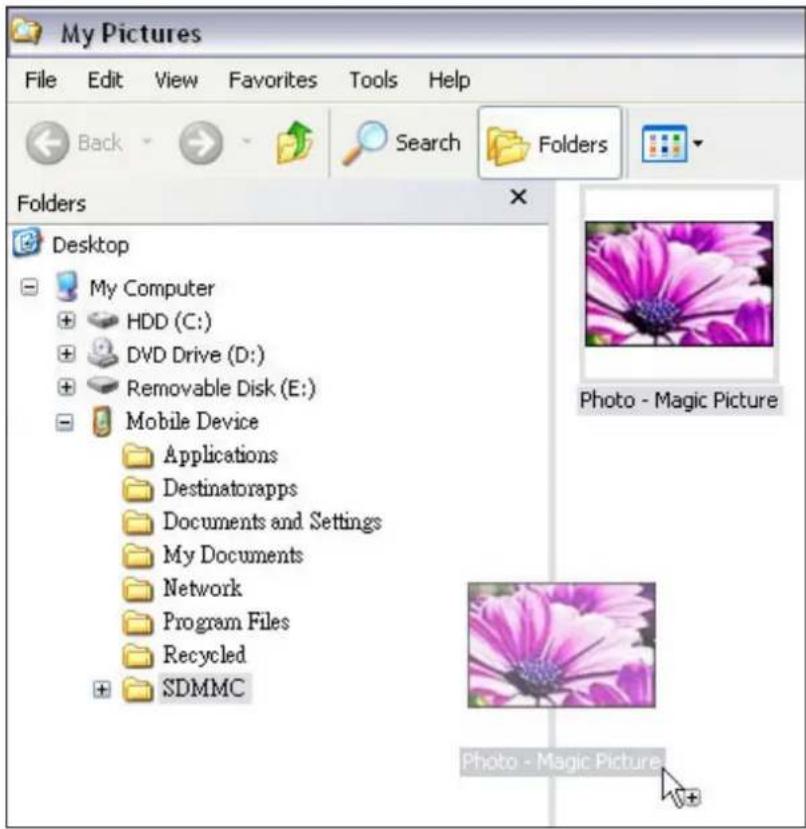
2.3 Disconnecting from your Computer
- Click on the Safely Remove Hardware icon in the Notification area (next to the clock).
- Click on Safely remove USB Mass Storage Device.
- Wait until a Safe to Remove Hardware message is displayed.
- Remove the device.
2.4 Charging the Battery
You are recommended to fully charge the battery each time the device is completely discharged. This will ensure maximum performance. Avoid frequent full discharges, because this puts additional strain on the battery. Several partial discharges with frequent recharges are better for lithium-ion than one deep one.
When the battery is too low, be sure to charge it in time. Otherwise, the device may automatically turn off and cannot be turned on. If your device becomes fully discharged and cannot be started, follow the procedure below.
- Connect the device to the computer for at least 20 minutes before tuning it on.
Note: when charging using the cigarette lighter adapter or the AC adapter (optional), you need to connect the device for at least 10 minutes before turning it on.
- After this short period, the battery should be sufficiently charged to allow the device to operate normally when connected to the computer, cigarette lighter adapter or AC adapter.
- Charging with the computer:
Connect the supplied USB cable to one of your computer's USB ports. The device will automatically charge.
Note: It may take up to 2.5 hours to fully charge the device.
- Charging with the cigarette lighter adapter:
You can plug in the cigarette lighter adapter to charge the Compasseo in your car.
Note: It may take up to 5 hours to fully charge the device.
- Charging with the AC adapter (optional):
Connect the AC adapter cable to the USB connector on your device. The device will automatically charge.
Note: It may take up to 2.5 hours to fully charge the device.
Note: The charging LED indicates the status of battery:
Red blinking: battery has less than 20% (with beep sound)
Static amber: charging
Static green: fully charged
The charging indicator (the last two) works only when AC power is present.
Chapter 3 - Troubleshooting & Upgrading the Compasseo
3.1 Resetting the device
Reset Button:
Should the Compasseo freeze or become unstable, insert a straightened paper clip into the Reset button located on back of the device. The device will then restart.
Hard Reset:
Use the battery lock switch to cut all power to the device. Note that this also resets the device's memory and restores the factory default settings of the device. You will have to perform the first start process again (calibrate screen, settings, acquire GPS connection, etc.).

3.2 Technical Support
For answers to common questions and quick assistance see the Destinator FAQ for Registered Users online at: http://www.destinatoreurope.com, click Community, login and choose FAQ.
If you have other questions about Destinator Navigates, please contact your supplier or Destinator Technical Support via email at support@destinatoreurope.com.
Chapter 4 - Installing the Packard Bell Compasseo in your car
Setting up the device
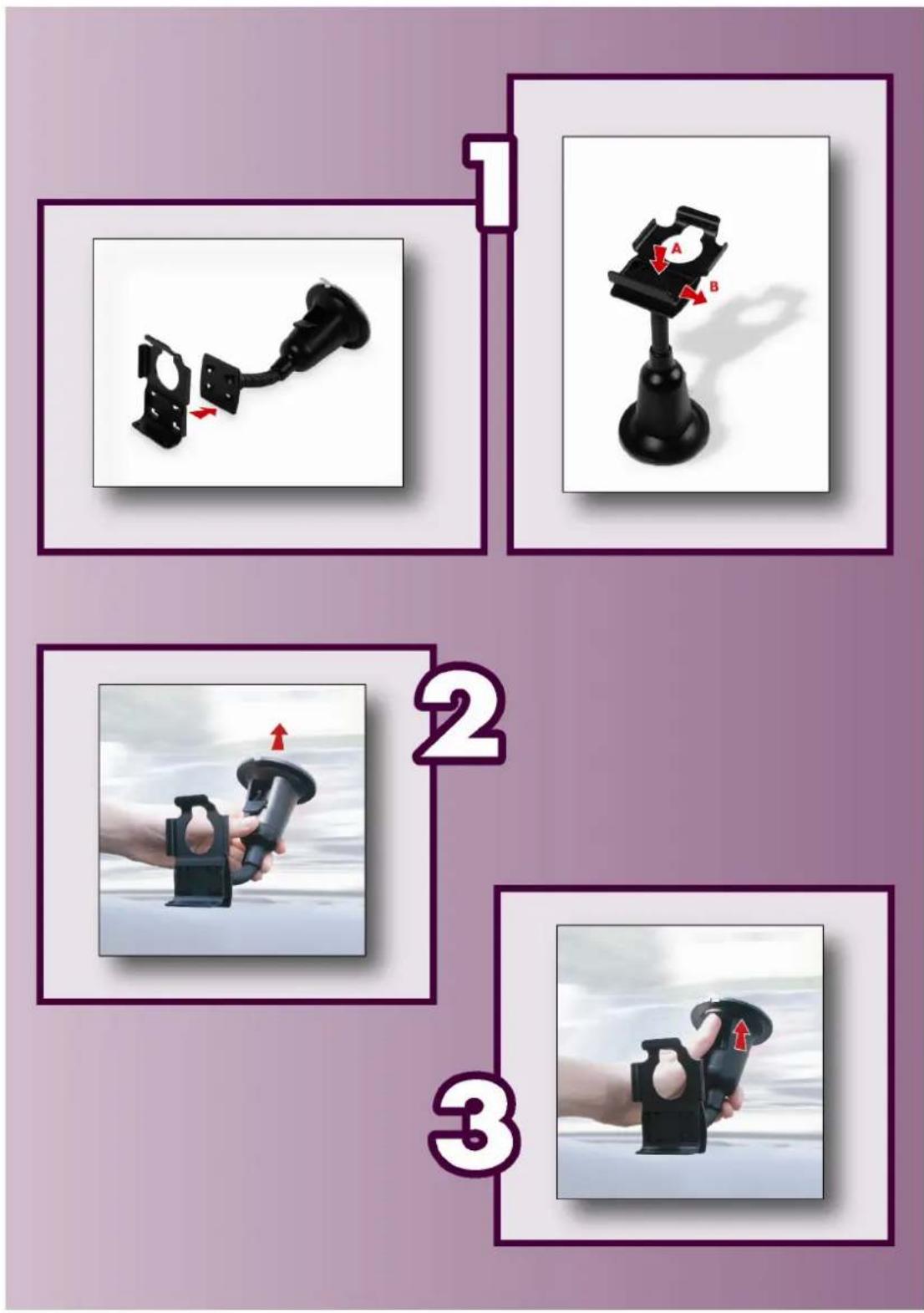
Please refer to the pictures on the following page and instructions below to set up your device correctly.
- To assemble your car holder kit first attach the cradle to the suction-mount gooseneck. Ensure that the 'CLOSE' arrow points in the direction you attach the cradle.
- Place the car holder kit in a suitable location on your windscreen and release the clip at the base of the gooseneck.
- Push the clip back into place to fix the suction-mount gooseneck firmly to the windscreen.
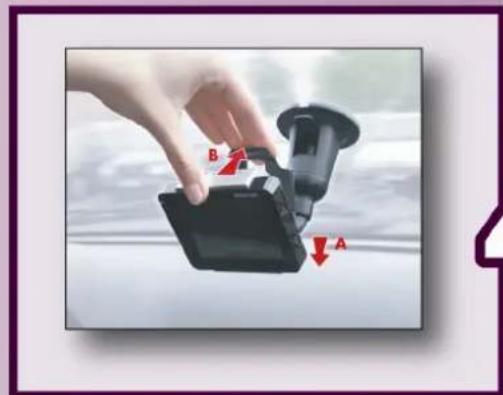
- Attach the Compasseo to the car holder kit: position the bottom of the Compasseo first, then tilt the top of the Compasseo back into position. Pull the top clip until it clicks into place. Twist the gooseneck to adjust the position of the Compasseo so that you can see the screen comfortably.
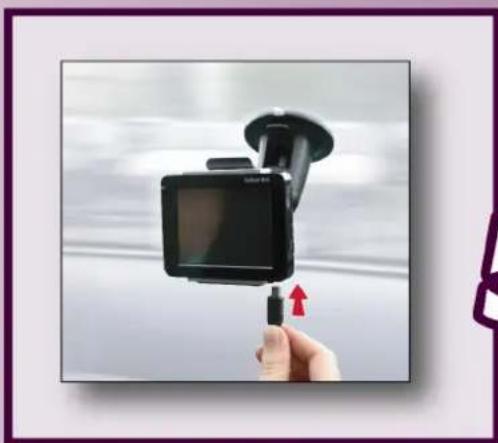
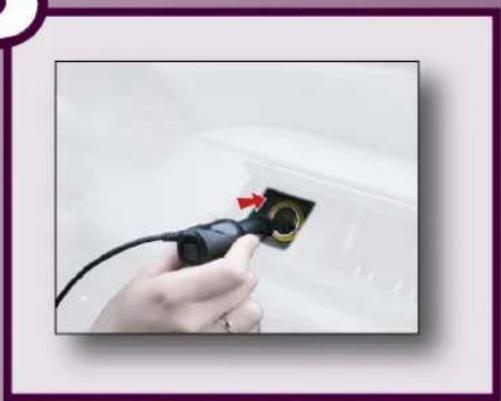
- You can charge the Compasseo from your car using the supplied car adapter cable. For your own safety and that of others, you should connect the cables only when your vehicle is stationary. Connect the supplied USB cable to the USB port on the Compasseo and plug the other end into the cigarette lighter. You can then start driving.
The Packard Bell Compasseo is now ready for use! Please read the instructions regarding Destinator Navigates to know how to use your GPS.
CAUTION: Do not leave the device in your car. Exposure to sunlight may cause damage.
4

5
Specifications
Hardware
Processor: Samsung S3C2410X02/A26 with internal clock speed 266MHz
On Board Memory
FLASH: 32MB for OS image and applications
DRAM: 64MB
Display
LCD: 3.5" TFT-LCD
Backlight: six levels of intensity (0, 20, 40, 60, 80 and 100% of the maximum level)
Touch Panel: 300 DPI touch screen; Finger-tapping type
Audio
CODEC:16-bits stereo; 44.1KHz max sample rate.
Earphone Jack: 3.5 mm stereo earphone jack
Speaker
Battery
Battery Pack: 3.7 volt Lithium-Ion cell (non-removable), 1 100 mAh.
Capacity Detection: six levels of battery capacity (0, 20, 40, 60, 80 and 100%).
I/O connectors
USB: USB (v1.1). Mini USB connector.
SD/MMC Slot: supports SD/MMC memory cards (up to 1G bytes)
External GPS Antenna Connector (MMCX type)
Environment
Temperature
Operating Temperature: 0 to 40 C°
Storage temperature: -20 to 60 C°
Humidity 20-95% non-condensing
ESD: +/-8kv air discharge, +/-4kv direct discharge.
Vibration: 2.60 Grms, 5 \~ 500 Hz
Regulatory/Certification
Complies with CE standards.
EMI/RFI:
In Emission: Radio R&TTE directive 99/5/EC 301-440
In Immunity: EN-55024
Safety: EN60950
GPS Receiver
Module
Chipset: SiRF Star III solution.
Frequency: 1575.42 MHz
C/A code: 1.023 MHz chip rate.
Channel: 20 channels.
Sensitivity: -159 dBm.
Performance
Position Accuracy: 10 meters, 2D RMS
Altitude: max. altitude 18000 m.
Velocity: max. velocity 515 m/s.
Interface
Baud rate: 4800 \~ 57600 bps adjustable
Output Message: SiRF binary or NMEA-0183 GGA, GSA, GSV, RMC, VTG



- PACKARD BELL COMPASSEO
- USER'S GUIDE
- NOTICES & DISCLAIMERS
- COPYRIGHT NOTICE
- DISCLAIMER
- TRADEMARK
- CAUTION
- PRODUCT DISPOSAL
- BATTERY NOTICE
- NOTE
- IMPORTANT INFORMATION
- TABLE OF CONTENTS
- CHAPTER 1 - INTRODUCING THE PACKARD BELL COMPASSEO....5
- CHAPTER 2 - GETTING STARTED ...... 7
- CHAPTER 3 - TROUBLESHOOTING & UPGRADING THE COMPASSEO 10
- CHAPTER 4 - INSTALLING THE PACKARD BELL COMPASSEO IN YOUR CAR ....11
- SPECIFICATIONS....14
- CHAPTER 1 - INTRODUCING THE PACKARD BELL COMPASSEO
- 1.1 CONTENTS OF THE BOX
- 1.2 FEATURES
- 1.3 CONTROLS
- CHAPTER 2 - GETTING STARTED
- 2.1 POWERING ON/OFF
- 2.2 CONNECTING TO YOUR COMPUTER
- 2.3 DISCONNECTING FROM YOUR COMPUTER
- 2.4 CHARGING THE BATTERY
- CHAPTER 3 - TROUBLESHOOTING & UPGRADING THE COMPASSEO
- 3.1 RESETTING THE DEVICE
- RESET BUTTON
- HARD RESET
- 3.2 TECHNICAL SUPPORT
- CHAPTER 4 - INSTALLING THE PACKARD BELL COMPASSEO IN YOUR CAR
- SETTING UP THE DEVICE
- SPECIFICATIONS
- HARDWARE
- ON BOARD MEMORY
- DISPLAY
- AUDIO
- BATTERY
- I/O CONNECTORS
- ENVIRONMENT
- TEMPERATURE
- REGULATORY/CERTIFICATION
- GPS RECEIVER
- MODULE
- PERFORMANCE
- INTERFACE
Brand : PACKARD BELL
Model : Compasseo 620
Category : Browser