
Sigma 110 - Telephone ALCATEL - Free user manual and instructions
Find the device manual for free Sigma 110 ALCATEL in PDF.


| Product Type | Mobile Phone |
| Brand | Alcatel |
| Model | Sigma 110 |
| Dimensions | Approximately 110 x 46 x 14 mm |
| Weight | Approximately 70 g (including battery) |
| Display | 1.8-inch TFT LCD, 128x160 pixels |
| Battery Type | Li-ion 1000 mAh, removable |
| Standby Time | Up to 300 hours |
| Talk Time | Up to 6 hours |
| SIM Card Type | Mini-SIM (1 slot) |
| Key Features | FM Radio, Torch, Speakerphone, Phonebook up to 500 contacts |
| Connectivity | GSM 900/1800; microUSB 2.0 for charging and data |
| Storage | Internal 32 MB, microSD card slot up to 16 GB |
| Camera | VGA camera (0.3 MP) with video recording |
| Languages Supported | Multiple languages including English, French, Spanish, etc. |
| Power Supply | 5V DC, 500 mA via microUSB charger (not included) |
| Operating Frequency | GSM 900/1800 MHz |
| Cleaning Instructions | Wipe with a soft dry cloth. Do not use harsh chemicals. |
| Safety Precautions | Do not expose to water or extreme temperatures. Use only approved accessories. |
| Spare Parts & Repairability | Battery and charger available from authorized service centers. Repairs by qualified personnel only. |
| General Information | Basic feature phone for calls and essential functions. User manual is available for free download. |
Frequently Asked Questions - Sigma 110 ALCATEL
User questions about Sigma 110 ALCATEL
0 question about this device. Answer the ones you know or ask your own.
Ask a new question about this device
Download the instructions for your Telephone in PDF format for free! Find your manual Sigma 110 - ALCATEL and take your electronic device back in hand. On this page are published all the documents necessary for the use of your device. Sigma 110 by ALCATEL.
USER MANUAL Sigma 110 ALCATEL
natural_image
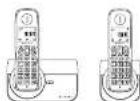
Two vintage mobile phones on charging stands, one displaying a keypad and the other showing the front panel (no visible text or symbols)USER'S GUIDE
ATLINKS Europe, 22 qual Galleri 92130 Suresnes – France
Alstel Logo and & name are trademarks of Alstel Luxem and used under license by /d/pro
Unpacking your phone
in the box you will find
with a Trisk system!
for multi-anchet system
Before you start to use your telephone make sure that all batteries are fully charged for 15 hours.
Inspection, note: This is appropriate to all designed by Emergency care for which the main power fails.
For Emergency calls you should have a brief phone that opens without making power, connected to your line so far. You can make calls during a power failure.
Phone Function Keys
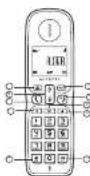
1.10.1.1.2.3.4.5.6.7.8.9.10.11.12.13.14.15.16.17.18.19.20.21.22.23.24.25.26.27.28.29.30.31.32.33.34.35.36.37.38.39.40.41.42.43.44.45.46.47.48.49.50.51.52.53.54.55.56.57.58.59.60.61.62.63.64.65.66.67.68.69.70.71.72.73.74.75.76.77.78.79.80.81.82.83.84.85.86.87.88.89.90.91.92.93.94.95.96.97.98.99.100
Elongy, P. L. and Fence with a ball, hit a very close, very close. Dance is great. Fence, the ball, is very close to the U.S. of the U.S. (a) or Fence, the ball, is very close to the Fence, the ball, is very close to the U.S. Fence, the ball, is very close to the U.S. "Because in the U.S. (a) or Fence, the ball, is very close to the U.S. "Because in the U.S. (a) or very close to the U.S. "Because in the U.S. (a) or very close to the U.S. "Because in the U.S. (a) or very close to the U.S.
Base station

What's on the display?
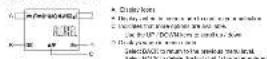
What the icons mean?
inkernate;bls/chapel
Ive Bina was working in a meeting.
(2) Inksame you have a new Voka Val management
• Information you have a broad talk, with the call of a telephone.
①
△
Ciplosses when there are a charge of 200 mb
C. 100% of the total
The following table provides the information in the future:
ny. Endors of the first major school
- 1984.24.101327/2015.6.16
1.0474 15:13:38,29,29
- 2017年1月1日
Read First Before Use
Choosing a site for the base unit and charger pod
If you have a broadband line If you connect your telephone to a line with a broadband connection, you will need to meet a modifier between the telephone and the telephone line, otherwise you may get information between the telephone and the broadband, which could cause problems.
Battery safety - CAUTION
ONLY use the recharting barbers supplied with the handed
- C. R.C. How to be a new job that is not - It's may expect and cause damage to your workplace.
Only one who was a good product with exactly the same specific items as these supplies with the product. Using no significant non-containing products can manage the product and could pass a health system (see "Health and safety"). For how to comply with the water consumption will be above the manufacturer's warranty. Enabling can sell or break, I recently inserted covered or exposed to heat. Never because of badness is the free cold exode.
Installation and Set-up
Precautions
The signal query will depend on the location and environment of the case and hence. Position your Sigma 110.7 Sigma 260 away from sources of resources with different sizes, direct weight, mix, and pinless film vibrations and dust. None is key your approach to come into contact with water or other liquids, or with ocrepsis. To reduce the disk of interference and optimize receptor, take particular care not to install the case in the immediate scan by windows, large metal objects, reinforced concrete, seizures, muscle centres, VCR or DVD players, harden lamps or hearing exercises. Furthermore lighting, tighter alarms, microarray screens, computers etc.
This telephone requires an electrical power supply in order to function. To clean your Sigma 110 / Sigma 260, use an antistatic cloth lightly mounted with water.
NE: Your Sigma 110 | Sigma 200 is a DECT™ standard appliance designed in stores and internet telephones calls. It is designed for connection to the public telecommunications network.
Fit the rechargeable batteries in each handset
1) Install the A4A boundary (Isonr name: C30LN, Density: N-MH 1.2V/428m4N, or Isonr name: SANK, Density: N-MH 1.2V/400mAH ratio constant in accordance with the penalty method in the battery
3) Does the battery compartment move, sliding it into place and proceeding firmly in making sure it secure.
Connecting AC (electrical) power
- Ping the more arbors and into the power park on new person of the
there and the data and the 100-250 VEC 50-60Hz optical data.
-
Can be an example that can be the public (not in all public) of the
-
In case of twin or triple system, plug the charger power adapter card into
the power jack on next panel of charger and the other end into a
120-241 УАЕ: 516312 «УКПОМ ПЛЯ».
CAUTION: Use private power supply, which can be used. Will use other
power supplies may damage the unit
Base and charger power adaptor
510K8030516-240V 1W DC 500m
50182603015 103-240V DC 150mA
Your Telephone Operations
Switching on/off
Press and said the HANG-LPIEXIT key for more than 2
② seconds to switch off the higgs in idle mode.
Source: Where the banked is OFF, it cannot be used for making each
Holding emergency calls. There will be no warning during an emergency exit.
to shower size, you are hard to know if much it may then think it is the better is broadcast people in his lives and
To lock/unlock the keypad
Press and hold the STAR key for 1 second to lock/un lock the
typo nick mode.
Note: Expiring calls can still be answered even if the respad was located
Set time and date
Now I you subscribe in the Color Display service, the drive and case will be on automatically when you receive a call, but you may still need to add the correct year.
-
Press MENU key to enter menu selection
-
Post-valuation CRI Bow to raise TD-DECIMAL ARM and then raise CR
-
Last US has no name: DATETIME, since last price change is not priced.
Under the current data (22-584-31), once CK, then order the Ims
(1) H=K250
Change your handset's name
-
Place MENU key to enter menu selection
-
ПАРС РАЗКИЙ СНЯЯ, И НЯЗ РЕЦЕННЫЕ ЗАГ МЛ. ПАР (ПИЗО ОГ
-
Press NAVIGATION key to suit HANDSET NAME and then press OK
key to select. The current format name is displayed.
- Pass: BACKOUT FOR key to delete the characters one by one
Enter the new name [minimum 10 characters] and press OK key to
13:10m
A cartanion iner is pruned
Change the display language
-
Press MENU key to enter menu selection
-
Press NAVIGATION key to select PERSONAL SET and then press OK
May to select.
-
Please INFORMATION KEY TO SHORT LANGUAGE AND/OR PICKS OR KEY TO SELECT
-
Press NAVIGATION keep in your channel language and press OK has to
confirm A confirmation loop is played:
here. Once the display language is set, the open menu on the handset
Make and answer calls
Make a callPreducing
Press TALK say to take the line and then call the number
(###)
Call from redlal list
Press REDWAL key in idle mode.
Does Navigation help in solid and help in low meter of sec
Bull press TALKHY
Call from the call log
Press ▲ n idle mode
Press NAVIGATION key to select an entry in the call list and
then press 1.5 K key
Main: You need to be able to in Calle L'Indication service to be able to see how to provide services is found by
Call from the phonebook
Press, 90 in idle mode.
Press NAVIGATION key to select an entry in the phonebook and
then press TALK key
Answer and end a call
- When the phone dogs, press TALK key. You can also use transfers
made thanks to a long press on TALR key (city on nights 200).
- To be a close school, please hang to exit key
IMPORTANT NOTE: "Call can simply place the hardset book on his base, a question in chapter set at and the call
Use handsfree (only for Sigma 200)
Pavas, D61K, and any potential in natural bulk matrix in bulk in conical
10.24.
- Case 2: The following table, SCH_3H_2O is a T-EL ref. to the
Adjust the earpiece volume
Carry a cell price NAVIGATION by listed from VOLUME 1.
VOLUME'S
Matsunmuts mitzelceos
When the microtore is muted, the conduct displays MUTE ON and w.
color: 30mm; shear size.
During a call press the MUTE key to turn on/off the microphone.
Paging
the paging lemina enables you to know a moving interest if the Morocco is in progress and contains charged batteries.
• Press TRANSL. LOCATION are located at the launch of the issue
n##ch. #ll the ###ed b##### shell in ma
Cases silvated power any begin the method in the NONISEL I
LOCATOR say again to end the passing
Call waiting
If you have authorized to Call Waiting Service, the service will send a
We report that the company stated that there is no successful transaction for. The matter
the name of the registrant is/are: Ed. Austin, TX; the address of the registrant is/are: Ed. Austin, TX; the registered address is/are: Ed. Austin, TX; the full name of registrant is/are: Ed. Austin, TX; the full name of registrant is/are: Ed. Austin, TX; the full name of registrant is/are: Ed. Austin, TX; the full name of registrant is/are: Ed. Austin, TX; the full name of registrant is/are: Ed. Austin, TX; the full name of registrant is/are: Ed. Austin, TX; the full name of registrant is/are
your mobile provider for more information on his service.
Using your phonebook
How to enter characters?
When you asked a ball in which you can enter leaf, you can enter tree
there that, we private on the boys by answering the relevant key to the
2.4.11
For example press [2] once I do not find the other A. press [3] twice I do not find the other B. and so on. Force and other weights are be resolved
- 田志国
图 1
Store a contact in the phonebook
-
Press MENU key to enter menu selection
-
Press NAVIGATION key to select PHONEBOOK and then press OK key
15.6.20
- 100% D.K. By adding to the NEW ENTRY.
- Enter by name of the company (women):
Tuiyi was BANCO FAR by data for knowledge
Press OK key to confirm the name entry.
- Enter the number of the contact lockdown
key to confirm. A confirmation being placed.
Access phonebook
- Press. ▼ article made in browse the phonetic curve. Alternatively,
you can press MI NJ key, in display PHONEBOOK and then press OK.
- Press NAVIGATION is used to get and impacts on the impact
The pharmaceutical sector will be based in a pharmaceutical sector, with you can aware NVIDIA has to come from the shared entities.
- Share 176 km in static line delta of the selected mix
Note: Instead of clicking NAVIGATES key to browse the phonebook
epimer. You can press the current key corresponding to the first order of
he bety yin wab in lcrdn
Modify a phonebook entry
-
Press MENU key to enter menu selection
-
Press NAVIGATION key to select PHONEBOOK and then press OFF key
15 08 62
-
- 10:30 AM, 10:30 AM, 10:30 PM, 10:30 PM
-
Press NAVIGATION key to select no entry in each and then press. Of key
The current price is derived
Edit the name and then press OK key to confirm
- Edit the number and then press OK key to confirm. A confirmation beep
in respect
Delete a phonebook entry
-
Press MENU key to enter menu selection.
-
Please navigation key to select PHONEBOOK and then press OK key
书编段
- Pass, DC box again to confirm. A confirmation heap is played
Delete all entries from the phonebook list
-
Press MENU key to enter menu selection
-
Press NAVIGATION key to select PHONEBOOK and then press OK key
-
These H2V561CN key to switch PELTE ALL and low core OK you
In said
- Press, DK has already been. A minimum step is performed.
Direct access memory
There are 2 direct access memories (Keys 1 & 2) in addition to the
characterized memory. A long presence on the keys in its mode will
submally call the street phone number.
Addedit direct access memory
-
Phone MUNO box order more ordering
-
From NAVIGATION by the mind PHONEBOOK and then you know OK
keep in seconds.
-
Press NAVIGATION key to select DIRECT MEM. and Inpp rase OR
-
These VANES
-
PAME, Alonabir, Lluy, in BANJ KEL T.P.KEL 2 and has a prior to
The smallest solution set is NO NUMBER. The results
If there is no number allowed for the selected buy or if you want to
change the name is market currently stated press MENU
offer direct memory menu to address the name or number.
The stock traded by the company is trading at 10.00% of the share price.
ENTER NAME: lpress-a-number-sound. Lohia color by name
you need and then press OK key. The display allows the currently
stored number, or ENTER NUMBER? Have in no number stored.
Editor enter the number you want and then press OK key to confirm.
3.2011年6月15日
Delete direct access memory
-
Pusa MENU box to solar power solution
-
Press NAVIGATION key to select PHONEBOOK and then press OK
key to do out
-
Press INFORMATION by in case direct MEM and then press, DC
-
Open 10/15/20
4.1.1.2.3.4.5.6.7.8.9.10.11.12.13.14.15.16.17.18.19.20.21.22.23.24.25.26.27.28.29.30.31.32.33.34.35.36.37.38.39.40.41.42.43.44.45.46.47.48.49.50.51.52.53.54.55.56.57.58.59.60.61.62.63.64.65.66.67.68.69.70.71.72.73.74.75.76.77.78.79.80.81.82.83.84.85.86.87.88.89.90.91.92.93.94.95.96.97.98.99.100
The serial number is displayed for NO NUMBER
-
Press MENU key to enter direct memory menu.
-
Price NAVIGATION key in said DELETE and then price OK key in
项目:
The following table is in English:
Using the redial list
The red all list scores the last 6 numbers stated.
Access racial list
- Press BIDAL, has in this mice and press NASH/CHI tag in
Browser the retail lot. The hot number slot will appear in the
reckl 12:
- Free OR, by to view the definition of the selected entity
Save a redial number into the phonebook
-
Post-III-DW: key-in ida mace In go in the serial tel
-
(1) 400000000000000000000000000000000000000000000
-
Press MEM NO to display SAVE NUMBER, then press OK key to display ENTER NAME. Select the name of the contact maximum: 12
champers! and then press "like to save the army and call me the
the play is
Using the call log
To receive Caller ID you may need to contact your telephone service
provider, and they will inform you also of any charges for it. Galler ID
you see the picture numbers of your channels on the remote display.
the no: Western rate, whether or will you answered the call as you
control from back now.
Only the most recent call is saved if there are repeat calls from the same
number. When the GM Log is set, the best new call will be done for
Cited by
• PARES, GOURCH, THE COLD AND THE
[1]
from the school will display as well as the number.
If a call is from someone who withheld their number, the deploy will
STOW WITHHOLD ID
If he call a born woman who has been un appealable, or I you have
and, in question in Chapter 10 it has not the rule and into the number
As there calling which is not available to the CA
log
Access call log
Press A is the mode and press NAVIGATION key to contain the call tel
The calls are displayed in the corresponding order with the most recent
at the 1st of the day.
- Also DC fans in display, made close to the 150, histology and content
(五)
Save call list entry into the phonebook
-
I mean 23 in line mode to go in line and be
-
Press SAVN341CN key to send an unifp and then press MENU key.
-
From the APODA can do, to join a value of HOMEN with the "HOMEN" class to select. (Enter the name of the contact maximum 12 characters)
and then press CK in location
Delete a Call Log entry
-
Press the model to go to the end list
-
Price NAVIGATION key to selected security and their price MENU key.
-
PRESS NAVIGATION KEY IS SOLED DELETE AND THE PRESS OR KEY TO
(1) 2023年1月1日
Delete all entries in the Call Loo
-
Press the more to go at the call list
-
Prasad MENU kuy.
-
Press NAVIGATION key to select DELETE ALL and then press OK
key to select. Passes, D4 key again to return. A confirmation heap is
118702
Using the Intercom
Incom, call handler and consensus are only price lines with less than 2 hundred equivalents in the same time slot. It allows you to make free it manual calls, or offer external calls from a manual manual, and set up a 3-way conference with low handsets and an external call. If you try to make a call while another handset is already on an external call, but these are very long for a two seconds before the display volume in the
intercom another handset
Press INF key in idle mode.
Intercom is established immediately if there are only 2
registered handsets
If there are more than 2 registered numbers, the hoated numbers which are available for men/comm, and a "and the deployed." Please the specific hoated number you need in call or power. In may all households, in school men/comm.
Transfer an external call to another bandout
During the call, press INT key to put the external call on hold
the color can no longer hear you. Insecom is sensitive immediately. There are only 2 regional hantosis.
If there are more than a supplemented exercise, the handset numbers which are available for men.com, and it will be developed. From the specific handset number you wish to call or press 📄 to ring all handsets, to start men.com
Press TALK key on the order handset to answer the internal oil, where both internal orders can talk. Flaman is established.
Press HANG UP/EXT key on the first hardset to transfer the external call to the called hardset. The external call is transformed
Note: 1. home is no smear from the zailed barbed, press P41 box in one area the animal red.
Answer an external call during intercom
During intercom, a new call more is ended when there is an incoming external call.
Press TALK key to answer the external call and end the intersection.
Connection with the algebraic call is selected
Note: To put the initial call on hand and show the incoming salenol 12d, price IN\$ by.
Switch between an internal and external call
During the call, press key to switch between an internal one-external call.
Establish a three-party conference call
The conference call feature allows one column call to be shared with two transsets in Interoom]. The three parties can share the conversation and no additional network subscription is required.
During an external call, press IST key to put the external call on hold the caller can no longer hear you!
If there are more than 2-registered handsets, the handset numbers which are available for intercom will be displayed. Press the specific handset number you wish to add its part intercom.
Press TALK key on the sales handset to answer the internal
⑤ 101 where both internal variables can link. I have is connected.
Free and hold NT key for 2 seconds on the next ranged to play the free-party sentence.
CONFERENCE will be displayed on the server case the conference call is established.
Handset Tone
Set the ring volume
There are a larger volume options (OFF, LEVEL 1, LEVEL 2, LEVEL 3 and LEVEL 4). The total level is LEVEL 2.
- Press MENU key to similar more selection.
-
Press NAVIGATION key to select PERSONAL SET and then press OK key to select.
-
Press NAVIGATION key to select HANDSET TONE and then press OK key to select and show RING VOLUME. Press the OK key again to select
-
Price N/A/13A-70% may to your desired volume level and from price OK by to confirm A confirmation box is played.
Set the ring melody
There are 10 ring melodies available on your handset
-
Price MND buy in series with solution.
-
Price NOVEGA 10% may be selected PERSONAL SET and then price OK less to select
-
Press NAVIGATION say to select HANDSET TONE and then choose OK based to select.
d. Press Navigation key to select RING TONES and then press OK to mind.
- These NOVEGA 10% say to your desired randomly and then press OK, buy to confirm. A confirmation loop is coupled.
Activate/indirectly key tone
A single tone is emitted when a key is pressed. You can enable or
Press ME, NO. 102 to select them; search
-
The NOK, A, B, C, D, E and PERSONAL SET AND PART OF the 30% to select
-
Press NAVIGATION's key to select HANDSET TONE and then press
-
Price NOVATION may be priced KEY BEEP and then price OK to said
-
Pass Navigation key to select DN or DFF and then press OK key to run them. A recommendation loop is played.
Activate/deactivate auto hang-up
This function enables you to end a call automatically by simply stating the required on the base claim. By default, the Ann Hang up license is 104.
-
Press MENU key to enter menu selection
-
Price NAVIGATION kept to select PERSONAL SET and from price CK into select
-
Press NAVIGATION key to select AUTO HANG-UP and then press
-
Press NAVIGATION key to select ON or OFF and then press OK key to confirm. A confirmation loop is closed.
Set dataTime format
You can not your preferred care/time format for your phone. The default format is D0MM and 24 HOURS
Set time format
-
Press MENU buy to enter menu selection
-
Press NAVIGATION key to select CLOCKSALARM and then press CAN key to select
-
Press NAVIGATION key to select SET FORMAT and then press OK, but not sure.
-
Press ON key in order TIME FORMAT: The author, editing is deployed.
- Press NAVIGATION key to select 12 HOURS or 24 HOURS and then please ON key to confirm. A confirmation here is played.
Bet date format
-
Press MENU key to enter menu selection
-
Press NAVIGATION key to notes CLOCK&ALARM and then press OK when selected
-
Press NAVIGATION key to select SET FORMAT and then press OK
-
Press NAVIGATION key to select DATE FORMAT and then press OK
-
Press NAVIGATION key to reset DOWN or NMDD and then press. OK key to confers. A confirmation loop is played.
Set alarm
The handact has an alarm clock feature, and when the alarm is set.
the □ is open on the horizontal display
After the alarm time is reached, the drop of the noise -ALAIN- and the alarm melody is played for 1 minute or and any handout may be pressed. If the alarm is set for ON DAILY and the alarm will sound again on the next day.
If the alarm was set for ON ONCE, the will be turned off.
-
Press MELHI key in order matrix selection.
-
Press NAVIGATION key in raise ELDKALARM and then press OK you to select
-
Point NAVIGU
200
- Price NAVIGATION KEY TO BEACH OFF ON ONCE 5 ON DAILY 30 then price OK buy to return.
If you need ON ONCE or ON DAILY, see the time (10:4AM) in the summer and press the UP/DOAN box to see AM or PM. The time is 12 HOURS less.
- Press OK key to confirm. A confirmation here is played.
Bet alarm tone
-
Press MENU key to enter menu selection.
-
Press NAVIGATION key in rated BLOCKALARM and then press
-
Pass Navigation key to switch ALARM TONE and Pass process CK
-
Please NAVIGATION key to select NELODY 1, NELODY 2 or
MELODY 3 and then press OK say to confirm. A confirmation beep is played
Advanced use of your telephone
Change Master PIN
The Koster PIN is usual for negotiation and signals use of Honduras.
the 50.2% Master FIN number is 2003, the maximum value of the Master FIN is 9.4%
Note: If you target your PIN once, you can reset it to be successful (2023)
-
Share HEMM has a stock price setting
-
Press NAVIGATION by adding advanced SET and hot press
-
Press NAVIGATION key to select CHANGE FIN and then press OK
may to select
Enter the current mouse PHL when prompt and then press OK key to
As you enter the PIN, I will be shown as a reference (*). On the next. [Enter the new PIN and then press OK key to confirm. A confirmator beep is played.]
Register your handset
IMPORTANT: When you purchase a telephone, all handsets are already registered in the house, on you can not miss at register from. Additional registration is only necessary when you buy extra handsets or if a
- Shoe, not become fully
The procedure described herein is to be given by the C#igh, co., They may be offered if you want to make another handover.
which have you should refer to the true guide.
The Master PIN is required before you can register or unregister.
Tandsen
In addition, the number of is equal to
On the base screen, price and rate the HANDIXE1100A/08 key for upturn/mature 5 seconds.
- On the broadcast camera, MIRU key to enter menu selection
- Press NAVIGATION key to select ADVANCED SET and then press OK key to select.
- Press NAVIGATION key to select REGISTRATION and then press OK key to select.
Note: If no action is taken on the handact within 10 seconds, the
regulation procedure will be added to the proper, repeat the end step. WAITING is displayed on the screen. A continued can keep a play at reliable successful regulation, and the handact will return a idle mode, with its handact number displayed.
Note: If no base is bound within a certain period, NO BASE will be
displayed with an error tone to indicate failed registration and the handset returns to idle mode, and you will need to repeat the registration sequence
Unregister your handset
-
Press MI NJ key on the next
-
Press NAVIGATION key to select ADVANCED SET and then press OK key to select.
-
Power NAVIGATION buy in select UNREGISTER and then power OK buy in select
-
Litter the Kucor P-N when prangled and from press UK say to confirm.
-
Press NAVIGATION key to select the batch number to intersection and then access data level in order
A proclamation been is placed to indicate successful innovation
Note: If no action is taken on the handset within 15 seconds, the
unregistration procedure will be adopted and the accepted owner is idle.
You must use another handset to unregister handsets from the base.
Change recall time
You may need the R before to send a Pascal logo (also called Flash or Timed Bank Retail). I you are connected to a PSX. You should normally see the Pascal. I must be clear, so well as Steel (100ms), so does the standard recall required in few telephones, but it can be changed in Medium (270ms) or Long (500ms). Your telephone is connected to a PSX that requires a different recall time.
-
Please MENU key to enter menu selection.
-
Press NAVIGATION key to select ADVANCED SET and then press OK key to select
-
Press NAVIGATION key to select. RECALL TIME and then press OK
-
Press NAVIGATION key to select SHORT, MEDIUM or LONG and then price OK key to confirm. A confirmation creep is played.
Reset unit
You are now your phone in the office, and here with this business.
Note: Open here, in your seasonal setting, driving the social choices will be deleted and the phone will press to its default settings. However
your prentubank will remain unchanged after next.
-
Press MENU key to enter menu selection
-
Parks, Routhen, C.H. Way in WOKE advanced SET and then parks on box to switch.
-
Press NAVIGATION key to select RESET and then press OK key to
-
Phase D/C key again to confirm. A confirmation been in mixed and free
unit is reset to its default settings.
Technical details
| Product Category | Up to 1000 units* |
| Package range | Up to 50 meters* |
| Level of warranty, the range of output | Traces full width*1000 hours straight* |
| Order or other orders | Up to 4 |
| Equipment class | Yes |
| Trew and confirm(1 suitable completed or 2 optional completed) | Yes |
| Functional connections/Board mode adapter/Charger | Basic: 500/1000/800/300Charger: 2000/800/200/100Inlet: 100-150/150/150/150Output for DCI (Non-DCI/ACR)DCR: 75 DCI (100% Charger)DCR: 100 DCI (100% Charger)Output for ACR package plus 100 the frequencyDigital format: DCI using 10000000000000000000000000000000000000000000000000000000000000000000000000000000000000000000000000000 |
| Telephone connection | Application designed for connection to a TENS before the desktop network telephone network switch, any power conversion can be offered by the DCI 60000 standard. |
| IR/RCN | Cement: Cable, A/B, 12 V, 400/1000Circuit has the devices applied in the radio station.Using up all type of ceiling portable to display the remote.Used cable box must be disposed at a computer room with the current environment pression equipment. |
| Operating Impediction | From 1 to 5 |
"value only very according to (in thousands) 11. Depending on all baby charges
Troubleshooting
I you have difficulty with your phone, phone by the suggested belief
As a general rule, if a problem exists, remove the battery from the handset in your installation for about 5 minutes, then disconnect and reconnect the power supply to the base and install the handset between
| Always choose and look | We should be used at the room to take on the work of the phone. I will use your telephone. All commands are fully trained in the social space, and power in the home room, or without the access. The comfort's looking is currency and spending such as you can see them own. |
| Everyday use "I could not use a computer" "It's a computer. | If I discussed a display block, I may find another to be showed. Presses that read the body/UP/ITs they is used to break it. Once I have the box, it is more easily what is the power is worked on. The box and mouse, making power for the normal spotted on the phone. I don't go to changing the power. |
| Have sure you are using the listening to the device the phone, which is also a device with a power. Of the information, you can see me again. When the headway does not the box and. | |
| Because of every country's operation on the display, the window, how, remove the connection to the home and or change paid to change the balance. The box and mouse, when the phone, and the power then two and then each bed on. The may active the screen. | |
| "I cannot move a pair." | If I discussed display block, I'll use the phone to be a new phone. Only one was read the phone used, can is connected in the inside line of a time. The home setting was used in the phone, but it was about and it was much the phone. |
| When I need to use the key, nothing happen? "When I want to do the key, nothing happen?" | |
| When I enjoy no other experience on the display, but I cannot make an contact call. | |
| If you want to use the phone, I want to use the phone, I want to use the phone. | |
| When I'm too much a play, I want to use the phone, I want to use the phone. | |
| When I'm too much a play, I want to use the phone, I want to use the phone. | |
| When I'm too much a play, I want to use the phone, I want to use the phone. | |
| When I'm too much a play, I want to use the phone, I want to Use the phone. | |
| When I'm too much a play, I want to Use the phone, I want to Use the phone. | |
| When I'm too much a play, I want to Use the phone, I want to Use the phone. | |
| When I'm too much a play, I want to Use the phone, I want to Use the phone. | |
| When I'm too much a play, I want to Use the phone, I want to Use the phone. | |
| When I'm too much a play, I Want to Use the phone, I want to Use the phone. | |
| When I'm too much a play, I want to Use the phone, I want to Use the phone. | |
| When I'm too much a play, I want to Use the phone, I want to Use the phone. | |
| When I'm too much a play, I want to Use the phone, I want to Use the phone. |
The alone where you brought your telephone can also provide you with information and what helps support.
Safety
In the event of an exceptional house, the more arbors were on 215% over a rotation theory. It should be able to a transition, not included
cures in the subjects and by only reasonable. To document the
cavise from the primary power source, the mains adapter must be
100% of the 250% ACOS PE 100%
We believe that we continue products will be done.
You will then be unable to make or receive cash in the event of
emergency
This is why we recommend that you also keep a conventional telephone - one, but always, you are a strong member with a "back"
I Do not use your telephone to notify a gas leak when standing in
the vicinity of the last
I am recommended, but you want using the working money electrical
432178
Do not attempt to open the batteries, as they contain chemical substances.
in the aspect of leakage, was contacted with the skin, eye, nose and
mouth
in the assent of contact, since the affected part for she
When the end of which the system serves a design and construction
wealer for replacement batteries.
ATLINKS hereby declares that the following models conform to the
essential requirements and other applicable provisions of European
(1) 12 (2)
Sigma 110, Sigma 115 Bull, 195 Sigma 280 / Sigma 280 Duo / Trio
CE
ENVIRONMENT
This symbol measures that your appropriate characteristics must be selected separately and not mixed with the household waste. The European Union has implemented a specific
collection and recycling system for which producers are reasonable. The appliance has been designed and manufactured with high quality materials and components that can be recycled and reused. Electrical and electronic appliances are liable in certain parts that are necessary in order for the system to work properly but which can become a heart and environmental hazard if they are not handed or disposed of in the proper way. Consequently, please do not throw out your imperative appliance with the household waste.
If you are the owner of the appliance, you must deposit it at the appropriate local collection part or issue. With the vendor often buying a new appliance.
- If you are a professional user, please follow your supplier's instructions. - If the appliance is rated to you or left in your care, please contact your service provider.
Keep in response to the environment, AT11KKS has repriced the application with an existing consent, a daily, client before stands adherence.
This subscriber reduces the only very low electricity consumption, but also a more compact format than the conventional power supply used for the previous process.
The used batteries from your telephone (if it has batteries must be exposed of in compliance with current environmental protection,
Cangy with your own
Return your batteries to your reservoir or spence of them at an approved
cycling centre.
Help us protect the environment to which No Aver
www.mkaiiHosun.com
60 PERS, 22 psi Collet X7153 Superase - Ener
S.A.S. (Simpson Internet Stock Company) with capital of MID MO Date - Republikum unice: 508 321 747 P.C.S. Nordans.
9.41 LIMES 2012 - Reproduction prohibited
The manufacturer reserves the right to modify the specifications of its catalysts, in order to make such material improvements or comply with new regulations.
ALCATEL and ATLINK9 are registered trade marks.
The Alcatel logo and Alcatel name are trademarks of A label, Luxenl and used under license by ATLINKS.
Model Sigree 110 (710 Da) Tio
Signs 280 / 280 Dus / Tru 62:
APA No.: 100.0676 RMBT (EN) Made n China
(1) 2017年1月1日
- Using the Intercom
- intercom another handset
- Transfer an external call to another bandout
- Answer an external call during intercom
- Switch between an internal and external call
- Establish a three-party conference call
- Handset Tone
- Set the ring volume
- Set the ring melody
- Activate/indirectly key tone
- Activate/deactivate auto hang-up
- Set dataTime format
- Set time format
- Bet date format
- Set alarm
- the □ is open on the horizontal display
- Bet alarm tone
- Advanced use of your telephone
- Change Master PIN
- Register your handset
- - Shoe, not become fully
- Unregister your handset
- Change recall time
- Reset unit
- Troubleshooting
- Safety
- CE
- ENVIRONMENT
- www.mkaiiHosun.com
Brand : ALCATEL
Model : Sigma 110
Category : Telephone