
DL8791 - Sports Watch PHILIPS - Free user manual and instructions
Find the device manual for free DL8791 PHILIPS in PDF.


| Product Type | Digital Sports Watch |
| Model | DL8791 |
| Brand | Philips |
| Display Type | Digital LCD |
| Case Diameter | Approximately 45 mm |
| Case Thickness | Approximately 12 mm |
| Weight | Approximately 50 g |
| Power Source | 1 x CR2032 coin cell battery |
| Battery Life | Up to 2 years |
| Water Resistance | 50 meters (5 ATM) |
| Main Functions | Time, date, stopwatch, countdown timer, alarm, backlight, step counter |
| Strap Material | Silicone |
| Strap Width | 22 mm |
| Care Instructions | Wipe with a dry cloth; avoid exposure to extreme temperatures |
| Safety Warnings | Keep away from children; do not puncture battery |
| Spare Parts | Battery (CR2032), strap replacements available |
| Repairability | Battery replaceable by user; strap easily changeable |
| Included Accessories | Watch, user manual |
Frequently Asked Questions - DL8791 PHILIPS
User questions about DL8791 PHILIPS
0 question about this device. Answer the ones you know or ask your own.
Ask a new question about this device
Download the instructions for your Sports Watch in PDF format for free! Find your manual DL8791 - PHILIPS and take your electronic device back in hand. On this page are published all the documents necessary for the use of your device. DL8791 by PHILIPS.
USER MANUAL DL8791 PHILIPS
Specifications are subject to change without notice.
Find the latest user manual on
www.philips.com/support
All rights reserved
Manufactured for
Philips Personal Health
a division of Philips North America LLC
P.O. Box 10313, Stamford, CT 06904
USA

1
2
3
4
7
General description
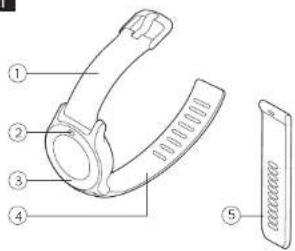
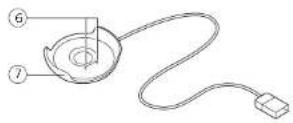
See illustrations overview (Fig. 1)
1 Wrist band with buckle
2 Menu button
3 Touch ring
4 Strap
5 Extra strap in a different size
6 Charging pins
7 USB charging cradle
8
9
12
ENGLISH
Introduction
Congratulations on your purchase and welcome to Philips! To fully benefit from the support that Philips offers, register your product at www.philips.com/
welcome
The Philips health watch empowers you to live a healthier life by continuously tracking activity, calorie burn, sleep habits, heart rate and other key metrics of your cardio condition, and more. The watch can wirelessly connect to a smartphone. An always ON-screen and battery charge of up to 4 days allows you to wear the watch every day and night. You can monitor your metrics and get personalized guidance with the Philips HealthSuite health app.
Intended use
Philips health watch measures, tracks, and analyzes movement and physiological parameters. These metrics are intended as input for behavioral change programs for managing lifestyle of individuals with risk of or affected by weight and activity related chronic disease. The device is intended for 24/7 use in daily life, both indoor and outdoor, by adults of 18 years and older.
Operating principle
The Philips health watch is a wrist-worn device for 24/7 home use (indoor and outdoor). The device uses a tri-axial accelerometer to measure motion and green Light Emitting Droces (LEDs) and a photodiode to create a photolethysmogram (PPG). The accelerometer output and the PPG signal are analyzed to determine heartbeat, activity type, steps taken, and are used as input for estimation of energy expenditure and other parameters.
IMPORTANT SAFEGUARDS
Warning: READ ALL INSTRUCTIONS BEFORE USING
When using battery-operated products, especially when children are present, basic safety precautions should always be followed, including the following:
To ensure safe usage of the device, follow the instructions in this user manual. Read the contraindications, warnings and precautions sections before you use this device. If you are not sure if the device is suitable for you, consult your doctor before using this device.
42221005309.6 (06/2017)www.phllips.com
Contraindications

Do not use this device if:
-You have skin problems, including wounds, sores and burns, in the wrist area as this can result in prolongation or aggravation of these symptoms.
Reactions
It is possible that you can experience adverse reactions due to wearing a device that stays in contact with your skin for long periods at a time. These reactions can include:
-Skin reactions to pressure or friction of the device against the skin.
-Skin reactions to dirt or moisture trapped between the device and the skin.
-Allergic reactions to the materials used; stainless steel, plain plastic or thermoplastic polyurethane (TPU).
If you experience such reactions remove the watch from your wrist, stop using the watch and give your skin a couple of days to rest. Before refastening the watch, be sure to read the instructions on how to wear the watch mentioned in the chapter "Wearing the health watch".
Discontinue use and consult your doctor if reactions persist.
Warning

-Only use a double insulated IFC60950-1 class II USB adapter or USB port for charging Check if the USB-adapter has the symbol for double insulation: If you don't use a double insulated IFC60950-1 class II USB-adapter, the USB adapter could malfunction and cause injury.
-Consult your doctor prior to starting an exercise regime if you have heart disease, kidney disease and/or diabetes mellitus type 1 or 2.
-Do not start or continue exercising before consulting your doctor if you experience any of the following signs or symptoms:
-feeling dizzy, nauseated or about to faint -feeling unusual fatigue with usual activities, -feeling pain in your chest, neck, jaw or arms. -feeling that your heart is beating too hard or fast.
-having shortness of breath during rest/mild exertion, when lying flat or during the night, -having a known heart murmur, -having swollen ankles.
-Exercising while experiencing any of these symptoms might increase the risk of heart problems.
-It is important to always listen to your body first, instead of only relying upon measurements that the watch provides
- If you are taking medicines that lower your maximum heart rate (e.g. for high blood pressure), consult your doctor. Ask your doctor what your target heart rate zone should be.
- If you have a heart condition or you are in cardiac rehab, talk to a healthcare professional about what exercises you can engage in and what your target heart rate should be. Exercising with a too high heart rate could cause health problems, like temporary chest pain, heart overload or exhaustion.
- Do not share the device. The Philips health watch is designed for personal use only. The watch measures several health parameters, which are updated over time and are tailored to you. Switching the watch between different people would lead to inaccurate measurements.
- Do not modify this equipment. This may result in hazardous situations. Make sure the device is in proper working condition before use.
- Only use the charging cradle and detachable parts authorized by the manufacturer. The use of unauthorized parts or accessories may cause injury or damage to the device.
-To reduce the risk of skin irritation please follow these instructions:
-Clean the device and skin underneath the device regularly and after each sports session. Take the watch off once in a while to give your skin some rest.
- Always dry the device when it has become wet. -Do not wear the strap too light, to ensure it is still comfortable to wear.
-Follow the instructions in chapter 'Wearing the health watch'.
-Keep the device out of reach of infants, children or pets, since inhalation or swallowing of small parts can be dangerous or even fatal.
-Keep the device away from fire and heat sources. The internal batteries can overheat and may explode or leak, causing fire or explosion.
- During pregnancy, always follow your doctor's advice with regards to weight management, exercise type, frequency, duration, intensity and rest intervals. Be aware that the heart rate zone indicator is not applicable when you are pregnant. Make sure to update your weight in the app on a regular basis. Failure to do so might result in inaccurate energy expenditure (calorie burn) estimation.
Sleep algorithms should not be used for diagnosis or treatment in case of sleep problems. They have not been validated for people with sleeping disorders.
Caution

- Do not use the device near strong electrical or magnetic fields, for example magnets, radio transmitters, microwave ovens. This could cause measurement errors.
- Use this device under the right environmental conditions as indicated in this user manual. If not, this could affect the performance and lifetime of the device and measurement results.
- If you have any problems with this device, such as setting up, malfunction, maintenance, visit www.philips.com/support or call 1-844-531-6861 for assistance
- If you have doubts about the accuracy of the measurements by the watch, stop using the watch and read the troubleshooting section. If you cannot find a solution there, visit
www.philips.com/support or call 1-844-531-6861 for assistance. Accurate measurement relies on three key factors: Placement of the sensor in direct contact with the skin, transmittance of light through the skin, and sufficient blood flow through the skin. There are conditions where accurate optical heart rate measurement is not possible.
GENERAL RECOMMENDATIONS
-Read this user manual carefully and always follow the instructions.
-Do not use this watch for any other purpose than what it is intended for.
-Make sure the device is in proper working condition before use.
-Do not wear the device when showering, bathing, swimming or scuba diving, as this may damage the device. The device is water resistant and is protected against rain and sweat.
Exercising at the right intensity is important to improve your overall health. The general recommendation for physical activity is to have at least 150 minutes of moderate intensity activity per week. This can made up of segments of at least 10 minutes duration. Additionally, it is important to note that even if you cannot achieve the recommended amount of physical activity, being physically active to a lesser amount (e.g. 90 minutes per week) is better than being inactive.
-To reduce chances of injury during exercise follow these recommendations:
-Wear appropriate clothing and protective gear
-Always perform proper warm-up and cool-
down procedures
-Slowly progress your activity level: plan 2-3 months to gradually increase exercise duration and intensity. If you are not very active, it is a good idea to start with taking brisk walks on a regular basis.
-Avoid vigorous to near maximal activity if you are not very active or unaccustomed to this.
Compliance with standards
The device meets the relevant standards for this type of Class II electrical medical equipment for home use.
-This Philips device complies with all applicable standards and regulations regarding exposure to electromagnetic fields.
- This Philips device complies with applicable standards and regulations of the FCC Rules. The FCC-ID is available as part of the regulatory information stored in the device. This information can be accessed by navigating to the settings in the main menu. From the settings menu select "regulatory information" and confirm by tapping the touch ring near the arrow icon.
SAVE THESE INSTRUCTIONS
Preparing for use
Charge the device prior to first use (see 'Charging'). A mobile device with the Philips HealthSuite health app installed is required to be able to use the Philips health watch. It is not possible to use third party apps with this device. See the following chapters for more explanation on how to setup your account.
Note: The watch does not have a power-button. The device will be activated when it is charged and is always on unless the battery is depleted.
Charging
The device has a built-in rechargeable battery. Use the charging cradle supplied to charge the battery. Only use a double isolated IFC60950-1 class II USB adapter for charging. Check if the adapter or the device with USB-port has the symbol for double isolation. When the battery is empty, the battery fully charges in approximately 90 minutes.
1 Place the device into the charging cradle.
Note: Check whether the charging pins in the charging cradle are aligned with the charging pads on the watch.
2 Plug the USB cable in a USB port of a compatible charger, such as a computer or an adapter. When the watch starts charging, it will briefly vibrate.
3 When the battery is fully charged, the watch will display the battery charge indicator with 100%. Tip: Charge your device during a meal or any other time when you are not active.
Battery charge indications
Battery symbol
Battery charge indication

Battery is charging

Battery is almost empty and requires charging
When initially charged properly, fully charged batteries can last for approximately four days. When the battery is almost empty and requires charging, the battery icon is shown on the clock screen. When the battery is empty, the display turns off and no further data will be stored. Note: Tap on the right or left side of the touch ring in the clock screen to see your battery status
Pairing and personalizing the Philips health watch
The device is equipped with Bluetooth*. You can sync your personal health data to iOS* and Android™ smartphones and tablets using Bluetooth wireless technology. Download the Philips HealthSuite health app from the App Store or Google Play. Use the search term 'Philips HealthSuite health'. The app is available for iOS® 8.0+ and Android™ 4.4.2+ operating systems. It is very important that you provide the right profile data in the app to enable accurate measurements.
1 Place the health watch in the charging cradle and charge the device.
2 Download the Philips HealthSuite health app on your mobile device.
3 Open the app and the setup wizard will guide you through the steps to create a user profile. In the page 'Add a device' select the Health watch from the list of devices.
4 Tap the > icon on the watch to enable pairing mode.
5 When connected via Bluetooth the app will show a pop-up asking you to pair.
6 Make sure the app is active and Bluetooth is enabled when pairing is in progress.
Keep the mobile device and the health watch within syncing range (no more than 6 feet /
2 meters from each other, in the same room) - Do not close the app and do not turn
Bluetooth off while pairing is in progress. When the health watch is successfully paired with your mobile device, the firmware of the watch will be updated to match the local language, time, profile settings and the latest features. The watch can now automatically sync your personal health data to your mobile device via Bluetooth. Pairing the health watch to your mobile device is only necessary once, unless you want to pair to another smartphone.
If you already have another Philips health connected device, go to the settings of the app and add a new device. Tip: If the pairing connection is lost and you want to pair the same phone again, see chapter 'Troubleshooting' for more information.
Sync and store personal health data in the app
Your personal health data is stored in Philips' cloud-based platform and displayed in the Philips HealthSuite health app. Only when the health app is active (or active in the background) and Bluetooth is enabled on your smartphone, your personal health data can be synchronized.
1 Open the Philips HealthSuite health app and activate Bluetooth on your mobile device. Keep the mobile device and the health watch within syncing distance (no more than 6 feet / 2 meters from each other, in the same room).
2 Once successfully connected, the measurement results are synced to the Philips HealthSuite health app. If the sync is successful, the measurement results are displayed in the Philips HealthSuite health app where you can check your personal health data. Note: Some measurements take up to 24 hours to begin to display data
Note: If you are unable to sync, see chapter 'Troubleshooting' for more information.
Firmware update: the app will notify you when new firmware of the health watch is available and will ask you whether you want to update it
Wearing the health watch
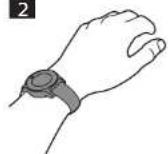
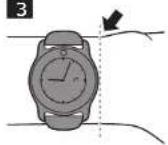
Always wear the Philips health watch on the outside of your wrist. In direct contact with your skin (Fig. 2). Make sure the watch is not on your wrist bone (Fig. 3). The straps need to be tight, but comfortable around your wrist to ensure a correct heart rate measurement. If you feel any discomfort due to the straps, give your skin some rest by not wearing the watch for a short period of time. When refastening the watch, try loosening the strap a notch. If you continue to feel discomfort after a short period of rest and loosening the strap, remove the device and call 1-844-531-6861 for assistance and/or consult your doctor.
Note: Please check and if necessary, change the setting 'handedness' and 'wearing position' in the device settings menu in the Philips HealthSuite health app. This is to indicate if you are left or right handed and the side that you wear your watch on. Remove the watch at least once a day (e.g. before or during a meal) to clean your wrist/arm with some mild soap and water. Clean the watch regularly, especially if your watch becomes dirty or wet during an activity. Make sure that your watch and arm are dry before refastening the watch to reduce the risk of skin irritation. If you use skin care products, do so sparingly on the areas of the skin that are covered by the watch. The watch is solash proof with a 1 atm rating, which allows you to use it outdoors in the rain.
Changing the strap
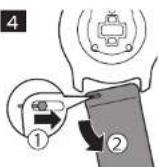
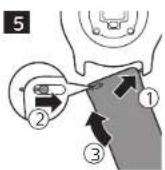
The Philips health watch comes with a second strap in a different size. Use this strap if the other strap does not fit. The straps have quick release pins which allow for easy change of straps
If you want to use the other strap: 1. Turn the watch upside down
- Release the pin of the strap (Fig. 4).
- Gently remove the strap.
- Position the watch correctly, lock one side of the new strap in the watch, unlock the pin of the new strap and lock the strap in the watch (Fig. 5)
User interface
The Philips health watch has a touch sensitive ring around the display. You can use the touch sensitive ring to navigate the menus.
User interface icons
| Symbol | Description | Explanation |
| Heart Heart rate menu and indication of heart rate deletion during measurement. | ||
| Bed Sleep: | ||
| Fork and knife | Food intake | |
| Clock Menu icon for the stopwatch, timer and alarm menu and icon for the stopwatch. | ||
| Hourglass Timer function | ||
| Bell Indicates alarm is set | ||
| Cogwheel Settings | ||
| Battery status | Indicates status of battery | |
| Lock Indicates display is locked | ||
| Walking person | Indication of the activity walking | |
| Running person | Icon used for the activity menu and indication for the activity running | |
| Cycling | Cycling activity | |

Fire Total amount of burned
calories (total energy expenditure).

Fire and
active person
Amount of burned calories
through sustained pry activity (active energy expenditure)

Steps Steps taken

Running
person with clo
Active minutes
(二)本说明仅供参考。

Check mark
Indicates successful operation, e.g. for pairing or firmware update.

Exclama-
non mark
Indicates an error, e.g. during pairing, syncing or firmware update
Main menu
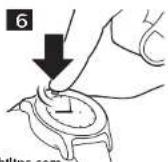
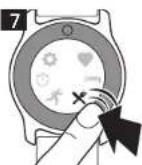
The clock screen of the watch shows the current time that it synced with your smartphone. To access the main menu, tap on the menu button (Fig. 6). The main menu has 6 different menu options which provide information about your activity, heart rate, sleep, time functions and settings. You can manually add information about your food intake in the dedicated menu section. Tap on the touch ring near the icon of the menu option you want to access (Fig. 7). To return to the main menu, tap on the menu button. From the main menu, return to the clock screen by tapping the menu button again.
The watch does not have a touch screen, only the ring around the display responds to touch. The touch interface does not function when it is wet. Wise the glass dry to enable it again.
Shortcuts menu
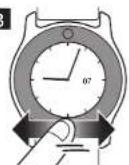
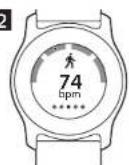
Use the shortcuts menu to go straight to your current heart rate, today's burned kilocalones (active and total energy expenditure), steps taken and active minutes. In your clock screen, swipe left or right on the lower part of the touch ring (Fig. 8) to navigate through the shortcuts menu options.
Active energy expenditure
Active energy expenditure shows today's amount of burned calories through sustained physical activity Total energy expenditure
Your total energy expenditure is how many calories you have burned overall today.
This number includes your active energy expenditure as well as the calories your body burns just to function normally.
Steps
Displays today's amount of steps.
Active minutes
This is the time, in minutes, that you've spent being active today. According to the World Health Organization, your body only starts feeling the effects of increased activity after you've been moderately active for 9 minutes, so we start tracking your active minutes from then.
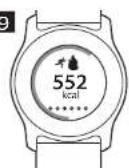
If you have set daily goals via the Philips HealthSuite health app, you can also track your progress here. A progress bar around the outside of the display lets you see how close you are to reaching your goal (Fig. 9). Kilocalone (kcal) is a measurement for energy expenditure as well as for energetic value of nutrients. Calories that are noted in US food packaging are actually kilocalories.
Locking and unlocking the screen
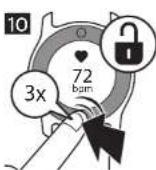
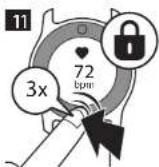
The device automatically returns to the clock screen and locks after 60 seconds of inactivity. To unlock the screen, quickly tap the lower part of the touch ring three times (Fig. 10). To lock a screen and prevent the watch from returning automatically to the clock screen after 60 seconds, quickly tap three times on the lower part of the touch ring at the 6 o clock position (Fig. 11). You will feel a vibration and see a lock appear on the screen. To unlock, tap the lower part of the touch ring three times again.
Heart rate
Select the heart rate in the main menu to see your current heart rate. Swipe left or right to select heart rate, resting heart rate or heart rate recovery. Heart rate, resting heart and heart rate recovery are measured in beats per minute.
Heart rate
Your current heart rate is displayed in beats per minute (bpm)
Resting heart rate
Resting heart rate is the rate that your heart beats at when you are at rest (displayed as rhr). Resting heart rate values can differ from one person to another. However, changes in resting heart rate can be an indication of changes in your fitness level. Active people often have a lower resting heart rate because their heart muscle is in better condition. It will take at least 24 hours of wearing the watch to get a first resting heart rate measurement.
Heart rate recovery
Heart rate recovery (HRR) is the difference in heart rate at peak exercise and the rate as measured after a one minute recovery period. The watch will measure HRR when you are exercising with your heart rate being at least 80% of your maximum heart rate for a minimum of ten minutes. The measurement starts when a change from high intensity activity (running or cycling) to low intensity activity (walking or other) is registered. The watch can detect these activities automatically or you can indicate them yourself (see 'activity recognition'). To obtain an estimate of HRR sit down immediately after stopping your activity and then rest for at least 2 minutes to let your heart rate recover. To make HRR estimates better comparable over time, try to estimate HRR in similar settings with respect to: time of day, type of activity and activity duration.
Important: Do not try to estimate your HRR if you are not very active or unaccustomed to high intensity activity. To reduce the chance of injury during exercise please read the information and follow the general recommendations (see 'GENERAL RECOMMENDATIONS').
Heart rate measurement
Optical heart rate measurement has been shown to provide valid estimates of heart rate for most people under most normal conditions. However, for accurate measurement it is reliant on three key factors:
-Placement of the sensor in direct contact with the skin.
-Transmittance of light through the skin. -Sufficient blood flow through the skin.
Note: When experiencing problems with your heart rate measurements, check if your problem is already mentioned in the troubleshooting chapter, visit www.philips.com/support, call 1-844-531-6861 for assistance or visit the help section in the app.
Heart rate zones
Heart rate zones span the range between your resting heart rate and your maximum heart rate and can help you in identifying the intensity of your exercise. Your heart rate zone is displayed in your heart rate screen. The dot indicates in which heart rate zone you are exercising. If you have set a target heart rate zone in the app, this zone is displayed in black (Fig. 12).
Heart rate zone 1 - Light:
This zone mostly covers regular daily activities such as leisurely strolls, moving around or performing easy tasks within your house or workplace.
-Heart rate zone 2 - Moderate:
Activities that get your heart rate to zone 2 include brisk walking, hiking, leisurely biking and swimming. During such moderate intensity activities, your breathing is often deep and you usually start to sweat after ten minutes.
-Heart rate zone 3 -High:
Training in this zone will help you get fitter. It may also improve your cardiovascular system and help you control your weight.
-Heart rate zone 4 - Anaerobic:
You'll be in this highest zone only for brief periods of time, as anaerobic exercise consists of bursts of high-intensity activity such as sprinting, interval training and heavy weight-lifting.
Sleep
The Philips health watch is designed to also be worn at night to allow automatic sleep tracking. If you are interested in collecting more sleep related information (for example the time to fall asleep), you can manually start the sleep mode when you intend to fall asleep, and stop the sleep mode at the moment of waking up in the morning. To activate sleep mode select Sleep from the menu and press the play icon. The watch will automatically estimate the moment when you actually fall asleep. Press the stop icon when you wake up without the intention to resume sleep. If you wake up in the middle of the night and get out of bed, you do not have to turn off sleep mode, the watch will automatically account for this. In case you have also set an alarm, stopping the alarm will also indicate that you have woken up and stop sleep mode. Data about your sleep will appear in the app within a few hours after you have woken up.
Note: Activation of sleep mode deactivates Bluetooth and sedentary alerts.
Food intake
This option allows you to manually track your calorie intake in kilocalories directly on your watch. Select the food option in the main menu. You have two options:
The first screen shows Food. Enter the Food intake menu by tapping the +’ icon. Tap the arrows at the bottom of the screen to select breakfast, lunch, dinner, drinks or snacks to enter your food intake. Indicate the amount of average by selecting small, normal or large (an average number of calories is assigned). -Swipe to the second page in the food menu which shows the calories you’ve logged today (in kcal). In this screen, tap on the +’ icon to add calories manually. Tap and hold + or - to enter the desired amount of calories. Then select the check icon to confirm the amount of calories. Tip: In the app you can select a type of food and corresponding amount of calories in the food database.
Activity
The Philips health watch can help you gain insight into your activity level by measuring several parameters such as: caloric burn, steps, active minutes, sedentary behavior, heart rate and heart rate zones. For explanation about heart rate zones, see 'heart rate' chapter.
Activity recognition
The Philips health watch can recognize the activities walking, running and cycling and start and stop measurements itself. You can also start and stop measurements manually by selecting the activity option from the main menu. If you want to start your activity manually, you can tap the 'play icon' in the walking, running or cycling screens in the activity menu. You can stop or pause the activity when desired. During your activity you can see information about the activity, the activity duration, your current heart rate and heart rate zone, number of calories burned and steps (in case of walking and running).
Note: You cannot manually stop activities on the device that were started automatically. In User settings you can choose if you see activity screens or current time when an activity is detected.
Sedentary behavior
To counter the negative effect of prolonged periods of sitting, the sedentary behavior feature will remind you to move with a short vibrating alert. You can change the time interval when the sedentary alert will vibrate in the Philips HealthSuite health app.
Alarm, stopwatch and timer
Tap on the Clock icon in the menu. Swipe left or right to select the alarm, stopwatch or timer.
Alarm: you can set the hours of the alarm time by tapping the + and - icons. Tap the check icon to confirm. Then set the minutes by tapping the + or - icons. Tap the check icon again to confirm and set the alarm. When the alarm goes off, the device vibrates until you stop the alarm by tapping the stop icon. You can tap the snooze icon to pause the alarm for 9 minutes.
-The stopwatch starts when you tap on the touch ring near the play icon and stops when you tap on the stop-button.
- Timer, you can set the hours of the timer by tapping the - and - icons. Tap the check icon to confirm. Then set the minutes by tapping on the + or - icons. Tap the check icon again to confirm. Then tap the play icon to start the timer. The timer can be paused or stopped by tapping on the pause or stop icon.
You can select analog or digital clock in the settings menu.
Note: You cannot change the time on the device. The time is synced with your mobile device settings when you connect the watch to your mobile device
Settings
Select settings from the main menu. Settings can be adapted to your preference. Swipe left or right at the bottom of the touch ring and tap to start to set user settings, to select flight mode, regulatory information or to reset the device to the factory settings.
-User settings: Swipe left or right to select the active view, to invert screen colors or select the type of clock displayed (analog or digital) and to set up backlight and vibrations.
-Active view: When this function is enabled, the screen goes to the activity screen when an activity is detected.
-Invert colors. Select either black or white as your standard screen color
-Clock: Select analog or digital display of the clock time.
-Backlight: When you enable backlight, the display lights up briefly when you touch the touch ring to improve visibility.
-Vibration Turn vibration on or off. The alarm will still vibrate in case vibration is turned off.
-Flight mode: When you select the flight mode, Bluetooth automatically switches off. Select 'turn off flight mode' to return to normal mode
-Unpair. This function unpairs the health watch and smartphone. Use this function if you want to pair the watch with a new phone or with your current phone in case of syncing issues. Pairing to the same phone might require to shut down the app and delete the health watch from your smartphone's Bluetooth settings first.
-Factory reset. This will reset your watch and will unpair your device with the Philips HealthSuite health app. This will also delete all your unsynchronized data from the Philips health watch. All settings will switch to default settings and the device will switch off. To activate the watch again, place it in the charger.
Cleaning and storage
To clean the watch, wipe the surface of the device with a dry or slightly damp cloth with water or mild detergent. Clean the charging cradle with a dry cloth. Never use compressed air, scouring pads, abrasive cleaning agents or aggressive liquids such as gasoline or acetone to clean the device. This could damage the device.
Store the device in a dry, dust-free place away from direct sunlight or other heat sources. Avoid surroundings with fluctuating temperatures.
Disposal
Your product is designed and manufactured with high quality materials and components, which can be recycled and reused. For recycling information, please contact your local waste management facilities or visit www.recycle.philips.com
This device contains a rechargeable battery which must be disposed of properly. Contact your local town or city officials for battery disposal information. You can also call 1-800-8-BATTERY or visit www.ibrc.com for battery drop-off locations.
For assistance, visit our website www.philips.com/support or call 1-844-531-6861 toll free.
Accessories
Philips accessories may be purchased at a store near you, or on our website www.philips.com/store.
Troubleshooting
This chapter summarizes the most common problems you could encounter with the device. If you are unable to solve the problem with the information below, visit www.philips.com/support for a list of frequently asked questions or call 1-844-531-6861 for assistance.
You can also visit the help section in the app.
| ProblemPossible cause | Solution | |
| Unable to find the Philips Health-Suite health app in the app store. | A typo in app store search is made. | Try to write the name 'HealthSuite' correctly in your app store or go to www.philips.com/healthprograms/ for further instructions. |
| Unable to down-load app. | Smartphone is not compatible with the app. Incorrect OS. | The app only works with iOS and Android. Make sure iOS 8.0+ or Android 4.4.2+ is installed on your mobile device. |
| Pairing was unsuccessful. | Bluetooth is switched off on your phone. | Activate Bluetooth on smartphone. |
| Hold device close to mobile phone and try again. | ||
| Pairing was not enabled on the health watch. | Make sure to enable pairing on the health watch by tapping the >+ button in the pairing screen. | |
| Devices are not within range or other devices interfere. | Make sure no other devices are nearby to avoid interference. | |
| Battery of the device is too low. | Make sure the battery of the device is charged. | |
| Pairing again with the same phone or tablet is not possible. | On the OS of the phone, in the app or in the health watch the former pairing bond still exists. | If you want to pair to the same phone again follow these steps below. |
For iOS: I. Go to Settings on your health watch and choose the unpair function.
| ProblemPossible cause | Solution | |
| 2. In the Philips HealthSuite health app, go to Health Watch in the Settings menu and choose 'Remove device'.3. Shut down the app.4. Remove the Philips health watch from the Bluetooth settings menu of your smartphone5. Open the Philips HealthSuite health app and pair again | ||
| For Android: 1. Go to Settings on your health watch and choose the unpair function2. In the Philips HealthSuite health app, go to Health Watch in the Settings menu and choose 'Remove device'.3. Try to pair again | ||
| Syncing does not work | Bluetooth is off on your phone or health watch | Activate Bluetooth on your smartphone and make sure flight mode is not activated on the health watch. |
| Devices are not within range | Hold device close to mobile phone and try again. | |
| Device is not paired. | Make sure device is properly paired. (see 'Preparing for use') | |
| Battery of the device is too low. | Make sure the battery of the device is charged. | |
| Touch interface is not working. | The screen is locked | Unlock the screen by tapping three times on the bottom of the touching. |
| ProblemPossible cause | Solution | |
| The device does not respond or the display is dark and the device seems switched off. | The battery is empty. | Put the device in the charging Croatia and connect to a power socket. Wait until the device is fully charged |
| There is an internal error. | If the device fails to charge or the device still does not respond, call 1-844-531-6861 for assistance | |
| The glass of the device is broken. | The watch was dropped | Call 1-844-531-6861 for assistance. Do not use the device when the glass is broken. |
| Heart rate signal is not showing. | Strap is not fastened tight enough around your wrist. | Make sure the watch is worn correctly. Indicate the side you are wearing the watch on in the aop. In the app you can also select if your wearing side is your dominant hand. |
| Personal settings are incorrect in the app. | Update and correct your personal settings in the app. | |
| Watch or skin is not clean. | Clean the device and your skin under the device. | |
| In doubt about accuracy / My device is not measuring correctly. | Direct contact with the skin can be lost if the watch is worn too loosely or when the strap is positioned over the wrist bone or when there is a lot of hand/wrist movement. | Make sure to position the watch correctly and provide a snug but comfortable fit. If this does not fix the issue, try re-positioning the watch at bit higher up on the arm or on the other arm (if you place the watch on the other arm, do not forget to change the watch placement setting in the app). |
| Blood flow in the skin can be impacted by increased pressure on the small blood vessels in the skin (e.g. when the watch strap is too tight). | Try loosening the strap a notch to relieve some pressure, but make sure the watch still retains a snug fit. | |
| Blood flow in the skin can be temporarily reduced during warm-up exercises as more blood is directed to the muscles. | Disregard inaccurate measures during warm-up exercises and provide some time for the blood flow to the skin to adjust to the exercising conditions. | |
| Blood flow in the skin can be temporarily reduced when going outside when it is very cold as more blood is directed to the body's core. | Try wearing long-sleeved clothing to cover the watch and starting the measurement inside. Disregard inaccurate measurements during the first couple of minutes and provide some time for the blood flow to the skin to adjust to the exercising conditions. | |
| Transmittance of light through the skin can be influenced by stark contrast in pigmentation of the skin (e.g. due to a pattern in a tattoo). This could result in inaccurate optical heart rate measurement | Try re-positioning the watch at bit higher up on the wrist or on the other wrist (if you place the watch on the other arm, do not forget to change the watch placement setting in the app). | |
| The strap of the watch is too small or too large for my wrist | Change the strap of the watch with the extra strap supplied (See 'Changing the strap'). | |
Assistance
For assistance, visit our website:
www.philips.com/support or call toll free
1-844-531-6861
You can also visit the help section in the app. Online information is available 24 hours a day, 7 days a week.
Full Two-Year Warranty
Philips North America LLC warrants each new Philips product, model DI 8791, against defects in materials or workmanship for a period of two years from the date of purchase and agrees to repair or replace any defective product without charge.
IMPORTANT: This warranty does not cover damage resulting from accident, misuse or abuse, lack of reasonable care, the affixing of any attachment not provided with the product or loss of parts or subjecting the product to any but the specified voltage. * NO RESPONSIBILITY IS ASSUMED FOR ANY SPECIAL, INCIDENTAL OR CONSEQUENTIAL DAMAGES. In order to obtain warranty service, simply go to www.philips.com/support or call toll-free 1-844-531-6861. It is suggested that for your protection you return shipments of product by insured mail, insurance prepaid. Damage occurring during shipment is not covered by this warranty NOTE. No other warranty, written or oral, is authorized by Philips North America LLC. This warranty gives you specific legal rights, and you may also have other rights which vary from state to state. Some states do not allow the exclusion or limitation of incidental or consequential damages, so the above exclusion and limitations may not apply to you. * Read enclosed instructions carefully. Manufactured for: Philips Consumer Lifestyle, a division of Philips North America LLC, P.O. Box 10.13, Stamford, CT 06904. PHILIPS and Philips Shield are registered trademarks of Konindijke Philips N.V. © 2017 Philips North America LLC All Rights Reserved.
Compliance information
Electromagnetic emissions and immunity
The device is approved according to EMC safety standard IEC 60601-1-2. It is designed to be used in typical domestic environments.
Table 1 Guidance and manufacturer's declaration – electromagnetic emissions
- for all ME equipment and ME systems
Guidance and manufacturer's declaration – electromagnetic emissions The device is intended for use in the electromagnetic environment specified below. The customer or the user of the device should assure that it is used in such an environment.
| Emissions test | Com- pliance | Electromagnetic environment - guidance |
| RF emissions CISPR II | Group 1 | The device must emit electromagnetic energy in order to perform its intended function. Nearby electronic equipment may be affected. |
| Emissions test | Com- pliance | Electromagnetic environment - guidance |
| RE emissions CISPR 11 | Class B. The device is suitable for use in all establishments, including domestic establishments and those directly connected to the public low voltage power supply network that supplies buildings used for domestic purposes. | |
| Harmonic emissions IEC 61000-3-2 | Not applicable | |
| Vollagelfluclutions/flicker emissions IEC 61000-3-3 | Not applicable | |
Declaration – electromagnetic immunity
Guidance and manufacturer's declaration – electromagnetic immunity. The device is intended for use in the electromagnetic environment specified below. The customer or the user of the device should assure that it is used in such an environment.
| IMMU-NITY test | IEC 60601 test level | Com- pli- ance level | Electromagnetic environment – guidance |
| Elec- trosta- cis- charge (ESD) IEC 61000-4-2 | = 6 kV contact = 8 kV air | = 6 kV con- fact = 8 kV air | Floors should be wood, concrete or ceramic tile. If floors are covered with synthetic material, the relative humidity should be at least 30%. |
| Electri- cal fast tran- sient/ burst IEC 61000-4-4 | = 2 kV for power supply lines = 1 kV for input/ output Lines | = 2 kV for power supply lines = 1 kV for input/ output Lines | Electrical power quality should be that of a typical commercial or hospital environment |
| Surge IEC 61000 4-5 | = 1 kV line(s) to line(s) = 2 kV line(s) to each | = 1 kV line(s) to line(s) | Electrical power quality should be that of a typical commercial or hospital environment |
| Voltage dips, short inter-rupions and voltage varia-tions on power supply input lines IEC 61000-4-TI | <5 % UT (>95 % dip in UT) for 0.5 cycle 40 % UT (60 % dip in UT) for 5 cycles 70 % UT (30 % dip in UT; for 25 cycles <5 % UT (>95 % dip in UT; for 5 s | <5 % UT (>95 % dip in UT) for 0.5 cycle 40 % UT (60 % dip in UT) for 5 cycles 70 % UT (30 % dip in UT) | Electrical power quality should be that of a typical commercial or hospital environment. If the user of the device requires continued operation during power interruptions, it is recommended that the device be powered from an uninterruptible power supply or a battery. |
| Power | 3 A/m 3A/m Power frequency |
| free | magnetic fields |
| quency | should be at levels |
| (50/60 Hz) | characteristic of a typical location in a typical commercial or hospital environment. |
| mag | |
| netic | |
| field IEC | |
| 61000-4-8 |
Note: UT is the a c electrical voltage prior to application of the test level.
Declaration – electromagnetic immunity
Guidance and manufacturer's declaration – electromagnetic immunity. The device is intended for use in the electromagnetic environment specified below. The customer or the user of the device should assure that it is used in such an environment.
| Immunity test | IEC 60601 test level | Compliance level |
| Conducted RF IEC 61000 4 6 | 3 Vrms 150 kHz to 80 Mhz | 3 Vrms |
| Raciated RF IEC 61000 4-3 | 3 V/m 80 MHz to 2.5 GHz | 3 V/m |
| Note 1: At 80 MHz and 800 MHz, the higher frequency range applies. | ||
| Note 2: These guidelines may not apply in all situations. Electromagnetic propagation is affected by absorption and reflection from structures, objects and people. | ||
Electromagnetic environment – guidance
Portable and mobile RI communications equipment should be used no closer to any part of the device, including cables, than the recommended separation distance calculated from the equation applicable to the frequency of the transmitter Recommended separation distance d = 1.17 vP
d - 1.17 vP 80 MHz to 800 MHz
d = 2.33 V P 800 MHz to 2.5 GHz
Where P is the maximum output power rating of the transmitter in walls (W) according to the transmitter manufacturer and d is the recommended
separation distance in meters (m) Field strengths from fixed RF transmitters, as determined by an electromagnetic site survey, should be less than the compliance level in each frequency range. Interference may occur in the vicinity of equipment marked with the following symbol: (ω)

Field strengths from fixed transmitters, such as base stations for radio (cellular/cordless) telephones and land mobile radios, amateur radio, AM and FM radio broadcast and TV broadcast cannot be predicted theoretically with accuracy. To assess the electromagnetic environment due to fixed RF transmitters, an electromagnetic site survey should be considered. If the measured field strength in the location in which the device is used exceeds the applicable RF compliance level above, the device should be observed to verify normal operation. If abnormal performance is observed, additional measures may be necessary, such as re-orienting or relotating the device. Over the frequency range 150 kHz to 80 MHz, field strengths should be less than 3 V/m.
Recommended separation distances between portable and mobile RF communications equipment and the Medical device
The device is intended for use in an electromagnetic environment in which radiated RF disturbances are controlled. The customer or the user of the device can help prevent electromagnetic interference by maintaining a minimum distance between portable and mobile RF communications equipment (transmitters) and the device as recommended below, according to the maximum output power of the communications equipment.
Separation distance according to frequency of transmitter
| Rated maximum output power of transmitter (W) | 150 kHz to 80 MHz outside ISM bands d-117 vP | 80 MHz to 800 MHz d-1.17 vP | 800 MHz to 2.5 GHz d-2.23 vP |
0.015in 5in 9in
0.1ft.4in 1ft.4in 2½ft
14ft 4ft 7/8ft
10 12% [12%] 24
100 39ft 39ft 75 ^1 /ft
For transmitters rated at a maximum output power not listed above, the recommended separation distance d in meters (m) can be estimated using the equation applicable to the frequency of the transmitter; where P is the maximum output power rating of the transmitter in walls (W) according to the transmitter manufacturer.
Note 1 At 80 MHz and 800 MHz, the separation distance for the higher frequency range applies.
Note 2. These guidelines may not apply in all situations. Electromagnetic propagation is affected by absorption and reflection from structures, objects and people.
Frequency range: 2402-2480 MHz. Effective radiated power: Max +5dBm. Modulation: GFSK
EMC Guidance
The device needs special precautions regarding EMC and needs to be installed and put into service according to the EMC information provided in the accompanying documents. Wireless communications equipment such as wireless home network devices, mobile phones, cordless telephones and their base stations, walkie talkies can affect this equipment and should be kept at least a distance d = 3.3 m (1 ft) away from the equipment.
Note: As indicated in IEC 60601-1-2:2007 for ME equipment, a typical cell phone with a maximum output power of 2 W yields d - 3.3 m (11ft) at an immunity level of 3V/m.
FCC Compliance information
This device complies with Part 15 of the FCC Rules. Operation is subject to the following two conditions: (1) this device may not cause harmful interference, and (2) this device must accept any interference received, including interference that may cause undesired operation.
Radio interference
This equipment has been tested and found to comply with the limits for a Class B digital device, pursuant to Part 15 of the FCC Rules. These limits are designed to provide reasonable protection against harmful interference in a residential installation. This equipment generates uses and can radiate radio frequency energy and, if not installed and used in accordance with the instructions, may cause harmful interference to radio communications. However, there is no guarantee that interference will not occur in a particular installation
If this equipment does cause harmful interference to radio or television reception, which can be determined by turning the equipment off and on; the user is encouraged to try to correct the interference by one or more of the following measures:
-Reorient or relocate the receiving antenna. -Increase the separation between the equipment and receiver.
-Connect the equipment to an outlet on a circuit different from that to which the receiver is connected
-Consult the dealer or an experienced radio/TV technician for help.
RF Radiation exposure statement
This equipment complies with FCC RF radiation exposure limits set forth for an uncontrolled environment. For wrist-worn operation, this equipment has been assessed and meets the FCC RF exposure guidelines for portable devices. Do not attempt to repair or modify this equipment. Any repairs or alterations made by the user to the equipment may void the warranty and compliance of the equipment. Changes or modifications made to this equipment not expressly approved by Philips may void the FCC authorization to operate this equipment. For assistance visit our website www.philips.com/support or call toll-free 1-8/44-531-6861.
Trademarks
BlueTooth wordmark
The BlueTooth ^® wordmark and logos are registered trademarks owned by Bluetooth SIG, Inc. and any use of such marks by Philips is under license.
App Store and iPhone
App Store and iPhone are trademarks of Apple Inc., registered in the U.S. and other countries. App Store is a service mark of Apple Inc.
Google Play and Android
Google Play and Android are trademarks of Google Inc.
Explanation of symbols
The warning signs and symbols are essential to ensure that you use this product safely and correctly and to protect you and others from injury. Below you find the meaning of the warning signs and symbols on the label and in the user manual.

Refers to the user manual. Read the user manual before you use the device.

indicates caution. The user should consult the instructions for use for important cautionary information such as warnings and precautions that cannot, for a variety of reasons, be presented on the medical device itself.

Indicates the manufacturer's model or type number of the device.

Symbol for 'Class II Equipment'. The adapter is double insulated (Class II).

Symbol for USB

This appliance contains a rechargeable battery which must be disposed of properly. See chapter 'Disposal' for more information.

This symbol indicates BF (body floating) applied part. This is the part that comes into physical contact with the user, according to IEC 60601-1. The applied part is the wrist band and back plate of the watch.
IP67
This symbol means: Totally protected against dust. Protected against the effect of water immersion between 15 cm / 5.15/16 in and 1 m / 39.3/8 in for 30 minutes

This symbol means: Protected against falling drops of water.
Bluetooth
Bluetooth® symbol

This means that this device emits non-ionizing radiation. All devices with RF transmitters or that use RF electromagnetic energy must have a label with this symbol.

Symbol for the 2 year Philips warranty

This symbol is a certification mark. It is used on electronic products manufactured or sold in the United States. It confirms that the electromagnetic interference from the device is lower than the limits approved by the FCC.

Manufactured for Philips Consumer Lifestyle. A division of Philips Electronics North America Corporation P.O. Box 10313, Stamford, CT 06904

Indicates the relative humidity limits to which the device can be safely exposed: 10% to 93%.

Indicates the storage and transportation temperature limits to which the medical device can be safely exposed: 41°F to 104°F / -20°C to 40°C
Specifications
| Power supply Bull-in rechargeable II-polymer battery | |
| Charging cradle | 5V DC and 500mA |
| Display Monochrome display with backlight | |
| Measurement range | Heart rate: 30-220 beats per minuteResting respiration rate: 5-45 breaths per minute |
| Accuracy Heart rate ± 10 bpm or 10% (which cover is greater)Resting heart rate ± 3 bpmTotal energy expenditure ± 15%Resting respiration rate ± 5 breaths per minuteSteps: + 5%Activity recognition (walking running, cycling, other): 90% accurately classified | |
| Normal operating conditions | Temperature: 5°C / 4°F to 40°C/ 104FERelative humidity: 15% to 93%RH.Atmospheric pressure: 700nPa to 1060nPa. |
| Storage and transportation conditions | Temperature: 20°C/ 4°F to 60°C/ 140°F.Relative humidity: 10% < 93%.Atmospheric pressure: 700nPa to 1060nPa. |
| Net weight Approx. 1.8 oz / 50 g | |
| External dimensions | Approx 205.5mm× 38 mm× 10 mm / 8"× 11/2" × 3/8" |
| Accessories Charging cradle, user manual,second strao size S/M. | |
| Mode of operation | Continuous operation |
| Degree of protection | Type DF applied part |
| Device classification | Battery Powered Mode InternallyPowered ME Equipment. Class IIME Equipment |
| Materials Housing | Surgical grade stainlesssteel 3FGL Glass; Corning Glass.Charger bottom and top case:Plain plastic. Material of straps(PU(thermoplastic polyurethane)DN670 |
Service lifetime 4 years
| IP 67 for the watch | This means. Totally protected against dust. Protected against the effect of water immersion between 15 cm and 1 m for 30 minute. This applies to the watch and not the charging cradle. |
| IP21 for the charging cradle | This means. Protected against falling drops of water. |
Caution: No modification of this equipment is allowed.
- General description
- ENGLISH
- Introduction
- welcome
- Intended use
- Operating principle
- IMPORTANT SAFEGUARDS
- Warning: READ ALL INSTRUCTIONS BEFORE USING
- Contraindications
- Do not use this device if:
- Reactions
- Warning
- -It is important to always listen to your body first, instead of only relying upon measurements that the watch provides
- Caution
- GENERAL RECOMMENDATIONS
- Compliance with standards
- SAVE THESE INSTRUCTIONS
- Preparing for use
- Charging
- Battery charge indications
- Pairing and personalizing the Philips health watch
- Sync and store personal health data in the app
- Wearing the health watch
- Changing the strap
- User interface
- Main menu
- Shortcuts menu
- Active energy expenditure
- Steps
- Active minutes
- Locking and unlocking the screen
- Heart rate
- Resting heart rate
- Heart rate recovery
- Heart rate measurement
- Heart rate zones
- Heart rate zone 1 - Light:
- -Heart rate zone 2 - Moderate:
- -Heart rate zone 3 -High:
- -Heart rate zone 4 - Anaerobic:
- Sleep
- Food intake
- Activity
- Activity recognition
- Sedentary behavior
- Alarm, stopwatch and timer
- Settings
- Cleaning and storage
- Disposal
- Accessories
- Troubleshooting
- Assistance
- Full Two-Year Warranty
- Compliance information
- Electromagnetic emissions and immunity
- Table 1 Guidance and manufacturer's declaration – electromagnetic emissions
- - for all ME equipment and ME systems
- Declaration – electromagnetic immunity
- Electromagnetic environment – guidance
- Recommended separation distances between portable and mobile RF communications equipment and the Medical device
- EMC Guidance
- FCC Compliance information
- RF Radiation exposure statement
- Trademarks
- BlueTooth wordmark
- App Store and iPhone
- Google Play and Android
- Explanation of symbols
Brand : PHILIPS
Model : DL8791
Category : Sports Watch