
Ufotube Plus - Docking Station Phoenix Technologies - Free user manual and instructions
Find the device manual for free Ufotube Plus Phoenix Technologies in PDF.


| Product Type | Docking Station |
| Brand | Phoenix Technologies |
| Model | Ufotube Plus |
| Dimensions (approx.) | 20 x 10 x 3 cm |
| Weight (approx.) | 250 g |
| Power Input | USB-C PD 100W |
| Output Ports | 2x USB-A 3.0, 1x HDMI 4K@60Hz, 1x USB-C Data, 1x Ethernet RJ45 |
| Compatible Devices | Laptops, tablets, smartphones with USB-C |
| Main Functions | Expand ports, charge devices, connect external monitor |
| Data Transfer Speed | Up to 5 Gbps (USB 3.0) |
| Video Resolution | Up to 4K@60Hz via HDMI |
| Charging Support | Pass-through charging up to 85W to host |
| Materials | Aluminum alloy, ABS plastic |
| Operating Temperature | 0°C to 45°C |
| Maintenance | Wipe with dry cloth; avoid liquids |
| Safety | Over-current, over-voltage, short-circuit protection |
| Spare Parts | Not available separately; contact support |
| Repairability | Not user-serviceable; professional repair required |
| Warranty | 1 year limited |
| General Information | Plug and play, no driver needed |
Frequently Asked Questions - Ufotube Plus Phoenix Technologies
User questions about Ufotube Plus Phoenix Technologies
0 question about this device. Answer the ones you know or ask your own.
Ask a new question about this device
Download the instructions for your Docking Station in PDF format for free! Find your manual Ufotube Plus - Phoenix Technologies and take your electronic device back in hand. On this page are published all the documents necessary for the use of your device. Ufotube Plus by Phoenix Technologies.
USER MANUAL Ufotube Plus Phoenix Technologies
Bluetooth Wireless Speaker & FM Radio
User Manual
Product Views
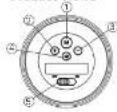
1 Know Key
- Heat track (short press)
Volume + (eng press)
- Previous track (and press);
You are
N. Praw 500
- Kremel Cardiol.
Specifications
- Output Power, 360
• Signal To Noise Train • Will
• Exports: 11.5%
- Battery LHon: 3.7v
- Utility Capexity: 500m3/h
• Sunny Clashing Vasey 2013 • Channing Law: 1943-2008
- Battery Life 3-4 hours for Bluetooth
4-5 hours in line
• CHEN OPE, 4000, 1:10 m. power, 3W • Germany, 865 MeV/ton
- ECU indicator
(a) Ready for Bluetooth pairing: Flasting In Blue
(5) Bluetooth planned: Bruc
(2) 100% of the following items
- Blackish Work Frequency: 2.402-3.480GHz
- Bluetooth Model V2.1+EDR
• The Sherrack Dr. (10-10): 21 Main • Caco Elastech (doi: 3)
Charging the battery
Contact the quarter in year 12 with the USPA-in-the-cable (please change the battery completely before using the product for the end arc).
NOTE:
-
The LED will flash red when the battery power is low.
-
The LED will turn and when the battery is being charged.
-
The LED will switch off automatically when the battery is fully charged.
-
The built-in rechargeable battery is not replaceable. Do not remove or replace it by yourself. Dispose of the battery properly. Do not dispose of the battery in trash or fire.
Initial Setup via Bluetooth

- Set the power output to "ON" to turn on the speaker.
- Wall for approximately 0-5 seconds, there will be a beep sound to advise that the speaker is ready for the pairing and the LED indicator will flash blue. The LED will flash blue and red during the pairing. Once the pairing is finished another
4.5
beep sound will appear and the LED will turn blue.
- Turn on a Blooth device such as the Intel Phone or any other Bluetooth device and do the following setting: Sailing General Blooths. The coming frame of the speaker "SHUYUUBE" will then appear on the Blackhook device. Click on the "20515" and the Bloothc device will be connected and paired with the speaker. If a coming order is requested, this will be 9000. Draw the speaker applied with the Bloothc device. The LED indicator will turn blue.
- If a pinning carried it successfully completed when in seconds, please rely by repeating exp to sleep it. If the mini set up a connection is successful, the mode of the speaker is turned on, it will automatically put in the best device if was connected with
NOTE:
-
The speaker only connects to one Bluetooth device at the same time. If you wish to connect the speaker to another Bluetooth device, stop the Bluetooth connection of the current Bluetooth device and connect the speaker to the new Bluetooth device. The maximum transmission distance between the speaker and the Bluetooth device is 10 meters or 22 feet.
-
maintenance may occur during playback when using the Bluetooth function near other wireless devices, if playback through Bluetooth is not smooth, move the speaker and the Bluetooth device to a different location, or use the in connect the external device instead of using the Bluetooth function.
Volume Control
The volume can be controlled by either the sound volume controlling or by long pressing on the end buttons. You can also control the volume of your speaker by rolling the black ring towards the right to up the volume or by rolling the black ring towards the left to down the volume.
Playing Music via microSD Card
Insert the microSD card into the memory card slot and the sponsor will play the music stored in the memory card automatically. Please make sure that the memory card is inserted in the correct direction.

Hands-free Function
When the speaker is paired with the cell phone and an incoming call is taken, the speaker will be used as the receiver and the microphone. All the controls will have to be done by the cell phone.
Built-In FM radio
The UPOTLEE comes with built-in radio so you can listen to all your favorite radio audience.
-
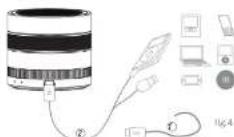
Connect the mini USB clock that works on an serial to the speaker Fig.4-7
-
Press button Mode "M" twice. You will hear a sound (a long "img"), the radio will start working. If it doesn't, please press "playpause"
-
Switch the radio station by pressing "+".
Playing Music via cable (Line-In) If you would like to play music via cable instead of via memory card or Bluetooth connection, please connect the USB/Audio cable between the speaker and the external device. Fig.4-2
NOTE: If Line-In, memory card and Bluetooth mode are all activated, the playing priority order is Line-In mode—memory card mode. Bluetooth mode. To switch
XPTONIX
English
between the mode, please press the Mode Key. Fig.1-3

Important Notes
- Protect the speaker from direct exposure to sunlight. - Make sure no sand or water will enter the speaker when the speaker is near the water or being used on the beach. Water, sand, dust and salt can damage the speaker.
- Protect the speaker from dirt, dust and chemical materials.
- Keep the speaker in a cool dry, well-ventilated pace - Do not store the speaker in hot, wet or dirty environments.
Intended Use
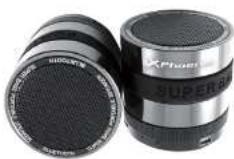
Your Bluetooth Speaker PHUPOTUBE+ has been created to connect to other Bluetooth devices, as well as to use it as a speaker with the USB/FAudio cable.
The Bluetooth connection is established in a specific radio frequency band. This frequency band is shared worldwide. This allows you to use this speaker globally. Radio contact is possible within a range of 10 m.
XPhoenix 12945 Phoenix
X
Phoenix

UFO TUBE
• In order to be done: 3.7x
- Carcated cells (sclam)
(2) Blackish water treatment, peripolar oil
Brand : Phoenix Technologies
Model : Ufotube Plus
Category : Docking Station