
07-033-003-12 - Audio/video converter Aitech - Free user manual and instructions
Find the device manual for free 07-033-003-12 Aitech in PDF.


| Product Type | Audio/Video Converter |
| Brand | Aitech |
| Model | 07-033-003-12 |
| Input Interface | HDMI (male) |
| Output Interface | RCA (composite video + stereo audio) |
| Supported Input Resolutions | 480p, 576p, 720p, 1080i, 1080p |
| Output Resolution | 480i (NTSC) / 576i (PAL) |
| Video Format | NTSC / PAL auto-switching |
| Audio Support | Stereo analog audio (L/R) |
| Power Supply | USB powered (5V DC, 500mA) |
| Cable Length | Approx. 20 cm (integrated HDMI cable) |
| Dimensions (W x H x D) | 6.5 x 2.0 x 1.5 cm |
| Weight | 30 g |
| Enclosure Material | Plastic |
| Operating Temperature | 0°C to 45°C |
| Compatibility | HDMI source devices (DVD, Blu-ray, game console, streaming device) |
| Compatible Display | TV/monitor with composite video input (RCA yellow + red/white) |
| Installation | Plug-and-play, no drivers required |
| Cleaning | Wipe with a dry soft cloth; do not use solvents |
| Safety | Do not expose to moisture, excessive heat, or direct sunlight |
| Spare Parts / Repairability | Non-repairable; replacement recommended if defective |
| Manual Languages | English (available for download) |
Frequently Asked Questions - 07-033-003-12 Aitech
User questions about 07-033-003-12 Aitech
0 question about this device. Answer the ones you know or ask your own.
Ask a new question about this device
Download the instructions for your Audio/video converter in PDF format for free! Find your manual 07-033-003-12 - Aitech and take your electronic device back in hand. On this page are published all the documents necessary for the use of your device. 07-033-003-12 by Aitech.
USER MANUAL 07-033-003-12 Aitech
HD.PC.Video to HDMI Converter
Operation Manual

TABLE OF CONTENTS
- Introduction ...... 3
- Features 3
- Operation Controls and Functions 4
3.1 Front Panel 4
3.2 Rear Panel 4 - Remote Control 5
- RS-232 Remote Control Protocol 5
5.1 RS-232 transmission format.... 6 - Connection and Installation.... 7
- Specifications 7
1. Introduction
The HD.PC.Video to HDMI Converter is a high quality Video converter box to convert Analog and digital signals to HDMI v1.3 output. The product is compatible to HDMI v1.3 specifications, a cutting edge technology which defines to transfer Deep Color (10-bit and 12-bit) video. Simply select from the front panel or remote control to choose the input sources.
2. Features
● HDMI 1.3, HDCP1.1 and DVI1.0 compliant Receiver.
● Deep Color video up to 12bit, 1080p@(24/60)Hz.
● Supports analog/digital video/audio input and HDMI v1.3 output.
- HDCP keysets allows each HDMI input to work independently when connecting to a HDMI display.
● Supports a wide range of PC and HDTV resolutions from VGA to SXGA@75Hz and 480i to 1080p. Excepted Component output, the output resolution up to 1080i.
● Support 3D comb filter.
● Support 3D noise reduction (DNR).
- Support format converter from 480i/576i to 480p/576p, simply press the front panel or remote control.
● Support audio delay for 150ms, this feature will not functional when HDMI input.
● Support IR remote control.
● Support RS-232 control.
3. Operation Controls and Functions
3.1 Front Panel:
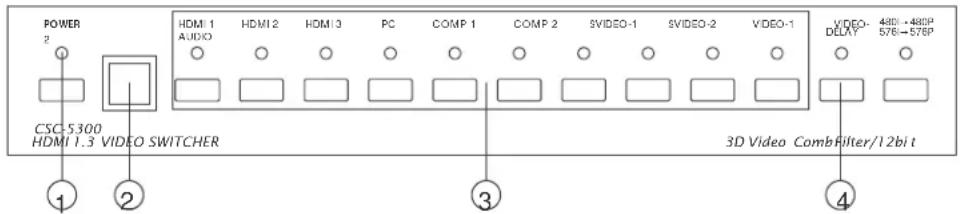
① Power switch and power LED indicator: Press the switch to power on the unit and the power LED will illuminate.
② IR sensor.
③ Input source selection: Press the input button to switch to your desired input sources, the LED will illuminate to indicate which input source is selected.
④ Audio delay: Press to delay audio sources for 150ms, the LED will illuminate when power on.
3.2 Rear Panel:

① Power: Plug the 5V DC power supply into this unit and connect the adaptor to AC wall outlet.
② CV/SV inputs: Connect each of the input ports to the CV/SV and R/L output ports of your source equipments such as DVD player or set-top-box. The CV1/SV1/Audio1 and CV2/SV2/Audio2 are individual loops for source equipments.
③ Component inputs: Connect each of the input component ports to the component and R/L output ports of your source equipments such as DVD player or set-top-box. The Component1/ Component Audio1 and Component2/ Component Audio2 are individual loops for source equipment.
④ HDMI inputs: Connect each of the input ports to the HDMI or DVI output ports of your source equipment such as DVD player or set-top-box.
⑤ PC input: Connect PC/audio input port to the PC/audio output port of your source equipment such as Notebook or PC.
⑥ RS232: 9-pin D-Sub connector for connecting to your PC or other control console for remote control.
⑦ HDMI output: Connect the output port to the HDMI display.
4. Remote Control
-
Audio Delay: Press to delay audio output for 150ms.
-
Format selection: To switch between Interlace and Progressive format.
-
Power: Press the button to turn on/off the unit.
-
Component 1/2: Press to select Composite 1 or 2 inputs.
-
PC: Press for PC input.
-
S-Video 1/2: Press to select S-Video 1 or 2 inputs.
-
Video 1/2: Press to select Video 1 or 2 inputs.
-
HDMI 1/2/3: Press to select HDMI 1, 2 or 3 inputs.

5. RS-232 Remote Control Protocol
The connection between system and remote controller with RS-232 modem cable.
| System | Remote Controller | ||
| Pin De | finition | Pin | Definition |
| 1 | NC | 1 | NC |
| 2 | TxD | 2 | RxD |
| 3 | RxD | 3 | TxD |
| 4 | NC | 4 | NC |
| 5 | GND | 5 | GND |
| 6 | NC | 6 | NC |
| 7 | NC | 7 | NC |
| 8 | NC | 8 | NC |
| 9 | NC | 9 | NC |
RS-232 transmission format:
- Connection and Installation
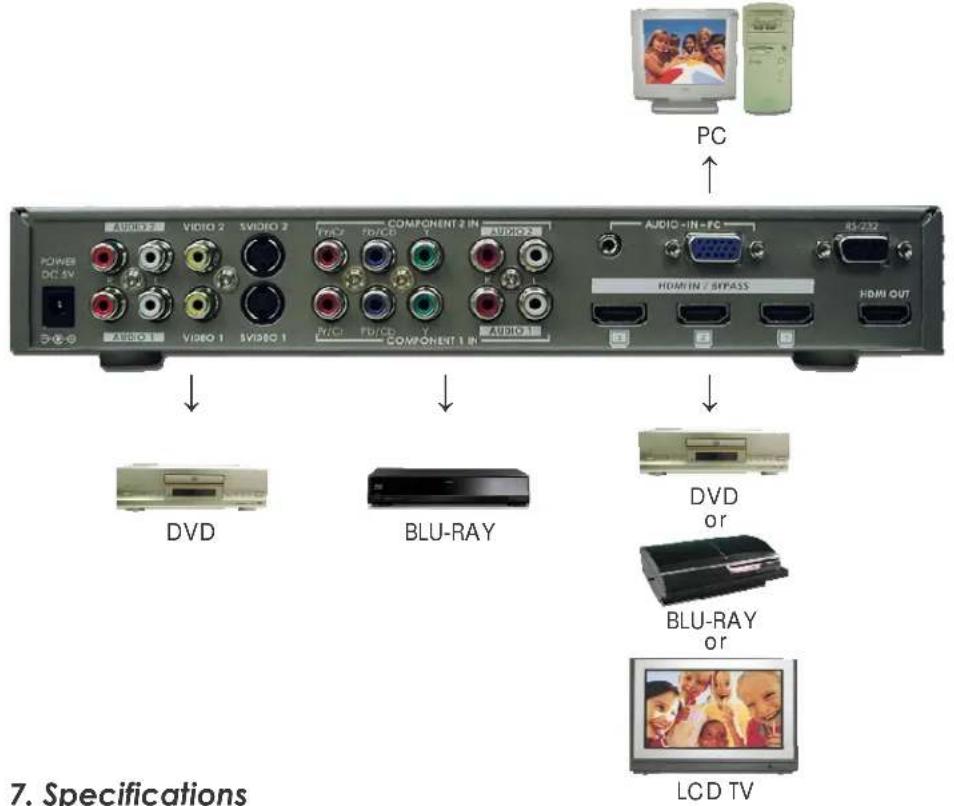
Frequency bandwidth 2.25Gbps (single link)
Input ports 3 x HDMI female ports (Type A connector)
1 x PC with audio jack
2 x Y/Pb/Pr with R/L
2 x CV/SV with R/L
1 x RS-232
Output port 1 x HDMI female port (signal link)
Power Supply 5VDC/2.6A (US/EU standards, CE/FCC/UL certified)
Dimensions (mm) 280(W) x 147(D) x 44(H)
Weight(g) 1380
Chassis Material Metal
Silk Skin Color Gray
Operating Temperature Operating from 0°C \~ 48°C
AITech
Vision for Net Media
AITech International
www.aitech.com
HD.PC.Video to HDMI Converter
AlTech P/N: 07-033-003-12
Brand : Aitech
Model : 07-033-003-12
Category : Audio/video converter