
177399 - Keyboard MANHATTAN - Free user manual and instructions
Find the device manual for free 177399 MANHATTAN in PDF.


| Product Type | Wired Keyboard |
| Brand | Manhattan |
| Model | 177399 |
| Interface | USB |
| Layout | Full-size (104 keys) |
| Dimensions (W x D x H) | 440 x 130 x 25 mm |
| Weight | Approximately 500 g |
| Power Supply | USB bus-powered |
| Key Type | Membrane |
| Multimedia Keys | Yes (dedicated buttons) |
| Compatible Systems | Windows, Linux, macOS |
| Cable Length | 1.5 m |
| Features | Spill-resistant, silent keys, LED indicators |
| Cleaning Instructions | Wipe with a soft, damp cloth; avoid liquids |
| Safety Precautions | Do not expose to moisture or extreme temperatures |
| Spare Parts Availability | Keycaps and cable available from manufacturer |
| Repairability | Basic cleaning and keycap replacement user-serviceable |
| Warranty | 2 years limited warranty |
Frequently Asked Questions - 177399 MANHATTAN
User questions about 177399 MANHATTAN
0 question about this device. Answer the ones you know or ask your own.
Ask a new question about this device
Download the instructions for your Keyboard in PDF format for free! Find your manual 177399 - MANHATTAN and take your electronic device back in hand. On this page are published all the documents necessary for the use of your device. 177399 by MANHATTAN.
USER MANUAL 177399 MANHATTAN
3-IN-1 NUMERIC KEYPAD USER MANUAL
MODEL 177399
Thank you for purchasing the MANHATTAN® 3-in-1 Numeric Keypad.
Fully integrated with numeric keypad, calculator and shortcut functions, this versatile time-saver includes a side-mount key that instantly activates one-touch access to frequent navigation, edit and view shortcuts to help improve productivity with Microsoft Office and other popular applications.
Follow the simple instructions below and you'll soon be enjoying the benefits of these additional features:
- Asynchronous number lock keeps numeric operation independent of keyboard for faster entry
• Large, bright LCD performs in most lighting conditions
• USB or battery-powered with detachable cable - Slim and lightweight — ideal for mobile computing
- Lifetime Warranty
Power Supply
The 3-in-1 Numeric Keypad is powered either by the included battery or through the USB connection. Battery life depends on usage, but should battery power be depleted, the USB connection will continue powering the device.
When the keypad isn't USB-connected, it turns off automatically after 7.5 minutes of inactivity to save power. To turn it back on, press the Thumb (On) key for a full second. NOTE: When the keypad is USB-connected, auto power-save is disabled.

Connecting to a Computer
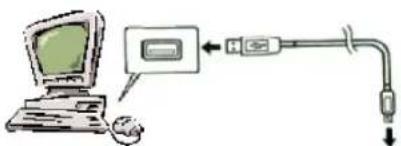
Use the included USB cable to connect the 3-in-1 Numeric Keypad to the computer USB port. NOTE: The device may not work properly unless it's connected directly to the computer.
Once the connection is made, the USB driver should automatically install. If not, refer to the driver installation instructions.
IMPORTANT: Do not disconnect the USB cable while a keypad operation is in progress. If a problem occurs with the data transfer between the keypad and the computer, disconnect, wait 10 seconds, then reconnect the USB cable.
Function Modes
The 3-in-1 Numeric Keypad has three modes: calculator (CAL), PC and LOCK PC. When powering up, the device will be in the CAL mode.
To switch to the other modes, the keypad must be USB-connected. Pressing the Num Lock-PC/Cal key (top left) then toggles among the modes, as indicated in the LCD.
CAL Mode
The keypad performs normal calculator operations (see the primary key IDs on the Numeric image below), and the results (display contents) can be sent to your computer by simultaneously pressing the Thumb and Enter (Send/=) keys.
LOCK PC Mode
In this mode, the numeric functions are primary, but pressing any of the keys in conjunction with the Thumb key directs the corresponding command function to the computer (see the secondary key IDs on the Navigation/Function image below).
NOTE: The LCD is disabled except for the mode display (PC or LOCK PC).
PC Mode
In this mode, the navigational functions are primary, but pressing any of the keys in conjunction with the Thumb key activates the corresponding numeric values.
NUMERIC/CALCULATOR (PRIMARY) KEYS
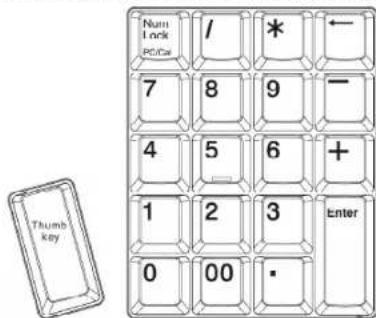
NAVIGATION/FUNCTION (SECONDARY) KEYS


MANHATTAN™
BRINGING COMPUTERS TO LIFE
MANHATTAN ® offers a complete line of PC Components, Peripherals, Cables and Accessories.
Ask your local computer dealer for more information or visit us online at
www.manhattan-products.com
Copyright © MANHATTAN
All products mentioned are trademarks or registered trademarks of their respective owners.
MAN-177399UM0708-01
Calculation Examples
The examples below present various calculation operation displays. NOTE: press simultaneously.
MIXED
| 75+36-23=885×5·6=30-5×88=-40(3+5)×6.2÷4=12.4 |  |
CONSTANT
NOTE: Electromagnetic interference and electrostatic discharge can cause the display to malfunction or the contents of the memory to be lost or altered. If this happens, press the C/CE key (at the top-right of the device) to reset. If pressing the C/CE key doesn't rectify the malfunction, use a pin or a similar object to press the recessed Reset button on the rear panel of the device.
Care/Maintenance of the Keypad
To clean the 3-in-1 Numeric Keypad, wipe it with a soft, dry cloth. If necessary use a soft, clean cloth moistened with a weak solution of water and a mild, neutral detergent, making sure you remove all excess water from the cloth. Never use thinner, benzene or any other volatile chemical for cleaning the device. IMPORTANT: If disposing of the device in any manner, first remove the battery.
Safety Precautions
As with any electronic device, discontinue use if there is any evidence of smoke, strange odors or excess heat, as these conditions create and/or indicate the danger of fire and electric shock. If any such concern arises, immediately disconnect the USB cable and determine the cause. Review the following guidelines to help ensure the safe use (and disposal) of this device.
CABLE
- Use only the USB cable included with this device.
- Do not place heavy objects on the USB cable, and never expose it to direct heat.
- Do not twist, pull, over-bend or otherwise modify the USB cable.
- Do not touch the USB cable or its connectors with wet hands.
- Do not leave the USB cable near stoves or other sources of intense heat.
- When plugging in the USB cable, grasp the plug and avoid pulling on the cord.
- Whenever leaving the device unattended for long periods, disconnect the USB cable.
KEYPAD
- Avoid dropping the device or otherwise subjecting it to high impact.
- Do not continue use if damage is visible.
- Do not take the device apart or modify it in any way.
- Do not allow any liquids or other foreign matter to get inside the device.
- Do not dispose of the device in a fire.
- Do not place heavy objects on the device.
- Do not place the device in areas of high humidity or excessive dust.
- Avoid use in food prep areas or other locations containing oil vapors
- Do not place the device near a heater, in direct sunlight, in a parked car or in any other area subject to high temperatures.
LCD
- Do not apply strong pressure to the LCD or subject it to strong impact, as doing so can crack the view panel.
- Should the LCD view panel crack, avoid touching the liquid inside, as it can cause skin inflammation.
- Should the LCD liquid get in your mouth, immediately rinse thoroughly and contact a physician.
- Should the LCD liquid get in your eyes or on your skin, immediately rinse thoroughly for at least 15 minutes, then contact a physician.
Specifications
GENERAL
• 21 full-sized keys, including mode and C/CE
• 12-digit LCD with mode indicator
- Modes: Calculator, PC and PC Lock
- Functions:
- Shortcuts: Cut, Copy, Paste, Undo, Esc, Tab, Insert, Delete
- Mathematical: Num Lock, Add, Subtract, Multiply, Divide, Percentage, Square Root, Sum
- Navigation: Home, End, Up, Left, Right, Down, Pg Up, Pg Down, Back, Enter/Send
PHYSICAL
• USB cable A-type male to mini B male, 66 cm (26 in.)
• Automatic power save; CR2032, 3 V lithium battery included
- Operating temperature: 0 - 40 C° (32° - 104° F)
• Dimensions: 15 x 11 x 2 cm (5.9 x 4.3 x 0.79 in.)
• Weight: 128 g (4.5 oz.)
PACKAGE CONTENTS
• 3-in-1 Numeric Keypad
• USB cable and battery
- User manual


Brand : MANHATTAN
Model : 177399
Category : Keyboard