
i707 - Hi-Fi System ILUV - Free user manual and instructions
Find the device manual for free i707 ILUV in PDF.


| Product Type | Car FM Transmitter & Charger |
| Brand | iLuv |
| Model | i707 |
| Dimensions (W x H x D) | 67.35 x 226.5 x 52.7 mm (2.65 x 8.92 x 2.07 in) |
| Weight | 122.5 g (4.32 oz) |
| Modulation | FM Stereo, PLL (Phase-Lock Loop) |
| Frequency Range | 88.1 MHz – 107.9 MHz (Step: 0.1 MHz) |
| Preset Memory | 2 FM stations (default: 90.1 MHz, 98.1 MHz) |
| Display | LCD with white backlight |
| Audio Input Level | 800 mV |
| Total Harmonic Distortion | 2.0% |
| Transmitting Power | ≤ 90 dBm |
| Transmitting Range | ≤ 33 ft (10 m) – Limited by FCC |
| Operating Voltage (iPod Power) | 2.7 V – 3.5 V |
| Operating Current (iPod Power) | 35 mA (Max) |
| Power Consumption (Transmitter) | ≤ 100 mW |
| Operating Temperature | -20°C to 50°C (-4°F to 122°F) |
| Storage Temperature | -10°C to 45°C (14°F to 113°F) |
| Included Accessories | FM transmitter, extension tube, dock adapters, instruction manual, warranty card |
| Compatible Devices | iPod with 30-pin connector (iPod not included) |
| Charging Function | Charges iPod via car cigarette lighter while transmitting |
| Safety Certifications | FCC Part 15, Industry Canada compliant |
| Cleaning Instructions | Clean with a dry cloth only; avoid liquids |
| Disposal | Do not dispose with household waste; recycle at designated collection points |
Frequently Asked Questions - i707 ILUV
User questions about i707 ILUV
0 question about this device. Answer the ones you know or ask your own.
Ask a new question about this device
Download the instructions for your Hi-Fi System in PDF format for free! Find your manual i707 - ILUV and take your electronic device back in hand. On this page are published all the documents necessary for the use of your device. i707 by ILUV.
USER MANUAL i707 ILUV
Car Charger & FM Transmitter
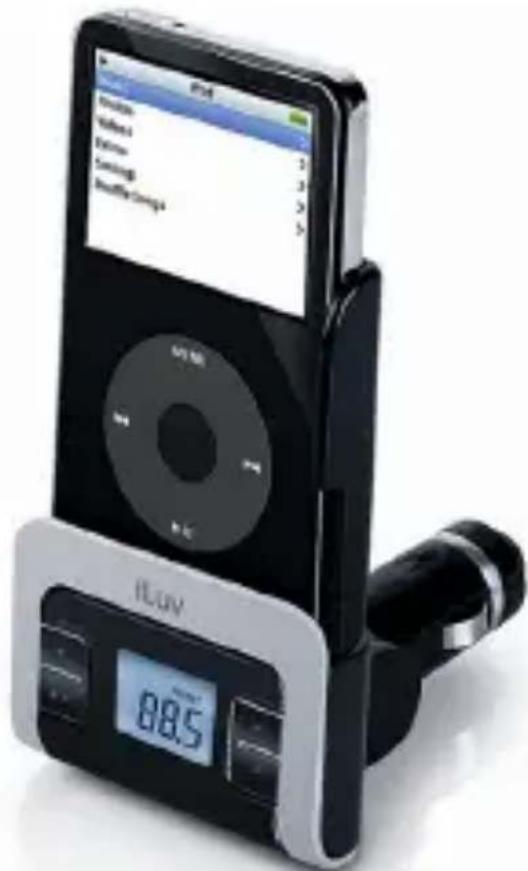
Instruction Manual i707
Please read this manual carefully before operating and save it for future reference.
Have a question? Please visit http://www.i-Luv.com
USER SAFETY GUIDE
Instructions on Environmental Protection
Do not dispose of this product in the usual household garbage at the end of its life cycle; bring it to a collection point for the recycling of electrical and electronic appliances. This symbol on the product means the instructions for use or the packing will inform about the methods for disposal. The materials are recyclable as mentioned in its marking. By recycling, material recycling, or other forms of re-utilization of old appliances, you make an important contribution to protect the environment. Please inquire at your local community administration for the authorized disposal location.
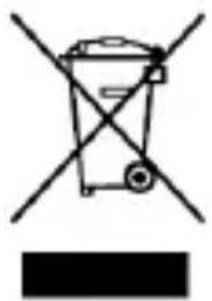
natural_image
Symbol of a trash bin crossed with diagonal lines, no text or numbers presentImportant Safety Warnings
- FCC regulations state that any change or modification to the equipment, not expressly approved by maker or its authorized parties, could void user's authority to operate this equipment.
- To prevent fire or electric shock, do not expose the unit to rain or moisture.
- Never attempt to open the cabinet. Always refer servicing to a qualified technician.
USER SAFETY GUIDE
Important Safety Instructions
- READ INSTRUCTIONS - All safety and operating instructions should be read before the appliance is operated.
- RETAIN INSTRUCTIONS - The safety and operating instructions should be retained in a secure place for future reference.
- HEED WARNINGS - All warnings on the appliance and in the operating instructions should be observed.
- FOLLOW INSTRUCTIONS - All operating and use instructions should be followed.
- WATER AND MOISTURE - The appliance should not be used near water. For example: near a bathtub, kitchen sink, laundry tub, and/or swimming pool.
- HEAT - The appliance should be situated away from heat sources such as radiators, heat registers, stoves, or other appliances (including amplifiers) that produce heat.
- POWER SOURCES - The appliance should be connected to a power supply only of the type described in the operating instructions or as marked on the appliance.
- CLEANING - The appliance should only be cleaned with a dry cloth.
- OBJECT AND LIQUID ENTRY - Care should be taken so that objects do not fall and liquids are not spilled into the device's openings.
- CARTS AND STANDS - The appliance should be used only with a cart or stand that is recommended by the manufacturer. An appliance and cart combination should be moved with care. Quick stops, excessive
force, and uneven surfaces may cause the appliance and cart combination to overturn causing possible injury to the user and/or damage to the unit.

natural_image
Symbolic illustration of a person using a ladder inside a circle (no text or symbols)USER SAFETY GUIDE
Important Safety Instructions – Continued
- DAMAGE REQUIRING SERVICE - The appliance should be serviced by qualified service professional when:
a. Objects have fallen into, or liquid has been spilled into the appliance's apertures.
b. The appliance has been exposed to rain.
c. The appliance has been dropped and suffered damage.
d. The appliance does not appear to operate normally, or exhibits a change in performance.
-
SERVICING - The user should not attempt to service the appliance beyond what is described in the user's operating instructions. All other servicing should be referred to qualified service professional.
-
LEAD AND MERCURY - This product may contain lead and/or mercury. Disposal of these materials may be regulated by your local authorities due to environmental considerations. For more detailed disposal or recycling information, please contact your local authorities or the EIA (Electronic Industries Alliance) – http://www.eiae.org
Additional Safety Instructions
- When not in use, keep your device in a safe place where it will not be bent or crushed.
- Do not listen to music with high volume while driving. Warning horn sounds may not be heard which could result in a traffic accident.
NOTE: Changes or modifications not expressly approved by the party responsible for compliance could void the user's authority to operate the equipment. Refer to 47 CFR Sec. 15.21.
USER SAFETY GUIDE
About Electromagnetic Interference (EMI)
This device is designed and manufactured not to exceed the exposure limit for radio frequency energy, which is set by the Federal Communications Commission of the U.S government. The term “EMI” is short for the electromagnetic interference caused by the electromagnetic field generated by electronic devices. In fact, most electrical appliances and devices emit electric and magnetic fields, and most of modern electronic devices are susceptible to electromagnetic interference (EMI) if they are inadequately shielded or designed.
- If you use any personal medical device, such as a pacemaker, please consult the manufacturer of the device to determine if it is adequately shielded from electromagnetic interference. Your physician may assist you in obtaining this information.
FCC Notice to U.S. Users
This device complies with Part 15 of the FCC Rules. Operation is subject to the following two conditions: (1) this device may not cause harmful interference, and (2) this device must accept any interference received, including interference that may cause undesired operation. Refer to 47 CFR Sec. 15.19.
This equipment has been tested and found to comply with the limits for a Class B digital device, pursuant to Part 15 of the FCC Rules. These limits are designed to provide reasonable protection against harmful interference in a residential installation. This equipment generates, uses, and can radiate radio frequency energy and, if not installed and used in accordance with the instructions, may cause harmful interference to radio communications, which can be determined by turning the equipment off and on, the user is encouraged to correct the interference by one or more of the following measures:
USER SAFETY GUIDE
FCC Notice to U.S. Users-continued
- Reorient or relocate the receiving antenna.
- Increase the separation between the equipment and receiver.
- Connect the equipment to an outlet on a circuit different from that to which the receiver is connected.
- Consult the dealer or an experienced radio/TV technician for help.
Industry Canada Notice to Canadian Users
Operation is subject to the following two conditions: (1) this device may not cause harmful interference, and (2) this device must accept any interference received, including interference that may cause undesired operation of the device. Refer to IC RSS 210 Sec. 5.11. The term “IC” before the certification or registration number only means that the registration was performed based on a Declaration of Conformity and that Industry Canada technical specifications were met. It does not imply that Industry Canada (IC) approved this equipment. Refer to Self-Marking 6(f) and RSP 100 Sec. 4.
GETTING STARTED
Thank you for purchasing the i707. Unpack the unit and make sure all the accessories are put aside so they will not be lost.
Be Free from Headphones and Share Your Music with Your Friends.
- Transmit your favorite songs on your iPod ^® to a nearby FM radio
• Supports the wide frequency range (88.1MHz to 107.9MHz) with the step size of 0.1MHz - Enjoy easy digital FM tuning with PLL technology
- Preset memory for up to 2 FM stations
• LCD screen with the white backlight - Compact and easy-to-use design
• Car adapter charges your iPod
What's Included?
• FM transmitter
- Extension tube
- Dock adapters
• Instruction manual
- Warranty card


GETTING STARTED
Location of Controls
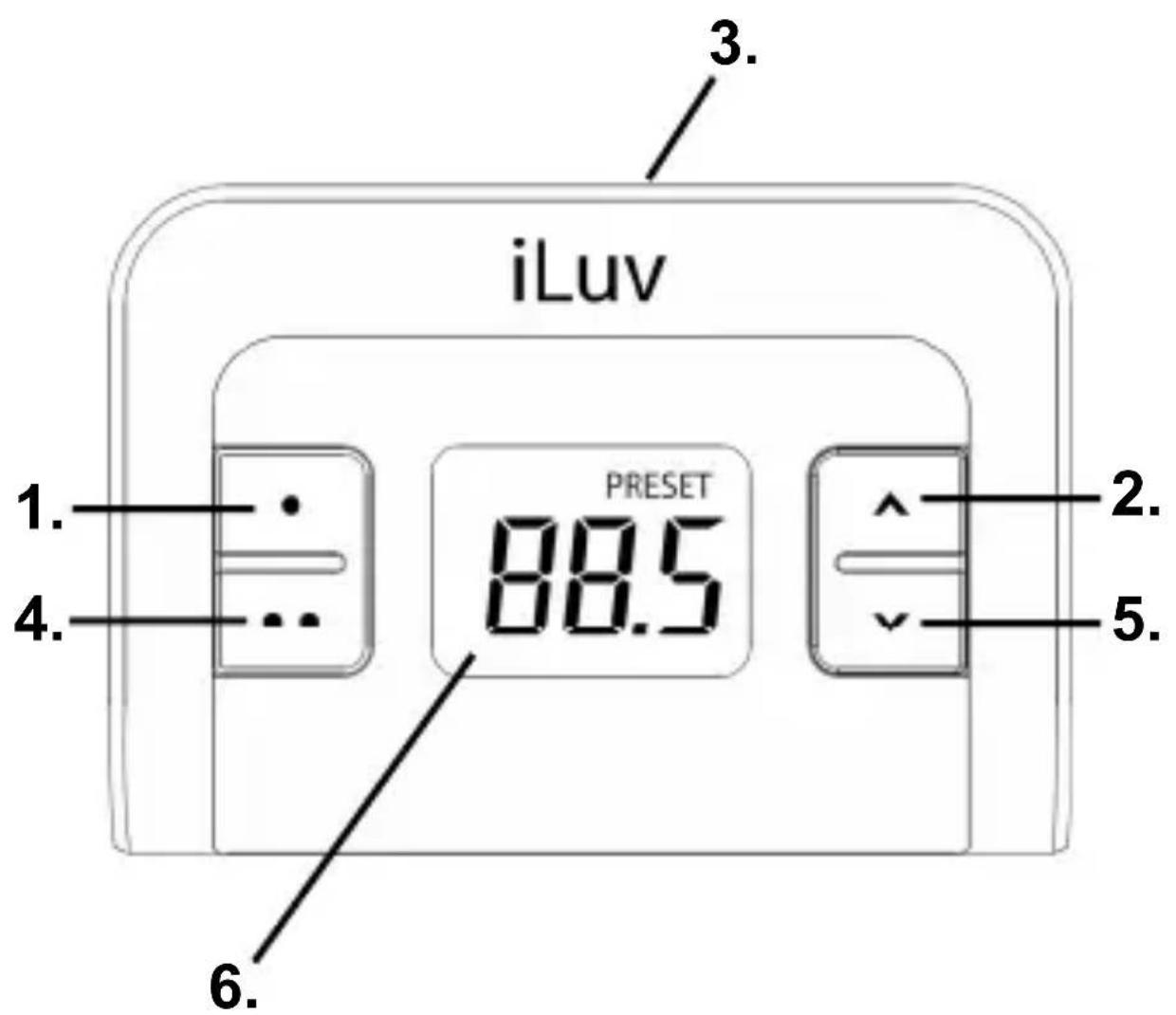
- ● (Preset 1) button
- ∧(Frequency up) button
- 30-pin connector
- ●● (Preset 2) button
- ∨ (Frequency down) button
- LCD screen
OPERATING INSTRUCTIONS
Connecting the extension tubes

There are 2 pcs tubes included with the i707. The longer one is the extension tube which can be used as needed. One end of the extension is smaller and has pins while the other is wider and has an opening with two holes on either side. To connect the extension tube with the car adapter and the display board and dock, find the pins and holes on each part. Align the pins on each tube with the holes on the connecting end and insert. The tubes will “click” together when a successful connection has been made.
OPERATING INSTRUCTIONS
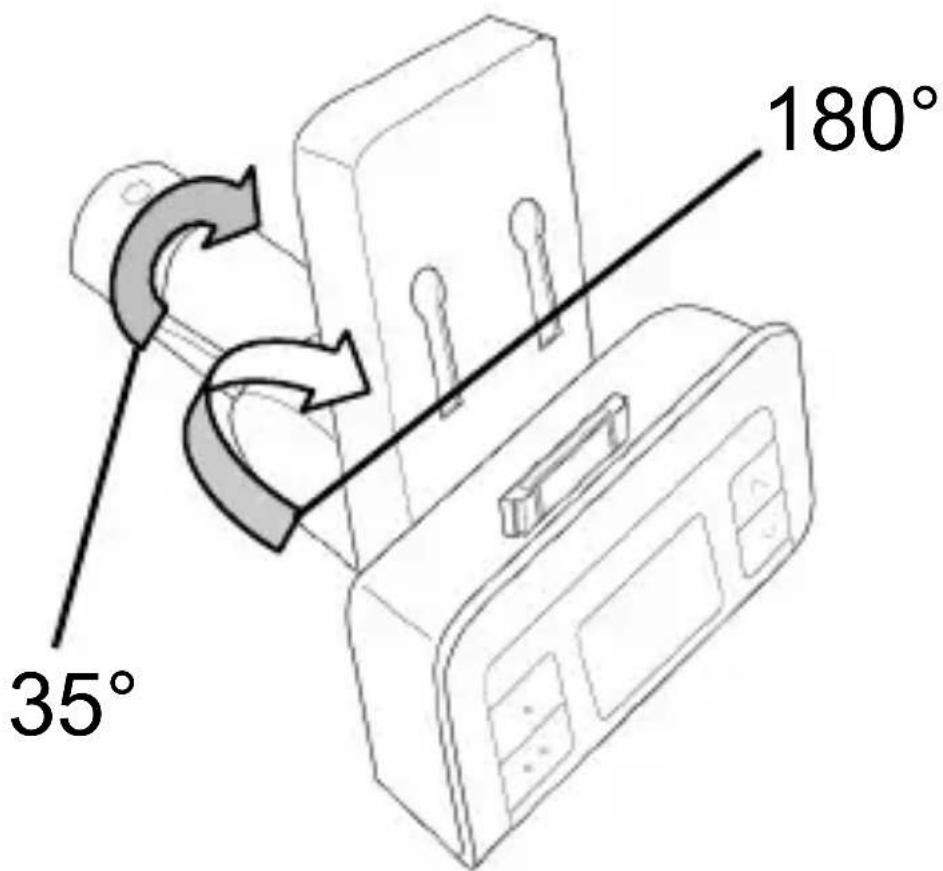
Adjusting the angle of FM transmitter
The display board and dock can be adjusted up or down 180 degrees. The connector, which connects the display board and the extension tube, can adjust 35 degrees to the left or right allowing you to adjust the i707 for easy operation while driving.
OPERATING INSTRUCTIONS
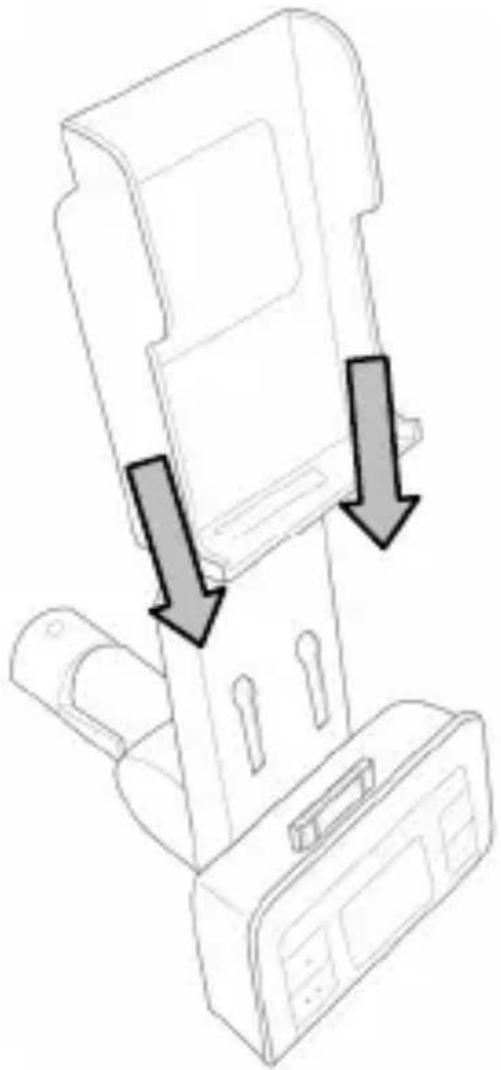
Inserting the Dock Adapter
The i707 comes with dock adapters for your iPod. There are also dock adapters included with your iPod. Choose the correct adapter and follow the instructions below.
- Align the hooks in the back of the dock adapter with the holes on the dock above the display board.
- Carefully lower the dock adapter until it rests securely in the dock with the 30 pin connector fitting through the opening at the bottom of the adapter.
natural_image
Diagram of a printer or scanner device with two downward arrows indicating compression or disassembly (no text or symbols present)OPERATING INSTRUCTIONS
Turning on / off the FM Transmitter
This unit is designed to charge your iPod as it plays. When connected to your iPod and plugged into the cigarette lighter outlet in your car, it automatically turns on. When disconnected, it turns off. If there is no audio input signal for more than 1 minute after connected to your iPod, this unit enters the standby mode. In the standby mode, transmission stops and the LCD turns off. When there is an audio signal, it automatically “wakes up” to start transmitting music.
Setting up the Preset Memory
You can store two FM frequencies in the preset memoy and easily call them up by pressing one of the preset buttons. The default frequency for Preset 1 is 90.1MHz, and 98.1MHz for Preset 2. To change the default-preset frequencies with other frequencies, follow the instructions below:
- Connect the FM transmitter to your iPod and plug into the cigarette lighter in your car. The LCD screen turns on.
- Turn on the radio in your car and find an unused frequency on the FM dial.
- Select a frequency using the “^” (Frequency Up) and “^”(Frequency Down) buttons.
- Press and hold “●” (Preset 1) button until the selected frequency display blinks.
- Select a frequency using the “^” (Frequency Up) and “∨” (Frequency Down) buttons.
- Press and hold “●●” (Preset 2) button until the selected frequency display blinks.
OPERATING INSTRUCTIONS
Transmitting Your Favorite Songs to a Nearby FM Radio
- Connect the FM transmitter to your iPod.
- Play songs from your iPod.
- Press one of the preset buttons.
- Turn on your car radio.
- Tune your FM radio to a FM frequency stored on the selected preset memory, and listen to your favorite music.
Warning: Do not listen to music with high volume while driving. Warning horn sounds may not be heard which could result in a traffic accident.
Helpful Tips on Obtaining Clear Sound
- An FM transmitter employs frequency modulation to transmit songs to an FM radio, which can be disturbed by a strong FM signal nearby. Thus, before transmitting songs with this unit, it is very important to select a clear FM station, one which has no other broadcasting and renders only static noise.
- The sound quality of an FM transmitter also depends on the direction of its built-in antenna and its surroundings. If you hear static noises while listening to music using the FM transmitter, rotate or move the FM transmitter around until you get a clearer sound.
- If a battery is low, the sound quality may also be poor. In this case, charge your iPod first and try it again.
TROUBLESHOOTING GUIDE
No sound
- Your iPod is not inserted into the dock properly. Insert into the dock again.
- Connection to car adapter is not secure. Check connections.
- Your car radio is not turned on. Turn on your car radio.
- Your iPod is not turned on. Turn on your iPod.
- The i707 is not turned on. Turn on i707.
Poor radio reception or interference
- The i707 is tuned to a frequency that is used by a local radio station. Find a frequency with no interference and reset the memory.
- The antenna on your car is not extended. Extend your car antenna.
Car adapter does not fit into cigarette lighter
- The lighter coil has not been removed. Remove the cigarette lighter coil and plug in car adapter.
- The cigarette lighter is not standard size. The car adapter is designed to fit into the cigarette lighters of most makes and models of car. However, there may be some models with different sized cigarette lighters.
SPECIFICATIONS
- Modulation: FM Stereo
- Tuning Type: PLL (Phase-Lock Loop)
- Frequency Range: 88.1MHz – 107.9MHz (Step: 0.1MHz)
- Frequency Response (Audio): 80Hz – 15kHz
• Audio Input Level: 800mV
• Total Harmonic Distortion: 2.0%
• Transmitting Power: ≤ 90 dBm
• Transmitting Range: ≤ 33ft (Limited by FCC) - Power for iPod
○ Operating Voltage: 2.7V – 3.5V
○ Operating Current: 35mA (Max) - Operating Voltage: 2.7V – 3.5V
- Operating Current: 35mA (Max)
• Power Consumption: ≤ 100mW - Operating Temperature: -4°F to 122°F (-20°C to 50°C)
• Storage Temperature: 14^ F to 113^ F ( -10^ C to 45^ C)
• Unit Dimension (W x H x D) - Power Consumption: ≤ 100mW
- Operating Temperature: -4°F to 122°F (-20°C to 50°C)
- Storage Temperature: 14°F to 113°F (-10°C to 45°C)
- Unit Dimension (W x H x D)
- 67.35mmX226.5mmX52.7mm
2.65"X8.92"X2.07"
• Unit Weight: 122.5±3g
* Features and specifications are subject to change without prior notification. The unit dimensions and weights are approximate.
iLuv™
TEL: 516-626-7188
FAX: 516-626-7105
Website: www.i-Luv.com
E-mail: info@i-Luv.com

iLuv is a trademark of jWIN Electronics Corp. iPod is a trademark of Apple Inc. All logos and brands are property of their respective owners. iPod is not included in this package. Features and specifications are subject to change without prior notification.
© 2007 jWIN Electronics Corp. All rights reserved. No portion of this printed material or product enclosed herewith including design, shape and graphics, may be reproduced or transmitted in any form without the expressed written consent of jWIN Electronics Corp. by any means, electronic or mechanical, including photocopying, recording or use of an information storage and retrieval system. Any unauthorized distribution or reproduction of this printed material or product, or any portion thereof, will be prosecuted to the fullest possible extent of the law. iPod is not included with this product.

- Car Charger & FM Transmitter
- Instruction Manual i707
- USER SAFETY GUIDE
- Instructions on Environmental Protection
- Important Safety Warnings
- Important Safety Instructions
- Important Safety Instructions – Continued
- Additional Safety Instructions
- About Electromagnetic Interference (EMI)
- FCC Notice to U.S. Users
- FCC Notice to U.S. Users-continued
- Industry Canada Notice to Canadian Users
- GETTING STARTED
- Be Free from Headphones and Share Your Music with Your Friends.
- What's Included?
- OPERATING INSTRUCTIONS
- Adjusting the angle of FM transmitter
- Inserting the Dock Adapter
- Turning on / off the FM Transmitter
- Setting up the Preset Memory
- Transmitting Your Favorite Songs to a Nearby FM Radio
- Helpful Tips on Obtaining Clear Sound
- TROUBLESHOOTING GUIDE
- No sound
- Poor radio reception or interference
- Car adapter does not fit into cigarette lighter
- SPECIFICATIONS
Brand : ILUV
Model : i707
Category : Hi-Fi System