
PBMSPG100 - Hi-Fi System Pyle - Free user manual and instructions
Find the device manual for free PBMSPG100 Pyle in PDF.


| Type | Hi-Fi System |
| Brand | Pyle |
| Model | PBMSPG100 |
| Dimensions (L x W x H) | Approx. 15.7 x 9.8 x 10.2 inches |
| Weight | Approx. 12.5 lbs |
| Power Supply | AC 120V/60Hz or built-in rechargeable battery |
| Output Power | 100W peak |
| Bluetooth Version | 5.0 with A2DP support |
| Bluetooth Range | Up to 33 feet |
| FM Radio | Yes, with antenna |
| USB Playback | Yes, up to 32GB |
| SD Card Slot | Yes, up to 32GB |
| AUX Input | 3.5mm stereo input |
| Microphone Input | 1/4" microphone jack (wired or wireless receiver available) |
| Display | LED backlit LCD |
| Remote Control | Included |
| Built-in Rechargeable Battery | Yes, battery life up to 4 hours at medium volume |
| Speaker Configuration | Full range drivers with dual 2" tweeters and 5" subwoofer |
| Handles & Wheels | Built-in telescopic handle and wheels for portability |
| Cleaning Instructions | Wipe with a dry, soft cloth. Avoid moisture and dust. |
| Safety Features | Overheat protection, short circuit protection, and automatic shut-off after inactivity |
| Spare Parts Availability | Contact Pyle support for replacement parts. |
Frequently Asked Questions - PBMSPG100 Pyle
User questions about PBMSPG100 Pyle
0 question about this device. Answer the ones you know or ask your own.
Ask a new question about this device
Download the instructions for your Hi-Fi System in PDF format for free! Find your manual PBMSPG100 - Pyle and take your electronic device back in hand. On this page are published all the documents necessary for the use of your device. PBMSPG100 by Pyle.
USER MANUAL PBMSPG100 Pyle
1000 Watt Rugged & Portable Bluetooth Wireless BoomBox with NFC, Built-in Amplifier, Rechargeable Battery, AUX-input, Mic and Guitar Inputs
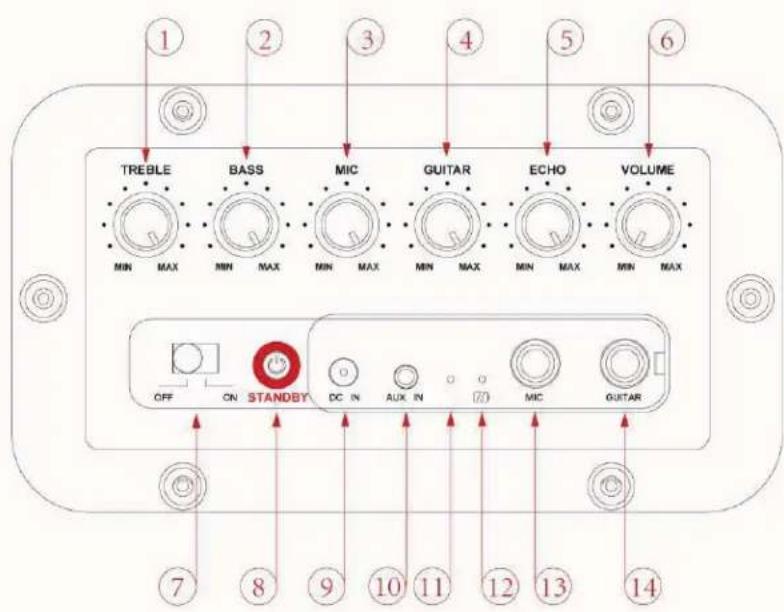
LOCATION OF CONTROLS

OPERATING INSTRUCTIONS
- TREBLE LEVEL CONTROL
- BASS LEVEL CONTROL
- MICROPHONE INPUT LEVEL CONTROL
- GUITAR INPUT LEVEL CONTROL
- ECHO LEVEL CONTROL
- VOLUME LEVEL CONTROL
- POWER ON/OFF SWITCH
-
STANDBY BUTTON
-
DC IN JACK
- AUX IN JACK
- POWER INDICATOR
- BATTERY INDICATOR
- MICROPHONE INPUT JACK
- GUITAR INPUT JACK
- NFC AREA
- BATTERY COMPARTMENT
CHARGE THE BATTERY (IF EQUIPPED)
Before using the speaker, you must charge the battery. When the battery is charging, the BATTERY INDICATOR lights solidly. After the battery has fully charged, the light switches off.
- Connect the AC adaptor to the DC IN JACK of the speaker firmly, and plug it into a wall outlet.
- When the battery is fully charged, first disconnect the AC adaptor from the speaker, then from the wall outlet.
POWER SOURCE
- Slide the POWER ON/OFF switch to "ON" position, the speaker is in standby mode.
- You can now press the STANDBY button to turn on the speaker.
- Slide the POWER ON/OFF switch to "OFF" position, and pull the AC adaptor out of the wall outlet if you want to switch off completely.
BLUETOOTH FUNCTION
PAIR THE BLUETOOTH DEVICE
Before using your speaker with a Bluetooth device for the first time, you must pair and connect it to the Bluetooth device. Press the STANDBY button to turn on the speaker, it will enter into the Bluetooth mode automatically, and the POWER INDICATOR starts to flash fast. Press the STANDBY button again, the POWER INDICATOR starts to flash slowly. The speaker is now in pairing mode.
OPERATING INSTRUCTIONS
PAIR THE SPEAKER USING NFC
-
With Near Field Communication (NFC), you can easily pair and connect the speaker to Android device with NFC.
-
If the Android device supports NFC, activate its NFC feature, and touch the NFC area of the speaker with the NFC area of your Android device. The speaker pairs and connects to the Android device automatically. For details on NFC, see the user guide of the Android device.

- For other Bluetooth device, pair the speaker manually.
PAIR THE UNIT MANUALLY
- Verify that the Bluetooth function of Bluetooth device is enabled.
- Choose the Bluetooth menu in your Bluetooth device, and from the found devices, select the "P127J". If you are prompted to enter the PIN code, please enter "0000" (four zeros).
- For more information, see the user manual of Bluetooth device.
- After a successful pairing, play the music from the Bluetooth device.
Note:
- Only one Bluetooth device can be connected to the speaker. If the speaker is already connected to another Bluetooth device, the speaker will not appear in the Bluetooth menu of your Bluetooth device.
- When you turn off/on the speaker or the Bluetooth device, the speaker will connect to the last Bluetooth device it was used with automatically within 10 seconds. Otherwise, you need to connect it manually on the Bluetooth menu in your Bluetooth device.
- Depending on the device manufacturer, some Bluetooth devices need to perform the pairing again.
AUX IN FUNCTION
- Connect an audio cable (not included) to the AUX IN JACK of the speaker and to the audio output socket on the external audio devices such as MP3 player, discman, etc. The POWER INDICATOR turns red.
- Play from an external audio device.
Note: When the speaker is connected to the AUX IN JACK, Bluetooth function is disabled.
OPERATING INSTRUCTIONS
CONNECTING A MICROPHONE/GUITAR
Using a microphone or a guitar, you can mix its sound with a source sound.
CAUTION
DO NOT connect a bass guitar to the MIC/GUITAR INPUTJACK, as it may damage the speaker.
- Turn the MIC/GUITAR LEVEL CONTROL fully counterwise.
- Connect a microphone or a guitar to the MIC/GUITAR INPUT JACK of the speaker.
- Select the Bluetooth or AUX IN as the source.
- Strat playback of the source.
- Turn the MIC/GUITAR LEVEL CONTROL to adjust the volume.
TO ADJUST THE VOLUME
Turn the VOLUME LEVEL CONTROL to adjust the volume of the speaker.
CONTROL THE TREBLE/BASS
Turn the TREBLE/BASS LEVEL CONTROL to adjust the treble/bass effect.
CONTROL THE ECHO
Turn the ECHO LEVEL CONTROL to adjust the echo effect.
SPECIFICATIONS
•Audio Output: 1000 watts = 500W (L) + 500W (R)
- Connectivity
-3.5mm Aux In Jack
oDC IN Jack
•Power Requirement
○AC 100-220V, 50/60Hz
oRechargeable Batteries (if equipped)
•Unit Dimensions: 24.5"(W) x 10"(D) x 10"(H) inches
Follow us on
YouTube


www.pyleaudio.com
IMPORTANT: Pack carefully in original package if possible. We are not responsible for damage incurred in returning items for repair. A letter stating your exact street address, daytime phone number, and the problem you are experiencing should be included. You must also enclose a copy of the original receipt as proof of date of purchase
Brooklyn, NY 11204
(718)535-1800
Monday Through Thursday. 9AM to 5PM
Friday 9AM to 12PM Eastern.
- OPERATING INSTRUCTIONS
- CHARGE THE BATTERY (IF EQUIPPED)
- POWER SOURCE
- BLUETOOTH FUNCTION
- PAIR THE BLUETOOTH DEVICE
- PAIR THE SPEAKER USING NFC
- PAIR THE UNIT MANUALLY
- Note:
- AUX IN FUNCTION
- CONNECTING A MICROPHONE/GUITAR
- CAUTION
- TO ADJUST THE VOLUME
- CONTROL THE TREBLE/BASS
- CONTROL THE ECHO
- SPECIFICATIONS
Brand : Pyle
Model : PBMSPG100
Category : Hi-Fi System