
PHPNC45 - Headphones Pyle - Free user manual and instructions
Find the device manual for free PHPNC45 Pyle in PDF.


| Product Type | Stereo Headphones with Active Noise Canceling |
| Brand | Pyle |
| Model | PHPNC45 |
| Transducer Type | Dynamic |
| Frequency Response | 30 Hz – 20 kHz |
| Impedance | 32 Ω |
| Power Output | 100 mW |
| Noise Attenuation | Up to 20 dB (85% noise reduction) |
| Total Harmonic Distortion | <1% |
| Cable Length | 1.0 m |
| Connector Type | 3.5 mm stereo jack (includes 6.3 mm adapter and dual 3.5 mm adapter for airplane) |
| Power Source | 2 x 1.5V AAA batteries (for active noise canceling) |
| Weight | 250 g |
| Active Noise Canceling | Yes, with ON/OFF switch and power indicator |
| Passive Mode | Yes, functions as conventional headphones without batteries |
| Swivel Earcups | Yes, fold inward for storage |
| Removable Ear Cushion | Yes (left ear pad turn counterclockwise for battery compartment) |
| Included Accessories | Transport case, 6.3 mm adapter, dual 3.5 mm adapter for airplane |
| Cleaning Instructions | Use soft, lint-free, damp cloth. Do not use alcohol or solvents. |
| Safety Notes | Lower volume before connecting; avoid use in traffic; remove batteries if not used for long periods |
Frequently Asked Questions - PHPNC45 Pyle
User questions about PHPNC45 Pyle
0 question about this device. Answer the ones you know or ask your own.
Ask a new question about this device
Download the instructions for your Headphones in PDF format for free! Find your manual PHPNC45 - Pyle and take your electronic device back in hand. On this page are published all the documents necessary for the use of your device. PHPNC45 by Pyle.
USER MANUAL PHPNC45 Pyle
Stereo headphones with activenoisecanceling function
- PHPNC45 headphones are any degradation headphones with active noise canceling function. Disturbing ambient noise in the low frequency range is recorded by tiny microphones and deleted by counter-sound (phase inverse tones). Thus, a noise canceling of more than 85% is achieved. For operation, two 1.5V micro batteries (type AAA) are required. The PHPNC45 can also be used passively, ie, without noise canceling and without batteries. The PHPNC45 are swivel and are supplied complete with a practical transport case and two audio adapters.
Safety Instructions
Always turn down the volume control before plugging the headphones into a sound source. Turn up the volume control only for acceptable home property.
If your are connecting these headphones to an airplane's sound system, listen at low levels so that loud messages from the pilot do not discomfort.
Ringing in the ears may indicate that the volume level is too high. Lower the volume.
Do not use these headphones where vehicular traffic is present, or in any other activity where a failure to hear surrounding sounds could be dangerous.
Maintenance and service operations are only to be carried out by authorized dealers. Damage, caused by manual modifications on the product is not subject to warranty.
If this product is used for other purposes than originally intended or if it is not correctly connected, the product may suffer damage and the guarantee becomes void.
If the headphones are not used for a longer period, please remove the batteries. Dispose of used batterie properly to save the environment.
Setting in toOperation
Inserting batteries
For active noise canceling you need two 1.5 V micro batteries (type AAA).
To insert the batteries, remove the leftear pad (turn the pad counterclockwise to remove).
Insert the batteries as indicated in the battery compartment. Close the compartment again with the left ear-piece.
If the headphones are not used for a longer period, please remove the batteries to prevent damage in case of batteryleakage.
Adjusting the headband
In order to achieve good transmission quality and noise canceling, as well as best possible comfort, the headband should be adjusted to properly fit your head. You can adjust the headband using the snap-in locking mechanism.
Connecting the headphones
Connect the head phones via the supplied audio cable to the sound source. If necessary, use the 6.3 mm jack adapter or the 3.5 mm double jack adapter for the in-flight entertainment in an airplane.

PHPNC45
Operation
ENGLISH
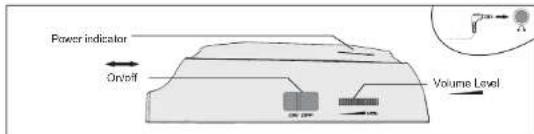
■ Adjust the volume at the headphones.
To switch on the active noise canceling function and to attenuate ambient noise set the ON/OFF switch to ON. The POWER indicator lights up.
After your turn on the power of the head phones, you may hear a slight. This is operating ground of the noise canceling function not a malfunction.
When the batteries are going flat, the power indicator starts flashing and goes off. The active noise canceling is switched off. However, the audio signal continues to be transmitted.
The PHPN045 can also be used like conventional headphones without batteries to listen to music.
After operation, switch off the PHPNC45 to extend battery life.
Cleaning
The headphones should be cleaned from time to time. Please use a soft lint-free and moistened cloth. Never use alcohol or solvents!
Transport
To transport the head phones in the transport case fold the ear-pieces inwards between the headband. You can store the accessories in the lid of the case.
Technical Specifications
Transducer type : ......Dynamic
Frequency range: 30-20,000 Hz
Impedance: 32Ω
Power output: 100 mW
Noise attenuation: max. 20 dB
Distortion: <1%
Cable length: 1.0m
Connection: 3.5 mm stereojack
Power supply: 2 x 1.5 V micro (type AAA)
Weight: 250g
Please note: Every information is subject to charge without prior rates. 02.08.2011 ©
www.pyleaudio.com
CE
Brand : Pyle
Model : PHPNC45
Category : Headphones