
iK63 - Docking Station IHOME - Free user manual and instructions
Find the device manual for free iK63 IHOME in PDF.


| Brand | iHome |
| Model | iK63 |
| Product Type | Portable Rechargeable Mini Speaker |
| Power Source | Internal rechargeable Lithium-ion battery |
| Charging Port | Micro-USB (charging only) and larger USB plug |
| Audio Input | 3.5mm stereo audio jack |
| Audio Output | Line-out for daisy chaining |
| Controls | Power switch (ON/OFF) |
| Indicators | Blue power light; red when charging |
| Special Features | Daisy chain capability (connect multiple iK63 speakers) |
| Compatibility | Any audio device with 3.5mm headphone jack or line-out; designed for Kindle Fire |
| Cleaning | Soft cloth moistened with mild soap and water |
| Safety | Do not expose to water, heat, or moisture; avoid overloading outlets |
| Warranty | Limited 90-day warranty from original purchase |
| Regulatory Compliance | FCC Part 15 Class B, Canadian ICES-003 |
| Country of Origin | China |
| Customer Support | www.ihomeaudio.com, 1-800-288-2792 Toll Free |
Frequently Asked Questions - iK63 IHOME
User questions about iK63 IHOME
0 question about this device. Answer the ones you know or ask your own.
Ask a new question about this device
Download the instructions for your Docking Station in PDF format for free! Find your manual iK63 - IHOME and take your electronic device back in hand. On this page are published all the documents necessary for the use of your device. iK63 by IHOME.
USER MANUAL iK63 IHOME
- Place the unit on a level surface away from sources of direct sunlight or excessive heat.
- Protect your furniture when placing your unit on a natural wood and lacquered finish. A cloth or other protective material should be placed between it and the furniture.
- Clean your unit with a soft cloth moistened only with mild soap and water. Stronger cleaning agents, such as Benzene, thinner or similar materials can damage the surface of the unit.
A Consumer Guide to Product Safety
IMPORTANT SAFETY INSTRUCTIONS
When used in this unit, the proper use can result in potential electrical shock or fire hazards. Please need all safety and operating instructions carefully before installation and use, and keep these instructions handy for future references. Take special note of all warnings listed in these instructions and on the unit.
- Water and Moisture – The unit should not be used near water. For example: near a bathtub, washbowl, kitchen sink, laundry tub, swimming pool or in a wet basement.
- Ventilation – The unit should be situated so that its location or position does not interfere with its proper ventilation. For example, it should not be situated on a bed, sofa, rug or similar surface that may block ventilation openings. Also, it should not be placed in a built-in installation, such as a lockcase or cabinet, which may impede the low of air through the insulation curtains.
- Heat - The unit should be situated away from heat sources such as radiators, heat registers, stovesa or other appliances (including amplifiers) that produce heat.
- Power Sources - The unit should be connected to a power supply only of the type described in the operating instructions or as mailed on the appliance.
- Power-Cable Protection - Power supply cables should be routed so that they are not likely to be walked on or pinched by items placed upon or against them. It is always best to have a clear area from where the cable exits the unit to where it is plugged into an AC socket.
- Cleaning - The unit should be cleaned only as recommended. See the Maintenance station of this manual for cleaning instructions.
-
Objects and Liquid Entry – Care should be taken so that objects do not fall and liquids are not scilled into any openings or vents located on the product.
-
Attachments - Do not use attachments not recommended by the product manufacturer. Lightning and Power Surge Protection - Unclug the unit from the wall scale, and disconnect the antenna or cable system during a lightning storm or when it is left unstended and unused for long periods of time. This will prevent damage to the product due to lightning and power-line surfaces.
-
Overloading – Do not overload wall sockets, extension cords, or integral convenience reectacles as this can result in a risk of fire or electric shock.
-
Damage Requiring Service – The unit should be serviced by qualified service personnel when: A. the power sample scale or pump has been damaged
B. objects have taken into or liquid has been applied into the snckceure.
C. the unit has been exposed to rain.
D. the unit has been grounded by the lockware transferred.
12. Periods of Nonuse – If the unit is to be left unused for an extended period of time, such as a month or longer, the power cable should be unplugged from the unit to prevent damage or corrosion.
- Servicing - The user should not attempt to service the unit beyond these methods described in the user's operating instructions. Service methods not covered in the operating instructions should be referred to qualified service personnel.
Questions? Visit www.ihomcaudio.com
or call 1-800-288-2792 Toll Free
Limited 90-Day Warranty Information
I Chemo Products, a division of SCI Technologies Inc., thereafter referred to as SCI Technologies, warrants this product to be free from defects in workmanship and materials, under normal use and conditions, for a period of 30 days from the date of original purchases.
Shuttle this product fail to function in a satisfactory manner, it is best to first return it to the store where it was originally purchased. Should this fail to resolve the matter and service at its required by reason of any defect or malfunction during the warranty period, SBI technologies will repair or act dissection, replace this product without charge except for a \1,000 charge for branding, packing, return 11%/standard, and insurance. This decision is subject to verification of the defect or malfunction upon delivery of the product to the Factory Service Center listed below. The product must include proof of purchase, including data of purchase. The list for service without proof of purchase is \15.00.
Before returning this product for service, please first replace the batteries (if applicable) with fresh ones, as exhausted or defective batteries are the most common cause of problem's encountered.
If service is still required
1. Remove the batteries (if applicable) and pack the unit in a well-padded, heavy corrugated box.
2. Enclose a photocopy of your sales receipt, credit card statement, or other price of the date of purchase, if within the warranty period.
3. Unclose a check or money order payable to the order of SUI I cashflow, for the sum of \7.00 (\10.00 without proof of purchase).
4. Send the unit prepaid and insured to the Factory Service Center based by us.
Consumer Repair Department
SOI Technologies Inc.
1335 Goodyear Drive
El Paso, TX 79935-6420
Disclosure of Warranty
NOTE: This warranty is valid only if the product is used for the purpose for which it was designed. It does not cover it products which have been damaged by negligence or will occur, misuse or accident, or which have been modified or retained by unauthorized otherwise (if deceased or stolen cabinets, or units damaged by excessive theft) (it damage to digital media players). CD's or tape caselines (if applicable). But the cost of shipping this product, or the Factory Service Center and its return to the owner.
This warranty is valid only in the United States or America and does not extend to owners of the product other than to the original purchaser. In no event will, SUIT Technologies or any of its affiliates, contractors, retailers, their officers, directors, shareholders' members or agents be liable to you or any third party for any consequential or incidental damages. Any lost profits, actual, exemplary or put the damages. (Some state tax no. is also if follows on implied warranties or exercise of consequential damages, so those restrictions may not apply to you.) This warranty gives you special legal rights, and you may also have other rights which vary from state to state.
Your strategic development and agreement to fully and commercially agree by the above mentioned disclosure of womenly is continually funding to you upon your transfer of money (money order, cash's issue, or credit used, for much use of your S&I Technologies product).
©2012 SUI Technologies Inc. All Rights Reserved.
ii Iame and 2 are registered trademarks of SUI Technologies Inc.
S. Halm, design and implementation of S. J. TURF/FIGURE 19:
Kindle Fink, the Amazon Kindle logo, and the Kindle Fink logo are introduced of Amazon logo, so he already
Questions? Visit www.jhomeaudio.com
or call 1-800-288-2792 Toll Free
N03-04182012-A
Painted in China

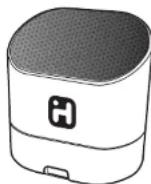
Model iK63
Portable rechargeable
mini speaker for
your Kindle Fire
Questions? Visit www.ihomeaudio.com
This device complies with Part 15 of the FCC Rules, operation is subject to the following two conditions: (1) This device may not cause harmful interference, and (2) this device must accept any interference received, including interference that may cause undesired operation.
This equipment complies with the limits for a Class B digital device as specified in Part 15 of FCC Rules. These limits provide reasonable protection against radio and TV interference in a residential area.
However, your equipment might cause TV or radio interference even when it is operating properly. To eliminate interference you can try one or more of the following corrective measures:
- Reorient or relocate the receiving antenna.
- Increase the distance between the equipment and the radio or TV.
- Use outlets on different electrical circuits for the equipment and the radio or TV.
- Consult your dealer or an experienced radio/television technician if the problem still exists.
Modifying or tampering with your system's internal components can cause a malfunction and might invalidate the system's warranty and void your FCC authorization to operate it.
This Class B digital apparatus complies with Canadian ICES-003.
Read before proceeding
If you have any question regarding the operation or use of this product, please visit www.lhomeaudio.com to view answers in frequently ordered questions.
To learn more about this and other iHome products, please visit us online at www.ihomeaudio.com
For Models That Use Lithium Batteries:
- Lithium bilirubin can explode or cause burres if disassembled, shirrict, recharged, exposed in water, free or high temperature and not harded aspermeability.
- Da not places kassie ballanima in a portozi, paraio, or other zantairse zantairing metal objetsla, da rest mix with
actions of British primary type, of shares with hazard ratios of experimental treatment.
- 2017年,公司与上海
• Follow applicable lines and regulators for transport and transport.
Rechargeable Lithium-ion Battery
This device uses an internal rechargeable Lithium-ion battery that should last the lifetime of the device. If you suspect your battery may be dead, try charging it several times. If the battery does not recharge, please contact us for repair information. Please do NOT attempt to change the battery yourself. If the battery has died and you do not want us to replace your battery, you should follow the disposal instructions below.
WARNING/DISPOSAL OF UNIT
- Never dispose of used batteries/electronics with ordinary solid wastes, since they contain toxic substances.
- Always dispose of used batteries/electronics in accordance with the prevailing community regulations that apply to the disposal of batteries/electronics. If there are no local regulations concerning battery/electronics disposal, please dispose of the device in a waste bin for electronic devices.
- Many electronics retailers now recycle batteries and other electronic components at no charge. Check to see which ones in your area do so.
Caution: The battery used in this device may present a risk of fire, explosion or chemical burn if mistreated
Unit shall not be exposed to excessive heat such as sunshine, fire, or the bike. Do not use or charge the battery if it appears to be leaking, discolored, deformed, or in any way is normal. Do not leave your battery discharged or unused for extended periods of time. When batteries are misused, they may explode or leak, causing burns and personal injury. If your battery leaks, use normal precaution and discard the unit immediately.
natural_image
Line drawing of a USB cable connector with USB 2.0 label (no text or symbols on diagram)Charging the iK63
Note: When not in use, turn speaker off to save battery power
natural_image
Line drawing of a coiled cable with connectors and connectors (no text or symbols)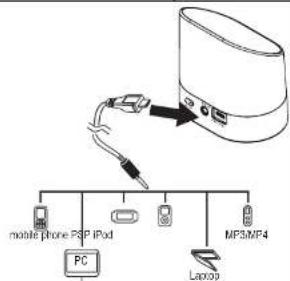
flowchart
graph TD
    A["Mobile phone PSP iPod"] --> B["PC"]
    C["MP3MP4"] --> D["Laptop"]
    B --> E["Switch"]
    D --> E
    E --> F["Anode"]
Connect To Audio Input Source
Using the iK63
Thank you for purchasing the iK63 mini speaker. This unit is designed to provide years of trouble free audio performance. Please read these instructions carefully for proper operation and save for future reference.
Connecting the iK63
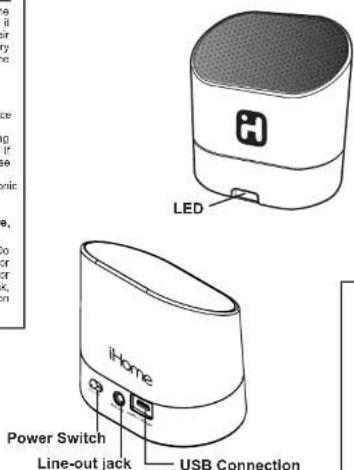
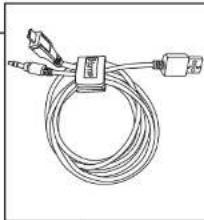
- Connect the micro-USB plug to the audio/charge input jack on the speaker.
- Connect the stereo 3.5mm audio plug to the headphone jack or line-out of any audio device.
- Slide the Power Switch of the speaker to the ON position. The blue power light (red if speaker is charging) will come on.
- Press play on your audio device and adjust its volume to listen to audio.
- If you wish to 'daisy chain' iK63 speakers, connect the 3.5mm audio plug to the Line Out Jack on an iK63 that is already connected to an audio source (see above) and the micro-USB plug to the audio input jack on another iK63. Tum on second speaker by sliding the Power Switch to ON.
- When you are done listening, turn iK63 speaker OFF to conserve battery charge.
Note: The larger USB plug is used for charging only, not for audio. Please refer to next section for charging instructions.
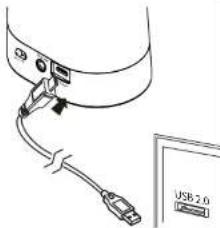
Charging the iK63
The iK63 is powered by a rechargeable battery in the speaker. When the blue power light dims, or if you start to notice sound distortion at higher volumes, it's time to recharge the battery.
- Connect the larger USB plug to a powered USB port, such as that on a computer. The light on the speaker will turn red while charging and turn blue when fully charged.
Note: You can continue to listen to the speaker while it is charging
- A Consumer Guide to Product Safety
- IMPORTANT SAFETY INSTRUCTIONS
- Questions? Visit www.ihomcaudio.com
- or call 1-800-288-2792 Toll Free
- Limited 90-Day Warranty Information
- Consumer Repair Department
- Disclosure of Warranty
- Questions? Visit www.jhomeaudio.com
- Rechargeable Lithium-ion Battery
- WARNING/DISPOSAL OF UNIT
- Using the iK63
- Connecting the iK63
- Charging the iK63
Brand : IHOME
Model : iK63
Category : Docking Station