
DK-M40 - Headphones KIDdesigns - Free user manual and instructions
Find the device manual for free DK-M40 KIDdesigns in PDF.


| Product Type | Over-the-Ear Headphones |
| Brand | KIDdesigns (eKids / iHome) |
| Model | DK-M40 (also DF-M40, DN-M40, DM-M40) |
| Connectivity | Wired, 3.5mm audio jack |
| Ear Cup Markings | Left (L) and Right (R) for proper orientation |
| Adjustable Headband | Ear cups slide up/down for customized fit |
| Volume Control | In-line volume control on cable |
| Cable Position | Cable exits left ear cup |
| Hearing Safety | Warns against prolonged high-volume listening; not for use when hearing warnings is required (e.g., driving, cycling) |
| Noise Isolation | Passive noise isolation (blocks outside noise) |
| Warranty | Limited 1-year warranty from original purchase date |
| Warranty Service | Return to store or send to eKids Factory Service Center with proof of purchase and $10 fee |
| Warranty Exclusions | Damage from misuse, unauthorized repair, excessive heat; excludes shipping costs |
| Warranty Region | Valid only in USA |
| Support Website | www.ekids.com, www.ihomeaudio.com |
| Customer Service Phone | 1-800-288-2792 (Toll Free) |
| Manual Language | English (available for download in PDF) |
| Intended Use | Personal audio devices (music players, game players) |
| Cleaning Instructions | Wipe with a soft, dry cloth. Do not use liquids or chemicals. |
| Storage | Keep in a cool, dry place. Avoid extreme temperatures. |
Frequently Asked Questions - DK-M40 KIDdesigns
User questions about DK-M40 KIDdesigns
0 question about this device. Answer the ones you know or ask your own.
Ask a new question about this device
Download the instructions for your Headphones in PDF format for free! Find your manual DK-M40 - KIDdesigns and take your electronic device back in hand. On this page are published all the documents necessary for the use of your device. DK-M40 by KIDdesigns.
USER MANUAL DK-M40 KIDdesigns
natural_image
Line drawing of a pair of audio headphones with earbuds and cable (no text or symbols)QUESTIONS? Visit www.ekids.com
IMPORTANT
Read before proceeding
If you have any questions regarding the operation or use of this product, please visit www.ekids.com to view answers to frequently asked questions.
To learn more about this and other iHome products, please visit us online at www.ihomeaudio.com
Using Your Headphones
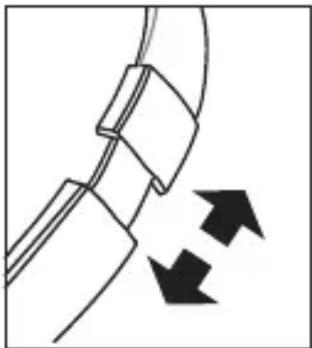
The ear cups are marked “L” and “R”; when worn properly the headphone cable will be on your left side. The two ear cups may be adjusted up or down for most comfortable fit.
Connect the headphone plug to the headphone jack of your music player. Be sure that the plug is fully inserted into the jack. If the plug is not fully inserted you may only hear sound from one side of the headphones.
natural_image
Diagram of a mechanical component with two arrows indicating rotational motion (no text or symbols)To protect your hearing, always start listening with the Volume Control of your music player or game player set to a low level and gradually increase the volume to a comfortable listening level.
Note: You may have to adjust the volume control on your music player as well as the In-Line Volume Control on your headphones to find the most satisfactory sound level. If one control is set too low and the other is set too high, the sound may be distorted. Try setting the volume control on your music player halfway between the Min and Max settings, and then use the In-Line Volume Control on your headphones to make final adjustments.
IMPORTANT! Listening at high volume for long periods of time can result in long-term hearing damage. For your safety, do not use headphones if they would prevent you from hearing warning sounds, such as while driving a car or motorcycle, riding a bike, etc. Remember that noise isolation type earphones such as these are very effective in blocking outside noise, including warning sounds. Always be aware of your surroundings and do not use these earphones in situations that require you to hear warning sounds.
Limited 1 Year Warranty
eKids warrants this product to be free from defects in workmanship and materials, under normal use and conditions, for a period of 1 year from the date of original purchase.
Should service be required by reason of any defect or malfunction, it is best to first return this product and all parts thereof to the store where it was originally purchased. If you need to send the product for service during the warranty period, eKids will repair or, at its discretion, replace this product without charge (except for a \$10.00 charge for handling, packing, return UPS/postage and insurance). This decision is subject to verification of the defect or malfunction upon delivery of this product to the Factory Service Center listed below. The product must include proof of purchase, including date of purchase.
Before returning this product for service, please first replace the batteries (if applicable) with fresh ones, as exhausted or defective batteries are the most common cause of problems encountered.
If service is still required:
- Remove the batteries (if applicable) and pack the unit in a well padded, heavy corrugated box.
- Enclose a photocopy of your sales receipt, credit card statement, or other proof of the date of purchase, if within the warranty period.
- Enclose a check or money order payable to the order of eKids, for the sum of \5.00 (\10.00 without proof of purchase).
- Send the unit prepaid and insured, to the Factory Service Center listed below.
Consumer Repair Department eKids
1330 Goodyear Drive El Paso, TX 79936-6420
Disclaimer of Warranty
NOTE: This warranty is valid only if the product is used for the purpose for which it was designed. It does not cover (i) products which have been damaged by negligence or willful actions, misuse or accident, or which have been modified or repaired by unauthorized persons; (ii) cracked or broken cabinets, or units damaged by excessive heat; (iii) damage to digital media players, CD's or tape cassettes (if applicable); (iv) the cost of shipping this product to the Factory Service Center and its return to the owner. This warranty is valid only in the United States of America and does not extend to owners of the product other than to the original purchaser. In no event will eKids or any of its affiliates, contractors, resellers, their officers, directors, shareholders, members or agents be liable to you or any third party for any consequential or incidental damages, any lost profits, actual, exemplary or punitive damages. (Some states do not allow limitations on implied warranties or exclusion of consequential damages, so these restrictions may not apply to you.) This warranty gives you specific legal rights, and you may also have other rights which vary from state to state.
Your acknowledgement and agreement to fully and completely abide by the above mentioned disclaimer of warranty is contractually binding to you upon your transfer of currency (money order, cashier's check, or credit card) for purchase of your eKids product.
Questions? Visit www.ekids.com
For any other questions: 1-800-288-2792 Toll Free
©2011 SDI Technologies, Inc. All Rights Reserved.
Home is a registered trademark of SDI Technologies Inc., used under license.
© The Muppets Studio, LLC. All Rights Reserved.
© Disney All Rights Reserved
Visit the Disney website at DisneyXD.com


Brand : KIDdesigns
Model : DK-M40
Category : Headphones