TRUST 18007 Tocamy Wireless Entertainment - Keyboard

18007 Tocamy Wireless Entertainment - Keyboard TRUST - Free user manual and instructions

Find the device manual for free 18007 Tocamy Wireless Entertainment TRUST in PDF.

📄 2 pages English EN Download 💬 AI Question 10 questions ⚙️ Specs
Notice TRUST 18007 Tocamy Wireless Entertainment - page 1
Pick your language and provide your email: we'll send you a specifically translated version.
Product Type Wireless Entertainment Keyboard
Brand Trust
Model 18007 Tocamy Wireless Entertainment
Dimensions (approx.) 440 x 130 x 20 mm
Weight (approx.) 400 g
Power Supply 2x AAA batteries (alkaline recommended)
Battery Life (approx.) 3 months (depending on usage)
Wireless Technology 2.4 GHz RF
Range Up to 10 meters
Compatibility Windows, macOS, Linux, Chrome OS
Number of Keys 104 (with multimedia hotkeys)
Multimedia Keys Play/Pause, Volume, Mute, Media Player, etc.
Low Battery Indicator Yes (LED on keyboard)
Connection Type USB nano receiver (stored in battery compartment)
Cleaning Instructions Wipe with a soft, damp cloth; do not use solvents
Safety Warnings Do not expose to liquids, extreme temperatures, or static discharge
Spare Parts & Repairability Only replaceable parts are batteries (AAA). No user-serviceable components.
Package Contents Keyboard, USB receiver, 2x AAA batteries (if included), user manual

Frequently Asked Questions - 18007 Tocamy Wireless Entertainment TRUST

How do I pair the keyboard with my computer?
Insert the USB receiver into an available USB port. Make sure the batteries are installed. The keyboard should connect automatically. If not, press the Connect button on the back of the keyboard.
How long do the batteries last?
Under normal usage, two AAA batteries can last up to 3 months. Actual battery life depends on usage intensity.
Why is my keyboard not working?
Check that the USB receiver is firmly plugged in and the batteries are fresh. Try a different USB port. If the keyboard still does not work, press the Connect button.
Can I use this keyboard with a smart TV?
Yes, as long as the TV has a USB port and supports USB HID keyboard input. Insert the receiver and the keyboard should work.
How do I clean my keyboard?
Disconnect the receiver and remove batteries. Wipe the keyboard with a soft, slightly damp cloth. Do not use alcohol or abrasive cleaners.
What is the range of the wireless connection?
The wireless range is up to 10 meters (30 feet) in open line-of-sight conditions.
Does the keyboard have multimedia keys?
Yes, there are multimedia hotkeys for play/pause, volume up/down, mute, and launching media player.
Is the keyboard compatible with Mac?
Yes, it works with macOS. All standard keys function normally. The Windows key acts as Command.
How do I replace the batteries?
Turn the keyboard over and slide open the battery compartment cover. Remove old batteries and insert two new AAA batteries with correct polarity.
I lost the USB receiver. Can I get a replacement?
The receiver is specifically paired to the keyboard. You can contact Trust support for a replacement. Alternatively, a universal 2.4GHz receiver may work if paired correctly.

User questions about 18007 Tocamy Wireless Entertainment TRUST

0 question about this device. Answer the ones you know or ask your own.

Ask a new question about this device

The email remains private: it is only used to notify you if someone responds to your question.

No questions yet. Be the first to ask one.

Download the instructions for your Keyboard in PDF format for free! Find your manual 18007 Tocamy Wireless Entertainment - TRUST and take your electronic device back in hand. On this page are published all the documents necessary for the use of your device. 18007 Tocamy Wireless Entertainment by TRUST.

USER MANUAL 18007 Tocamy Wireless Entertainment TRUST

natural_image Black handheld keyboard with control knobs and a digital display (no visible text or symbols)

Quick Installation Guide

Keyboard

18007

1

2 USB CPU Your device is ready to use Device drive software installed successfully. 231PM 8/27/2001

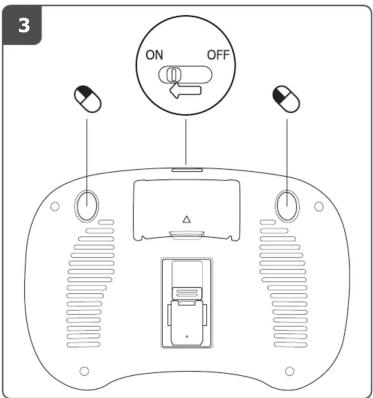
3 ON OFF

Diagram showing three hand gestures and a keyboard with mouse control, likely illustrating a finger movement or touch state in a computer interface.

A Fn 1 2 3 4 Tah Q W E R Caps A S D F U shunt Z X C V Curl 1 -

65 Only for Windows Media Center Nirust

FAQtrust.com/18007/faq 20110818R1 © Trust International B.V.

Manual assistant
Powered by Anthropic
Waiting for your message
Product information

Brand : TRUST

Model : 18007 Tocamy Wireless Entertainment

Category : Keyboard