
Nado 22247 - Keyboard TRUST - Free user manual and instructions
Find the device manual for free Nado 22247 TRUST in PDF.


Pick your language and provide your email: we'll send you a specifically translated version.
| Product Type | Wireless Keyboard |
| Brand | Trust |
| Model | Nado 22247 |
| Dimensions (W x D x H) | 440 x 140 x 25 mm |
| Weight | 510 g (including batteries) |
| Power Source | 2 x AAA batteries (not included) |
| Connection Type | Wireless 2.4 GHz via USB nano receiver |
| Number of Keys | 104 keys (full-size layout) |
| Special Features | Multimedia hotkeys, numeric keypad |
| Compatible Systems | Windows, macOS, Linux |
| Battery Life | Up to 12 months (typical use) |
| Color | Black |
| Cleaning Instructions | Wipe with a soft, dry cloth. Avoid liquids. |
| Safety Warnings | Keep away from water and heat sources. Do not disassemble. |
| Package Contents | Keyboard, USB receiver, 2 x AAA batteries, user manual |
Frequently Asked Questions - Nado 22247 TRUST
How do I connect the keyboard to my computer?
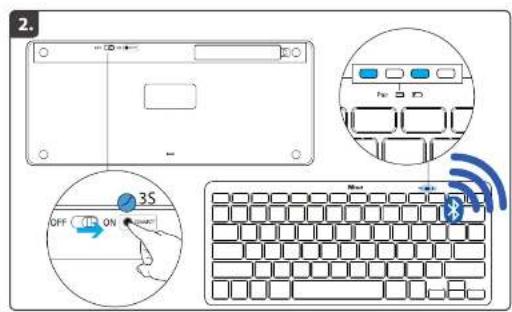
Insert the USB receiver into an available USB port. The keyboard should connect automatically. If not, press the Connect button on the bottom of the keyboard and then press the connect button on the receiver (if applicable).
How do I replace the batteries?
Turn the keyboard over and slide off the battery compartment cover. Remove old batteries and insert two new AAA batteries with correct polarity. Replace the cover.
Why is the keyboard not working?
Check that the USB receiver is properly inserted and the keyboard is turned on (switch on the bottom). Try replacing the batteries. Ensure you are within 10 meters of the receiver. Also check for interference from other wireless devices.
Can I use the keyboard with my tablet or smartphone?
This keyboard is designed for computers with a USB port. It may work with some tablets via an OTG adapter (not included) if they support external keyboards.
How do I clean the keyboard?
Turn the keyboard off and remove batteries. Use a soft, dry cloth to wipe the keys and surface. For stubborn dirt, slightly dampen the cloth with water, but avoid getting moisture inside. Do not use chemicals.
Does the keyboard have Bluetooth?
No, this keyboard uses a 2.4 GHz wireless connection via a USB receiver, not Bluetooth.
What should I do if some keys are sticking or unresponsive?
First, clean the keyboard as described. If the problem persists, check for debris under the keys. You can gently pry off a keycap (if designed to be removable) and clean underneath. Note: removing keycaps may void warranty.
How long do the batteries last?
Under normal usage, the batteries can last up to 12 months. Battery life depends on usage frequency and the quality of batteries used.
Is the keyboard compatible with macOS?
Yes, it works with macOS. However, some multimedia keys (like Volume) may function differently. You can reassign keys in System Preferences if needed.
Can I use multiple Trust wireless devices with one receiver?
This keyboard comes with a dedicated receiver. It is not designed to pair with other receivers. Use only the provided receiver for best performance.
User questions about Nado 22247 TRUST
0 question about this device. Answer the ones you know or ask your own.
Ask a new question about this device
No questions yet. Be the first to ask one.
Download the instructions for your Keyboard in PDF format for free! Find your manual Nado 22247 - TRUST and take your electronic device back in hand. On this page are published all the documents necessary for the use of your device. Nado 22247 by TRUST.
USER MANUAL Nado 22247 TRUST



Manual assistant
Powered by Anthropic
Waiting for your message
Product information
Brand : TRUST
Model : Nado 22247
Category : Keyboard