
14.01.3579 - Switch Roline - Free user manual and instructions
Find the device manual for free 14.01.3579 Roline in PDF.


| Product Type | KVM Switch |
| Model | 14.01.3579 |
| Brand | Roline |
| Dimensions (approx) | 10.0 cm × 6.0 cm × 2.5 cm |
| Weight (approx) | 200 g |
| Power Supply | USB bus-powered (5 V, 500 mA) or optional DC adapter |
| Number of Ports | 4 input ports (USB-A) |
| Supported Computers | Up to 4 computers via USB |
| Switching Method | Push button or hotkey sequence (Scroll Lock + Scroll Lock + number) |
| LED Indicators | Yes, for each port |
| Supported Resolutions | Up to 1920×1080 @ 60 Hz |
| Keyboard & Mouse Support | USB HID, hot-pluggable |
| System Compatibility | Windows, macOS, Linux |
| Cleaning Instructions | Wipe with a soft, dry cloth; avoid liquids and abrasives |
| Safety Precautions | Use only with USB-powered peripherals; do not expose to moisture |
| Spare Parts Availability | None; device is not user-serviceable |
Frequently Asked Questions - 14.01.3579 Roline
User questions about 14.01.3579 Roline
0 question about this device. Answer the ones you know or ask your own.
Ask a new question about this device
Download the instructions for your Switch in PDF format for free! Find your manual 14.01.3579 - Roline and take your electronic device back in hand. On this page are published all the documents necessary for the use of your device. 14.01.3579 by Roline.
USER MANUAL 14.01.3579 Roline
All brand names and trademarks are properties of their respective owners
INTRODUCTION:
14.01.3579 is a true 4K60 4:4:4 4x2 HDMI matrix switch, supporting HDMI 2.0, HDCP 2.2, HDR and up to 18 Gbps bandwidth. This switch allows any source (Blu-ray, UHD Blu-ray, satellite receiver, game consoles, PCs, etc...) to be shown on any of the connected displays.
Remote Control
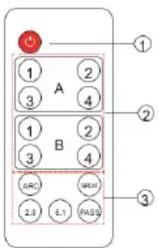
- Power ON/OFF button.
- HDMI Input Source Selector: Select an input source.
- Audio Output control buttons.
ARC: Enable or disable Audio Return Channel.
SPDIF: Enable or disable Optical Digital Audio output.
2.0: Sets audio output mode to 2.0 channel.
5.1: Sets audio output mode to 5.1 channel.
PASS: Use the AUDIO EDID from Display device.
CONNECTION DIAGRAM:
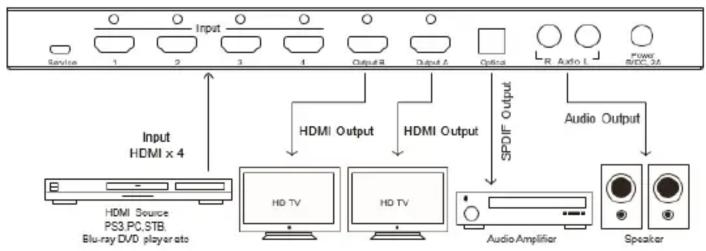
flowchart
graph TD
    A["Service"] --> B["1"]
    C["Input"] --> D["2"]
    E["Service"] --> F["3"]
    G["Input"] --> H["4"]
    I["Service"] --> J["Output B"]
    K["Input"] --> L["Output A"]
    M["Service"] --> N["Optics"]
    O["Input"] --> P["R"]
    Q["Input"] --> R["Auto L"]
    S["Service"] --> T["Power BCC 3A"]
    U["Input"] --> V["HDMI x 4"]
    W["HDMI Source PS3.PC.STB Blu-ray DVD player info"] --> X["HDMI TV"]
    Y["HDMI Output"] --> Z["HDMI Audio"]
    AA["Audio Amplifier"] --> AB["Speaker"]
    AC["Audio Output"] --> AD["Speaker"]
    AE["SPOF Output"] --> AF["Output"]
How to Connect
- Use a HDMI cable to connect a HD source to the HDMI Input Port.
- Use a HDMI cable to connect a HD display to the HDMI Output Port.
- For audio connection, choose one from the following options.
a. To use HDMI pass-through, use the HDMI cable from step 2 to connect audio receiver to the HDMI Output Port. Your audio receiver will have to output video signal to your HD display.
b. To use Toslink, use a Toslink cable to connect to audio equipment. (Note: Toslink does not support Dolby Digital plus please change the input source's audio output to a different setting, if needed.)
c. To use R/L, use a R/L cable to connect a stereo audio equipment. - Connect the power adapter.
- Note: If using Toslink cable, please make sure the rubber protective tip cover has already been removed from both ends before connecting them to devices.
FEATURES:
- Input: HDMI x 4.
- Output: HDMI x 2, Toslink/SPDIF x 1, Stereo RCA x 1.
• Supports Ultra HD 4Kx2K@60Hz. - Supports 3D.
- Supports Standard Audio, DSD Audio, and HD(HBR) Audio.
- Supports HDMI2.0, HDCP2.2, HDR Signal format
- Supports 6.0Gbps TMDS/600MHz pixel clock rate per channel, maximum total TMDS through outputs 18Gbps.
- Supports uncompressed audio such as LPCM.
- Supports compressed audio such as DTS Digital, Dolby Digital, DTS-HD, and Dolby TrueHD.
- Supports up to 7.1CH digital surround on HDMI output.
- Supports up to 5.1CH digital surround on Toslink output.
- Supports up to 2.0 channel analog stereo on Stereo output.
- Support the ARC (Audio Return Channel).
PRODUCT OVERVIEW:

- Power LED
- Infrared for Remote Control
- Audio Return Channel (ARC) LED Indicator
- Optical Digital Audio Output LED Indicator
- HDMI Pass-through/2.0CH/5.1CH Audio Channel LED Indicators
- Audio mode selection Button
- HDMI Input LED Indicators
- Input Port selection Button
- Service (Manufacturer only)
- HDMI Input Ports
- HDMI Output Port
- Optical Digital Audio Outptu Port
- L/R Analog Stereo Audio Output Port
- Power Input Port
SPECIFICATIONS:
| Video and Audio | |
| HDMI resolution | 4Kx2K@24/25/30/60fps@60Hz,3D(1080P @24/60/120Hz),1080P/1080i/720P/576P/ 576i/480P/480i@24/30/50/60fps@120Hz |
| HDMI version | HDMI2.0, HDCP2.2 |
| Support video color format | 36-bit Deep Color all channels maximum |
| Audio output | HDMI pass-throughUp to 7.1CHToslink output up to 5.1 chRCA L/R out put stereo audio |
| Max bandwidth per channel | 600MHz |
| Max baud rate per display | 18Gbps |
| Input/Output TMDS signal | 0.5~1.5V p-p(TTL) |
| Input/Output DDC signal | 5V p-p(TTL) |
| Input cable distance | ≤50ft/15m 24 AWG HDMI high speed Cable at1080P@24bit 60Hz |
| Output cable distance | ≤50ft/15m 24 AWG HDMI high speed Cable at1080P@24bit 60Hz |
| Environmental | |
| Operating Temperature range | 5°F to 131°F / -15°C to 55°C |
| Operating Humidity range | 5% to 90% RH (No Condensation) |
| Power Requirements | |
| Max working current | 1A |
| External Power Supply | DC5V/2A |
PACKAGE CONTENTS:
- 1x Main unit
- 1x Remote Control
- 1x User Manual
- 1x Power adapter


Brand : Roline
Model : 14.01.3579
Category : Switch