
NOXM42-AL - Binoculars Night Owl - Free user manual and instructions
Find the device manual for free NOXM42-AL Night Owl in PDF.


| Product Type | Binoculars |
| Brand | Night Owl |
| Model | NOXM42-AL |
| Magnification | 10x |
| Objective Lens Diameter | 42 mm |
| Exit Pupil | 4.2 mm |
| Field of View | 5.5° (96 m @ 1000 m) |
| Prism Type | BAK-4 |
| Lens Coating | Fully multi-coated |
| Focus System | Center focus with diopter adjustment |
| Eye Relief | 16 mm |
| Interpupillary Distance | 56 - 74 mm |
| Close Focus | 3 m |
| Weight | 620 g |
| Dimensions (L x W x H) | 17 x 13 x 6 cm |
| Body Material | Rubber armor |
| Waterproof / Fogproof | Yes |
| Tripod Adaptable | Yes (adapter not included) |
| Included Accessories | Neck strap, lens caps, carrying case, cleaning cloth |
| Cleaning | Use soft brush and lint-free cloth; avoid solvents |
| Storage | Store in dry, cool place with caps on |
| Safety Warning | Never look directly at the sun through binoculars |
Frequently Asked Questions - NOXM42-AL Night Owl
User questions about NOXM42-AL Night Owl
0 question about this device. Answer the ones you know or ask your own.
Ask a new question about this device
Download the instructions for your Binoculars in PDF format for free! Find your manual NOXM42-AL - Night Owl and take your electronic device back in hand. On this page are published all the documents necessary for the use of your device. NOXM42-AL by Night Owl.
USER MANUAL NOXM42-AL Night Owl
By Night Owl Optics®
OWNERS
MANUAL
NIGHT SCOPE
Monocular Models NOXM50/NOXM42
Please Read
Excessive exposure to bright light, with power on, will destroy internal Image Intensifier Tube. Night Visio n device is d esigned for nighttime use o nly. Not for u se in d aylight conditions nor in light ted environ ments. Keep lens cap on device when not in use to p rotect intern al Image Intensifier Tube.
CAUTION: Do not point Infrared Emitter directly into eye at close range. Keep out of reach of children.
The infrared emitter emits a BRIGHT, although invisible, beam of light. As with any bright light, do not point into the eye.
Quick Start
In a LIGHTED environment:
Step 1 Install Battery (battery not included).
Step 2 DO NOT REMOVE the LENS CAP.
The pinhole in the lens cap lets through a small amount of light.
Removing lens cap in daylight could damage the unit.
Step 3 Rotate both EYEPIECE and OBJECTIVE LENS clockwise until they stop.
Step 4 Press POWER button to turn device on.
Lens cap should still be installed on the device.
Step 5 Look through the EYEPIECE.
Look at an object across the room, and rotate EYEPIECE until object comes into focus.
Important:
In LIGHTED conditions,
Rotating OBJECTIVE LENS, with lens cap on, will not effect focus or clarity of image. Do not rotate OBJECTIVE LENS yet.
Activating INFRARED has no effect on image.


In a DARK environment:
Step 6 In the dark, remove LENS CAP.
Step 7 Do NOT rotate EYEPIECE. Rotate OBJECTIVE LENS until objects come into focus.
You have already adjusted the EYEPIECE to your individual eyesight.
Rotate the OBJECTIVE LENS to focus on objects at varying distances.
Step 8 Click on the INFRARED button.
A beam of infrared light, invisible to the human and animal eye, provides extra illumination.
Warning:
When the power is turned OFF, the image will not immediately disappear. It will remain visible for up to several minutes as the tube discharges. The discharge (fading of image) will be faster in higher light environments, slower in the dark.
For technical assistance, call our customer service line at 1-800-444-5994. If you have any problem, call before returning the product to the store where purchased.
Image Quality
The image you see through a Night Vision device is VERY DIFFERENT from the image observed using day-time monoculars. A Night Vision image is electronically amplified and then reproduced on a phosphorus screen and therefore not as “clear” as a day-time monocular image.
Light and dark marks (spots) caused by the Electronic Intensifier Tube can be seen in the field of view. These are normal and are not defects in the Electronic Intensifier Tube.
Image sharpness is also not consistent across the field of view. The image has very high resolution in the center. The image becomes more distorted toward the periphery of the image. Due to our sophisticated corrective optics, the amount of distortion in your Night Owl Optics ® Night Vision device is less than the distortion found in other Night Vision devices.
IMPORTANT:
You may see spots or other anomalies on the image when testing in a lighted environment with the lens cap on.
When using the device in the field with the lens caps removed, many of these anomalies will disappear. Testing indoors, with the lens caps affixed, focuses the light into a narrow beam through the center of the image intensifier tube; this causes light to reflect inside the device to produce spots on the phosphorus screen that many times will not be visible in the field.
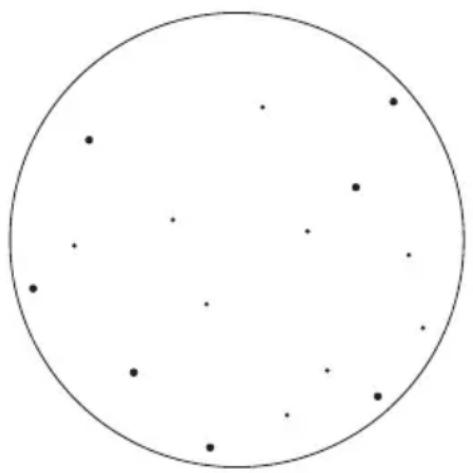
Typical Image Appearance
Use of the Infrared Illuminator in a closed room, or at close range, will exaggerate the light and dark spots on the Electronic Intensifier Tube. The Infrared Illuminator, although invisible to human and animal eyes, is very bright at close range when viewed through the device. This bright light exaggerates the spots on the Electronic Intensifier Tube. Testing your Night Vision device indoors with the Infrared Illuminator, at close range, is not representative of the performance of the device in its intended outdoor application.
Frequently Asked Questions
Why are the projected images always green using Night Vision technology?
The human eye resolves detail best at the wave length of green light.
Why do you focus both the front (Objective lens) and Eyepiece (Ocular lens)?
You do not see through the Night Vision device, like a pair of binoculars. Rather, you see an image on the phosphor screen on the back of the image intensifier tube. The objective lens focuses the image on to the front of the intensifier tube. That image is then converted into electrons. The electrons strike the phosphorous screen converting electrical energy into a visible image. The eyepiece focuses your vision on to the image on the phosphorous screen.
What is the effective range of Night Vision?
Maximum range depends on the light conditions and the size of the object being viewed. Overcast conditions, fog or rain will reduce the effective distance you can see. The Infrared Illuminator will increase viewing range, especially in areas of complete darkness where there is no ambient light available to amplify.
What is the maximum effective distance of the Infrared Illuminator?
75 to 125 yds. The farther the object, the less intense the infrared light will be on the target.
Are Night Vision devices safe?
Night Vision products include shield-encased image intensifiers. The infrared illuminator utilizes light emitting diodes (LED's) operating in the infrared range and will not harm your eyes like a laser.
CAUTION: Do not point Infrared Emitter directly into eye at close range.
The infrared Emitter emits a BRIGHT, although invisible, beam of light.
As with any bright light, do not point into the eye.
Recognize that the image produced on the phosphorous screen can be very bright. Staring into a very bright light causes the pupil to constrict. Your eye needs time to adjust to ambient light.
Why does the image still appear after I turn the device off?
The image intensifier tube remains charged and electrons continue to strike the phosphor, creating the image. After the charge in the tube dissipates, the image will then disappear.
When can I expose the unit to light?
For demonstration purposes there is a pinhole in the lens cap, which enables you to power the device on in the light. The lens cap can be taken off during daylight, but the unit has to be powered off.
What is Generation 1? How does it differ from other Generations of Night Vision devices?
Generation 1, 2, 3 and 4 all employ electron bombardment technology. All of these technologies convert light into electrons and reproduce the image on a phosphorous screen. Generation 1 produces a higher resolution image than Generation 2.
Generation 3 and 4 are used by the United States Military and are very expensive.
Generation 2, 3 and 4 use a fiber optic device and/or special chemicals to further amplify light.
Performance under Various Light Conditions
Complete Darkness
Your Night Vision device works by amplifying available natural light. In complete darkness, with no available natural light, you cannot see without the use of the Infrared Illuminator (IR). The IR works like a flashlight, but is invisible to human and animal eyes.
Half-Moon
A half-moon provides a substantial amount of ambient light to be amplified by the internal Electronic Intensifier Tube. Without the assistance of the IR, you can recognize a man-sized object about 100 yards away.
Starlight
A starlit night provides the minimal amount of ambient light to allow viewing unassisted by the IR. The IR will greatly improve target recognition.
Urban Environment (with man-made light sources)
Streetlights and headlights will generally not damage the Electronic Intensifier Tube, if a safe distance away. As a precaution, do not point the device directly into a light source. At a distance of more than 30 yards, most common man-made light sources will generally not damage the device.
Troubleshooting
Unit may require several seconds after power-on for image to appear. This is normal.
Focus Problems
Try in lighted environment with lens cap on.
Are you able to focus the eyepiece?
- YES - Use in dark with lens cap off but do not rotate eyepiece.
• NO - Call our Customer Service Line
Unit does not turn on.
Light does not illuminate when button is pressed.
- Check to see if battery is installed correctly
- No battery
- Dead battery
• Power light on, but no image - Unit could be defective, call our Customer Service Line
Image is too dark
- Use the Infrared (IR) Illuminator
- Take off the lens cap
Projected image is dim.
- Battery is low – insert new battery
How Night Vision Works
Light (like moonlight or starlight) coming into the device from the direction of the object is gathered by the objective lens and focused onto the Image Intensifier Tube.
The front of the Image Intensifier Tube contains a photocathode which converts light into electrons.
The device contains a very high voltage power supply, which converts the 3 volts supplied by the battery into 17 kilovolts.
The high voltage hurls the electrons into the phosphorous screen. The phosphorous screen illuminates with an image when struck by electrons. The eyepiece optic then focuses the phosphorous screen image to your eye.
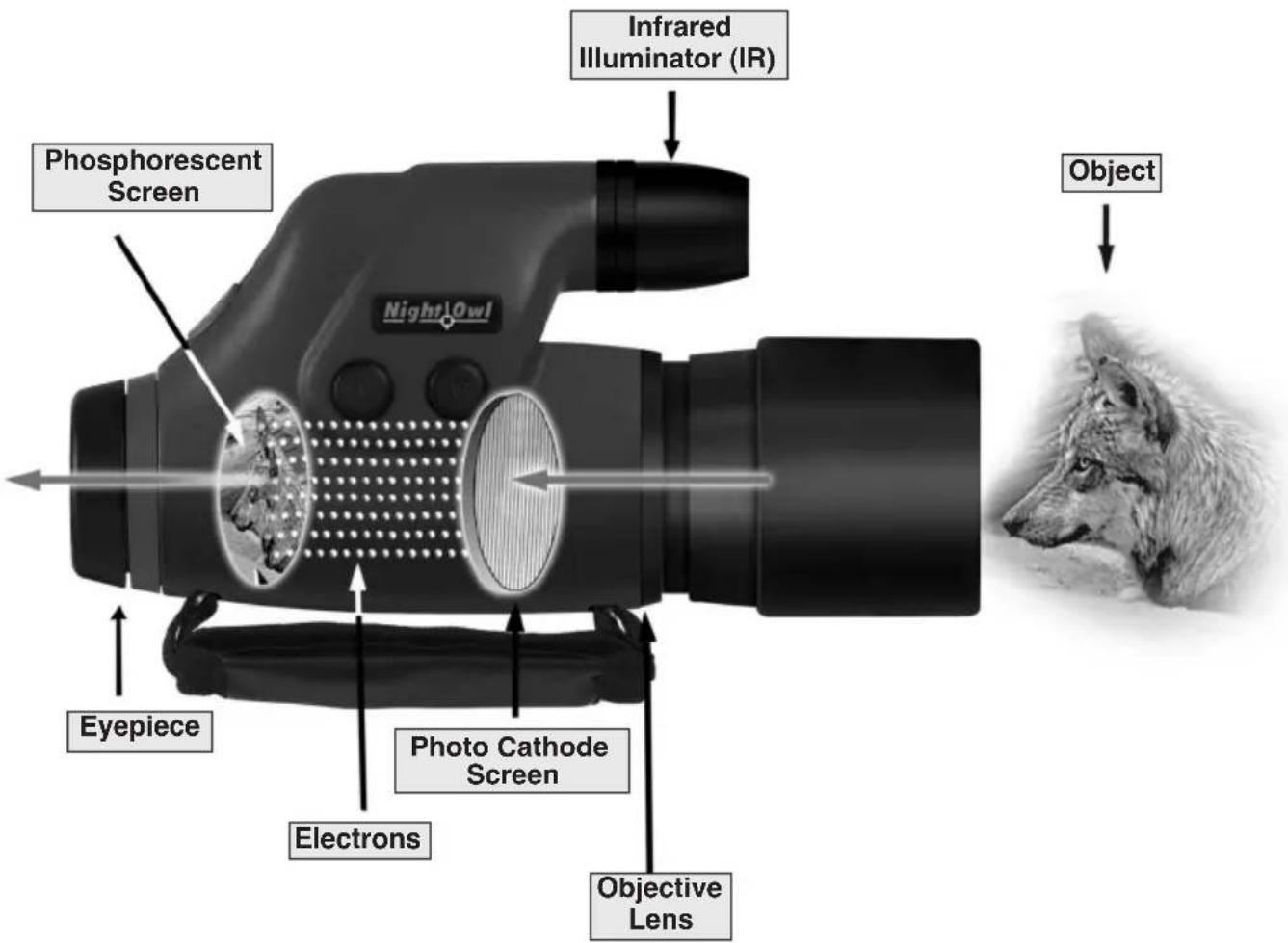
How to Care for your Night Vision Device
If you intend to store your unit for more than 24 hours, it is best to remove the battery.
Keep the unit in a cool, dry place.
Clean lenses the same way you would your camera, with professional lens cleaning supplies.
The lenses are optically coated and may be scratched if abrasive material is used or if dirt is rubbed into the glass. Do not touch lens surface with fingers.
Do not drop or expose to shock. The Intensifier Tube is made of glass.
Do not disassemble or attempt to service the device. The power supply generates 17,000 volts inside!
If your device needs repair, please refer to your warranty card.
Do not leave inside a car on a hot, sunny day.
Clean exterior with a soft, clean cloth.
If condensation is visible on the unit, return it to a normal temperature and wait until the condensation disappears before using.
Product Specifications
| MODEL NOXM42 NOXM50 | ||
| MAGNIFICATION | 3x 5x | |
| FIELD OF VIEW 67 ft. | at 53 ft. at a distance of a distance of 200 ft. 19° angle 200 ft. 15° angle | |
| INFRARED IR Field of | IR Field of Illumination is 35 ft diam. is 35 at 100 ft. (10° Projection Angle) | Illumination ft diam. at 100 ft. (15° Projection Angle) |
| POWER SUPPLY | (1) CR-123/3-volt lithium battery | (1) CR-123/3-volt lithium battery |
| WEIGHT (w/o batt.) | 13.9 oz. | 14.0 oz. |
| DIMENSIONS | 6.50" long 3.79" tall 2.33" wide | 7.45" long 4.25" tall 2.50" wide |
CUSTOMER SERVICE
If you have any questions or problems with your device, you may visit our website at www.nightowloptics.com where you will find answers to the most frequently asked questions.
If you experience any problems with your device, or if your device is in need of service, please call our customer support number 1.800.444.5994. The hours of operation are 8:00 a.m.-5:00 p.m. MST, Monday to Friday.
LIMITED ONE YEAR WARRANTY
Congratulations on the purchase of your new Night Vision device. This certifies that the Warrantor warrants this product to be free of defects in material and workmanship when used in accordance with the accompanying owner's manual. Warrantor's obligation under this Warranty shall be limited to the original purchaser to repair or replace, free of charge, within the specified period of Warranty. This Warranty is not transferable.
This Warranty does not apply to any Night Vision products that have been subject to indirect damage due to misuse, abuse, accident, and alteration due to the attempt to repair a unit by a non-authorized repair agent. This Warranty does not cover damage to the intensifier tube due to using the unit in the daytime or in a lighted area. Please see owner's manual for the proper conditions of use.
During the Warranty period, Warrantor and/or any of its affiliates or authorized repair agents will, at their discretion, repair or replace defective parts in the warranted products free of charge.
Proof of purchase is required to make a claim under this warranty.
PROCEDURE FOR WARRANTY CLAIM
Please contact a Night Vision Customer Service Representative by mail or telephone for return authorization.
Warrantor will not accept any returns unless they contain a return authorization number issued by a Night Vision optics Customer Service Representative.
Should you be interested in returning your device for service, please include with your device its original carrying case, manual, adapters, and carrying straps. Also, please pack the unit with enough protective material so it does not get damaged or scratched during shipment. Please include your name, shipping address, telephone number, along with proof of purchase and a brief note describing the defect. The unit will be repaired or replaced at the discretion of the Warrantor. In the event the repairs are not covered by this Warranty, an estimate will be sent for your approval. Please know that non-Warranty repair or refurbishing of your device is always provided at a reasonable cost.
NOTE TO CUSTOMERS OUTSIDE THE U.S.
This warranty may vary in other countries, check with your distributor for details.
Warranty does not cover shipping costs
Night Owl Optics®
NIGHT VISION
Copyright©2014
1465 Henry Brennan
El Paso, Texas 79936
1-800-444-5994
www.nightowloptics.com
Made in Russia
- BY NIGHT OWL OPTICS®
- OWNERS
- MANUAL
- NIGHT SCOPE
- MONOCULAR MODELS NOXM50/NOXM42
- PLEASE READ
- QUICK START
- IN A LIGHTED ENVIRONMENT
- IMPORTANT
- IN A DARK ENVIRONMENT
- WARNING
- IMAGE QUALITY
- TYPICAL IMAGE APPEARANCE
- FREQUENTLY ASKED QUESTIONS
- PERFORMANCE UNDER VARIOUS LIGHT CONDITIONS
- COMPLETE DARKNESS
- HALF-MOON
- STARLIGHT
- URBAN ENVIRONMENT (WITH MAN-MADE LIGHT SOURCES)
- TROUBLESHOOTING
- FOCUS PROBLEMS
- UNIT DOES NOT TURN ON
- IMAGE IS TOO DARK
- PROJECTED IMAGE IS DIM
- HOW NIGHT VISION WORKS
- HOW TO CARE FOR YOUR NIGHT VISION DEVICE
- CUSTOMER SERVICE
- LIMITED ONE YEAR WARRANTY
- PROOF OF PURCHASE IS REQUIRED TO MAKE A CLAIM UNDER THIS WARRANTY
- PROCEDURE FOR WARRANTY CLAIM
Brand : Night Owl
Model : NOXM42-AL
Category : Binoculars