SLS-AC-79 - Tripod / Lighting Stand Impact - Free user manual and instructions
Find the device manual for free SLS-AC-79 Impact in PDF.


| Product Type | Light Stand / Tripod |
| Brand | Impact |
| Model | SLS-AC-79 |
| Maximum Height | 79 in (200.7 cm) |
| Minimum Height | 35 in (88.9 cm) |
| Folded Length | 36 in (91.4 cm) |
| Weight | 5.5 lb (2.5 kg) |
| Load Capacity | 13.2 lb (6 kg) |
| Material | Aluminum |
| Color | Black |
| Number of Sections | 3 |
| Leg Lock Type | Flip locks |
| Head Type | 5/8 in (16 mm) stud with 1/4 in (6.4 mm) adapter |
| Features | Air cushioned, detachable legs, adjustable spread |
| Accessories Included | Carrying bag |
| Cleaning | Wipe with dry cloth; do not use harsh chemicals |
| Safety Note | Do not exceed maximum load; avoid instability on uneven surfaces |
| Repairability | Spare parts available: locking knobs, rubber feet, bag |
Frequently Asked Questions - SLS-AC-79 Impact
User questions about SLS-AC-79 Impact
0 question about this device. Answer the ones you know or ask your own.
Ask a new question about this device
Download the instructions for your Tripod / Lighting Stand in PDF format for free! Find your manual SLS-AC-79 - Impact and take your electronic device back in hand. On this page are published all the documents necessary for the use of your device. SLS-AC-79 by Impact.
USER MANUAL SLS-AC-79 Impact
natural_image
Industrial impact sensor device with black cylindrical components and yellow background (no text or symbols visible)Introduction
Thank you for choosing Impact.
The air-cushioned link stands are industry-standard general-purpose light stands that interlock, which makes them perfect for storage and travel because they take up minimal space. When the stands are stacked together, you can easily carry several of them with one hand. These stands feature beefy locks with T-handles for exceptional torque, so even at maximum height, they provide a secure mount for your lights.
Each stand features a corrosion-resistant brass baby pin that's compatible with most studio lights and flash heads. And for extra functionality, the baby pin has a 3/8-inch male thread to add a ball head has a 3/8-inch male thread to add an accessory such as a ball head. A 3/8-16 to 1/4-20 adapter is included to mount an accessory like a ring light or microphone. Air cushioning ensures protection for your mounted equipment and fingers when the locks are loosened. The sections will slowly ease down without slamming.
Precautions
- Please read and follow these instructions, and keep this manual in a safe place.
- Handle the unit with care.
-
Clean the unit with a soft, dry cloth.
• Make sure everything is secure before proceeding.
• Make sure the item is intact and there are no missing parts. -
Do not exceed the maximum load capacity.
- Use caution when mounting a product at the maximum load capacity.
- All images are for illustrative purposes only.
Setting Up the Stand
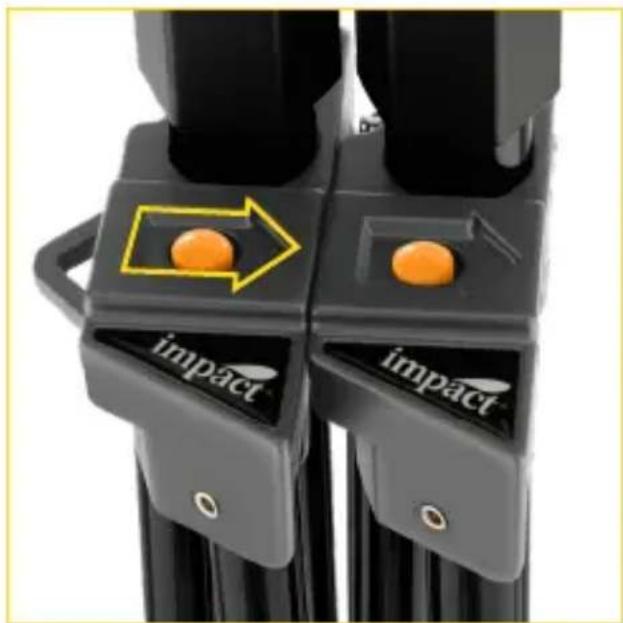
natural_image
Close-up of two black mechanical components with orange buttons and a yellow arrow highlighting a circular feature (no text or symbols)- If the stands are interlocked, separate them by pressing the release button and removing the stand in the direction indicated by the recessed arrow.
- Loosen the center lock, and spread the tripod legs.
For the widest footprint and maximum stability, make sure the spreader is parallel to the floor.
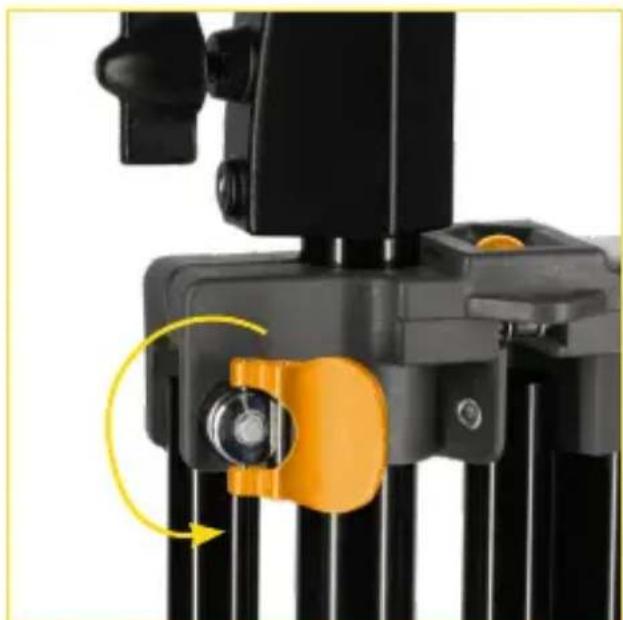
natural_image
Close-up of a black camera module with orange adjustment knob and yellow arrow indicating rotation (no text or symbols)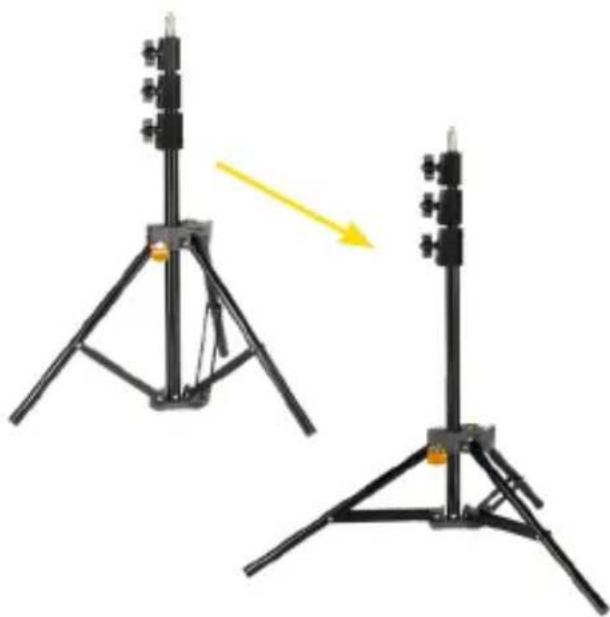
natural_image
Two black tripod-mounted devices with camera modules, one showing a yellow arrow indicating motion (no text or symbols)Interlocking the Stands
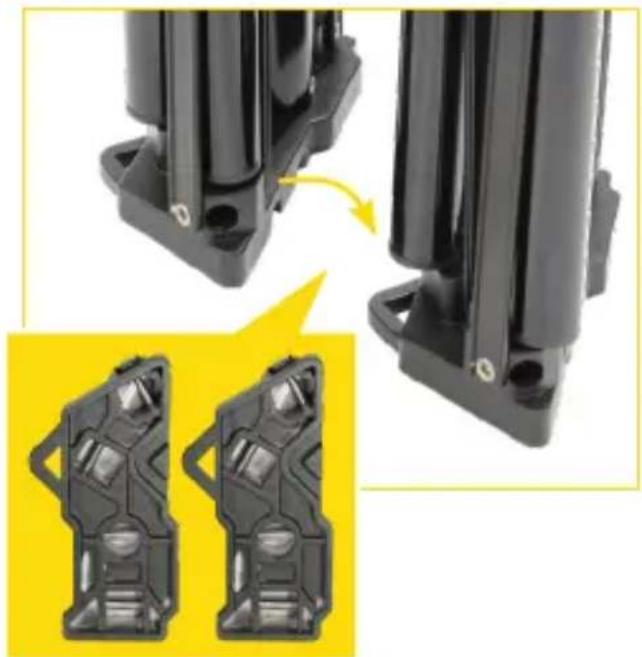
natural_image
Close-up of black mechanical components with mounting holes and a yellow inset showing two views (no text or symbols)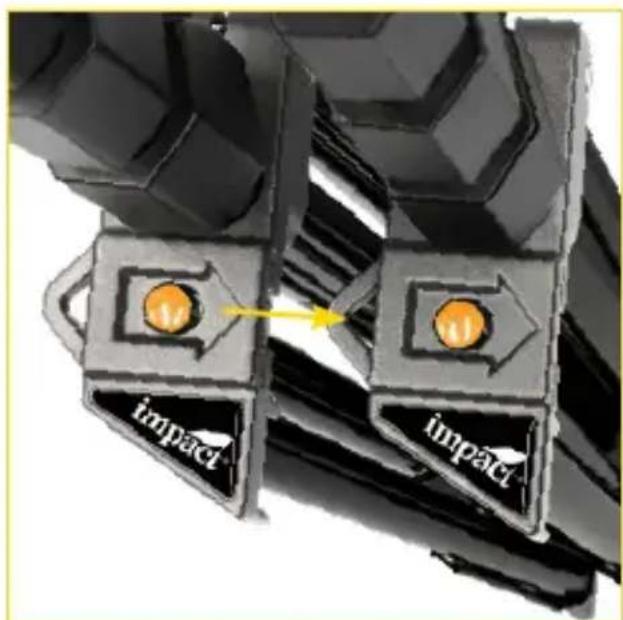
- Close the stands so the legs fold flat, and tighten the center lock.
- Make sure the release button arrows are all pointing in the same direction, and place the bottom tab into the triangular notch.
- Press the tops of the stands together. Insert the triangular tab into the slot so they click and lock together.
Specifications
| SLS-AC-79 S | SLS-AC-9 SLS-AC-12 | |||
| Number of Sections 4 3 3 4 | ||||
| Maximum Working Height 83.9 in. (2.13 m) | 94.9 in. (2.41 m) | 108.1 in. (2.75 m) | 144 in. (3.66 m) | |
| Minimum Working Height 29.9 in. (76 cm) | 40.6 in. (103 cm) | 47.5 in. (120.5 cm) | 49.3 in. (125 cm) | |
| Load Capacity 8.8 lb. | (4 kg) | 8.8 lb. (4 kg) | 22 lb. (10 kg) | 22 lb. (10 kg) |
| Closed Length 27.4 in. | (69.5 cm) | 34.9 in. (88.5 cm) | 40.6 in. (103 cm) | 42 in. (106.5 cm) |
| Footprint Diameter 27.6 in. (70 cm) | 44.5 in. (113 cm) | 43.3 in. (110 cm) | 43.3 in. (110 cm) | |
| Material Aluminum, Polymer, Brass | Aluminum, Polymer, Brass | Aluminum, Brass | Aluminum, Brass | |
| Weight 2.68 lb. | (1.22 kg) | 3 lb. (1.35 kg) | 4.9 lb. (2.2 kg) | 5.6 lb. (2.55 kg) |
Mounting
Stand/Column Top Mount 5/8 in. receiver with 3/8-16 male thread
Included Adapter 3/8-16 female to 1/4-20 male
One-Year Limited Warranty
This Impact product is warranted to the original purchaser to be free from defects in materials and workmanship under normal consumer use for a period of one (1) year from the original purchase date or thirty (30) days after replacement, whichever occurs later. The warranty provider's responsibility with respect to this limited warranty shall be limited solely to repair or replacement, at the provider's discretion, of any product that fails during normal use of this product in its intended manner and in its intended environment. Inoperability of the product or part(s) shall be determined by the warranty provider. If the product has been discontinued, the warranty provider reserves the right to replace it with a model of equivalent quality and function.
This warranty does not cover damage or defect caused by misuse, neglect, accident, alteration, abuse, improper installation or maintenance. EXCEPT AS PROVIDED HEREIN, THE WARRANTY PROVIDER MAKES NEITHER ANY EXPRESS WARRANTIES NOR ANY IMPLIED WARRANTIES, INCLUDING BUT NOT LIMITED TO ANY IMPLIED WARRANTY OF MERCHANTABILITY OR FITNESS FOR A PARTICULAR PURPOSE. This warranty provides you with specific legal rights, and you may also have additional rights that vary from state to state.
To obtain warranty coverage, contact the Impact Customer Service Department to obtain a return merchandise authorization ("RMA") number, and return the defective product to Impact along with the RMA number and proof of purchase. Shipment of the defective product is at the purchaser's own risk and expense.
For more information or to arrange service, visit www.impactstudiolighting.com or call Customer Service at 212-594-2353.

IMPACT®
A Gradus Group Brand
Product warranty provided by the Gradus Group.
www.gradusgroup.com
Impact is a registered trademark of the Gradus Group.
© 2023 Gradus Group LLC. All Rights Reserved.
Brand : Impact
Model : SLS-AC-79
Category : Tripod / Lighting Stand