BSK 310 - Scale PCE Instruments - Free user manual and instructions
Find the device manual for free BSK 310 PCE Instruments in PDF.


| Product Type | Digital Scale |
| Brand | PCE Instruments |
| Model | BSK 310 |
| Capacity | 310 g |
| Readability | 0.01 g |
| Units | g, oz, ct, lb:oz, etc. |
| Display | Backlit LCD, 5 digits |
| Calibration | External calibration with 200 g weight |
| Tare Range | Full capacity subtraction |
| Pan Size | Approx. 80 mm diameter |
| Power Supply | AC adapter (included) or 6 x AA batteries |
| Auto-Off | Adjustable (1, 2, 5, 10 min) |
| Operating Temperature | 5°C to 35°C |
| Net Weight | 0.6 kg |
| Dimensions (W x D x H) | 160 x 200 x 65 mm |
| Housing Material | ABS plastic |
| Protection Class | IP54 (dust and splash resistant) |
| Functions | Tare, counting, check weighing, percent weighing |
| Interface | RS-232 optional |
| Spare Parts | AC adapter, pan, calibration weight (optional) |
| Maintenance | Clean with dry cloth; avoid liquids; calibrate periodically |
| Safety | Overload protection; do not exceed max capacity |
Frequently Asked Questions - BSK 310 PCE Instruments
User questions about BSK 310 PCE Instruments
0 question about this device. Answer the ones you know or ask your own.
Ask a new question about this device
Download the instructions for your Scale in PDF format for free! Find your manual BSK 310 - PCE Instruments and take your electronic device back in hand. On this page are published all the documents necessary for the use of your device. BSK 310 by PCE Instruments.
USER MANUAL BSK 310 PCE Instruments
natural_image
Three digital laboratory balance pans with digital displays and control buttons (no visible text or labels)User Manual
Precision Balance PCE-BSK Series

User manuals in various languages (français, italiano, español, português, nederlands, türk, polski, русский, 中文) can be found by using our product search on: www.pce-instruments.com
Last change: 18 December 2019
v1.0
Contents
1 Safety notes....1
2 Technical specifications .... 2
3 Delivery contents 2
4 Device description .... 3
5 First use of the balance....4
6 Calibration 4
6.1 One-point calibration....4
6.2 Three-point calibration....5
7 Function settings .... 5
7.1 Setting the weight unit 5
7.2 Counting function 6
7.3 User-specific functions 6
8 Serial interface - communication protocol....7
9 Troubleshooting....7
10 Contact....8
11 Disposal 8
1 Safety notes
Please read this manual carefully and completely before you use the device for the first time. The device may only be used by qualified personnel and repaired by PCE Instruments personnel.
Damage or injuries caused by non-observance of the manual are excluded from our liability and not covered by our warranty.
- The device must only be used as described in this instruction manual. If used otherwise, this can cause dangerous situations for the user and damage to the meter.
- The instrument may only be used if the environmental conditions (temperature, relative humidity, ...) are within the ranges stated in the technical specifications. Do not expose the device to extreme temperatures, direct sunlight, extreme humidity or moisture.
- Do not expose the device to shocks or strong vibrations.
- The case should only be opened by qualified PCE Instruments personnel.
- Never use the instrument when your hands are wet.
- You must not make any technical changes to the device.
- The appliance should only be cleaned with a damp cloth. Use only pH-neutral cleaner, no abrasives or solvents.
- The device must only be used with accessories from PCE Instruments or equivalent.
- When weighing powder and similar products, use a suitable container to make sure no small parts enter the scales.
- Before each use, inspect the case for visible damage. If any damage is visible, do not use the device.
- Do not use the instrument in explosive atmospheres.
- Do not expose the device to radioactive environments or corrosive substances.
- The measurement range as stated in the specifications must not be exceeded under any circumstances.
- Non-observance of the safety notes can cause damage to the device and injuries to the user.
- Do not use any sharp objects such as pens to press the keys of the balance. Only use your fingers to press the keys.
We do not assume liability for printing errors or any other mistakes in this manual.
We expressly point to our general guarantee terms which can be found in our general terms of business.
If you have any questions please contact PCE Instruments. The contact details can be found at the end of this manual.
2 Technical specifications
| PCE-BSK 310 | PCE-BSK 1100 | PCE-BSK 5100 | |
| Weighing range | 310g | 1,100g | 5,100g |
| Accuracy class | II | III | III |
| Resolution/readability | 0.001g | 0.01g | 0.1g |
| Repeatability | ±0.002g | ±0.02g | ±0.2g |
| Linearity | ±0.003g | ±0.03g | ±0.3g |
| Settling time | <3 s | ||
| Operating temperature | 17.5 ... 22.5 °C | ||
| Dimensions of weighing plate | 90 mm | 130 mm | 160x160 mm |
| Calibration | external | ||
| Overall dimensions | 270 x 265 x 190 mm | 270 x 200 x 80 mm | |
| Overall weight | 4.0 kg | 2.5 kg | |
| Interface | RS232 | ||
| Mains adaptor | Primary: 100 ... 240 V, 50 / 60 HzSecondary: 6 V, 500 mAoutside minus, inside plus | ||
| Batteries | 3 x AA (LR6)not included, not rechargeable within the balance | ||
3 Delivery contents
| PCE-BSK 310 | PCE-BSK 1100 | PCE-BSK 5100 | |
| Electronic balance | • | • | • |
| Weighing plate | 90 mm | 130 mm | 160 x 160 mm |
| Mains adaptor | • | • | • |
| User manual | • | • | • |
| Test weight | 200 g | 500 g | --- |
| Wind shield | • | --- | --- |
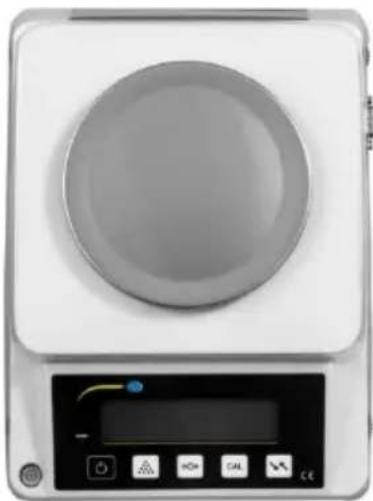
natural_image
Front view of a white laboratory instrument with a circular top and control panel (no visible text or symbols)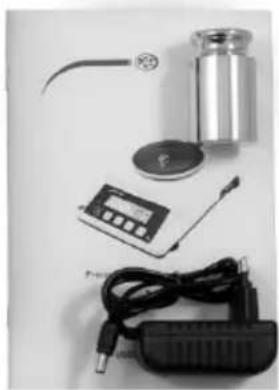
natural_image
Assorted electronic devices including a cylindrical device, switch, capacitor, and power adapter (no visible text or symbols)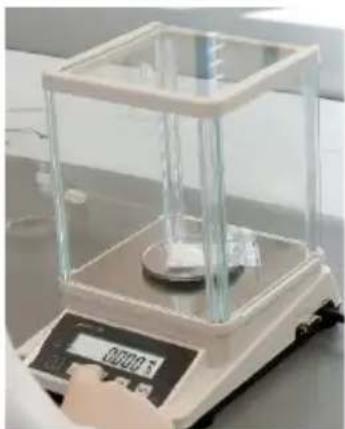
natural_image
Laboratory balance scale with transparent glass and central sample, no visible text or symbols on the device itself.only PCE-BSK 310 includes wind shield
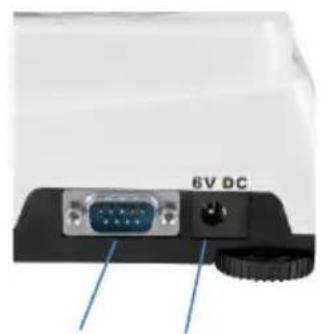
4 Device description
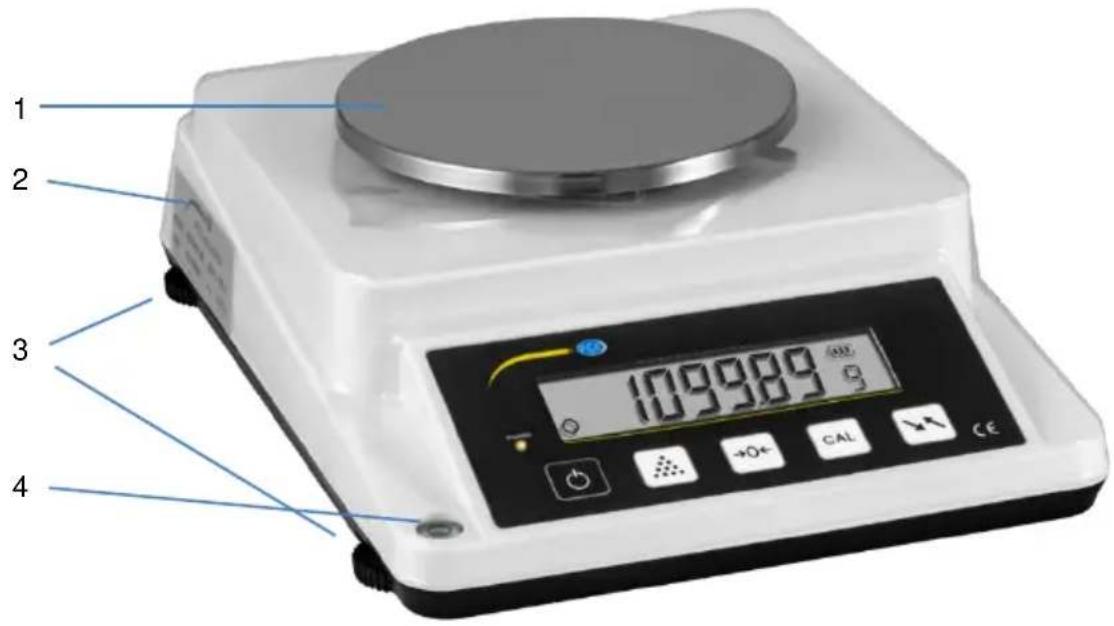
natural_image
Close-up of a computer monitor rear panel showing an VGA port and a switch, with no visible text or symbols on the device itself.5 6
12 13
14
15
16
- Weighing plate
- Type plate
- Adjustable feet
- Level for alignment
- RS232-Schnittstelle
- Connection for mains adaptor
- Stable weight indicator
- Power supply lamp
- Weight display
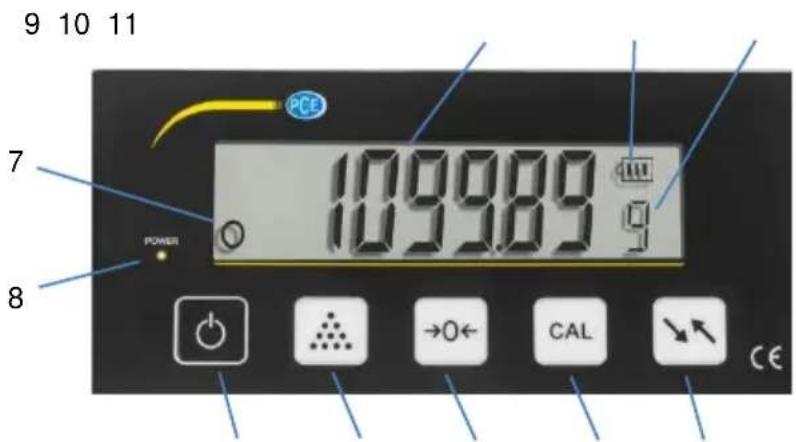
- Battery level indicator
- Current weight unit
- ON/OFF key
- Counting key
- ">0<" key, e. g. for zeroing
- "CAL" key, e. g. for calibration
- Unit key for changing weight unit
5 First use of the balance
Open the packaging carefully and keep it for possible later returns. Place the weighing plate on the scales and connect the mains adaptor. If you prefer battery operation, insert the batteries. (If the weighing plate has not been placed on the balance correctly, a notification will be displayed to inform you that weighing is not possible.) The balance will start after a short beeping sound and will show 300.00 or 1000.00 or 5000 respectively, followed by a dashed line. With a second short beeping sound, it will then display 0.00 kg. The balance is now in weighing mode.
Set-up location
- Keep the set-up location clean and dry.
- Place the balance on an even and stable surface.
- Align the balance by means of the adjustable feet. The bubble of the level must be exactly within the circle marked in black.
-
Avoid draught and fluctuations in temperature, e. g. coming from open windows and doors as well as placing the scales below heaters or exposed to direct sunlight.
-
Avoid exposure to vibration.
-
Avoid interference from other devices.
-
Please note that static charges can occur when the scales are used in dry environments or for bulk materials.
-
Keep the balance away from objects with magnets and from magnetic fields.
-
Do not use the scales in explosive areas.
-
Do not use the scales in areas with high air humidity or in dusty environments.
-
When the balance is carried from a cold to a warm environment, moisture within the balance can condense. This has an effect on the accuracy and the reliability of the weighing. To avoid this, allow 2 hours for the balance to take on room temperature before switching it on.
6 Calibration
The weighing accuracy of the balance depends, among other factors, on the environmental conditions (gravitation, temperature, humidity). With the calibration function, the scales can be adapted to the current environmental conditions. The balance must have been exposed to stable environmental conditions for at least 30 minutes before the calibration can be started.
6.1 One-point calibration
In weighing mode, press
- CAL for approx. 4 seconds – "I.CAL Ig" should be displayed.
- Press the >0< key – a weight value for the calibration should be displayed.
- Press >0< to apply or
press the counting key as well as the CAL key to make a change – then confirm with >0<.
- Apply the weight that flashes in the display.
A line will appear, followed by the non-flashing weight.
- Remove the weight – a line will be displayed, followed by "0.00 g".
The calibration is now completed.
6.2 Three-point calibration
In weighing mode, press
- CAL for approx. 4 seconds – "I.CAL Ig" should be displayed.
- Press the counting key to select "2.CAL 3".
- Press >0< - a weight value for the calibration should be displayed.
- Apply the weight that flashes in the display.
A line will appear, followed by the non-flashing weight. - Remove the first weight.
- Apply the next weight which flashes in the display.
A line will appear, followed by the non-flashing weight. - Remove the second weight.
- Apply the next weight which flashes in the display.
A line will appear, followed by the non-flashing weight. - Remove the third weight - a line will be displayed, followed by "0.00 g".
The calibration is now completed.
For the PCE-BSK 1100, 200 g, 500 g and 1000 g weights are required.
7 Function settings
7.1 Setting the weight unit
Go to "F01" to define your own custom unit with decimal places and conversion factor related to grams. Go to "F02" to deactivate or activate the pre-set units.
To enter the menu, first turn off the scales and then:
a) press and hold the unit key and press and release the ON/OFF key or
b) short-press the ON/OFF key and then the unit key.
"F-01" Decimal character and factor for custom unit
- Press >0< to open the function.
- “----g” will be displayed.
- Use the counting key to change the decimal position.
- Confirm with >0<.
- "00000.00g" will be displayed for example, with the selected decimal places.
- Enter the conversion factor from grams to the custom unit with the counting key (for the position) and the CAL key (for the value)
The customer-specific unit will be saved so that it is still available after turning off the scales. - Confirm with >0<. "F-02" will be displayed.
- Enter weighing mode with the unit key.
"F-02" Activation/deactivation of weight units
- Press >0< to open the function.
- Select the unit with the CAL key.
- Use the counting key to switch between ON and OFF.
- These units can be selected: g / CT / OZ / FRE / dWT / OZT / gn /G.S.M. (grams, carat, ounces, free unit (user-defined), pennyweight, troy ounce, grain, g/m²).
- Confirm with >0<. "F-01" will be displayed.
- Enter weighing mode with the unit key.
7.2 Counting function
To enable the scales to count pieces, the reference quantity must be saved first:
- In weighing mode, press and hold the counting key for approx. 4 seconds.
- “---.COU ---” will be displayed and after some time, 5 PCS will appear in the display.
- The number of reference pieces can be selected with >0<.
You can select 5, 10, 20, 40, 50, 100, 200, 300, 400 or 500.
- Place the selected number of pieces on the scales and confirm with the counting key.
- A line will be displayed, followed by the number of pieces placed on the scales.
- Remove the reference pieces from the weighing plate. The display will now show 0 and you can use the counting function.
- To switch between the counting and weighing functions, short-press the counting key.
- The determined reference value will be saved so that it is still available after turning off the balance.
7.3 User-specific functions
In weighing mode, press the counting key and the unit key at the same time until "I. FIL" is displayed.
You can go to the next menu item by pressing the counting key. You can confirm your selection with the >0< key or return to the menu with the unit key.
| Display | Function | Description |
| I. FIL | Sensitivity | Selection with counting key:1.1 FIL 1- fast,1.2 FIL 2 - normal,1.3 FIL 3 - slow, |
| 2. bA_LI | Backlight | Selection with counting key:2.1 ON2.2 OFF2.3 AUTO (energy saving mode, backlight will turn off after 30 seconds) |
| 3. AU_Po | Automatic power off | Selection with counting key:3.1 ON (power off after 3 minutes)3.2 OFF |
| 4. PEAK | Maximum value / PEAK | Selection with counting key:4.1 ON (last maximum weight will be displayed until a higher weight is added; a new maximum value will be determined after restarting the scales)4.2 OFF |
| 5 SENd | Data transfer to PC | 5.1 KEY CAL key for transmission5.2 ASK.....Query from PC5.3 Cont.....Continuous transmission5.4 StAb Automatic transmission when value is stable |
8 Serial interface - communication protocol
1: Tare Format: ST + CR + LF
2: Entering tare value
Format: ST***** ***** (i. e. from 9e to maximum weight)
The signal has 16 digits
1 icon + or -
2 space
3 ...10 digits for the weight value or space
11 space
12...14 display unit (Newton, kg, g, lb or PCS (pieces))
15 CR
16 LF
3: Query of current weight display
Format: Sx + CR + LF
4: Turn off balance (not possible in standby mode – can only be turned back on via the "ON" key of the balance.)
Format: SO + CR + LF
9 Troubleshooting
| Problem | Possible cause | Solution |
| No display indication | Mains plug not connected, mains adaptor defective, red light below “Power” is glowing but nothing is displayed after pressing ON/OFF | Connect mains cable, replace mains adaptor where required |
| Displayed value not stable | Environmental conditions, wind shield open, foreign object on/within the balance, weight exceeds weighing range, change in weighed product (evaporation, absorption, movement), power supply not stable | Avoid air flow and vibration, close wind shield, remove foreign objects, ensure stable power supply by mains adaptor |
| Displayed value different from actual value | No calibration, no taring, zero point not adapted | Calibrate, tare, adapt the zero point by pressing >0< before weighing |
If your problem cannot be solved with the help of the chart above, please contact our technical support.
10 Contact
If you have any questions, suggestions or technical problems, please do not hesitate to contact us. You will find the relevant contact information at the end of this user manual.
11 Disposal
For the disposal of batteries in the EU, the 2006/66/EC directive of the European Parliament applies. Due to the contained pollutants, batteries must not be disposed of as household waste. They must be given to collection points designed for that purpose.
In order to comply with the EU directive 2012/19/EU we take our devices back. We either re-use them or give them to a recycling company which disposes of the devices in line with law.
For countries outside the EU, batteries and devices should be disposed of in accordance with your local waste regulations.
If you have any questions, please contact PCE Instruments.


PCE Instruments contact information
Germany France Spain
PCE Deutschland GmbH PCE Instruments France EURL PCE Ibérica S.L.
Im Langel 4 23, rue de Strasbourg Calle Mayor, 53
D-59872 Meschede 67250 Soultz-Sous-Forets 02500 Tobarra (Albacete)
Germany United Kingdom Italy
Unit 11 Southpoint Business Park
Ensign Way, Southampton
Capannori (Lucca)
Italia
Tel: +44 (0) 2380 98703 0
Fax: +44 (0) 2380 98703 9
info@pce-instruments.co.uk
www.pce-instruments.com/english
PCE Italia s.r.l.
Via Pesciatina 878 / B-Interno 6
55010 Loc. Gragnano
PCE (Beijing) Technology Co., Limited
1519 Room, 6 Building
Zhong Ang Times Plaza
No. 9 Mentougou Road, Tou Gou District
102300 Beijing, China
Tel: +86 (10) 8893 9660
Hong Kong
PCE Instruments HK Ltd.
Unit J, 21/F., COS Centre
56 Tsun Yip Street
Kwun Tong
Kowloon, Hong Kong
Tel: +852-301-84912
jyi@pce-instruments.com
www.pce-instruments.cn
United States of America
PCE Americas Inc.
711 Commerce Way suite 8
Jupiter / Palm Beach
33458 FL
USA Türkiye
Tel: +1 (561) 320-9162
Fax: +1 (561) 320-9176
info@pce-americas.com
www.pce-instruments.com/us
Turkey
Pehlivan Sok. No.6/C
www.pce-instruments.com/turkish
- User Manual
- Contents
- Safety notes
- Technical specifications
- Delivery contents
- Device description
- First use of the balance
- Set-up location
- Calibration
- One-point calibration
- Three-point calibration
- Function settings
- Setting the weight unit
- "F-01" Decimal character and factor for custom unit
- "F-02" Activation/deactivation of weight units
- Counting function
- User-specific functions
- Serial interface - communication protocol
- Troubleshooting
- Contact
- Disposal
- PCE Instruments contact information
- Germany France Spain
- Germany United Kingdom Italy
- Hong Kong
- United States of America
- Turkey
Brand : PCE Instruments
Model : BSK 310
Category : Scale