
HSP5200 - Home Automation PHILIPS - Free user manual and instructions
Find the device manual for free HSP5200 PHILIPS in PDF.


| Product Type | Home Automation Kit (Motion Sensing Plugs and Door Sensor) |
| Brand | Philips |
| Model | HSP5200 |
| Power Supply (Smart Plug) | AC 230V, 50/60 Hz |
| Power Supply (Door Sensor) | 1 x CR2477 3V DC battery (non-rechargeable) |
| Operating Temperature | -10°C to 45°C |
| Operating Humidity | <90% RH |
| Wireless Connectivity | Wi-Fi 802.11 b/g/n (2.4 GHz), Thread 1.3 (IEEE 802.15.4), Bluetooth (2.402-2.480 GHz) |
| Max RF Power (Wi-Fi) | 19.85 dBm (96.61 mW) |
| Max RF Power (Bluetooth) | 9.67 dBm (9.27 mW) |
| Max RF Power (Thread) | 9.57 dBm (9.06 mW) |
| App Control | Philips Home Safety app (iOS/Android) |
| Motion Detection | Yes (Motion Sensing Plug) |
| Door/Window Sensor | Yes (Door Sensor) |
| Recommended Loads | Lighting, fans, televisions, humidifiers, air purifiers, resistive loads up to 13A |
| Prohibited Loads | High-power inductive loads (air conditioners, refrigerators, electric motors, transformers) |
| Light Indications | Status LED on plug and sensor (pairing, reset, on/off) |
| Battery Type (Door Sensor) | CR2477 (coin cell, non-rechargeable) |
| Warranty | 2 years (by Versuni) |
| Safety | Button battery warning; do not use with wet hands; avoid behind metallic appliances |
| Recycling | Separate collection at official recycling points |
| Standards Compliance | IEC applicable standards for electromagnetic fields (EMF) |
Frequently Asked Questions - HSP5200 PHILIPS
User questions about HSP5200 PHILIPS
0 question about this device. Answer the ones you know or ask your own.
Ask a new question about this device
Download the instructions for your Home Automation in PDF format for free! Find your manual HSP5200 - PHILIPS and take your electronic device back in hand. On this page are published all the documents necessary for the use of your device. HSP5200 by PHILIPS.
USER MANUAL HSP5200 PHILIPS

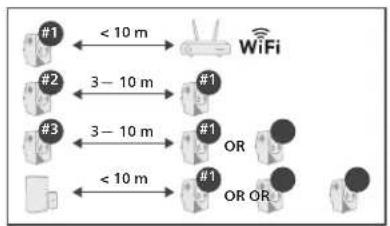
flowchart
graph TD
    A["#1"] < 10 m --> B["WiFi"]
    C["#2"] 3–10 m --> D["#1"]
    E["#3"] 3–10 m --> F["#1"]
    G["#1"] OR OR #1 --> H["OR"]
    I["#1"] OR OR #1 --> J["OR"]
    K["#1"] < 10 m --> L["OR"]
    M["#1"] < 10 m --> N["OR"]
    O["#1"] < 10 m --> P["OR"]
    Q["#1"] < 10 m --> R["OR"]
    S["#1"] < 10 m --> T["OR"]
    U["#1"] < 10 m --> V["OR"]
    W["#1"] < 10 m --> X["OR"]
    Y["#1"] < 10 m --> Z["OR"]
PHILIPS and the Philips Shield Emblem are registered trademarks of Koninklijke Philips N.V. and are used under license.
This product has been manufactured by and is sold under the responsibility of Versuni Holding B.V., and Versuni Holding B.V. is the warrantor in relation to this product.
2025 © Versuni Holding B.V.
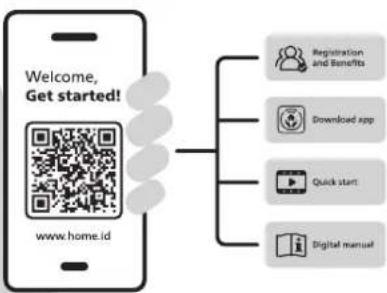
flowchart
graph TD
    A["Welcome, Get started!"] --> B["www.home.id"]
    B --> C["Registration and Benefits"]
    B --> D["Download app"]
    B --> E["Quick start"]
    B --> F["Digital manual"]
642001021838


Introduction
Thank you for purchasing a Philips Home Safely product. To get started, please download the Philips Home Safety app to set up and manage all your devices directly from your phone. Simply connect to your home Wi-Fi and enjoy total control at your fingertips.
■Important
- Do not handle Motion Sensing Plugs or Door Sensor with wet hands.
• Children should be supervised to ensure that they do not play with the appliance. - Do not insert anything unexpected inside power plug.
- Do not install and connect the plug behind the refrigerator, washing machine or similar appliance. Avoid installing plugs behind metallic appliances that will impact sensing performance.
- Do not use the Motion Sensing Plugs and Door Sensor outdoors.
- If the Motion Sensing Plugs' housing is damaged in any way, do not use.
• Prohibited loads: High-power inductive loads such as air
conditioning, refrigerators, electric motors, and transformers - Recommended loads: General housing appliances such as lighting, fans, televisions, humidifiers, air purifiers, and other resistive loads. Heating appliances are acceptable provided they do not exceed 13A or the maximum wattage.
• Wi-Fi 802.11 b/g/n: frequency 2412MHz\~2472MHz, max radio
transmission power 19.85dBm (equivalent to 96.61 mW EIRP). - Wireless connectivity: frequency 2402MHz\~2480MHz, max radio
transmission power 9.67dBm (equivalent to 9.27 mW EIRP). - Thread 1.3 (IEEE 802.15.4): frequency 2405MHz–2480MHz, max radio transmission power 9.57dBm (equivalent to 9.06 mW EIRP).
- This appliance contains non-rechargeable coin battery (type: CR2477). Please dispose of old batteries in accordance with national regulations.
A WARNING
THIS PRODUCT CONTAINS A BUTTON BATTERY
If swallowed, a lithium button battery can cause severe or fatal injuries within 2 hours. Keep batteries out of reach of children. If you think batteries may have been swallowed or placed inside any part of the body, seek immediate medical attention.
Electromagnetic Fields (EMF)
This Philips appliance complies with IEC applicable standards and regulations regarding exposure to electromagnetic fields.
■Technical Specifications
Motion Sensing Plugs
- Operating Temperature: -10°C to 45°C
- Operating Humidity: <90%
• Power: AC 230V 50/60 Hz
Door Sensor
- Operating Temperature: -10°C to 45°C
- Operating Humidity: <90%
• Power: Battery, 3VDC CR2477 x 1
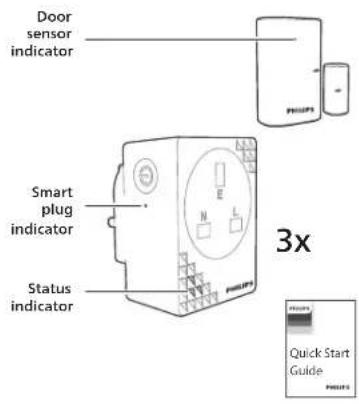
Light Indications
Status Indicator
- Pairing mode on: pulsing every 2 sec.
- Hard reset: blinking rapidly for 6 sec, followed by slow pulses for 4 sec
- Soft reset (delete device): pulsing twice for 4 sec
Smart plug indicator
- Smart plug on: LED ON
• Smart plug off: LED OFF
Door Sensor Indicator - Pairing mode: pulsing every 2 sec
- Contact opens/closes: Short blink
- Hard reset: blinking rapidly for 6 sec, followed by slow pulses for 4 sec
■Recycling
- Do not throw away the product with the normal household waste at the end of its life, but hand it in at an official collection point for recycling. By doing this, you help to preserve the environment.
- Follow your country's rules for the separate collection of electrical and electronic products. Correct disposal helps prevent negative consequences for the environment and human health.
Warranty and Support
Versuni offers a two-year warranty after purchase on this product. This warranty is not valid if a defect is due to incorrect use or poor maintenance. Our warranty does not affect your rights under law as a consumer. For more information or for invoking the warranty, please visit our website www.philips.com/support
Brand : PHILIPS
Model : HSP5200
Category : Home Automation