
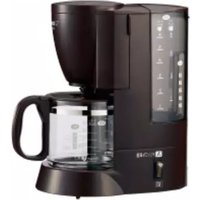
Dome Brew Programmable EC-ESC120 - Coffee maker Zojirushi - Free user manual and instructions
Find the device manual for free Dome Brew Programmable EC-ESC120 Zojirushi in PDF.


| Type | Programmable Drip Coffee Maker |
| Brand | Zojirushi |
| Model | Dome Brew Programmable EC-ESC120 |
| Capacity | 10 cups (approx. 1.25 L) |
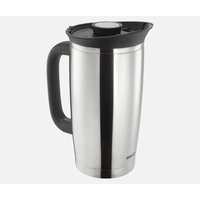
| Carafe Type | Stainless Steel Thermal Carafe |
| Brew Basket | Dome-shaped for optimal extraction |
| Programmable Timer | Up to 24 hours in advance |
| Auto Shut-Off | Adjustable (0 to 4 hours) |
| Brew Strength Selector | Regular and Strong |
| Water Window | External water level indicator |
| Filter Type | Permanent gold-tone filter (included) |
| Cleaning Indicator | Yes |
| Dimensions (W x D x H) | 12 x 8 x 14 inches (approx.) |
| Weight | 8 lbs (approx.) |
| Power Rating | 120 V, 60 Hz, 1000 W |
| Warranty | 1 year limited |
| Manual Included | Yes (PDF available online) |
Frequently Asked Questions - Dome Brew Programmable EC-ESC120 Zojirushi
User questions about Dome Brew Programmable EC-ESC120 Zojirushi
0 question about this device. Answer the ones you know or ask your own.
Ask a new question about this device
Download the instructions for your Coffee maker in PDF format for free! Find your manual Dome Brew Programmable EC-ESC120 - Zojirushi and take your electronic device back in hand. On this page are published all the documents necessary for the use of your device. Dome Brew Programmable EC-ESC120 by Zojirushi.
USER MANUAL Dome Brew Programmable EC-ESC120 Zojirushi
Always follow basic safety precautions when using electrical appliances.
Read all instructions carefully.
Please keep these Operating Instructions at hand for easy reference.
INDEX
IMPORTANT SAFEGUARDS .... 2
BEFORE USE 5
PARTS NAMES 5
HOW TO REMOVE AND ATTACH EACH PART....7
HOW TO SET THE CLOCK....8
SOUND SIGNALS AND HOW TO CHANGE THEM....8
HOW TO USE 9
● BREWING ICED COFFEE 14
HOW TO SET THE 24-HOUR BREW TIMER .... 15
CLEANING AND MAINTENANCE 16
● How to Perform Citric Acid Cleaning 17
TROUBLESHOOTING GUIDE 18
REPLACEMENT PARTS 19
SPECIFICATIONS 19
QUICK START GUIDE .... BACK COVER
To reduce the risk of fire, electric shock, and / or injury to persons, when using electrical appliances, basic safety precautions should always be followed, including the following:
- Read all instructions.
- Do not touch hot surfaces. Use handles or knobs. Do not close or clog the steam vent opening under any circumstances.
- To protect against fire, electric shock and other injury to persons, do not immerse cord, plugs or the appliance in water or other liquids.
- Close supervision is necessary when any appliance is used by or near children.
- Unplug from outlet when either the appliance or display clock is not in use, and before cleaning. Allow to cool before adding or removing parts other than the Glass Carafe, and before cleaning the appliance.
- Do not operate any appliance with a damaged cord or plug, or after the appliance malfunctions or has been damaged in any manner. Return appliance to the nearest authorized service facility for examination, repair or adjustment.
- The use of accessory attachments not recommended by the appliance manufacturer may result in fire, electric shock or other injury to persons.
- Do not use outdoors.
- Keep the power cord away from hot surfaces and do not let the cord hang over the edge of tables or counters.
- Do not place on or near a hot gas or electric burner, or in a heated oven.
- To disconnect, turn the power off by pressing the BREW/OFF button, then remove plug from wall outlet.
- Do not use appliance for other than intended use.
- To protect against electrical hazards, unplug the cord at all times before cleaning.
- Scalding may occur if the Lid is opened during the brewing cycles.
- The Glass Carafe is designed for use with this appliance. It must never be used on a range top.
- Do not set the hot Glass Carafe on a wet or cold surface.
- Do not use a cracked Glass Carafe or a Glass Carafe having a loose or weakened handle.
- Do not clean the Glass Carafe with cleansers, steel wool pads, or other abrasive materials.
NOTE: This appliance has a polarized plug (one blade is wider than the other). To reduce the risk of electric shock, this plug is intended to fit into a polarized outlet only one way. If the plug does not fit fully into the outlet, reverse the plug. If it still does not fit, contact a qualified electrician. Do not attempt to modify the plug in any way.
SAVE THESE INSTRUCTIONS
THIS APPLIANCE IS FOR HOUSEHOLD USE ONLY.
A. A short power-supply cord is provided to reduce risks resulting from becoming entangled in or tripping over a longer cord.
B. Extension cords may be used if care is exercised in their use.
C. If an extension cord is used, (1) the marked electrical rating of the extension cord should be at least as great as the electrical rating of the appliance, (2) if the appliance is of the grounded type, the extension cord should be a grounding-type 3-wire cord, and (3) the longer cord should be arranged so that it will not drape over the counter top or table top where it can be pulled on by children or tripped over.
| WARNINGRISK OF FIRE OR ELECTRIC SHOCKDO NOT OPEN | ||
| WARNING: TO REDUCE THE RISK OF FIRE OR ELECTRIC SHOCK,DO NOT REMOVE COVER (OR BOTTOM)NO USER-SERVICEABLE PARTS INSIDEREPAIRS SHOULD BE DONE BY AUTHORIZED SERVICE PERSONNEL ONLY | ||
| The lightning flash with arrowhead symbol, within an equilateral triangle, is intended to alert the user to the presence of uninsulated “dangerous voltage” within the product’s enclosure that may be of sufficient magnitude to constitute a risk of fire or electric shock to persons. | |
| The exclamation point within an equilateral triangle is intended to alert the user to the presence of important operating and maintenance (servicing) instructions in this literature. |
IMPORTANT SAFEGUARDS (cont.)
These WARNINGS and CAUTIONS are intended to prevent property damage or personal injury to you and others.

WARNINGS
 | Do not modify the product. Only a repair technician may disassemble or repair this unit.Attempting to do so may cause fire, electric shock or injury.Make any repair inquiries to Zojirushi Customer Service. | Insert the Power Plug completely and securely into the electrical outlet.A loosely inserted Power Plug may cause electric shock, short circuit, smoke or fire.Use only an electrical outlet rated at 15 amperes minimum, and do not plug other devices into the same outlet.Plugging other devices into the same outlet may cause the electrical outlet to overheat, resulting in fire.If the blades or surface of the Power Plug become soiled, wipe them clean.A dirty Power Plug may cause fire.Stop using immediately if you notice any of the following symptoms indicating a malfunction or breakdown.Continued use of the product may cause smoke, fire, electric shock or injury.The Power Plug or Power Cord has become very hot.The Power Cord is deeply damaged or deformed.There is a burning smell.Some part of the product is cracked, unstable or loose.The electricity turns on and off when the Power Cord is touched or moved.The product does not operate even though the BREW/OFF button is pressed.Water leaks from the Main Body.The Main Body is deformed or has become very hot.If any of the above occurs, unplug the product immediately and return to Zojirushi Customer Service for check-ups and/or repairs.This product is not intended for use by persons (including children) with reduced physical, sensory or mental capabilities, or lack of experience and knowledge, unless they have been given supervision or instruction concerning use of the product by a person responsible for their safety.Children should be supervised to ensure that they do not play with the product. |
 | Do not immerse the product in water or splash it with water.Doing so may cause short circuit or electric shock. | |
| Do not allow liquid to come in contact with the Power Plug or Power Cord.Doing so may cause short circuit or electric shock. | ||
 | Do not plug or unplug the Power Plug if your hands are wet.Doing so may cause electric shock or injury. | |
 | Do not touch the Steam Vent and Warming Plate, or bring your hands or face near the Steam Vent.Doing so may cause burns or scalding. Take special precautions with children and infants. | |
 | Do not allow children to use the product unsupervised. Keep it out of the reach of infants.Children are at risk of burns, electric shock or injury. | |
| Do not use a power source other than 120 V AC.Use of any other power supply voltage may cause fire or electric shock. | ||
| Do not use this product without the Glass Carafe. Doing so may cause scalding. | ||
| Do not use the product if the Power Plug or Power Cord is damaged or if the Power Plug is loosely inserted into the electrical outlet.Doing so may cause electric shock, short circuit or fire. | ||
| Do not damage the Power Cord.Do not bend, pull, twist, fold, or attempt to modify the Power Cord. Do not place it on or near high temperature surfaces or product, under heavy items or between objects.A damaged Power Cord can cause fire or electric shock. |
●The illustrations used in these Operating Instructions may vary from the actual product you have purchased.
IMPORTANT SAFEGUARDS (cont.)

CAUTIONS

Do not touch hot surfaces such as the Lid, Shower Head, Filter Basket, or body of the Glass Carafe while the product is in use or shortly after.
Doing so may cause burns or injury.

Do not use the product on surfaces that are vulnerable to heat. Doing so may cause fire.
Do not use the product on unstable surfaces. Doing so may cause scalding or injury.
Do not use the product near walls or furniture. Steam or heat may damage, discolor or deform walls or furniture.
Do not use near an open flame. Doing so may cause fire.
Do not heat the Main Body and Glass Carafe in a microwave oven or place it on top of direct flames (such as a gas stove top), or electric or induction heating (IH) cookers. Doing so may cause smoke or fire. The Handle of the Glass Carafe may deform or sparks may emit from the metal parts.
Do not move the Main Body when the Glass Carafe is in place. Doing so may cause scalding or other injury.

After filling the Water Tank with water, do not move the Main Body.
Doing so may cause scalding, malfunction or water leak.
Do not leave the Glass Carafe removed for long periods of time.
Doing so may cause scalding.
Do not refill the Water Tank while coffee is brewing.
Coffee may overflow and cause scalding.

Unplug the Power Plug from the electrical outlet when the product is not in use.
Leaving the Power Plug in an outlet may cause injury or burns, or electric shock and fire due to insulation degradation.

Please allow the product to cool down before cleaning.
Touching hot surfaces may cause burns.
Always unplug the product by holding the Power Plug, not by pulling the Power Cord.
Pulling the Power Cord to unplug the product may cause electric shock, short circuit or fire.
If the Power Cord or Power Plug is damaged, it must be replaced by the manufacturer, its service agent or similarly qualified persons to avoid hazards.
IMPORTANT
■Do not use the product outdoors. Doing so may cause malfunction.
■Do not use or place the product on wet surfaces. Doing so may cause electric shock.
Do not use the product where its steam may come into contact with other electrical appliances. The steam may cause fire, malfunction, discoloration or deformation to other electrical appliances.
When using the product on a kitchen shelf or in a similar location, exercise care to ensure that steam does not come into contact with the ceiling. Doing so may cause discoloration or deformation of the ceiling.
■Do not use the product on a carpet or fabric tablecloth. The carpet or tablecloth may be stained if the coffee splashes out.
■Make sure that the entire product is placed squarely on a table and does not protrude. Failure to do so may cause scalding or other injury.
■Do not drop the Glass Carafe or hit it against a hard surface or object. It may break the glass and cause injury.
Do not soak the Glass Carafe in water, splash it with water or place it on a wet surface while it is still hot. If the Glass Carafe is damaged, it could easily break. If it does, please be careful not to cut your hands with broken glass.
■Do not fill the Water Tank with anything other than water, such as milk, alcohol, coffee, or hot water. Doing so may cause malfunction.
■Do not leave the Water Tank filled with water. Doing so may cause malfunction, discoloration, odor, or deterioration in water quality.
■Do not use finely-ground coffee. Doing so may cause the coffee to overflow and cause scalding.
■Do not use more than 6 leveled Coffee Scoops (approx. 2.54 oz. / 72g) of ground coffee. Doing so may cause the coffee to overflow and cause scalding.
IMPORTANT (cont.)
| ■Do not operate the product with an empty Water Tank (except during KEEP WARM).It may cause malfunction. | ■Do not touch the Shower Head, paper filter, or Filter Basket immediately after brewing has finished.Doing so may cause scalding. |
| ■Do not open the Lid while the product is in use.Doing so may cause scalding. | ■Wait at least 5 minutes before brewing consecutively.Otherwise, steam or hot water may come out from the Steam Vent when water is added or the product is moved, and may cause scalding. |
■Do not open the Lid if the Main Body is still hot.Even if the Power Plug is unplugged from the electric outlet, hot water or steam may come out from the Nozzle, resulting in scalds.  | |
| ■Do not put your hand under the Main Body Gasket while the product is in use or shortly after.Hot water may drip and cause scalding. | ■Do not discard water by turning the Main Body upside down.Doing so may cause scalding or other injury. |
| ■This product is intended for household use only. |
BEFORE USE
- This product is intended for household use only and not for commercial use.
- This product has been designed for brewing coffee only. Do not use for any other purpose. Do not fill the Water Tank with anything other than water (such as milk, alcohol, coffee, or hot water), as doing so may cause malfunction.
- This product will initially have a plastic odor, but this will fade with use.
- Do not carry the product by the Lid. Doing so may cause the product to fall.
| Prior to initial use or when using the product after a long period of storage: | 1 Wash the Shower Head, the Filter Basket, and the Glass Carafe. → P.162 Attach each part.3 Add water until it reaches the “HOT 12” Water Fill Line on the Glass Carafe and pour the water into the Water Tank.4 Set the Glass Carafe (with Carafe Lid) in the Main Body. Press the BREW/OFF button to run the water through the machine without brewing any coffee. |
PARTS NAMES
Control Panel


PARTS NAMES (cont.)
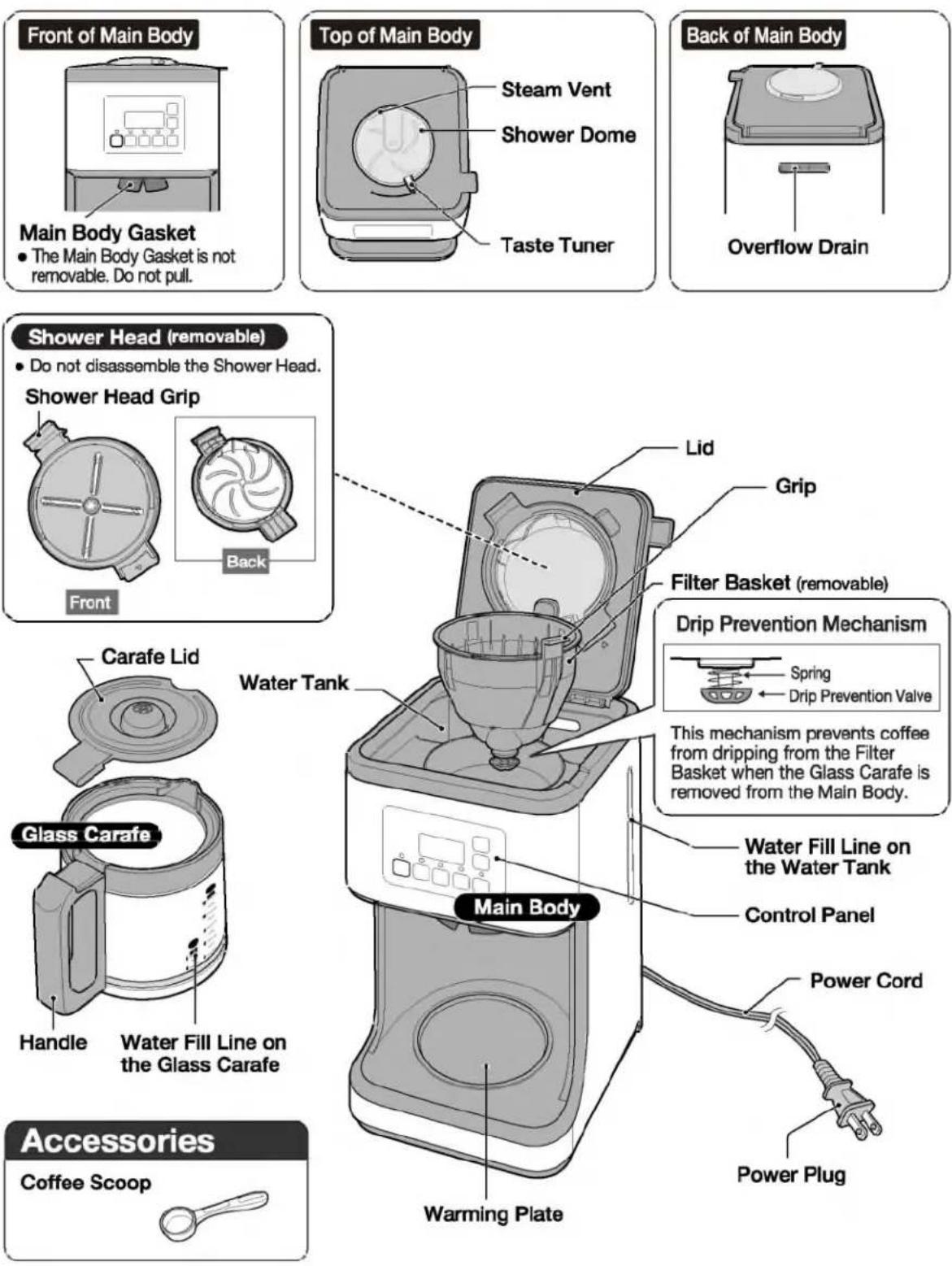
HOW TO REMOVE AND ATTACH EACH PART
- Please allow the product to cool down before removing or attaching its parts.
Filter Basket
How to Remove
① Open the Lid.
② Hold the Grip and remove the Filter Basket.
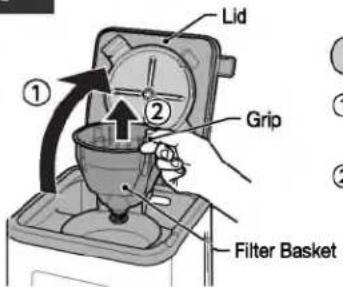
How to Attach
① Hold the Grip and attach the Filter Basket.
② Close the Lid.

Shower Head
How to Remove
Grasp the Shower Head Grip and remove in the direction of the arrow.

How to Attach
- Align part of the Shower Dome to part of the Shower Case.
① Align the ▽ marks on the Shower Head and the Lid.
② Press until it clicks into place.


natural_image
Mechanical component diagram showing a key inserted into a housing (no text or symbols)Carafe Lid
How to Remove
Lift the Carafe Lid to remove it from the Glass Carafe.

How to Attach
① Align part
② Press until it clicks into place.

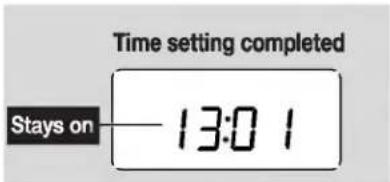
e.g.: If the current time is 13:01 but displays 12:58.
1 Insert the Power Plug into an electrical outlet.
The time appears on the Display.
- The clock is displayed in 24-hour (military) time.
2 Press the TIME SETTING button (HR / MIN) to set the current time on the Display.
The clock will start to blink.

- Press and hold MIN to quickly adjust in 10-minute increments.
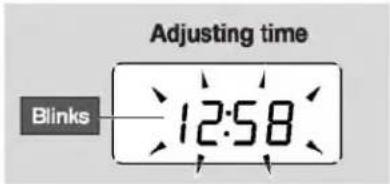
3 The time display will stop blinking after 5 seconds, indicating the time setting is completed.
If the clock still does not show the current time, repeat Step 2 to readjust the time.
- If the display shows a blinking "7:00" when the Power Plug is inserted, the built-in lithium battery is running out. You may continue using the product and readjust the time each time the Power Plug is plugged in. (To replace the battery → P.18)
SOUND SIGNALS AND HOW TO CHANGE THEM
This product is equipped with a Sound Signal function, which will inform you when brewing has completed. The signal may be switched between Beep and Mute (the default setting is Beep).
How to Change:
① Insert the Power Plug into an electrical outlet.
② Hold the 1-42 button for more than 3 seconds.
③ The setting is completed when a beep is heard.
- The selected Sound Signal is stored and will remain even if the product is unplugged.
Sound Signal Options:

flowchart
graph TD
    A["Beep"] --> B{Hold the 1-4 button for more than 3 seconds.}
    B --> C["Mute"]
    C --> D{Long beep}
    D --> B
    E["Short beep"] --> A
    style A fill:#ccc,stroke:#333
    style B fill:#fff,stroke:#333
    style C fill:#ccc,stroke:#333
    style D fill:#fff,stroke:#333
1 Fill the Water Tank with water.
① Fill the Glass Carafe with the desired amount of water using the Water Fill Lines.
*If brewing 1-3 cups of coffee, use a measuring cup (not provided) to measure the water.
② Open the Lid and pour the water from ① to the Water Tank.
- When opening and closing the Lid, make sure that the Main Body does not tip over.
- Make sure that the Shower Head is attached to the Main Body before brewing.
Be sure to follow the instructions below to prevent a malfunction, water leak, or overflowing of coffee.
- Do not add water above "12" of the Water Fill Line on the Water Tank.
- Do not refill the Water Tank while coffee is brewing.
- Do not fill the Water Tank with hot water.
- If too much water is added to the Water Tank, water will overflow from the Overflow Drain at the back of the Main Body.
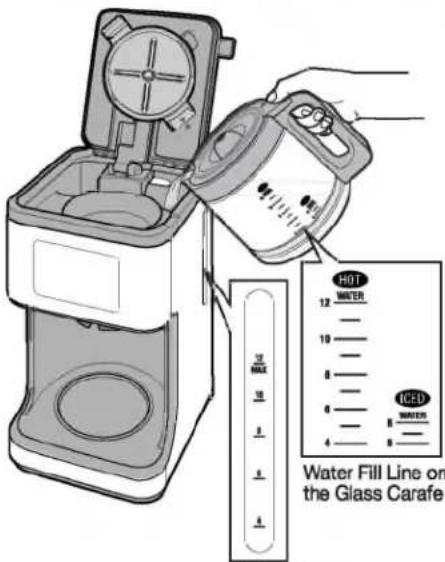
Water Fill Line on the Water Tank
Water Amount Guidelines for 1-3 Cups
| Cups Brewed | 1 | 2 | 3 | |
| Water | Approx. oz. | 4.6 | 10.5 | 15.7 |
| Approx. mL | 135 | 310 | 465 | |
Precautions When Using Hard Water:
- Do not use water with 400ppm or more total dissolved solids.
Minerals may build up inside the pipes of the product and hinder the brewing performance. For example, brewing may take longer or water may not drip properly.
• We recommend using water with 200ppm or less total dissolved solids.
- If brewing takes longer than usual, please clean the product using citric acid. P.17
2 Attach the Filter Basket and place a paper filter.
① Attach the Filter Basket to the Main Body.
② Place a paper filter in the Filter Basket.
- Do not use the product without a paper filter.
- Be sure to place the paper filter properly as described below. Failure to do so could cause coffee grounds to overflow from the filter.
- Fold the filter as shown in the illustration below.
- Adjust the width of the fold so that the filter does not protrude from the Filter Basket.
- Do not use 2 or more filters at the same time.

■ How to Fold the Paper Filter

flowchart
graph LR
    A["① Fold the bottom"] --> B["② Fold the side"]
    B --> C["③ Open up the filter"]
    D["Fold to front"] --> E["Fold to opposite side of ①"]
Please use a No. 4 cone coffee filter.
3 Add ground coffee.
① Measure ground coffee using the provided Coffee Scoop, place in the paper filter and level the grounds.
- Use only ground coffee in the paper filter. Using anything other than ground coffee may damage the product.
② Close the Lid.
- Coffee Scoop
1 leveled scoop of coffee grounds approx. 0.42 oz. / 12g


Paper filter
■ Hot Coffee Brewing Guidelines
| Cups Brewed | 1 | 2 | 3 | 4 | 5 | 6 | 7 | 8 | 9 | 10 | 11 | 12 | |
| Ground Coffee | In Leveled Coffee Scoop | 0.5 | 1 | 1.5 | 2 | 2.5 | 3 | 3.5 | 4 | 4.5 | 5 | 5.5 | 6 |
| Weight (Approx. oz.) | 0.21 | 0.42 | 0.63 | 0.85 | 1.06 | 1.27 | 1.48 | 1.69 | 1.90 | 2.12 | 2.33 | 2.54 | |
| Weight (Approx. g) | 6 | 12 | 18 | 24 | 30 | 36 | 42 | 48 | 54 | 60 | 66 | 72 | |
- Do not use finely-ground coffee.
Depending on the type of ground coffee being used (such as decaf or light roast), coffee grounds may overflow from the paper filter.
If this happens, reduce the number of cups to be brewed.
- Do not brew more than 6 leveled Coffee Scoops (approx. 2.54 oz. / 72g) of ground coffee.
(Doing so may cause the coffee to overflow and cause scalding.) - When brewing just a few cups of coffee, the coffee may turn out weaker than expected. Increase the
amount of ground coffee in accordance with your preferred strength. - The number of cups brewed may vary depending on the amount, type, and fineness of the ground coffee that you use.
4 Set the strength using the Taste Tuner.
Slide the Taste Tuner left or right to select the desired strength.
- Do not slide the Taste Tuner while brewing coffee.
(Doing so may cause burns.)
• BOLD is recommended for brewing 1-3 cups of coffee.
(The coffee tends to be weaker when brewed with a small amount of ground coffee.)

natural_image
Illustration of a device with a circular dial and directional arrow, no text or symbols present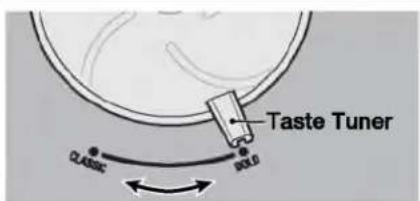
The strength of the coffee can be adjusted in a continuous manner from Classic to Bold.
CLASSIC: light and smooth flavor
BOLD: dynamic and bold flavor
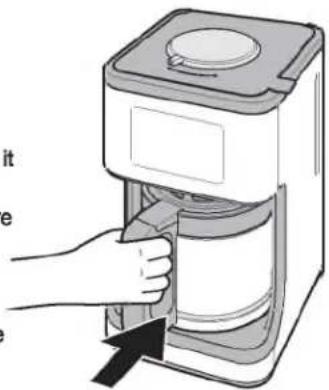
5 Set the Glass Carafe in the Main Body.
Place the Glass Carafe on the Warming Plate.
- Do not scrape the Glass Carafe against the Warming Plate when you place it on the Warming Plate.
- Using the product when the Warming Plate is dirty or when there is moisture on the Warming Plate may cause the coating to peel off or become discolored.
- Be sure to place the Carafe Lid on the Glass Carafe. P.7
- When putting the Glass Carafe in place, do not apply excessive force to the Drip Prevention Valve.
natural_image
Illustration of a hand using a digital water dispenser to open the lid (no text or symbols visible)6 Insert the Power Plug into an electrical outlet, and start brewing.
- Do not use or place the product on wet surfaces. (Doing so may cause electric shock.)
REGULAR course
- Use to brew 5-12 cups of coffee.
Press the BREW/OFF button.
The BREW light will turn on and brewing will begin.

ICED COFFEE course
- Use to brew Iced Coffee. See P.14 for details.
1-4 CUPS course
- Use to brew 1-4 cups of coffee.
① Press the 1-4 CUPS button.
The 1-4 CUPS light will blink.

flowchart
graph TD
    A["BREW/OFF"] --> B["1-4"]
    B --> C["ICED COFFEE"]
    C --> D["CLEAN"]
    E["Short beep"] --> B
② Press the BREW/OFF button.
The BREW light and 1-4 CUPS light will turn on and brewing will begin.
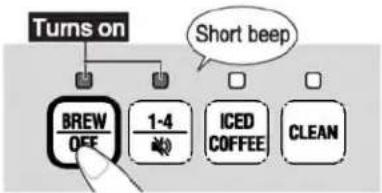
flowchart
graph TD
    A["Turns on"] --> B["BREW/OFF"]
    A --> C["1-4"]
    A --> D["ICED COFFEE"]
    A --> E["CLEAN"]
    F["Short beep"] --> A
- To change the course before brewing begins, press the selected course button again to un-select it or press the button of the desired course.
• The course cannot be changed after brewing begins.
Never open the Lid while brewing.
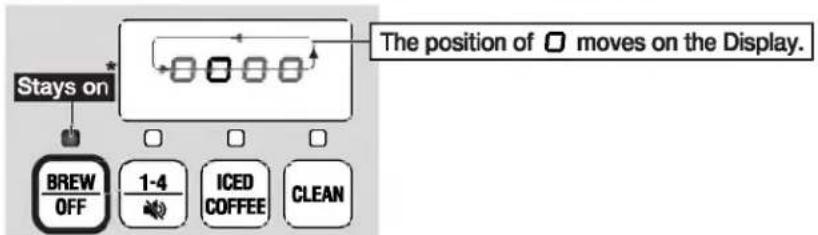
The Display will look like the illustration below during brewing.
flowchart
graph TD
    A["Stays on"] --> B["BREW OFF"]
    B --> C["1-4 🎯"]
    C --> D["ICED COFFEE"]
    D --> E["CLEAN"]
    F["The position of □ moves on the Display."] --> G["→ Box with arrows"]
*When using the 1-4 CUPS course, the 1-4 CUPS light and the BREW light will stay on.
■ Estimated Time Until Completion:
(Based on water and room temperature of 68°F / 20°C, BOLD strength setting, and REGULAR course)
| Cups Brewed | 1* | 2* | 3* | 4* | 5 | 6 | 7 | 8 | 9 | 10 | 11 | 12 |
| Estimated Time (Approx. minutes) | 4.5 | 6.5 | 7 | 8 | 8.5 | 9.5 | 10.5 | 11 | 12 | 12.5 | 13.5 | 14.5 |
*When brewing 1-4 cups of coffee, use the 1-4 CUPS course.
- The estimated time until completion may vary depending on the amount of water, room temperature and the amount of ground coffee.
To Cancel Brewing
① Hold the BREW/OFF button for more than 1 second.
② Make sure the Main Body has cooled down and coffee is no longer dripping from the Filter Basket and then remove the Glass Carafe and the Filter Basket.
③ if there is any water left in the Water Tank, place the Glass Carafe (with Carafe Lid) and Filter Basket in the product and press the BREW/OFF button to run the water through the machine without brewing any coffee.
- Do not discard water by turning the Main Body upside down. (Doing so may cause injury or burns.)
7 Beeps will sound and brewing will be completed.
① When brewing is completed, beeps will sound.
The Display will show the time elapsed since brewing completion in 1-minute intervals.
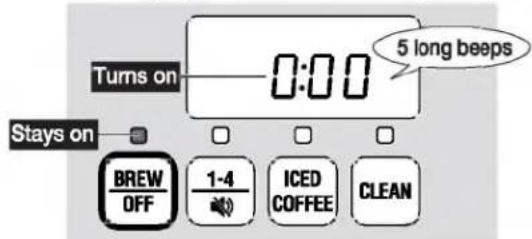
- The product will automatically switch to KEEP WARM (unless using the iCED COFFEE course).
*When operating the 1-4 CUPS course, the 1-4 CUPS light will turn off.
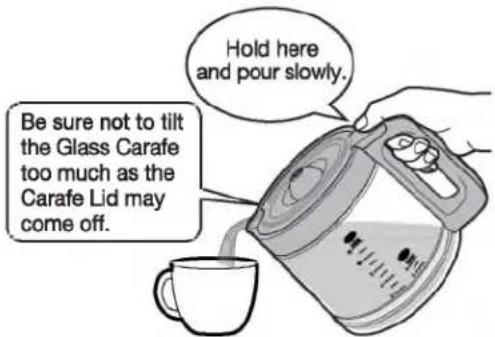
② Remove the Glass Carafe and pour coffee into a cup.
- Do not scrape the Glass Carafe against the Warming Plate when you remove it from the Plate.
If You Like Your Coffee Hot
- Preheat cups with hot water before serving.
- Leave the Glass Carafe on the Warming Plate after brewing completes.
When Keeping the Coffee Warm
- Keep the Carafe Lid on the Glass Carafe.
-
The aroma and flavor of the coffee will deteriorate if it is left in the Glass Carafe for a long time.
When the remaining coffee is low, try to limit the length of Keep Warm to 15 minutes max. -
KEEP WARM will stop automatically after about 2 hours.
(3 long beeps will sound, switch to current time display, and the light will turn off.) - To cancel KEEP WARM, hold the BREW/OFF button for more than 1 second.
8 After use
Hold the Power Plug and pull it out of the electrical outlet. (The product will beep when it is unplugged.)

After Use
Allow the Main Body to cool completely, open the Lid, remove the Filter Basket from the Main Body, and remove the used paper filter.
- Exercise care not to burn yourself as the paper filter, which will be saturated with hot water, will be hot.
- Wipe any water droplets inside of the Lid and Main Body.
■ When Brewing Coffee Consecutively
- To brew your next pot of coffee, allow the Main Body to cool at least 5 minutes, and then follow "HOW TO USE" from step 1. → P.9
- Do not add water or move the Main Body while it is still hot. Steam or scalding water may suddenly emit from the Steam Vent, causing burns.
BREWING ICED COFFEE

Required items
◆ Ground coffee for iced coffee
Ice cubes
- 6 cups is the minimum amount of iced coffee that can be made.
■ Iced Coffee Brewing Guidelines and Estimated Time Until Completion
| Cups Brewed | 6 | 7 | 8 | |
| Ground Coffee | In Leveled Coffee Scoop | 4.5 | 5 | 5.5 |
| Weight (Approx. oz.) | 1.90 | 2.12 | 2.33 | |
| Weight (Approx. g) | 54 | 60 | 66 | |
| Estimated Time (Approx. minutes) | 8 | 8.5 | 9 | |
(Based on water and room temperature of 68°F / 20°C, BOLD strength setting)
- The estimated time until completion may vary depending on the amount of water, room temperature and the amount of ground coffee.
How to Brew Iced Coffee
1 Follow the instructions from step 1 to step 5 under "HOW TO USE" to brew the coffee. → P.9-11
- Add water to the "ICED" line on the Glass Carafe.
- Do not put ice cubes in the Glass Carafe before brewing coffee. (Doing so may cause coffee to overflow and cause scalding.)
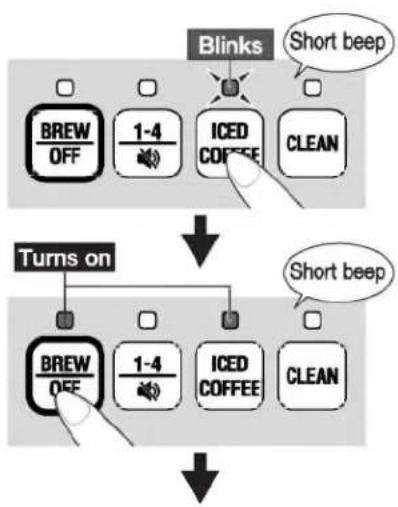
2 Press the ICED COFFEE button, then the BREW/OFF button to start brewing.
3 Beeps will sound when brewing is complete. Carefully take the Glass Carafe out of the Main Body.
4 Remove the Carafe Lid, put ice cubes in the Glass Carafe, and stir the coffee to cool it down.
■ Ice Amount Guidelines
| Cups Brewed | 6 | 7 | 8 | |
| Amount of ice | Approx. number of ice cubes* | 24 | 28 | 32 |
| Weight (Approx. oz.) | 12.7 | 14.8 | 16.9 | |
| Weight (Approx. g) | 360 | 420 | 480 | |
*Based on ice cubes measuring approx. 1 inch / 2.5 cm on all sides. The number of ice cubes to put in the Glass Carafe varies depending on the size of the cubes. Make adjustments in accordance with your preferences.
5 Place the Carafe Lid on the Glass Carafe and pour the coffee into a glass.
- Place ice cubes in a glass as you like and pour the coffee over it.
flowchart
graph TD
    A["Blinks"] --> B["Short beep"]
    C["Turns on"] --> D["Short beep"]
    E["BREW/OFF"] --> F["1-4"]
    F --> G["ICED COFFEE"]
    G --> H["CLEAN"]

HOW TO SET THE 24-HOUR BREW TIMER
The Timer allows you to delay the time to begin brewing.
- The Timer can be set from the current time until 24 hours in advance.
- Do not set the Timer too far in advance when the room temperature is high, such as during summer. Doing so may cause the water quality or the aroma and flavor of the coffee to deteriorate.
- Press the TIME SETTING button ( [IR] / [MIN]) to check the current time while using the Timer.
• The Timer cannot be set when using the CITRIC ACID CLEANING course.
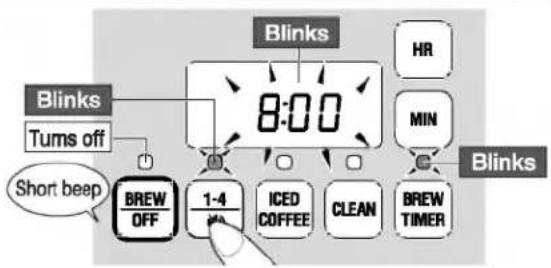
e.g.: To start brewing at 8:00 using the 1-4 CUPS course
- To cancel operation, press the BREW TIMER button.
(The lights will turn off, and the display will return to the current time.)
1 Prepare the product for brewing and press the BREW TIMER button.
The clock* will blink, and the BREW TIMER light and BREW light will blink.
*The display will show the last Timer setting used. The factory default is "7:00".

2 Press the TIME SETTING button (HR / MIN) to select the time to begin brewing.

- Press and hold MIN to quickly adjust in 10-minute increments.

3 Select the course.
(If using the 1-4 CUPS or ICED COFFEE course)
The light for the selected course will blink, and BREW light will turn off.
flowchart
graph TD
    A["8:00"] --> B["Blinks"]
    B --> C["Tums off"]
    C --> D["BREAD/OFF"]
    D --> E["1-4"]
    E --> F["ICED COFFEE"]
    F --> G["CLEAN"]
    G --> H["BREW TIMER"]
    H --> I["Blinks"]
    I --> J["HR"]
    I --> K["MIN"]
    J --> L["Blinks"]
    K --> M["Blinks"]
4 Press the BREW OFF button.
The BREW TIMER light, BREW light, and light for the selected course will turn on, and the Timer setting is complete.
The Display will indicate the time at which brewing will begin.
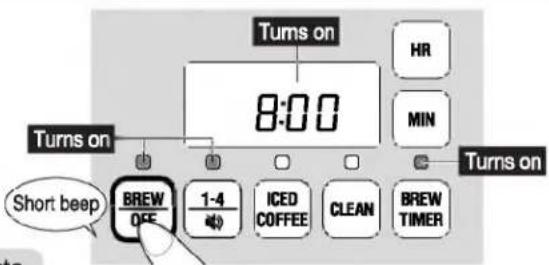
- The BREW/OFF button must be pressed to complete the timer setting
To Cancel the Timer Setting
- Hold the BREW/OFF button for more than 1 second. (The lights will turn off, and the product will return to the current time display.)
CLEANING AND MAINTENANCE
Always unplug the product from the electrical
outlet and allow the Main Body and Glass
Carafe to cool completely before cleaning.
- Be sure to clean the product after every use.
- Do not splash the Main Body, Power Cord and Power Plug with water or immerse them in water. Doing so may cause electric shock or malfunction.
- Do not use a dishwasher or a dish-dryer. Doing so may cause deformation.
- Do not use boiling water to wash the product or parts as they may deform or break.
- Do not use the following:
- Detergents other than mild kitchen detergent, such as thinner and bleach. Doing so may cause discoloration, cracks, degradation or corrosion.
- Polishing powder, nylon brushes, scrub brushes, anything made with metal, eraser pads, hard nylon sponges and abrasive cleaners. Doing so may cause corrosion.
- When using chemically treated cloths, do not rub too hard or leave them on the product for a long time as the surface of the product may become damaged from chemical reactions.
- If you plan not to use the product for an extended period of time, allow it to dry completely to avoid unpleasant odors and store it in a plastic bag or other suitable container.
Main Body, Warming Plate
① Wipe the Main Body and Warming Plate clean with a soft cloth immersed in diluted mild kitchen detergent and wrung well.
② Wipe with a well-wrung soft damp cloth.
③ Wipe dry with a soft dry cloth.
• Exercise care concerning burns when discarding coffee.
- Wipe any coffee droplets or grounds remaining on the Warming Plate or the Main Body (in the vicinity of the Warming Plate).
- Wipe any coffee grounds remaining between the Main Body and the Lid so they do not fall into the Water Tank.
• The Main Body Gasket is not removable.

Glass Carafe, Shower Head
① Wash with a sponge or soft material with diluted mild kitchen detergent.
② Rinse with water.
③ Wipe dry with a soft dry cloth.
- Be sure to fully drain water from the Shower Head. Water may remain inside the part.
- Do not disassemble the Shower Head.
- Do not drop the Glass Carafe or hit it against a hard surface or object. It may break the glass and cause injury.
Filter Basket
① Wash the Filter Basket clean with a sponge or soft material with diluted mild kitchen detergent.
① Rinse with water.
③ Pour water in the Filter Basket, press the Drip Prevention Valve two or three times and wash.
④ Wipe dry with a soft dry cloth.
- If coffee grounds clog the Drip Prevention Valve, it may not seal properly and coffee may leak. Be sure to wash it after each use.
- Be sure to fully drain water from the Filter Basket. Otherwise, this water may drip into your coffee during brewing.
- Exercise care as pulling or forcibly twisting the Drip Prevention Valve may cause it to come off.
- Do not immerse the Filter Basket in water. Doing so may cause water to collect in spaces inside the part, resulting in rust or causing its shape to deform.
- Do not disassemble the Drip Prevention Valve. If the Drip Prevention Valve Gasket comes off, insert the Drip Prevention Valve with Spring into the Filter Basket. Attach the Drip Prevention Valve Gasket to the Groove while pressing up on the Drip Prevention Valve to hold in place.


- Be sure that the Drip Prevention Valve Gasket is attached securely.
Water may leak if it is deformed or is loose.
| √ | Attached correctly | |
| × | Water may leak from gaps | Loose |
Power Cord and Power Plug
Wipe with a soft dry cloth.
If hot water does not dispense smoothly, clean using citric acid.
Minerals contained in water may build up inside the pipes and other parts with use.
If minerals accumulate, hot water may not dispense smoothly, the amount of coffee brewed may be reduced, or hot water may leak from gaps in the Main Body.
- Remove any mineral buildup by cleaning with citric acid. (See "How to Perform Citric Acid Cleaning" below.)
- Perform citric acid cleaning about every 4 weeks of usage. The cleaning interval depends on your water quality. If your area has water that's high in mineral content or if you use mineral water, the product will be more susceptible to mineral buildup.
How to Perform Citric Acid Cleaning
① Put 1 package of the Citric Acid Cleaner CD-K03E-JU in the Glass Carafe and add a cup of warm water to dissolve.
② Add water to the "HOT 12" Water Fill Line on the Glass Carafe, mix thoroughly, and pour the resulting citric acid solution into the Water Tank.
③ Attach the Filter Basket and Shower Head to the Main Body (without any paper filter) and place the Glass Carafe (with Carafe Lid) onto the Warming Plate.
④ Press the CLEAN button. (The CLEAN light will blink.)
⑤ Press the BREW/OFF button to initiate the citric acid cleaning cycle.


⑥ When the cleaning cycle is completed, press the BREW/OFF button. (The BREW light will turn off, and the product will return to the current time display.)
⑦ If the citric acid solution remains in the Water Tank, allow the Main Body to cool for at least 5 minutes, then repeat ⑤ and ⑥ until the Water Tank is empty.
⑧ Pour the citric acid solution that's been run through the product into a different container, cool it, and remove any white crystals or other matter in the solution.
⑨ Allow the Main Body to cool for at least 5 minutes.
⑲ Pour the citric acid solution from ⑧ back into the Water Tank and repeat ④ through ⑨ until the solution no longer contains white crystals or other matter.
⑪ After allowing the Main Body and Warming Plate to cool sufficiently, rinse the Glass Carafe and then run water through the product several times to eliminate any citric acid odor. (When brewing more than one pot of water, wait at least 5 minutes after the BREW light turns off before starting the next brewing cycle.)
⑫ Press the BREW/OFF button and unplug the Power Plug from the electrical outlet.
- To stop the citric acid cleaning cycle before it finishes, hold the BREW/OFF button for more than 1 second.
If cleaning was cancelled before it finished, restart the cleaning cycle from step ①.
- In order to prevent gas bubbles and bubbling-over, the Citric Acid Cleaner for Electric Water Boilers (CD-K03E-JU) is recommended for cleaning. (Available separately) → P.19
Citric acid (100%) is used as a food additive and is harmless from a food sanitation standpoint, but do not consume it.
- If hot water does not dispense smoothly, perform citric acid cleaning again.
TROUBLESHOOTING GUIDE
Please check the following before calling for service.
| Condition | Cause | Remedy |
| The product does not operate even when the button is pressed. | is the Power Plug inserted correctly? | Insert the Power Plug into the electrical outlet. |
| Hot water does not dispense. Hot water does not dispense smoothly. | Is the Water Tank filled with water? | Pour water into the Water Tank. → P.9 |
| When minerals accumulate inside the pipes and other parts, hot water may not dispense smoothly. In that case, perform citric acid cleaning. → P.17 | ||
| The coffee is not hot (the heating plate is not keeping coffee hot properly). | Has the coffee been left in the Glass Carafe for a long time? | KEEP WARM will automatically stop after about 2 hours. |
| When the Glass Carafe contains small amounts of coffee or the room temperature is low, the temperature of the coffee will drop. | ||
| Coffee or coffee grounds overflow from the filter. | Has the paper filter been placed properly in the Filter Basket? | Place the paper filter properly in the Filter Basket. → P.9 |
| Did you add more than 6 scoops of coffee grounds? | Do not add more than 6 scoops of coffee grounds. → P.10 | |
| Is the Drip Prevention Valve clogged with coffee grounds? | Clean the Filter Basket. → P.16 | |
| Has the Filter Basket been placed properly in the Main Body? | Place the Filter Basket properly in the Main Body. → P.7 | |
| Is finely-ground coffee being used? | Please do not use finely-ground coffee. | |
| Are you using two or more layers of paper filter? | Use just one paper filter. | |
| Depending on the type of coffee or paper filter being used, coffee or coffee grounds may overflow from the filter. In that case, reduce the amount of coffee (number of cups) to be brewed. | ||
| There is water left in the Water Tank. | When minerals accumulate inside the pipes and other parts, hot water may not dispense smoothly and water may be left in the Water Tank. In that case, perform citric acid cleaning. → P.17 | |
| A noise is heard before or after brewing is complete. | The hissing sound from steam being forced out may be heard before and after brewing is complete. | |
| "7:00" is blinking on the Display when the Power Plug is inserted. | The built-in lithium battery is running out. Readjust the clock to use the product in a normal manner. To replace the lithium battery, contact the store where you purchased the product or Zojirushi Customer Service. (There will be a charge for the service.) | |
| Beeps sound, the lights turn on, and "HH" appears on the Display. | Did you try to brew coffee consecutively without allowing the Main Body to cool? | Press the BREW/OFF button and wait until the product cools down. Fill with water and press the BREW/OFF button. |
| Brewing may continue during KEEP WARM. | Minerals have accumulated inside the pipes and other parts. Perform citric acid cleaning. → P.17 | |
| E2 E3 E4 or ES is displayed. | Indicates malfunction. Please contact Zojirushi Customer Service. | |
| The Power Cord becomes hot. | The Power Cord may become hot while the product is turned on. This is not a malfunction. | |
| When performing cleaning or maintenance. | Unplug the Power Plug from the electrical outlet and allow the Main Body to cool for at least 5 minutes first. | |
REPLACEMENT PARTS
● Replacement parts may be available for an additional charge. Please replace damaged parts only with new parts.
- When replacing parts, please record the model number and part name beforehand. Parts can be purchased through Zojirushi.com, by contacting Zojirushi Customer Service, or the store where you purchased the product.
Zojirushi Customer Service
1-800-733-6270
www.zojirushi.com
| Parts Name | Parts Number |
| Glass Carafe | JUGECESC |
| Coffee Scoop | BX194029L |
| Citric Acid Cleaner for Electric Water Boilers (1 oz. / 30g × 4 packets) | CD-K03E-JU |
● The Glass Carafe (sold as a replacement part) does not include the Carafe Lid.
SPECIFICATIONS
| Model No. | EC-ESC120 | |
| Rating | AC 120 V 60 Hz | |
| Electric Consumption | 1050 W | |
| Capacity | Max. 61 oz. (1.8 L) | |
| Coffee Brewing System | Automatic Drip | |
| Length of the Power Cord | 1' 11" (0.6 m) | |
| External Dimensions | (approx. inches) | 8-1/8(W) × 8-3/4(D) × 15-1/4(H) |
| (approx. cm) | 20.5 (W) × 22 (D) × 38.5 (H) | |
| Weight | Approx. 7 lbs. (3.0 kg) | |
- External dimensions are measured without the Handle of the Glass Carafe.
- In certain locations (at high elevations, in severely cold climates, etc.), the product may not perform as specified. Avoid using the product in such areas or in other extreme conditions.
- This product is not suitable for use in countries or regions with different power supply voltages or frequencies.
QUICK START GUIDE

■ Hot Coffee Brewing Guidelines
(See P.9 and 10)
| Cups Brewed | 1 | 2 | 3 | 4 | 5 | 6 | 7 | 8 | 9 | 10 | 11 | 12 | |
| Water | Approx. mL | 135 | 310 | 465 | Measure using the Water Fill Lines on the Glass Carafe. | ||||||||
| Ground Coffee | In Leveled Coffee Scoop | 0.5 | 1 | 1.5 | 2 | 2.5 | 3 | 3.5 | 4 | 4.5 | 5 | 5.5 | 6 |
www.zojirushi.com
FOR CALIFORNIA USA ONLY
This product contains a CR Coin Lithium Battery which contains Perchlorate Material - special handling may apply. See www.dtsc.ca.gov/hazardouswaste/perchlorate
EC-ESC ⒸB&A
- INDEX
- SAVE THESE INSTRUCTIONS
- THIS APPLIANCE IS FOR HOUSEHOLD USE ONLY.
- IMPORTANT SAFEGUARDS (cont.)
- WARNINGS
- CAUTIONS
- IMPORTANT
- BEFORE USE
- PARTS NAMES
- PARTS NAMES (cont.)
- HOW TO REMOVE AND ATTACH EACH PART
- Filter Basket
- How to Remove
- How to Attach
- Shower Head
- Carafe Lid
- Insert the Power Plug into an electrical outlet.
- Press the TIME SETTING button (HR / MIN) to set the current time on the Display.
- The time display will stop blinking after 5 seconds, indicating the time setting is completed.
- SOUND SIGNALS AND HOW TO CHANGE THEM
- How to Change:
- Sound Signal Options:
- Fill the Water Tank with water.
- Precautions When Using Hard Water:
- Attach the Filter Basket and place a paper filter.
- ■ How to Fold the Paper Filter
- Add ground coffee.
- ■ Hot Coffee Brewing Guidelines
- Set the strength using the Taste Tuner.
- Set the Glass Carafe in the Main Body.
- Insert the Power Plug into an electrical outlet, and start brewing.
- REGULAR course
- ICED COFFEE course
- 1-4 CUPS course
- ■ Estimated Time Until Completion:
- To Cancel Brewing
- Beeps will sound and brewing will be completed.
- After use
- BREWING ICED COFFEE
- Required items
- ■ Iced Coffee Brewing Guidelines and Estimated Time Until Completion
- How to Brew Iced Coffee
- HOW TO SET THE 24-HOUR BREW TIMER
- e.g.: To start brewing at 8:00 using the 1-4 CUPS course
- Prepare the product for brewing and press the BREW TIMER button.
- Press the TIME SETTING button (HR / MIN) to select the time to begin brewing.
- Select the course.
- Press the BREW OFF button.
- To Cancel the Timer Setting
- CLEANING AND MAINTENANCE
- Main Body, Warming Plate
- Glass Carafe, Shower Head
- Power Cord and Power Plug
- If hot water does not dispense smoothly, clean using citric acid.
- How to Perform Citric Acid Cleaning
- TROUBLESHOOTING GUIDE
- REPLACEMENT PARTS
- QUICK START GUIDE
- FOR CALIFORNIA USA ONLY
Brand : Zojirushi
Model : Dome Brew Programmable EC-ESC120
Category : Coffee maker