
Dash - Segway Hover-1 - Free user manual and instructions
Find the device manual for free Dash Hover-1 in PDF.


| Product Type | Self-Balancing Hoverboard |
| Brand | Hover-1 |
| Model | Dash |
| Dimensions | Approx. 24 x 8 x 7 inches |
| Weight | Approx. 22 lbs |
| Maximum Rider Weight | 220 lbs |
| Recommended Age | 8 years and up |
| Battery Type | Lithium-ion Rechargeable |
| Battery Charging Time | 4-5 hours |
| Maximum Speed | 7 mph |
| Range per Charge | Up to 7 miles |
| Tire Type | Solid Rubber, Puncture-Proof |
| Motor | Dual Hub Motors |
| Power Output | 250W each motor |
| Main Functions | Forward, Reverse, Turn, Self-Balancing |
| Lighting | LED Headlights and Taillights |
| Safety Features | UL 2272 Certified, Overheating Protection |
| Maintenance | Keep dry, wipe with damp cloth, avoid water |
| Cleaning | Use a soft, dry cloth; do not use water or solvents |
| Spare Parts Availability | Battery, Charger, Foot Pads (contact manufacturer) |
| Repairability | Minimal user serviceable parts; contact Hover-1 support |
| Warranty | 90-day limited warranty |
Frequently Asked Questions - Dash Hover-1
User questions about Dash Hover-1
0 question about this device. Answer the ones you know or ask your own.
Ask a new question about this device
Download the instructions for your Segway in PDF format for free! Find your manual Dash - Hover-1 and take your electronic device back in hand. On this page are published all the documents necessary for the use of your device. Dash by Hover-1.
USER MANUAL Dash Hover-1
natural_image
Abstract blue geometric logo design with no text or symbolsHOVER-1™
ELECTRIC HOVERBOARD
DASH

natural_image
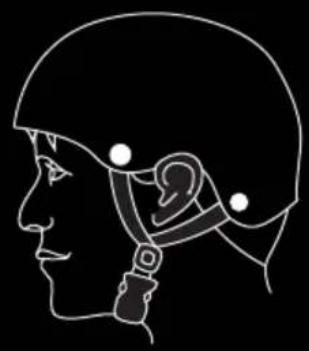
Exterior view of a black three-wheeled electric scooter with visible propeller and brand logo (no text or symbols on the device body)Always wear a properly fitted helmet that complies with CPSC or CE safety standards when you ride your hoverboard.
natural_image
Profile illustration of a human helmet and ear (no text or symbols)Correct Fit:
Make sure your helmet covers your forehead.

natural_image
Side profile line drawing of a human head with an ear and medical device (no text or symbols)Incorrect Fit:
Forehead is exposed and vulnerable to serious injury.
WARNING!
PLEASE READ THE OPERATION MANUAL THOROUGHLY.
Failure to follow the basic instructions and safety precautions listed in the operation manual can lead to damage to your Dash, other property damage, serious bodily injury, or death.
Thank you for purchasing the Hover-1 Dash hoverboard. Please read all instructions carefully before using it, and retain this manual for future reference.
- To avoid collisions, falls, and loss of control, please learn how to ride the Dash safely.
- You can learn how to ride the Dash by reading the operation manual and watching videos.
- Hover-1 can not be held liable for damage or injury caused by failure to understand and/or failure to follow the warnings and instructions in this manual.
ATTENTION
- Only use the supplied charger from Hover-1 with this hoverboard.
- The operating temperature range of the Dash is 32^ F - 104^ F ( 0^ C - 40^ C).
- The operating temperature range of the charger is 32^ F - 104^ F ( 0^ C - 40^ C).
- Do not ride on icy or slippery surfaces.
- Read the operation manual and warning labels before riding.
- Store the Dash in a dry, ventilated environment.
- When transporting the Dash, avoid violent crashes or impact.
LOW TEMPERATURE WARNING
Low temperatures will affect the lubrication of moving parts inside the Dash hoverboard, increasing internal resistance. Additionally, the discharge capacity and the capacity of the battery will be significantly decreased.
Use caution when riding the Dash in cold temperatures (below 40^ F/ 4^ C). Doing so may increase the risk of mechanical failures of the hoverboard, which may lead to damage to your Dash, other property damage, serious bodily injury, or death.
SAFETY INSTRUCTIONS
- Keep the Dash away from heat sources, direct sunlight, humidity, water, and any other liquids.
- Do not operate the Dash if it has been exposed to water, moisture, or any other liquids to prevent electric shock, explosion, and/or injury to yourself and damage to the Dash.
- Do not use the Dash if it has been dropped or damaged in any way.
- Repairs to electrical equipment should only be performed by the manufacturer. Improper repairs void the warranty and may place the user at serious risk.
- Do not puncture or harm the exterior surface of the product in any way.
- Keep the Dash free from dust, lint, etc.
- Do not use this Dash for anything other than its intended use or purpose. Doing so may damage the Dash or lead to property damage, injury, or death.
• This product is not a toy. Keep out of reach of children.
- Do not expose the batteries to excessive heat, such as direct sunlight or open flame.
- Do not allow hands, feet, hair, body parts, clothing, or similar articles to come in contact with moving parts, wheels, or the drivetrain while the Dash is running.
- Do not operate or allow others to operate the Dash until the user understands all instructions, warnings, and safety features described in this manual.
- Check with your doctor if you have a medical condition that could affect your ability to use the Dash.
- Persons with head, back, neck ailments, or prior surgeries to those areas of the body are not recommended to use the Dash.
- Do not operate if you are pregnant or have a heart condition.
- Persons with any mental or physical conditions that may make them susceptible to injury or impair their physical or mental capabilities to recognize, understand, and perform all of the safety instructions and assume the hazards inherent in operation should not use the Dash.

NOTE:
In this manual, the above symbol with the word "NOTE" indicates instructions or relevant facts the user should understand prior to using the device.

WARNING
In this manual, the above symbol with the word "WARNING" indicates a hazardous situation which, if not avoided, can cause serious injury or death.
SERIAL NUMBER
Please keep your serial number on file for warranty claims, as well as proof of purchase.

WARNING
Prolonged Exposure to UV rays, rain, and the elements may damage the enclosure materials. Store indoors when not in use.
WARNING – Risk of fire – No user serviceable parts.
INTRODUCTION
PACKAGE CONTENTS
• Hover-1 Dash Hoverboard
- Wall Charger
• Operation Manual
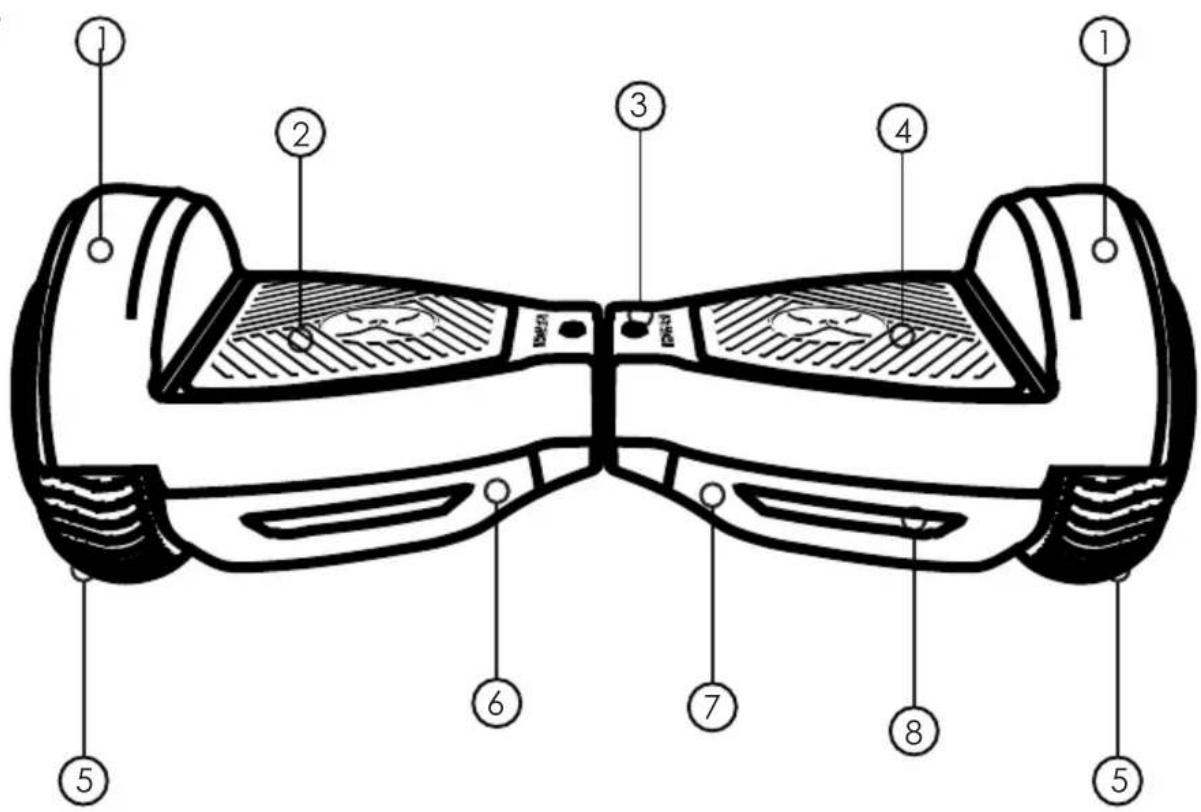
FEATURES/PARTS
- Fender 5. Tire
- Left Foot Mat 6. Charge Port
- Battery Indicator 7. Power Button
- Right Foot Mat 8. Protective Chassis Casing
OPERATING PRINCIPALS
The Dash uses digital electronic gyroscopes and acceleration sensors to control balance and motion, depending on the user's center of gravity. The Dash also uses a control system to operate the motors that are located within the wheels. The Dash has a built-in inertia dynamic stabilization system that can assist with balance when moving forward and backward, but not while turning.
TIP – To increase your stability, you must shift your weight during turns, especially when entering a turn at higher speeds.
SPECIFICATIONS
| Model: | Dash |
| Net Weight: | 11.1 lbs (5.1 kg) |
| Max Supported Weight: | 80 lbs (36.2 kg) |
| Min Supported Weight: | 44 lbs (20 kg) |
| Rated Power: | 150W X 2 (Dual motor) |
| Max Speed: | Up to 5 mph (8 km/h) |
| Max Range: | Up to 3 miles (1.9 km) |
| Max Incline Angle: | 5° |
| Minimum Turning Radius: | 0° |
| Charge Time: | Up to 5 hours |
| Battery Type: | Lithium-ion |
| Battery Voltage: | 22.2V |
| Battery Capacity: | 2Ah |
| Power Requirement: | AC 100V-240V, 50 Hz/60 Hz |
| Ground Clearance: | 1.15 Inches (2.9 cm) |
| Platform Height: | 4.72 Inches (12 cm) |
| Tire Size: | 6.3 inches (16 cm) |
| Tire Type: | Non-pneumatic solid tires |
| UL Certification: | UL2272 certified |
CONTROLS AND DISPLAY
PLEASE READ THE FOLLOWING INSTRUCTIONS CAREFULLY
Power On: Place your Dash flat on the ground and press the power button (located on the rear of your Dash) once. Check the LED indicator (located in the center of your Dash). The battery indicator should be lit white, indicating the Dash is powered on.
Power Off: Press the power button once.
MAT SENSORS
There are four sensors under the foot mats of your Dash.
When riding the hoverboard, you must ensure you are stepping on the foot mats. Do not step or stand on any other area of your hoverboard.
The hoverboard may vibrate or spin in one direction if weight and pressure are applied to only one foot mat.
BATTERY INDICATOR
The battery indicator is located in the middle of the Dash.
- A green LED Light indicates the hoverboard is fully charged.
- When the green LED light starts flashing, turns to red and starts beeping, it indicates that the hoverboard is on low battery.
- A green flashing LED light indicates the hoverboard is charging.
- A red LED light indicates the hoverboard is out of power and needs to be recharged.
RUNNING INDICATOR
When the operator triggers the foot mats, the running indicator LED will light up, which means that the hoverboard has entered the running state.
When the hoverboard encounters an error during operation, the running LED light will turn red (for more details, see "SAFETY ALERTS").
BEFORE RIDING
Practice using the Dash at slower speeds in a flat, open area until you are comfortable riding it.
PRE-RIDE CHECKLIST
Ensure that your Dash is in proper working order each time you ride. If a part of the hoverboard does not function correctly, please contact our Customer Support Center.
WARNING
Any Dash that does not work properly can cause you to lose control and fall. Do not ride a Dash with a part that is damaged. Replace the damaged part before riding.
- Ensure the battery is fully charged before riding your hoverboard.
- Please wear all appropriate safety gear before operating your hoverboard.
- Make sure to wear comfortable clothes and flat, closed-toe shoes when operating your hoverboard.
SAFETY PRECAUTIONS
Different localities and countries have different laws about riding electric transportation devices on public roads. You should check with local officials to ensure you are complying with these laws.
Hover-1 is not liable for tickets or violations given to riders who do not follow local laws and regulations.
- For your safety, always wear a helmet that meets CPSC or CE safety standards. In the event of an accident, a helmet can protect you from serious injury and in some cases, death.
- Obey all local traffic laws. Obey red and green lights, one-way streets, stop signs, pedestrian crosswalks, etc.
- Ride with traffic, not against it.
- Ride defensively; expect the unexpected.
- Give pedestrians the right-of-way.
- Do not ride too close to pedestrians. Alert them if you intend to pass them from behind.
- Slow down at all street intersections and look to the left and right before crossing.
- Your hoverboard is not equipped with reflectors. It is not recommended that you ride in low-visibility conditions.

WARNING
When you ride in low-visibility conditions such as fog, dusk, or at night, you might be difficult to see, which could lead to a collision. Wear bright, reflective clothing when riding in low-visibility conditions.
- Do not ride above your skill level. Ensure you have had enough practice with all functions and features of your Dash.
- Before stepping on your Dash, make sure it is placed flat on level ground, the power is on, and the running indicator light is green. Do not step on if the running indicator light is red.
- Do not try to open or modify your Dash. Doing so voids the manufacturer warranty and may cause your Dash to fail, resulting in injury or death.
- Do not use the Dash in a manner that would put people or property in danger.
- If riding near others, keep a safe distance to avoid collision.
- Be sure to keep your feet on the foot mats at all times. Moving your feet off your Dash while driving is dangerous and may cause the Dash to stop or veer sideways.
- Do not operate the Dash while under the influence of drugs or alcohol.
- Do not operate the Dash when you are restless or sleepy.
- Do not ride your Dash off of curbs, ramps, or in a manner similar to a skateboard. Do not attempt to operate in a skate park or empty pool. Misuse of your Dash voids the manufacturer warranty and may lead to injury or damage.
- Do not continuously spin in place, it will cause dizziness and increases your risk of injury.
- Do not abuse your Dash, doing so can damage your unit and cause failure to the operating system, which may lead to injury. Physical abuse, including dropping your Dash, voids the manufacturer warranty.
- Do not operate in or near puddles of water, mud, sand, stones, gravel, debris, or near rough and rugged terrain.
- The Dash can be used on paved surfaces that are flat and even. If you encounter uneven pavement, please lift your Dash over and past the obstruction.
- Do not ride in inclement weather: snow, rain, hail, sleet, on icy roads, or in extreme heat or cold.
- Bend your knees when riding on bumpy or uneven pavement to absorb the shocks and vibrations. This will help you keep your balance.
- If you are unsure if you can safely ride on a specific terrain, step off and carry your Dash. Always be on the side of caution.
- Do not attempt to ride over bumps or objects greater than 12 inch, even when prepared and bending your knees.
- Pay attention - look at where you are riding and be conscious of the road conditions, people, property, and objects around you.
- Do not operate the Dash in crowded areas.
- Operate your Dash with extreme caution when indoors, especially around people, property, and narrow spaces.
- Do not operate the Dash while talking, texting, or looking at your phone.
- Do not ride your Dash where it is not permitted.
- Do not ride your Dash near motor vehicles or on public roads.
- Do not travel up or down steep hills.
- The Dash is intended for use by a single individual, DO NOT attempt to operate the Dash with two or more people.
- Do not carry anything while riding the Dash.
- Individuals with lack of balance should not attempt to operate the Dash.
• The Dash is recommended for riders ages 8 and older.
- At higher speeds, always take longer stopping distances into consideration.
- Do not step forward off of your Dash.
- Do not attempt to jump on or off your Dash.
- Do not attempt any stunts or tricks with your Dash.
- Do not ride the Dash in dark or poorly lit areas.
- Do not ride the Dash off-road, near or over potholes, cracks, or uneven pavement or surfaces.
- Keep in mind that you are 4.72 inches (12 cm) taller when operating the Dash. Make sure to go through doorways safely.
- Do not turn sharply, especially at high speeds.
- Do not step on the fenders of the Dash.
- Avoid riding the Dash in unsafe places, including areas with flammable gas, steam, liquid, dust, or fibers that could cause fire or explosion accidents.
- Do not operate near swimming pools or other bodies of water.
WARNING
When a hoverboard and a kart attachment (sold separately) are being used together, it is NOT ADVISABLE to ride the combo uphill. If you attempt to ride on a steep incline above 5-10°, a safety mechanism built into the hoverboard will activate, which will shut down your hoverboard automatically. If this happens, dismount your hoverboard, place it on a flat surface, wait 2 minutes, then power your hoverboard on again.
WARNING
To reduce the risk of injury, adult supervision is required. Never use in roadways, near motor vehicles, on or near steep inclines or steps, swimming pools, or other bodies of water. Always wear shoes and never allow more than one rider at a time.
RIDING YOUR DASH
FAILURE TO FOLLOW ANY OF THE FOLLOWING SAFETY PRECAUTIONS MAY LEAD TO DAMAGE TO YOUR DASH, DAMAGE TO PROPERTY, VOID YOUR MANUFACTURER WARRANTY, AND MAY CAUSE SERIOUS BODILY INJURY OR DEATH.
Before using your Dash, be sure to familiarize yourself with the operating procedures.
OPERATING YOUR DASH
Make sure the Dash is fully charged before initial use. For charging instructions, please refer to "CHARGING YOUR DASH".
Stand directly behind your Dash and place one foot on the corresponding foot mat (as shown in the diagram below). Keep your weight on the foot that is still on the ground, otherwise the Dash may begin to move or vibrate, making it difficult to step on evenly with your other foot. When you are ready, shift your weight to the foot already placed on the Dash and step on with your second foot quickly and evenly.

natural_image
Diagram showing a hand gesture transforming from a double-hat headboard to a two-hat headboard, with no text or symbols present.
NOTES:
Stay relaxed and step on quickly, confidently, and evenly. Imagine climbing stairs, one foot, then the other. Look up once your feet are even. The hoverboard may vibrate or spin in one direction if weight and pressure are applied to only one foot mat. THIS IS NORMAL.
Find your center of gravity. If your weight is distributed correctly on the foot mats and your center of gravity is level, you should be able to stand on your Dash just as if you were standing on the ground.
On average, it takes 3-5 minutes just to get comfortable standing on
your Dash and maintaining proper balance. Having a spotter will help you feel more secure. The Dash is an incredibly sensitive device; it senses even the slightest bit of motion. Having any anxiety or reservation about stepping on may cause you to panic and trigger unwanted movement.
When you first begin using your Dash, the fastest way to move in your desired direction is to focus in that direction. You will notice that just thinking about which way you would like to go will shift your center of gravity, and that subtle movement will propel you in that direction.
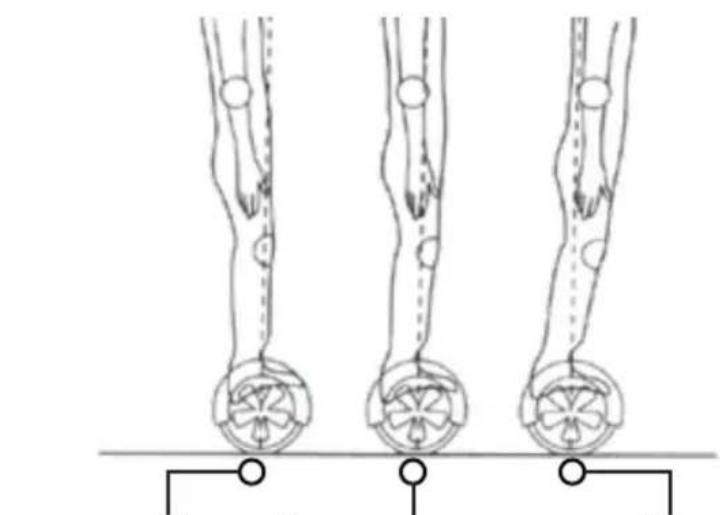
Your center of gravity determines which direction you move and your speed. Stand straight up to come to a complete stop. As shown in the diagram below, tilt your center of gravity in the direction you wish to move.
To turn, focus on the direction you wish to turn and stay relaxed. Apply pressure on your right foot to turn right and apply pressure on your left foot to turn left.
WARNING
To avoid danger, do not turn sharply or at high speeds. Do not turn or ride quickly along slopes, as it may cause injury.
As you get comfortable on the Dash, you will notice it becomes easier to maneuver. Remember at higher speeds, it is necessary to shift your weight when making turns to maintain your stability.
Bend your knees if you encounter bumps or uneven surfaces, then dismount and carry your hoverboard to a safe operating surface.
natural_image
Three identical line drawings of human legs with circular base elements, no text or symbols presentMove Backward Stop Move Forward

NOTES:
Try staying relaxed and focus on finding your center of gravity to maintain full control of your Dash.
Dismounting your hoverboard can be one of the easiest steps, yet when done incorrectly, may cause you to fall. To properly dismount from a stopped position, lift your dominant leg up and set your foot down on the ground behind you (STEP BACK). Then, step off the hoverboard with your other foot, as shown in the diagram below.

natural_image
Diagram showing a hand-drawn headlight device transforming into a pair of two headwheels with footprints below (no text or symbols)
WARNING
Make sure to lift your feet completely off the foot mat to clear the hoverboard when stepping back to dismount. Failure to do so may send the hoverboard into a tailspin.
SPEED AND WEIGHT LIMITATIONS
Speed and weight limits are set for your own safety. Please abide by the limits listed here in the manual.
• Maximum Speed: 5 mph
• Maximum Weight: 80 lbs
• Minimum Weight: 44 lbs

WARNING
Riding the Dash while exceeding the weight limit may increase the possibility of injury or product damage.

NOTES:
When max speed is reached, the Dash will beep to alert the user and tilt the rider slowly back to prevent injury.
OPERATING RANGE
The Dash can travel up to 3 miles on a fully charged battery under ideal conditions. The following are some of the major factors that will affect the operating range of your Dash.
- Terrain: Range is highest when riding on a smooth, flat surface. Riding uphill and/or on rough terrain will reduce range significantly.
• Weight: A lighter user will have a higher range than a heavier user. - Ambient Temperature: Please ride and store the Dash in recommended temperatures. This will preserve the range, battery life, and overall performance of your Dash.
- Speed and Riding Style: Maintaining a moderate and consistent speed while riding helps achieve the highest possible range. Traveling at high speeds for extended periods of time, frequent starts and stops, and idling will decrease overall range.
BALANCE & CALIBRATION
If your Dash is unbalanced, vibrating, or not turning properly, you can follow the steps below to calibrate it:
- First, place the Dash on flat ground or the floor. The foot mats should be even with each other and not tilted forward or backward. Make sure the charger is not plugged in and the hoverboard is turned off.
- Press and hold the power button for a total of 10-15 seconds. The hoverboard will turn on, and the battery indicator will light up.
• After the light flashes 5 times consecutively, you may release the power button. Turn the hoverboard off and then back on. Calibration is now complete.
SAFETY ALERTS
If a system error occurs or an improper operation is performed while riding the Dash, the device will alert the user in a variety of ways.
You will notice the running indicator light will turn red and you will hear a beep sound, alerting you to take precaution and cease operation. The hoverboard may stop suddenly.
The following are common occurrences that will produce safety alerts. These notices should not be ignored, and appropriate action should be taken to correct any improper operation, failure, or errors.
- Unsafe riding surfaces (uneven, too steep, unsafe, etc.)
- Battery voltage is too low.
• The Dash is still charging. - During operation, the platform self initiates tilt due to excess speed.
• The hoverboard is overheating, or the motor temperature is too high.
• The Dash has been rocking back and forth for over 30 seconds.
- If the system enters protection mode, the alarm indicator will light up and the hoverboard will vibrate. This typically occurs when the battery is about to run out of power.
- If the platform is tilted forward or backward more than 10 degrees, the Dash will power off and stop suddenly, possibly causing the rider to lose balance or fall off.
- If any tires are blocked, the Dash will stop after 10 seconds.
- When the battery level has depleted below protection mode, the Dash will power off and stop after 15 seconds.
- If a high discharge current is produced during use (such as driving up a steep slope for a long period of time), the Dash will power off and stop after 15 seconds.
WARNING
When the Dash turns off during a safety alert, all operation systems will halt. Do not attempt to ride the Dash when the system initiates a stop. Turn your Dash off and back on to unlock it from a safety lock.
CHARGING YOUR DASH
- Ensure that the charging port is clean and dry.
- Make sure that there is no dust, debris, or dirt inside the port.
- Plug the charger into a grounded wall outlet. The charging indicator light on the charger will be green.
- Connect the charging cable to the power supply (100V-240V; 50 Hz/60 Hz).
- Align and connect the 3-pin charging cable into the charging port of the Dash. DO NOT FORCE THE CHARGER INTO THE CHARGING PORT, AS THIS MAY CAUSE THE PRONGS TO BREAK OFF OR CAUSE PERMANENT DAMAGE TO THE CHARGING PORT.
- Once attached to the hoverboard, the charging indicator light on the charger should change to red, indicating that your device is now being charged.
- When the red light on your charger turns to green, then your hoverboard is fully charged. A full charge may take up to 5 hours. While charging, you will see a red light.
- If you charge the hoverboard while it is powered on, you will see a green flashing light on the hoverboard that indicates it is charging.
• After fully charging your Dash, unplug the charger from your Dash and the power outlet.
BATTERY CARE / MAINTENANCE
BATTERY SPECIFICATIONS
Battery Type: Rechargeable lithium-ion battery
Charge Time: Up to 5 hours
Voltage: 22.2V
Initial Capacity: 2Ah
BATTERY MAINTENANCE
- The lithium-ion battery is built into the Dash. Do not disassemble the Dash to remove the battery or attempt to separate it from the Dash.
- Only use the charger and charging cable supplied by Hover-1. Use of any other charger or cable may lead to damage to the hoverboard, overheating, and risk of fire. Use of any other charger or cable voids the manufacturer warranty.
- Do not connect or attach the Dash or the battery to a power supply plug or directly to a car's cigarette lighter.
- Do not place the Dash near a fire or leave it out in direct sunlight. Heating the Dash can break or ignite the battery inside the device.
- Do not continue charging the battery if it does not recharge within the specified charging time. Doing so may cause the battery to become hot, rupture, or ignite.
• To preserve natural resources, please recycle or dispose of batteries properly. This product contains lithium-ion batteries. Local, state, or federal laws may prohibit disposal of lithium-ion batteries in ordinary trash. Consult your local waste authority for information regarding available recycling and/or disposal options.
- Do not attempt to modify, change, or replace your battery.
WARNING
Failure to follow the safety precautions listed below could lead to serious bodily injury or death.
- Do not use your Dash if the battery begins to emit odor, overheats, or begins to leak.
- Do not touch any leaking materials or breathe fumes emitted.
- Do not allow children or animals to touch the battery.
- The battery contains dangerous substances. Do not open the battery or insert anything into the battery.
- Do not attempt to charge the Dash if the battery has discharged or emits any substances. In that case, immediately distance yourself from the battery in case of fire or explosion.
WARNING
SEEK IMMEDIATE MEDICAL ASSISTANCE IF YOU ARE EXPOSED TO ANY SUBSTANCE THAT IS EMITTED FROM THE BATTERY.
WARNING
Risk of fire – no user serviceable parts.
WARNING
The Dash is not intended for use at elevations greater than 2,000 meters above sea level.
CARE & MAINTENANCE
- To avoid damage to the Dash's internal circuitry, do not expose it to liquid, moisture, or humidity.
- Do not use abrasive cleaning solvents to clean the Dash.
- Do not expose the Dash to extremely high or low temperatures, as this will shorten the life of the electronic components, destroy the battery, and/or distort certain plastic parts.
- Do not dispose of the Dash in fire as it may explode or combust.
- Do not let the Dash come into contact with sharp objects, as this will cause scratches and damage.
- Do not allow the Dash to fall from high places, as doing so may damage the internal circuitry.
- Do not attempt to disassemble the Dash.
- Only use the charger provided by Hover-1.

WARNING
Avoid using water or other liquids for cleaning. If water or other liquids enter the Dash, it will cause permanent damage to the internal components.

WARNING
Users who disassemble the Dash without permission from Hover-1 will void the warranty.
FCC STATEMENT
This device complies with Part 15 of the FCC Rules. Operation is subject to the following two conditions: (1) this device may not cause harmful interference, and (2) this device must accept any interference received, including interference that may cause undesired operation.
Please note that changes or modifications not expressly approved by the party responsible for compliance could void the user's authority to operate the equipment.
FCC INSTRUCTIONS FOR A CLASS B DIGITAL DEVICE OR PERIPHERAL
Note: This equipment has been tested and found to comply with the limits for a Class B digital device, pursuant to Part 15 of the FCC Rules. These limits are designed to provide reasonable protection against harmful interference in a residential installation. This equipment generates, uses, and can radiate radio frequency energy and, if not installed and used in accordance with the instructions, may cause harmful interference to radio communications. However, there is no guarantee that interference will not occur in a particular installation. If this equipment does cause harmful interference to radio or television reception, which can be determined by turning the equipment off and on, the user is encouraged to try to correct the interference by one or more of the following measures:
• Reorient or relocate the receiving antenna.
- Increase the separation between the equipment and receiver.
- Connect the equipment into an outlet on a circuit different from that to which the receiver is connected.
- Consult the dealer or an experienced radio/TV technician for help.
WARRANTY
For warranty information, please visit us at www:hover-1.com
Manufacturer: DGL Group, Ltd.
2045 Lincoln Highway, Edison, NJ 08817
Affix Serial Number Label Here:
CHARGER TYPE: HB3

@Hover1Rideables

@RideHover1

@RideHover1

www:hover-1.com


- HOVER-1™
- ELECTRIC HOVERBOARD
- DASH
- Correct Fit:
- Incorrect Fit:
- WARNING!
- PLEASE READ THE OPERATION MANUAL THOROUGHLY.
- ATTENTION
- LOW TEMPERATURE WARNING
- SAFETY INSTRUCTIONS
- NOTE:
- WARNING
- SERIAL NUMBER
- INTRODUCTION
- PACKAGE CONTENTS
- FEATURES/PARTS
- OPERATING PRINCIPALS
- SPECIFICATIONS
- CONTROLS AND DISPLAY
- PLEASE READ THE FOLLOWING INSTRUCTIONS CAREFULLY
- MAT SENSORS
- BATTERY INDICATOR
- RUNNING INDICATOR
- BEFORE RIDING
- PRE-RIDE CHECKLIST
- SAFETY PRECAUTIONS
- RIDING YOUR DASH
- FAILURE TO FOLLOW ANY OF THE FOLLOWING SAFETY PRECAUTIONS MAY LEAD TO DAMAGE TO YOUR DASH, DAMAGE TO PROPERTY, VOID YOUR MANUFACTURER WARRANTY, AND MAY CAUSE SERIOUS BODILY INJURY OR DEATH.
- OPERATING YOUR DASH
- NOTES:
- SPEED AND WEIGHT LIMITATIONS
- OPERATING RANGE
- BALANCE & CALIBRATION
- SAFETY ALERTS
- CHARGING YOUR DASH
- BATTERY CARE / MAINTENANCE
- BATTERY SPECIFICATIONS
- BATTERY MAINTENANCE
- CARE & MAINTENANCE
- FCC STATEMENT
- WARRANTY
Brand : Hover-1
Model : Dash
Category : Segway