
SP320 - Printer Unitech - Free user manual and instructions
Find the device manual for free SP320 Unitech in PDF.


| Product Type | Portable thermal printer |
| Brand | Unitech |
| Model | SP320 |
| Print Method | Direct thermal |
| Resolution | 203 dpi (8 dots/mm) |
| Max Print Width | 72 mm (2.83 inches) |
| Print Speed | Up to 100 mm/s |
| Media Type | Thermal paper rolls, labels (max diameter 50 mm) |
| Connectivity | Bluetooth 2.0+EDR, USB 2.0, RS232 |
| Dimensions (W x D x H) | 108 x 76 x 48 mm |
| Weight | 280 g (including battery) |
| Power Supply | Rechargeable Li-ion battery 7.4V, 2000 mAh; AC adapter 9V DC, 2A |
| Battery Life | Up to 10 hours continuous printing |
| Supported Barcodes | 1D: Code39, Code128, EAN-13, UPC-A; 2D: PDF417, QR Code |
| Memory | 8 MB Flash, 16 MB SDRAM |
| Operating Temperature | 0°C to 40°C |
| Storage Temperature | -20°C to 60°C |
| Maintenance | Clean print head with isopropyl alcohol; avoid dust and debris |
| Safety | Use only approved charger; do not immerse in water; avoid short circuits |
| Spare Parts | Print head, platen roller, battery pack, belt (contact support) |
Frequently Asked Questions - SP320 Unitech
User questions about SP320 Unitech
0 question about this device. Answer the ones you know or ask your own.
Ask a new question about this device
Download the instructions for your Printer in PDF format for free! Find your manual SP320 - Unitech and take your electronic device back in hand. On this page are published all the documents necessary for the use of your device. SP320 by Unitech.
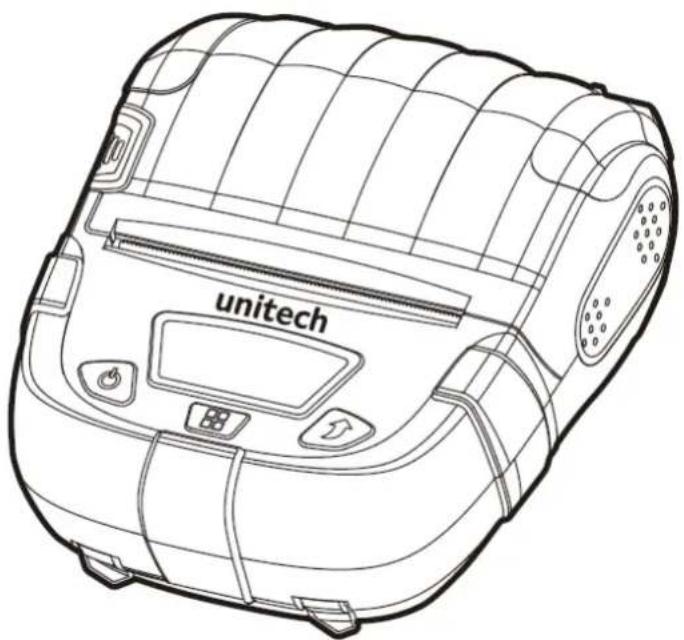
USER MANUAL SP320 Unitech
Bluetooth Mobile Printer
- SP320 -
natural_image
Line drawing of a white unmanned vacuum cleaner with visible control panel and buttons (no text or symbols)User's Manual
Version 1.2
Revision History
| Date | Change Description | Version |
| 20221220 | Type-C Version | 1.1 |
| 20230523 | Add SP320 Utility APP information | 1.2 |
Preface
About This Manual
Thank you for purchasing the Unitech product.
This manual explains how to install, operate and maintain our product.
No part of this publication may be reproduced or used in any form, or by any electrical or mechanical means, such as photocopying, recording, or information storage and retrieval systems, without permission in writing from the manufacturer. The material in this manual is subject to change without notice.
Regulatory Compliance Statements
FCC Warning Statement
This device has been tested and found to comply with the limits for a Class B digital device, pursuant to part 15 of the FCC rules. These limits are designed to provide reasonable protection against harmful interference in a residential installation. This equipment generates, uses and can radiate radio frequency energy and, if not installed and used in accordance with the instructions, may cause harmful interference with radio communications. However, there is no guarantee that interference will not occur in a particular installation. If this equipment does cause harmful interference with radio or television reception, which can be determined by turning the equipment off and on, the user is encouraged to try to correct the interference by one or more of the following measures:
-Reorient or relocate the receiving antenna.
—Increase the separation between the equipment and receiver.
-Connect the equipment into an outlet on a circuit different from that to
which the receiver is connected.
-Consult the dealer or an experienced radio/TV technician for help.
- This transmitter must not be co-located or operating in conjunction with any other antenna or transmitter.
- This device complies with FCC RF radiation exposure limits set forth for an uncontrolled environment. To maintain compliance with FCC RF exposure requirements, avoid direct contact to the transmitting antenna during transmitting.
- Any changes or modifications (including the antennas) made to this device that are not expressly approved by the manufacturer may void the user's authority to operate the equipment.
FCC Label Statement
This device complies with part 15 of the FCC rules. Operation is subject to the following two conditions:
- This device may not cause harmful interference.
- This device must accept any interference received, including interference that may cause undesired operation.
RF Radiation Exposure Statement
For body contact during operation, this device has been tested and meets FCC RF exposure guidelines when used with an accessory that contains no metal and that positions the handset a minimum of 1.0 cm from the body.
Use of other accessories may not ensure compliance with FCC RF exposure guidelines.
European Conformity Statement
Unitech Electronics co., Ltd herewith declares that the Unitech product is in compliance with the essential requirements and all other provisions of the RED 2014/53/EU directive.
The declaration of conformity is available for download at : https://portal.Unitech.eu/public/Safetyregulatorystatement
CE RF Exposure Compliance
For body-worn operation, this device has been tested and meets the ICNIRP guidelines and the European Standard EN 62209-2, for use with dedicated accessories, SAR is measured with this device at a separation of 0.5cm to the body, while transmitting at the highest certified output power level in all frequency bands of this device. Use of other accessories which contain metals may not ensure compliance with ICNIRP exposure guidelines.
CE Mark Warning
CE
RoHS Statement
unitech
Green Product

This device conforms to RoHS (Restriction Of Hazardous Substances) European Union regulations that set maximum concentration limits on hazardous materials used in electrical and electronic equipment.
Waste electrical and electronic equipment (WEEE)
Unitech has set up a policy and process to meet the 2012/19/EU concerning electronic waste disposal.
For more detailed information of the electronic waste disposal of the products you have purchased from Unitech directly or via Unitech's resellers, you shall either contact your local supplier or visit us at :
https://portal.Unitech.eu/public/WEEE
Taiwan NCC Warning Statement
NCC 譎語
Within the 5.25-5.35 GHz band, U-NII devices will be restricted to indoor operations to reduce any potential for harmful interference to co-channel MSS operations.
LED Information
The Unitech product contains LED indicator(s) or LED ring whose luminance is not harmful to human eyes during normal operation, user maintenance or prescribed service operations.
*LED information only applies to the products with LED components.
Battery Notice
- To guarantee optimal performance, it is recommended that rechargeable batteries be replaced every year, or after 500 charging cycles are completed. It is normal for the battery to balloon or expand after one year or 500 cycles. Although it does not cause damage, it cannot be used again and must be disposed of according to the location's safe battery disposal procedures.
- If a battery performance decreases more than 20%, the battery is at the end of its life cycle. Stop use and ensure the battery is disposed of properly.
-
The length of time that a battery lasts depends on the battery type and how the device is used. Conserve the battery life by doing the following:
-
Avoid fully uncharging the battery because this places additional strain on it. Several partial uncharges with frequent charges are better than a fully uncharged battery. Charging a partially charged battery does not cause harm to the unit.
- Keep the battery cool. Avoid hot vehicles. For prolonged storage, keep the battery at a 40% charge level.
-
Do not leave the battery uncharged and unused for an extended period of time, the battery will wear out and the longevity of the battery will be at least half of one with frequent charges.
-
Protect battery life by not over or under charging the battery.
- Please do not leave battery unused for long time without charging it. Despite Unitech's safety precautions, the battery pack may begin to change shape. If so, stop using it immediately. Please check to see if you are using a proper power adapter to charge the battery or contact your service provider for service.
- If you cannot charge the battery after it has been idle for an extended period of time and it begins to heat up, please do not try to charge it. It may not be functional anymore.
- Please only use the original battery from Unitech. Using a third party battery can damage our products. Please note that when such damage occurs, it is not covered by Unitech's warranty policy.
CAUTION!
● RISK OF EXPLOSION IF BATTERY IS
REPLACED INCORRECTLY.
DISPOSE OF USED BATTERIES ACCORDING
TO THE INSTRUCTIONS.
Battery charge notice
It is important to consider temperature when the battery pack is charging.
Charging is most efficient at normal room temperature or in a slightly cooler environment. It is essential that batteries are charged within the stated range of 0^ C to 40^ C. Charging batteries outside of the specified range could damage the batteries and shorten their life cycle.
CAUTION!
Do not charge batteries at a temperature lower than 0^ C. This will make the batteries unstable and dangerous. Please use a battery temperature detecting device for a charger to ensure a safe charging temperature range.
CAUTION!
To ensure the unit working properly, please keep all connectors away from the contaminants staying inside of them such as dust, grease, mud, and water. The negligence may cause the unit with no communication, short circuited, overheated and so on.
CAUTION!
If the connector is damaged, please ensure the connector is being fully repaired before use the unit to avoid causing short circuited.
Battery Recycling
This product uses a rechargeable lithium battery. To protect the environment, please do not dispose of used batteries at will. The supplier will provide you with battery recycling service.
viii
© 2023 Unitech Electronics Co., Ltd. All rights reserved.
Unitech is a registered trademark of Unitech Electronics Co., Ltd.
All product and company names are trademarks, service marks, or registered trademarks of their respective owners
Storage and safety notice
Although charged batteries may be left unused for several months, their capacity may be depleted due to build up of internal resistance. If this happens, they will require recharging prior to use. Batteries may be stored at temperatures between -20°C to 60°C, however they may deplete more rapidly at higher temperatures. It is recommended to store batteries at room temperature.
* The message above only applies to the usage of the removable batteries. For the products with non-removable batteries / without batteries, please refer to the specification of each product.
Product Operation and Storage Notice
The Unitech product has applicable operation and storage temperature conditions. Please follow the limitation of suggested temperature conditions to avoid failure, damage or malfunction.
*For applicable temperature conditions, please refer to the specification of each product.
Adapter Notice
- Please do not leave the power adapter in the socket when it is not connected to your Unitech product for charging.
- Please remove the power adapter when the battery is fully recharged.
- The bundled power adapter that comes with your Unitech product is not meant to be used outdoors. An adapter exposed to water or rain, or a very humid environment can cause damage to both the adapter and the product.
- Please only use the bundled power adapter or same specification of adapter to charge your Unitech product. Using the wrong power adapter can damage your Unitech product.
* The message above only applies to the product connected to the adapter. For the products without using the adapters, please refer to the specification of each produc
Safety Instruction
1. About the Printer
Please follow the following precautions when using the printer:

WARNING
- Please turn off the power immediately in case of failure. When you notice smoke or odor coming from the printer or power adapter, please unplug the power adapter and remove the battery immediately. Please be careful not to get burnt.
- Please do not use the printer near gas stations, fuel warehouses and other flammable materials.
- During charging, the printer and power adapter must be placed in a ventilated place with the ambient temperature of 0^ C - 45^ C, and be sure to use the power adapter provided by the Company. The use of unapproved power adapters may be hazardous and also violates our warranty policy.

ATTENTION
- Do not disassemble the printer by yourself. Please read this Manual carefully before use.
- When the printer is printing, please do not open the cover of the paper bin; otherwise, unpredictable conditions may occur and the printer may even be damaged.
- After printing, the print head is still at a high temperature. Do not touch it to avoid burns.
- Please do not use dissolved matter (such as benzene thinner) to wipe the printer shell, and please keep the printer away from corrosive chemicals. You can only gently wipe the printer with a clean soft cloth.
- Please use our original or approved printing paper; otherwise, it may lead to poor printing quality or even damage to the printer mechanism.
- If the printer is to be stored for a long time, be sure to remove the battery from the printer and store it separately; otherwise, the battery may fail or
even have leakage, which may damage the printer.
- Make sure the printer is turned off before replacing the battery. If a power adapter is used, make sure the power is cut off before replacing the battery.
- The printer can work stably at an ambient temperature of 0^ C - 40^ C. Too high or too low ambient temperature will lead to low printing quality.
- The time that the printed text can be kept on the thermal printing paper is related to the paper quality. To print documents that need to be kept for a long time, please use long-lasting thermal printing paper.
● This printer is suitable for areas under below 5000 meters (above sea level).
2. About the Battery
Please follow the following precautions when using the battery:
WARNING
- Please charge the battery in a cool and ventilated room. The high ambient temperature during charging will cause the battery to heat up, emit smoke, burn, deform, or even explode.
- There are special protective circuits and devices inside the battery. Please do not disassemble the battery by yourself, or it will cause a short circuit or electrolyte leakage.
- There is a risk of blindness if the electrolyte gets into the eye. In case of eye contact, rinse immediately with water and seek doctor's advice immediately.
- Do not squeeze, mechanically vibrate or shake the battery, and short circuit of the battery is strictly forbidden.
- Please do not put the battery into water; otherwise, it may result in internal short circuit, which may cause the battery to heat up, emit smoke, deform, damage or even explode.
ATTENTION
- Please carefully read this Manual and symbols on the battery surface before use.
- Do not expose the battery to direct sunlight or put it in a place with
excessive smoke and dust. Do not use the battery in a high humidity environment, such as a bathroom.
- Please replace the battery if it cannot meet the performance requirements.
- Keep the battery out of reach of children to prevent danger.
- If you notice any discoloration or deformation of the battery, stop using it immediately.
3. About the Power Adapter

WARNING
- Do not disassemble or modify the power adapter. Do not use the power adapter if the power line is damaged; otherwise, it may cause electric shock, fire and damage to the power adapter.
- Do not touch the power adapter with wet hands. If the power adapter comes into contact with water or other liquids, cut off the power supply immediately.
- Please avoid short circuit, vibration or shaking of the power adapter.
- Do not use the power adapter in a high humidity environment, such as a bathroom. The equipment is not waterproof and must not be exposed to rain or moisture.
- Hold the power adapter body when unplugging. Simply pulling the power line will damage the wires.

ATTENTION
Keep the power adapter out of reach of children to prevent danger.
Worldwide Support
Unitech's professional support team is available to quickly answer questions or assist with technical-related issues. Should an equipment problem occur, please contact the nearest Unitech regional service representative.
For complete contact information please visit the Web sites listed below:
| Taipei, Taiwan – Headquarters | Europe |
| Tel: +886-2-89121122E-mail: info@hq.ute.comAddress: 5F, No. 136, Lane 235, Baoqiao Road, Xindian District, New Taipei City 231, Taiwan (R.O.C.)Website: http://www.ute.com | Tel: +31-13-4609292E-mail: info@eu.ute.comAddress: Kapitein Hatterasstraat 19, 5015 BB,Tilburg, the NetherlandsWebsite: http://eu.ute.com |
| China | Japan |
| Tel: +86-59-2310-9966E-mail: info@cn.ute.comAddress: Room401C, 4F, RIHUA International Mansion,Xinfeng 3nd Road, Huoju Hi-tech District,Xiamen, Fujan , ChinaWebsite: http://cn.ute.com | Tel: +81-3-62310896E-mail: info@jp.ute.comAddress: Tosei Building 3F., 1-8-10Nihonbashi-Hakozakicho, Cyuouku,Tokyo, 103-0015, JapanWebsite: http://jp.ute.com |
| Asia & Pacific / Middle East | Latin America |
| Tel: +886-2-27911556E-mail: info@apac.ute.cominfo@india.ute.cominfo@mideast.ute.comAddress: 4F., No. 236, ShinHu 2nd Rd.,NeiHu Chiu, 114, Taipei,TaiwanWebsite: http://apac.ute.com / http://mideast.ute.com | Tel: +52-55-5171-0528E-mail: info@latin.ute.comAddress: 17171 Park Row, Suite 210Houston, TX 77084USA (Rep.)Website: http://latin.ute.com |
| North America | Please scan QR Code to visit us : |
| Tel: +1-714-8916400E-mail: info@us.ute.com / info@can.ute.comAddress: 6182 Katella Ave, Cypress, CA 90630, USAWebsite: http://us.ute.com |  |
Warranty Policy
The following items covered under the Unitech Limited Warranty are free from defects during normal use:
The warranty period is varied from each country. Please consult with your supplier or Unitech local office for actual length of warranty period to your purchased product.
Warranty becomes void if equipment is modified, improperly installed or used, damaged by accident or neglect, or if any parts are improperly installed or replaced by the user.
Table of Contents
Preface......i
Regulatory Compliance Statements ...... i
LED Information ...... vi
Battery Notice.... vii
Adapter Notice....x
Safety Instruction....xi
Worldwide Support....xii
Warranty Policy ....xiii
Chapter 1 - Overview....1
1.1 Package .... 1
1.2 Product Detail....2
1.3 Specifications .... 3
1.4 Self-test 4
1.5 Getting Started ....6
Chapter 2 - Installation & Operation .... 11
2.1 Basic Use Functions.... 11
2.2 Communication 15
3.2 Use and Storage of Printing Paper 18
3.3 Troubleshooting....19
Chapter 1 - Overview
1.1 Package
Please make sure the following contents are in the SP320 gift box. If something is missing or damaged, please contact your Unitech representative.
| Standard accessories | |||
 | 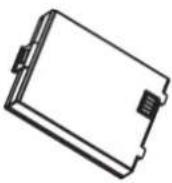 | 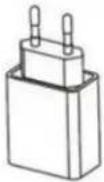 | 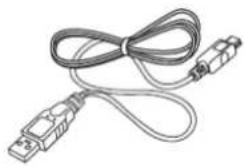 |
| SP320 (1 set) | Battery (1 pcs) | Power charger (1 pcs) (EU/US) | USB cable (1 pcs) |
| Standard accessories | Optional accessories | ||
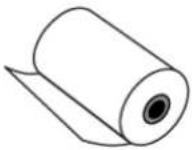 | 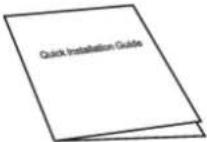 | 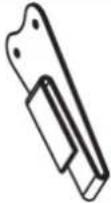 | 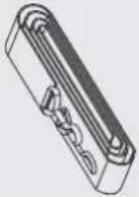 |
| Thermal paper (1 roll) | Quick Start Guide (1 pcs) | Belt buckle (1 pcs) | Straps (1 pcs) |
1.2 Product Detail
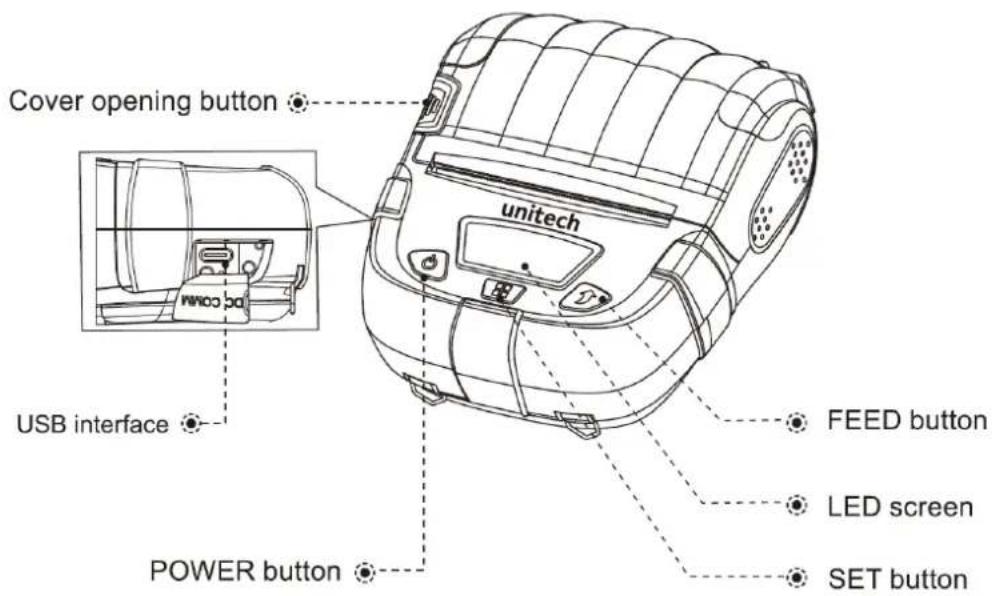
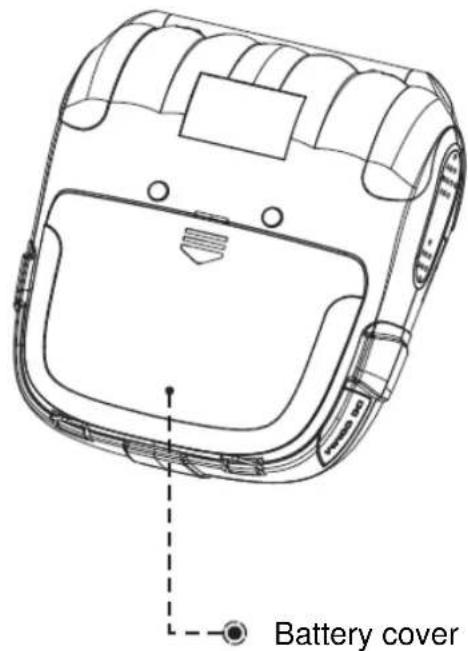
1.2.1 SP320 Front View
1.2.2 SP320 Rear View
1.3 Specifications
| Printing Parameters | |
| Printing method | Thermal line printing |
| Printing paper width | 3"/72mm |
| Paper | ≤50mm |
| Printing speed | 90mm per second |
| Resolution | 203dpi (8dots/mm) |
| Fonts | GB 18030ASCII font (8x16,12x24,16x32),GBK (16x16,24x24,32x32),BIG5 (16x16,32x32)Unicode (UTF8) |
| Printer core live | 50km for thermal label150km for thermal paper/ receipt(25% print density or the following) /Each point: 1.5 million pulses |
| Command set | ESC/POS CPCL (compatibility) |
| Print length | >300m |
| Print content | 1D barcode: Support UPC-A, UPC-E, EAN-13, EAN-8,Code39, ITF, CodeBar, Code 93, Code 128, I2/52D barcode: Support QR CODE, PDF417, DataMatrix |
| Battery specification | 7.4V 2700mAh rechargeable Li-ion battery |
| Charging time | < 6 hours |
| Wire communication | Type-C USB |
| Wirelesscommunication | Dual-mode Bluetooth 5.0 (SPP+BLE) |
| Dimensions | 140mm x117 mm x 60 mm |
| weight | 450g |
| Working environment | Temperature: 0°C-45°CHumidity: 20%-85% (non-condensing) |
| Storage environment | Temperature: -10°C-60°CHumidity: 10%-90% (non-condensing) |
1.4 Self-test
The self-test page will list the model of printer, communication interface configuration, etc.
*Please note that the following data is only for reference, and may change depends on the module you get.
| Product information |
| Selftest |
| Firmware Ver: ...... A45B1C3D1F0_V1.10 2022-09-30 |
| Model: ...... SP320 |
| SN: ...... A30142220003 |
| Flash:......4MByte |
| Interface: ......USB& Bluetooth |
| Code Page: ......CP437 [U.S.A.,Standard Europe] |
| Print Method:......Direct Thermal |
| Print Quality:...... 2 |
| Print Density: ......2 |
| Print Speed: ......4 |
| Media Type: ......Receipt |
| Instruction Set:......CPCL or ESC/POS |
| Dpi: ......203 |
| Print size parameter |
| Size:......72 mm, 152 mm |
| Reference: ......0 mm, 0 mm |
| Shift: ......0 mm |
| Offset: ......0mm |
| Milage(m): ...... 1.299999 |
| POWER & DEGREE |
| VOLTAGE: 8.097 DEGREE:26 |
| Bluetooth Configure |
| EDR NAME:......SP320N_FDOE |
| EDR PIN:......0000 |
| EDR ADDR:......04-7F-0E-6D-F2-F9 |
BT VERS: 2141e_BR8051B_DS_210616QRCODE BT ADD |
SN BARCODE A30142220003 A30142220003 |
PCBA SN BARCODE PA30142220003 PA30142220003 |
1.5 Getting Started
1.5.1 Install the Battery
The battery is not installed in the printer before the product leaves factory.
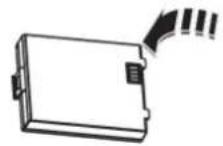
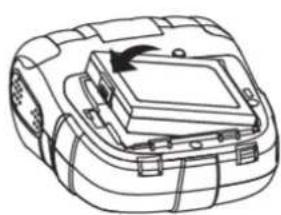
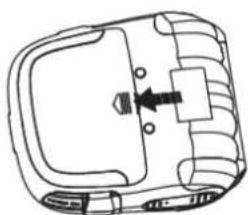
- Remove the protective film of battery contacts.
- Install the battery as shown in the figure below.
- Fasten the battery cover.
①
②
natural_image
Line drawing of a mechanical device with a central component and mounting brackets (no text or symbols)③
natural_image
Diagram of a vehicle's internal components with a directional arrow indicating movement (no text or labels)Note: The battery must be fully charged before using it for the first time. After storing for a long time, the battery also needs to be fully charged before reuse to achieve the best use effect.
1.5.2 Printing Paper Loading
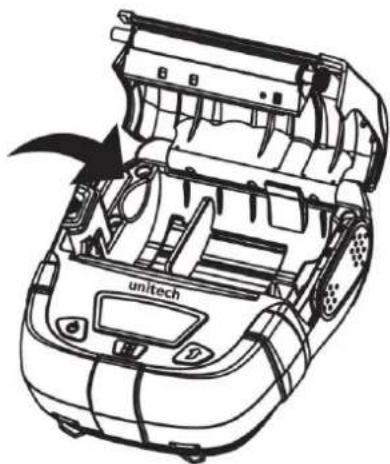
- Press the cover opening button to open the paper bin cover.
natural_image
Technical line drawing of a car's internal components, showing engine, chassis, and dashboard (no text or symbols)- Load paper roll into the paper bin according to the direction as shown in the figure.
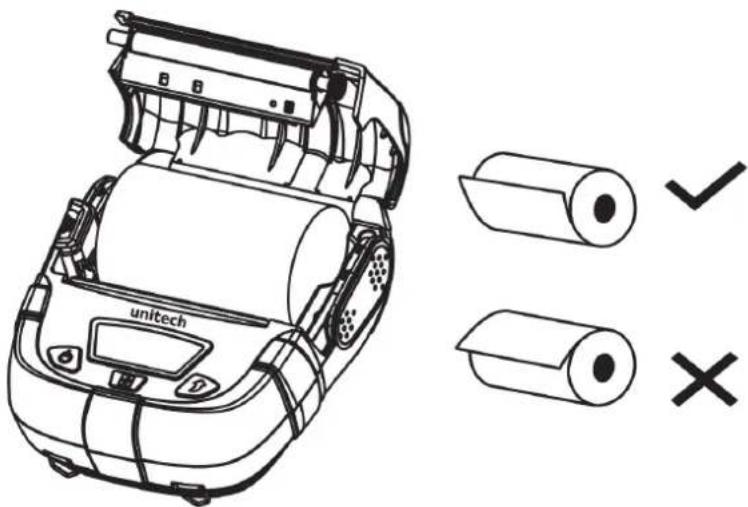
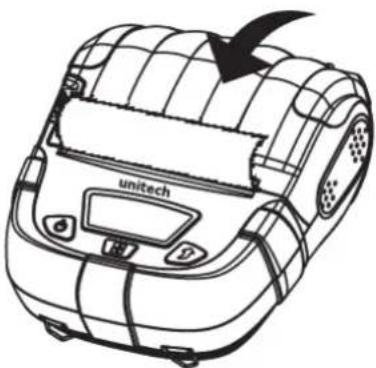
- Pull out a part of paper roll and close the paper bin cover.
natural_image
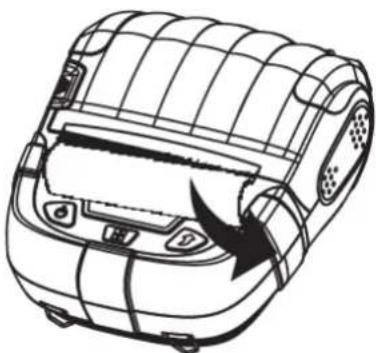
Line drawing of a UNitech mobile phone with visible scroll and control panel (no text or symbols)- Tear off the excessive paper according to the direction as shown in the figure.
natural_image
Line drawing of a car's roof structure with visible door and vent slots (no text or symbols)Note:
- Paper specification used by the printer: Paper width:80mm (One side can be adjusted), paper roll diameter: 50mm.
- Pay attention to the direction of paper roll. If it is placed in the wrong direction, it will lead to blank printing.
- Be sure to pull a part of paper out of the paper bin.
1.5.3 Charging the Battery
Plug the charger plug into the power socket, and the charger DC plug into the printer charging port. (AC:100V-240V(50/60Hz))
WARNING
If you use a power adapter not provided or approved by us, the printer may be damaged.
ATTENTION
Do not remove the battery while charging.
Note:
You can print while charging.
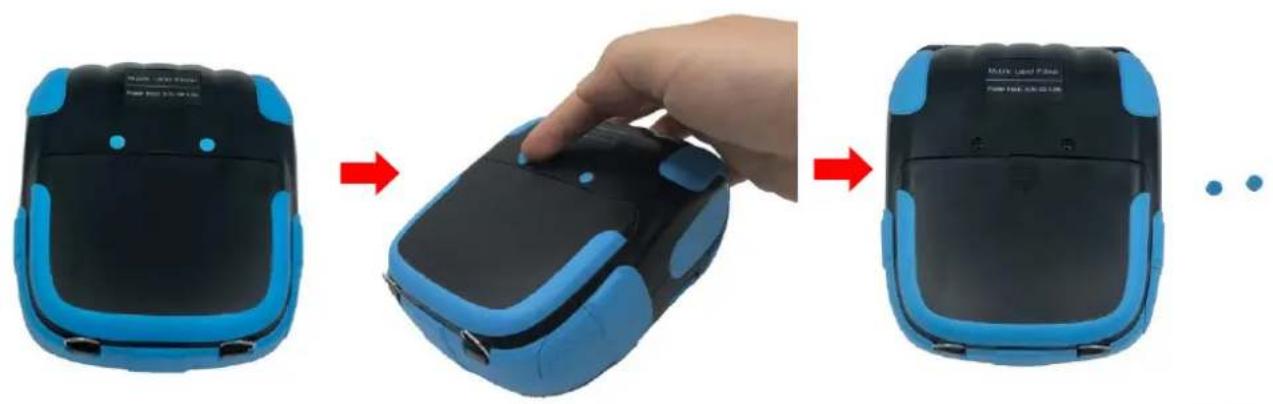
1.5.4 How to Attach Belt Buckle
- Pick out the two circle fillers.
natural_image
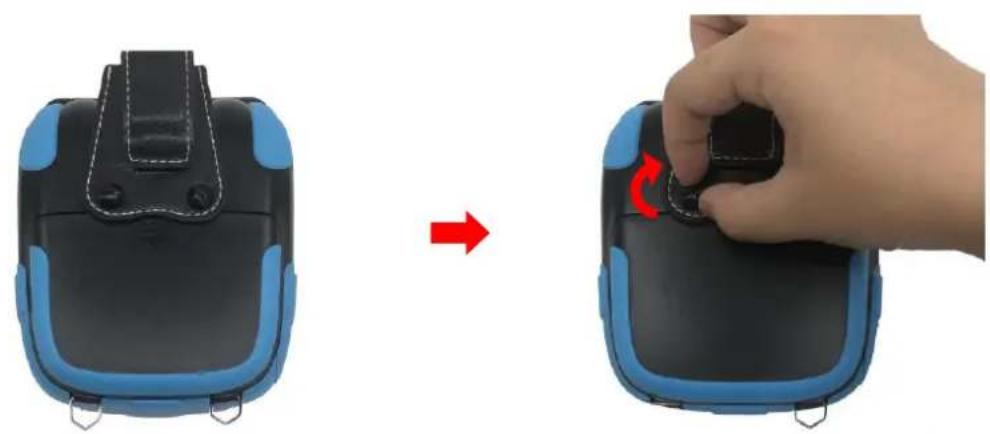
Three-step photo showing a hand placing a device into a black and blue device, with no visible text or symbols.- Align two screws of the belt buckle with the two holes on the SP320 printer. The side with the screws are pointing down. Lock two screws by spinning the screw clockwise.
natural_image
Two-step illustration showing a hand pressing down on a device's back panel, with a red arrow indicating the process (no text or symbols present)Chapter 2 - Installation & Operation
2.1 Basic Use Functions
2.1.1 Basic Functions
Power On: Press and hold the POWER button for 3 seconds.
Power Off: When the printer is on, press and hold the POWER button.
FEED: Press the FEED button (under continuous feeding mode, press FEED button to feed paper of about 5mm; under label/black label mode, press FEED button to feed paper to seam label or black label.)
Auto sleep / wake:
When the printer is turned on and has no button operation or data transmission within 10 seconds, it will automatically enter sleep mode. Press POWER button to wake up the printer (the printer will automatically wake up when data is received.)
2.1.2 Settings
Enter setting screen: During power-on state (non-sleep mode), press and hold SET button to enter the option screen.
Press SET button: Go to the next option.
Press FEED button: Change option parameters. Press POWER button:
Confirm settings and exit.
*Please note that the following data is only for reference, and may change depends on the module you get.
 Do: Print Info Do: Print Info | print self-test page | Press Power button to start printing self-test page |
 Print Quality: 0-4 Print Quality: 0-4 | 0-4 | Set wide range definition (coarse tuning) |
 Darkness: 0-4 Darkness: 0-4 | 0-4 | Set small range definition (fine tuning) |
 Speed: 0-4 Speed: 0-4 | 0-4 | Set print speed |
 language: English language: English | English | Set language |
 Buzzer Set: Open Buzzer Set: Open | Open | Set whether to turn on the buzzer |
 Paper: Receipt/Gap/Mark Paper: Receipt/Gap/Mark | Label | Set according to the paper type used |
SP320 User's Manual
 | Open/Close | |
 | Open/Close | |
 | 10/15/30/40S | Set screensaver time |
 | 1-5H | Set auto shutdown |
 | TSPL/ESC or CPCL/ESC | Set command mode |
 | 80/58 mm | Set according to the paper width |
Note:
Power Feed and Cover Feed are only effective under Cmd: CPCL with paper type: Gap, and are disabled under other conditions.
2.1.3 Icon Description
| Printing status |  | This icon is displayed when the printer is printing or feeding paper. |
| Paper shortage state |  Insert Paper Insert Paper | When paper shortage occurs or the paper roll is not properly loaded. |
| Cover opening state | Close Cover | When the paper bin cover is not closed or not properly closed. |
| Battery indication |  | When charging, the icon will scroll to indicate the charging status. |
| Bluetooth indicator |  | The printer has Bluetooth function. |
2.2 Communication
2.2.1 USB Communication
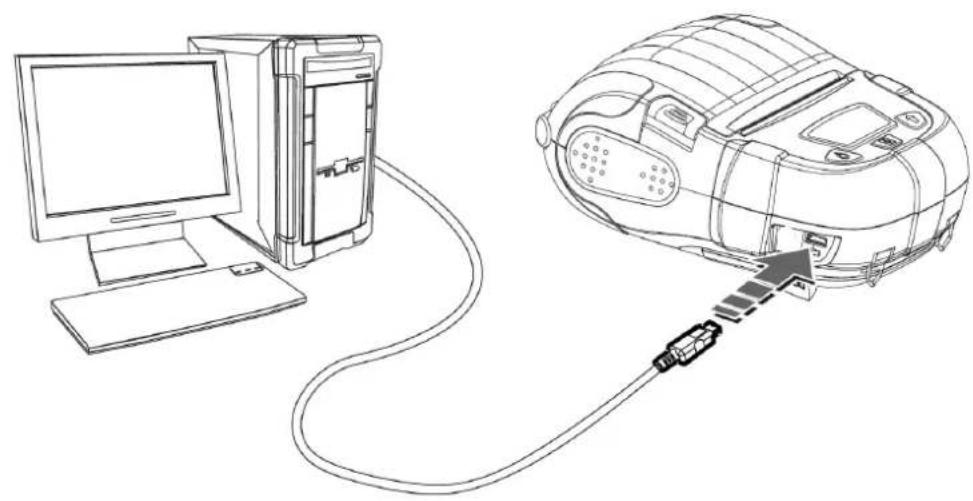
SP320 provides USB port, which is used to connect the printer to a PC as shown in the figure to charge the printer, set parameters, and transmit data, etc.
natural_image
Line drawing of a computer connected to a device via cable, showing internal components and connection point (no text or symbols)2.2.2 Bluetooth Communication
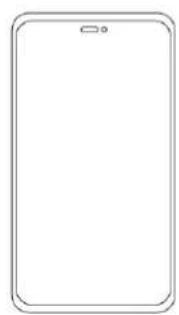
SP320 provides dual-mode Bluetooth 5.0 (SPP+BLE) to communicate with iPhone, iPad, Android model, with the effective distance no more than 10 meters.
natural_image
Blank white rounded rectangle outline with a small circular mark at the top (no text or symbols)
natural_image
Simple diagram of concentric arcs with no text or symbols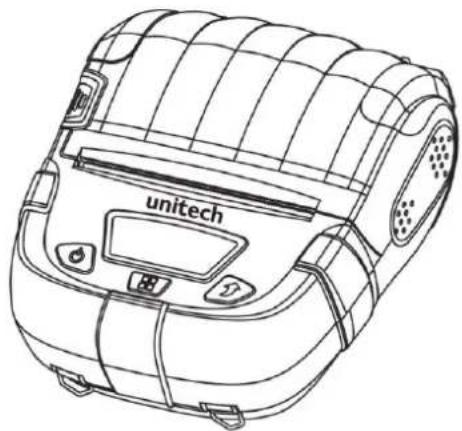
natural_image
Line drawing of a UNitech robotic vacuum cleaner (no text or symbols on body)The default pairing password of Bluetooth is 0000, and the parameters can be set through the setting tool. For details, please refer to the "Instruction Manual for Setting Tool".
Note:
- For SP320's utility APP, please download it through the link below:
https://a2401.s3.amazonaws.com/cs/app/SP320/SP320-Utility-app.7z
Install the app into Android device, then you can test SP320's setting function.
- For Instruction Manual for Setting Tool, please download it through the link below:
https://a2401.s3.amazonaws.com/cs/app/SP320/Label-Printer-Tool-1.69.zip
Chapter 3 – Repair & Maintenance 3.1 Daily Maintenance of Printer
- Cleaning of outside and paper bin: Wipe the surface of the printer and the inside of the paper bin gently with a wrung-out wet cloth. Make sure that the wet cloth is completely wrung out.
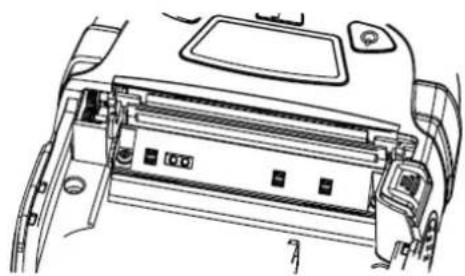
- Cleaning of printer mechanism: The printer mechanism must be cleaned regularly, especially when the print quality declines. The cleaning method is as follows: Use absorbent cotton moistened with anhydrous alcohol to gently wipe the area marked with a gray box as shown in Fig. 1 until it is clean.
natural_image
Technical line drawing of a device interior showing internal components and mounting points (no text or symbols)Fig 1
- If water is found inside the printer, turn it off immediately, remove the battery, and dry the printer by airing.
- If the printer will not be used for a long time, remove the battery and store it separately.
3.2 Use and Storage of Printing Paper
- Please keep newly purchased printing paper in intact package and prevent it from direct sunlight and high temperature.
- Please keep printed documents in a dark place at room temperature (about 20^ C), so as to effectively extend the storage life of the documents.
- If the documents need to be kept for a long time, please use long-lasting thermal printing paper.
3.3 Troubleshooting
| Fault Phenomenon | Cause | Solution | Refer to page |
| Paper is fed but no data is printed. | Printing paper is loaded in the wrong direction. | Please load the printing paper in the other direction. | 7 |
| Blurry printing | The printer is not cleaned for a long time and the printer mechanism is contaminated by dirt. | Clean the printer mechanism. | 17 |
| Poor color rendering of printing paper | Please set higher blackness or use paper with better color rendering. | — | |
| Printed documents are blurred in months or even weeks | Poor quality of printing paper | Please use long-lasting thermal printing paper. | 18 |
| Documents are kept at high ambient temperature | Please keep the documents at room temperature.(about 20°C) | 18 |
- Bluetooth Mobile Printer
- Preface
- About This Manual
- Regulatory Compliance Statements
- FCC Warning Statement
- FCC Label Statement
- RF Radiation Exposure Statement
- European Conformity Statement
- CE RF Exposure Compliance
- CE Mark Warning
- CE
- RoHS Statement
- Waste electrical and electronic equipment (WEEE)
- Taiwan NCC Warning Statement
- NCC 譎語
- LED Information
- Battery Notice
- CAUTION!
- Battery charge notice
- Battery Recycling
- Storage and safety notice
- Product Operation and Storage Notice
- Adapter Notice
- Safety Instruction
- About the Printer
- WARNING
- ATTENTION
- About the Battery
- About the Power Adapter
- Worldwide Support
- Warranty Policy
- Table of Contents
- Preface......i
- Chapter 1 - Overview....1
- Chapter 2 - Installation & Operation .... 11
- Chapter 1 - Overview
- Package
- Product Detail
- SP320 Front View
- SP320 Rear View
- Self-test
- Getting Started
- Install the Battery
- Printing Paper Loading
- Note:
- Charging the Battery
- How to Attach Belt Buckle
- Chapter 2 - Installation & Operation
- Basic Use Functions
- Basic Functions
- Auto sleep / wake:
- Settings
- Icon Description
- Communication
- USB Communication
- Bluetooth Communication
- Chapter 3 – Repair & Maintenance 3.1 Daily Maintenance of Printer
- Use and Storage of Printing Paper
- Troubleshooting
Brand : Unitech
Model : SP320
Category : Printer