
Highline Stereo - Audio Equipment Radial Engineering - Free user manual and instructions
Find the device manual for free Highline Stereo Radial Engineering in PDF.


| Product Type | Active Stereo Direct Box |
| Model | Highline Stereo |
| Brand | Radial Engineering |
| Dimensions (H x W x D) | 2.0" x 5.5" x 4.5" (51 x 140 x 114 mm) |
| Weight | 1.8 lbs (0.82 kg) |
| Power Supply | 48V Phantom Power or external 9-15V DC |
| Inputs | 2 x 1/4" TS (stereo) or dual mono |
| Outputs | 2 x XLR male (balanced) |
| Frequency Response | 20 Hz - 20 kHz (±0.5 dB) |
| Dynamic Range | > 110 dB |
| THD+N | < 0.005% @ 1 kHz |
| Input Impedance | 200 kΩ (unbalanced) |
| Output Impedance | 600 Ω (balanced) |
| Features | Ground lift switch, -15 dB pad, stereo/mono merge switch, high-pass filter |
| Construction | 14-gauge steel chassis, baked enamel finish |
| Maintenance | Wipe with dry cloth; no user-serviceable parts inside |
| Safety | Use phantom power only from a mixer or preamp; keep away from moisture |
| Spare Parts | Contact Radial Engineering for replacement parts |
| Reparability | Repair by authorized service center recommended |
| Mounting | Designed for floor or pedalboard use |
| Included Accessories | Quick start guide, rubber feet |
Frequently Asked Questions - Highline Stereo Radial Engineering
User questions about Highline Stereo Radial Engineering
0 question about this device. Answer the ones you know or ask your own.
Ask a new question about this device
Download the instructions for your Audio Equipment in PDF format for free! Find your manual Highline Stereo - Radial Engineering and take your electronic device back in hand. On this page are published all the documents necessary for the use of your device. Highline Stereo by Radial Engineering.
USER MANUAL Highline Stereo Radial Engineering
User Guide
Radial Engineering Ltd.
1165-1845 Kingsway Ave, Port Coquitlam
British Columbia, Canada, V3C 0H3
Tel: 604-942-1001 • www.radialeng.com
Email: info@radialeng.com
Radial® Highline Stereo User Guide
Table of Contents Page
Overview....1
Features 2
Getting Started ....3
Making Connections....3-4
The Lift Switch....4
The Thru Sum Switch....5
The XLR Sum Switch ....5
Specifications 6
Warranty ....Back cover
Thank you for purchasing the Radial Highline Stereo, a passive line isolator designed to seamlessly integrate guitar and amp modelers with PA and recording systems. The Highline Stereo is built with premium Jensen transformers for exceptional audio quality, along with the same ruggedness you would expect from any Radial product, so you can rely on it to faithfully deliver your tone night after night.
We recommend you take a few minutes to read this short manual before you begin using the Highline Stereo, as it covers the various features of the device and tips for setup and use. Should you have any questions about the Highline Stereo or any other Radial devices, please visit our website at www.radialeng.com for additional resources and frequently asked questions.
OVERVIEW
Amp and cab simulators are more popular than ever, and with good reason: they can produce a wide variety of amp tones that sound as good as a well-mic'd amp in a studio, they provide a consistent sound at every venue and, best of all, fit right on a pedalboard and eliminate the need to lug a heavy amplifier to a gig.
Guitarists and bassists who use these devices have a unique set of problems: While amp simulators can produce line-level outputs, they often still use 14 " unbalanced connectors that won't support long cable runs without degrading the tone of the instrument, and they are particularly susceptible to noise from ground loops when connected directly to the PA. Some are even vulnerable to damage from 48V phantom power, should it be accidentally engaged at the PA mixer.
The Highline Stereo is a line isolator designed to specifically address these issues and seamlessly interface any amp simulator with a PA system. The Highline employs a premium Jensen 1:1 transformer, which retains the full volume level from the pedalboard to the PA and also provides galvanic isolation that eliminates ground loop noise for a clean and noise-free signal. The output of the Highline is a balanced signal for long cable runs to the PA, and the device blocks phantom power so it never reaches your pedalboard.
The Highline Stereo combines the features today's guitar and bass players need, along with the quality and durability that Radial Engineering products provide. Housed in steel metalwork with ruggedized connectors and switches, the Highline is built for reliable performance over years of use. The industry-leading Jensen transformers inside retain the original tone of the pedalboard as much as possible, with minimal phase shift, distortion, or coloration, all while providing the full output of the pedalboard to the PA for optimal gain staging.

flowchart
graph LR
    A["High-line Audio System"] --> B["Radiofoil"]
    B --> C["Radiofoil"]
    C --> D["Electric Guitar"]
    D --> E["Radiofoil"]
    E --> F["High Line Audio System"]
    F --> G["High Line Audio System"]
    G --> H["High Line Audio System"]
    H --> I["High Line Audio System"]
    I --> J["High Line Audio System"]
    J --> K["High Line Audio System"]
    K --> L["High Line Audio System"]
    L --> M["High Line Audio System"]
    M --> N["High Line Audio System"]
    N --> O["High Line Audio System"]
    O --> P["High Line Audio System"]
    P --> Q["High Line Audio System"]
    Q --> R["High Line Audio System"]
    R --> S["High Line Audio System"]
    S --> T["High Line Audio System"]
    T --> U["High Line Audio System"]
    U --> V["High Line Audio System"]
    V --> W["High Line Audio System"]
    W --> X["High Line Audio System"]
    X --> Y["High Line Audio System"]
    Y --> Z["High Line Audio System"]
    Z --> A
Connecting your amp modeler to the PA with the Highline Stereo
FEATURES
-
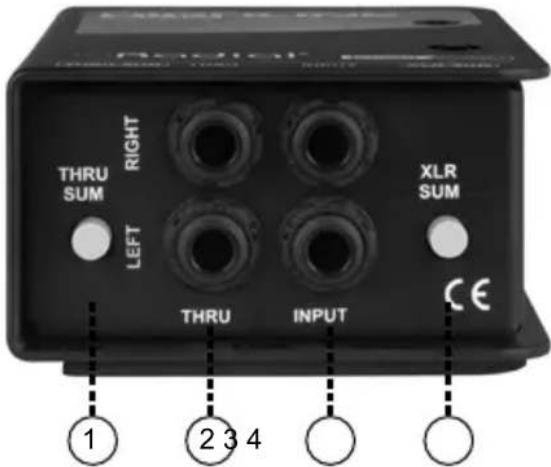
THRU SUM: Sums the left and right input channels to mono at both Thru outputs, allowing you to feed a stereo signal to the PA while monitoring locally with a single amplifier.
-
THRU: Left and right 14 " outputs to feed a pair of stage amplifiers.
-
INPUT: Left and right 14 " input jacks to connect to the balanced or unbalanced outputs from amp simulators & guitar pedals.
-
XLR SUM: Sums the left and right input channels to mono at both XLR outputs, allowing you to reduce your channel count at the PA.

-
OUTPUT: Left and right XLR outputs provide balanced & isolated signals for feeding the inputs of a mixer.
-
LIFT: Ground lift switch eliminates hum and buzz from ground loops.
GETTING STARTED
The Highline Stereo is completely passive, meaning it doesn't require any power to operate. As soon as you've made your connections it will be ready for use.
The Input and Thru connectors are designed for use with standard 14 "TS instrument cables – we recommend keeping your cable lengths as short as possible to minimize the possibility of introducing noise into your audio signal.
If your source device is equipped with balanced outputs, as some amp modelers are, you can use cables or adaptors with a 14 " TRS balanced connector to feed the inputs of the Highline Stereo. Using balanced cables between your amp modeler and the Highline will provide more protection against noise and interference, but if your cable lengths are kept short then the additional benefits will be minimal.
The outputs of the Highline Stereo use standard XLR connectors, which allow you to feed the front of house mixer using balanced XLR cables that can be up to 300 feet in length without any signal degradation.
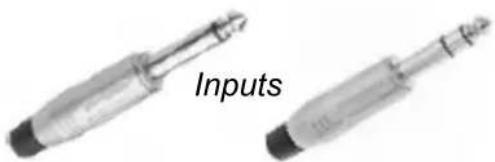
1 / 4 "TS 1 / 4 "TRS
Outputs

XLR
The Highline Stereo ships with a neoprene pad that can be affixed to the bottom of the unit to prevent it from sliding around. To attach, simply peel off the plastic backing and place it on the bottom of the Highline, making sure to line up the holes in the pad with the screws on the chassis. If you plan on mounting the Highline Stereo on a pedalboard using velcro or another mounting system, leave the neoprene pad unattached.
MAKING CONNECTIONS
The simplest Highline Stereo setup will look something like this: Connect the left and right outputs of your amp modeler to the Inputs of the Highline, and then take the left and right outputs of the Highline directly to a pair of channels on the front of house mixer for playback.

flowchart
graph TD
    A["Radio"] --> B["ABacus"]
    B --> C["Electric Guitar"]
    C --> D["Radio"]
    D --> A
Connecting your amp modeler to the PA with the Highline
The Highline Stereo will deliver your tone to the mixer without any signal loss or change in tone, while the Jensen transformers on board will isolate your pedalboard from the PA in order to reduce the chance of ground loop noise and protect your gear against 48V phantom power from the mixer.
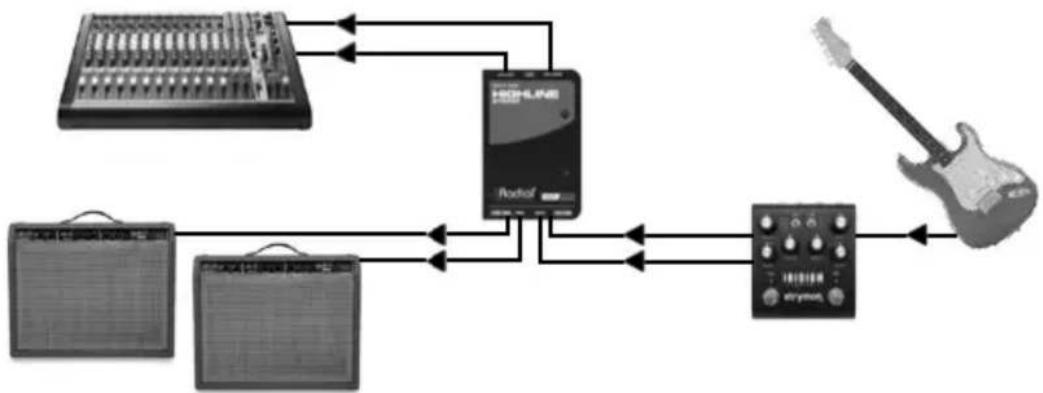
The Thru outputs on the Highline are designed to feed one or two guitar amplifiers, should you need them on stage for local monitoring or if you want to plug into an amp when practicing at home.
flowchart
graph TD
    A["RadioLine"] --> B["Amplifier"]
    B --> C["Audio Device"]
    C --> D["Handheld Guitar"]
    D --> E["RadioLine"]
    E --> F["Amplifier"]
    F --> G["Handheld Guitar"]
    G --> H["Handheld Instrument"]
    H --> I["RadioLine"]
    I --> J["Handheld Instrument"]
    J --> K["RadioLine"]
    K --> L["Handheld Instrument"]
    L --> M["RadioLine"]
    M --> N["Handheld Instrument"]
    N --> O["RadioLine"]
    O --> P["Handheld Instrument"]
    P --> Q["RadioLine"]
    Q --> R["Handheld Instrument"]
    R --> S["RadioLine"]
    S --> T["Handheld Instrument"]
    T --> U["RadioLine"]
    U --> V["Handheld Instrument"]
    V --> W["RadioLine"]
    W --> X["Handheld Instrument"]
    X --> Y["RadioLine"]
    Y --> Z["Handheld Instrument"]
    Z --> AA["RadioLine"]
    AA --> AB["Handheld Instrument"]
    AB --> AC["RadioLine"]
    AC --> AD["Handheld Instrument"]
    AD --> AE["RadioLine"]
    AE --> AF["Handheld Instrument"]
    AF --> AG["RadioLine"]
    AG --> AH["Handheld Instrument"]
    AH --> AI["RadioLine"]
    AI --> AJ["Handheld Instrument"]
    AJ --> AK["RadioLine"]
    AK --> AL["Handheld Instrument"]
    AL --> AM["RadioLine"]
    AM --> AN["Handheld Instrument"]
    AN --> AO["RadioLine"]
    AO --> AP["Handheld Instrument"]
    AP --> AQ["RadioLine"]
    AQ --> AR["Handheld Instrument"]
    AR --> AS["RadioLine"]
    AS --> AT["Handheld Instrument"]
    AT --> AU["RadioLine"]
    AU --> AV["Handheld Instrument"]
    AV --> AW["RadioLine"]
    AW --> AX["Handheld Instrument"]
    AX --> AY["RadioLine"]
Connecting the Thru outputs to a pair of amplifiers
The Lift switch on the Highline helps to eliminate buzz and hum that is often caused by ground loops. When this switch is engaged, it disconnects the audio ground path at the XLR output.
The Jensen transformer inside the Highline will eliminate the vast majority of ground loops, but, in some cases, the Lift switch can provide further assistance with this issue.
There is no right or wrong setting for this switch: once you've made your connections to the Highline you can toggle this switch and leave it in the position that results in the least amount of noise coming through the PA system.

The Lift switch
THE THRU SUM SWITCH
The Thru Sum switch merges the two Thru outputs together, allowing you to hear both sides of your stereo signal through a single amplifier, while still feeding separate left and right channels to the PA system.

The Thru Sum switch

flowchart
graph LR
    A["Radio receiver"] -->|Signal| B["Abacus"]
    B --> C["Music Player"]
    C --> D["Electric Guitar"]
    D -->|Feedback| A
    A -->|Signal| E["Radio receiver"]
    E --> F["Abacus"]
    F --> G["Music Player"]
    G --> H["Electric Guitar"]
Using the Thru Sum switch to feed a single stage amp
THE XLR SUM SWITCH
The XLR Sum switch merges the two XLR outputs together, so you can feed a mono signal to the PA system when extra channels are at a premium. This allows you to change your outputs from gig to gig without having to reconfigure any settings on your pedalboard.

The XLR Sum switch
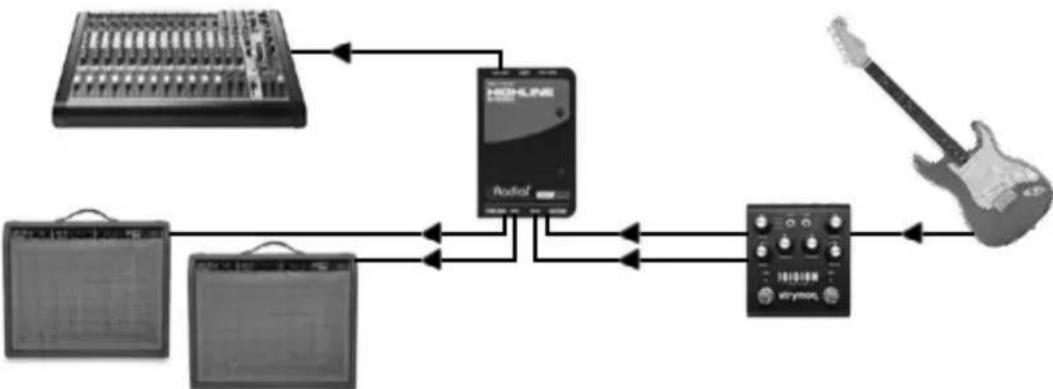
Using the XLR Sum switch to feed a mono signal to the PA
SPECIFICATIONS\*
Audio circuit type: ...... Passive, transformer based
Number of channels: .... Two channel (dual mono)
Frequency response: 20Hz - 20kHz (±0.05dB)
Signal to noise ratio: 112dB
Total harmonic distortion + noise:.....<0.05% from 20Hz - 20kHz @ -10dBV,
<0.0008% @ 1kHz / -10dBV
Phase deviation:....±0.3° from 20Hz - 20kHz @ -10dBV
Features
Ground Lift, XLR Sum, Thru Sum
General
Construction: 14 gauge steel Outer Shell & 16 gauge Chassis
Finish: Durable Powder Coat
Size (L x W x D): 5" x 3.3" x 1.8" (127mm x 84.1mm x 45.5mm)
Power: ...... Passive, no power required
Conditions:....For use in dry locations only between 5°C and 40°C
Warranty: Radial 3-year, transferable
THREE YEAR TRANSFERABLE LIMITED WARRANTY
RADIAL ENGINEERING LTD. ("Radial") warrants this product to be free from defects in material and workmanship and will remedy any such defects free of charge according to the terms of this warranty. Radial will repair or replace (at its option) any defective component(s) of this product (excluding finish and wear and tear on components under normal use) for a period of three (3) years from the original date of purchase. In the event that a particular product is no longer available, Radial reserves the right to replace the product with a similar product of equal or greater value. In the unlikely event that a defect is uncovered, please call 604-942-1001 or email service@radialeng.com to obtain an RA number (Return Authorization number) before the 3 year warranty period expires. The product must be returned prepaid in the original shipping container (or equivalent) to Radial or to an authorized Radial repair centre and you must assume the risk of loss or damage. A copy of the original invoice showing date of purchase and the dealer name must accompany any request for work to be performed under this limited and transferable warranty. This warranty shall not apply if the product has been damaged due to abuse, misuse, misapplication, accident or as a result of service or modification by any other than an authorized Radial repair center.
THERE ARE NO EXPRESSED WARRANTIES OTHER THAN THOSE ON THE FACE HEREOF AND DESCRIBED ABOVE. NO WARRANTIES WHETHER EXPRESSED OR IMPLIED, INCLUDING BUT NOT LIMITED TO, ANY IMPLIED WARRANTIES OF MERCHANTABILITY OR FITNESS FOR A PARTICULAR PURPOSE SHALL EXTEND BEYOND THE RESPECTIVE WARRANTY PERIOD DESCRIBED ABOVE OF THREE YEARS. RADIAL SHALL NOT BE RESPONSIBLE OR LIABLE FOR ANY SPECIAL, INCIDENTAL OR CONSEQUENTIAL DAMAGES OR LOSS ARISING FROM THE USE OF THIS PRODUCT. THIS WARRANTY GIVES YOU SPECIFIC LEGAL RIGHTS, AND YOU MAY ALSO HAVE OTHER RIGHTS, WHICH MAY VARY DEPENDING ON WHERE YOU LIVE AND WHERE THE PRODUCT WAS PURCHASED.
To meet the requirements of California Proposition 65, it is our responsibility to inform you of the following: WARNING: This product contains chemicals known to the State of California to cause cancer, birth defects or other reproductive harm.
Please take proper care when handling and consult local government regulations before discarding.

Made in Canada

www.radialeng.com
Radial Engineering Ltd.
1165-1845 Kingsway Ave, Port Coquitlam, British Columbia, V3C 0H3
Tel: 604-942-1001 • www.radialeng.com • info@radialeng.com
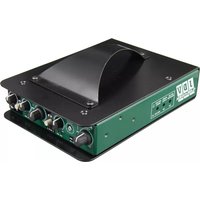

Brand : Radial Engineering
Model : Highline Stereo
Category : Audio Equipment