
Tempest RX - Keyboard Savio - Free user manual and instructions
Find the device manual for free Tempest RX Savio in PDF.


| Product Type | Keyboard |
| Brand | Savio |
| Model | Tempest RX |
| Connection Type | Wired USB 2.0 |
| Layout | Full-size (104 keys) |
| Backlighting | RGB per-key |
| Keycap Material | ABS |
| Frame Material | Plastic |
| Dimensions (W x D x H) | 440 x 130 x 35 mm |
| Weight | 800 g |
| Power Source | USB bus power |
| Polling Rate | 1000 Hz |
| Key Lifespan | 50 million clicks |
| Anti-Ghosting | Full key rollover |
| Detachable Cable | No |
| Compatible OS | Windows, macOS, Linux |
| Maintenance | Clean with a soft, dry cloth |
| Safety Certifications | CE, FCC |
| Spare Parts | Keycap puller included |
| Warranty | 2 years limited |
Frequently Asked Questions - Tempest RX Savio
User questions about Tempest RX Savio
0 question about this device. Answer the ones you know or ask your own.
Ask a new question about this device
Download the instructions for your Keyboard in PDF format for free! Find your manual Tempest RX - Savio and take your electronic device back in hand. On this page are published all the documents necessary for the use of your device. Tempest RX by Savio.
USER MANUAL Tempest RX Savio
Thank you for choosing Savio product!
If our product meets your expectations, share your opinion with other people on the portal ceneo.pl, social media or on the website of the store where you made the purchase. If you want to show our device on SAVIO Facebook Page, we will be very pleased.
If there is something that we could improve on our products, please write to us at support@savio.net.pl
Thanks to your feedback, we will be able to better adapt the product to your expectations.
Before starting the use of purchased device it is recommended to read the whole manual.
1. Main product features:
- Outemu Blue/Red/Brown Switches (depends on a model)
- Backlit keycaps in blue/red/green (depends on a model)
- Keystrokes lifetime up to 50 000 000
• Keycaps are made with "double injection" technology, that prevents them from rubbing away - N-Key Rollover (Full Anti-Ghosting) - a function that allows pressing many keycaps at once
• Metal keyboard surface ensures good durability
• Proper balance and rubber feet prevent the keyboard from moving - Backlit keycaps with the possibility of choosing one of 10 types of backlit.
2. Package contents:
- Mechanical keyboard
- User manual
3. Technical specification:
- Keyboard type: Mechanical
- Keyboard layout: US (87 keys)
- Interface: USB
• Switches: OUTEMU Blue / Red / Brown (depending on the model) - Switch lifespan: 50 000 000 keystrokes
• Keyboard dimensions: 357×125×38 mm - Weight: 830 g
• Cable length: 1.5 m
• Anti-ghosting: Full
- Compatibility: Windows 2000, XP, Vista, Win 7 / 8 / 10 / 11
4. Device installation:
4.1 Connect the keyboard to a USB port in your computer.
4.2 An operating system will detect the keyboard and will install the drivers automatically.
4.3 The keyboard is ready to use.
5. Activation mode of multimedia keys:
| Music | Next track | ||
| Volume down | Play/pause | ||
| Volume up | |||
| Mute | Internet browser | ||
| Stop | Lock/Unlock keyboard | ||
| Previous track | Calculator |
6. Keyboard has 10 modes of backlit:
To activate backlit mode press the FN + INS(Insert). Every FN + INS(Insert) keys combination press will make a change in the backlit mode. Keyboard also is able to lower or enhance the backlit. To do so press keys FN + arrow up/down. It is also possible to regulate the speed of backlit change by pressing FN + arrow left/right.
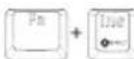
Change backlit

Backlit intensity change

Change effects speed
7. Type of backlit for games:
Depending on a game, the keyboard enables you to illuminate only some of the keys. To Activate the backlit predefined for games press the key combination FN + 1-9 key.
| First Person Shooter |  | CrossFire | |
| Call of Duty | Real Time Strategy | ||
| League of Legends |  | Car Race | |
| Special 1 | 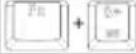 | Special 2 |
CrossFire
Real Time Strategy
Special 2
8. Setting the user mode:
The user mode lets the user set the backlit for the chosen keys
8.1 Press FN + HM (Home).
8.2 Chose keys, that you want to backlit, and press them.
8.3 Press FN + HM(Home), to save the user mode.
8.4 The user mode will be saved under the 9 number.
8.5 Press FN + 9, to turn on the user mode.
9. Changing WSAD to arrow keys mode
Keyboard has a possibility to change the functionality of WSAD keys to arrow keys. To Activate this mode, press FN + W , to get back to the previous setting do the same key sequence.
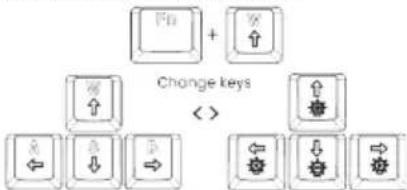
flowchart
graph TD
    A["Input"] --> B["Change keys"]
    C["Input"] --> B
    D["Change"] --> E["Output"]
    F["Output"] --> E
10. Windows key lock
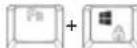
To lock the WINDOWS key, press FN + WINDOWS. Backlit of the WINDOWS key means it's blocked and deactivated. To return to previous settings, press FN + WINDOWS again. Reactivating the key will turn off the key backlight.
11. Safety conditions:
- Use the product in accordance with its intended use, as improper use may damage the product.
- Do not expose the device to moisture, heat or sunlight, do not use the product in a dusty environment.
• The device should be cleaned only with a dry cloth. - Independent repairs and modification result automatic loss of the warranty.
- Hitting or dropping may damage the product.

Savio
The warranty covers a period of 24 months. Independent repairs and modifications result in automatic loss of the warranty. Warranty card is available for download on our website: www.savio.net.pl/en/service
Gwarancja:
Information for customers and contractors and communication regarding complaints:
Pursuant to Article 13 section 1 and 2 of the General Data Protection Regulation (EU) 2016/679 of the European Parliament and of the Council of 27 April 2016 (hereinafter referred to as GDPR), please be advised that Elmak Sp. z o.o., with its registered seat at ul. Morgowa 81; 35-323 Rzeszów becomes the Administrator of your personal data. The Specialist for General Data Protection (SODO) can be contacted in writing to: SODO, Elmak Sp. z o.o., ul. Morgowa 81; 35-323 Rzeszów, via e-mail address: sodo@elmak.pl, and by phone at +48 (17) 854 98 14. Your personal data will be processed in order to perform the contract, in accordance with Article 6(1)(b) of the aforementioned regulation, to the extent resulting from tax laws and financial regulations. Recipients of your personal data include entities authorized by legal regulations to obtain personal data as well as processing entities providing services to Elmak Sp. z o.o. Your personal data will be stored on the basis of Administrator's legitimate interest. You have the right to access your data, and the right to rectify, delete or limit processing of your data. You have the right to lodge a complaint to the supervisory body if you believe that the processing violates the GDPR. The provision of personal data is voluntary, however, a failure to provide such data may result in a refusal to conclude or in termination of a contract. Your personal data will not be subjected to automated decision making, including profiling referred to in Article 22 section 1 and 4 of the GDPR of April 27, 2016.
Information of the utilization of electrical and electronic equipment
This symbol indicates that electrical appliances should not be discarded with other household waste. Used equipment should be handed over to a local collection point for this type of waste or to a recycling center. Please contact your local authorities for information about disposal methods available in your area. Waste electrical equipment may contain hazardous substances (e.g. mercury, lead, cadmium, chromium, phthaltes) which can get into air, soil and groundwater when leaking from used appliances. Environmental pollution with these substances leads to their bioaccumulation, causing lesion of disease in living organisms, which would pose a risk to human and animal health or life. Households may contribute to environmental protection by proper waste collection. In such way, hazardous substances from the equipment are neutralized and valuable secondary raw materials are reused for production of new equipment.
www.sávio.net.pl/en/download


- Main product features:
- Package contents:
- Technical specification:
- Device installation:
- Activation mode of multimedia keys:
- Keyboard has 10 modes of backlit:
- Type of backlit for games:
- Setting the user mode:
- Press FN + HM (Home).
- Changing WSAD to arrow keys mode
- Windows key lock
- Safety conditions:
- Gwarancja:
- Information of the utilization of electrical and electronic equipment
Brand : Savio
Model : Tempest RX
Category : Keyboard