
Karplus-Strong - Electronic musical instrument Morphor - Free user manual and instructions
Find the device manual for free Karplus-Strong Morphor in PDF.


| Product Type | Sound Synthesis Module |
| Brand | Morphor |
| Model | Karplus-Strong |
| Form Factor | Eurorack compatible, 10HP width, 3U height |
| Depth | 30 mm |
| Weight | 150 g |
| Power Supply | +12V DC, 50 mA (Eurorack bus ribbon cable) |
| Main Functions | Karplus-Strong string synthesis with adjustable pitch, decay, damping, and feedback |
| Audio Inputs | 1x 3.5 mm monophonic (exciter) |
| Audio Outputs | 1x 3.5 mm monophonic (main) |
| CV Inputs | Pitch (1V/oct), Decay, Damping (0-5V) |
| Controls | 4 knobs (Pitch, Decay, Damping, Mix) |
| Display | None |
| Construction Material | Aluminum front panel, steel case |
| Operating Temperature | 0°C to 50°C |
| Storage Temperature | -20°C to 60°C |
| Humidity | 0% to 90% non-condensing |
| Maintenance | Clean with a dry, soft cloth. Avoid liquids. |
| Safety | Do not expose to moisture or extreme temperatures. Disconnect power before cleaning. |
| Spare Parts | None user-serviceable. Contact support for repairs. |
| Firmware | Updatable via micro-USB (requires computer) |
| Included Accessories | Power ribbon cable, mounting screws |
Frequently Asked Questions - Karplus-Strong Morphor
User questions about Karplus-Strong Morphor
0 question about this device. Answer the ones you know or ask your own.
Ask a new question about this device
Download the instructions for your Electronic musical instrument in PDF format for free! Find your manual Karplus-Strong - Morphor and take your electronic device back in hand. On this page are published all the documents necessary for the use of your device. Karplus-Strong by Morphor.
USER MANUAL Karplus-Strong Morphor
Safety Instructions 3
Conformity 3
Installation 4
Introduction 5
Module overview 5
Controls & Connections 6
Technical Specifications 7
Support 7
Module Revision History 7
Manual Version 7
Warranty
THIS PRODUCT IS COVERED BY MORPHOR'S LIMITED WARRANTY, FOR TWO YEARS FOLLOWING THE DATE OF PURCHASE (PROOF OF PURCHASE/INVOICE REQUIRED).
THIS WARRANTY COVERS ANY DEFECT IN THE MANUFACTURING OF THIS PRODUCT.
THIS WARRANTY DOES NOT COVER ANY DAMAGE OR MALFUNCTION CAUSED BY INCORRECT USE - SUCH AS, BUT NOT LIMITED TO: POWER CABLES CONNECTED BACKWARDS, WRONG POWER SUPPLY VOLTAGES, BACKWARDS OR REVERSED EURORACK BUS BOARD CABLE CONNECTION, EXCESSIVE VOLTAGE LEVELS, ABUSE OF THE PRODUCT, REMOVING KNOBS, CHANGING FACE PLATES, EXPOSURE TO EXTREME TEMPERATURE OR MOISTURE LEVELS, OR ANY OTHER CAUSES DETERMINED BY MORPHOR TO BE THE FAULT OF THE USER ARE NOT COVERED BY THIS WARRANTY, AND NORMAL SERVICE RATES WILL APPLY.
THE WARRANTY COVERS REPLACEMENT OR REPAIR, AS DECIDED BY MORPHOR. PLEASE CONTACT OUR CUSTOMER SERVICE (SUPPORT@MORPHOR.IO) FOR A RETURN AUTHORIZATION BEFORE SENDING THE MODULE. THE COST OF SENDING A MODULE BACK FOR SERVICING IS PAID FOR BY THE CUSTOMER. CHANGES AND/OR MODIFICATIONS TO THE MODULE NOT APPROVED BY MORPHOR COULD VOID THE USER'S AUTHORITY TO OPERATE THE EQUIPMENT.
THE INSTRUMENT IS TO BE SHIPPED IN THE ORIGINAL PACKAGING ONLY. ANY INSTRUMENT SHIPPED TO US FOR RETURN, EXCHANGE, WARRANTY REPAIR, UPDATE OR EXAMINATION HAS TO BE IN ITS ORIGINAL PACKAGING! ALL OTHER DELIVERIES WILL BE REJECTED. THEREFORE, MAKE SURE YOU KEEP THE ORIGINAL PACKAGING AND TECHNICAL DOCUMENTATION.
PLEASE FOLLOW THE INSTRUCTIONS FOR USE OF THE INSTRUMENT CAREFULLY BECAUSE THIS WILL GUARANTEE PROPER OPERATION OF THE INSTRUMENT. DUE TO THE FACT THAT THESE INSTRUCTIONS TOUCH ON PRODUCT LIABILITY, IT IS ABSOLUTELY IMPERATIVE THAT THEY BE READ CAREFULLY. ANY CLAIM FOR DEFECT WILL BE REJECTED IF ONE OR MORE OF THE ITEMS HAS NOT BEEN OBSERVED. DISREGARD OF THE INSTRUCTIONS CAN VOID THE TWO YEARS COVERED BY WARRANTY.
Package Contents
In the Morphor Plectrum - Analogue BBD Pluck box you will find:
• The Morphor Plectrum module itself
• A 16-to-16-pin Eurorack power cable (already plugged in)
- 4 high-quality thumb screws including washer
• An original Morphor brand sticker
If any of the above items is missing, please contact your dealer or send an email to support@morphor.io.
Safety Instructions
I. Never use the instrument in a humid or wet environment, nor near flammable goods. The instrument must never be operated outdoors but solely in dry rooms.
II. No liquids or conducting substances must get into the instrument. Should this be the case, the instrument is to be disconnected from mains power immediately and examined, cleaned and possibly repaired by a qualified technician.
III. Never expose the instrument to temperatures above +50°C or below -10°C. Before operation, the instrument should have a temperature of at least 10°C. Do not expose the instrument to direct sunlight. Do not install the instrument near heat sources like heaters, open fire places, central heating etc. Keep the top of the instrument clear in order to allow proper ventilation, otherwise the instrument could eventually overheat.
IV. Never place heavy objects on the instrument.
V. Transport the instrument carefully, never let it drop or fall over. Make sure that during transport and in use the instrument is supported properly and cannot drop, slip or fall over because people might get injured.
VI. The instrument may only be used for the purpose described in this operating manual. Due to safety reasons, the instrument must never be used for other purposes.
Conformity
This device meets the requirements of the following standards and/or directives: 2014/30/EU, 2014/35/EU, 2009/125/EC, 2011/65/EU, 2012/19/EU, EN 60065, EN 55032, EN 55035. Please refer to the online Declaration of Conformity for detailed information regarding compliance.

Installation
Before you start
Morphor modules are designed to be used with an Eurorack-compatible case and power supply. We recommend you to use a case with an adequate high-quality power supply. Before installing the module in your case, you must ensure your power supply has a free Eurorack standard PSU connector (2x8 pin header connector) and sufficient available capacity to power the module:
- Make a separate sum of the +12 V, -12 V and +5 V maximum current draws respectively for all your modules, including the new one. The maximum current draw is specified in the manufacturer's technical specifications for each module. You can use a tool like ModularGrid to help you calculate the total values for your case.
- Compare each of these sums to the specifications of your case's power supply.
- Proceed only with the installation if none of the total values exceeds the power supply's specifications. Otherwise you must remove some modules to free up some capacity or upgrade your power supply to allow more capacity in your case. If you do not adequately power your modules, it may result in damage to your modules or power supply. If you are unsure, please contact us before proceeding.
- Make sure your case has enough free space (HP) to fit the new module. To prevent screws or other debris from falling into the case and shorting any electrical contacts, do not leave gaps between adjacent modules, and cover all unused areas with blank panels. Similarly, do not use open frames or any other enclosure that exposes the backside of any module or the power distribution board.
Installing your module
Always turn off the power to the case and disconnect the power cable when installing or removing a module from your case to avoid injury or equipment damage.
The Morphor Plectrum uses the -12 V and the +12 V rail of the power supply (using a standard Eurorack 2x8 pin connector). The red stripe of the included ribbon cable (-12 V side) must be oriented on the same side as the "RED -12 V" marking on the module and on your Eurorack power distribution board.
The module draws a maximum current of 40 mA from the +12 V rail and maximum 40 mA from the -12 V rail.
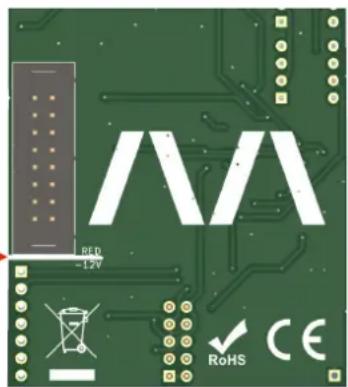
Example rear side of a module

Introduction
The Morphor Plectrum - Analogue BBD Plutthei successor of our successful AP-1 module. Now only 8 HP instead of 10 HP with additional CV-able feedback!
Plectrum is a high quality, fully analogue Eurorack module that can produce plucked string-like sounds. It is a compact all-in-one solution for generating amazing bass, acoustic guitar, percussion and other amazing sounds.
The module is based on the Karplus-Strong principle with a true analog audio path built with an authentic bucket brigade delay (BBD) circuit which is recognizable by its specific timbre. By using carefully chosen high quality components, this module has a rich, warm analogue sound.
Now being only 8 HP in width, you won't need a lot of space to get going and start creating some incredible sounds.
If you're looking to fully sculpt the string-like sound, you can extend the internal Karplus-Strong loop by breaking out the signal and adding external modules like filters and/or FX modules to it.
Happy morphing!
Module overview
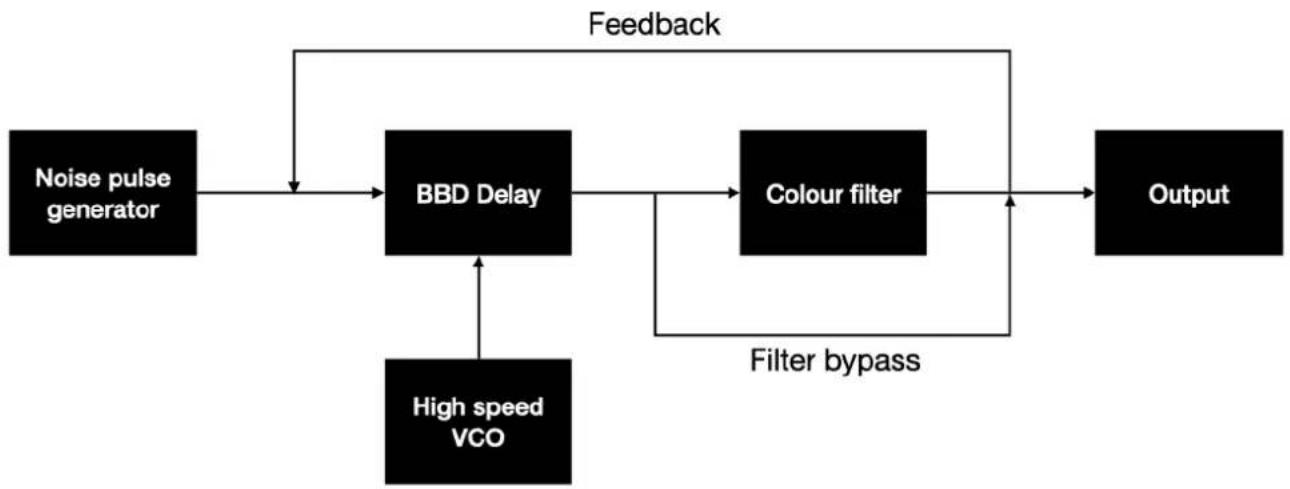
flowchart
graph TD
    A["Noise pulse generator"] --> B["BBD Delay"]
    C["High speed VCO"] --> B
    B --> D["Colour filter"]
    D --> E["Output"]
    F["Feedback"] --> B
    G["Filter bypass"] --> D
Controls & Connections

TRIG [1]
To pluck the "string", simply insert a trigger pulse into the input. Short triggers work great but you can play around with longer pulses to get more experimental sounds.
1V/OCT[2]
1 V/octave pitch control voltage input.
TUNE [3]
The tune control knob spans 15 Hz - 800 Hz.
CV (tune/frequency) [4]
Exponential frequency control voltage input. Can be used for frequency modulation (FM) for example. The control voltage supplied can be attenuated using the control knob.
FEEDBACK [5]
Level of the Karplus-Strong feedback loop gain. With this you can set a short or long sustain. Now with added CV input to easily change from short percussive sounds to long bass sounds.
COLOUR[6]
Controls the cut-off frequency of the internal single pole low-pass filter (LPF). Turning left the knob makes the sound darker, to the right it gets brighter. The cut-off frequency is also controllable with a CV input.
KARPLUS STRONG LOOP EXTENDER [7]
Use the toggle switch [7] and select EXT to feed the Karplus-Strong loop audio OUT [7_a] to any external modules and return your noodled audio signal back into the Karplus-Strong loop IN [7_b] . Use the toggle switch [7] and select INT to use the internal low-pass filter (LPF) in the Karplus-Strong loop, combined with any external signals that may be connected to Karplus-Strong loop IN [7_b] .
OUTPUT [8]
Your juicy analogue audio output signal at 10 V_pp .
Technical Specifications
| module width | 8 HP (40.3 mm) |
| module height | 3 U (128.5 mm) |
| module maximum depth (incl. power cable) | 40 mm |
| module mass | 145 g |
| maximum current draw | 40 mA @ +12 V40 mA @ -12 V |
| input impedances | 100 kOhm |
| output impedances | 1 kOhm |
| front panel | 2 mm anodized aluminum |
Support
To provide the best possible performance with the highest quality and reliability for music professionals, all Morphor's products are designed, manufactured and tested in-house with the highest possible standards. In case your module is not functioning as it should, make sure to check your Eurorack power supply and all connections first.
If the problem persists, contact your dealer or send an email to support@morphor.io. Please mention your serial number, which can be found on the module's rear side.
Module Revision History
Revision 1.0 - initial release
Manual Version
07/06/2023 - initial release
https://www.morphor.io

natural_image
Abstract geometric pattern with two white vertical lines on black background (no text or symbols)Designed & made in Belgium


- Warranty
- Package Contents
- Safety Instructions
- Conformity
- Installation
- Before you start
- Installing your module
- Introduction
- Controls & Connections
- TRIG [1]
- 1V/OCT[2]
- TUNE [3]
- CV (tune/frequency) [4]
- FEEDBACK [5]
- COLOUR[6]
- KARPLUS STRONG LOOP EXTENDER [7]
- OUTPUT [8]
- Support
- Module Revision History
- Manual Version
Brand : Morphor
Model : Karplus-Strong
Category : Electronic musical instrument