
LA880I - Loudspeaker SoundTube - Free user manual and instructions
Find the device manual for free LA880I SoundTube in PDF.


| Product Type | Professional installation loudspeaker |
| Brand | SoundTube |
| Model | LA880I |
| Driver Configuration | Two-way (woofer and tweeter) |
| Woofer Size | 8 inches (estimated) |
| Tweeter Size | 1 inch (estimated) |
| Frequency Response | 60 Hz – 20 kHz (typical) |
| Impedance | 8 ohms (typical) |
| Power Handling (RMS) | 150 W (estimated) |
| Power Handling (Peak) | 300 W (estimated) |
| Sensitivity | 90 dB (typical) |
| Inputs | SpeakOn NL4 or Euroblock (4-pin) |
| Dimensions (H x W x D) | 15.0 x 10.0 x 8.0 inches (estimated) |
| Weight | 12 lbs (5.4 kg) (estimated) |
| Enclosure Material | Polypropylene or similar (estimated) |
| Mounting Options | Wall mount, pole mount, ceiling mount, flown array using optional accessories |
| Safety Features | Attach included safety cable; designed for professional rigging |
| Box Contents | 1 Speaker, 1 Safety Cable (10 ft), 3 Zip Ties, 1 AC-LA8-BACK Back Plate, 7 Mounting Bolts (1/4-20 x 0.5"), 1 Euroblock Connector |
| LFDE Switch | NO (default); switch to YES when used with LA808i subwoofer |
| Maintenance | Clean with dry cloth; inspect connections periodically |
| Spare Parts and Repairability | Contact SoundTube or authorized dealer; no user-serviceable parts |
Frequently Asked Questions - LA880I SoundTube
User questions about LA880I SoundTube
0 question about this device. Answer the ones you know or ask your own.
Ask a new question about this device
Download the instructions for your Loudspeaker in PDF format for free! Find your manual LA880I - SoundTube and take your electronic device back in hand. On this page are published all the documents necessary for the use of your device. LA880I by SoundTube.
USER MANUAL LA880I SoundTube
Install Instructions For:
LA880i speaker
Box contents
1 Speaker
1 10' Safety cable
3 Black zip ties
1 AC-LA8-BACK Back plate
7 Mounting bolts (1/4-20 x 0.5")
1 Euroblock connector
Optional mounting accessories
• Allen Products MM-024 Pan and Tilt wall moun
• Allen Products PoleStar pole mount
• Allen Products MM-020X
MultiMount ceiling mount
• Allen Products SAS-1WA-20
One-Way-Array
• Allen Products TCK-010-S Fly cable kit
• AC-LA8-LINK stacking adapter plate
• AC-LA8-FLY hanging adapter plate
• AC-LA8-BACK bent back plate

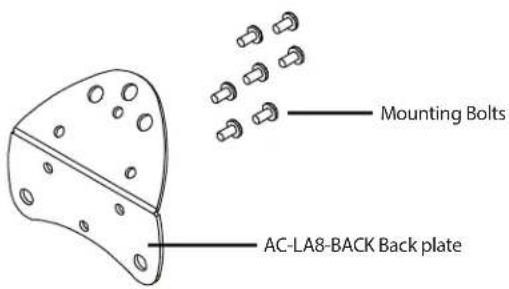


Connector Plate (Back)
1.435.64 7.9555
800.64 7.TUBE
www.soundtube.com
LA880i
© 2012 SoundTube Entertainment, Inc. All rights reserved. PN INS-LA880i Rev 08.15.12

Warning
SoundTube speakers must be installed by a professional audio installer/contractor. For safety and for optimum audio performance, installer must follow all directions issued by SoundTube Entertainment.

Warning
Do not spec or install speaker near support beam, ventilation duct or other structure that may interfere with speaker function or dispersion.
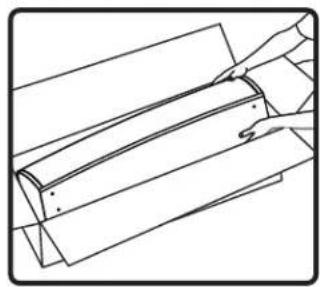
- Unpack speaker.

- Using supplied bolts, attach included AC-LA8-BACK back plate to rear of speaker near the bottom of the cabinet. WARNING: Do not exceed 100 in-lbs when installing bolts in threaded inserts.
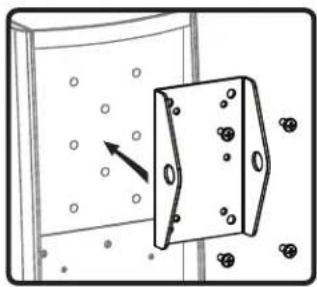
- Attach Allen Products MM-024 speaker adapter plate (available separately) to to rear of speaker using supplied bolts. See Allen Products installation manual for more details.

- Attach Allen Products Pan and Tilt bracket (available separately) to wall. Choose a secure mounting surface with sufficient strength to reliably hold the speaker.
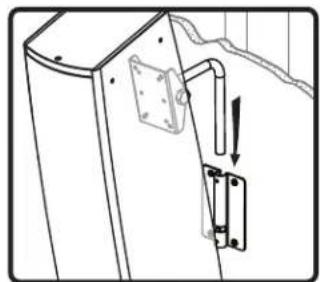
- Attach speaker with Allen Products speaker adapter plate to wall plate.
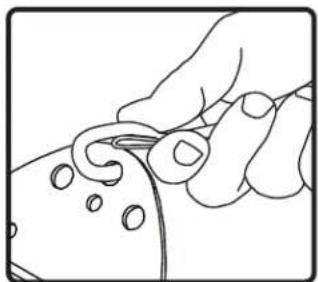
- Attach included safety cable from bent bracket to secure mounting point on structure. Installer to supply structural fastener.
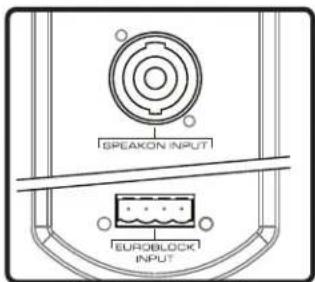
- Chose one of two inputs: SpeakOn, ™ or included Euroblock. Note: If using LA808i, refer to wiring instructions 7-11.
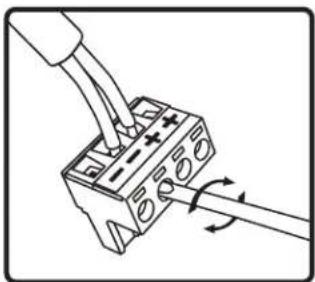
- If using Euroblock input, connect signal wire to four-pin Euroblock plug. If using SpeakOn connector skip to step 10.

- Insert wired 4-pin Euroblock jack into speaker. Connectors are keyed for polarity. Skip to step 11.

- If using SpeakOn cable, insert the end of the cable into the SpeakOn input connector, and twist to lock.
![[LABOBI (LFDE)] YES NO](/content/2026/05/986555/images/21e0a37d8622bd9667fd43e0a5d825f6bb5939722bc19f2a8c7382c242d15e3b.jpg)
- Speaker ships with LFDE switch in "NO" position. If using with LA808i switch to "YES" position.

- Done!

- Unpack speaker.

- Using supplied bolts, attach included AC-LA8-BACK back plate to rear of speaker near the bottom of the cabinet. WARNING: Do not exceed 100 in-lbs when installing bolts in threaded inserts.

- Attach Allen Products MM-024 speaker adapter plate (available separately) to to rear of speaker using supplied bolts. See Allen Products installation manual for more details.

- Attach Allen Products Pan and Tilt bracket (available separately) to polestar. Choose a secure mounting surface with sufficient strength to reliably hold the speaker.

- Attach speaker with Allen Products speaker adapter plate to mounting plate/pole adapter.

- Attach included safety cable from bent bracket to secure mounting point on structure. Installer to supply structural fastener.
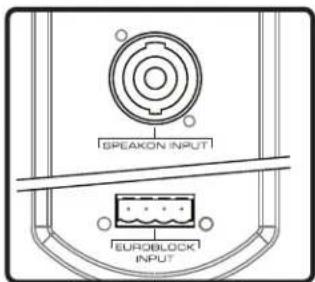
- Chose one of two inputs: SpeakOn, ™ or included Euroblock. Note: If using LA808i, reference its wiring instructions for steps 8-11.

- If using Euroblock input, connect signal wire to four-pin Euroblock plug. If using SpeakOn connector skip to step 10.

- Insert wired 4-pin Euroblock jack into speaker. Connectors are keyed for polarity. Skip to step 11.

- If using SpeakOn cable, insert the end of the cable into the SpeakOn input connector, and twist to lock.
![[LABOBI (LFDE)] YES NO](/content/2026/05/986555/images/f531934b3853a931d246e3ea54757393940a35d9ea6c3681a4ee44e7aba98f65.jpg)
- Speaker ships with LFDE switch in "NO" position. If using with LA808i switch to "YES" position.

- Done!

- Unpack speaker.

- Using supplied bolts, attach included AC-LA8-BACK back plate to rear of speaker near the bottom of the cabinet. WARNING: Do not exceed 100 in-lbs when installing bolts in threaded inserts.

- Attach Allen Products MM-024 speaker adapter plate (available separately) to to rear of speaker using supplied bolts. See Allen Products installation manual for more details.
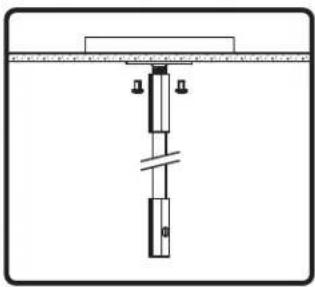
- Attach Allen Products MM-020x mounting plate/pole (available separately) to ceiling. Use hardware with sufficient strength to reliably hold the speaker.

- Attach speaker with Allen Products speaker adapter plate to mounting plate/pole.
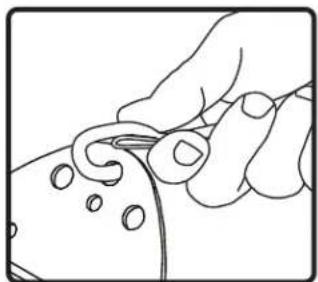
- Attach included safety cable from bent bracket to secure mounting point on structure. Installer to supply structural fastener.

- Chose one of two inputs: SpeakOn, ™ or included Euroblock. Note: If using LA808i, reference its wiring instructions for steps 8-11.

- If using Euroblock input, connect signal wire to four-pin Euroblock plug. If using SpeakOn connector skip to step 10.

- Insert wired 4-pin Euroblock jack into speaker. Connectors are keyed for polarity. Skip to step 11.
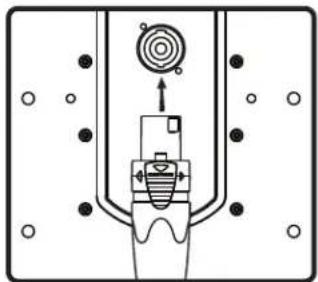
- If using SpeakOn cable, insert the end of the cable into the SpeakOn input connector, and twist to lock.
![[LAB08i (LFDE)] YES NO](/content/2026/05/986555/images/1239f208d97b801af99239a3d36775135975863deaeac238fd4515451c0f1ed8.jpg)
- Speaker ships with LFDE switch in "NO" position. If using with LA808i switch to "YES" position.

- Done!
WARNING: Flown products must only be installed by trained rigging professionals.
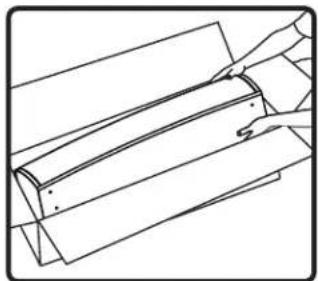
- Unpack speaker.

- Using supplied bolts, attach included AC-LA8-BACK back plate to rear of speaker near the bottom of the cabinet. WARNING: Do not exceed 100 in-lbs when installing bolts in threaded inserts.

- Attach AC-LA8-FLY hanging adapter plate(optional accessory) to left and right sides of speaker using bolts supplied with accessory kit.

- Hang the Allen Products One-Way-Array bracket from the structure. Installation location and hanging hardware must be sufficiently strong to reliably hold the speaker. See Allen Products installation manual for more details.

- Attach speaker to One-Way-Array bracket using Allen Products flying hardware. Cables should connect to hanging adapter plates at the top, and back plate near the bottom of the cabinet.
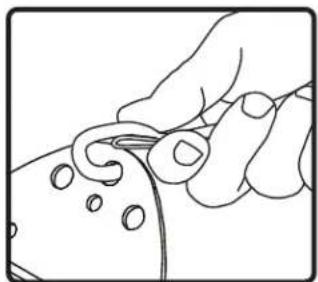
- Attach included safety cable from bent bracket to secure mounting point on structure. Installer to supply structural fastener.

- Chose one of two inputs: SpeakOn, ™ or included Euroblock. Note: If using LA808i, reference its wiring instructions for steps 8-11.

- If using Euroblock input, connect signal wire to four-pin Euroblock plug. If using SpeakOn connector skip to step 10.
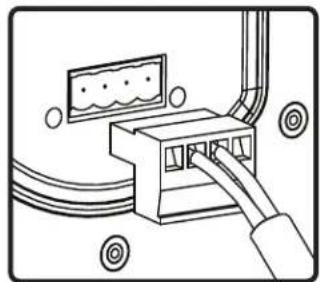
- Insert wired 4-pin Euroblock jack into speaker. Connectors are keyed for polarity. Skip to step 11.

- If using SpeakOn cable, insert the end of the cable into the SpeakOn input connector, and twist to lock.
![[LABOBI (LFDE)] YES NO](/content/2026/05/986555/images/67462629428837d20fb027a7ed32c9bbfc04213aa77ab6410f427b1dc8a2c040.jpg)
- Speaker ships with LFDE switch in "NO" position. If using with LA808i switch to "YES" position.
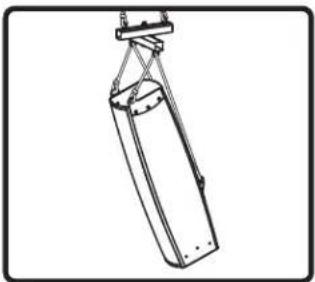
- Done!
Brand : SoundTube
Model : LA880I
Category : Loudspeaker