
JR-5 - Pédalier de commande à distance Radial Engineering - Free user manual and instructions
Find the device manual for free JR-5 Radial Engineering in PDF.


| Product Type | 5-Channel Passive Direct Box |
| Inputs | 5 x 1/4" TS instrument/line (unbalanced) |
| Outputs | 5 x XLR (balanced) with ground lift and polarity reverse |
| Impedance | Input: 220 kΩ (instrument), 10 kΩ (line); Output: 600 Ω |
| Transformer | 5 x Jensen JT-DB-E (or equivalent premium transformers) |
| Frequency Response | 10 Hz – 40 kHz (±0.5 dB) |
| Dynamic Range | > 115 dB |
| THD+N | < 0.01% @ 1 kHz, +4 dBu |
| Ground Lift | Per channel, lifts pin 1 on XLR |
| Polarity Reverse | Per channel, 180° phase inversion |
| Construction | Steel chassis with black finish, 1U rackmount |
| Dimensions | 19" x 1.75" x 7" (483 x 44 x 178 mm) |
| Weight | 5.5 lb (2.5 kg) |
| Power Requirement | Passive – no external power needed |
| Operating Temperature | 32°F to 104°F (0°C to 40°C) |
| Accessories Included | Rack screws, user manual |
| Spare Parts Availability | Limited; contact Radial for service |
| Repairability | Not user-serviceable; refer to authorized service center |
| Safety Certification | CE, RoHS compliant |
Frequently Asked Questions - JR-5 Radial Engineering
User questions about JR-5 Radial Engineering
0 question about this device. Answer the ones you know or ask your own.
Ask a new question about this device
Download the instructions for your Pédalier de commande à distance in PDF format for free! Find your manual JR-5 - Radial Engineering and take your electronic device back in hand. On this page are published all the documents necessary for the use of your device. JR-5 by Radial Engineering.
USER MANUAL JR-5 Radial Engineering
True to the Music
Viade In Canada

Radial Engineering Ltd.
1165-1845 Kingsway Ave, Port Coquitlam BC V3C 1S9
Tel: 604-942-1001 • www.radialeng.com
Email: info@radialeng.com
RADIAL JR-5
Table of Contents Page
Features .... 1
Overview & Making connections 2
Using the JR-5 for Guitar Switching 3
Using the JR-5 for Amp Switching....3
Bank Mode vs. Manual Mode....4
Warranty......Back Cover
Thank you for purchasing the JR-5, a remote footswitch controller designed for use with Radial guitar and amplifier switchers such as the JX44 and the JX42.
We recommend you take a few minutes to read this short manual before you begin using the JR-5 remote, as it covers the various features of the device and tips for setup. Should you have any questions about the JR-5 or its use with compatible Radial devices, please visit our website at www.radialeng.com for additional resources and frequently asked questions.
FEATURES
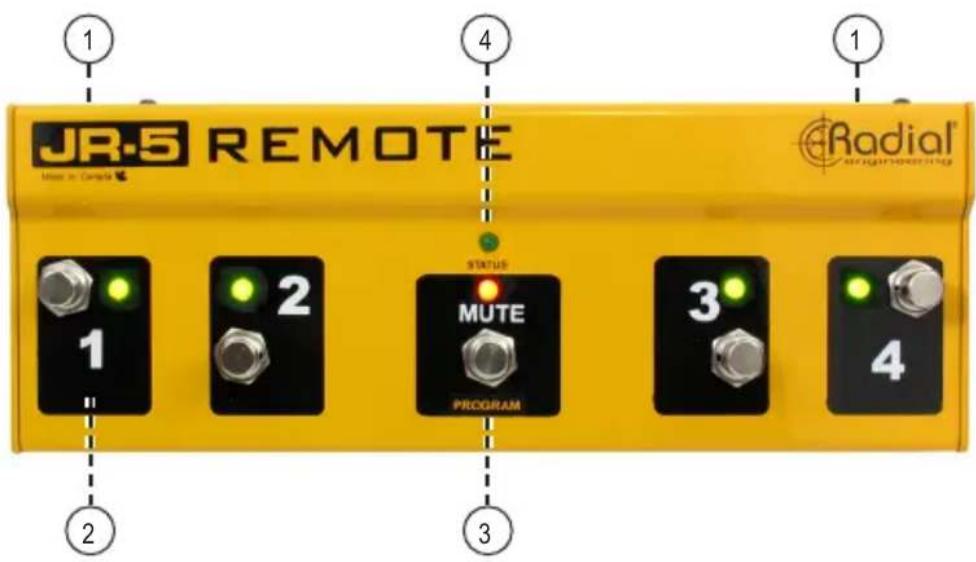
-
XLR JACK (x2): Connects the JR-5 to the Radial JX44 or JX42 using a standard XLR mic cable. Connectors are available on both sides of the JR-5 for the most flexible pedalboard arrangement.
-
FOOTSWITCHES 1-4: Heavy-duty latching footswitches with LED indicators are used to select guitars or amplifiers, or recall scenes from the BANK memory.
-
MUTE FOOTSWITCH: This switch is used to activate BANK mode on the JR-5, or it can mute instrument inputs or amplifier outputs, depending on which Radial device it is connected to.
-
STATUS LED: Illuminates when BANK mode is active and when programming banks into the JR-5 memory.
OVERVIEW
The JR-5 is a rugged footswitch designed to operate with Radial instrument and amplifier switchers such as the JX44 and the JX42, allowing remote control over some features from up to 300 feet away. This gives guitar technicians the ability to manage inputs and outputs hands-free, or it can allow the artist additional control from their pedalboard on stage.
MAKING CONNECTIONS
The JR-5 connects to your Radial switcher using a standard XLR mic cable. No local power supply is required, as the JR-5 receives power automatically from the switcher itself.

The JR-5 remote inputs on the JX44 V2
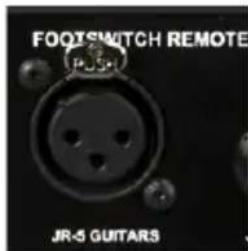
The JR-5 remote input on the JX42 V2
When used with the JX44, the JR-5 can control either the instrument inputs or the amplifier outputs, or you can use two JR-5 remotes and control guitars and amps simultaneously. On the JX42, the JR-5 can only be used to select the instrument inputs.
USING THE JR-5 FOR INSTRUMENT SWITCHING
To control the instrument inputs with the JR-5, connect it to the XLR input labelled GUITARS. The footswitches 1-4 on the JR-5 will perform the same function as the ON switches on the front panel of the JX44 or the JX42, complete with LED indicators to let you know at a glance which instruments are currently active.
In addition to the input selector footswitches, the JR-5 includes a MUTE switch. When pressed, this will temporarily mute all instrument inputs on the JX44. Pressing this switch a second time will revert back to the prior combination of active inputs.

The JR-5 can be used to select the guitar inputs of the JX42 V2.
USING THE JR-5 FOR AMPLIFIER SWITCHING
To control the amplifier outputs with the JR-5, connect to the XLR marked AMPS. The footswitches 1-4 on the JR-5 will now control the ON switches on the JX44 for the amplifier outputs. When selecting amplifiers with the JR-5 remote, the LED status indicators on the front panel of the JX44 will also turn on/off to mirror your selections.
When used for amplifier switching, the center MUTE footswitch on the JR-5 duplicates the JX44's front panel mute control. Both switches can be used to silence the amplifier outputs of the JX44, and their LED indicators sync together to display the current mute status at both

The JR-5 can be used to select either the guitar inputs or the amplifier outputs of the JX44 V2.
USING THE JR-5 TO STORE AND RECALL BANKS
The JR-5 can also be operated in BANK mode, which stores up to four combinations of instrument or amplifier on/off settings, eliminating excess toe-tapping during complex performances. BANK mode can be accessed when using the JR-5 for either guitar or amplifier switching.
When the JR-5 is operating in BANK mode, the front panel controls on the JX44 o the JX42 will still function as typical on/off switches. This scenario allows you to recall four banks with the JR-5 footswitch, while using the JX44 front panel controls to temporarily add or subtract instruments/amplifiers.
PROGRAMMING BANKS WITH THE JR-5 FOOTSWITCH
Besides manually controlling the inputs or outputs of a Radial instrument switcher, the JR5 also has the ability to program and store its own set of four banks. The following steps outline this procedure:
- Hold down the MUTE footswitch for 8 seconds.
- The MUTE LED indicates the bank you are currently programming by the number of blinks. Select the desired combination of guitar inputs/amplifier outputs using the footswitches 1 thru 4. Hit the MUTE footswitch to write the bank to memory and advance to the next bank.
- Repeat until all four banks are setup and stored. Hold the MUTE footswitch for 3 seconds when finished.
RECALLING BANKS
- Hold the MUTE footswitch for 3 seconds to enter BANK mode. The STATUS LED on the JR-5 will illuminate, indicating BANK mode is active.
- Use the footswitches 1 thru 4 to recall the four banks from the JR-5's internal memory.
- You can exit BANK mode at any time by holding the MUTE footswitch for 3 seconds, until the STATUS LED turns off.
THREE YEAR TRANSFERABLE LIMITED WARRANTY
RADIAL ENGINEERING LTD. ("Radial") warrants this product to be free from defects in material and workmanship and will remedy any such defects free of charge according to the terms of this warranty. Radial will repair or replace (at its option) any defective component(s) of this product (excluding finish and wear and tear on components under normal use) for a period of three (3) years from the original date of purchase. In the event that a particular product is no longer available, Radial reserves the right to replace the product with a similar product of equal or greater value. In the unlikely event that a defect is uncovered, please call 1-800-939-1001 or email service@radialeng.com to obtain a RA number (Return Authorization number) before the 3 year warranty period expires. The product must be returned prepaid in the original shipping container (or equivalent) to Radial or to an authorized Radial repair center and you must assume the risk of loss or damage. A copy of the original invoice showing date of purchase and the dealer name must accompany any request for work to be performed under this limited and transferable warranty. This warranty shall not apply if the product has been damaged due to abuse, misuse, misapplication, accident or as a result of service or modification by any other than an authorized Radial repair center.
THERE ARE NO EXPRESSED WARRANTIES OTHER THAN THOSE ON THE FACE HEREOF AND DESCRIBED ABOVE. NO WARRANTIES WHETHER EXPRESSED OR IMPLIED, INCLUDING BUT NOT LIMITED TO, ANY IMPLIED WARRANTIES OF MERCHANTABILITY OR FITNESS FOR A PARTICULAR PURPOSE SHALL EXTEND BEYOND THE RESPECTIVE WARRANTY PERIOD DESCRIBED ABOVE OF THREE YEARS. RADIAL SHALL NOT BE RESPONSIBLE OR LIABLE FOR ANY SPECIAL, INCIDENTAL OR CONSEQUENTIAL DAMAGES OR LOSS ARISING FROM THE USE OF THIS PRODUCT. THIS WARRANTY GIVES YOU SPECIFIC LEGAL RIGHTS, AND YOU MAY ALSO HAVE OTHER RIGHTS, WHICH MAY VARY DEPENDING ON WHERE YOU LIVE AND WHERE THE PRODUCT WAS PURCHASED.
To meet the requirements of California Proposition 65, it is our responsibility to inform you of the following:
WARNING: This product contains chemicals known to the State of California to cause cancer, birth defects or other reproductive harm.
Please take proper care when handling and consult local government regulations before discarding.

www.radialeng.com
Made In Canada
Radial Engineering Ltd.
1165-1845 Kingsway Ave, Port Coquitlam BC V3C 1S9
Tel: 604-942-1001 • www.radialeng.com
Email: info@radialeng.com


Brand : Radial Engineering
Model : JR-5
Category : Pédalier de commande à distance