
HD-EARC KIT - Audio/Video Kit Crestron - Free user manual and instructions
Find the device manual for free HD-EARC KIT Crestron in PDF.


| Product Type | HDMI eARC Audio/Video Extender Kit |
| Brand | Crestron |
| Model | HD-EARC KIT |
| HDMI Standard | HDMI 2.1 (eARC support) |
| Maximum Resolution | 4K@60Hz 4:4:4, 8K@30Hz |
| Transmission Distance | Up to 100m (328 ft) over CAT6a/7 |
| Audio Support | Dolby Atmos, DTS:X, PCM up to 7.1 |
| EDID Management | Automatic and manual (via DIP switches) |
| Dimensions (Transmitter) | 11.4 cm x 7.6 cm x 2.5 cm |
| Dimensions (Receiver) | 11.4 cm x 7.6 cm x 2.5 cm |
| Weight (each) | 200 g |
| Power Supply | 5V DC via USB-C (adapter included) |
| Power Consumption | < 5W per unit |
| Connectors | HDMI input/output (Type A female), RJ45 (CAT cable), USB-C (power) |
| Mounting | Surface mount with included brackets |
| Operating Temperature | 0°C to 50°C |
| Humidity | 10% to 90% (non-condensing) |
| Compliance | CE, FCC, RoHS |
| Included Accessories | 2x mounting brackets, 2x USB-C power adapters, 1x CAT6a cable (2m) |
| Maintenance | Wipe with dry cloth; avoid liquids |
| Safety | Do not block ventilation; use only supplied power adapters |
| Spare Parts & Repairability | Contact Crestron for service; no user-serviceable parts inside |
Frequently Asked Questions - HD-EARC KIT Crestron
User questions about HD-EARC KIT Crestron
0 question about this device. Answer the ones you know or ask your own.
Ask a new question about this device
Download the instructions for your Audio/Video Kit in PDF format for free! Find your manual HD-EARC KIT - Crestron and take your electronic device back in hand. On this page are published all the documents necessary for the use of your device. HD-EARC KIT by Crestron.
USER MANUAL HD-EARC KIT Crestron
Transmitter/Receiver Kit for HDMI ^® ,
RS-232, IR, and Analog Audio Signal
Extension over CATx Cable
The original language version of this document is U.S. English. All other languages are a translation of the original document.
Regulatory Model: M202243001
Crestron product development software is licensed to Crestron dealers and Crestron Service Providers (CSPs) under a limited nonexclusive, nontransferable Software Development Tools License Agreement. Crestron product operating system software is licensed to Crestron dealers, CSPs, and end-users under a separate End-User License Agreement. Both of these Agreements can be found on the Crestron website at www.crestron.com/legal/software_license_agreement.
The product warranty can be found at www.crestron.com/warranty.
The specific patents that cover Crestron products are listed online at www.crestron.com/legal/patents.
Certain Crestron products contain open source software. For specific information, please visit www.crestron.com/opensource.
Crestron, the Crestron logo, and DM are either trademarks or registered trademarks of Crestron Electronics, Inc. in the United States and/or other countries. Dolby, Dolby Atmos, and Dolby Digital are either trademarks or registered trademarks of Dolby Laboratories in the United States and/or other countries. DTS, DTS-HD, and DTS-X are either trademarks or registered trademarks of DTS, Inc. in the United States and/or other countries. HDMI, the HDMI logo, and High Definition Multi Interface are either trademarks or registered trademarks of HDMI Licensing LLC in the United States and/or other countries. Intertek is either a trademark or registered trademark of Intertek Group in the United States and/or other countries. TOSLINK is either a trademark or registered trademark of Toshiba Corporation in the United States and/or other countries. UL is either a trademark or registered trademark of Underwriters Laboratories, Inc. in the United States and/or other countries. DisplayPort is either a trademark or registered trademark of Video Electronics Standards Association in the United States and/or other countries. Other trademarks, registered trademarks, and trade names may be used in this document to refer to either the entities claiming the marks and names or their products. Crestron disclaims any proprietary interest in the marks and names of others. Crestron is not responsible for errors in typography or photography.
HDMI
©2024 Crestron Electronics, Inc.
Contents
Overview ...1
Features ..1
4K60 4:4:4 and HDR Support...1
eARC and S/PDIF Audio Extraction...1
Compact, Surface-Mountable Design...2
Physical Description...2
HD-TXC-EARC Front Panel...2
HD-TXC-EARC Rear Panel...3
HD-RXC-EARC Front Panel...4
HD-RXC-EARC Rear Panel...5
Specifications ...6
Product Specifications...6
Dimension Drawings...10
Installation ...11
In the Box...11
Installation Guidelines 12
DM Essentials Cabling 12
HDMI Cabling 13
Power Connection 13
Install the Device 14
Rack Mounting 14
Mounting Under a Table 16
Surface Mounting 17
Connect the Device 18
Set the HDMI/OPTICAL Switch 20
Observe the LED Indicators 21
Resources 22
Crestron Support and Training 22
Programmer and Developer Resources 22
Product Certificates 22
Overview
The HD-EARC KIT consists of a transmitter (HD-TXC-EARC) and receiver (HD-RXC-EARC), which enable the extension of HDMI® AV and eARC (Enhanced Audio Return Channel) or optical digit signals. This is useful in applications where an AV source is located remotely from its destination, a display, projector, or codec solution. A CAT5e or greater twisted pair cable must be used to the transmitter and receiver.
NOTE: Power is transmitted over the CATx cable that connects the transmitter to the receiv
This section provides the following information:
- Features
• Physical Description
Features
Key features include:
• 4K video with 4:4:4 color sampling
- Transmitter and receiver for extension of an HDMI® AV signal and eARC or optical digital signals over a CAT5e or greater cable
- eARC support available on HDMI® connection to display - supports all Dolby® audio forma Dolby Atmos® and all DTS® formats up to DTS:X®
• Video, audio, and power extension over a CAT5e (or greater) cable - up to 230 ft (70 m resolutions up to 2K or up to 130 ft (40 m) for higher resolutions up to 4K
• HDCP 2.3 compliant
• RS-232, IR, EDID, and Consumer Electronics Control (CEC) pass-through capability
- Low-profile installation
• 100-240VAC power pack included
4K60 4:4:4 and HDR Support
The HD-EARC KIT supports video resolutions up to 4K60 with 4:4:4 color sampling. HDR10, HDR Dolby Vision® video formats are also supported
eARC and S/PDIF Audio Extraction
The HDMI output of the HD-RXC-EARC receiver supports Enhanced Audio Return Channel (eARC connectivity, allowing audio to be extracted from a connected display and transmitted back to HDMI connector of the HD-TXC-EARC transmitter. Extracting audio from the display via the eARC connection means only a single cable is required for video and bidirectional audio. An opt
TOSLINK® S/PDIF input is also available on the receiver to extract 2-channel LPCM digital audio display. These connections allow local audio content from the display (such as smart TV s applications) to be sent back to the transmitter. The HDMI/OPTICAL switch on the transmitter determines which audio output connection on the HD-TXC-EARC is prioritized.
Compact, Surface-Mountable Design
Compact in design, the transmitter and receiver of the HD-EARC KIT can be mounted onto a surface such as a wall behind a flat-panel display or on a ceiling above a projector. They are attached to a single rack rail in the back of an equipment cabinet. The power pack supplied by HD-TXC-EARC transmitter powers both units in the kit.
Note:
- For the DM CATx cable connection, use Crestron DM-CBL-8G, Crestron DM-CBL-ULTRA, or third-party CAT5e or greater cable. To safeguard against unpredictable environmental electrical noise that may impact performance at resolution above 1080p, shielded cable and connectors are recommended for all applications, and are required when bundlin multiple cables in a wire run. Wire and cables are sold separately. The DM Essentials ports in this kit are not compatible with DigitalMedia 8G+®, HDBaseT®, PoE, or PoDM technology or any other type of CATx based interface or net
Physical Description
The HD-EARC KIT provides the following connectors, controls, and indicators.
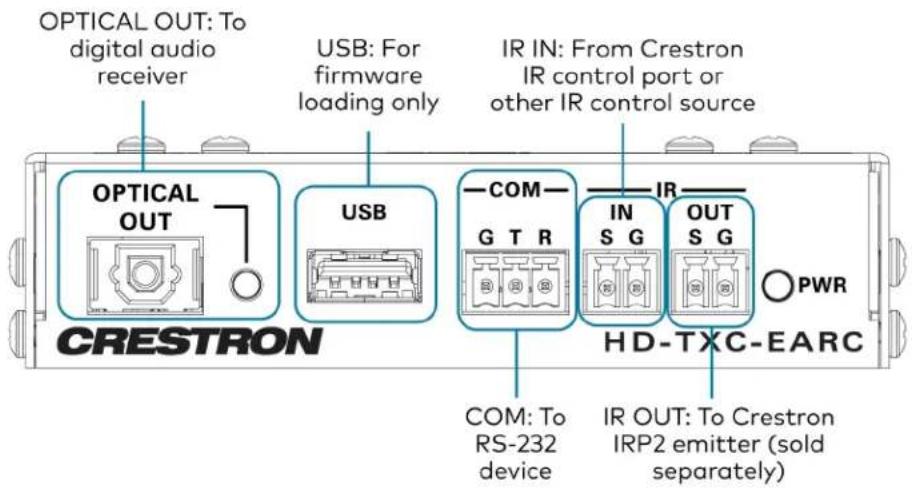
HD-TXC-EARC Front Panel
The following illustration shows the front of the HD-TXC-EARC:
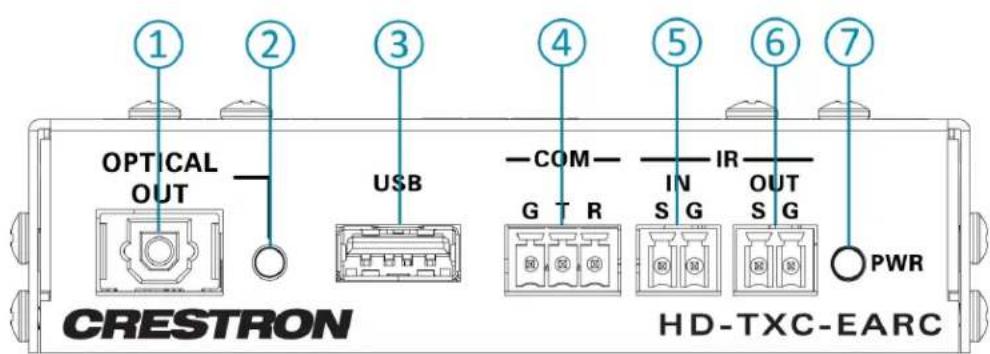

OPTICAL OUT: S/PDIF TOSLINK® connector, outputs digital audio over an optical cable to an audio receiver device
② OPTICAL OUT Indicator: Green LED, indicates S/PDIF digital audio signal presence at the OPTICAL OUT connector
③ USB: USB Type-A female connector, for firmware loading procedures only
④ COM: 3-pin terminal block connector, connects to RS-232 device, bidirectional, passes RS-232 signal to and from the connected HD-RXC-EARC device's COM port
⑤ IR IN: 2-pin terminal block connector, receives IR serial signal from a Crestron IR control port or other IR control device and transmits it to the IR OUT port of the connected HD-RXC-EARC device
⑥ IR OUT: 2-pin terminal block connector, receives IR serial signal from the IR IN port of the connected HD-RXC-EARC device, connects to a Crestron IRP2 IR emitter (sold separately)
⑦ PWR Indicator: Green LED, indicates power is supplied to the device via the included power pack
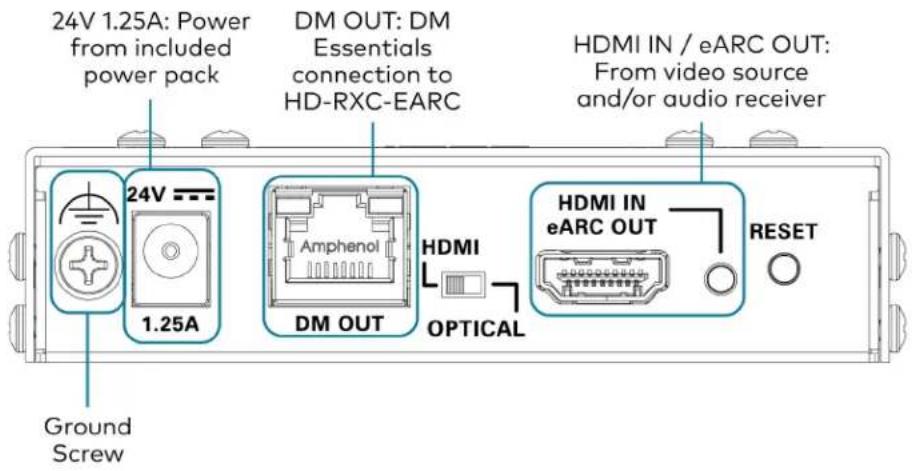
HD-TXC-EARC Rear Panel
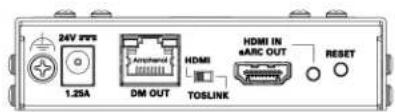
The following illustration shows the rear of the HD-TXC-EARC:
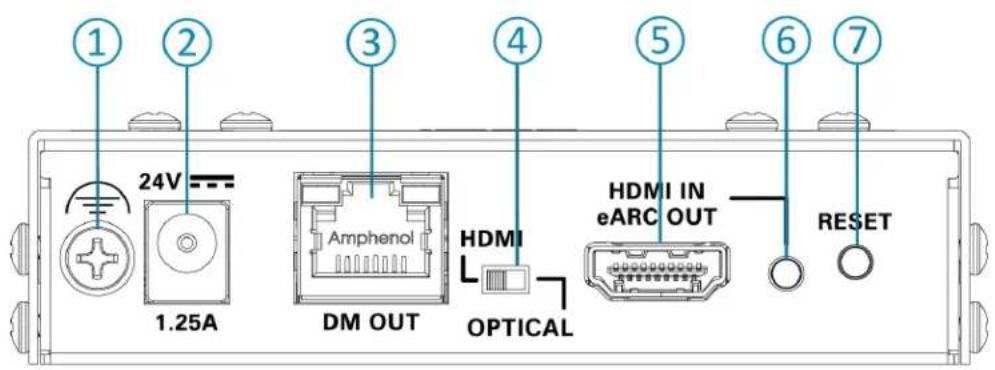
① Ground screw
24V 1.25A: DC power input, connects to the included power pack, supplies power to both the HD-TXC-EARC and connected HD-RXC-EARC
③ DM OUT: DM Essentials output port, connects to the HD-RXC-EARC receiver, passes digital A/V signal, power, COM, and IR signals over a CAT5e or greater cable
④ HDMI/OPTICAL Switch: 2-position slide switch, selects which audio output connector is prioritized;
HDMI position prioritizes extracting audio via the HDMI IN/eARC OUT port;
OPTICAL position prioritizes extracting audio via the OPTICAL OUT port
⑤ HDMI IN/eARC OUT: HDMI input and eARC output port, connects to an AV input source and/or an eARC digital audio receiver
⑥ HDMI IN/eARC OUT Indicator: Green LED, indicates HDMI input and/or eARC digital audio presence at the HDMI IN/eARC OUT port

RESET: Recessed red pushbutton, restarts the device
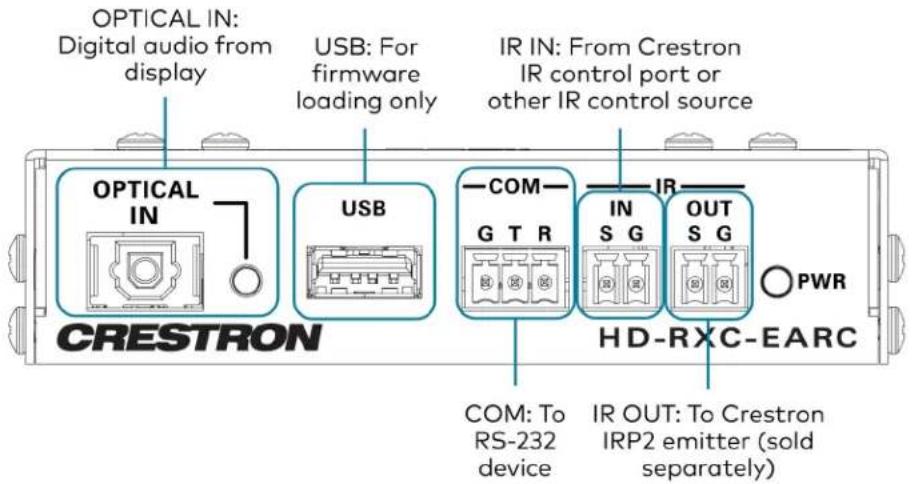
HD-RXC-EARC Front Panel
The following illustration shows the front of the HD-RXC-EARC:
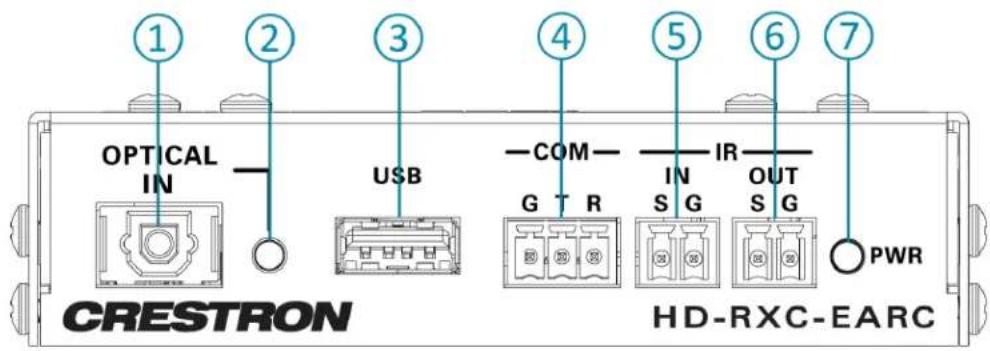
① OPTICAL IN: S/PDIF TOSLINK® connector, receives digital audio over an optical cable from a connected display
② OPTICAL IN Indicator: Green LED, indicates S/PDIF digital audio signal presence at the OPTICAL IN connector
③ USB: USB Type-A female connector, for firmware loading procedures only
④ COM: 3-pin terminal block connector, connects to RS-232 device, bidirectional, passes RS-232 signal to and from the connected HD-TXC-EARC device's COM port
⑤ IR IN: 2-pin terminal block connector, receives IR serial signal from a Crestron IR control port or other IR control device and transmits it to the IR OUT port of the connected HD-TXC-EARC device
⑥ IR OUT: 2-pin terminal block connector, receives IR serial signal from the IR IN port of the connected HD-TXC-EARC device, connects to a Crestron IRP2 IR emitter (sold separately)
⑦ PWR Indicator: Green LED, indicates power is supplied to the device via the DM Essentials connection to the HD-TXC-EARC
HD-RXC-EARC Rear Panel
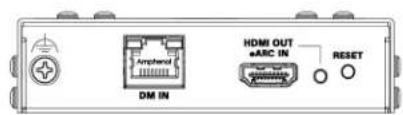
The following illustration shows the rear of the HD-RXC-EARC:
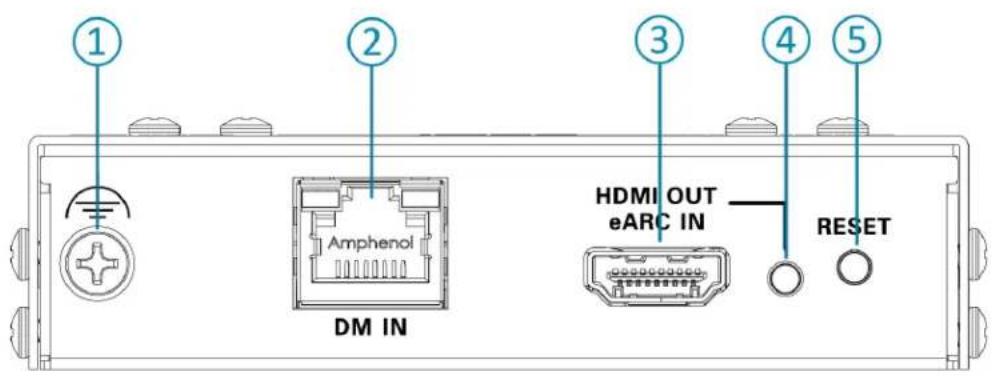
① Ground screw
② DM IN: DM Essentials input port, connects to the HD-TXC-EARC transmitter, receives digital A/V signal, power, COM, and IR signals over a CAT5e or greater cable, transmits digital audio and IR signal the transmitter
③ HDMI OUT/eARC IN: HDMI output and eARC input port, connects to an ARC (Audio Return Cha eARC-capable input of a display
④ HDMI OUT/eARC IN Indicator: Green LED, indicates HDMI and/or eARC digital audio presence at HDMI OUT/eARC IN port
⑤ RESET: Recessed red pushbutton, restarts the device
Specifications
Product specifications for the HD-EARC KIT.
Product Specifications
Video
Input Signal Types HDMI with Deep Color and 4K (DVI and Dual-Mode DisplayPort™ interface compatible ^2 )
Output Signal Types HDMI with Deep Color and 4K (DVI compatible)
Copy Protection HDCP 2.3 compliant
Resolutions Common resolutions are listed in the following table
| Scan Type Resolution Frame Rate Color Sampling Color Depth | ||||
| Progressive | 4096x2160 DCI 4K &3840x2160 4K UHD | 24 Hz 4:4:4 12 | bit | |
| 30 Hz 4:4:4 12 | bit | |||
| 60 Hz 4:2:2 12 | bit | |||
| 60 Hz 4:4:4 8 | bit | |||
| 2560x1600 WQXGA | 60 Hz 4:4:4 8 | bit | ||
| 1920x1080 FHD 1080p | 60 Hz 4:4:4 | 12 bit | ||
NOTES:
- The maximum supported resolution is 4K60 with 4:4:4 color sampling. Custom resolutions are supported at pixel clock rates up to 600 MHz.
• The HD-EARC KIT does not support interlaced video.
Audio
Input Signal Types HDMI eARC, S/PDIF
Digital Formats, HDMI Dolby Digital®, Dolby Digital EX, Dolby Digital Plus, Dolby TrueHD, Dolby Atmos®, DTS®, DTS ES, DTS 96/24, DTS HD® High Res, DTS HD Master Audio, DTS:X®, up to 8 channels
Digital Formats, S/PDIF Dolby Digital, Dolby Digital EX, DTS, DTS-ES, LPCM up to 6 channels
Communications
| RS-232 | Two way device control and monitoring up to 115.2k baud; Hardware and software handshaking |
| IR | One way device control via infrared up to 60 kHz |
| HDMI | HDCP 2.3, EDID, CEC |
| DM Essentials | HDCP 2.3, EDID |
eARC Enhanced audio return channel via HDMI;
Supports all Dolby ^® audio formats up to Dolby Atmos ^® and all DTS ^® formats up DTS:X ^®
Connectors - Transmitter (HD-TXC-EARC)
24V 1.25A (1) 2.1 x 5.5 mm DC power connector;
24VDC power input;
PW-2420RU power pack included
DM OUT (1) 8-pin RJ-45 connector, female, shielded;
DM Essentials output port for connection to the receiver
HDMI IN/EARC OUT (1) HDMI Type A connector, female;
HDMI digital video/audio input;
DVI and Dual-Mode DisplayPort interface compatible
Transmits eARC audio signal from the HDMI OUT/EARC IN port of the receiver
OPTICAL OUT (1) TOSLINK® S/PDIF connector, female;
Digital audio output;
Transmits digital audio signal from the OPTICAL IN port of the receiver
USB (1) USB Type-A connector, female;
For firmware loading
COM (1) 3-pin 3.5 mm detachable terminal block;
Bidirectional RS-232 port;
Supports RS-232 up to 115.2k baud;
Passes communications through to the COM port of the receiver
IR IN (1) 2-pin 3.5 mm detachable terminal blocks;
Comprises (1) IR input port;
For connection from a Crestron IR control port or other IR signal source;
Passes the IR input signal to the IR OUT port on the receiver;
Supports IR up to 60 kHz
IR OUT (1) 2-pin 3.5 mm detachable terminal blocks;
Comprises (1) IR output port;
For connection to an IR emitter (IRP2, sold separately);
Transmits the IR signal from the IR IN port on the receiver;
Supports IR up to 60 kHz
Connectors - Receiver (HD-RXC-EARC)
DM IN (1) 8-pin RJ-45 connector, female, shielded;
DM Essentials link port for connection to the 1transmitter
HDMI OUT/EARC IN (1) HDMI Type A connector, female;
HDMI digital video/audio output;
DVI and Dual-Mode DisplayPort interface compatible
Receives eARC audio signal from the connected display and passes it through to
HDMI IN/EARC OUT port of the transmitter
OPTICAL IN (1) TOSLINK® S/PDIF connector, female;
Digital audio input;
Receives digital audio signal from a connected source and passes it to the
OPTICAL OUT port of the transmitter
USB (1) USB Type-A connector, female;
For firmware loading
COM (1) 3-pin 3.5 mm detachable terminal block;
Bidirectional RS-232 port;
Supports RS-232 up to 115.2k baud;
Passes communications through to the COM port of the transmitter
IR IN (1) 2-pin 3.5 mm detachable terminal blocks;
Comprises (1) IR input port;
For connection from a Crestron IR control port or other IR signal source;
Passes the IR input signal to the IR OUT port on the transmitter;
Supports IR up to 60 kHz
IR OUT (1) 2-pin 3.5 mm detachable terminal blocks;
Comprises (1) IR output port;
For connection to an IR emitter (IRP2, sold separately);
Transmits the IR signal from the IR IN port on the transmitter;
Supports IR up to 60 kHz
Controls and Indicators - Transmitter
HDMI/OPTICAL (1) 2-position slider switch;
Selects which audio output connector to prioritize on the HD-TXC-EARC
PWR (1) Green/amber bi-color LED;
Amber indicates that the device is booting;
Green indicates that the device is operational
DM OUT (2) LEDs on RJ-45 connector, one green and one amber;
Green indicates that DM Essentials link is established;
Flashing amber indicates non-HDCP video;
Solid amber indicates HDCP video
HDMI IN/EARC OUT (1) Green LED, indicates that the device is receiving an HDMI signal and/or
transmitting an eARC digital audio signal
OPTICAL OUT (1) Green LED, indicates an S/PDIF digital audio signal is present at the OPTICAL OUT
connector
Controls and Indicators - Receiver
PWR (1) Green/amber bi-color LED;
Amber indicates that the device is booting;
Green indicates that the device is operational
DM IN (2) LEDs on RJ-45 connector, one green and one amber;
Green indicates that DM Essentials link is established;
Flashing amber indicates non-HDCP video;
Solid amber indicates HDCP video
HDMI OUT/EARC IN (1) Green LED, indicates that the device is transmitting an HDMI signal and/or
receiving an eARC digital audio signal
OPTICAL IN (1) Green LED, indicates that the device is receiving a S/PDIF digital audio signal
Power
Power Pack (included withput: 100-240VAC;
transmitter) Output: 24VDC 2.5A;
Model: PW-2420RU
Power Consumption 30 W typical
Environmental
Temperature 32° to 104°F (0° to 40°C)
Humidity Transmitter: 20% to 90% RH (noncondensing);
Receiver: 20% to 90% RH (noncondensing)
Heat Dissipation 102 BTU/hr
Ambient Noise Level N/A (fanless)
Construction
Chassis Metal, black finish, vented sides, 2 mounting flanges
Mounting Surface or rack rail mount
Dimensions - Transmitter
Height 4.13 in. (105 mm)
Width 4.18 in. (106 mm)
Depth 1.08 in. (27 mm)
Dimensions - Receiver
Height 4.13 in. (105 mm)
Width 4.18 in. (106 mm)
Depth 1.08 in. (27 mm)
Weight
Transmitter 12.02 oz (341 g)
Receiver 11.95 oz (339 g)
Compliance
Regulatory Model: M202243001
Intertek® Listed for US and Canada, CE, IC, FCC Part 15 Class B digital device
Notes:
- For the DM CATx cable connection, use Crestron DM-CBL-8G, Crestron DM-CBL-ULTRA, or third-party CAT5e or greater cable. To safeguard against unpredictable environmental electrical noise that may impact performance at resolution above 1080p, shielded cable and connectors are recommended for all applications, and are required when bundlin multiple cables in a wire run. Wire and cables are sold separately. The DM Essentials ports in this kit are not compatible with DigitalMedia 8G+, HDBaseT®, PoE, or PoDM technology or any other type of CATx based interface or net
- The HDMI input requires an appropriate adapter or interface cable to accommodate a DVI or Dual-Mode DisplayPort signal. CBL-HDI-DVI interface cables are available separately.
- The HDMI output requires an appropriate adapter or interface cable to accommodate a DVI signal. CBL-HDI-DVI interface cables are available separately.
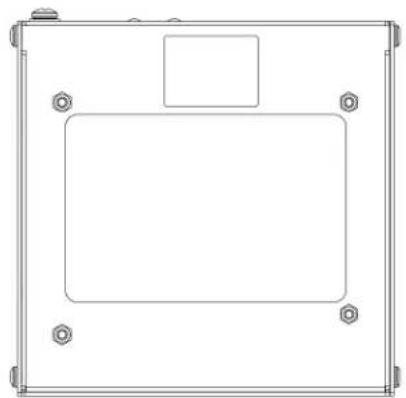
Dimension Drawings
HD-TXC-EARC
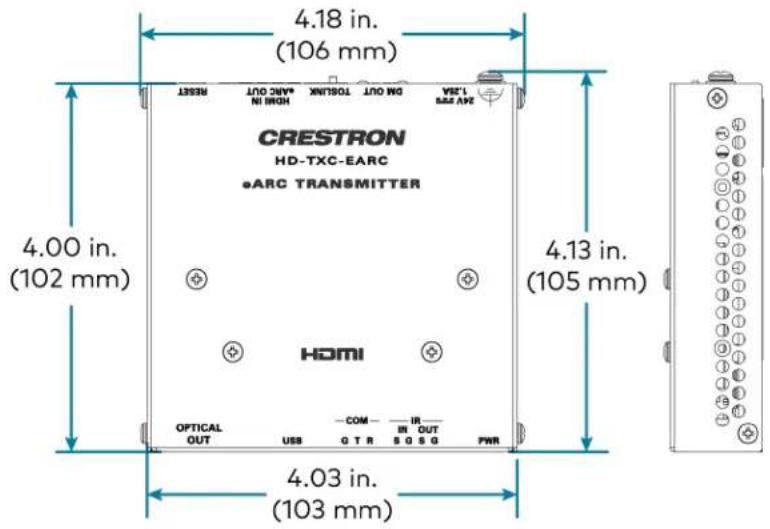
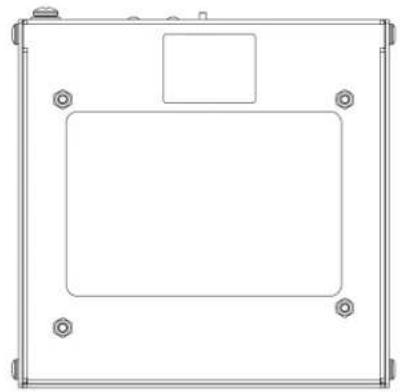
natural_image
Technical line drawing of a rectangular enclosure with mounting holes and a central square (no text or symbols)
HD-RXC-EARC
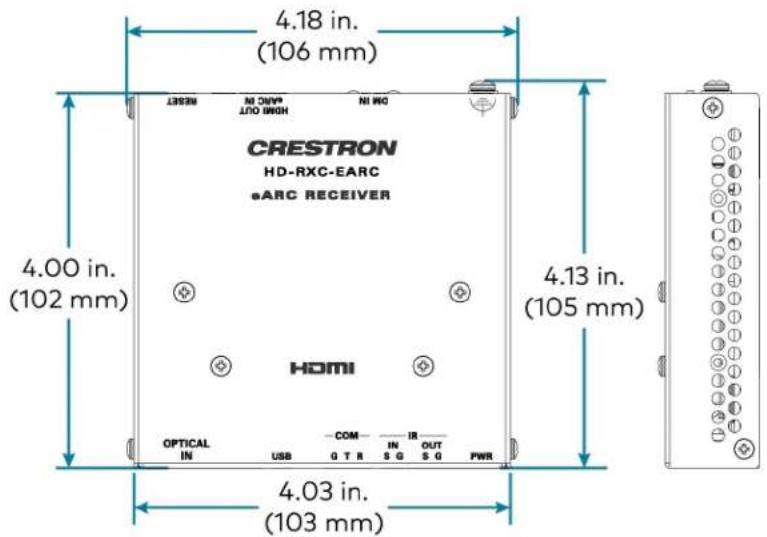
natural_image
Technical line drawing of a rectangular enclosure with mounting holes and a central square (no text or symbols)
Installation
Use the following procedures to install the HD-EARC KIT.
In the Box
Qty. Description
| 1 HD-TXC-EARC, DM® Essentials 4K60 4:4:4 eARC Transmitter for HDMI®, RS-232, IR, and Analog Audio Signal Extension over CATx Cable |
| 1 HD-RXC-EARC, DM® Essentials 4K60 4:4:4 eARC Receiver for HDMI®, RS-232, IR, and Analog Audio Signal Extension over CATx Cable |
Additional Items
| HD-TXC-EARC Contents | |
| 2 | Connector, 2-pin (2003574) |
| 1 | Connector, 3-pin (2003575) |
| 4 | Screw, 06-32, 3/4 in. Pan Head, Phillips, Steel (2007247) |
| 2 | Mounting Bracket, Galvannealed Metal (2057072) |
| 4 | Screw, 04-40, 1/4 in., Pan Head, Phillips, Black Oxide-Coated Metal (2007158) |
| 4 | Wall Anchor, Plastic, #6 x 1- 5/16 (2043585) |
| 1 | Power Pack, Desktop, 24VDC, 2.5A, Model PW-2420RU (2045873) |
| 1 | Power Cord, 6 ft (2042043) |
HD-RXC-EARC Contents
| 2 Connector, 2-pin (2003574) |
| 1 Connector, 3-pin (2003575) |
| 4 Screw, 06-32, 3/4 in. Pan Head, Phillips, Steel (2007247) |
| 2 Mounting Bracket, Galvannealed Metal (2057072) |
| 4 Screw, 04-40, 1/4 in., Pan Head, Phillips, Black Oxide-Coated Metal (2007158) |
| 4 Wall Anchor, Plastic, #6 x 1- 5/16 (2043585) |
Installation Guidelines
Before installing the device, be aware of the following information regarding DM Essentials cabling, HDMI cabling, and the power connection to the device.
DM Essentials Cabling
The DM Essentials output port (DM OUT) of the HD-TXC-EARC transmitter must be connected to DM Essentials input port (DM IN) of the HD-RXC-EARC. For DM Essentials connections, use Crestron DM-CBL-8G, Crestron DM-CBL-ULTRA, or third-party CAT5e or higher cable (Crestron DM-CBL Series cables are sold separately).
NOTE: Cables that can be used for DM Essentials connections are designed for intrabuilding use only.
To safeguard against unpredictable environmental electrical noise that may impact performance of resolutions above 1080p, shielded cable and connectors are recommended for all applications and required when bundling multiple cables in a wire run.
The following table provides information about the maximum transmission distance for each cab Maximum DM Essentials Transmission Distance
| Resolution | Frame Rate (Hz) | Color Sampling | Color Depth | Cable Type | |||||
| DM-CBL-ULTRA Cable | DM-CBL-8G Cable or CAT5e (UTP) or Higher | ||||||||
| 1920x1080 | FHD | 1080p | 60 | 4:4:4 | 8, 12 bit | ||||
| 1600x1200 | UXGA | 60 | 4:4:4 | 8, 12 bit | |||||
| 2048x1080 | DCI | 2K | 60 | 4:4:4 | 8, 12 bit | ||||
| 1920x1200 | WUXGA | 60 | 4:4:4 | 8, 12 bit | |||||
| 2048x1152 | QWXGA | 60 | 4:4:4 | 8, 12 bit | |||||
| 2560x1080 | UWFHD | 60 | 4:4:4 | 8 bit | |||||
| 2560x1440 | WQHD | 60 | 4:4:4 | 8 bit | 230 ft (70 m) | 195 ft (60 m) | |||
| Reduced Blanking | |||||||||
| 2560x1600 | WQXGA | 60 | 4:4:4 | 8 bit | |||||
| Reduced Blanking | |||||||||
| 2048x1152 | QWXGA | 60 | 4:4:4 | 12 bit | |||||
| 3840x2160 | 4K | UHD and30 | 4:2:2 | 12 bit | |||||
| 4096x2160 | DCI | 4K | 30 | 4:4:4 | 8 bit | ||||
| 60 | 4:2:0 | 8 bit | |||||||
| Resolution | Frame Rate (Hz) | Color Sampling | Color Depth | Cable Type | ||||
| DM-CBL-ULTRA Cable | DM-CBL-8G Cable or CAT5e (UTP) or Higher | |||||||
| 3840x2160 | 4K | UHD and30 | 4:4:4 | 12 bit | ||||
| 4096x2160 | DCI | 4K | 60 | 4:2:0 | 12 bit | 130 ft (40 m) | 100 ft (30 m) | |
| 60 | 4:2:2 | 12 bit | ||||||
| 60 | 4:4:4 | 8 bit | ||||||
NOTE: The HD-EARC KIT does not support interlaced video.
HDMI Cabling
4K60 4:4:4 performance and HDR support require the use of HDMI cables and couplers with TMDS bandwidth of 18 Gbps. If 4K60 4:2:0 or 4K30 4:4:4 performance is acceptable, cables are with a minimum bandwidth of 10.2 Gbps can be used. Bandwidth loss is cumulative; therefore, performance may be reduced when inserting multiple cables and couplers inline.
An HDMI input requires an appropriate adapter or interface cable to accommodate a Dual-Moc DisplayPort™ or DVI signal. An HDMI output requires an appropriate adapter or interface cable accommodate a DVI signal. Crestron CBL-HD-DVI interface cables are sold separately.
Power Connection
A 24VDC power pack is included with the HD-TXC-EARC transmitter. This power pack supplies both devices in the HD-EARC KIT via the DM Essentials connection.
Install the Device
Each component of the HD-EARC KIT may be mounted onto a flat surface, under a table, c single rack rail.
Rack Mounting
To mount the transmitter or receiver to a single rack rail:
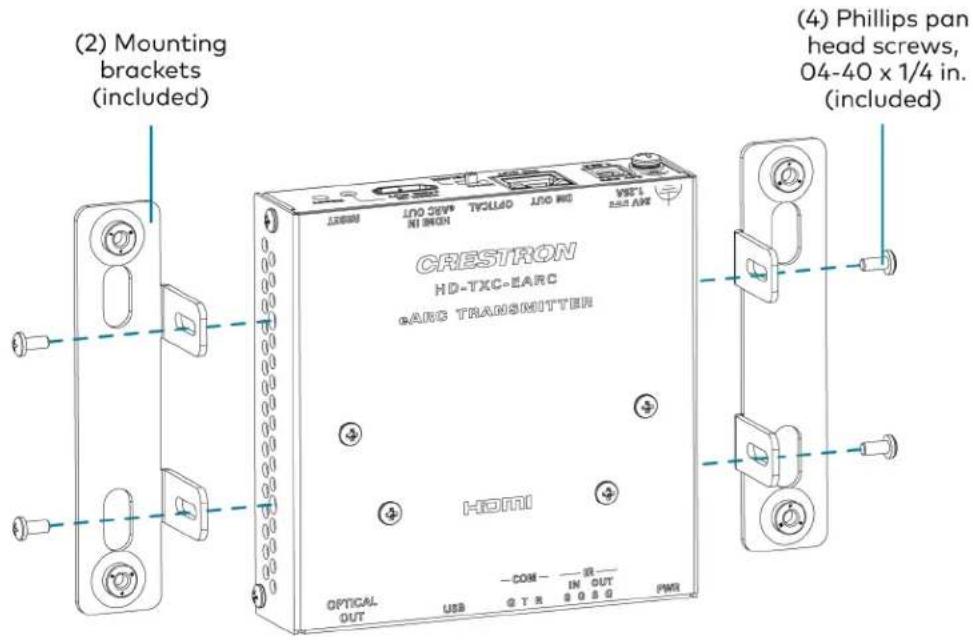
- Using the four included 4-40 x 1/4 in. Phillips pan head screws, attach one of the includ mounting brackets to the left or right side panel of the device.
Attach the Mounting Brackets (HD-TXC-EARC Shown)
-
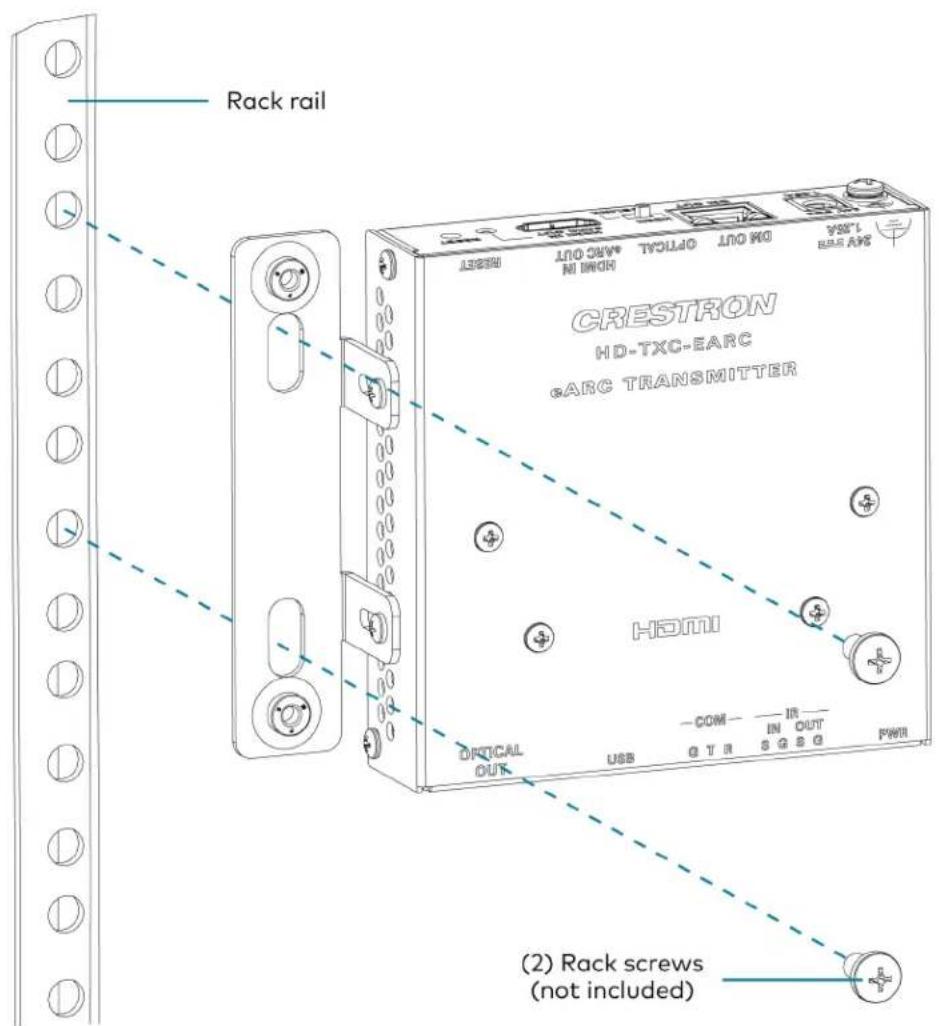
Position one of the mounting brackets so that the holes align with the holes in the ra
-
Secure the device to the rack rail using two rack mount screws (not included). Mount to a Rack Rail (HD-TXC-EARC Shown)
Mounting Under a Table
To mount the transmitter or receiver to the underside of a table:
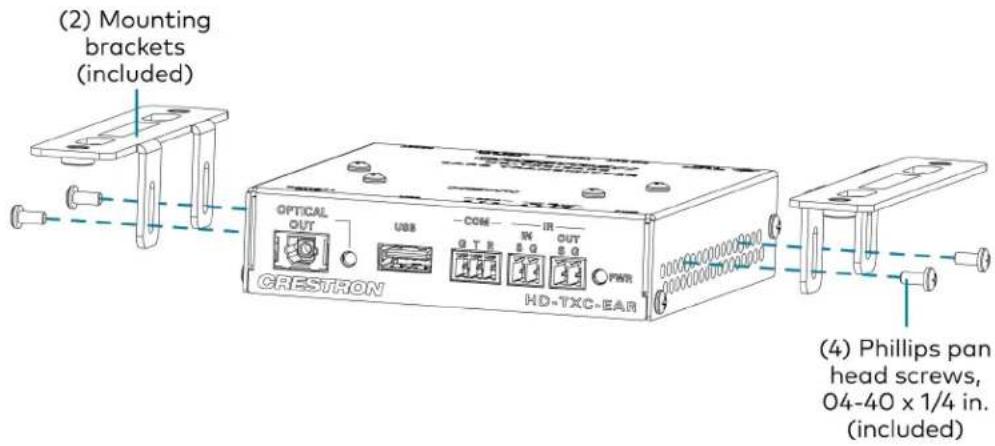
- Using the four included 4-40 x 1/4 in. Phillips pan head screws, attach the two included brackets to the left and right side panels of the device. Attach the Mounting Brackets (HD-TXC-EARC Shown)
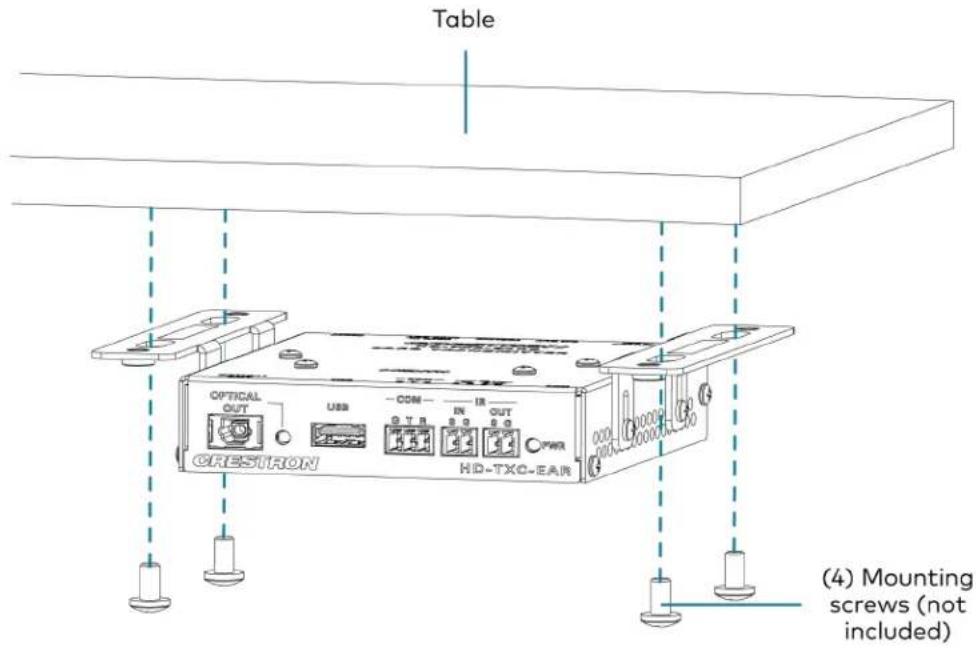
- Using four mounting screws (not included), attach the device to the underside of a table Mount Under a Table (HD-TXC-EARC Shown)
Surface Mounting
To mount the transmitter or receiver to a flat surface:
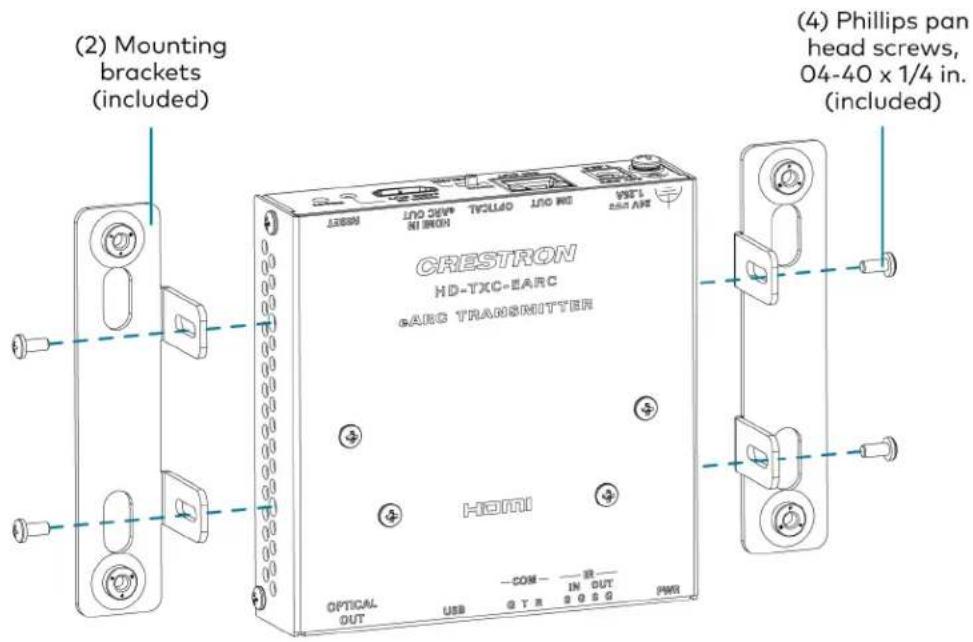
- Using the four included 4-40 x 1/4 in. Phillips pan head screws, attach the two included brackets to the left and right side panels of the device. Attach the Mounting Brackets (HD-TXC-EARC Shown)
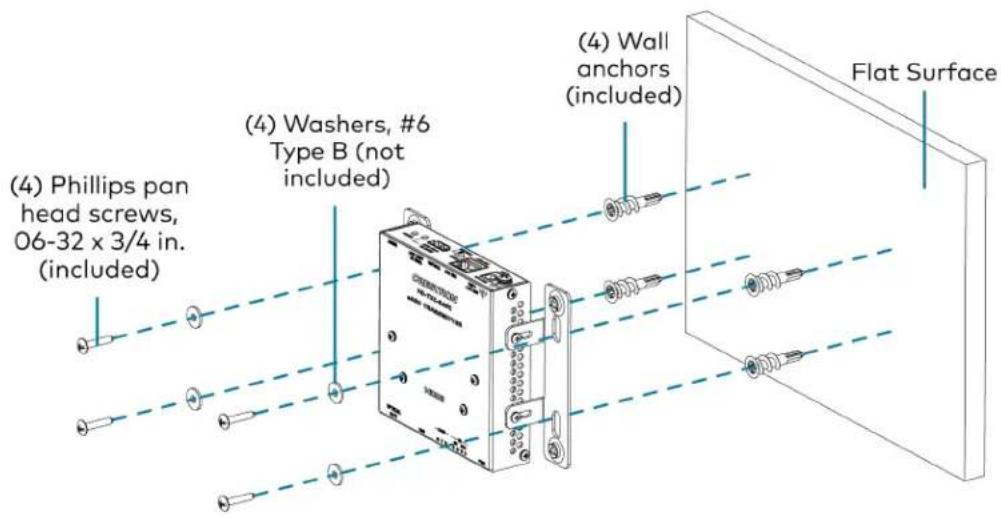
- Using four # 6 Type B washers (not included), four plastic wall anchors (included), and 3/4 in. Phillips pan head screws (included), secure the device to the surface.
Mount to a Surface (HD-TXC-EARC Shown)
Connect the Device
Make all necessary connections to the HD-EARC KIT as shown in the following diagrams:
HD-TXC-EARC Front Panel Connections
HD-TXC-EARC Rear Panel Connections
HD-RXC-EARC Front Panel Connections
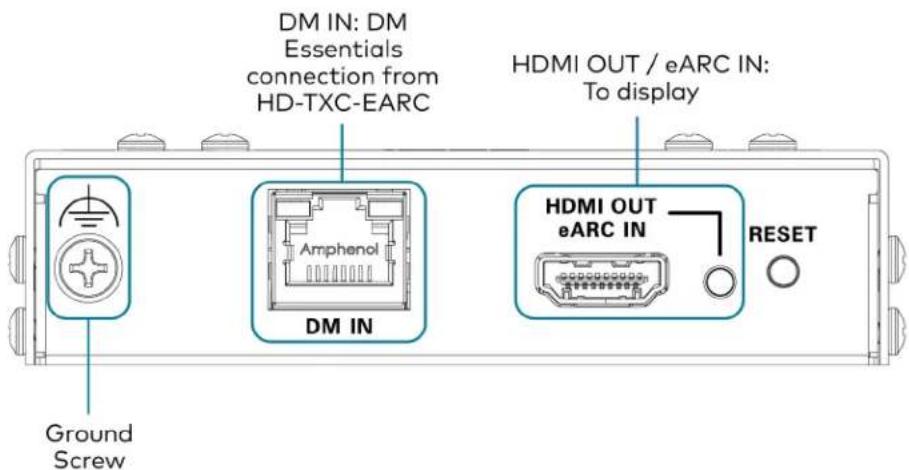
Set the HDMI/OPTICAL Switch
The HD-TXC-EARC transmitter features a two-position HDMI/OPTICAL slide switch on its rear panel.
This switch determines which audio output of the transmitter to prioritize. If this switch is not properly, certain combinations of audio input at the HD-RXC-EARC and audio output at the HD-TXC-EARC will prevent audio from passing.
Set the HDMI/OPTICAL switch to HDMI to prioritize the HDMI IN/eARC OUT port of the HD-TXC-EARC as the audio output. With this position selected:
- An eARC audio signal connected to the HD-RXC-EARC will be available only from the HI IN/eARC OUT port of the HD-TXC-EARC. This signal will not be available from the OPTI port of the HD-TXC-EARC.
- An ARC audio signal connected to the HD-RXC-EARC will be available from both the HD IN/eARC OUT and OPTICAL OUT ports of the HD-TXC-EARC.
- An S/PDIF audio signal connected to the HD-RXC-EARC will not be available from either HDMI IN/eARC OUT or OPTICAL OUT ports of the HD-TXC-EARC. No audio will pass from either connector in this configuration.
Set the HDMI/OPTICAL switch to OPTICAL to prioritize the OPTICAL OUT port of the HD-TXC-EARC as the audio output. With this position selected:
- An ARC or eARC audio signal connected to the HD-RXC-EARC will be available from bot HDMI IN/eARC OUT and OPTICAL OUT ports of the HD-TXC-EARC.
- An S/PDIF audio signal connected to the HD-RXC-EARC will be available from the OPTIC port of the HD-TXC-EARC. This signal will not be available from the HDMI IN/eARC OU" the HD-TXC-EARC.
Press the RESET button on the HD-TXC-EARC once the switch is set to the desired position. The new setting will take effect after the device has rebooted.
Observe the LED Indicators
Refer to the following table for information about the LED indicators on the HD-TXC-EARC:
| LED Indicator Color Meaning | |
| PWR Green The device is powered on and fully booted. | |
| Amber The device is receiving power and is booting up. | |
| Off The device is not receiving power. | |
| OPTICAL OUT Green An S/PDIF digital audio output signal is detected at the OPTICAL OUT connector. | |
| Off No audio signal is detected at the OPTICAL OUT connector. | |
| HDMI IN/eARC OUT Green The device is receiving an HDMI signal and/or transmitting an eARC digital audio signal at the HDMI IN/eARC OUT connector. | |
| Off No AV signals are detected at the HDMI IN/eARC OUT connector. | |
Refer to the following table for information about the LED indicators on the HD-RXC-EARC:
| LED Indicator Color Meaning | ||
| PWR | Green | The device is powered on and fully booted. |
| Amber | The device is receiving power and is booting up. | |
| Off | The device is not receiving power. | |
| OPTICAL IN | Green | An S/PDIF digital audio input signal is detected at the OPTICAL IN connector. |
| Off | No audio signal is detected at the OPTICAL IN connector. | |
| HDMI OUT/eARC IN | Green | The device is transmitting an HDMI signal and/or receiving an eARC digital audio signal at the HDMI OUT/eARC IN connector. |
| Off | No AV signals are detected at the HDMI OUT/eARC IN connector. | |
Resources
The following resources are provided for the HD-EARC KIT.
NOTE: You may need to provide your Crestron.com web account credentials when prompted to access some of the following resources.
Crestron Support and Training
• Crestron True Blue Support
• Crestron Resource Library
• Crestron Online Help (OLH)
• Crestron Training Institute (CTI) Portal
Programmer and Developer Resources
- help.crestron.com: Provides help files for Crestron programming tools such as SIMPL, SIMPL# and Crestron Toolbox™ software
• developer.crestron.com: Provides developer documentation for Crestron APIs, SDKs, and other development tools
Product Certificates
To search for product certificates, refer to the Product Certificates section of the Crestron Resource Library.
- Regulatory Model: M202243001
- HDMI
- Contents
- Overview ...1
- Specifications ...6
- Installation ...11
- Resources 22
- Overview
- Features
- 4K60 4:4:4 and HDR Support
- eARC and S/PDIF Audio Extraction
- Compact, Surface-Mountable Design
- Physical Description
- HD-TXC-EARC Front Panel
- HD-TXC-EARC Rear Panel
- HD-RXC-EARC Front Panel
- HD-RXC-EARC Rear Panel
- Specifications
- Product Specifications
- Video
- NOTES:
- Audio
- Communications
- Connectors - Transmitter (HD-TXC-EARC)
- Connectors - Receiver (HD-RXC-EARC)
- Controls and Indicators - Transmitter
- Controls and Indicators - Receiver
- Power
- Environmental
- Construction
- Dimensions - Transmitter
- Dimensions - Receiver
- Weight
- Compliance
- Dimension Drawings
- Installation
- In the Box
- Installation Guidelines
- DM Essentials Cabling
- HDMI Cabling
- Power Connection
- Install the Device
- Rack Mounting
- Mounting Under a Table
- Surface Mounting
- Connect the Device
- Set the HDMI/OPTICAL Switch
- Observe the LED Indicators
- Resources
- Crestron Support and Training
- Programmer and Developer Resources
- Product Certificates
Brand : Crestron
Model : HD-EARC KIT
Category : Audio/Video Kit