KAPBBLAD20A - Power bank Kogan - Free user manual and instructions
Find the device manual for free KAPBBLAD20A Kogan in PDF.


| Product Type | Portable Power Bank |
| Model | KAPBBLAD20A |
| Brand | Kogan |
| Battery Capacity | 20000mAh / 74Wh |
| Battery Type | Lithium-ion |
| Input | Micro USB: 5V/2A; USB-C: 5V/2A |
| Output | USB-A 1: 5V/2.1A; USB-A 2: 5V/2.1A; USB-C: 5V/2A |
| Total Output | 5V/3.0A (shared) |
| Dimensions | 150 x 72 x 25 mm |
| Weight | 380 g |
| LED Indicators | 4-level LED power indicator |
| Material | PC+ABS shell |
| Charging Time | Approx. 6-8 hours (with 2A charger) |
| Protection Features | Overcharge, over-discharge, short circuit, overcurrent, temperature protection |
| Compatible Devices | Smartphones, tablets, cameras, and other USB-charged devices |
| Operating Temperature | 0°C to 45°C |
| Storage Temperature | -20°C to 60°C |
| Package Contents | Power bank, Micro USB cable, user manual |
| Maintenance | Clean with dry cloth; avoid moisture and extreme temperatures |
| Safety Certifications | CE, RoHS |
Frequently Asked Questions - KAPBBLAD20A Kogan
User questions about KAPBBLAD20A Kogan
0 question about this device. Answer the ones you know or ask your own.
Ask a new question about this device
Download the instructions for your Power bank in PDF format for free! Find your manual KAPBBLAD20A - Kogan and take your electronic device back in hand. On this page are published all the documents necessary for the use of your device. KAPBBLAD20A by Kogan.
USER MANUAL KAPBBLAD20A Kogan
ULTRA SLIM BLADE LAPTOP POWER BANK
20000MAH 100W PD
KAPBBLAD20A
SAFETY & WARNINGS
- If the device will not be used for an extended period, charge it at least once every 3 months.
- It is normal for the device to produce slight heat during charging, as long as the temperature remains below 55°C.
• Always keep the device dry and avoid cleaning it with chemical agents. - Recycle the device responsibly at designated recycling locations in accordance with your local environmental authority.
- Children should use the device only under adult supervision.
- Do not crush, disassemble, impale, or expose the device to humid conditions.
- Avoid using the device to charge electronics that require incompatible current and voltage to prevent fire or other hazards.
Additional Information
- This product is a high-watt power bank with a low-current mode feature. When charging small devices like Bluetooth headphones, true wireless speakers (TWS), or smartwatches, press the power button twice. The indicator light or display will blink, indicating that the low-current charging mode is enabled. Press the power button twice again to disable this mode.
- The new power bank may display virtual power differently. First, ensure the virtual power is depleted to 0 and cannot output (it is also normal if the power depletes from 50% to 0). Next, charge the power bank to 100%. Finally, deplete the power to 0 again. Repeat this cycle 3 times for the most accurate power indication.
- This product supports dual fast charging. When both output ports are used simultaneously or during charge and discharge, press the power button once to display the voltage/current of the other output port. The display will switch back and forth.
COMPONENTS
- Power bank
- Chargin cable
- User guide
OVERVIEW
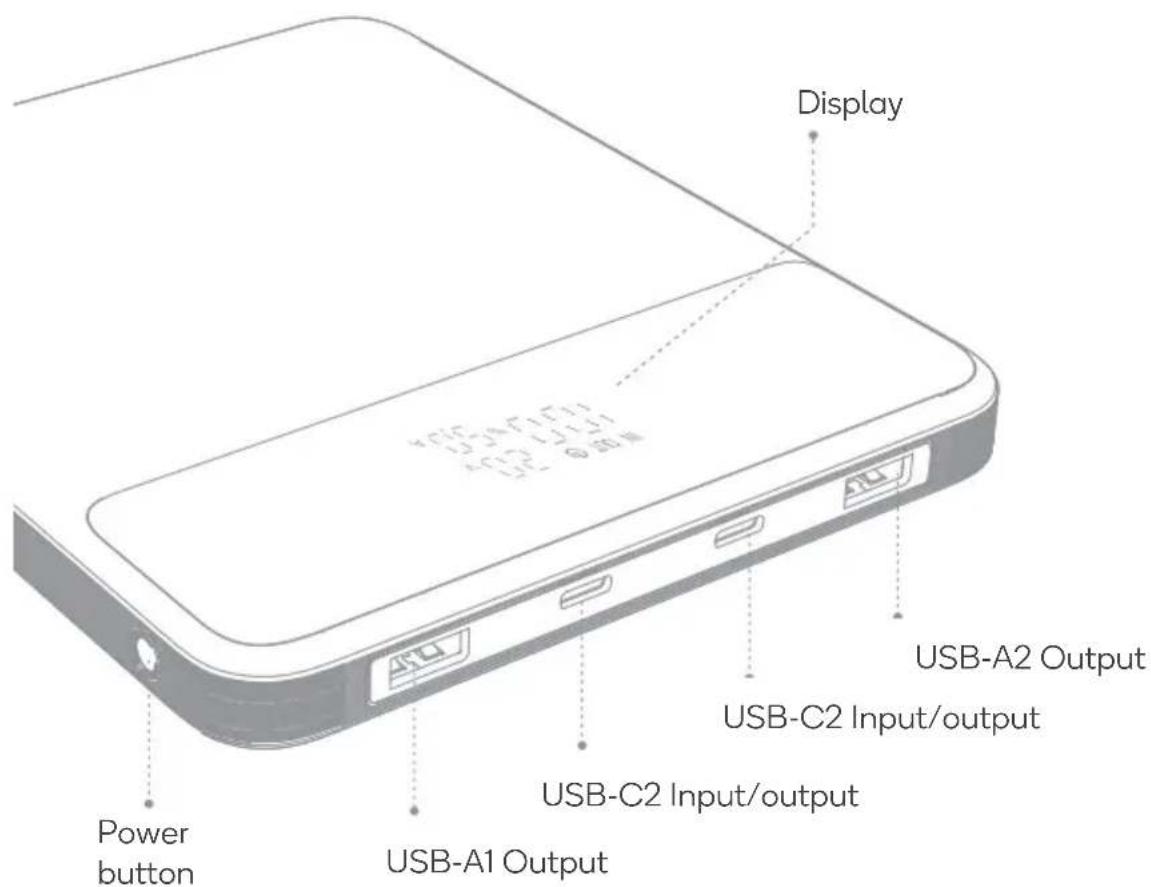
OPERATION
Features
- The USB-C port supports a maximum PD110W output, enabling fast charging for electronic devices such as laptops, game consoles, drones, heated clothing, and mobile phones.
- The USB port supports a maximum 18W quick charge and is compatible with various mobile phone fast-charging protocols.
- The USB port features a small current mode. Double-click the power button to activate this mode, suitable for charging Bluetooth headphones, small speakers, electronic watches, and other low-current devices.
Display Indicators
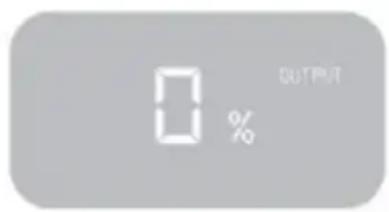
When devices are connected to the power bank, the display will decrease from 100% to 0%. When it approaches 0%, the power bank's charge is low and needs to be recharged.
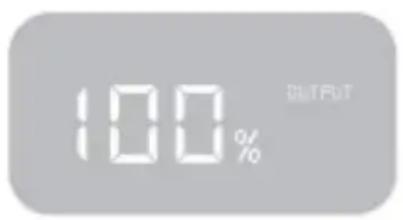
100% Power
0% Power
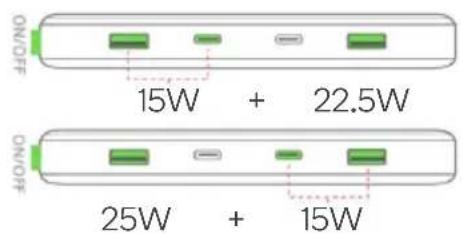
Power Distribution
1-Port Output
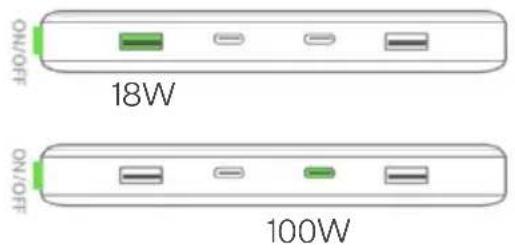
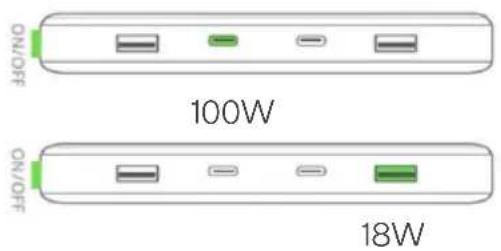
2-Port Output
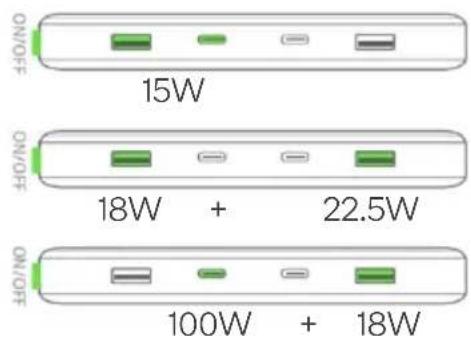
bar
| Category | Power (W) | |---|---| | 15W | 15W | | 18W + 22.5W | 18W | | 100W + 18W | 100W |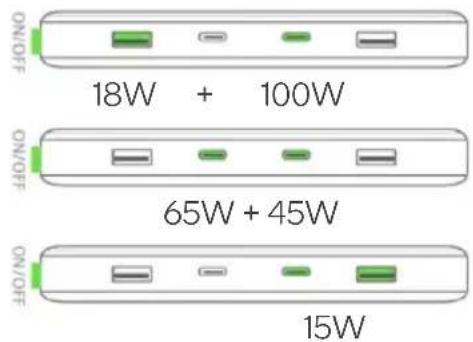
3-Port Output
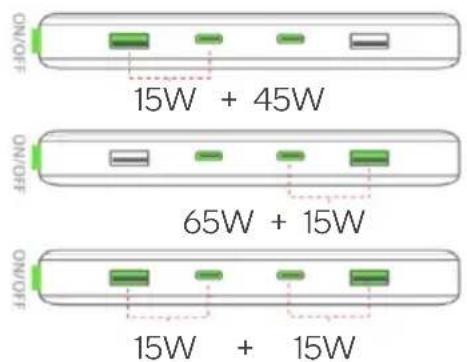
SPECIFICATIONS
| Product 110W PD Power Bank | |
| Battery Capacity | 20000mAh/3.7V 74Wh |
| Rated Capacity | 12Ah (5V-2A |
| USB-C1 Output | 5V-3A,9V-3A,12V-3A,15V-3A,20V-5A,100W Max |
| USB-C2 Output | 5V-3A,9V-3A,12V-3A,15V-3A,20V-5A,100W Max |
| USBA1/2 Output | 5V-3A,9V-2A,12V-1.5A,18W Max |
| USB-C1/C2 input | 5V-3A,9V-3A,12V-3A,15V-3A,20V2.25A,45W Max |
| USB-C1+C2 Total Output | 110W Max |
FAQ
Q: What should I do if the device is not charging?
A: Check that the cable, charger, or adapter being used is functioning correctly. If they are not, use compatible components to charge the device.
Q: What should I do if my phone is not charging?
A: Ensure that the power bank is turned on and has sufficient charge remaining. If these conditions are met and the phone still does not charge, please visit your local retailer for assistance.
Need more information?
We hope that this user guide has given you the assistance needed for a simple set-up.
For the most up-to-date guide for your product, as well as any additional assistance you may require, head online to help.kogan.com
kogan.com
Brand : Kogan
Model : KAPBBLAD20A
Category : Power bank