
Binary Amp - Amplifier Hotone - Free user manual and instructions
Find the device manual for free Binary Amp Hotone in PDF.


| Product Type | Compact Amplifier Modeling Pedal |
| Brand | Hotone |
| Model | Binary Amp |
| Dimensions | 4.5 x 2.5 x 2.0 inches (114 x 64 x 51 mm) |
| Weight | 0.5 lbs (227 g) |
| Power Supply | 9V DC, center negative, 500mA minimum |
| Number of Amp Models | 11 |
| Number of Cabinet Models | 11 |
| Built-in Effects | 57 including compression, drive, modulation, delay, reverb |
| Presets | 128 preset slots (64 user + 64 factory) |
| Input | 1/4" instrument input |
| Output | 1/4" line out, 1/8" headphone out |
| MIDI | MIDI in/out via TRS (type A), USB-MIDI |
| USB | Micro USB for firmware updates and PC editor |
| Display | OLED screen |
| Controls | Footswitch, knobs for volume, tone, etc. |
| Housing | Aluminum alloy, durable |
| Maintenance | Clean with a dry cloth; avoid liquids |
| Safety Warnings | Do not disassemble; use only specified power supply |
| Spare Parts | Power supply available separately; contact Hotone support |
| Repairability | Professional repair recommended; no user-serviceable parts |
| General Information | Includes printed manual and USB cable |
Frequently Asked Questions - Binary Amp Hotone
User questions about Binary Amp Hotone
0 question about this device. Answer the ones you know or ask your own.
Ask a new question about this device
Download the instructions for your Amplifier in PDF format for free! Find your manual Binary Amp - Hotone and take your electronic device back in hand. On this page are published all the documents necessary for the use of your device. Binary Amp by Hotone.
USER MANUAL Binary Amp Hotone
Binary Amp Owner's Manual
HOTONE DESIGN INSPIRATION
Welcome
Congratulations on your new Hotone Binary pedal! You have just added some serious power to your pedalboard.
The Binary series lets loose versatile pro effects in compact cases. A dual-DSP powered platform and CDCM modeling system ensure a realistic playing experience, dual-footswitch design and variable I/Os make it easy to use, and an OLED screen offers clear, detailed display.
Binary Amp is an amp simulator delivering precise classic amp sounds along with high quality cab simulators, and a built-in FX loop lets you expand your own sound.
Features
Grown out of next-gen XTOMP technology
Compact, easy-to-use dual footswitch amp simulator pedal
Advanced CDCM modeling system ensures realistic playing experience
Dual DSP-powered platform ensures high sound quality
24-bit A/D/A conversion, up to 110dB S/N ratio
16 CDCM powered legendary amp models along with dedicated cab models
USB jack for firmware upgrading, loading/managing effects with free PC/Mac software
FX Loop jacks for expanded effects
10 Presets (2 banks x 5 presets)
Built-in OLED screen with clear display
5 transparent knobs with LEDs
9V DC power supply
Panel Introduction
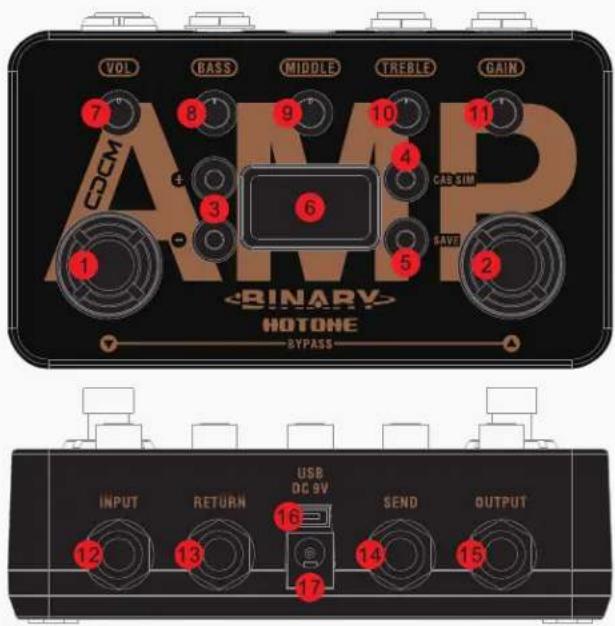
1-2. / : For selecting presets, bypass, and other parameters.
3. +/- buttons: For selecting effects and adjusting parameters.
4. CAB SIM button: For switching cab sim on/off.
5. SAVE button: For saving parameter changes.
6. OLED screen: Shows bank/patch numbers, setting values and other operation info.
7. VOL: Controls effect output level.
8-10. BASS/MIDDLE/TREBLE: 3-Band EQ, controls the effect tone.
11. GAIN: Controls effect gain amount.
12. INPUT: 1/4" (6.35mm) mono jack, for plugging in instruments or other effects.
13-14. SEND/RETURN jacks: 1/4" (6.35mm) mono jacks, for connecting other effects.
15. OUTPUT: 1/4" (6.35mm) mono jack, for connecting to amps or other effects.
16. USB jack: Mini USB jack, for effects editing, firmware updates, and factory reset.
17. DC 9V: Plug in your power supply here (DC 9V, center negative).
Connections

Note:
-
If Binary Amp sounds harsh or weird when connecting to the input jack on your amp, try to connect to the amp's FX Loop return jack.
-
TURN ON FIRST, TURN OFF LAST. Always mute the mixer/audio interface or turn down the volume knob on your amp before plugging or unplugging power jacks, cables, etc. When you're using a mixer or an audio interface, please adjust the knobs onboard carefully to avoid signal clipping.
Display
Plugging in your power supply will turn on the device. The main display will come up as below:

1 - Current bank/patch number
2 - Shows only when the cab sim is on
3 - Indicates the amp model you're using in current patch
Select a Patch/Bank
Tap either / footswitch once to change patches. Tap footswitch repeatedly to cycle through patches in the order A1, A2, A3, ..., B5, then A1. Tap footswitch to change patches in the opposite order.

Bypass
Tap both / footswitches at the same time. In Bypass status, all the LED knobs will go out.
BYPASS
Note: This unit will be set to bypass status when you plug in the power jack.
Edit
1. Adjust the parameters
Use the onboard knobs to adjust the effect parameters. The screen display will be shown as below when adjusting:

1 - Current parameter value you're adjusting (shown: volume)
2 - Saved parameter value in the current patch (PREV. = Previous value)
Edit
2. Select a different effect
Use the +/- button to change to another amp:

The inverted bank/patch number indicates that the current patch has been edited.
Save
Hold the SAVE button to activate save function. The screen will be shown as below:

Use the +/- buttons to choose a location. Tap the SAVE button to confirm saving.
Tap either footswitch to cancel saving and go back to edit status.
Check Firmware Version
You can check firmware version on your Binary Amp after updating to firmware v1.1.1 or later. To check firmware version, simply hold the CAB SIM button when effect is on:
BINARY AMP FIRMWARE VERSION V1.1.1
HOTONE
•BINARY
AMP
Amp Models List\*
| No. | Name | Based On | Cab Sim (Not shown in Binary Amp) |
| 1 | FRED HBE Friedman BE100 FRED 4x12 | ||
| 2 | RECT LEAD Mesa/Boogie Dual Rectifier RECT 4x12 | ||
| 3 | CHEF CLN Matchless Chieftain CHEF 2x12 | ||
| 4 | USA 2C+ | Mesa/Boogie Mark II C+ | RECT 4x12 |
| 5 | DARK DUO | Fender '65 Twin Reverb | DARK 2x12 |
| 6 | DIZZ VH | Diezel VH4 | DIZZ 4x12 |
| 7 | BASS CLN Fender '59 Bassman | BASS 4x10 | |
| 8 | AREA 51 | Peavey 5150 | AREA 2x12 |
| 9 | BRIT J45 | Marshall JTM45 | BRIT 4x12 |
| 10 | SAGA 120 | ENGL Savage 120 | SAGA 4x12 |
| 11 | BRIT 800 Marshal JCM800 | BRIT 4x12 | |
| 12 | TWD LUX | Fender Tweed Deluxe | TWD 1x8 |
| 13 | SOLO 100 | Soldano SLO 100 | SOLO 4x12 |
| 14 | VOXY T30* | Vox AC30 Top Boost | VOXY 2x12 |
| 15 | OGRE A30 | Orange AD30 | OGRE 4x12 |
| 16 | JAZZ TWIN | Legendary Jazz Clean amp | JAZZ 2x12 |
^1. The Manufacturers and product names mentioned above are trademarks or registered trademarks of their respective owners. The trademarks were used merely to identify the sound character of the products.
2. The MIDDLE knob cuts the effect presence (the screen shows CUT when adjusting) on VOXY T30.
Specifications
Numbers of Effects: 16
Numbers of Patches: 10 (2 banks x 5 patches)
Digital Processing: 24-bit A/D/A conversion, 44.1 kHz sample rate
Frequency Response: 20 Hz-20 kHz
S/N Ratio: Up to 110dB
Input Impedance: 1M Ohms
Output Impedance: 100 Ohms
Power Requirement: DC 9V, center negative
Current Consumption: 200mA minimum
Dimensions: 121mm (D) x 72mm (W) x 47mm (H)
Weight: 340g
The contents of this manual are subject to change without notice.
Brand : Hotone
Model : Binary Amp
Category : Amplifier