
DMP 64 Plus - Audio processing system Extron - Free user manual and instructions
Find the device manual for free DMP 64 Plus Extron in PDF.


| Product Type | Digital Audio Matrix Processor |
| Model | DMP 64 Plus |
| Brand | Extron |
| Number of Inputs | 6 balanced analog audio (captive screw connectors) |
| Number of Outputs | 4 balanced analog audio (captive screw connectors) |
| Audio Resolution | 24-bit, 48 kHz sampling |
| Built-in DSP | Yes, including mixing, routing, EQ, dynamics, delay |
| Control Interface | Ethernet (TCP/IP), RS-232, USB, GPIO |
| Enclosure Type | 1U, full rack width, fanless |
| Dimensions (H x W x D) | 1.75 x 17.0 x 7.0 inches (44 x 432 x 178 mm) |
| Weight | 2.3 kg (5.1 lbs) |
| Power Supply | Internal, 100-240 VAC, 50/60 Hz, 15 watts |
| Operating Temperature | 32 to 104 °F (0 to 40 °C) |
| Cooling | Convection cooled, no fans |
| Software | Extron DSP Configurator for setup and control |
| Front Panel Indicators | LEDs for power, signal, and error status |
| Compliance | CE, FCC Class A, RoHS |
| Accessories Included | Power cord, rack mounting brackets, captive screw connectors |
| Spare Parts Availability | Available via Extron authorized dealers |
| Repairability | Field-repairable by qualified technicians; contact Extron support |
| Maintenance | Keep ventilations clear, clean with dry cloth; avoid liquids |
| Safety Notice | Use provided power cord; disconnect before servicing; no user-serviceable parts inside |
Frequently Asked Questions - DMP 64 Plus Extron
User questions about DMP 64 Plus Extron
0 question about this device. Answer the ones you know or ask your own.
Ask a new question about this device
Download the instructions for your Audio processing system in PDF format for free! Find your manual DMP 64 Plus - Extron and take your electronic device back in hand. On this page are published all the documents necessary for the use of your device. DMP 64 Plus by Extron.
USER MANUAL DMP 64 Plus Extron
INTERFACING, SWITCHING AND CONTROL
Dante FAQ
REVISION: 1.1
DATE: JULY 30, 2020
Revision Log
| Date | Version | Notes |
| May 30, 2018 | 1.0 | Initial Release |
| July 30, 2020 | 1.1 | Updated Devices in Flows available in Extron Dante-enabled products Table |
Table of Contents
1.0 Introduction 4
2.0 Dante Flows....5
3.0 Unicast and Multicast 7
1.0 Introduction
This document provides a single reference for answers to Dante questions that commonly come in to Extron support staff. Check back for updates as this document will be revised as needed.
2.0 Dante Flows
The channels of audio going into and out of a Dante device are organized into groups of one to four channels, called Flows. Dante devices have limits to the number of input Flows and output Flows, depending on the type of Dante technology (chipset) utilized in the device. A single Flow cannot have its channels divided or distributed among multiple devices. Therefore, it is advisable to plan for channel connectivity between devices while considering the number of Flows available per device and the layout of device to device connectivity.
The table below shows the number of Flows available in Extron Dante-enabled products.
| Model | Transmit Flows | Receive Flows |
| DMP 128 Plus (AT Models) | 32 | 32 |
| DMP 128 (AT Models) | 32 | 32 |
| DMP 128 FlexPlus C (V) AT | 32 | 32 |
| DMP 64 Plus (AT Models) | 32 | 32 |
| XMP 240 C AT | 32 | 32 |
| AXI 02 AT | 2 | 2 |
| AXI 22 AT D | 2 | 2 |
| AXI 22 AT | 2 | 2 |
| AXI 44 AT | 2 | 2 |
| NetPA Ultra | 2 | 2 |
| NetPA 502 AT | 0 | 2 |
| NetPA 1001-70V AT | 0 | 2 |
| FOX3 Matrix | 32 | 32 |
| XTP II CP 4o HD AT 4K PLUS | 32 | 32 |
Flow Examples
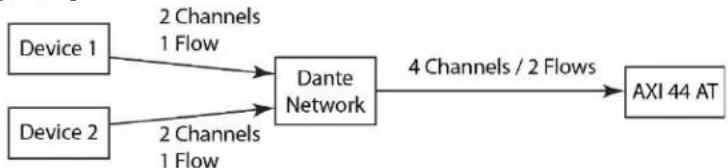
Four channels are routed to an AXI 44 AT via Dante from two devices. The four channels are available at the analog outputs of the AXI 44 AT. This is possible because the AXI 44 AT has two Receive Flows. [Figure 1]
flowchart
graph LR
    A["Device 1"] -->|2 Channels\n1 Flow| C["Dante Network"]
    B["Device 2"] -->|2 Channels\n1 Flow| C
    C -->|4 Channels / 2 Flows| D["AXI 44 AT"]
[Figure 1] This application will work
If those channels originate from more than two transmitting devices, the number of Receive Flows available on the AXI 44 AT would be exceeded. This application will not work. [Figure 2]

flowchart
graph LR
    Device1["Device 1"] --> DTE_Dante_Dante_Network["Dante Network"]
    Devices2["Device 2"] --> DTE_Dante_Dante_Network
    Devices3["Device 3"] --> DTE_Dante_Dante_Network
    Devices4["Device 4"] --> DTE_Dante_Dante_Network
    DTE_Dante_Dante_Network -->|4 Channels / 4 Flows| AXI_44_AT["AXI 44 AT"]
    DTE_Dante_Dante_Network -->|1 Channel / 1 Flow Per Device| DTE_Dante_Dante_Network
[Figure 2] This application will not work
3.0 Unicast and Multicast
By default, Dante routing is done by unicast Flow, meaning that the routing of up to four channels between two devices uses up a single unicast Flow [Figure 3]. A unicast Flow cannot be routed to multiple Receivers. With unicast routing, extraneous network traffic is typically avoided.

flowchart
graph LR
    Device1["Device 1"] -->|1 Flow| DNTD["Dante Network"]
    Device2["Device 2"] -->|1 Flow| DNTD
    DNTD -->|1 Flow| Device3["Device 3"]
    DNTD -->|1 Flow| Device4["Device 4"]
[Figure 3 – Two Unicast Flows]
In cases where a single Dante Transmitter must be routed to many Dante Receivers, having a separate unicast Flow per Receiver not only uses up Flows but also increases network bandwidth use. In these cases, creating a single multicast Flow is recommended for routing to many Receivers without using up Flows [Figures 4 & 5]. Dante Controller will present a message when a Multicast Flow may be advantageous based on the routing defined.
Multicast Flows are also useful when transmitting the same audio to more than two Receiver devices

flowchart
graph LR
    A["Device 0"] -->|1 Flow| B["Dante Network"]
    B --> C["Device 1"]
    B --> D["Device 2"]
    B --> E["Device 3"]
    B --> F["Device 4"]
[Figure 4 – Multicast Flow]
To create a multicast Flow:
- Double-click the device in the Routing tab or CTRL-D
- Click the Create a new multicast flow button
- Check the box for each channel to be included
- Click Create

[Figure 5] Multicast Flow window in Dante Controller
Brand : Extron
Model : DMP 64 Plus
Category : Audio processing system