
Champagne - Loudspeaker HARMAN KARDON - Free user manual and instructions
Find the device manual for free Champagne HARMAN KARDON in PDF.


| Product Type | Portable Bluetooth Speaker |
| Brand | Harman Kardon |
| Model | Champagne |
| Dimensions (H x W x D) | 170 mm x 90 mm x 90 mm |
| Weight | 0.8 kg |
| Power Source | Built-in rechargeable battery via USB-C |
| Battery Life | Up to 10 hours at moderate volume |
| Bluetooth Version | 5.0 |
| Wireless Range | Up to 10 meters |
| Driver Size | 60 mm full-range |
| Frequency Response | 65 Hz - 20 kHz |
| Output Power | 30 W |
| Water Resistance | IPX7 |
| Controls | Volume, Play/Pause, Skip, Voice Assistant |
| Voice Assistant Support | Siri, Google Assistant |
| Multi-Speaker Pairing | Yes, via Party Mode |
| Charging Time | Approximately 3 hours |
| Cleaning Instructions | Wipe with a soft, dry cloth; do not use abrasive cleaners. |
| Safety Information | Do not expose to extreme temperatures. Keep away from water when charging. |
| Repairability | Battery replacement service available via authorized centers. |
Frequently Asked Questions - Champagne HARMAN KARDON
User questions about Champagne HARMAN KARDON
0 question about this device. Answer the ones you know or ask your own.
Ask a new question about this device
Download the instructions for your Loudspeaker in PDF format for free! Find your manual Champagne - HARMAN KARDON and take your electronic device back in hand. On this page are published all the documents necessary for the use of your device. Champagne by HARMAN KARDON.
USER MANUAL Champagne HARMAN KARDON
User's Guide harman/ kardon Champagne
950-0010
English
French
German
Italian
Spanish
natural_image
Illustration of a modern audio amplifier with two speakers and a speaker tower (no text or symbols)Safety Instructions
Please read the following operation precautions before use:
- Read instructions ---All the safety and operating instructions should be read thoroughly before attempting to operate this audio system.
- Retain instructions for future reference.
• Heed warnings --- All warnings on this audio system and in the operating instructions should be adhered to. - Follow instructions --- All operating and use instructions should be followed.
- TO PREVENT THE RISK OF ELECTRIC SHOCK, DO NOT REMOVE THE COVER (OR BACK). THERE ARE NO USER SERVICEABLE PARTS INSIDE THIS UNIT, PLEASE REFER SERVICING TO QUALIFIED HARMAN/KARDON CORPORATION SERVICE PERSONNEL.
- Do not expose the speakers to liquid or solvent.
- Never remove grille covers in order to service the speaker system. The speaker system does not contain any user serviceable parts. Refer all servicing to the Harman/Kardon Technical Support Group.
• Do not expose the speaker system to temperature or humidity extremes, direct sunlight, excessive dust, or vibrations. - Place the speaker system on a stable, level surface. Do not drop, apply excessive force to the controls, or put heavy objects on top of the speaker.
• If cleaning is required, use a soft dry cloth. If necessary, use a damp cloth without any solvents. - In order to protect the speaker system, avoid microphone feedback, continuous output from electronic musical instruments, or distorted output from any signal source.
- Do not place the speakers close to fluorescent light sources, or neon light fixtures.
- Although the speakers are magnetically shielded, keep magnetic storage media (disks and tapes) at least four inches from the speaker system in order to avoid data loss.
- WARNING: To reduce the risk of fire or electric shock, do not expose this speaker system to rain or moisture.
Introduction
The HK 695 is the latest innovation from harman/kardon, a long time leader in the manufacture of high-end component and computer audio systems. harman/kardon's audio heritage combined with continual research has provided the unique technologies included in the HK 695.
These technologies include Vmax, a Harman International audio image-processing algorithm that seamlessly supports both two and four channel sound cards. This audio hologram creates a four speaker sound field from two speakers through the use of a head related transfer function when used with a four channel sound card. In addition, the algorithm provides enhanced stereo when used with a two channel sound card.
The Harman Multimedia Odyssey I transducer is another technology critical to the HK 695. This unique full range transducer was designed specifically for extremely small speaker enclosures while providing significant mid bass. In addition to the bass, the small, rigid and light inverted aluminum cone provides performance that will rival any tweeter used in multimedia speakers today. The result is a small and elegant satellite speaker that perfectly integrates with the subwoofer while providing superior midrange and highs.
The Magnum series subwoofer transducer provides deep bass. This Magnum series of woofers are designed specifically to match with the Harman Multimedia Odyssey I transducers. The same approach of providing solid bass from a small enclosure guided the development of these Magnum transducers.
As described in the Using the speaker system section of the user's guide, the top of the control/right speaker features - and + buttons. Briefly pressing the appropriate button will cause a small step increase or decrease in the system volume. Holding down the appropriate button for more than 0.5 seconds will cause the volume to decrease or decrease rapidly while that button is held down.
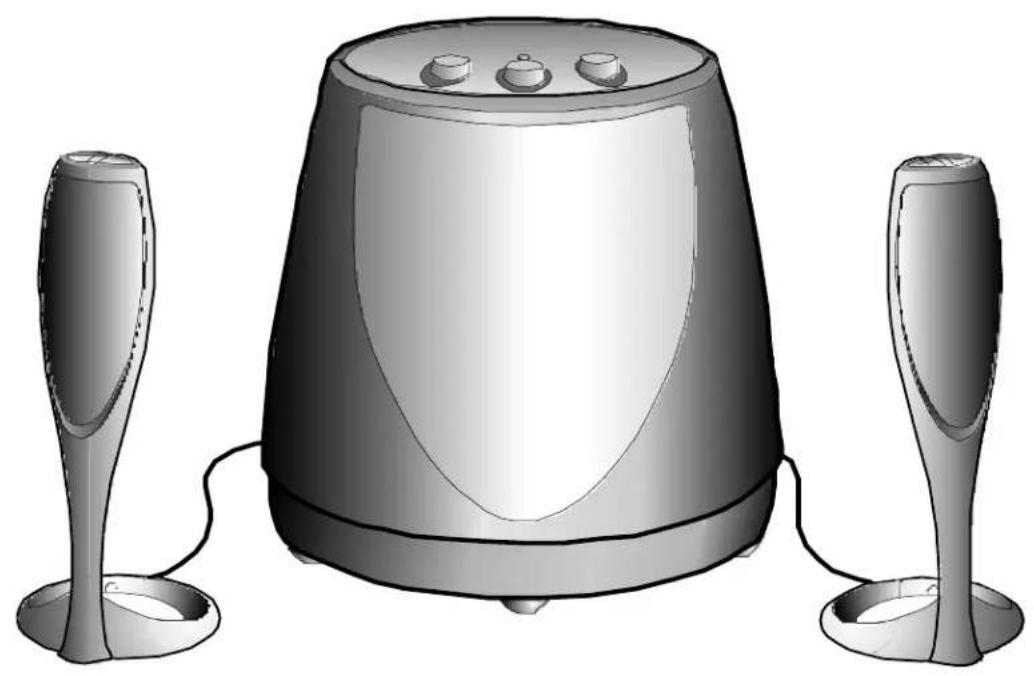
Treble, Bass and Surround level adjust knobs are located on top of the subwoofer unit. A system on/off switch is also provided on the rear of the subwoofer unit. The system includes two desktop speakers and a subwoofer that can be placed either on the floor or on your desk. Both satellite speakers and the subwoofer are magnetically shielded to provide the greatest protection against computer monitor image distortion.
Setup
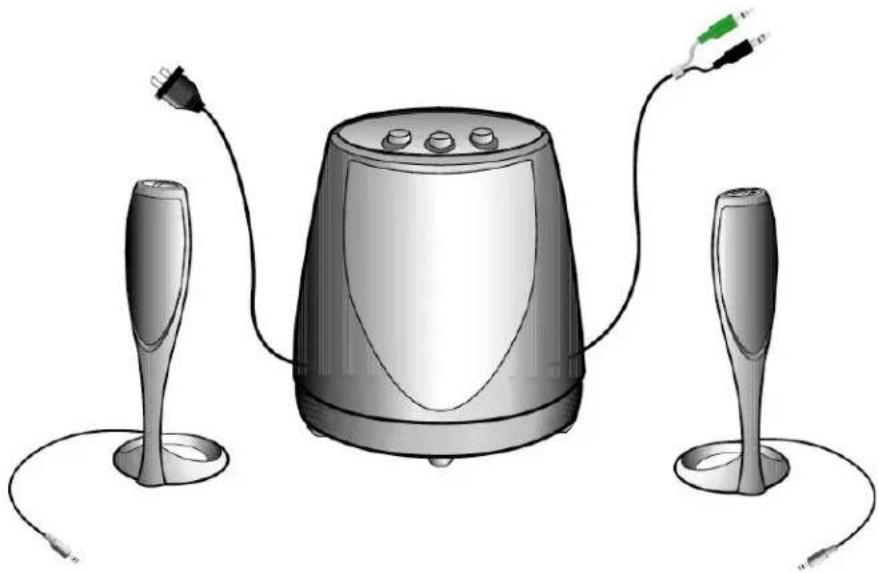
Carefully unpack your speaker system and identify all components:
• Control/Right Satellite speaker
• Auxiliary/Left Satellite speaker
- Subwoofer with attached power and audio input cables
natural_image
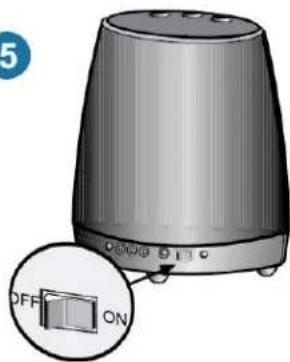
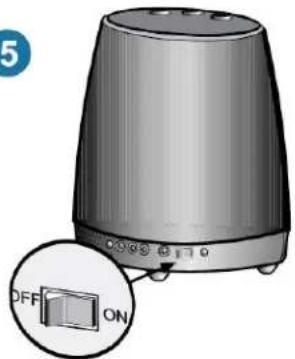
Illustration of a desktop audio amplifier with two speakers and connected cables (no text or symbols)Connect the speaker system as shown in the Connecting the speaker system to sound card illustrations. Once the speaker system is properly connected, turn on the power switch located on the rear of the subwoofer.
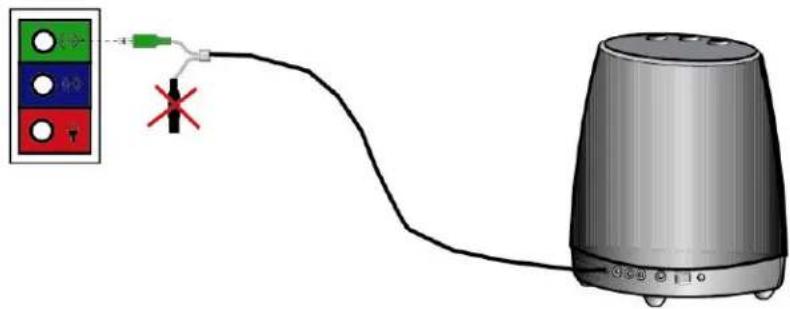
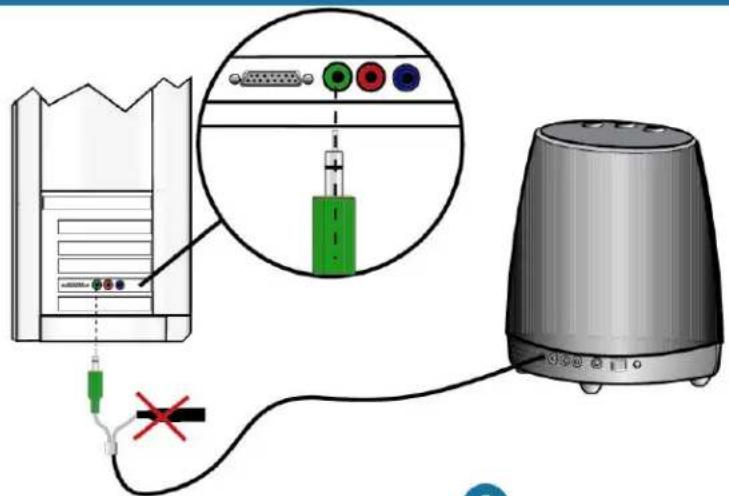
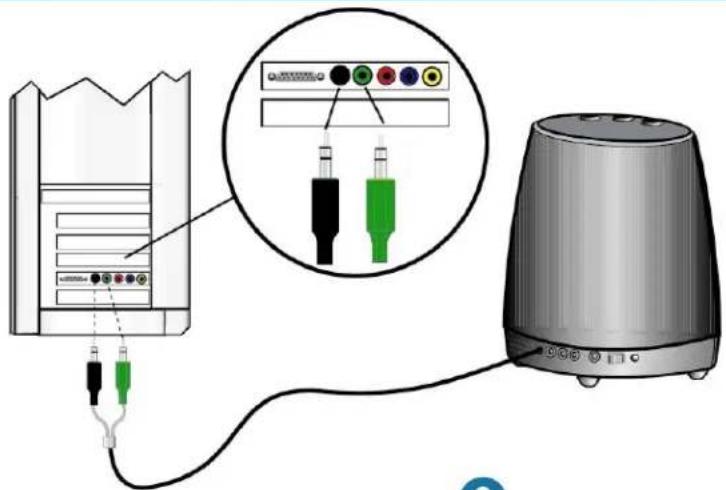
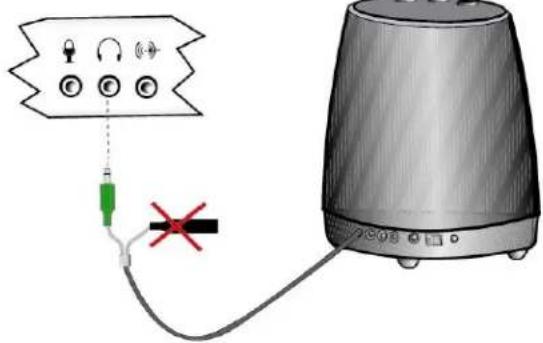
Step 1 Connecting the speaker system to the computer. If you have an integrated sound solution or a stereo sound card (as shown on page 4 and 5); connect the green connector from the subwoofer into the green jack on the computer, the black connector is not used, leave the rubber cap on the black connector to prevent static from the pin grounding on the system. If you have a multi-channel sound card (as shown on page 6); connect the green connector from the subwoofer into the green jack on the computer and connect the black connector from the speaker into the black jack on the computer. If you have a portable computer (as shown on page 7); connect the green connector from the subwoofer into the headphone jack on the computer, the black connector is not used, leave the rubber cap on the black connector to prevent static from the pin grounding on the system.
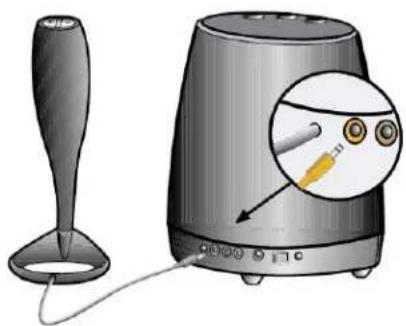
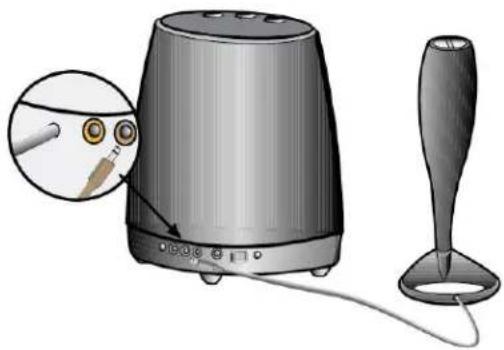
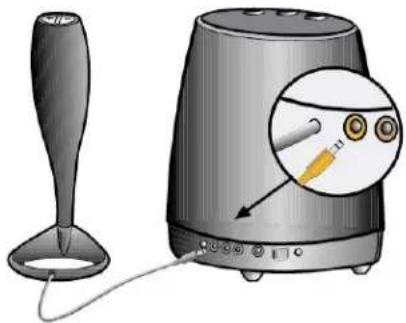
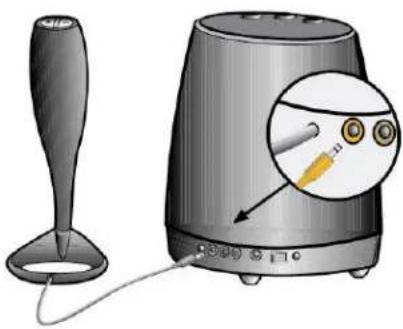
Step 2 Plug the orange connector from the right/control satellite into the orange jack on the subwoofer.
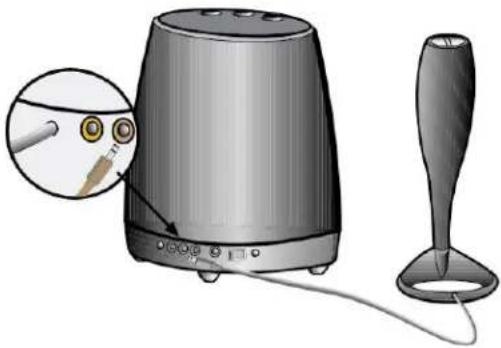
Step 3 Plug the brown connector from the left satellite into the brown jack on the subwoofer.
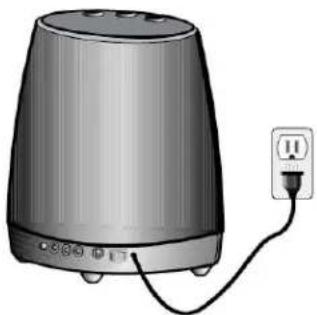
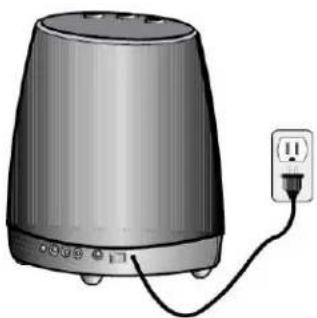
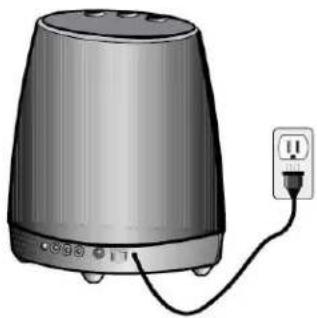
Step 4 Plug the AC plug into the wall outlet.
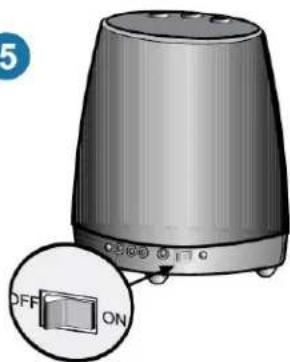
Step 5 Turn on the speaker set and adjust the volume accordingly.
1
2
natural_image
Illustration of a portable electronic device with a stand and a close-up view showing its internal components (no text or symbols)3
natural_image
Illustration of a portable electronic device with a close-up view showing its internal components and a separate funnel-shaped stand (no text or symbols present)4
natural_image
Illustration of a portable electronic device with a power outlet connected to its side (no text or symbols visible)5
natural_image
Illustration of a portable electronic device with a button labeled 'OFF' and 'ON' (no text or symbols on the device itself)1
2
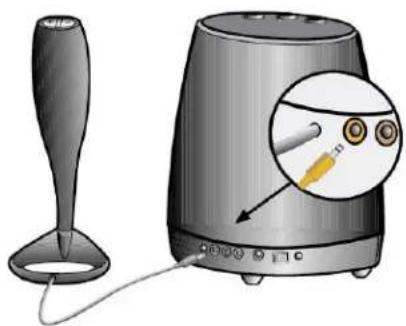
natural_image
Illustration of a portable electronic device with a funnel-shaped base and a close-up inset showing a sensor or probe inserted into the speaker (no text or symbols present)3
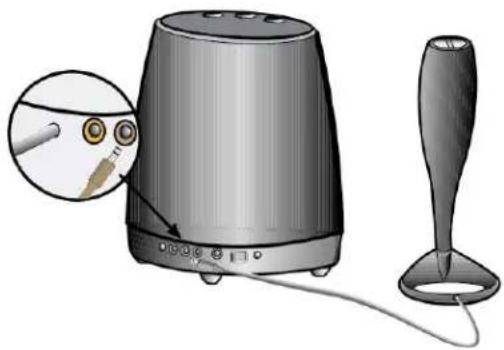
natural_image
Illustration of a portable electronic device with a close-up view showing its internal components and a separate funnel-shaped stand (no text or symbols present)4
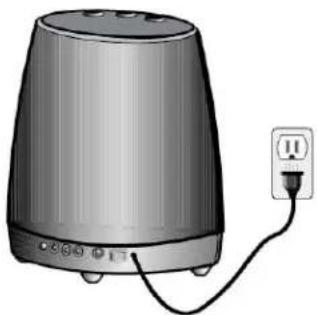
natural_image
Illustration of a portable electronic device with a power outlet connected to its side (no text or symbols visible)5
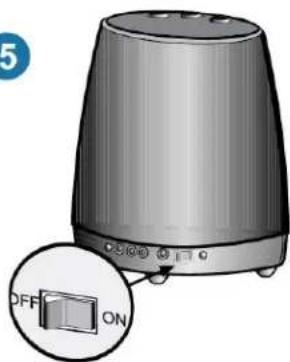
natural_image
Illustration of a portable electronic device with a highlighted 'ON' button and 'OFF' label (no text or symbols on the device itself)1
3
2
natural_image
Illustration of a speaker with a microphone and a stand, showing the device's internal components (no text or symbols present)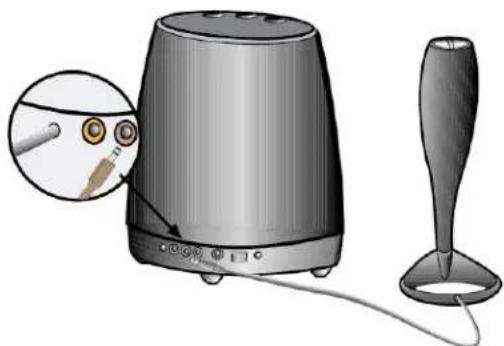
natural_image
Illustration of a portable electronic device with a stand and a spout, showing a close-up of its internal components (no text or symbols present)4
natural_image
Illustration of a portable electronic device with a power outlet connected to its side (no text or symbols visible)5
natural_image
Illustration of a portable electronic device with a close-up inset showing a 'ON' button (no text or symbols on the device itself)1

2
natural_image
Illustration of a small glass cup and a portable electronic device with a close-up inset showing internal components (no text or symbols)3
natural_image
Illustration of a portable electronic device with a stand and cord, showing internal components and a close-up view of its cable (no text or symbols present)4
natural_image
Illustration of a portable electronic device with a power outlet and cable, no text or symbols present5
natural_image
Illustration of a portable electronic device with a close-up inset showing a 'OFF' button and 'ON' label (no text or symbols on the device itself)Placement of speakers
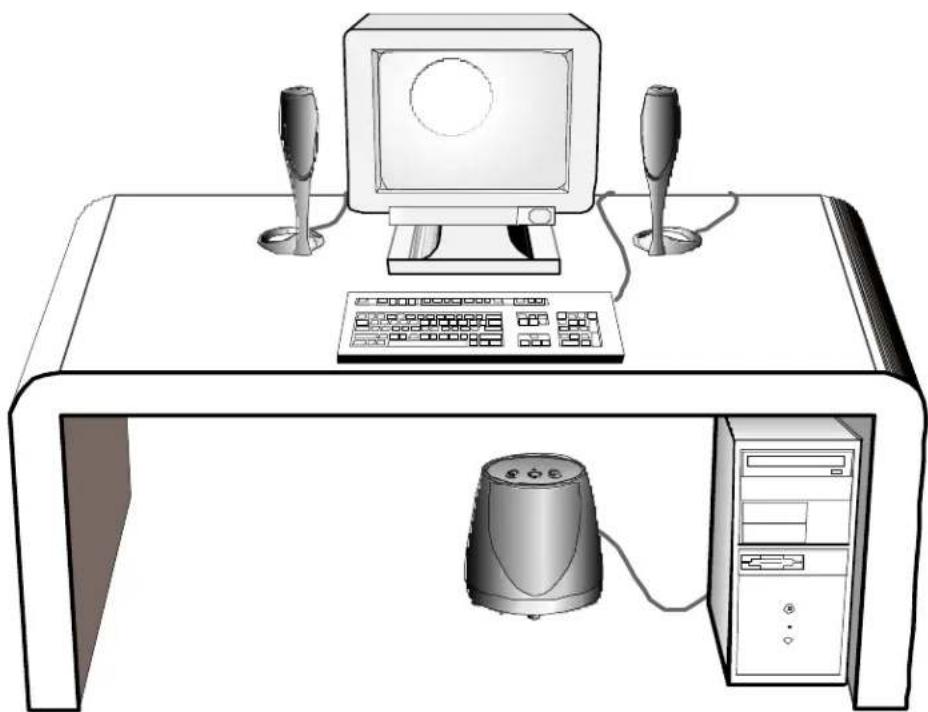
The speakers are magnetically shielded and can be placed close to a computer monitor without distorting the image. For optimal stereo imaging, separate the speakers from each other by a distance equal to your distance from the speakers.
The subwoofer's sound is non-directional; therefore, it does not have to be placed in any particular relationship to the satellites. The subwoofer is magnetically shielded and can be placed on the desktop, if desired. If the subwoofer is placed too close to a computer monitor it can cause vibration on the monitor screen.
natural_image
Line drawing of a desktop computer setup with monitor, keyboard, and tower (no text or symbols)Using the speaker system
On/Off Switch
natural_image
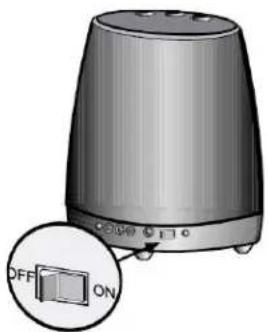
Illustration of a portable electronic device with an open dialog box (no text or symbols on the device itself)An on/off switch is located on the rear of the subwoofer.
There is a green LED located on top of each of the two satellite speakers. There is also a green LED located on the top of the subwoofer. All three LEDs should illuminate when the system is connected correctly and receiving power.
Turn the speaker off if it will not be used for a long period.
Volume Control
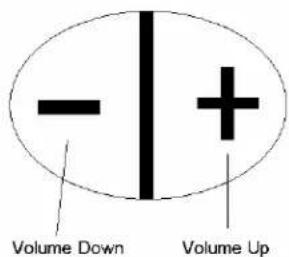
The volume control can be found on the top of the control/right satellite speaker.
Pushing the right + button on the top of this speaker will turn up the volume setting in increments of 2.0 dB per step. If the button is continuously depressed, after 0.5 seconds the volume level will constantly increase at a rate of 20 dB per second.
Pushing the left - button on the top of the right speaker will turn down the volume setting in increments of 2.0 dB per step. If the button is continuously depressed, after 0.5 seconds the volume level will constantly decrease at a rate of 20 dB per second until the system is muted.
The harman/kardon HK 695 will retain the volume setting when it is turned off so that when the speaker system is turned back on, it will restore the last volume setting.
Muting
Pushing the left and right buttons simultaneously on the top of the right speaker will mute the audio. Power will remain on (both speakers' LED's remain illuminated). When muted, pushing either the left button or the right button, or both buttons simultaneously will restore volume to the level prior to the activation of the mute function.
Controls on the Subwoofer
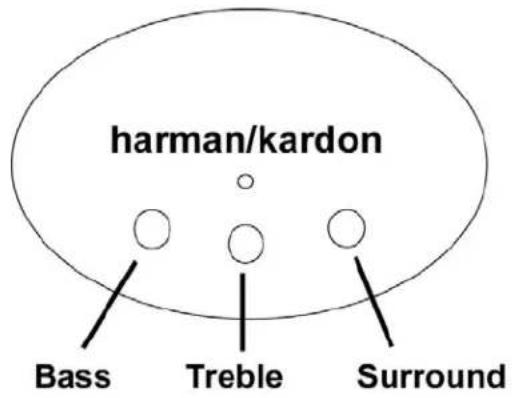
There are three tone and effects level knobs located on the top of the subwoofer. They control Bass, Treble and Surround.
Bass - Turn the knob marked Bass clockwise to increase the subwoofer level or counterclockwise to decrease the subwoofer level.
Treble - Turn the knob marked Treble clockwise to increase the treble level or counterclockwise to decrease the treble level.
Surround - Turn the knob marked Surround clockwise to increase the surround level or counterclockwise to decrease the surround level. Turning this knob all the way counterclockwise will defeat the surround mode.
Diagnostics
natural_image
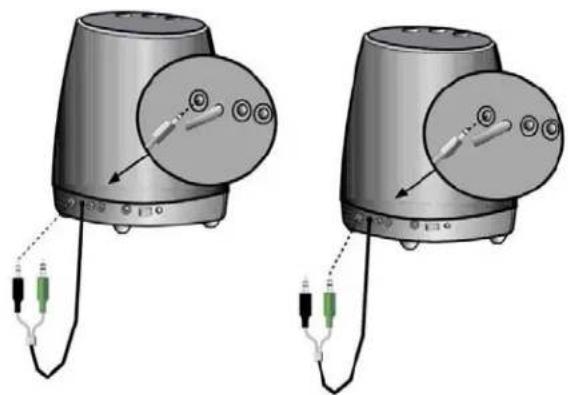
Two identical 3D illustrations of a portable electronic device with attached cables and connectors, no text or symbols present.In order to facilitate optimal system setup, a diagnostic system has been built in to the harman/kardon HK 695. If you are having trouble getting sound out of your system, or are not confident that your setup is optimal, use these system diagnostics to configure your harman/kardon HK 695.
Disconnect all speaker cables from the sound card. To test the front speaker channel, plug the green connector into the diagnostic jack on the rear of the subwoofer. This will generate a test tone. This tone will sweep from 40Hz to 400Hz. As the frequency of the tone increases, the sound will transition from the Subwoofer to the satellites, then start over again.
The diagnostic test can also be used to test the rear speaker channel input by plugging in the black connector into the diagnostic jack on the rear of the subwoofer. The surround level may need to be adjusted. (Test tone may sound different due to the surround characteristics of speaker system).
When you have finished the test, unplug the connector from the 'DIAG' jack and plug the audio connector back into the correct soundcard output jack. Review the user setup if necessary on pages 3 thru 7.
While the speaker system is in the diagnostic mode, the + and - controls will control the volume of the diagnostics tone.
If the test tone was heard from all speakers, your HK 695 is working correctly. If not, see the troubleshooting section for detailed troubleshooting techniques.
Troubleshooting
| SYMPTOM | POSSIBLE PROBLEM | SOLUTION | NOTE |
| No sound from Speakers | No power to unit.Is the control/right satellite of your HK 695 plugged in correctly? | Make sure wall power outlet or power strip has power. Make sure all switches for outlet/power strip are on and that all switches for speaker system are on.Toggle the power switch.Replace the fuse.The fuse holder is on the back of the subwoofer between the power cord connector and the power switch. Use a screwdriver to turn a quarter turn in the direction indicated by the arrow. A spare fuse was supplied with the product attached to the AC power cord. See the back of the subwoofer for a description of the fuse.Ensure that the control speaker connector is pushed in properly.Remove the control /right speaker connector from the subwoofer, then re-connect this cable ensuring that the connector is pushed in properly. | Check green power LED on the sub. Are the LED's on? If the sub's led is not on, power is not getting to your speaker system.Try the solutions shown.WARNING!Unplug the speaker system from the electrical outlet before replacing the fuseThere is an LED located in the top of each of the two satellite speakers. These should both be lit. If they are, your speakers are both plugged in correctly. |
| Volume level may be set low or muted. | Increase volume level on control/right speaker.Check volume level and mute setting in Windows Volume Control. | Assuming power has been verified, engage the self-test by removing the audio connector(s) from the soundcard output(s) and connecting it to the 'DIAG' jack. | |
| Distortion (static, crackling or hissing sounds) | Noise may be caused by interference from the monitor. | Turn monitor off to see if noise is eliminated. Move speaker cables farther away from monitor. | |
| Speaker is being overdriven by an amplified audio source. | Ensure that speaker is connected to the appropriate receptacle. Check color-coding on connectors when making connections. Make sure that all signal cables are inserted snugly into receptacles. | ||
| Volume level on sound card may be too high. | Check volume of sound card via Windows Volume Control. | ||
| Sound card or audio source material may be cause of problem. | Check speakers with another audio source. | Disconnect speaker input cable (green connector) from sound card and plug into CD ROM headphone jack. If static is eliminated, troubleshoot the soundcard. | |
| Are the speaker | system mode settings optimized? | Set each of the three knobs (treble, Sub level, surround) on top of the subwoofer back the their center/ nominal positions. | |
| Too much bass or treble. | Bass/Treble level is set too high | Turn Bass/Treble down or return their settings to the center position. | |
| Subwoofer emits a loud hum or buzzing noise. | Input cables not plugged in properly | Check input cable connection | |
| Speaker system emits a loud hum or buzzing noise when used with a stereo only (not multichannel) soundcard. | The redundant rear (black) audio connector is not protected by the rubber cover and is touching the computer case. | Replace the rubber cover or otherwise insulate the rear audio connector so it cannot contact any metallic surfaces. | |
| Speaker system experiences radio frequency interference or picks up a radio station | Input cable may be picking up interference | Wrap up excess input cable in order to make as short as possible | |
| Purchase a ferrite clamp and attach over input cable. A clamp can be purchased at your local electronics store |
Specifications
| Manufacturer | Harman |
| Model Number HK 695 | |
| Drivers (satellite) Two Odyssey | |
| Drivers (subwoofer) One 5.25 inch woofer | |
| Power (satellite) 6 watts per satellite at 1% THD | |
| Power (subwoofer) 28 watts at 1% THD | |
| Crossover Frequency (subwoofer) 180 Hz | |
| Dimensions | |
| Width: | |
| Satellite | 3.5 |
| Subwoofer | 11.75 |
| Depth: | |
| Satellite | 5.75 |
| Subwoofer | 11.75 |
| Height: | |
| Satellite | 11.5 |
| Subwoofer | 13 |
| Input Impedance 5-10kOhm | |
| Signal-to-Noise ratio | >70dB |
| Frequency Response | 35 – 20 kHz |
| Input Sensitivity | 300-400 mV rms for rated power output |
| Fuse type | Radio Shack 270-1062 or Eqiv. |
| NOTE: Before replacing fuse, remove AC power plug from the wall outlet. To replace fuse, twist fuse cap counterclockwise with a standard flathead screwdriver. The fuse cap is spring loaded and will pop out. | |
| USA/Canada Power | 120 volts, 60Hz AC |
| Maximum Power Consumption | 120 watts |
| UL/CUL/CE Approved | |
Inter
inches
inches
inches
inches
inches
inches
Regulatory
FCC Statement and Warning
This equipment has been tested and found to comply with the limits for a Class B digital device, pursuant to Part 15 of the FCC rules. These limits are designed to provide reasonable protection against harmful interference in a residential installation. This equipment generates, uses and can radiate radio frequency energy and, if not installed and used in accordance with the instructions, may cause harmful interference to radio communications. However, there is no guarantee that interference will not occur in a particular installation. If this equipment does cause harmful interference to radio or television reception, which can be determined by turning the equipment off and on, the user is encouraged to try to correct the interference by on or more of the following measures:
a) Re-orient or relocate the receiving antenna.
b) Increase the separation between the equipment and receiver.
c) Connect the equipment to an outlet on a circuit different from that to which the receiver is connected.
d) Consult the dealer or an experienced radio/TV technician for help.
MODIFICATIONS NOT EXPRESSLY APPROVED BY THE MANUFACTURER COULD VOID THE USER AUTHORITY TO OPERATE THE EQUIPMENT UNDER FCC RULES.
Brand : HARMAN KARDON
Model : Champagne
Category : Loudspeaker