
Rei Béaute Cool Pro - Appareil de beauté optique domestique YA-MAN - Free user manual and instructions
Find the device manual for free Rei Béaute Cool Pro YA-MAN in PDF.


| Brand | YA-MAN |
| Model | Rei Béaute Cool Pro (YJEA6W) |
| Product Type | Household Optical Beauty Device |
| Modes Available | Single Mode, Roller Mode, LED Mode |
| Attachments Included | Roller attachment, LED attachment, Spot attachment |
| Level Settings Range | 1 (MIN) to 5 (MAX) for Single and Roller Modes; LED Mode has fixed level |
| Auto Level Function | Yes, available only in Roller Mode |
| Cooling Feature | Yes, toggle ON/OFF via LEVEL/COOLING button |
| Power Source | AC adapter (included) |
| Lamp Type | Xenon lamp (consumable) |
| Accessories Included | V design tool, User's Manual |
| Safety Precautions | Do not look directly into treatment window; press firmly against skin; moisturize skin daily; use appropriate attachment for area |
| Skin Preparation | Remove unwanted hair with electric shaver or razor |
| Treatment Area | Face and body (depending on attachment) |
| Operation Buttons | POWER/MODE button, LEVEL/COOLING button |
| Indicator | LEVEL indicator (LED) |
| Weight | Not specified |
Frequently Asked Questions - Rei Béaute Cool Pro YA-MAN
User questions about Rei Béaute Cool Pro YA-MAN
0 question about this device. Answer the ones you know or ask your own.
Ask a new question about this device
Download the instructions for your Appareil de beauté optique domestique in PDF format for free! Find your manual Rei Béaute Cool Pro - YA-MAN and take your electronic device back in hand. On this page are published all the documents necessary for the use of your device. Rei Béaute Cool Pro by YA-MAN.
USER MANUAL Rei Béaute Cool Pro YA-MAN
Household Optical Beauty Device
Rei Beauté Cool Pro YJEA6W
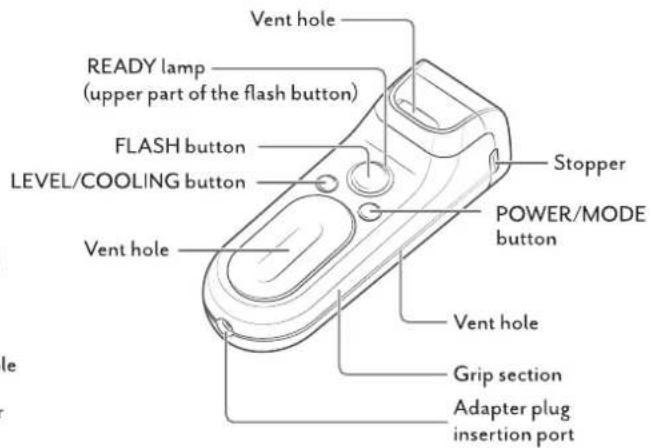
Names and Functions of Components
Main Unit
*This manual explains using illustrations when the roller attachment is attached.
*The xenon lamp is a consumable item.

Accessories
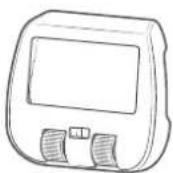
- Roller attachment
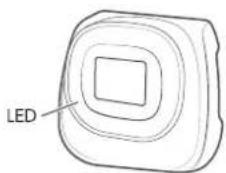
LED attachment
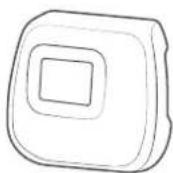
Spot attachment
AC adapter
• V design tool
- User's Manual
AC adapter
• V design tool
- User's Manual
Modes
Select the mode and level
You can change the treatment mode by pressing POWER/MODE button.
Press the LEVEL/COOLING button to select a treatment level. Mode and level will switch as below.
Roller attachment
[Mode]
Single Mode → Roller Mode*
*Roller Mode and Auto Level are not available when the LED attachment or the spot attachment is mounted.
[Level]
(MIN)→2→3→4→5(MAX)→Auto Level(AUTO)
[Cooling feature]
Cooling ON → Cooling OFF
*Press and hold the LEVEL/COOLING button to change ON and OFF.
LED attachment
[Mode]
Single Mode → LED Mode
[Level]
1 (MIN) → 2 → 3 → 4 → 5 (MAX)
*There is no treatment level selection available for LED Mode.
Spot attachment
[Mode]
Single Mode
[Level]
1 (MIN) → 2 → 3 → 4 → 5 (MAX)

LEVEL/COOLING button
POWER/MODE button
LEVEL indicator
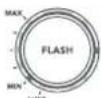
Level 1 (MIN)
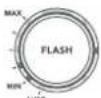
Level 2

Level 3

Level 4
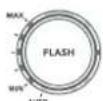
Level 5 (MAX)
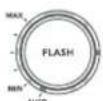
Auto Level (AUTO)


flowchart
graph LR
    A["1 Prepare the treatment area\nRemove unwanted hairs from the area to be treated with an electric shaver or razor."] --> B["2 Attach the attachment and turn on the power\nHold down the POWER/MODE button."]
    B --> C["3 Select the mode\nPress the POWER/MODE button."]
    C --> D["4 Select the level\nPress the LEVEL/COOLING button."]
    D --> E["5 Flashing light\nPress the device firmly to your skin and start a treatment."]
ATTENTION
- Be sure to use the attachment that is appropriate to the area being treated. Failure to comply may cause a burn injury.
- Ensure that neither you nor anyone else looks directly into the treatment window of the device. Also ensure that no one nearby looks at the treatment window. Failure to comply may damage your eyes.
- Moisturize your skin daily to prevent your skin from becoming dry. If your skin is dry, the device might not work properly.
- When treating the face, press the treatment window firmly against the skin. If the treatment window is not pressed firmly against the skin, the flashing light may become overly bright.
Brand : YA-MAN
Model : Rei Béaute Cool Pro
Category : Appareil de beauté optique domestique