GA04 - Loudspeaker Audibax - Free user manual and instructions
Find the device manual for free GA04 Audibax in PDF.


| Product Type | Portable Bluetooth Speaker |
| Brand | Audibax |
| Model | GA04 |
| Dimensions (approx.) | 20 x 10 x 10 cm |
| Weight | 1 kg |
| Power Supply | Built-in rechargeable battery, USB charging (5V) |
| Battery Life | Up to 8 hours (typical) |
| Charging Time | Approximately 3 hours |
| Connectivity | Bluetooth 5.0, AUX 3.5mm input |
| Speaker Type | Full-range driver with passive radiator |
| Output Power | 10W RMS |
| Frequency Response | 80 Hz – 20 kHz |
| Controls | Power, Volume +/-, Play/Pause, Bluetooth pairing button |
| Water Resistance | Not specified; avoid exposure to water |
| Included Accessories | USB charging cable, AUX cable, user manual |
| Cleaning and Maintenance | Wipe with a soft, dry cloth. Do not use abrasive cleaners. |
| Safety Precautions | Keep away from heat sources and moisture. Do not disassemble. |
| Spare Parts and Repairability | No spare parts available; contact Audibax support for service. |
| General Information | Designed for indoor and outdoor use. Compact and portable. |
| Package Contents | 1x GA04 speaker, 1x USB cable, 1x AUX cable, 1x user manual |
Frequently Asked Questions - GA04 Audibax
User questions about GA04 Audibax
0 question about this device. Answer the ones you know or ask your own.
Ask a new question about this device
Download the instructions for your Loudspeaker in PDF format for free! Find your manual GA04 - Audibax and take your electronic device back in hand. On this page are published all the documents necessary for the use of your device. GA04 by Audibax.
USER MANUAL GA04 Audibax
natural_image
Two circular diagrams showing concentric rings and a grid-patterned circle, no text or symbols present.GA series USER GUIDE
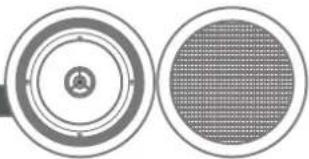
The GA range is a series of ceiling speakers designed with a 5 inches woofer and a 13mm tweeter. The GA series is the perfect choice for the distribution of microphone calls and background music both for restaurants or commercial stores. The mounting frame is made of high quality ABS. The grille is made of metal. The GA is available in white.
SAFETY PRECAUTION
- Keep this manual for future reference.
- When cutting the mounting hole for the speaker, make sure there is sufficient clearance behind the panel (no obstructions like A/C channels, power lines, etc).
• Take care of your speaker wires, they should be free of damage. Damaged speaker wires might result in poor sound quality and can damage amplifiers. - Only use accessories specified by the manufacturer.
• Make sure the mounting panel can support the speakers weight. - Use sufficient amount of speakers to avoid dead spots.
- No mains power shall be connected to the loudspeakers, doing so will damage the speaker.
- This apparatus should only be serviced by qualified personnel. If not warranty might be void.
- Use cable of the right gauge, certainly for long runs.
- Use cables with clear color indication and maintain polarity throughout the whole system.
- Avoid loud feedback from microphones, this can damage your speaker.
- Please check the units condition after unpacking. If the outside of the carton box has been damaged, Inform your shipper immediately.
WARRANTY INFO
The warranty for hidden defects can only be considered if they appear within the 24-month warranty period. The warranty is not valid in case of misuse, wear, power surges, improper packaging or shipping, improper use or storage and failure to comply with Audibax recommendations. The product must be returned in the original packaging with proof of purchase made by an authorized distributor of Audibax
①
MOUNT THE SPEAKER
The loudspeaker is easy to install, due to its simple mounting system.
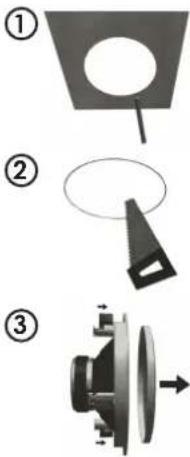
(1) Use the cutout template to mark the mounting hole.
(2) When making the hole in your mounting panel, double check if there are no cables or any other obstructions behind the mounting panel. Cutting the mounting panel without this check might result in damaged infrastructure or power lines. Please make sure that the mounting structure is capable of safely supporting the speaker's weight.
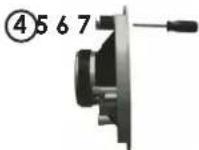
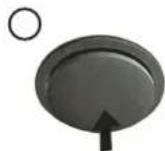
(3) Remove the speaker grille: turn the mounting clamps (dog-ears) outwards and push them in the direction of the grille until it pops out. Remove the grille.
(4) Turn the dog-ears inwards again and tighten the dog-ear screws slightly to make them stay in the inward position.
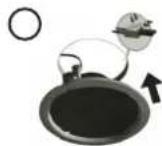
(5) Connect the speaker wires and insert the speaker in the precut speaker opening.
(6) Fasten the dog-ear screws carefully until the speaker sits safely in place. Do not overlighten the dog-ear screws!
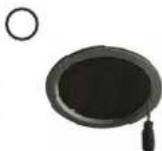
(7) Carefully push the grille back in place.
SPECIFICATIONS GA
| Model | |
| Characteristics | GA04 |
| Outside diameter | 170mm |
| Depth | 75mm |
| Loudspeaker system | 2 ways |
| Woofer size | 5" |
| Tweeter size | 13mm |
| Impedance | 8 ohmios |
| Power | 30w |
| SPL | 88 |
| Frequency | 80HZ-20KHZ |
| Material | ABS |
| Grille material | Metal |
| 100W Line | No |

AUDIBAX
ALTAVOZ DE TECHO
natural_image
Two circular diagrams showing concentric rings and a grid-patterned circle, no text or symbols present.Serie GA
GUÍA DEL USUARIO
Brand : Audibax
Model : GA04
Category : Loudspeaker