CS 10000N - Scale PCE Instruments - Free user manual and instructions
Find the device manual for free CS 10000N PCE Instruments in PDF.


| Product Type | Precision Counting Scale |
| Brand | PCE Instruments |
| Model | CS 10000N |
| Weighing Capacity | 10000 g (10 kg) |
| Readability | 0.1 g |
| Weighing Units | g, kg, lb, oz |
| Tare Function | Yes |
| Counting Function | Yes (piece counting) |
| Calibration | External, with calibration weight |
| Display | LCD with backlight |
| Pan Material | Stainless steel |
| Pan Size | 250 x 200 mm |
| Overall Dimensions | 300 x 250 x 100 mm |
| Net Weight | 2.5 kg |
| Power Supply | AC adapter (included) or 6 x AA batteries |
| Auto-Off | Yes, programmable |
| Interface | RS-232 (optional) |
| Operating Temperature | 0°C to 40°C |
| Humidity Range | Max 80% RH (non-condensing) |
| Housing Material | ABS plastic |
| Included Accessories | AC adapter, manual |
| Maintenance | Clean with damp cloth; avoid moisture |
| Safety | Do not overload; use on stable surface |
| Spare Parts | Pan, AC adapter available |
| Repairability | Service by authorized PCE center |
Frequently Asked Questions - CS 10000N PCE Instruments
User questions about CS 10000N PCE Instruments
0 question about this device. Answer the ones you know or ask your own.
Ask a new question about this device
Download the instructions for your Scale in PDF format for free! Find your manual CS 10000N - PCE Instruments and take your electronic device back in hand. On this page are published all the documents necessary for the use of your device. CS 10000N by PCE Instruments.
USER MANUAL CS 10000N PCE Instruments
Southpoint Business Park
Ensign way
Hampshire / Southampton
United Kingdom, SO31 4RF
From outside UK: +44
Tel: (0) 2380 98703 0
Fax: (0) 2380 98703 9
info@pce-instruments.com
www.pce-instruments.com/english
www.pce-instruments.com
Manual Electronic Balance PCE-CS 10000N
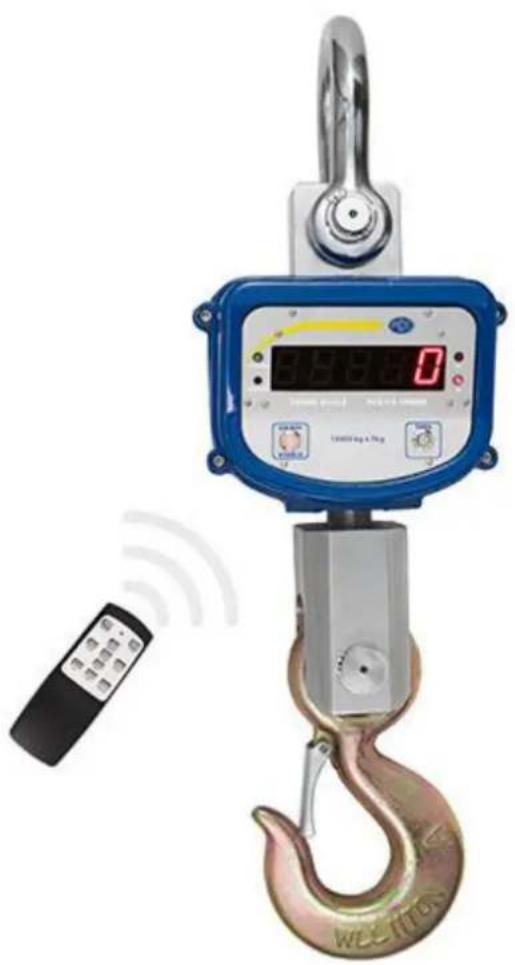
natural_image
Digital crane hook with digital display and remote control, no visible text or symbols on the device itself.Contents
1 Introduction....3
2 Safety notes....3
3 Specification....5
3.1 Technical specifications....5
3.2 Delivery contents 5
4 System description....6
4.1 Dimensions....6
4.2 Display 6
4.3 Remote control 7
4.4 Battery 7
5 Operation 8
5.1 Turn the scale on/off....8
5.2 Zero function....8
5.3 Tare function....8
5.4 Hold function....8
5.5 Accumulation function 9
5.6 Battery voltage....9
5.7 Brightness....9
5.8 Measuring unit 9
6 Troubleshooting....10
7 Contact....11
7.1 PCE Instruments UK 11
7.2 PCE Americas 11
1 Introduction
Thank you for purchasing a crane scale from PCE Instruments.
The crane scale PCE-CS 10000N can weigh up to 10 tons. To do so, the scale comes with a solid shackle on top and a rotatable safety hook on the bottom side. The 5-digit LED display has a character height of 30 mm, so that it is easily readable, even from a distance. The crane scale PCE-CS 10000N can be operated from a distance up to 15 m as well by using the infrared remote control. The internal battery of the crane scale allows up to 50 hours of operation.
2 Safety notes
Please read this manual carefully and completely before you use the device for the first time. The device may only be used by qualified personnel and repaired by PCE Instruments personnel. There is no warranty of damages or injuries caused by non-observance of the manual.
- If the equipment is not used for a long period of time, please recharge the battery every 3 months, as well as right before the next use. Otherwise it can affect the battery life.
- In order to prevent potential hazardous situations when using this measuring equipment, it is vital to adhere to the safety precautions provided by the manufacturer.
- Do not expose the equipment to extreme temperatures, direct sunlight, extreme humidity or moisture.
- Never use the measuring equipment with wet hands.
- It is not permitted to carry out any technical changes on the equipment.
- The equipment should only be cleaned with a damp cloth. Do not use abrasive cleaners or detergents which contain solvents.
- The equipment must only be used with accessories offered by PCE Germany or with replacements of equal value.
- The environmental conditions, for example the temperature ranges in which the measuring equipment can be used, as stipulated in the operating instructions specifications, must always be adhered to. Otherwise the operation of the equipment is prohibited.
The measuring equipment is not to be used in an environment where there is a danger of explosion.
- Please mind the maximum capacity of the scale at any point. Do not exceed it.
- In order to prevent potential hazardous situations when using heavy-lifting equipment, it is vital the manufacturer and the operator adhere to certain requirements. When using the measuring equipment, no risk must be posed to the operator.
- The operator or the person responsible for operating the measuring equipment must adhere to the national regulations for example health and safety at work regulations or any other governmental safety standards.
- There are also other safety precautions to be taken into consideration when operating the equipment, for example precautions provided by the crane, lifting device or shackle manufacturer etc.
- The assembly, the commissioning and the servicing of the measuring equipment must only be carried out by properly trained personnel who have been provided with the appropriate protective equipment.
- The measuring equipment must not be altered and is only allowed to be used for the intended purpose.
- The measuring equipment as well as any other equipment (for example the crane or any other heavy-lifting equipment) must be regularly serviced and maintained and where necessary have the service history correctly logged or certified. Each time before using the equipment a visual check must be carried out. In the case of any discrepancies for example cracks, breaks or deformities, the equipment must be immediately disabled and declared unfit for use. This must also be reported where necessary to the person in your company who is responsible for health and safety.
- Repairs must only be carried out by trained service personnel and only approved replacement parts must be used when carrying out a repair. All repairs, servicing and replacement parts must be documented by the service department
- The operating instructions as well as the safety instructions must always be visible whilst using the measuring equipment.
- The measuring equipment is not explosion-proof and must not be used in an environment where there is a danger of explosion. The environmental conditions, for example the temperature
ranges in which the measuring equipment can be used, as stipulated in the operating instructions, must always be adhered to. The usage of the equipment in areas which are exposed to high levels of contamination or corrosion should be avoided. In instances of major temperature fluctuations, the equipment must be given time to acclimatise before being used.
- The measuring equipment is only to be used for lifting and weighing of freely moving loads. A twisting or stressing of the load must not occur during the weighing process. The equipment must not be used for lifting people. It is prohibited for loads to be allowed to be dropped or be pulled along the ground or pulled at an angle.
- The maximum load as stipulated in the operating instructions [MAX] must never be exceeded (this also includes the maximum load stipulated for the crane or the heavy-lifting equipment being used in conjunction with the measuring equipment).
- Whilst operating the equipment any other potential hazardous areas, directly around the equipment should also be taken into consideration. When the equipment is in operation the hazardous area must be kept clear of any personnel. Directly beneath the load is of course an obvious hazardous area, but the danger of, for example a cable snapping, should also be taken into consideration, and a sufficient amount of safety distance should be observed.
Servicing and examination
Checks to be made before the use of the measuring equipment
The equipment must be checked before the beginning of every workday. . In the course of the examination, the operator must ensure that,
- no deformations or other damages for example cracks are visible
- all the attachment parts are present and in good order and condition (for example safety splints etc.).
- the present complete system does not conceal any hazards (for example an incorrect assembly).
- there are no potential hazards within the vicinity of the operating area and if so the must be dealt with or rendered safe before operating the equipment.
Regular inspection / Servicing
| After every 3 months or after 12,500 measurements, depending on which comes first. | - Check all parts for any excessive wear and tear.- Check all dimensions.- Check housing for any signs of deformation or damage.- Check all parts and ensure they are functioning correctly. |
| After every 12 months or after 50,000 measurements, depending on which comes first. | - Check all load-bearing parts for example hairline cracks etc. Only trained personnel are to carry out maintenance. |
| After every 5 years or 25,000 measurements, depending on which comes first. | - All load-bearing parts must be exchanged. |
| After every 10 years or 50,000 measurements, depending on which comes first. | - If the measuring equipment has reached the end of its usable life, then it needs to be replaced. |
This user's handbook is published from PCE Instruments without any guarantee.
We expressly point to our general guarantee terms, they can be found in our general terms of business.
If you have any questions please contact PCE Instruments.
3 Specification
3.1 Technical specifications
| Max. capacity | 10,000 kg |
| Min. weight | 100 kg |
| Resolution | 5 kg |
| Standard | According to OIML class III |
| Zero range | 4 % F.S. (full scale) |
| Tare range | 100 % F.S. |
| Settling time | ≤ 10 seconds |
| Overload indication | 100 % F.S. + 9e |
| Max. safety load | 125 % F.S. |
| Ultimate load | 400 % F.S. |
| Battery type | Fully-sealed lead-acid battery, 6 V / 1 Ah |
| Battery life | ≥ 50 hours |
| Charging adaptor | 9 V DC / 1000 mA |
| Remote control range | 15 m |
| Remote control battery | 2 x 1.5 V AAA batteries |
| Operating temperature | -10 ... +40 °C |
| Operating humidity | ≤ 85 % RH under +20 °C |
| Dimensions | 264 x 206 x 745 mm |
| Weight | 30 kg |
3.2 Delivery contents
1 x crane scale PCE-CS 10000N incl. Shackle, hook and battery
1 x charging adaptor
1 x remote control
2 x 1.5 V AAA batteries
1 x instruction manual
4 System description
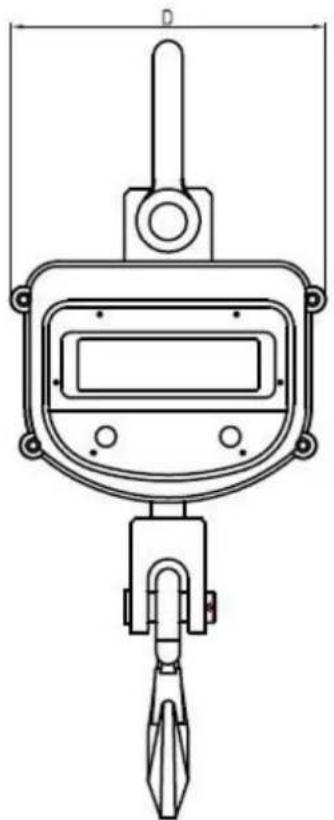
4.1 Dimensions
natural_image
Technical line drawing of a mechanical measuring device with no visible text or symbols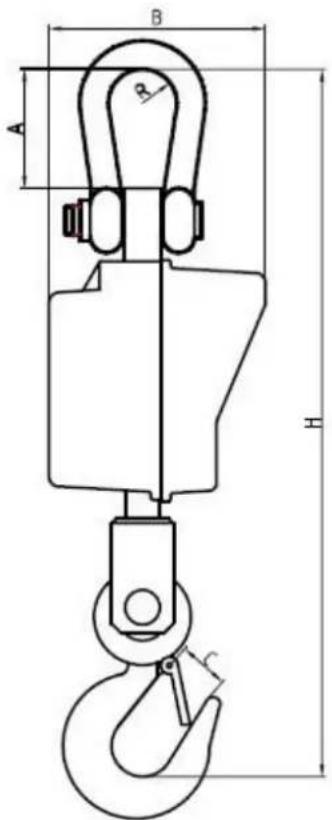
| A (mm) | B (mm) | C (mm) | D (mm) | H (mm) | R (mm) |
| 124 | 206 | 48 | 264 | 745 | 45 |
4.2 Display
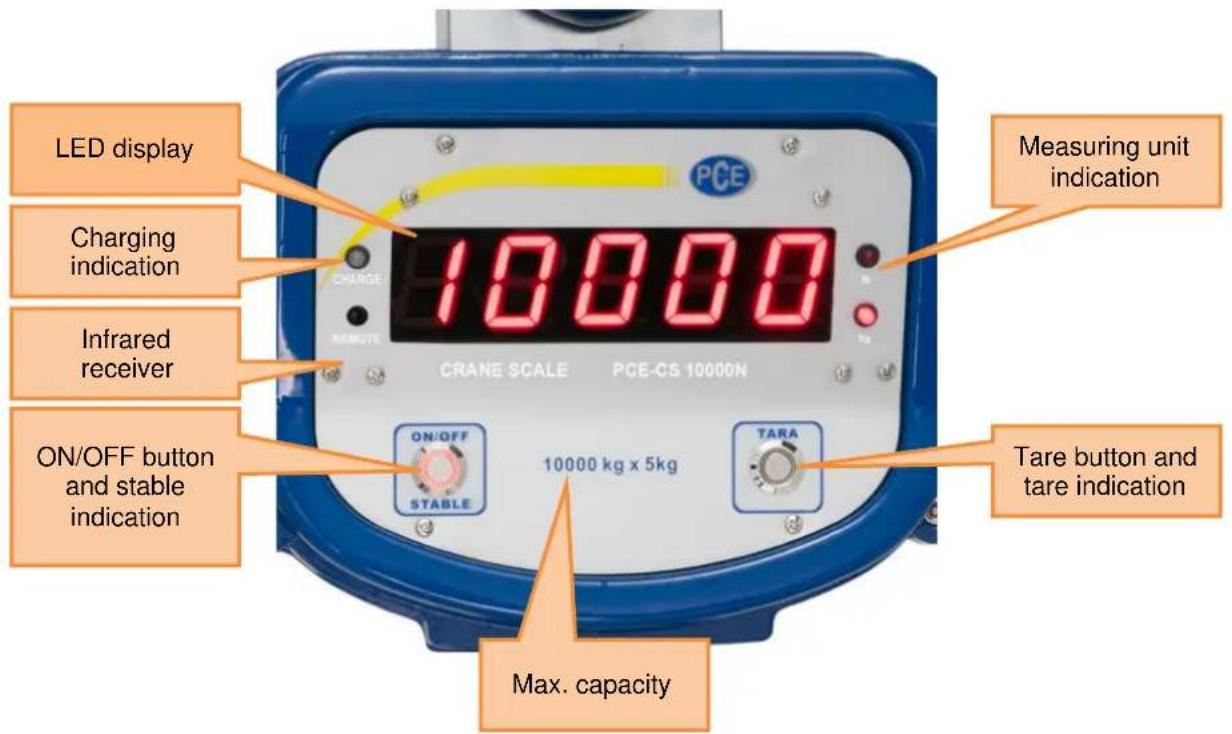
4.3 Remote control
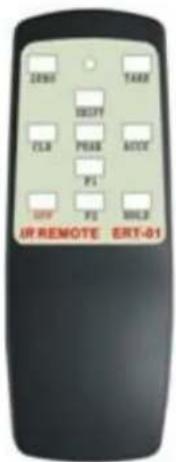
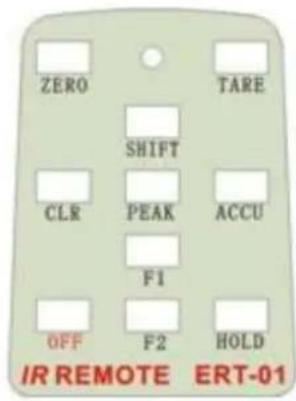
| Button | Function |
| ZERO | ZeroingNote: Use this function, if the scale is unloaded, but the display shows a reading unequal “0”.In settings: Increase selected digit |
| TARE | Activate tare functionIn setting: go to next digit |
| SHIFT | Activate further functions in combination with other buttons (see chapter 5)In settings: confirm input |
| CLR (clear) | Deactivate accumulation function / delete total valueIn settings: Decrease selected digit |
| ACCU (accumulation) | Activate accumulation function |
| F1 | Adjust display brightness |
| F2 | No function |
| HOLD | Activate/deactivate hold function |
| OFF | Shut the scale down |
4.4 Battery
The crane scale comes with a usual 6 V / 7 Ah lead-acid battery, which can be replaced if it breaks down. When fully loaded, the crane scale can be operated for ca. 50 hours.
If the display of the scale begins to blink, it means that the battery voltage is low. In this case, please recharge the battery. If the battery is not recharged, the scale automatically shuts down after 1-2 hours. If this happens, recharge the battery before the next usage.
To charge the battery, use the charging adaptor (9 V DC / 1000 mA), which is included in the package. Turn the crane scale off and plug in the charging adaptor. The charging indication glows orange during charging. If the battery is fully loaded, the charging indication turns green.
If the battery voltage is low, the battery should be charged for at least 8 hours. An integrated overcharge protection prevents the battery from taking damage, if it is connected to the adaptor for too long.
5 Operation
5.1 Turn the scale on/off
To turn the crane scale on, press and hold the ON/OFF Button on the scale for 3 seconds.
Now, the display shows the following:
- [88888] 2 times
- [Ert] 2 times
- [XXXXX] capacity of the scale
- [U 6.XX] current battery voltage
- [----] waiting for stable
- [0] reading is stable -> stable indication is active
Now you can measure with the crane scale.
To turn the scale off, press and hold the ON/OFF button on the scale or the OFF button on the remote for 3 seconds.
5.2 Zero function
If the scale is unloaded but the display does not show "0", you can zero the scale manually. To do so, just press the ZERO button on the remote control.
Note: This cannot be done, if the displayed value exceeds 4% of the capacity of the scale. If this is the case, please contact our customer support.
To display the current zero point, press SHIFT and ZERO on the remote at the same time.
5.3 Tare function
To use the tare function, hang a weight on the scale, wait for the reading to be stable and press the TARE button on the remote control or the TARE button on the scale itself.
The display now shows "0" and the tare indication is active.
If you already know the weight to be tared, you can also type it in manually. To do so, press SHIFT and TARE on the remote at the same time. The display now shows [0000.0].
Use ZERO and CLR to increase/decrease the selected digit and TARE to go to the next digit. If you typed in the weight correctly, press SHIFT to confirm. The display now shows the tare weight as a negative value and the tare indication is active,
5.4 Hold function
Press the HOLD button on the remote control, to freeze the current reading on the display. Press HOLD again, to unfreeze the reading.
5.5 Accumulation function
To activate the accumulation function, press the ACCU button on the remote control. The display now shows the following:
- [No***] how many readings have been added to the sum
- [H^****] the first 4 digits of the sum
- [L^****] the last 4 digits of the sum
The current reading has been added to the sum.
After the values above have been displayed twice, the scale returns to normal weighing mode. You can also press SHIFT to return to normal weighing mode.
To display the current values of the accumulation function, press SHIFT and ACCU on the remote at the same time. The display now shows the following:
- [No***] how many readings have been added to the sum
- [*****] current reading
- [H****] the first 4 digits of the sum
- [L^****] the last 4 digits of the sum
You can navigate between the individual accumulations by using TARE and ZERO on the remote control. Press SHIFT to return to normal weighing mode.
If you want to deactivate the accumulation function (all accumulation data will be deleted), press the CLR button on the remote control. The display now shows [ Clr ]. Press SHIFT to confirm the deletion or press CLR to cancel it.
5.6 Battery voltage
Press SHIFT and F1 on the remote at the same time to show the battery voltage. The display now shows the current battery voltage [U 6.XX]. To return to normal weighing mode, press SHIFT.
Note: If the display starts to blink, the battery voltage is low. Please recharge the battery.
5.7 Brightness
To adjust the brightness of the display, press F1 on the remote control. There are 5 different options, from dark (1) to bright (5). Option 3 is set by default.
5.8 Measuring unit
You can switch between kg and lb. To do so, press SHIFT and HOLD on the remote at the same time. The current measuring unit is displayed right next to the display.
6 Troubleshooting
| Problem | Possible cause | Possible solution |
| Display does not show anything | Battery dead | Recharge battery |
| Battery damaged | Replace battery | |
| ON/OFF button damaged | Contact customer support | |
| ON/OFF button was not pressed properly | Press and hold ON/OFF button for 3 seconds | |
| Display starts blinking | Battery voltage low | Recharge battery |
| Charging indicator does not glow when charging | Charging adaptor damaged | Check/replace adaptor |
| Charging adaptor not plugged in properly | Plug adaptor in properly | |
| Display does not respond to weight changes | Load cell damaged | Contact customer support |
| Load cell cable damaged | Contact customer support | |
| Out of calibration range | Contact customer support | |
| Display shows excessive zero drift between measurements | Electronics do not stabilize after turning on | After turning on, let scale hang for 3-5 minutes |
| Scale was put on the ground for too long | Scale should be hung | |
| Displayed weight differs from actual weight | Scale was not zeroed before applying weight | Press ZERO before applying weight |
| Calibration required | Contact customer support | |
| Wrong measuring unit selected | See chapter 5.8 | |
| Battery cannot be recharged | Battery damaged | Replace battery |
| Charging adaptor damaged | Replace charging adaptor | |
| Range of remote control shortened | Infrared receiver window is dirty | Check and clean |
| Batteries of remote are low | Replace batteries |
7 Contact
If you have any questions about our range of products or measuring instruments please contact PCE Instruments.
7.1 PCE Instruments UK
By post:
PCE Instruments UK Ltd. Units 12/13 Southpoint Business Park Ensign Way, Southampton Hampshire
United Kingdom, SO31 4RF
By phone:
02380 987 035
7.2 PCE Americas
By post:
PCE Americas Inc. 711 Commerce Way Suite 8 Jupiter 33458 FL USA
By phone:
561 3209162
- Manual Electronic Balance PCE-CS 10000N
- Contents
- Introduction
- Safety notes
- Servicing and examination
- Checks to be made before the use of the measuring equipment
- Specification
- Delivery contents
- System description
- Dimensions
- Display
- Remote control
- Battery
- Operation
- Turn the scale on/off
- Zero function
- Tare function
- Hold function
- Accumulation function
- Battery voltage
- Brightness
- Measuring unit
- Contact
- PCE Instruments UK
- By post:
- By phone:
- PCE Americas
Brand : PCE Instruments
Model : CS 10000N
Category : Scale