KAPBCMPN50A - Power bank Kogan - Free user manual and instructions
Find the device manual for free KAPBCMPN50A Kogan in PDF.


| Product Type | Power Bank |
| Brand | Kogan |
| Model | KAPBCMPN50A |
| Capacity | 5000 mAh |
| Input | Micro USB, 5V/2A |
| Output | USB-A, 5V/2.1A |
| Battery Type | Lithium-ion |
| Dimensions (approx.) | 100 x 60 x 20 mm |
| Weight (approx.) | 150 g |
| Charging Time | Approx. 3 hours |
| Overcharge Protection | Yes |
| Short Circuit Protection | Yes |
| LED Indicator | 4 LEDs (battery level) |
| Color | Black (typical) |
| Compatibility | Smartphones, tablets, any 5V USB device |
| Maintenance | Wipe with a dry, soft cloth |
| Repairability | Not user-serviceable; contact Kogan support |
Frequently Asked Questions - KAPBCMPN50A Kogan
User questions about KAPBCMPN50A Kogan
0 question about this device. Answer the ones you know or ask your own.
Ask a new question about this device
Download the instructions for your Power bank in PDF format for free! Find your manual KAPBCMPN50A - Kogan and take your electronic device back in hand. On this page are published all the documents necessary for the use of your device. KAPBCMPN50A by Kogan.
USER MANUAL KAPBCMPN50A Kogan
natural_image
Line drawing of a digital water heater with control panel and digital display (no text or symbols)ENERGYMAX 50000MAH 100W PD POWER BANK
(820 SERIES, WITH BUILT-IN LED LIGHT)
KAPBCMPN50A
SAFETY & WARNINGS
Handle with care and inspect regularly to ensure product is in good working order.
If this product, power supply cord or plug shows any signs of damage: stop use, unplug the product and contact Kogan.com support.
- Read all instructions before using and retain for reference.
- This device contains small parts is not intended for use by persons (including children) with reduced physical, sensory or mental capabilities or lack of experience and knowledge, unless they have been given supervision or instruction concerning use of the device by a person responsible for their safety. This device is not suitable for children under 5 years of age.
- Do not put the device into fire or water, as this will destroy it and may pose an electrical hazard.
- Do not use in high-temperature or high-humidity environments
- Do not disassemble, squeeze or puncture the device.
- This appliance contains no user-serviceable parts. If it suffers any failure or damage, cease usage and contact Kogan Support.
COMPONENTS
- Power bank
• USB-C charging cable (60W max). - User Guide
OVERVIEW
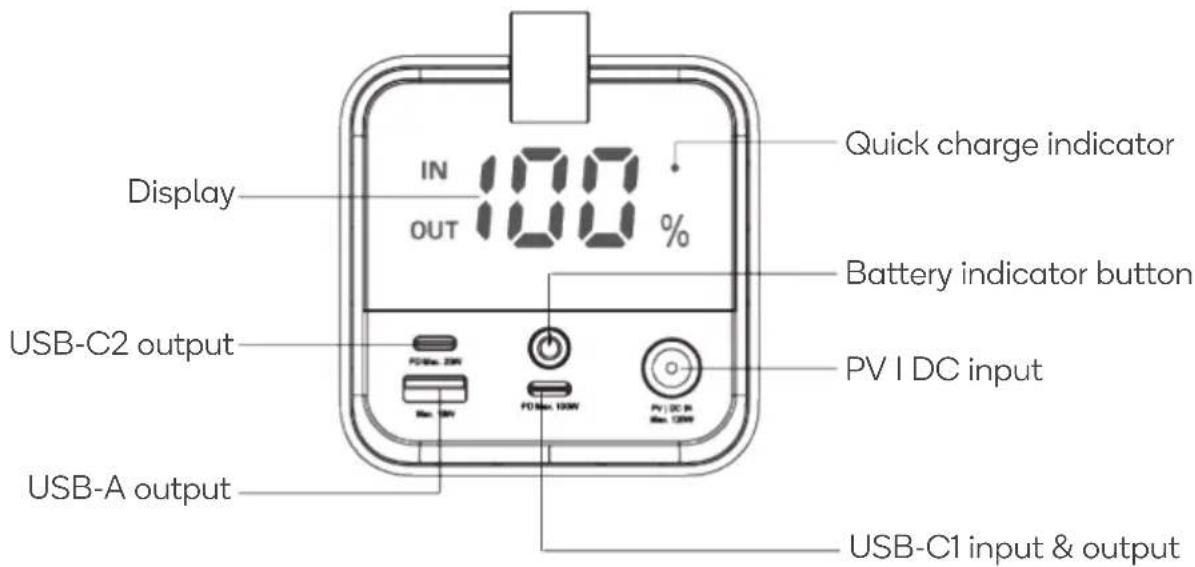
| USB-C1 input port | Used to charge the power bank |
| Output ports | Used for charging devices |
| Display | Shows battery status and the current battery level |
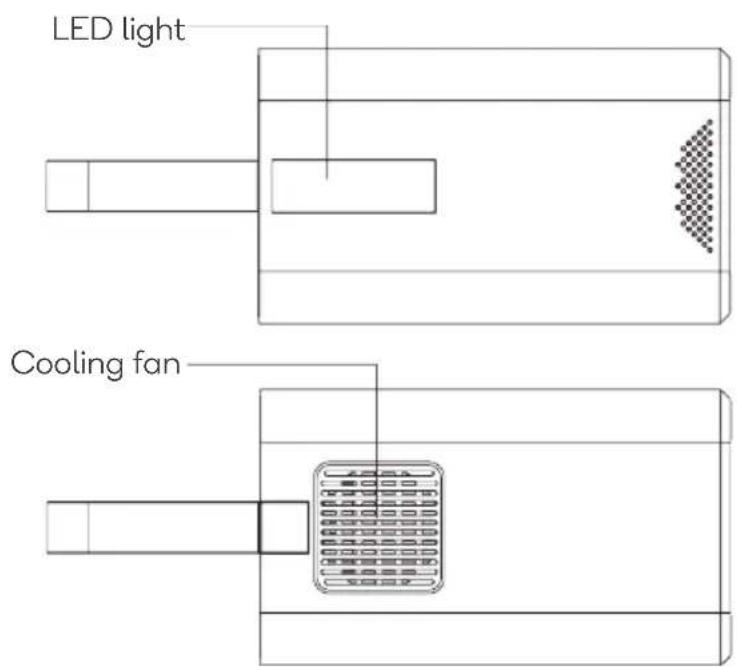
| Battery indicator button | Press to check the battery levelActivate or disactivate outputPress and hold for 3 seconds to enable/disable the LED light.In LED light mode, you can press the button to shift between LED light and SOS function. |
OPERATION
Charging the Power Bank
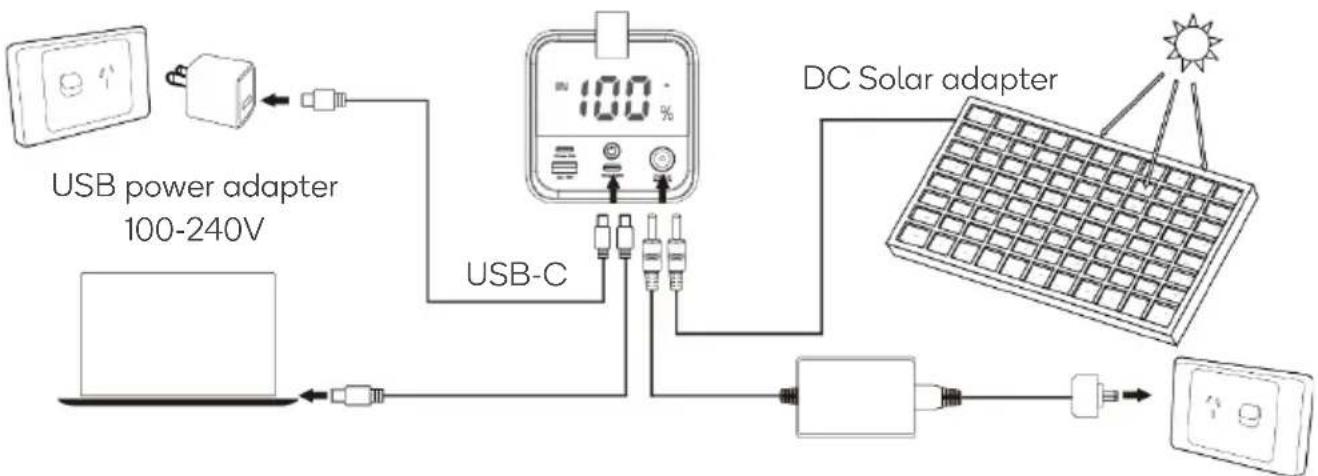
1. Using the USB-C Charging Cable:
- Connect the power bank's C1 input port to the included USB-C charging cable. Plug the other end of the USB-C charging cable into a power adapter (not supplied) or a vacant USB port on your laptop/computer.
2. Using an AC Power Adapter:
- You can also use a 100-240V AC power adapter (not supplied).
- Plug the adapter into the power input port of the power bank.
- Connect the AC power adapter into an electrical outlet and turn it on.
3. Using a DC Solar Adapter:
- A DC solar adapter (not supplied) can be used.
- Plug the solar adapter into the power input port.
- When the LED power percentage is flickering, the power bank is being charged. Once the display shows 100%, the power bank is fully charged. Please unplug the adapter.
flowchart
graph TD
    A["USB power adapter 100-240V"] --> B["USB-C"]
    B --> C["DC Solar adapter"]
    C --> D["Output"]
Power adapter AC 100-240V
Charging Devices
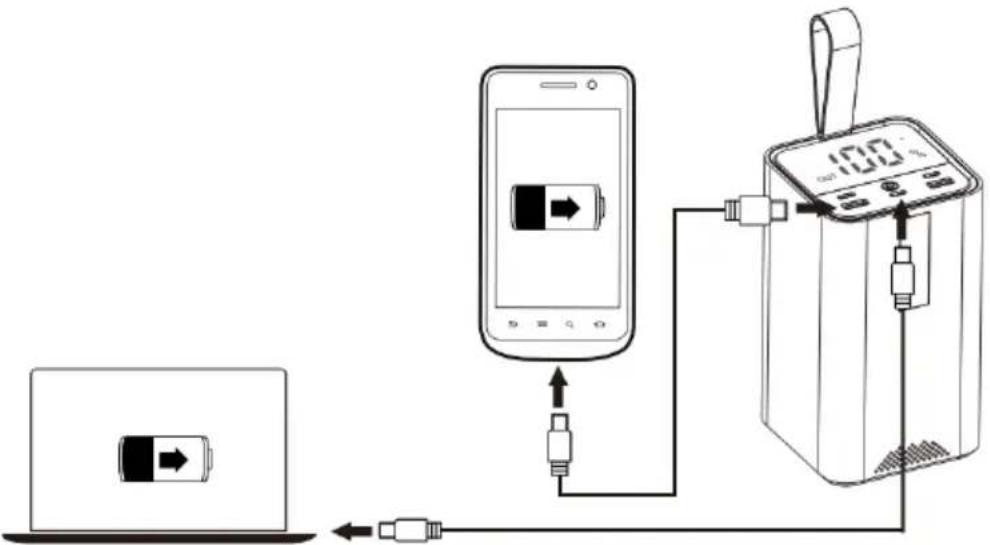
- Connect your device to the power bank's output port using a USB cable.
- Once connected, the power bank will automatically start charging the device.
- As the power bank's power level decreases, the LED digital display will show the battery percentage decreasing from 100% to 0%.
Note:
To better protect the battery, when the LED display is 0%, it means that it is running out of power and will need to be charged immediately.
SPECIFICATIONS
Battery Capacity
3.7V 50000mAh, 185Wh
Dimensions 84 x 144.5 x 84mm
Weight 1190g±10g
PV/DC (7909) Input 120W (Max)
Total Output 120W (Max)
USB-C1 Input/Output 5V=3A, 9V=3A, 12V=3A, 15V=3A, 20V=5A (PD 100W)
USB -C2 Output 5V=3A, 9V=2.22A, 12V=1.67A (PD 20W)
USB-A Output 5V=2.4A, 9V=2A, 12V=1.5A, 5V=4.5A (Max 22.5W)
Need more information?
We hope that this user guide has given you the assistance needed for a simple set-up.
For the most up-to-date guide for your product, as well as any additional assistance you may require, head online to help.kogan.com
kogan.com
Brand : Kogan
Model : KAPBCMPN50A
Category : Power bank