
Mars E4M - PC Case Gamdias - Free user manual and instructions
Find the device manual for free Mars E4M Gamdias in PDF.


| Product Type | Mid-Tower PC Case |
| Dimensions (L x W x H) | 440 x 210 x 470 mm (17.3 x 8.3 x 18.5 in) |
| Weight | 6.2 kg (13.7 lbs) |
| Motherboard Support | ATX, Micro-ATX, Mini-ITX |
| Expansion Slots | 7 |
| Drive Bays (internal) | 2x 3.5" / 2x 2.5" |
| Fan Support (max) | Front: 3x 120mm | Rear: 1x 120mm | Top: 2x 120mm |
| Radiator Support | Front: 360mm | Rear: 120mm | Top: 240mm |
| Front Panel Ports | 2x USB 3.0, HD Audio (Mic + Headphone) |
| Power Supply | Standard ATX, bottom mount (max 160mm) |
| GPU Clearance | Up to 320mm |
| CPU Cooler Clearance | Up to 155mm |
| Side Panel | Tempered glass (left side) |
| Material | Steel, tempered glass, plastic |
| Color | Black |
| Cable Management | 5mm clearance behind motherboard tray with Velcro straps |
| Dust Filters | Front, top, and bottom |
| Cleaning Instructions | Use a soft dry cloth to clean. Avoid abrasive cleaners or liquids near electronic components. |
| Safety Warnings | Ensure adequate ventilation. Do not block fan openings. Keep away from water and excessive heat. |
| Spare Parts / Repairability | Fans, dust filters, and feet are replaceable. Contact support for availability. |
| Warranty | 2 years (subject to region) |
Frequently Asked Questions - Mars E4M Gamdias
User questions about Mars E4M Gamdias
0 question about this device. Answer the ones you know or ask your own.
Ask a new question about this device
Download the instructions for your PC Case in PDF format for free! Find your manual Mars E4M - Gamdias and take your electronic device back in hand. On this page are published all the documents necessary for the use of your device. Mars E4M by Gamdias.
USER MANUAL Mars E4M Gamdias
GAMING ART IN MOTION
MARS IE4M
Micro-Tower PC Case

natural_image
Line drawing of a desktop computer tower case with ventilation grille and control panel (no text or symbols)▼ Case Layout and Parts Identification Case Layout and Parts Identification

- Front Panel
- ID Port Module
- Right Side Panel
- Left Side Panel
- PCIe Slots
- Power Supply Unit Mounting Hole
- Rear Fan
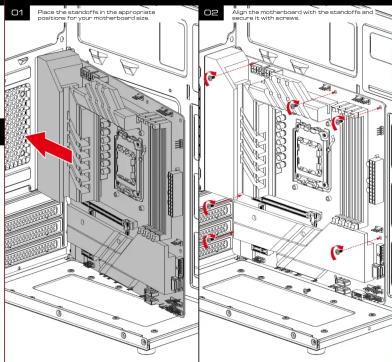
- Motherboard Placement
- Motherboard Mounting Holes
- Chassis Pedestals
▼ Safety Information Package Contents
- General Safety Warnings
Always ensure the computer case is placed on a stable, flat surface to prevent it from tipping over. Keep the case away from water, moisture, or high humidity environments to avoid electrical hazards. Do not block or obstruct the ventilation openings to ensure proper airflow and prevent overheating
-
Electrical Safety
-
Electrical Safety Disconnect the power supply before installing or modifying any internal components.
Avoid touching internal components directly; always ground yourself to prevent static discharge, which can demand sensitive components.
Use only compatible power supplies and cables, ensuring that all connections are secure and free from
fraying or damage.
- Handling Precautions
Handle the computer dose with cane during transportation to prevent physical damage
Use appropriate tools when assembling or disassembling components inside the case to avoid injury. Do not force components into place; ensure they align properly before securing them.
(三) 本报告书全文
- Fire Hazard Warnings
Ensure all components are properly ventilated and not overheating, as this can be a potential fire hazard. Avoid overloading electrical circuits connected to the computer case to prevent overheating and potential
Fine risks. Knee dimmable materials were from the same time ago.
Keep himmable material tray from a computer data.
- Child Safety
Keep the computer case and its components out of reach of children.
Do not allow children to play with or operate the computer case, especially when it is powered on.
- Clustion (M)
B. Cleaning and Maintenance Implus the computer press from the
Use a dry soft cloth for cleaning the exterior of the case. Do not use liquid cleaners or surgeons.
Periodically check and clean the ventilation openings to ensure proper airflow
[Non-Text]
- Installation Safety
Ensure that all components are installed correctly and securely before powering on the system.
Double-check connectiona and so news to prevent potential hazards during operation. Follow the manufacturer's guidance for component installation and any no compatibility with the one
Follow External structure guidelines for component installation and maintenance compared with the case
- Disposal Instructions
Dispose of the computer case and its components according to local electronic waste regulations.

▼ Case Layout and Parts Identification Case Layout and Parts Identification
-
Gaming Case: MARSEAM
-
Chassis Protection: Styrofoam
▼ Specification
-
Case Type: Micro Tower
-
Motherboard Support: Micro-ATX, Mini-TX
-
Expansion Slots: 4
1.2 Material / SODD ART
-
Matherie: SPCU, ABS
-
Product Dimension: 320 x 170 x 360 mm (12.6 x 6.7 x 12.1 inch)
G. Chassis Dimension: 260 x 170 x 350mm(11.4 x 6.7 x 13.9 inch)
- Radiator Support: No
-
Fan Support : Hear: 1x 8
-
Motherboard Sync : N
-
Drive Bays: 1 x 2.5" or 1 x 3.5"(Chessie Bottom)
-
Clearance : CPU cooler height limitation: 150mm - VGA length limitation: 260mm - PSU length limitation: 160mm


▼HDD Installation SSD Installation Other Supports

▼ Front I/O cables

▼
Troubleshooting and Maintenance
- Regularly clean the dust filters and fans to maintain airflow.
- Check all connections if the system is not powering on.
Warranty and Support Information
- Provide details on the warranty period and how to contact support for assistance.
▼ GPU Installation GPU Installation


natural_image
Completely blank white image with no visible content, text, or symbols.Brand : Gamdias
Model : Mars E4M
Category : PC Case