
DS-QAE0A60G1-VB - Receiver Hikvision - Free user manual and instructions
Find the device manual for free DS-QAE0A60G1-VB Hikvision in PDF.


| Product Type | Receiver |
| Brand | Hikvision |
| Model | DS-QAE0A60G1-VB |
| Dimensions (H x W x D) | 1.7 x 4.7 x 3.9 in (43 x 120 x 100 mm) |
| Weight | 0.6 lb (270 g) |
| Power Supply | 12 V DC, 1 A |
| Power Consumption | Max 5 W |
| Supported Video Formats | HDMI, VGA, CVBS |
| Supported Audio Formats | PCM, G.711 |
| Maximum Resolution | 1920 x 1080p at 30 fps |
| Operating Temperature | 14°F to 122°F (-10°C to 50°C) |
| Storage Temperature | -4°F to 140°F (-20°C to 60°C) |
| Humidity | 10% to 90% (non-condensing) |
| Installation | Mounting bracket or desktop placement |
| Maintenance | Clean with soft dry cloth; avoid liquids |
| Safety | Use only specified power adapter; do not open |
| Spare Parts | Available through authorized Hikvision dealers |
| Repair | Contact Hikvision support for service |
Frequently Asked Questions - DS-QAE0A60G1-VB Hikvision
User questions about DS-QAE0A60G1-VB Hikvision
0 question about this device. Answer the ones you know or ask your own.
Ask a new question about this device
Download the instructions for your Receiver in PDF format for free! Find your manual DS-QAE0A60G1-VB - Hikvision and take your electronic device back in hand. On this page are published all the documents necessary for the use of your device. DS-QAE0A60G1-VB by Hikvision.
USER MANUAL DS-QAE0A60G1-VB Hikvision
©2023 Hangzhou Hikvision Digital Technology Co., Ltd. All rights reserved.
About this Manual
The Manual includes instructions for using and managing the Product. Pictures, charts, images and all other information hereinafter are for description and explanation only. The Information contained in the Manual is subject to change, without notice, due to firmware updates or other reasons. Please find the latest version of this Manual at the hikvision website (https://www.hikvision.com/). Please use this Manual with the guidance and assistance of professionals trained in supporting the Product.
Trademarks
HKVISION and other Hikvision's trademarks and logos are the properties of Hikvision, various jurisdictions.
Other trademarks and logos mentioned are the properties of their respective
owners.
TO THE MAXIMUM EXTENT PERMITTED BY APPLICABLE LAW, THIS MANUAL AND THE PRODUCT DESCRIBED, WITH ITS HARDWARE, SOFTWARE AND FIREWARE ARE PROVIDED AS IS AND "WITH ALL ITEMS AND LITERIES" HIKVISION MAILS NO WARRANTIES, EXPRESS OR IMPLICIT, INCLUDING WITHOUT LIMITATION, RESPONSIBILITY, SATISATORY QUALITY, OR FITNESS FOR A PARTICULAR ORDER OF THIS PROCEDURE. ANY INFORMATION USED IN THIS REPORT TO THE INFO OF THIS WILL HIKVISION IS LIABLE TO YOU FOR ANY SPECIAL, CONSEQUENTIAL, INCIDENTAL, OR INDIRECT DAMAGES, INCLUDING, AMONG OTHERS, DAMAGES FOR LOSS OF BUSINESS PROFITS, BUSINESS INTERPROUATION, OR LOSS OF DATA, COBRUPTION OF SYSTEMS, OR LOSS OF DOCUMENTATION, WHETHER RASSED ON THIS PROCEDURE. ANY INFORMATION USED IN THIS REPORT TO THE INFO OF THIS RESULT OR OTHERWISE, IN CONNECTION WITH THE USE OF THE PRODUCT, EVEN IF HIKVISION HAS BEEN ADVISED OF THE POSSIBILITY OF SUCH DAMAGES OR LOSS YOU ACKNOWLEDGTE THAT THE NATURE OF THE INTERNET PROVIDES FOR INHLRANT SECURITY RISKS, AND HIKVISION SHALL NOT TAKLY, ANY RESPONSIBILITIES FOR ABNORMAL OPERATION, PRIVACY LEAKAGE OR OTHER DAMAGES RESULTING FROM CYSLR ATTACK, HACKY ATTACK, VIRUS INCLUSION, UNLESS OTHERWISE WITHOUT SECURITY. HOWEVER, HIKVISION WILL PROVIDE HLWYLIC TOLERI SUPPORT II BLOQUILD.
YOU AGREE TO USE THIS PRODUCT IN COMPLIANCE WITH ALL APPLICABLE LAWS, AND YOU ARE SOFLY RESPONSIBLE FOR FUSURING THAT YOUR USE CONFORMS. YOU ARE TO USE THIS PRODUCT IN A PAPER OF THE WORLD IN THIS PRODUCT IN A MANNER THAT DOES NOT INFRINGER ON THE RIGHTS OF THIRD PARTIES, INCLUDING WITHOUT LIMITATION, RIGHTS OF PUBLICITY, INTELlectual PROPERTY RIGHTS, OR DATA PROTECTION AND OTHER PRIVACY RIGHTS. YOU ARE TO USE THIS PRODUCT IN A PROPRIED INFORMATION PROCESSED IN THE DEVELOPMENT OR PRODUCTION OF WEAPONS, MASS DESTRUCTION, THE DEVELOPMENT/INTRODUCTION OF CHEMICAL OR BIOLOGICAL WEAPONS, ANY ACTIVITIES IN THE CONTEXT RELATED TO ANY NUCLEAR EXPLOSIVE OR UNSAFE NUCLEAR FULL CIRCUL, OR IN SUPPORT OF HUMAN RIGHTS ABUSES. IN THE EVENT THE INTERESTS BETWEEN THIS MANUL AND THE APPLICABLE LAW, THE LATTER PREVAIRS.
1 Appearance
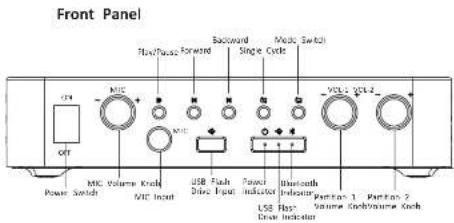
Appearance
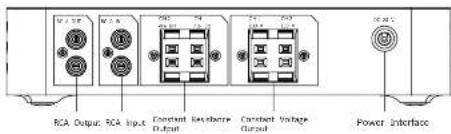
Rear Panel
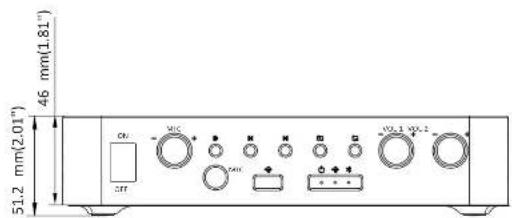
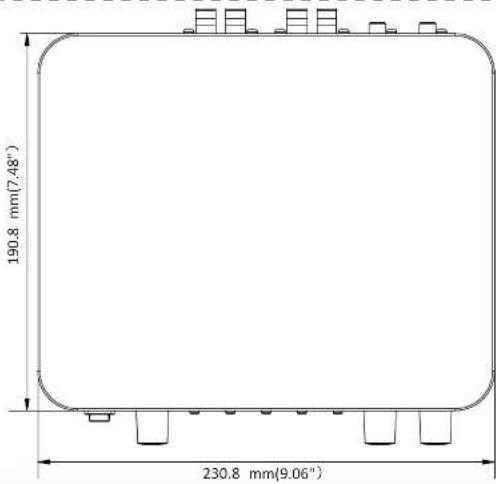
Dimensions
Indicators:
Power indicator (solid white): the device is normally working.
USB flash drive indicator (solid white); the device is in USB flash drive mode.
Bluetooth indicator (solid blue): the device is in Bluetooth mode. The default Bluetooth name is "Hik-Audio xxx".
Buttons:
Mode switch: switch to the USB flash drive mode or Bluetooth mode. You can view which mode the is in by indicators.
Single cycle: single cycle playback of USB flash drive audio,
Knobs:
MIC volume knob: adjust the output volume of MIC.
Partition 1 volume knob: adjust the volume output of CH1 on the rear panel.
Partition 2 volume knob: adjust the volume output of CH2 on the rear panel.
Interfaces:
MIC input: connect to the 6.35 mm moving-coil microphone.
USB flash drive input: connect to the USB flash drive in USB2.0 format.
RCA output: for amplifier cascading.
RCA input: connect to the audio device with RAC interface.
Power interface: 24 VDC.
Constant resistance output: a channel can be connected to a speaker which power resistor is 4 Ω, 30 two speakers which power resistor is 8 Ω, 15 W.
Constant voltage output: a channel can be connected to speakers with a voltage of 100 V.

●The total power of constant resistance output CH1 and constant voltage output CH1 cannot exceed
●The total power of constant resistance output CH2 and constant voltage output CH2 cannot exceed
2 Installation

● Use the standard power adapter.
● Complete wiring before installation.
● Make sure all the related equipment is power-off during the installation.

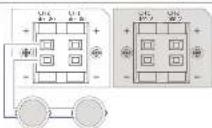
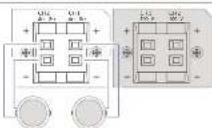
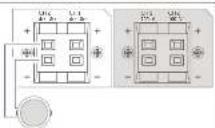
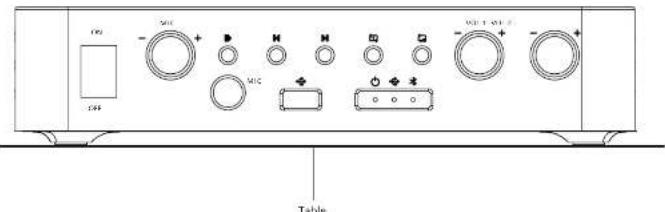
Place the device directly on a sturdy and stable table.

Warning
- Refer to the device label for the standard power supply. Please make sure your power supply matches with your desire.
• In the use of the product, you must be in strict compliance with the electrical safety regulations of the nation and region. - CAVITATION: If the loss of the device can be restored, replace it only with the same model to resolve the loss of the or clamping shock.
- CAUTION: If the device needs to be installed with a specific bracket of our company, use the corresponding bracket only. Use others (such as carts, stands, and carriers) may result in instability and cause injury. Refer to the device disturbance for bestoint model details. Refer to dependent for device
• For the device with sound audio function, to prevent possible heart rate camera, do not listen at high volume levels for lone periods. Refer to the user manual for details.
• Refer to the device label for the standard power supply. Please make sure your power supply matches with your device.
• Make sure that the power has been disconnected before you wire, install, or disassemble the device.
• To avoid heat accumulation, good ventilation is required for a proper operating environment. - If smoke, color or noise arises from the device, immediately turn off the power, using the power ratio, and contact the service number.
- If the product does not work properly, please contact your dealer in the nearest service center. Never attempt to disassemble the product yourself. We shall not assume any responsibility for problems caused by
the following section of the information

Caution
- For the battery with + and - signs, - identify the positive terminals of the device which is used with or generates direct current, and - identifies the negative terminals of the device which is used with or generates
(1) 2017年1月1日
- No called these substances, such as lighted candies, should be posted on the equipment.
• If the serial port of the device is used for obutting only, it is reserved only for professionals or technical support for device maintenance. Refer to the document for details.
- Attach the device property to the floor/wall in accordance with the installation instructions to prevent injury. Refer to the document for details.
- DO NOT drop the product or subject it to physical shock. DO NOT install the product on voluntary surface or plates.
• DO NOT expose the device to high electromagnetic radiation.
• DD NOT expose the device to extremely hot, cold, dusty, corrosive, saline alkal, or damp environments. For temperature and humidity requirements, refer to the datasheet for details.
• DO NOT install indoor product where it may get wet by water or other liquid.
• To avoid fire hazard or electric shock, DO NOT expose the device to rain or extremely damp environments
- According to the internal mis-ranges network security concerns, please submit the contact list of our neural information and data security. (While we find that this is a man, has neural own-site risks.
please contact us in time.
• Proper configuration of all passwords and other security settings is the responsibility of the installer and/or end-use;
- Keep all wrappers after unpacking them for future use. In case of any failure occurred, you need to return the device to the factory with the original wrapper. Transportation without the original wrapper may result
in damage on the device and the company seal but issue any responsibilities.

Note
- This installation should be made by a qualified service person and should conform to all the local codes.
These clauses apply only to the products bearing the corresponding mark or information.
EU/UK Compliance Statement
This product and - if applicable - the supplied accessories too ar marked with "CE" and comply therefore with the applicable harmonized European standards listed under the Directive
2014/30/EU (FMCD) and Directive 2011/65/EU (RoHS). Note: The products with the input voltage of within 50 to 1000 VAC o to 1500 VDC comply with Directive 2014/35/EU (VVD), and the rest products comply with Directive 2001/95/FC (GPSD). Please check the specific power supply information for reference.
The full text of the EU declaration of conformity is available at the following internet address: https://www.bilevision.com/seq/support/compliance/delclaration-at-contravity.
This product and - it applicable - the supplied accessories too ar marked with "UKCA" and comply therefore with the following directives: Electromagnetic Compatibility Regulations 2016.
Electrical Equipment (Safety) Regulations 2016, the Restriction of the Use of Certain Hazardous Substances in Electrical and Electronic Equipment Regulations 2012
Directive 2012/19/EU [WEEE Directive]. Products marked with this symbol cannot be disposed of as unsorted municipal waste in the European Union. For proper recycling return this product to you
■ local supplier upon the purchase of equivalent new equipment, to dispose of it at designated collection points. For more information see: www.ncyclothis.info.
According to the Waste Electrical and Electronic Equipment Regulations 2013: Products marked with this symbol cannot be disposed of as unsorted municipal waste in the United Kingdom. For proper recycling, return this product to your local supplier upon the purchase of aquival new equipment, or dispose of it at designated collection points. For me information see: www.recyclethis.info.
Directive 2008/06/LC. See its elimination: 2013/36/LO (battery Directive): This product contains a battery that cannot be disposed of as unsorted municipal waste in the European Union. See the product documentation for specific battery information. The
battery is marked with this symbol, which may include lettering to indicate cadmium (Cd), lead (Pb), or mercury (Hg). For proper recycling, return the battery to your supplier or to a designated collection point. more information see: www recycleths.info
According to the Batteries and Accumulators (Placing on the Market) Regulations 2008 and the Waste Batteries and Accumulators Regulations 2009: this product contains a battery that cannot be disposed of as unsorted municipal waste in the United Kingdom. See the product documentation for specific battery information. The battery is marked with this symbol, which may include lettering to indicate cadmium (Cd), lead [Pb], or mercury (Hg). For proper recycling, return the battery to a supplier or to a designated collection paint. For more information see: www.recyclers.info.
Industry Canada ICES-003 Compliance
This device meets the LSR ILE5-033 [6] / NVI8-033 [6] standards.
Brand : Hikvision
Model : DS-QAE0A60G1-VB
Category : Receiver