SET 8042 - Microphone Karma - Free user manual and instructions
Find the device manual for free SET 8042 Karma in PDF.


| Product Type | Microphone |
| Brand | Karma |
| Model | SET 8042 |
| Microphone Type | Dynamic |
| Polar Pattern | Cardioid |
| Frequency Response | 50 Hz - 15 kHz |
| Impedance | 600 ohms |
| Connector | XLR (3-pin) |
| Power Requirements | Phantom power 48V |
| Dimensions (with stand) | 180 x 50 x 50 mm |
| Weight | 350 g |
| Material | Metal housing with grille |
| Included Accessories | Microphone clip, stand adapter, carrying case |
| Compatible Devices | Audio interfaces, mixers, PA systems |
| Usage | Vocal, speech, live performance |
| Cleaning | Wipe with dry cloth, avoid moisture |
| Storage | Dry place, room temperature |
| Warranty | 1 year |
| Certifications | CE, RoHS |
Frequently Asked Questions - SET 8042 Karma
User questions about SET 8042 Karma
0 question about this device. Answer the ones you know or ask your own.
Ask a new question about this device
Download the instructions for your Microphone in PDF format for free! Find your manual SET 8042 - Karma and take your electronic device back in hand. On this page are published all the documents necessary for the use of your device. SET 8042 by Karma.
USER MANUAL SET 8042 Karma
SET 8042 SET 8042LAV SET 8042PAL SET 8042PL
4 Radiomicrofoni UHF 4 UHF Wireless Microphones

MANUALE
Instructions

When you open the package check that product is in good condition and that all the parts are present. Immediately notify the seller if any part is damaged or missing.
CE
DICHIARAZIONE DI CONFORMITA' UE EU COMPLIANCE DECLARATION
Hereby, KARMA ITALIANA SRL declares that the radio equipment type Wireless Microphone SET 8042 series is in compliance with Directive 2014/53/EU. The full text of the EU declaration of conformity is available at the following internet address: www.karmaitaliana.it.
Karma Italiana Srl

WARNING: In the countries indicated in the below chart the operating frequencies of this product might be not authorized, be subject to local restrictions or limitations of use, require a general authorization or an individual license for use. Please contact your telecommunications authority for detailed information about authorized frequencies and ERP power levels in your country or your region for wireless microphones.

| AT | BE | BG | CH | CY | CZ | DE |
| DK | EE | EL | ES | FI | FR | HR |
| HU | IE | IS | IT | LI | LT | LU |
| LV | MT | NL | NO | PL | PT | RO |
| SE | SI | SK | TR | UK(NI) |
The manufacturer, in order to improve its products, reserves the right to modify their characteristics whether technical or aesthetic, at any time and without notice.
IT
GRAZIE PER IL VOSTRO ACQUISTO
Microfono palmare
Microfono bodypack
Microfono da tavolo
6
FUNZIONI
- DISPLAY
IT
SPECIFICHE TECNICHE
The product you have purchased is the result of careful planning by specialized engineers. High quality materials were used for its construction, to ensure its functioning over time.
The product is manufactured in compliance with the strict regulations imposed by the European Union, a guarantee of reliability and safety.
Please read this manual carefully before starting using the device in order to take advantage of its full potential.
Hoping that you will be satisfied of your purchase, we thank you again for your trust in our brand and we invite you to visit our website www.karmaitaliana it where you will find the whole range of our products, along with useful information and updates.
This manual refers to 4 models of the SET 8042 series, differing from each other in the combination of supplied transmitters.

CAUTIONS AND WARNINGS
- Read and follow strictly the instructions contained in this manual
- Keep this manual for future reference and include it if you give the product to another user.
• Do not open or take apart the device and don't make changes to it.
• The installation of the product must be carried out exclusively by skilled persons.
In case of wrong installation or connections, the manufacturer doesn't take any responsibility for damages to people or objects. - Before making any connection with other devices, check that all the fixtures are turned off and disconnected from the power source.
- The product is not suitable for outdoor use. To avoid the risk of shortcircuits don't expose it to high temperatures (above 40°), rain or humidity.
• Do not allow flammable liquid, water or metal objects to enter the product.
• Don't touch the product with wet hands. - Do not place any recipients filled with liquids, such as vases, on top of or directly next to the appliance.
• install the product in a stable and ventilated position, far from heat sources and don't obstruct the air vents. - Use the fixture, its controls and the accessories with due accuracy, avoiding falls, vibrations or impacts.
- In the event of a serious operating problem, stop using the product immediately. Never try to repair it by yourself, but contact the authorized technical service center. Repairs carried out by unskilled persons could lead to serious damages both to the fixture and to people.
• Do not turn the product on and off at short intervals, it may reduce the life of the device. - Disconnect the unit from power when it is not used.
- Do not cut, kink, otherwise damage nor modify the power adaptor's cable and periodically check that it is in good condition.
- Do not leave the batteries inside the transmitters if you do not use them for a long time, to avoid acid leakage which could damage the contacts.
• Wait for the product to cool before cleaning or maintenance. - To clean the product, use only a dry or slightly damp cloth, avoiding solvents or detergents of any kind.
• If the product is used in the presence of children they must be supervised.
10
EN

This symbol alerts you of the presence of important operating and maintenance instructions, in the manual or in the documentation accompanying the product
This symbol indicates a risk of electric shock in case of wrong use or alteration of the product.
The CE mark indicates that this product complies with the applicable European directives and their related standards. Compliance documentation in complete form is available at the company Karma Italiana Srl
Directive 2012/19/UE regarding electric and electronic equipment waste (WEEE). The symbol of the crossed-out dustbin indicates that the product at the end of its life must be collected separately from other waste. The user must, therefore, confer the future complete with all the essential components to an authorized disposal center for collection of electronic and electrical waste, or return it to the dealer when buying new equipment of equivalent type, at a rate of one to one, or one to zero if external dimension is less than 25cm. Appropriate separate collection to send the decommissioned equipment to recycling, treatment and environmentally compatible disposal helps to prevent negative impact on the environment and human health and promotes recycling of the materials making up the product. In Italy illegal dumping of the product by the user entails the application of administrative sanctions pursuant to Legislative Decree n. 49 (14/03/2014).
This device is powered by batteries subject to European Directive 2013/56/EU, which cannot be disposed of with normal domestic waste. Find out about the local regulations regarding the separate collection of batteries: a correct disposal allows to avoid negative consequences for environment and health
WARRANTY CONDITIONS
The product is covered by warranty according to current national and European regulations. For detailed warranty conditions and RMA requests please refer to our website www.karmaitaliana.it
- The warranty covers manufacturing defects and faults occurred in the first 2 years from the date of purchase. In case of purchase with invoice, the warranty is limited to 1 year.
• Damages caused by negligence or wrong use of the device are not covered by warranty. - The warranty is no longer effective if the item is modified or disassembled by not authorized people.
- This warranty doesn't necessarily anyage the product's replacement.
- This warranty doesn't necessarily envisage the product's replacement.
- External components, batteries, knobs, switches and any removable or subject to wear and tear parts are excluded from warranty.
- Shipment for the return of faulty items is at expense and risk of the owner.
- For all intents and porpuses the warranty is effective only upon exhibition of the invoice or of the purchase receipt.
- If you send the product for repair, it must be shipped with complete original packaging we therefore recommend to save it.
We also suggest to register your product on our website www.karmaitaliana.it, after signing in to access the reserved area. In this way you will have the possibility to keep track of the warranty validity and to receive updates on our items.
11
EN
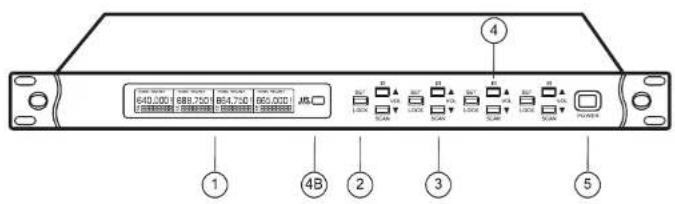
Front panel
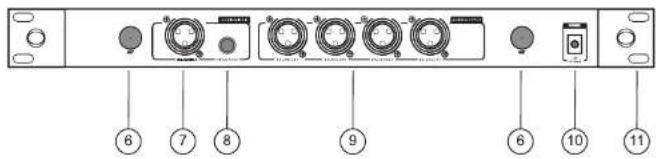
Back panel
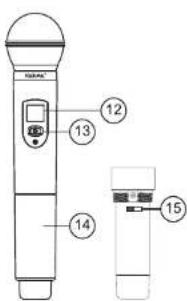
Handheld microphone
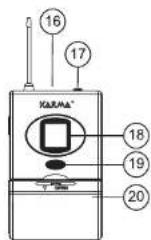
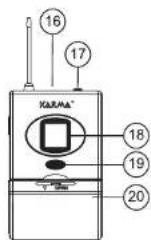
Bodypack microphone
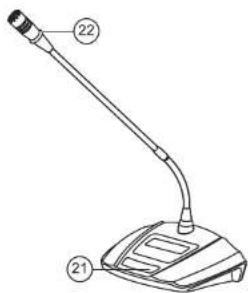
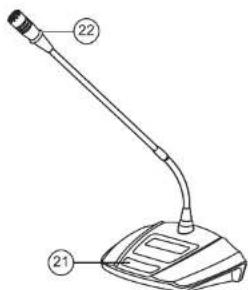
Desk microphone
EN
FUNCTIONS
-
DISPLAY It shows main information on the microphones you are using.
-
SET/LOCK BUTTON Press it to have the possibility to set manually the channel's frequency. Once pressed, use the IR [4] and SCAN [3] buttons to scroll through the selectable frequencies. After selecting the frequency press again the LOCK [2] button.
-
SCAN / VOL - BUTTON A short press reduces the channel's volume. With a long press it starts scan to look for a free frequency in the operating area.
-
IR / VOL + BUTTON A short press increases the channel's volume. A long press activates the "pairing" mode. Place the transmitter near the IR (4B) sensor of the receiver.
-
ON/OFF BUTTON Use it to turn on/off the receiver,
-
ANTENNAS Insert here the two included antennas,
-
MIXED XLR OUTPUT Use this balanced output to obtain the mixed signal of the 4 wireless microphones.
-
JACK 6,3mm MIXED SOCKET Use this unbalanced output to obtain the mixed signal of the 4 wireless microphones.
-
XLR OUTPUTS Use these balanced outputs to obtain the individual signals of the 4 wireless microphones. By sending these signals to an audio mixer it will be possible to adjust volume and tone of each microphone.
-
POWER SUPPLY SOCKET Connect the included power adaptor to this socket to power the fixture.
-
RACK MOUNT BRACKET Thanks to this bracket it is possible to mount the receiver in a standard 19" rack. The oval hole in the middle will be useful if you need to connect front antennas (not included).
HANDHELD MICROPHONE
• Before using the microphone unscrew the cap (14) and insert two AA batteries.
• Each handheld transmitter must always operate exclusively in combination with its own receiver base. The frequency of the microphone and of the base must be the same to operate correctly.
• After turning on the receiver base, press the button (13) to turn on the transmitter. The display (12) will show main information.
- You can set the transmission frequency, by choosing one of the 50 available frequencies for each channel. To do that select the desired frequency on the base, by means of the buttons SET (2) or SCAN (3) and then press the IR (4) button to send the frequency to the transmitter. During pairing take care that the infrared sensors are perfectly aligned and at a distance of approximately 2 cm.
- It is possible to set the transmission power on 2 positions. Use the selector (15) for selection.
ATTENTION: The microphone enters "mute" mode after a few seconds of immobility and reactivates as soon as it is moved again. It is possible to deactivate it in this way; with the microphone turned on, press and hold the power button. Continue to hold it even after the microphone is turned off. After a while it will turn back on and the word "OFF" will appear for an instant. To reactivate the function, repeat the operation.
EN
BODYPACK MICROPHONE
- Before using the microphone open the cover (20) and insert two (AA) batteries, then plug the headset microphone into the plug (17).
• Each bodypack transmitter must always operate exclusively in combination with its own receiver base. The frequency of the microphone and of the base must be the same to operate correctly.
• After turning on the receiver base, press the button (19) to turn on the transmitter. The display (18) will show main information. - You can set the transmission frequency, by choosing one of the 50 available frequencies for each channel. To do that select the desired frequency on the base, by means of the buttons SET (2) or SCAN (3) and then press the IR (4) button to send the frequency to the transmitter. During pairing take care that the infrared sensors are perfectly aligned and at a distance of approximately 2cm. The bodypack's sensor is in the battery housing.
- It is possible to set the transmission power on 2 positions. Use the selector (15) for selection.
DESK MICROPHONE
• Before using the microphone open the cover on its bottom and insert 2 x AA batteries.
• Each desk microphone must always operate exclusively in combination with its own receiver base. The frequency of the microphone and of the base must be the same to operate correctly.
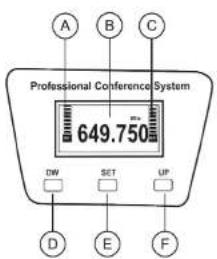
• After turning on the receiver base, press the button (21) to turn on the transmitter. The display (B) will show main information, such as the signal power (A) or the battery level (C).
- You can set the transmission frequency, by choosing one of the 50 available frequencies for each channel. To do that select the desired frequency on the base, by means of the buttons SET (2) or SCAN (3) and then press the IR (4) button to send the frequency to the transmitter. During pairing take care that the infrared sensors are perfectly aligned and at a distance of 2cm .
- It is possible to set the transmission power (RF) on 2 positions. To do that press twice the SET (E) button and use the buttons DW e UP (D-F) to adjust the desired power. After a few seconds the display will stop flashing.
- When the microphone is turned on the ring (22) on the goosenect top will light up.
• The packaging also includes some windscreen sponges to be applied on the microphone.
EN
TECHNICAL SPECIFICATIONS
| Power supply | 12V DC = 1A (via power adaptor) |
| Power adaptor | Input 100-240V ~/50-60HzOutput 12V = |
| Operating range | 50 m |
| Channels | 50 selectable frequencies for each microphone |
| Frequency band | UHF |
| Frequency range | 1) 640,00 -664.75 MHz 2) 665,00 -689.75 MHz3) 640,00 -664.75 MHz 4) 665,00 -689.75 MHz |
| Sensitivity | -90 dB |
| Frequency response | 60 Hz - 15 Khz |
| T.H.D. | < 0,5% |
| Output sockets | Mixed signal: 1 x XLR or 1 x 6,3mm |
| Single signals: 4 x XLR | |
| Transmitters power supply | 2 x AA 1,5V batteries (not included) |
| Receiver dimensions | 475 x 40 x 190 mm |
| Receiver weight | 1,85 kg |
AVAILABLE CONFIGURATIONS
| SET 8042 | 1 x Receiver base4 x Desk transmitter microphones |
| SET 8042LAV | 1 x Receiver base4 x Bodypack transmitter microphones with headset |
| SET 8042PAL | 1 x Receiver base4 x Handheld transmitter microphones |
| SET 8042PL | 1 x Receiver base2 x Bodypack transmitter microphones with headset2 x Handheld transmitter microphones |
KARMA
Brand : Karma
Model : SET 8042
Category : Microphone