
VT-6000W - Loudspeaker V-TAC - Free user manual and instructions
Find the device manual for free VT-6000W V-TAC in PDF.


| Product Type | Portable Bluetooth Speaker with Dual 8-inch Woofers |
| Brand | V-TAC |
| Model | VT-6000W |
| Dimensions | 32 x 29.5 x 65 cm |
| Weight | 5600 g |
| Input Power | 5 V, 1 A |
| Output Power | 20 W |
| Woofer | 2 x 8 inches |
| Speaker Configuration | 10 W x 2 |
| Frequency Response | 100 Hz - 18 kHz |
| Bluetooth Version | 5.0 |
| Signal-to-Noise Ratio | ≥80 dB |
| FM Radio Frequency | 87.5 - 108 MHz |
| Battery Type | Rechargeable Li-ion, 3.7 V, 2400 mAh |
| Playtime | 2 - 4 hours (depending on volume and usage) |
| Charging Time | 5 - 6 hours |
| Supported Media | USB, TF card (max 64 GB, MP3 format) |
| Connectivity | Bluetooth, AUX 3.5 mm, FM Radio, TWS |
| Additional Features | Microphone priority, Recording, LED light, Echo control |
| Included Accessories | Speaker, User Manual, USB Charging Cable |
| Battery Care | Fully charge before first use (10-12 h); recharge when fully depleted; charge regularly to maintain life |
| Safety Warning | Do not open the unit; keep away from children; consult a professional technician for issues |
Frequently Asked Questions - VT-6000W V-TAC
User questions about VT-6000W V-TAC
0 question about this device. Answer the ones you know or ask your own.
Ask a new question about this device
Download the instructions for your Loudspeaker in PDF format for free! Find your manual VT-6000W - V-TAC and take your electronic device back in hand. On this page are published all the documents necessary for the use of your device. VT-6000W by V-TAC.
USER MANUAL VT-6000W V-TAC
natural_image
Black portable electronic device with colorful ambient lighting (no visible text or symbols)INTRODUCTION
Thank you for selecting and buying V-TAC Product. V-TAC will serve you the best. Please read these instructions carefully & keep this user manual handy for future reference. If you have any another query, please contact our dealer or local vendor from whom you have purchased the product. They are trained and ready to serve you at the best.

Multi-Language Manual QR CODE
Please scan the QR code to access the manual in multiple languages.
PACKAGE INCLUDEDTECHN
- Input Power: 5 ~V = = 1 ~A
• Output Power: 20W - Woofer: 2x8 inches
- Speaker: 3 10Wx2
• Frequent Effect: 100Hz - 18KHz - BT version: 5.0
- S/N: ≥80dB
• FM Radio Frequency: 87.5-108MHz
• P.M.P.O: 600 - Rechargeable Battery: 3.7V 2400mAh
• Working time: Playtime 2-4 hours - Charging Time: 5-6 hours
- Dimensions: 32x29.5x65cm
• Supporting: USB/TF card play -
Speaker weight: 5600g
-
Speaker (1Pc)
- User Manual (1Pc)
- USB Cable (1Pc)
CHARGING INDICATOR
Connect the charging cable to the DC: 5V == 1A adapter, plug it into the charging port after the machine is turned off; red light will be on when charging, red light will be off when it is fully charged. The time of full charge is about 6 hours.
ATTENTION
- To maintain battery life, please charge the battery every time the power is completely depleted. Damage may occur if the battery is not charged for longer periods, so please use and charge the battery at regular intervals.
- Our company reserves the right to update the product without any notice.
- If you have any issue with the product, kindly contact a professional technician. Do not open the unit yourself.
- For safety reasons, keep the device away from children.
INSTRUCTIONS
- This unit uses a rechargeable battery. When the battery power is depleted, please plug the device to an electric socket with the correct input voltage.
- When the unit is charging, please make sure to switch on the AC/DC option, then safely unplug when finished.
- On first use, the battery must be charged for 10 to 12 hours.
- The unit's battery working time lasts up to 3 to 6 hours, depending on the usage.
BLUETOOTH FUNCTION
When you turn on the speaker, Bluetooth function will be activated. Search for the Bluetooth "V-TAC VT-6000W" on your device and connect
Bluetooth connection status, press and hold the "TWS" key, and then turn on another audio, press and hold the "TWS" key for the same time, at this time, the two audio will automatically pair. Successfully connected to 2.0 sound effect. Some products do not have this function
PANEL FUNCTION
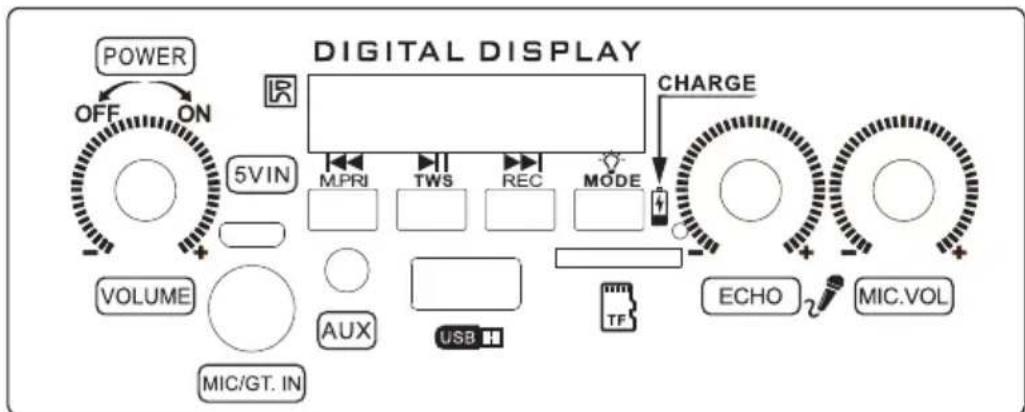
flowchart
graph TD
    A["POWER"] --> B["OFF"]
    B --> C["ON"]
    C --> D["5VIN"]
    D --> E["MPRI"]
    E --> F["TWS"]
    F --> G["REC"]
    G --> H["MODE"]
    H --> I["CHARGE"]
    I --> J["ECHO"]
    J --> K["MIC.VOL"]
    L["VOLUME"] --> M["AUX"]
    M --> N["USB"]
    N --> O["TF"]
    O --> P["MODE"]
    P --> Q["MODE"]
    Q --> R["MODE"]
    R --> S["MODE"]
    S --> T["MODE"]
    T --> U["MODE"]
    U --> V["MODE"]
    V --> W["MODE"]
    W --> X["MODE"]
    X --> Y["MODE"]
- TF card, U Disk reader function (Max support 64G), MP3 format can be play. (Some products do not have TF card holder, please buy USB card reader).
- The speaker will automatically read the first input media device.
- Press "PREV ◀◀◀" key is last song, long press it is Volume decease.
- Press "NEXT ▶▶I" is next song, Long press it is Volume increase.
- Long Press "LED off/on" LED power switch offen.
- Long Press "TWS" True Wireless Stereo, Connect another speaker.
- Press "MODE" choose "BLUE", "USB" and "TF" play state.
- Press the "REC/Del" key to enter the recording mode, and then press "REC/Del" key to exit recording and play recording content.
(Some machines do not have this function).
- Long Press "REC/Del" key to delete the recording file.
(Some machines do not have this function).
-
Press the "MIC priority" key to insert the microphone when the music is playing. The microphone has the priority function.
-
In AUX State, connect 3.5mm stereo audio cable to the socket "AUX" you can enjoy the music from mobile phone, MP3, MP4, Mp5, PC, IPOD, and other audio devices.
Brand : V-TAC
Model : VT-6000W
Category : Loudspeaker