
CM-i3 - Audio Point Source Audio - Free user manual and instructions
Find the device manual for free CM-i3 Point Source Audio in PDF.


| Product Type | In-Ear Audio Headset with Boom Microphone |
| Brand | Point Source Audio |
| Model | CM-i3 |
| Included Accessories | CM-CSE Premium Headset, Orange Storage Case, CM-WSN Windscreen, CM-BCP Belt-clip, CM-HSi Headband Sizer, 6-ETP Ear-tips (S/M/L) |
| Microphone Type | Adjustable Boom Microphone with locking mechanism |
| Compatibility | Intercom systems and smartphones (via optional adapters) |
| Cable | Coiled cable for tangle-free storage |
| Headband | Adjustable using CM-HSi Headband Sizer |
| Ear-tips | Three sizes (Small, Medium, Large) for custom fit |
| Storage Case | Orange storage case included for protection |
| Windscreen | Included for wind noise reduction |
| Belt-clip | Included for secure attachment to XLR connector |
| Warranty | Register at point-sourceaudio.com/support |
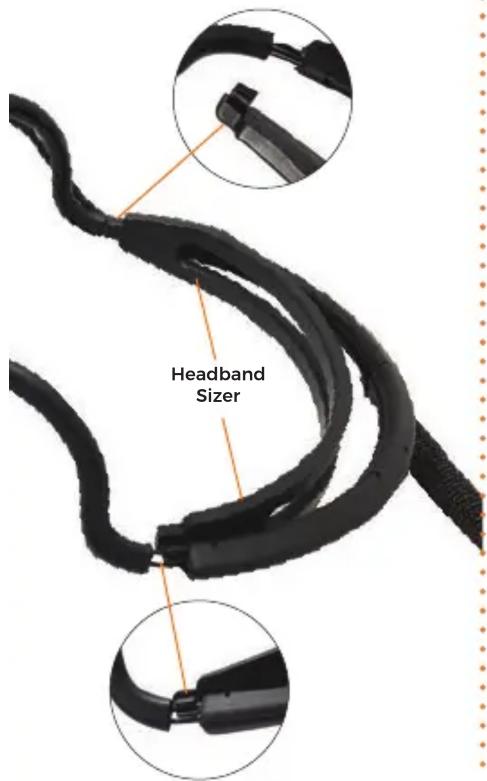
| Fitting | Attach headband sizer to interior of headframe for tighter fit |
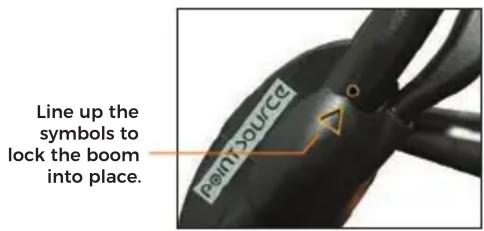
| Microphone Positioning | Align arrow with circle to lock boom mic; do not force |
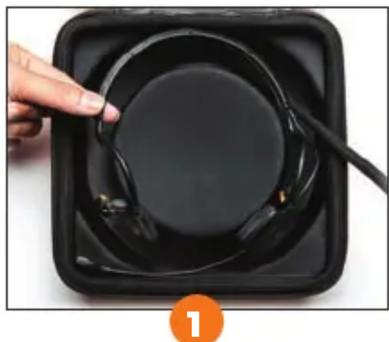
| Storage Procedure | Place headset in case base, coil cable around headset |
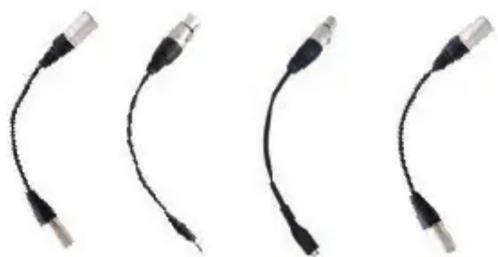
| Switching Intercom Systems | Use accessories page for cross-compatibility options |
| Care Instructions | Avoid forcing boom mic beyond locking point to prevent damage |
| Certification | ©2020 Point Source Audio, registered trademark |
Frequently Asked Questions - CM-i3 Point Source Audio
User questions about CM-i3 Point Source Audio
0 question about this device. Answer the ones you know or ask your own.
Ask a new question about this device
Download the instructions for your Audio in PDF format for free! Find your manual CM-i3 - Point Source Audio and take your electronic device back in hand. On this page are published all the documents necessary for the use of your device. CM-i3 by Point Source Audio.
USER MANUAL CM-i3 Point Source Audio
WHAT'S INCLUDED

natural_image
Orange 3D-printed orange box with a spiral design on the cover (no text or symbols visible)CM-CSE
Premium Headset Storage Case, Orange

CM-WSN
Windscreen

CM-BCP
Belt-clip for XLR connector

CM-HSi
Headband Sizer

6-ETP
Ear-tips (small, med, large)

Failure to observe proper use of this product could result in voiding your warranty.
©2020 Point Source Audio. All rights reserved. The Point Source Audio logo is a registered trademark of Point Source Audio.

Register Your Warranty:
POINT - SOURCE AUDIO.COM / SUPPORT
CMi
IN-EAR AUDIO HEADSETS
USER GUIDE
FITTING YOUR HEADSET
To size the headset for a tighter fit, attach the CM-HSi headband to the interior of the headframe and snap to frame on both sides.
SECURING YOUR BOOM MIC
When adjusting your boom microphone, always secure the mic to the headset by aligning the arrow with the circle to "lock" the mic into position. DO NOT force the boom past this point as it may cause damage to your microphone over time.
SWITCHING INTERCOM SYSTEMS
Your headset can be conveniently adapted to work with different intercom systems or even your smart phone. Visit our accessories page online for cross compatibility options.
natural_image
Four black USB cable connectors arranged horizontally (no text or symbols visible)STORING YOUR HEADSET
natural_image
Close-up of a hand holding a black fan with a cable, inside a black square (no text or symbols visible)Gently place the headset into the base of the case.

natural_image
Top-down view of a black plastic device with coiled cable and internal components, labeled with number 2 (no text or symbols on the device itself)Coil the cable around your headset until you reach the end of the cable.


Brand : Point Source Audio
Model : CM-i3
Category : Audio