KASBD5123HA - Soundbar Kogan - Free user manual and instructions
Find the device manual for free KASBD5123HA Kogan in PDF.


| Product Type | Soundbar |
| Brand | Kogan |
| Model | KASBD5123HA |
| Dimensions (W x H x D) | Approx. 900 x 65 x 85 mm |
| Weight | Approx. 2.5 kg |
| Power Output | 45W RMS |
| Power Supply | AC 100-240V, 50/60Hz (via included adapter) |
| Connectivity | Bluetooth 5.0, AUX 3.5mm, HDMI ARC, USB |
| Remote Control | Included (batteries not included) |
| Wall Mountable | Yes (brackets and screws included) |
| Sound Modes | Movie, Music, News, Night |
| Frequency Response | 60 Hz – 20 kHz |
| Driver Units | 2 x full-range drivers + 1 x subwoofer |
| Cleaning Instructions | Wipe with a soft, dry cloth. Do not use solvents. |
| Safety Precautions | Do not expose to water, moisture, or heat sources. Unplug during storms or long disuse. |
| Spare Parts Available | Remote control, power adapter, wall mount kit (contact Kogan support) |
| Warranty | 1 year limited warranty (check Kogan website for details) |
Frequently Asked Questions - KASBD5123HA Kogan
User questions about KASBD5123HA Kogan
0 question about this device. Answer the ones you know or ask your own.
Ask a new question about this device
Download the instructions for your Soundbar in PDF format for free! Find your manual KASBD5123HA - Kogan and take your electronic device back in hand. On this page are published all the documents necessary for the use of your device. KASBD5123HA by Kogan.
USER MANUAL KASBD5123HA Kogan
natural_image
Product photo of a black audio streaming device with two speakers and a speaker tower (no text or symbols visible)(WITH SUBWOOFER & REAR SPEAKERS)
KASBD5123HA
SAFETY & WARNINGS
Caution
To reduce the risk of electric shock, do not dismantle the product and do not expose the apparatus to rain or moisture. No user-serviceable parts inside.
- Read the safety, installation, and operating instructions in this user guide before operating the product.
- Power and speaker wired should be routed so that they are not likely to be walked on, kicked, or pressed by items placed on or against them. Pay special attention to cords from plugs, power receptacles and the point where they exit from the product.
- The product should be situated away from heat sources such as radiators, stoves, or other products, including amplifiers that produce heat. Naked flames such as lighted candles, should not be placed on this product.
- To reduce the risk of fire or electric shock, do not expose the product to dripping, splashing or excessive moisture such as in a sauna or bathroom. Do not use this product near water, for example, near a bathtub, washbowl, kitchen sink, laundry tub, in a wet basement or near a swimming pool (or similar).
- Never insert objects into this product through openings, as they may touch dangerous voltage points or short-circuit parts that could result in a fire or electric shock.
- Do not use attachments or accessories not included with this product or recommended by Kogan.com, as they may cause hazards.
- Do not place this product on an unstable cart, stand, tripod, bracket, or table. The product may fall, causing serious injury and serious damage to the product. Any mounting of the product should follow the instructions in this user guide and should use a mounting accessory recommended by Kogan.com
- Do not attempt to service this product yourself, as opening or removing covers may expose you to potentially dangerous voltage or other hazards. Refer all servicing and repairs to qualified service personnel.
- If objects or liquids fall into the product enclosures, disconnect the power, cease use immediately and contact help.Kogan.com for support.
COMPONENTS LIST
- Soundbar
- Rear speaker (x2)
- Wired Subwoofer
- Remote Control
- Power cable
- DC-DC cable
- Speaker connecting cable (x2)
• AC-DC Power Adaptor - AUX Cable
- Wall-Mount Kit
OVERVIEW
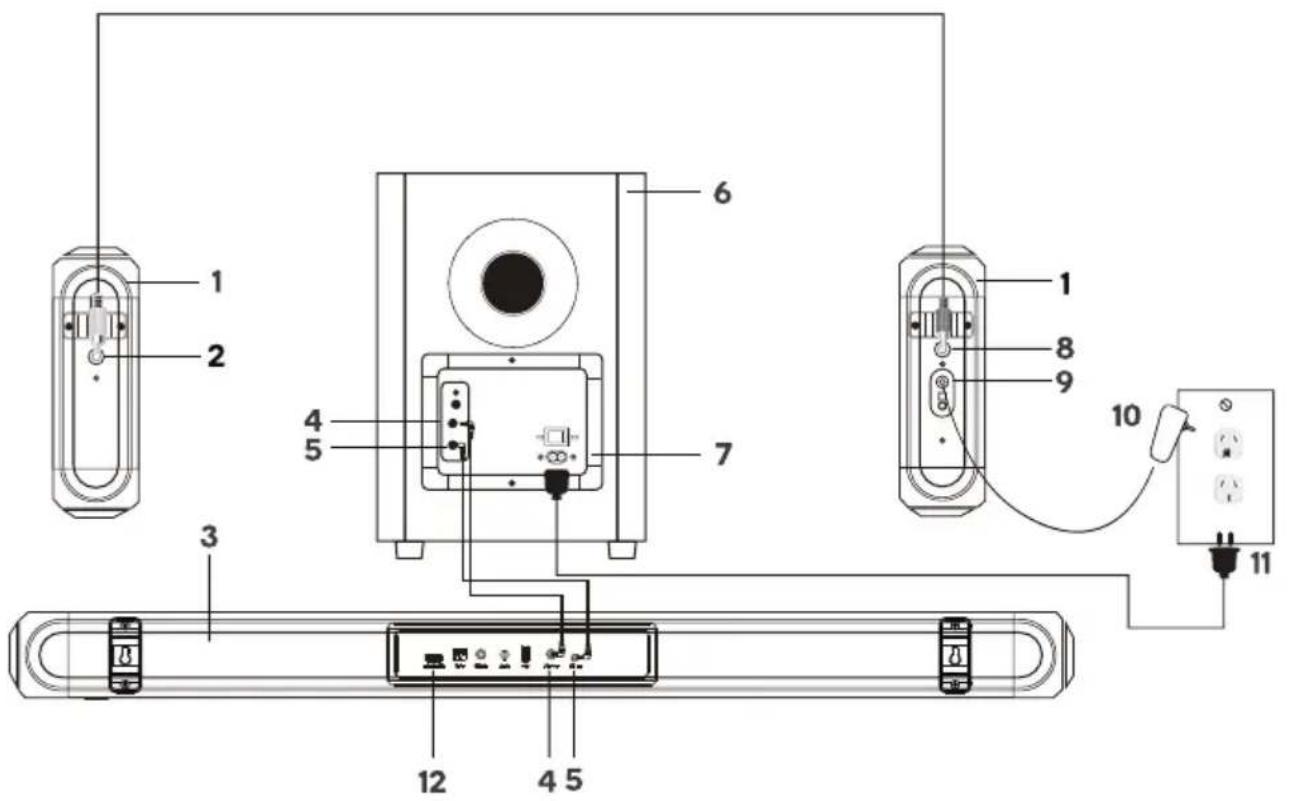
1 Rear speakers
2 RS input
3 Soundbar
4 Subwoofer input (from Soundbar)
5 24V Output (to Soundbar)
6 Subwoofer
7 Power input (subwoofer)
8 RS output
9 Power input (Rear speaker)
10 Power adaptor (Rear speaker)
11 Power cord (subwoofer)
12 Soundbar ports
Soundbar Ports

HDMI (ARC)

OPT

COAX

AUX
USB

SW OUT

DC IN
| 1 | HDMI(ARC) | Use to connect compatible devices using a HDMI cable (not provided). |
| 2 | OPTICAL IN | Use to connect compatible devices using an optical cable (not provided). |
| 3 | COAXIAL | Use to connect compatible devices using the coaxial cable (not provided). |
| 4 | AUX IN | Use to connect compatible devices using the 3.5mm – 3.5mm stereo jack cable (provided). |
| 5 | USB IN | Use to connect a flash drive for direct MP3 playback (FAT32 format and 64GB max). |
| 6 | SW OUT | Use to connect the subwoofer. |
| 7 | DC IN | Use to connect the DC output jack of subwoofer. |
LED display
| 1 | RED LED | Standby mode | 5 | OPT | Optical mode |
| 2 | BT | Bluetooth mode | 6 | ARC | HDMI(ARC)mode |
| 3 | USB | USB media mode | 7 | COA | Coaxial mode |
| 4 | AUX | Auxiliary input mode |
Remote Control
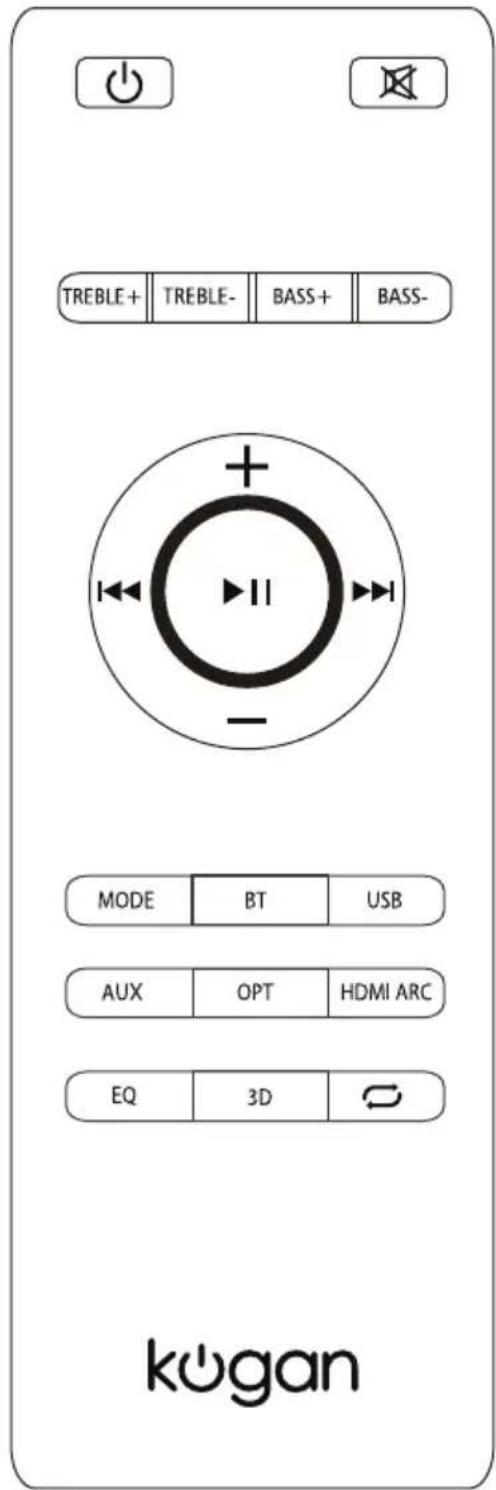
| Button | Function |
 | Power on/off |
| [cwzy] | Mute or restore the volume |
| TREBLE+ | Increase the Treble |
| TREBLE- | Decrease the Treble |
| BASS+ | Increase the Bass |
| BASS- | Decrease the Bass |
 | Previous Track |
 | Pause/Play |
 | Next Track |
| [6X5S] | Increase the volume |
 | Decrease the volume |
 | Cycle between BT/USB/AUX/OPTICAL/COAXIAL/HDMI(ARC) |
 | Switch to Bluetooth mode |
 | Switch to USB mode |
 | Switch to AUX mode |
 | Switch to Optical mode |
 | Switch to HDMI (ARC) mode |
| [x358] | Switch between different EQ setting |
 | Switch to 3D EQ setting |
 | Switch USB repeat modes |
INSTALLATION
Connecting the Rear Speakers to the Soundbar
- Connect the power adaptors to the Subwoofer and Rear speakers. Plug both adaptors into a power outlet.
- The red LED on the back of the rear speaker will flash.
- Press and hold the pair button on the rear speaker, the red LED will blink rapidly.
- Then press and hold the Play/Pause button on the remote control, 'pair' will show on the soundbar display.
• After a few seconds, the soundbar will connect to the wireless rear speakers automatically. - Once pairing is successful, the red LED on the rear speaker will illuminate.
- Pairing does not need to be done again.
- Every time the unit is switched on, the soundbar and wireless rear speaker will connect automatically.
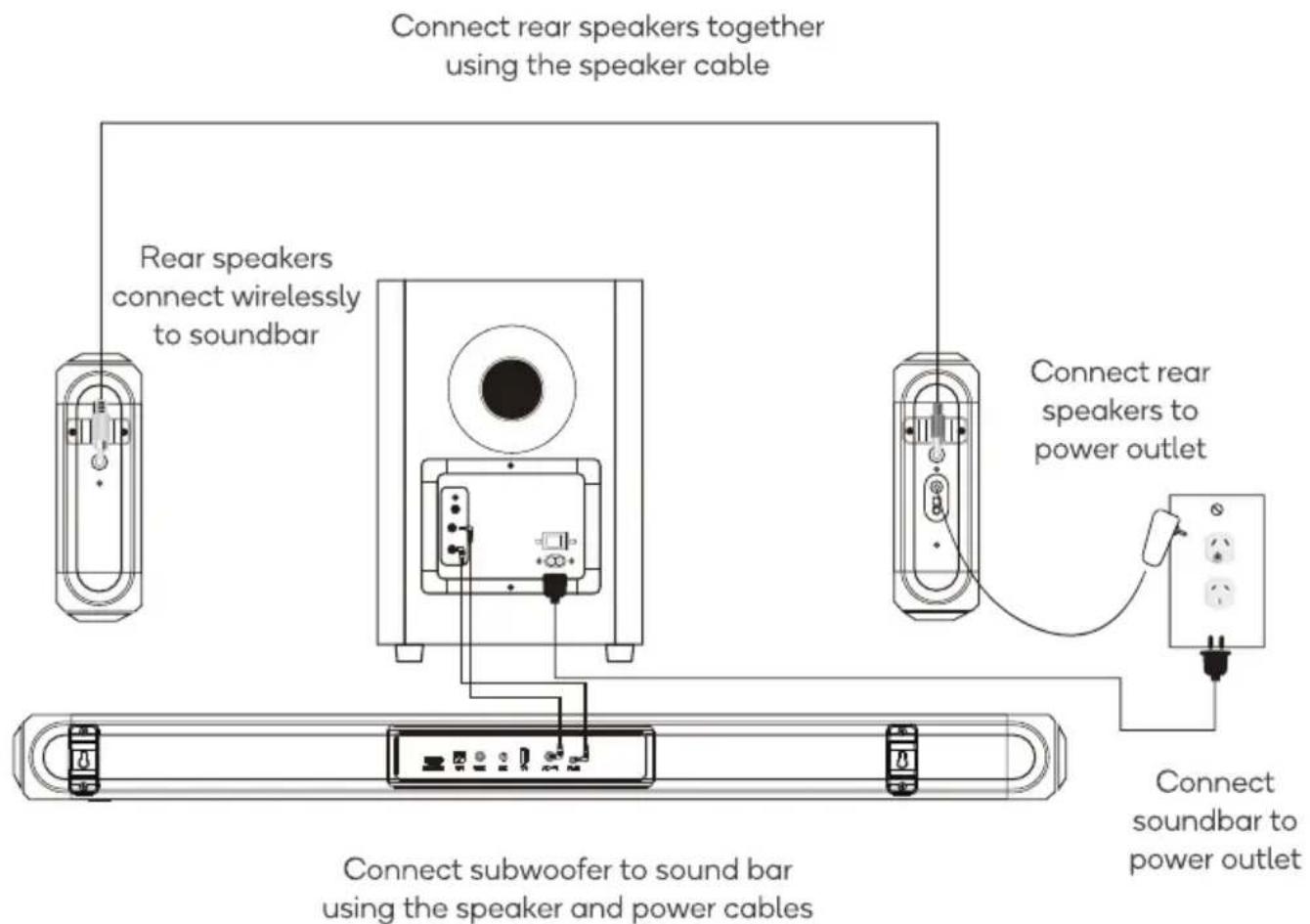
flowchart
graph TD
    A["Connect rear speakers together using the speaker cable"] --> B["Rear speakers connect wirelessly to soundbar"]
    A --> C["Connect rear speakers to power outlet"]
    B --> D["Connect subwoofer to sound bar using the speaker and power cables"]
    C --> E["Connect soundbar to power outlet"]
Placing the soundbar on a entertainment unit
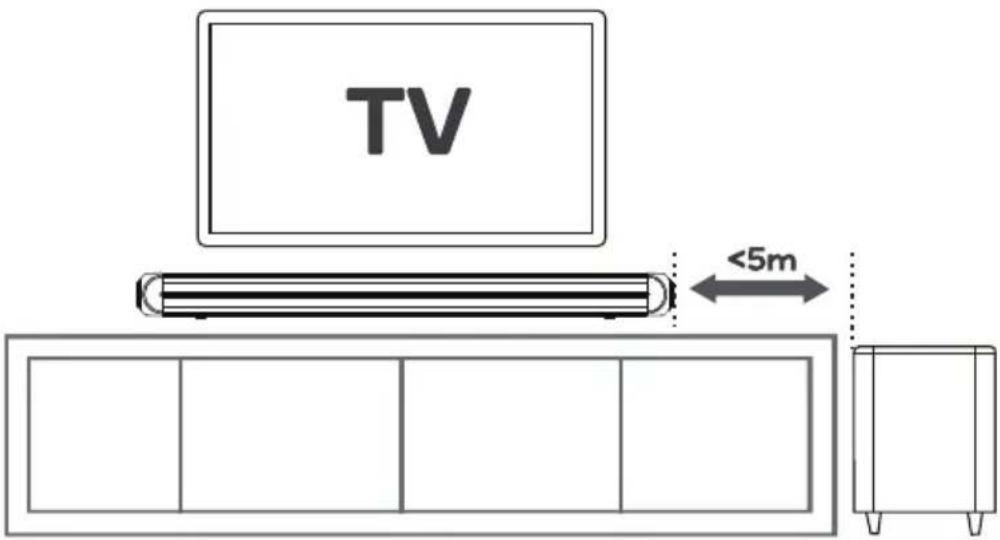
If your TV is placed on an entertainment unit, you can place the soundbar directly in front of the TV stand, centred with the TV screen. If the surface of the table is flat, the soundbar will rest on its metal feet.
Wall mounting the Soundbar
This soundbar can be mounted on your wall. Follow the instructions below:
Note: If you aren't confident in mounting this product yourself, please seek advice from a qualified trades person.
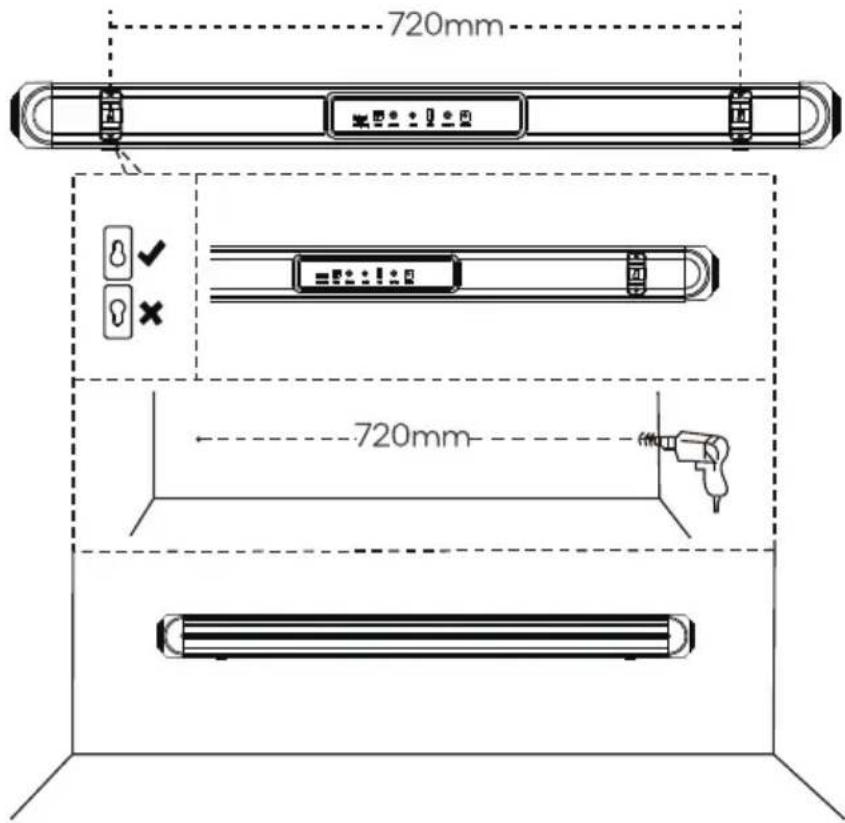
- Mark and drill two parallel holes, 720mm apart on the wall. Secure the supplied anchors and screws into the holes. Ensure the screws are protruding 5mm from the wall.
Note: Anchors are only required when mounting onto a solid wall.
Anchor
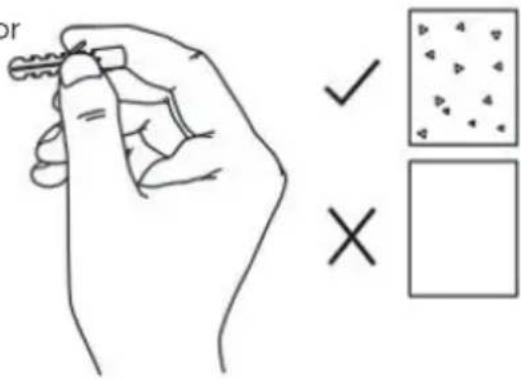
Solid wall (i.e., solid brick, solid concrete, solid wood)
Drywall, plastered wall ect.
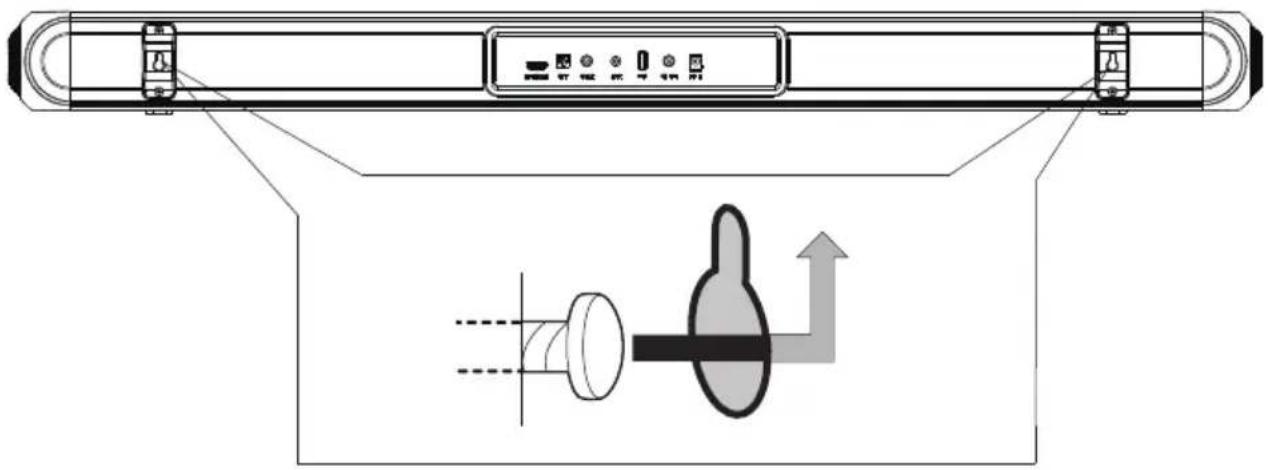
- Hang the Soundbar on the fastening screws.
- Gently push the Soundbar in a downward direction to lock and secure in place.
OPERATION
Power on/off
Press the Power on/off button on the remote control or soundbar control panel to turn the unit on or switch it off.
HDMI (ARC)
Connect an HDMI ARC compatible device to the HDMI(ARC) port on the soundbar by a HDMI cable (not supplied). Select HDMI(ARC) mode either by pressing the ARC button on remote control or repeatedly pressing the MODE button on the soundbar control panel until ARC display on the LED screen.
Ensure HDMI ARC is selected as the TV's audio output, then adjust the volume of soundbar by the Volume up and Volume down buttons on the remote control or soundbar control panel.
AUX in
Connect a compatible device using a 3.5mm stereo jack cable (provided). Select AUX mode either by pressing the AUX button on remote control or repeatedly pressing the MODE button on the soundbar control panel until AUX display on the LED screen.
Ensure the connected device is producing audio signal, then adjust the volume of soundbar by pressing the Volume up and Volume down buttons on the remote control or soundbar control panel.
Optical in
Connect a compatible device to the OPTICAL input on the soundbar by a digital optical cable (not supplied). Select OPT mode either by pressing the OPT button on remote control or repeatedly pressing the MODE button on the soundbar control panel until OPT display on the LED screen.
Ensure Optical SPDIF is selected as the TV's audio output, then adjust the volume of the soundbar by pressing the Volume up and Volume down buttons on the remote control or soundbar control panel.
Bluetooth
Press the BT button on the remote control or repeatedly pressing the MODE button on the soundbar control panel until BT display on the LED screen. The LED display will flash to indicate that the soundbar is in Bluetooth pairing mode.
Ensure that the device you wish to connect is also in pairing mode and search for Kogan 5.1Ch Soundbar in its device list. The LED display on the soundbar will stop flashing and remain constant when the two devices pair. (The soundbar will now automatically re-pair with this device whenever it is within range and has Bluetooth turned on.) Once paired, the remote control can be used to play, pause and navigate between tracks on compatible iOS and Android devices.
USB mode
The soundbar is compatible with USB flash drives up to 64GB in size and can play MP3 and WAV audio files directly. Simply insert a compatible drive into the USB port on the back of the soundbar and the soundbar will automatically switch to USB mode and play the first compatible track. The media controls on the remote control can be used to play, pause and navigate between tracks on the flash drive and the LED display will indicate the current track time.
USB repeat mode (also accessed via the remote control) enables single track repeat (ONE), all track repeat (ALL). The media player also has a memory function that will recall and continue from the last-played point when a USB flash drive that has previously been used with the soundbar is reinserted.
Coaxial in
Connect a compatible device to the Coaxial input on the soundbar by using coaxial cable (not supplied). Select coaxial mode either by pressing the MODE button on remote control or on the soundbar control panel until COA is displayed on the LED display. Ensure Coaxial selected as the TV's audio output, and then adjust the volume of the soundbar by pressing the Volume up and Volume down buttons on the remote control or soundbar control panel.
Equalizer modes
The soundbar has 3 equalizer pre-sets, tailored to complement various styles of music. Press the EQ button on the remote to choose between Music (EQ1), Movie (EQ2), News (EQ3).
NOTES
Need more information?
We hope that this user guide has given you the assistance needed for a simple set-up.
For the most up-to-date guide for your product, as well as any additional assistance you may require, head online to help.kogan.com
kogan.com
- SAFETY & WARNINGS
- Caution
- COMPONENTS LIST
- OVERVIEW
- Soundbar Ports
- LED display
- Remote Control
- INSTALLATION
- Connecting the Rear Speakers to the Soundbar
- Placing the soundbar on a entertainment unit
- Wall mounting the Soundbar
- OPERATION
- Power on/off
- HDMI (ARC)
- AUX in
- Optical in
- Bluetooth
- USB mode
- Coaxial in
- Equalizer modes
- NOTES
- Need more information?
Brand : Kogan
Model : KASBD5123HA
Category : Soundbar