EcoFlow DELTA Pro - Power bank Aputure - Free user manual and instructions
Find the device manual for free EcoFlow DELTA Pro Aputure in PDF.


| Type of product | Portable power station |
| Battery type | LiFePO4 (Lithium Iron Phosphate) |
| Battery capacity | 3600 Wh (3.6 kWh) |
| AC output | 3600 W (7200 W surge) |
| AC outlets | 6 x 120V/20A outlets (NEMA 5-20R) |
| USB-A output | 2 x 5V/2.4A |
| USB-C output | 2 x 100W PD |
| DC output | 2 x 12V/30A (car port) + 2 x 12V/10A (Anderson) |
| Solar input | Up to 1600W (11-150V, 15A max) |
| AC input | 1800W (max), 15A |
| Dimensions (L x W x H) | 19.3 x 9.6 x 12.5 in (49 x 24.4 x 31.8 cm) |
| Weight | 99 lb (45 kg) |
| Operating temperature | 14°F to 113°F (-10°C to 45°C) |
| Charging time (AC) | ~2 hours (using 1800W AC input) |
| Warranty | 5 years (limited) |
| Maintenance & cleaning | Wipe with dry cloth; avoid water and solvents |
| Safety features | Overload, short-circuit, over-temperature, over-voltage protection |
| Spare parts & repairability | Contact official support for battery module and fan replacement |
| General information | Designed for home backup, RV, camping, and off-grid use |
Frequently Asked Questions - EcoFlow DELTA Pro Aputure
User questions about EcoFlow DELTA Pro Aputure
0 question about this device. Answer the ones you know or ask your own.
Ask a new question about this device
Download the instructions for your Power bank in PDF format for free! Find your manual EcoFlow DELTA Pro - Aputure and take your electronic device back in hand. On this page are published all the documents necessary for the use of your device. EcoFlow DELTA Pro by Aputure.
USER MANUAL EcoFlow DELTA Pro Aputure
Disclaimer
Read this user manual carefully before using the product to ensure that you completely understand the product and can correctly use it. After reading this user manual, keep it properly for future reference. Improper use of this product may cause serious injury to yourself or others, or cause product damage and property loss. Once you use this product, it is deemed that you understand, approve and accept all the terms and content in this document. Aputure is not liable for any loss caused by the user's failure to use this product in compliance with this user manual.
In compliance with laws and regulations, Aputure reserves the right to final interpretation of this document and all documents related to this product. This document is subject to changes (updates, revisions, or termination) without prior notice. Please visit Aputure's official website to obtain the latest product information.
Content
Specifications 1
Safety Instructions 2
EcoFlow App 4
What's in the Box 4
Product Details 4
Overview 4
LCD screen 6
Power On/Off 7
Charging Your Devices 7
Charging DELTA Pro 9
AC Charging 9
Solar Charging 10
Car Charging 10
Smart Extra Battery 11
X-Boost and EPS 12
X-Boost 12
EPS 12
FAQ 13
Storage and Maintenance 13
Troubleshooting 14
FCC Statement 15
Specifications
| General Info | |
| Net Weight | Approximately 45kg (99 lbs) |
| Dimension (L × W × H) | 635×285×416mm / 25 × 11 × 16 in |
| Capacity | 3,600Wh, 48V= |
| Wi-Fi | Frequency Range: 2412-2462MHzMaximum Output Power: 0.05862W |
| Bluetooth | Frequency Range: 2402-2480MHzMaximum Output Power: 0.0006W |
| Output Ports | |
| AC (×5) | Pure sine wave, 3,600W total (surge 7,200W), 120V~ (60Hz) |
| USB-A (×2) | 5V = 2.4A, 12W Max per port, total 24W |
| USB-A Fast Charging (×2) | 5V = 2.4A 9V = 2A 12V = 1.5A, 18W Max per port, total 36W |
| USB-C (×2) | 5/9/12/15/20V = 5A, 100W Max per port, total 200W |
| Car Charger | 12.6V = 10A, 126W Max |
| DC5521 Output (×2) | 12.6V = 3A, 38W Max per port |
| Anderson Output | 12.6V = 30A, 378W Max |
| Input Ports | |
| AC Charging | 120V~ 1,800W Max, 240V~ 3,000W Max |
| AC Input Voltage | 100-120V~ 15A, 220-240V~ 12.5A, 50Hz/60Hz |
| Solar Charger | 11-150V = 15A Max, 1,600W Max |
| Car Charger | Supports 12V/24V Battery, default 8A |
| Battery Info | |
| Cell Chemistry | LFP |
| Cycle Life | 3,500 cycles to 80% + capacity |
| Protection Type | Over Voltage Protection, Overload Protection, Over Temperature Protection, Short Circuit Protection, Low Temperature Protection, Low Voltage Protection, Overcurrent Protection |
Operating Temperature
| Optimal Operating Temperature 20 | °C~30°C (68°F ~ 86°F) |
| Discharging Temperature -10 | °C~45°C (14°F ~ 113°F) |
| Charging Temperature 0 | °C~45°C (32°F ~ 113°F) |
| Storage Temperature | -10°C~45°C (14°F ~ 113°F)(optimal: 20°C~30°C (68°F ~ 86°F)) |
Add-ons (sold separately)
| DELTA Pro Smart Extra Battery Up to two units |
| EcoFlow Smart Generator |
| DELTA Pro Remote Control Wired or wireless |
| Double Voltage Hub |
| EV X-Stream Adapter Charge from electric vehicle charging |

- A car charger shares power with the DC5521 output port, offering a maximum output of 126W.
- Whether the product can be charged or discharged depends on the actual temperature of the battery pack.

Safety Instructions
Usage
- Do not use the product near a heat source, such as a fire source or a heating furnace.
- Avoid contact with any liquid. Do not immerse the product in water or get it wet. Do not use the product in rain or humid environments.
- Do not use the product in an environment with strong static electricity/magnetic fields.
- Do not disassemble the product in any way or pierce the product with sharp objects.
- Avoid using wires or other metal objects that may result in a short circuit.
- Do not use unofficial components or accessories. If you need to replace any components or accessories, please visit official channels to check relevant information.
- When using the product, please strictly follow the operating environment temperature specified in this user manual. If the temperature is too high, it may result in a fire or explosion; if the temperature is too low, the product performance may be severely reduced, or the product may cease to work.
- Do not stack any heavy objects on the product.
- Do not lock the fan forcibly during use.
- Please avoid impact, falls, or severe vibrations when using the product. In case of a severe external impact, turn off the power supply immediately and stop using the product. Ensure
the product is well fastened during transportation to avoid vibrations and impacts.
- If you accidentally drop the product into water during use, please place it in a safe open area, and stay away from it until it is completely dry. The dried product should not be used again, and should be properly disposed of according to section "Disposal Guide" below. If the product catches fire, we recommend that you use the fire extinguishers in the following order: water or water mist, sand, fire blanket, dry powder, and finally a carbon dioxide fire extinguisher.
- Use a dry cloth to clean off dirt on the product ports.
- Rest the product on a flat surface to avoid damages caused by the product falling over. If the product is overturned and severely damaged, turn it off immediately, place the battery in an open area, keep it away from combustible matter and people, and dispose of it in accordance with local laws and regulations.
- Ensure that the product is kept out of reach of children and pets.
- Store the product in a dry and ventilated place.
- It is recommended to use moisture barrier bags in wet environments (for example, places by the sea or waterways) to prevent the product from getting soaked. If water is found inside the product, it must not be used or turned on again. Please take anti-electric shock measures before touching the product. Following this, place the product in a safe, waterproof and open area. Once complete contact EcoFlow Customer Service immediately.
- This product is not recommended for powering medical emergency equipment related to personal safety, including but not limited to medical grade ventilators (hospital version CPAP: Continuous Positive Airway Pressure), artificial lungs (ECMO, Extracorporeal Membrane Please follow your doctor's instructions and consult with the manufacturer for restrictions on the use of the equipment. If used for general medical equipment, please be sure to monitor the power status to ensure that the power does not run out.
- When in use, power supply products will generate electromagnetic fields, which are likely to affect the normal operation of medical implants or personal medical equipment such as pacemakers, cochlear implants, hearing aids, defibrillators etc. If these types of medical equipment are being used, please contact the manufacturer to inquire about any restrictions on the use of such equipment. These measure are fundamental to ensure a safe distance between the medical implants (for example, pacemakers, cochlear implants, hearing aids, defibrillators etc.) and this product while in use.
- When the power supply is connected in normal mode to a refrigerator, power fluctuations may cause the power supply to automatically shut down. When connecting the power supply to a refrigerator that stores medicine, vaccines or other valuable items, it is recommended to set the AC output to "Always on" in the app. This helps support a continuous power supply and ensures a safe and efficient power consumption state.
Disposal Guide
- If conditions permit, make sure that the battery is fully discharged before disposing it in a designated battery recycling bin. The product contains batteries with potentially dangerous chemicals, so it is strictly prohibited to dispose of it in ordinary trash cans. For more details, please follow the local laws and regulations on battery recycling and disposal.
- If the battery cannot be fully discharged due to a product failure, please do not dispose of the battery directly in the battery recycling box. In such case, you should contact a professional battery recycling company for further processing.
- Please dispose of over-discharged batteries that cannot be recharged.
EcoFlow App
Control, monitor and customize your EcoFlow DELTA Pro from afar with the EcoFlow App. Download at: https://download.ecoflow.com/app

Privacy policy
By using EcoFlow Products, Applications and Services, you consent to the EcoFlow Term of Use and Privacy Policy, which you can access via the "About" section of the "User" page on the EcoFlow App or on the official EcoFlow website at
https://www.ecoflow.com/policy/terms-of-use and https://www.ecoflow.com/policy/privacy-policy
What's in the Box
AC Charging CableDELTA Pro
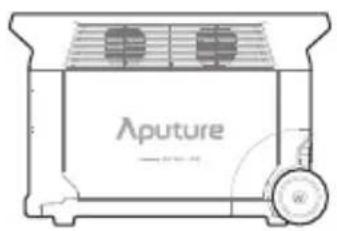
natural_image
Line drawing of a Aputure toaster oven with cooling fans and a rotary button (no text or symbols)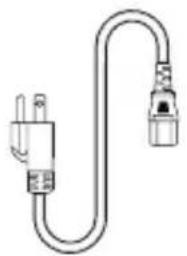
natural_image
Simple line drawing of a U-shaped electrical plug with two connectors (no text or symbols)Car Charging Cable
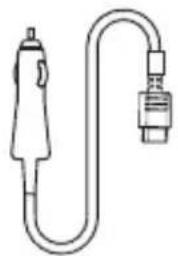
natural_image
Simple line drawing of a U-shaped connector with a separate connector (no text or symbols)DC5521 to DC5525 Cable Handle Cover
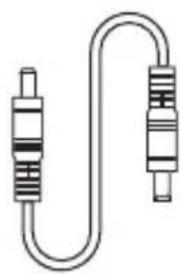
natural_image
Pure electrical circuit lines without any symbols
natural_image
Simple rectangular frame with a hatched bottom edge (no text or symbols)User Manual & Warranty Card
natural_image
Simple line drawing of stacked paper sheets (no text or symbols)Product Details
Overview
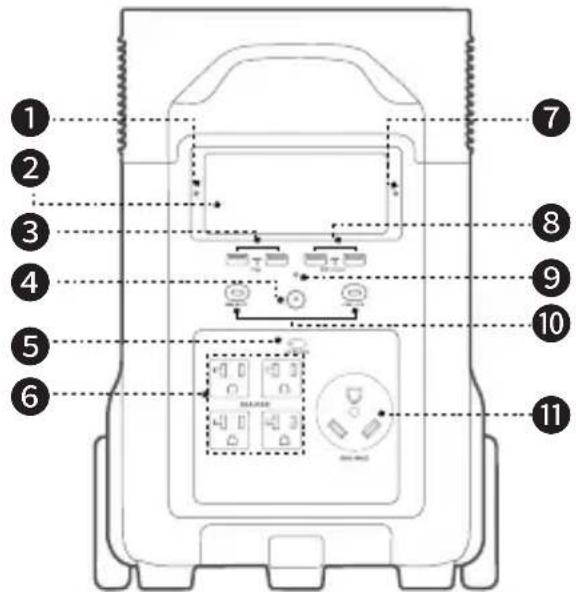
- Ambient light detector
- LCD screen
- USB-A output port
- Main power button
- AC power button
-
AC output socket (20 A max. per port)
-
Pairing indicator
- USB-A fast charging output port
- Main power button indicator
- USB-C 100W output port
-
AC output socket (30 A max.)
-
AC charge speed switch
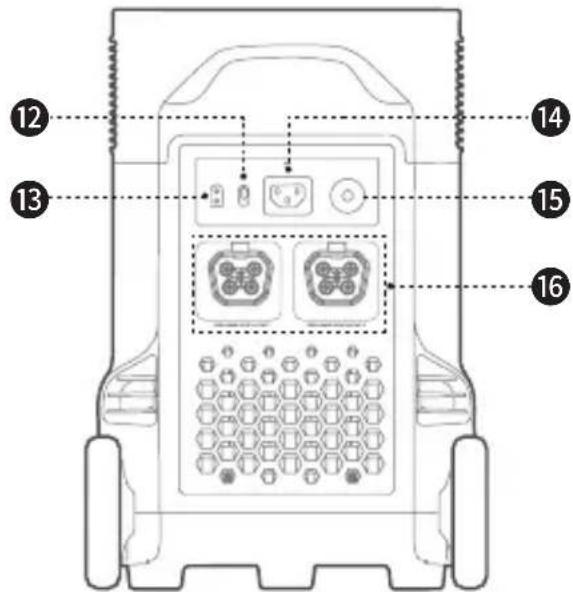
- Solar/car charging input port
- X-Stream charging input port
- Overload protection switch
- Extra battery port (supports 48 V output)

The type of AC socket varies in different countries or regions, the picture above is for illustration only, please refer to the actual product.
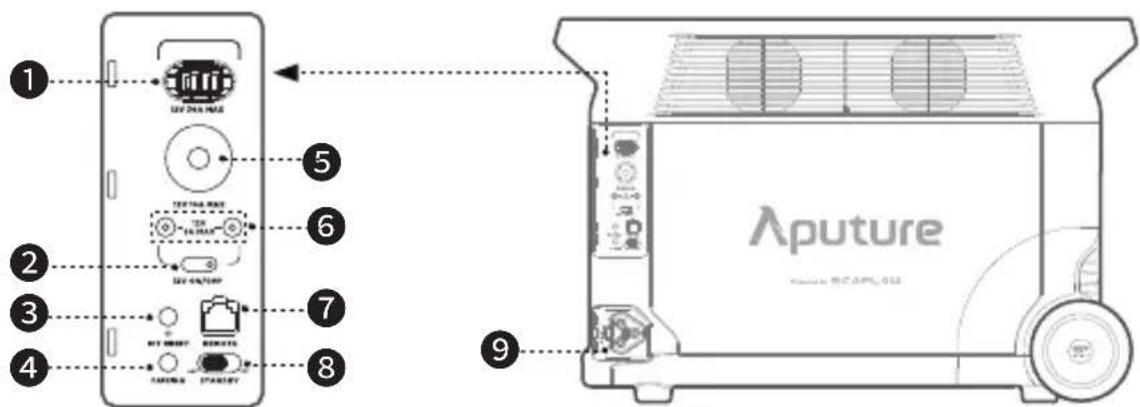
- Anderson port
- 12V DC power button
-
IOT button
-
Pairing button
- Car outlet
-
DC5521 output port
-
Remote control port
- Bluetooth standby switch
- Infinity port

Bluetooth standby:
After the Bluetooth standby switch is turned on, DELTA Pro still works with the main power button turned off, use EcoFlow app or remote control (sold separately) to turn on/off the product (Bluetooth standby has a certain amount of power consumption, please turn it off if you don't need to remotely control the product).
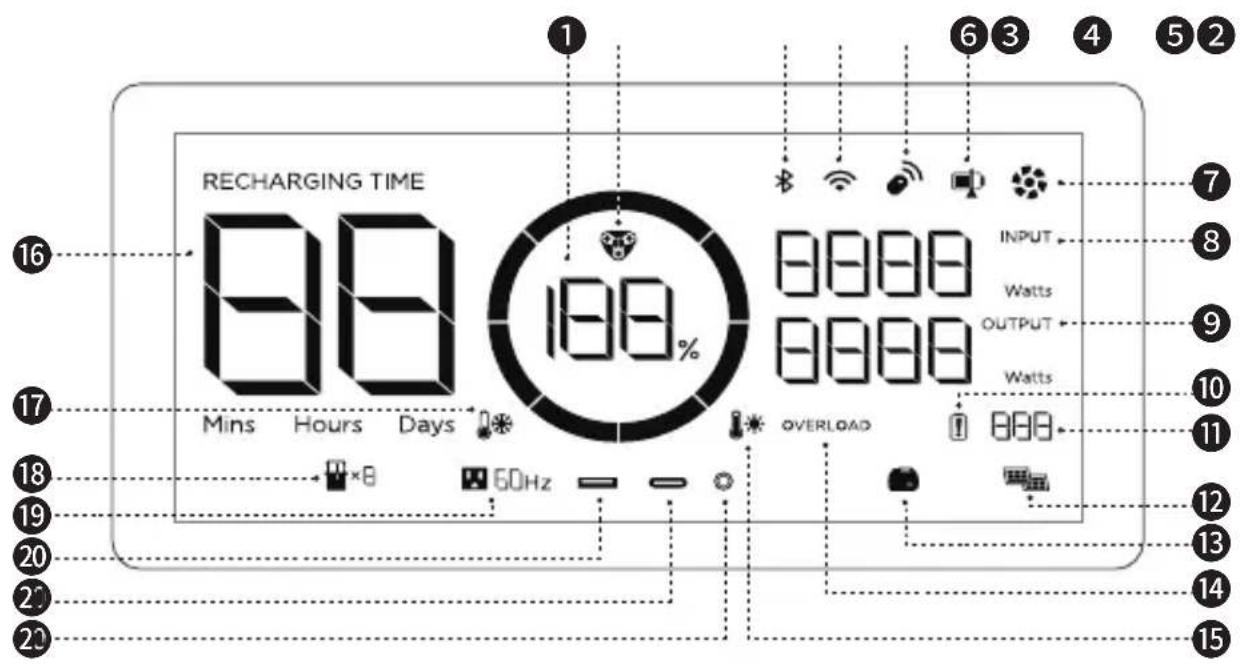
- Remaining battery percentage
- EV X-Stream charging indicator
- Bluetooth connection
- WiFi connection
- Remote control
- State of charge
- Fan
- Input power
-
Output power
-
Battery failure warning
- Error code
- Solar charging
- Smart generator
- Overload warning
- High temp warning
- Remaining charge/discharge time
- Low-temp warning
-
Extra battery
-
AC output
- USB-A output
- USB-C output
- DC output
| Icon Name State | ||
 | Remaining battery | Rotating clockwise: charging100%: fully chargedFlashing: flat battery |
 | Error code Refer to the EcoFlow app for details | |
 | Wi-Fi | Flashing: 1) the product is ready for pairing;2) pair with the product via hotspot on your phoneSolid: Internet connection succeededOff: Internet connection failed |

Refer to "Troubleshooting" for details.
Power On/Off
Press the main power button once to turn on the product, then the LCD screen lights up and the main power indicator becomes breathing white; press and hold the main power button for at least 3 seconds to turn off the product, meanwhile, the LCD screen also goes off.
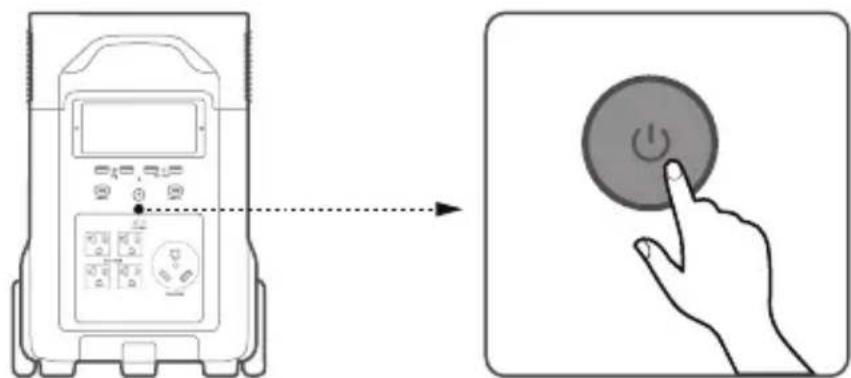

- After main power turned on, press the main power button once to turn off the LCD screen
- If the product is not used for 5 minutes, it will enter hibernation state with the LCD screen gone off. When you start to use the product again, the LCD screen will turn on automatically.
- The product defaults to 2 hours of standby time. With the output power buttons turned off and no other load for 2 hours, the product will shut off automatically. You can set the standby duration in the app.
Charging Your Devices
Press "DC power button" or "AC power button" once to turn on their corresponding DC/AC ports or sockets; press again to turn them off.
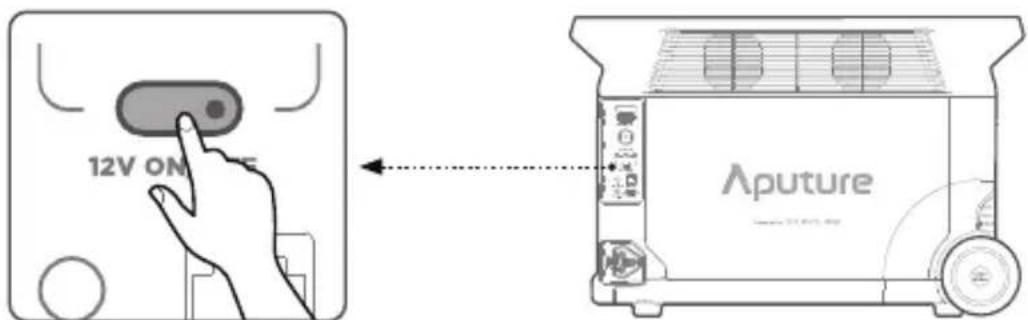
Short press 12V DC power button
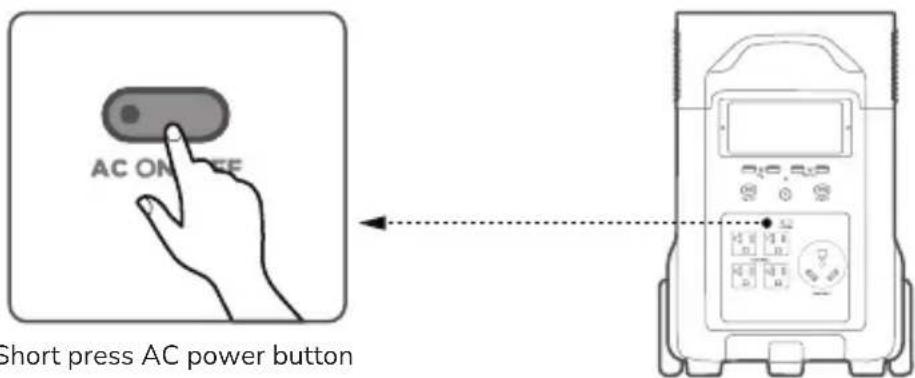

- Please make sure that the product is turned on.
- After the DC output power button is turned on, the product will not shut off automatically.
- Make sure that the sum power of all loaded devices is lower than that of the rated power.
- After 12 hours without any load for the AC output ports, the AC power button will shut down automatically.
Charging DELTA Pro
AC Charging
EcoFlow's X-Stream fast charging technology is specifically for AC charging, offering 1800W of max input power. You can control the charging power through the AC charging Speed Switch. The default max input power for the AC charging speed is 400W, which can be modified in the EcoFlow app.
In case of unusual situations where the AC input current remains higher than 20A, the X-Stream charging input port will initiate a self-protection function, and the Overload Protection Switch on the product will automatically pop up. After confirming that there is no product failure, you can press the Overload Protection Switch to resume charging.
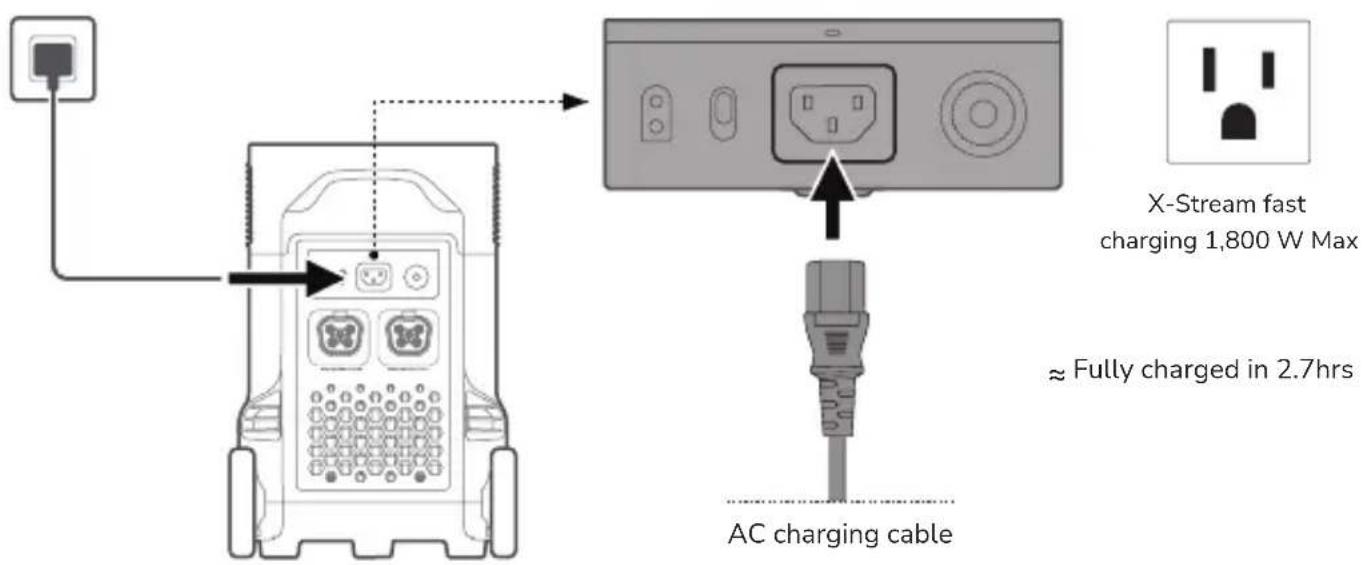
The charging power can be adjusted through the AC Charge Speed Switch on the back of the product. You can set the charging power range in the EcoFlow App.
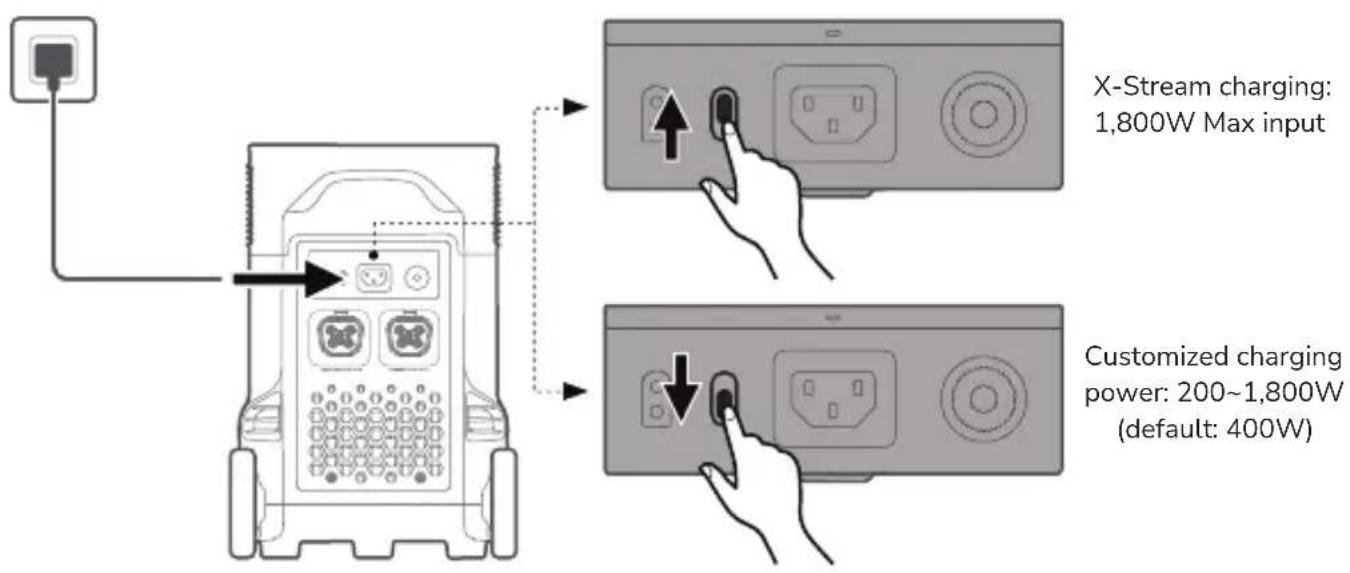

Please use the AC Charging Cable included in the package for fast charging. Do not use other cables to charge. Plug directly into an AC wall outlet and make sure that the wall output current is more than 15A. Otherwise, reduce the unit charging speed with the AC Charge Speed Switch. Aputure takes no responsibilities for any consequences caused by failures to follow instructions, including but not limited to charging with other AC charging cables.
Solar Charging
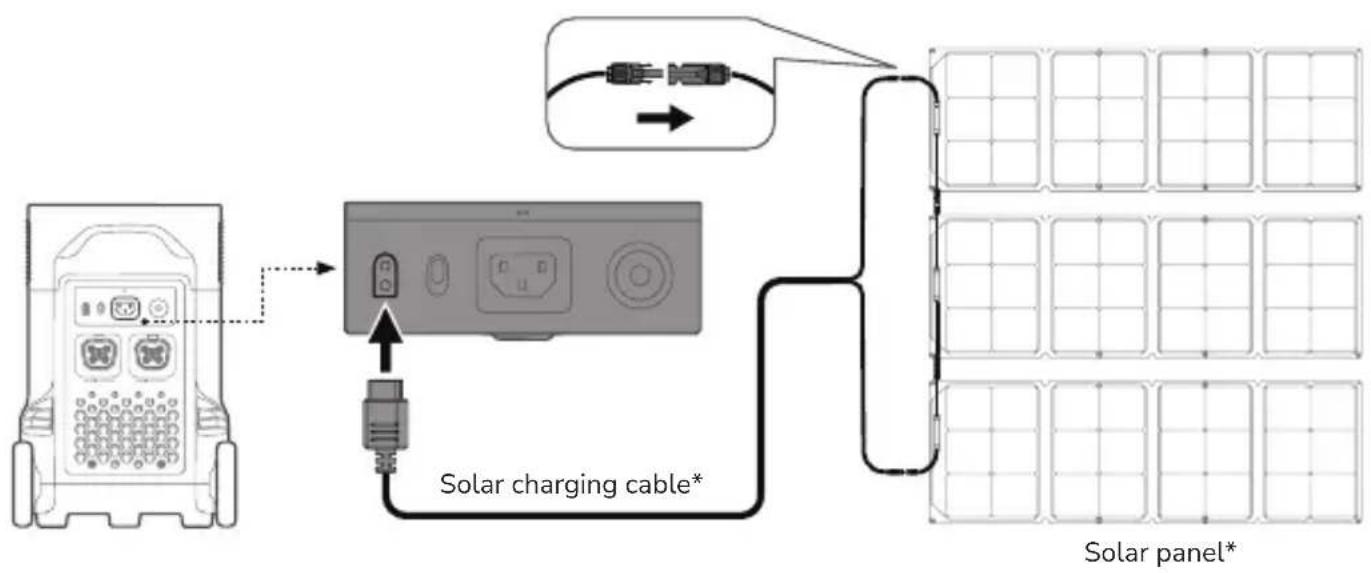
flowchart
graph TD
    A["Device with ports"] --> B["Solar charging cable*"]
    B --> C["Grid Panel"]
    D["Switch"] --> E["Switch to Cable"]
    E --> F["Grid Panel"]
    G["Solar panel*"]

- Solar charging cable (MC4-XT60 adapter cable) and the solar panel are supplied separately.
- When using an EcoFlow solar panel to charge the product, please follow the instructions that come with the solar panel.
- Before connecting the solar panel, please ensure that the solar panel's output voltage is within 150V to avoid product damages.
Car Charging
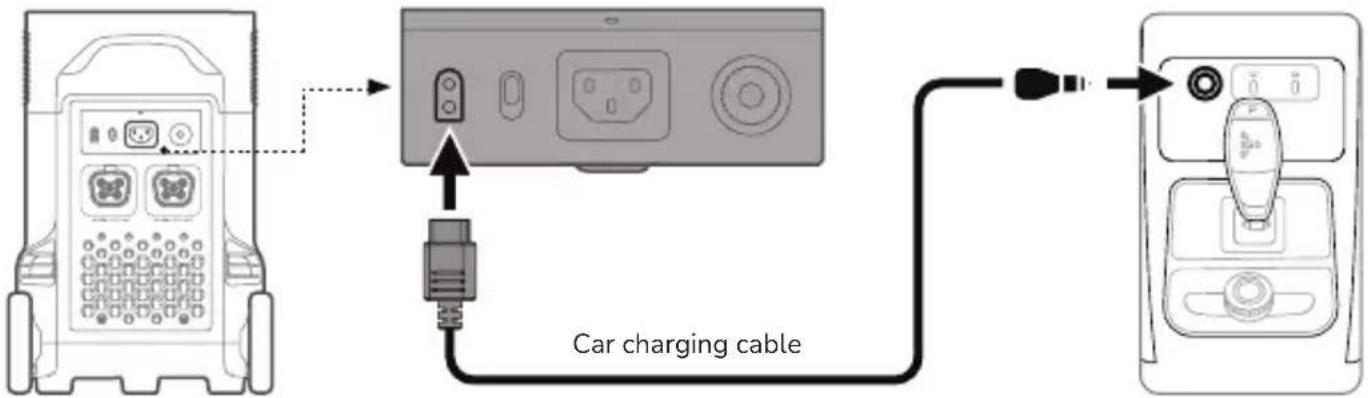
Users can recharge the product through the Car Outlet. It supports 12V/24V car chargers and an 8A default charging current.
Please charge using the car charger after you've started the car to avoid failure to start due to insufficient car battery. In addition, please make sure that the cigarette lighter of the Car Outlet and the Car Charger Input Cable are in good condition. EcoFlow takes no responsibilities for any losses or damages caused by failures to follow instructions.
Smart Extra Battery
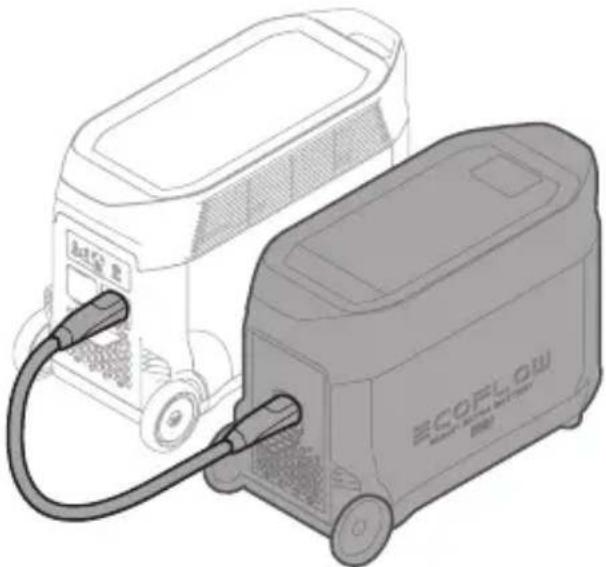
A single DELTA Pro can link with up to two Smart Extra Batteries at once for added capacity. Refer to the user manuals of the Smart Extra Battery and Smart Generator for detailed instructions.
natural_image
Illustration of two electric vehicle charging stations, one connected to a battery and the other with a logo (no text or symbols on the devices themselves)
- Turn off both the Smart Extra Battery and DELTA Pro before connecting or disconnecting them.
- Before using, make sure both DELTA Pro and Smart Extra Battery display the extra battery icon on their screens.
- Turn off the Smart Battery before connecting or disconnecting it.
- Do not touch the metal terminals of the Smart Extra Battery connector. If the metal terminals need to be cleaned, gently wipe them with a dry cloth.
X-Boost and EPS
X-Boost
With EcoFlow X-Boost technology, the product can power a 4,500W max. device while the rated output power remains 3,600W, avoiding operation failure due to overload protection. X-Boost Tips:
- X-Boost is not available when the AC output is turned on in a recharging state (in bypass mode).
- X-Boost is not applicable for all electrical appliances; it's incompatible with appliances with strict voltage requirements and a rated power over 3600W. Appliances with voltage protection (such as precise instruments) are not supported. X-Boost mode is more suitable for heating devices. Please conduct your own tests with your devices with X-Boost enabled.

Bypass mode: When the product is plugged into the power socket for recharging and connected to other devices at the same time, it cannot provide power to the devices if the AC power button is turned on, instead, the devices are powered by the grid.
EPS
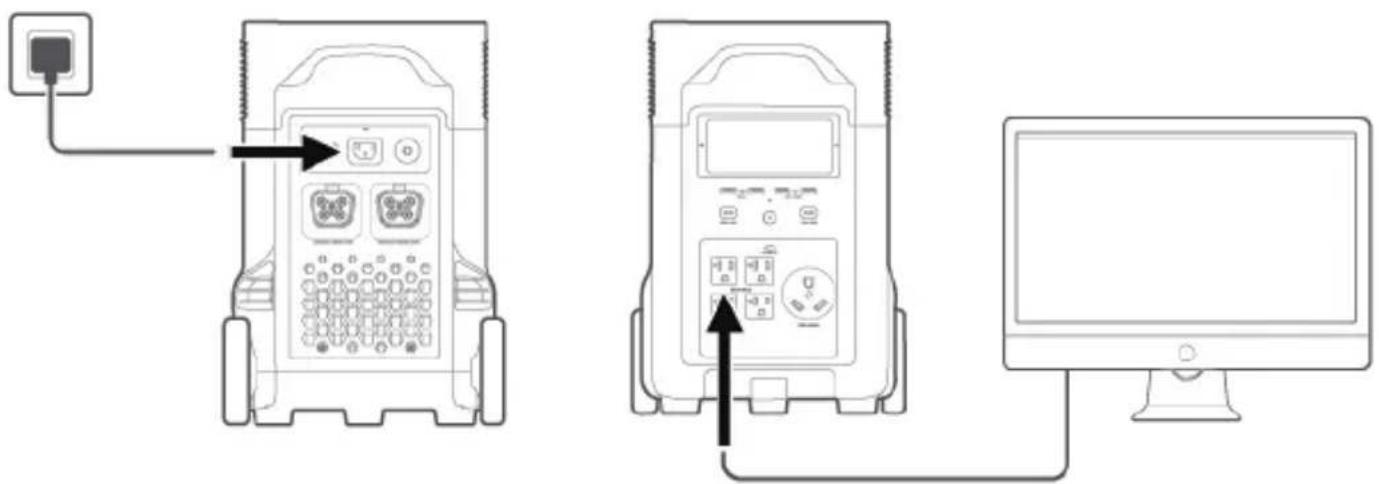
The product supports EPS. When you connect the grid power to the AC Input Port of the product through an AC cable, you can power electrical devices through the AC Output Port (AC power will come from the grid and not the power station in this situation). In case of a sudden blackout, the product can automatically switch to the battery powered supply mode within 30ms.

As a basic UPS function, this function does not support Oms switching. Please do not connect the product to any device that requires Oms UPS, such as data servers and workstations. Please test and confirm the compatibility before using the product. We recommend that you only charge one device at a time and avoid using multiple ones at the same time to avoid overload protection. EcoFlow and Aputure take no responsibilities for any device failures or data losses caused by failures to follow instructions.
FAQ
- What battery does the product use?
High-quality LFP battery.
- What devices can the product's AC output port power?
With 3600W rated power and 7200W peak power, the product's AC output ports can power most household appliances. Before you use it, we recommend that you confirm the power of the appliances first and ensure the sum power of all loaded appliances is lower than that of the rated power.
- How long can the product charge my devices?
The charging time is shown on the product's LCD Screen, which can be used to estimate the charging time of most appliances with stable power usage.
- How do I know if the product is charging?
When it's charging, the remaining charging time will be shown on the LCD Screen. Meanwhile, the charging indicator icon begins to rotate with the remaining battery percentage and the input power shown on the right of the circle.
- How do I clean the product?
Gently wipe it with a dry, soft, clean cloth or paper towel.
- How do I store the product?
Before storing, please turn off the product first, and then store it in a dry and ventilated place at room temperature. Do not place it near water sources. For long-term storage, please discharge and recharge it every three months to extend its battery life (See "Storage and Maintaince" for details).
- Can I bring the product on a plane?
No.
- How do I recharge DELTA Pro at 200V-240V in a 100V-120V region?
The cable provided with your DELTA Pro cannot be plugged into higher-voltage outlets, you need a third party adapter/charging cable.
Storage and Maintenance
-
Ideally, use and store the product in a place of between 20^ C \~ 30^ C ( 68^ F \~ 86^ F), and always keep it away from water, intense heat, and sharp objects. For an extended product lifespan, do not store it in places of temperatures above 45^ C ( 113^ F) or below -10^ C ( 14^ F).
-
For long-term storage, please discharge the product every three months (firstly discharge it to 0%, then fully recharge it, and lastly discharge it to 60%); the product will not be covered by the warranty if it is not charged or discharged for more than 6 months.
Troubleshooting
| Indicator | Problem | Solution | ||
 | OVERLOAD | (Flashing) | USB-A Overload Protection | Resume normal operation by removing the electrical device connected to the USB-A port. |
 | OVERLOAD | (Flashing) | USB-C Overload Protection | Resume normal operation by removing the electrical device connected to the USB-C port. |
 | (Flashing) | USB-C High Temperature Protection | After the product cools down, it will resume normal operation automatically. | |
 | (Flashing) | High Temperature Charge Protection | Charging can be resumed automatically after the battery cools down. | |
| (Flashing) | High Temperature Discharge Protection | The power supply can be resumed automatically after the battery cools down. | ||
 | (Flashing) | Low Temperature Charge Protection | Charging can be resumed automatically after battery temperature rises above 5°C (41°F). | |
| (Flashing) | Low Temperature Discharge Protection | The power supply can be resumed automatically after the battery temperature rises above -12°C (10°F). | ||
 | OVERLOAD | (Flashing) | AC Output Overload Protection | Normal operation will be resumed automatically after you remove the overloaded device and restart the product.Electrical appliances should be used within rated power.(Refer to X-Boost instructions to get more details about power limitations). |
| (Flashing) | AC High Temperature Protection | Please confirm whether the fan inlet and outlet are blocked, if not, normal operation will be resumed automatically after the product temperature drops. | ||
| [72SH] | (Flashing) | AC Low Temperature Protection | Normal operation will be resumed automatically after the product is used at optimum environmental temperatures. | |
| (Flashing) | Fan Blockage | Please check if the fan is blocked by foreign materials. | ||
| (Flashing) | Car Charger Overload Protection | The product will resume normal operation automatically after you remove the device connected to the car charger. | ||
| (Flashing) | Car Charger High Temperature Protection | After the product cools down, it will resume normal operation automatically. | ||
| (Stays on) | Battery Failure | Contact EcoFlow customer service. |
FCC Warning
This device complies with part 15 of the FCC Rules. Operation is subject to the following two conditions: (1) This device may not cause harmful interference, and (2) this device must accept any interference received, including interference that may cause undesired operation.
Any Changes or modifications not expressly approved by the party responsible for compliance could void the user's authority to operate the equipment.
Note: This equipment has been tested and found to comply with the limits for a Class B digital device, pursuant to part 15 of the FCC Rules. These limits are designed to provide reasonable protection against harmful interference in a residential installation. This equipment generates uses and can radiate radio frequency energy and, if not installed and used in accordance with the instructions, may cause harmful interference to radio communications. However, there is no guarantee that interference will not occur in a particular installation. If this equipment does cause harmful interference to radio or television reception, which can be determined by turning the equipment off and on, the user is encouraged to try to correct the interference by one or more of the following measures:
-Reorient or relocate the receiving antenna.
-Increase the separation between the equipment and receiver.
-Connect the equipment into an outlet on a circuit different from that to which the receiver is connected.
-Consult the dealer or an experienced radio/TV technician for help.
This equipment complies with FCC radiation exposure limits set forth for an uncontrolled environment.
This equipment should be installed and operated with minimum distance 20cm between the radiator & your body.
Aputure
- Disclaimer
- Content
- Specifications
- Safety Instructions
- Usage
- Disposal Guide
- EcoFlow App
- What's in the Box
- Product Details
- Power On/Off
- Charging Your Devices
- Charging DELTA Pro
- AC Charging
- Solar Charging
- Car Charging
- Smart Extra Battery
- X-Boost and EPS
- X-Boost
- EPS
- FAQ
- Storage and Maintenance
- FCC Warning
- Aputure
Brand : Aputure
Model : EcoFlow DELTA Pro
Category : Power bank