Leisure 460 - Video projector Vankyo - Free user manual and instructions
Find the device manual for free Leisure 460 Vankyo in PDF.


| Product Type | Video Projector |
| Brand | Vankyo |
| Model | Leisure 460 |
| Display Technology | LCD |
| Light Source | LED |
| Native Resolution | 1280 x 720 |
| Input Signal Support | 576i, 720P, 1080i, 1080P |
| Aspect Ratio | 4:3 / 16:9 / Auto |
| Focus | Manual (Focus Ring) |
| Keystone Correction | ±15° (Manual) |
| Speaker | 3W / 4ohm |
| Dimensions (W x D x H) | 245 x 166 x 81.5 mm (9.6 x 6.5 x 3.2 in) |
| Net Weight | 1.35 kg (2.98 lb) |
| Power Supply | AC 100-240V, 50/60Hz |
| Ports | HDMI x1, USB 2.0 x2, Audio Out x1, AV In x1, VGA x1 |
| Mounting Screw Size | 1/4" (not included) |
| Installation Type | Front / Rear / Ceiling |
| Photo Format Support | BMP, JPEG, PNG, JPG |
| Audio Format Support | MP3, WMA, OGG, AAC, FLAC, APE, WAV |
| Video Format Support | AVI, MP4, MKV, FLV, MOV, RMVB, 3GP, MPG, VOB, RM |
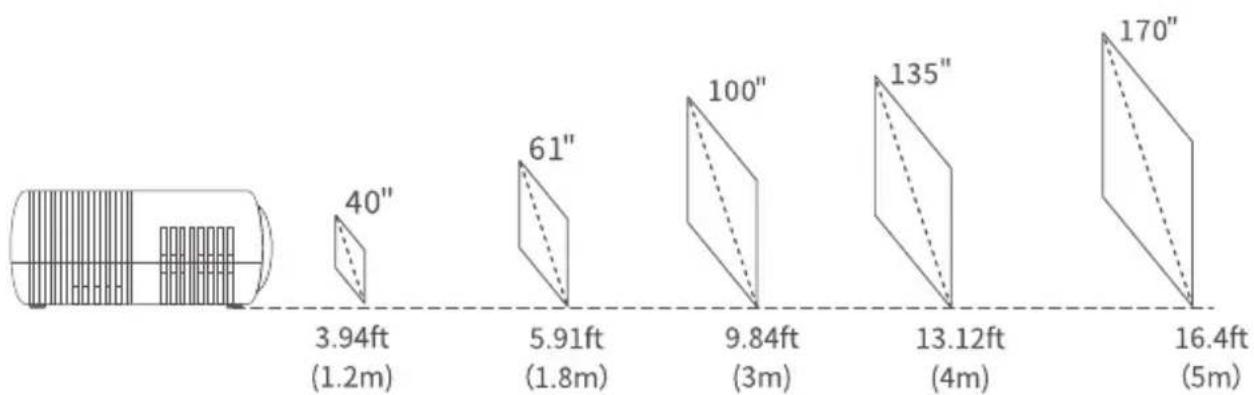
| Recommended Screen Size | 100 inches at 3m (9.84 ft) distance |
| Projection Distance Range | 1.2 m to 5 m (3.94 ft to 16.4 ft) |
| Included Accessories | Projector, Power Cord, Remote Control (AAA batteries included), Lens Cover, User Manual |
Frequently Asked Questions - Leisure 460 Vankyo
User questions about Leisure 460 Vankyo
0 question about this device. Answer the ones you know or ask your own.
Ask a new question about this device
Download the instructions for your Video projector in PDF format for free! Find your manual Leisure 460 - Vankyo and take your electronic device back in hand. On this page are published all the documents necessary for the use of your device. Leisure 460 by Vankyo.
USER MANUAL Leisure 460 Vankyo
natural_image
Technical line drawing of a mechanical conveyor belt system with two circular components and a central shaft (no text or symbols)LEISURE 460 USER MANUAL
Please read this manual throughly before using and keep it for future reference.
PACKING LIST

NOTICE
Recommended

NOT Recommended

EN
FUNCTION OVERVIEW

02
support@ivankyo.com
QUICK START
natural_image
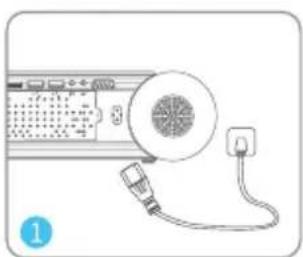
Illustration of a device with a speaker and plug, no text or symbols presentPlug the power cord into an outlet.
natural_image
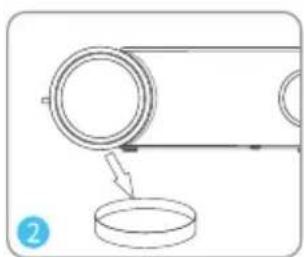
Simple line drawing of a mechanical assembly with a pulley and base (no text or symbols)Take off the lens cover.
flowchart
graph TD
    A[" projector"] -->|Sold Separately| B["Pod 1"]
    A --> C["Pod 2"]
    B --> D["LED Unit"]
    C --> E["LED Unit"]
    D --> F["LED Unit"]
    E --> G["LED Unit"]
    F --> H["LED Unit"]
    G --> I["LED Unit"]
    style A fill:#f9f,stroke:#333
    style B fill:#ccf,stroke:#333
    style C fill:#ccf,stroke:#333
    style D fill:#cfc,stroke:#333
    style E fill:#cfc,stroke:#333
    style F fill:#fcc,stroke:#333
    style G fill:#fcc,stroke:#333
    style H fill:#fcc,stroke:#333
    style I fill:#fcc,stroke:#333
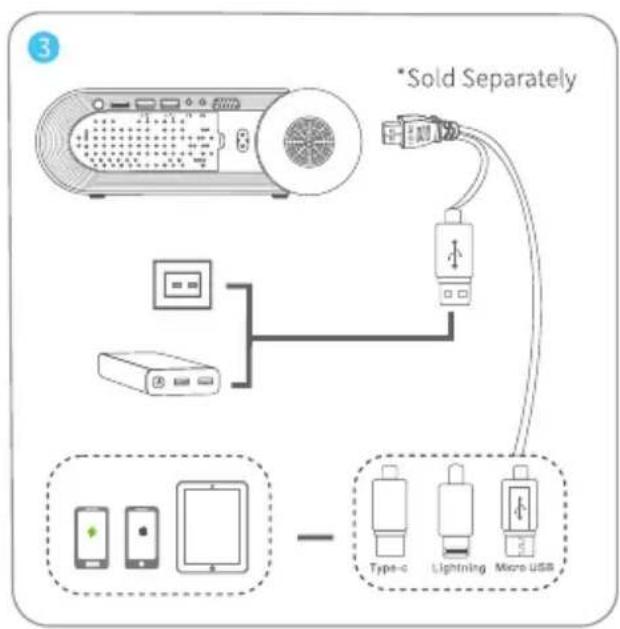
Connect your device to the projector correctly.
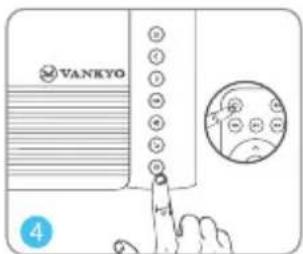
Press the Power Button to turn on the projector.

Select the correct input source to project your device.

natural_image
Mechanical diagram showing a belt drive system with pulleys and a hanging weight (no text or labels)Adjust the kickstand accordingly.

Adjust the keystone and focus ring to get the best image performance.
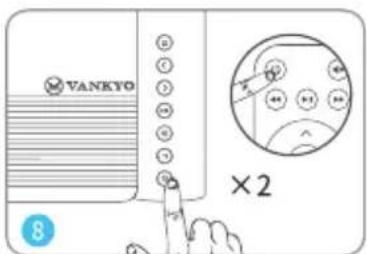
Press the Power Button twice to turn off the projector.
EN
INPUT SOURCE
Press ☑ on the projector or remote to enter the interface of Input Source.
A. USB Connection

PROJECTOR CONNECTION
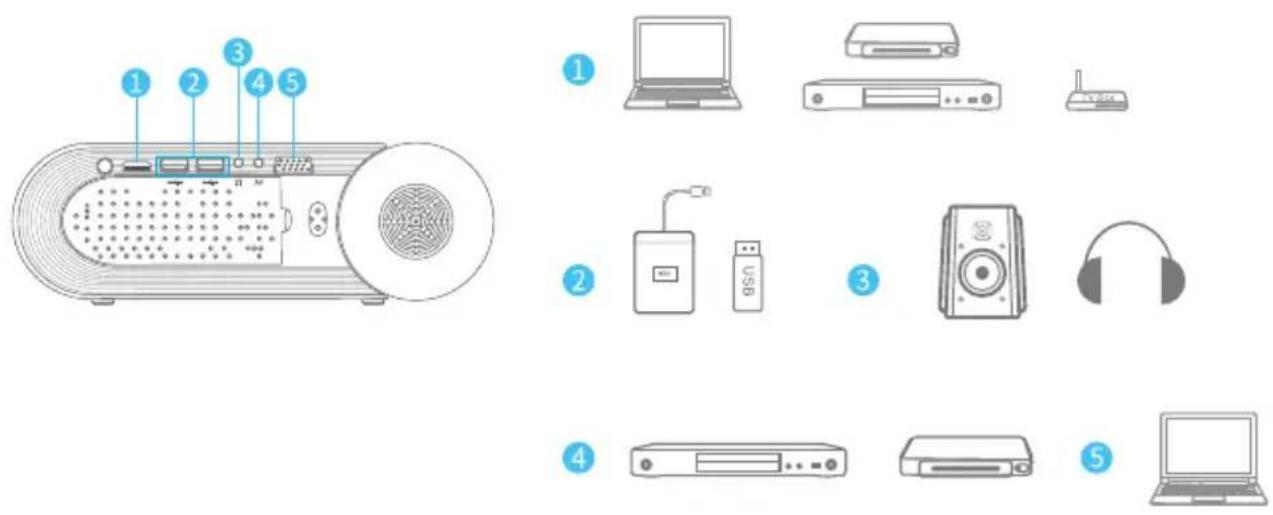
PROJECTION DISTANCE&SIZE
bar
| Height (ft) | Distance (m) | | :--- | :--- | | 3.94 | 1.2 | | 5.91 | 1.8 | | 61 | - | | 9.84 | 3 | | 13.12 | 4 | | 170 | 5 |The recommended projection screen is around 100 inches with a projection distance of around 9.84ft. Ambient darkness will improve the clarity of the projected images.
EN
SPECIFICATION
| Display Technology | LCD | Light Source | LED |
| Resolution | Native 1280 x 720 | Input Signal | 576i、720P、1080i、1080P |
| Installation Type | Front/Rear/Ceiling | Aspect Ratio | 4:3/16:9/Auto |
| Focus | Manual | Keystone | ±15° |
| Speaker | 3W/4ohm | Power Supply | AC 100-240V, 50/60Hz |
| Unit Dimension | 245 x 166 x 81.5mm(9.6 x 6.5 x 3.2inch) | Unit Net Weight | 1.35kg(2.98lb) |
| Photo Format Supported | BMP/JPEG/PNG/JPG | Audio Format Supported | MP3/WMA/OGG/AAC/FLAC/APE/WAV |
| Video Format Supported | AVI/MP4/MKV/FLV/MOV/RMVB/3GP/MPG/VOB/RM | Ports | HD In x 1/USB2.0 Port x 2/Audio Out x 1/AV In x 1/VGA Port x 1 |
| Mounting Screw | 1/4" | Number of Screw | Not included |
TROUBLESHOOTING GUIDE
1. Blurry Image
* Adjust focus ring/keystone.
* Projector and screen/wall must be in effective distance.
2. Remote Unresponsive
* Make sure remote points at IR receiver directly.
* Do not cover IR receiver.
* Try a new pair of AAA batteries.
3. Mobile Connection
iOS: Genuine lightning to HDMI cable Android: Micro USB to HDMI adapter/Type C to HDMI cable
4. Upside Down Images
* Go to Menu > PICTURE > Projection Mode to flip the projection image.
CAUTION

The symbol indicates AC voltage

RECYCLING
This product bears the selective sorting symbol for Waste electrical and electronic equipment (WEEE). This means that this product must be handled pursuant to European directive 2012/19/EU in order to be recycled or dismantled to minimize its impact on the environment.
This product can be used across EU member states.
EN
VANKYO SUPPORT
North America support@ivankyo.com
United Kingdom support.uk@ivankyo.com

www.ivankyo.com

@VankyoOfficial

VANKYO
Brand : Vankyo
Model : Leisure 460
Category : Video projector