BUGL900WH/A+ - Range hood Cookology - Free user manual and instructions
Find the device manual for free BUGL900WH/A+ Cookology in PDF.


| Product Type | Range Hood |
| Brand | Cookology |
| Model | BUGL900WH/A+ |
| Width | 90 cm (also available in 52 cm and 75 cm) |
| Installation Type | Built-in under cabinet |
| Venting Type | Ducted (outside exhaust) |
| Power Supply | 220-240 V, 50 Hz (mains) |
| Lighting | LED, 2 x 1.5 W max, DC 12 V |
| Number of Speeds | 3 (low, mid, high) |
| Control Type | Touch control panel |
| Timer Function | Yes, 9-minute auto shut-off |
| Grease Filters | Aluminum mesh, washable |
| Carbon Filter | Optional, not supplied |
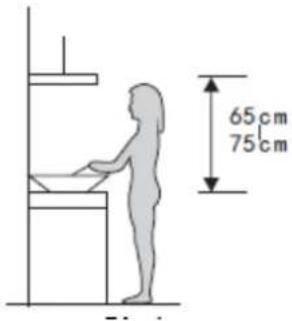
| Minimum Distance to Hob | 65 cm (gas hob), 65-75 cm recommended |
| Maximum Duct Bend | No sharper than 90 degrees |
| Safety Features | Automatic shut-off on timer, child lock (supervision required), overheat protection |
| Material | Stainless steel |
| Energy Efficiency | A+ (indicated in model) |
| Warranty | Register at www.Cookology.com |
| Weight | Not specified, approximately 12-15 kg |
| Noise Level | Not specified, typical range hood 55-65 dB |
Frequently Asked Questions - BUGL900WH/A+ Cookology
User questions about BUGL900WH/A+ Cookology
0 question about this device. Answer the ones you know or ask your own.
Ask a new question about this device
Download the instructions for your Range hood in PDF format for free! Find your manual BUGL900WH/A+ - Cookology and take your electronic device back in hand. On this page are published all the documents necessary for the use of your device. BUGL900WH/A+ by Cookology.
USER MANUAL BUGL900WH/A+ Cookology
natural_image
Technical line drawing of a rectangular frame with mounting brackets and a 52cm dimension label (no text or symbols beyond the measurement)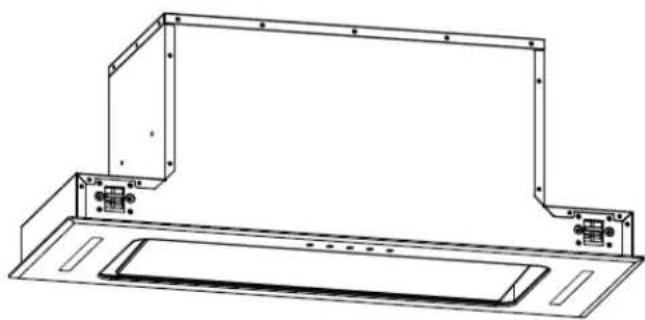
natural_image
Technical line drawing of a mechanical bracket assembly (no text or symbols)75cm/90cm
Please register the warranty for this product on www.Cookology.com
Content
1....Safety instructions
2....Installation
3....Start using your cooker hood
4....Troubleshooting
5....Maintenance and cleaning
6 Environment protection
SAFETY INSTRUCTIONS
This manual explains the proper installation and use of your cooker hood,
please read it carefully before using even if you are familiar with the product.
The manual should be kept in a safe place for future reference.
Never to do:
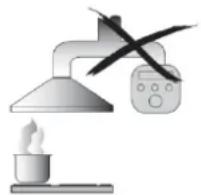
- Do not try to use the cooker hood without the grease filters or if the filters are excessively greasy!
- Do not install above a cooker with a high level grill.
- Do not leave frying pans unattended during use because overheated fats or oils might catch fire.
● Never leave naked flames under the cooker hood.

- If the cooker hood is damaged, do not attempt to use.
● Do not flambé under the cooker hood.
● CAUTION: Accessible parts may become hot when used with cooking appliances.
● The minimum distance between the supporting surface for the cooking vessels on the hob and the lowest part of the cooker hood. (When the cooker hood is located above a gas appliance, this distance shall be at least 65 cm)
● The air must not be discharged into a flue that is used for exhausting fumes from appliances burning gas or other fuels. Cooker hoods and other cooking fume extractors may adversely affect the safe operation of appliances burning gas or other fuels (including those in other rooms) due to back flow of combustion gases. These gases can potentially result in carbon monoxide poisoning. After installation of a cooker hood or other cooking
fume extractor, the operation of open flued gas appliances should be tested by a competent person to ensure that back flow of combustion gases does not occur.
natural_image
Illustration of a laboratory setup with a lamp, heating a test tube, and a control panel (no text or symbols)Always to do:
● Important! Always switch off the electricity supply at the mains during installation and maintenance such as light bulb replacement.
● The cooker hood must be installed in accordance with the installation instructions and all measurements followed.
● All installation work must be carried out by a competent person or qualified electrician.
● Please dispose of the packing material carefully. Children are vulnerable to it.
● Pay attention to the sharp edges inside the cooker hood especially during installation and cleaning.
● Make sure the ducting has no bends sharper than 90 degrees as this will reduce the efficiency of the cooker hood.
● Warning: Failure to install the screws or fixing device in accordance with these instructions may result in electrical hazards.
● Warning: Before obtaining access to terminals, all supply circuits must be disconnected.
- If the voltage rating of the lamp is less than the rated voltage of the appliance, the voltage rating of the lamp shall also be marked on or near the lamp holder.
Always to do:
● Always put lids on pots and pans when cooking on a gas cooker.
- When in extraction mode, air in the room is being removed by the cooker hood. Please make sure that proper ventilation measures are being observed. The cooker hood removes odours from room but not steam.
● There shall be adequate ventilation of the room when the cooker hood is used at the same time as appliances burning gas or other fuels.
● Cooker hood is for domestic use only.

- If the supply cord is damaged, it must be replaced by the manufacturer, its service agent or similarly qualified persons in order to avoid a hazard.
● This appliance is not intended for use by persons (including children) with reduced physical, sensory or mental capabilities, or lack of experience and knowledge, unless they have been given supervision or instruction concerning use of the appliance by a person responsible for their safety
● Children should be supervised to ensure that they do not play with the appliance.
● This appliance can be used by children aged from 8 years and above and persons with reduced physical, sensory or mental capabilities or lack of experience and knowledge if they have been given supervision or instruction concerning use of the appliance in a safe way and
understand the hazards involved. Children shall not play with the appliance. Cleaning and user maintenance shall not be made by children without supervision.
natural_image
Symbolic illustration of two people crossed out of a circle, no text or symbols presentAlways to do:
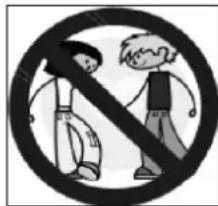
●Caution: The appliance and its accessible parts can become hot during operation. Be careful to avoid touching the heating elements. Children younger than 8 years old should stay away unless they are under permanent supervision.
● There is a fire risk if cleaning is not carried out in accordance with the instructions.
● Regulations concerning the discharge of air have to be fulfilled.
● Clean your appliance periodically by following the method given in the chapter MAINTENANCE.
● For safety reason, please use only the same size of fixing or mounting screw which are recommended in this instruction manual.
● Regarding the details about the method and frequency of cleaning, please refer to maintenance and cleaning section in the instruction manual.
● Regarding the information about how the appliance is to be fixed to its support, please refer to Operation section, the Installation procedures in this manual.
● Cleaning and user maintenance shall not be made by children without supervision.
- When the cooker hood and appliances supplied with energy other than electricity are simultaneously in operation, the negative pressure in the
room must not exceed 4 Pa(4 x 10 ^-5 bar).
●WARNING: Danger of fire: do not store items on the cooking surfaces.
●A steam cleaner is not to be used.
● NEVER try to extinguish a fire with water, but switch off the appliance and then cover flame e.g. with a lid or a fire blanket.
INSTALLATION (VENT OUTSIDE)
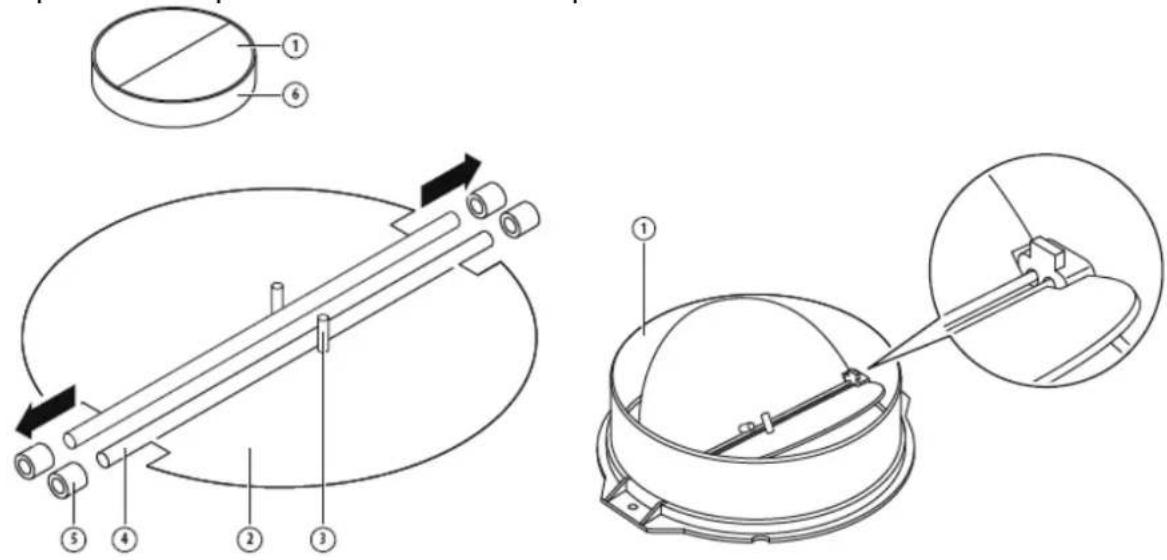
MOUNTING OF THE V-FLAP
If the cooker hood does not have an assembled V-flap 1, you should mount the half-parts to its body. The images only show an example of how to mount the V-flap, because the outlet may vary according to different models and configurations.
To mount the V-flap 1 you should:
- Mount two half-parts 2 into the body 6;
• the pin 3 should be top oriented; - the axis 4 should be inserted into the holes 5 on the body;
- repeat all the operations for the 2nd half-part.
INSTALLATION
- The cooker hood should be placed at a distance of 65-75cm from the cooking surface for the best effect.
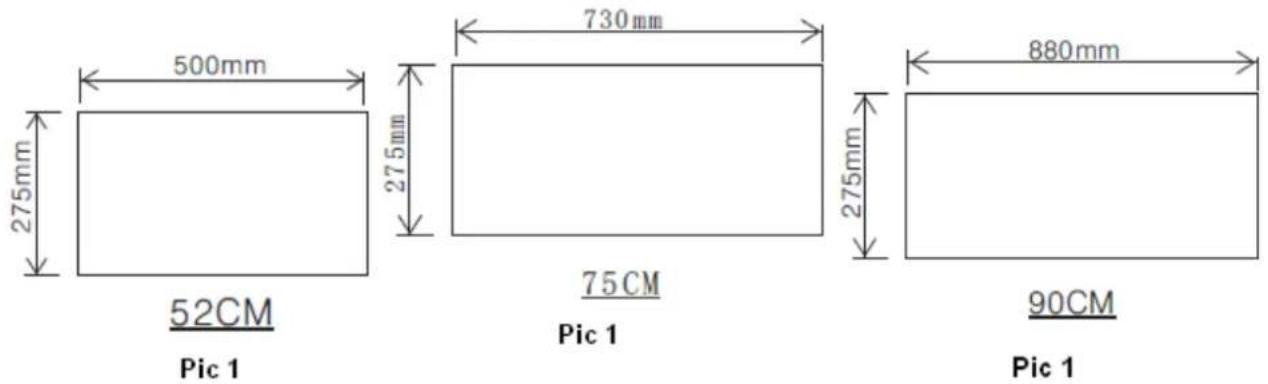
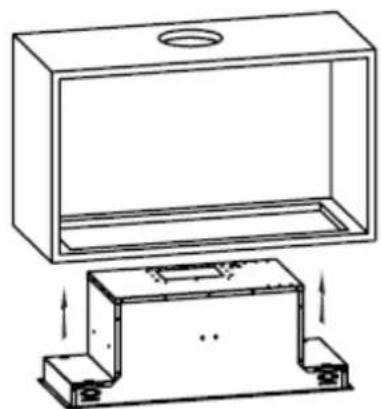
- Drill a hole in the cabinet, with hole wide 500*275 (mm) for model 52cm, 730*275 (mm) for model 75cm, 880*275 (mm) for model 90cm. Refer to pic 1. Make sure the hole edge to the cupboard edge at least 35mm distance.
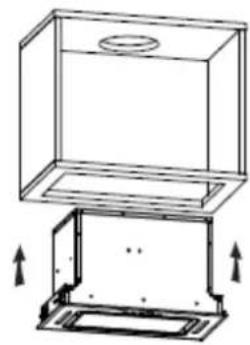
3. Put the hood into the
cabinet, tighten up the screws by screwdriver, and make sure the hood was fixed. See pic 2.
natural_image
Technical line drawing of a cabinet or enclosure with mounting base and top panel, showing internal components and directional arrows (no text or symbols)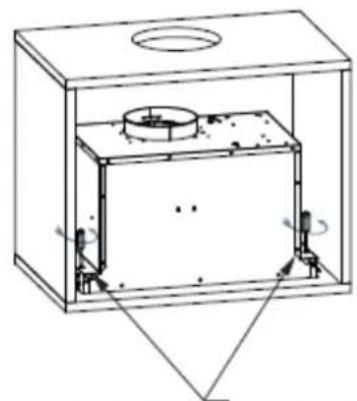
natural_image
Technical line drawing of a rectangular enclosure with internal components and mounting holes (no text or symbols)Tighten up the screws anticlockwise direction
52cm
Pic 2
natural_image
Technical line drawing of a rectangular enclosure with a circular top and a base support structure (no text or symbols)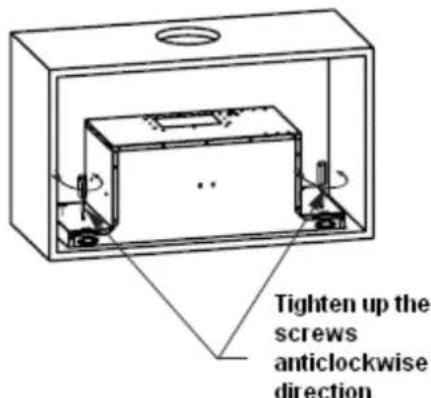
Pic 2
75cm
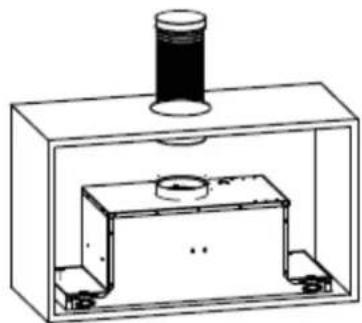
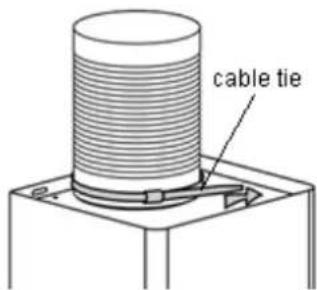
- Fix the expansion pipe on the outlet with cable tie. Note: the expansion pipe is not included in the product. See pic 3.
natural_image
Technical line drawing of a mechanical assembly with a cylindrical component mounted on top, enclosed in a rectangular housing (no text or symbols)Pic 3
WARNING: | For safety reason, please use only the same size of fixing or mounting screws which are recommended in this instruction manual.Failure to install the screws or fixing device in accordance with these instructions may result in electrical hazards. |
Start Using Your Cooker Hood
Touch control

Timer

Lamp


Speed

Power
- Press the "Power" button, the button control the "on" & "off" of the hood.
- Press the button "Speed" time after time, the motor runs as low / mid / high / low / mid..., the speed runs circularly; and the LED display will indicate as 1-2-3-1-2... circularly.
- Press "Lamp" button, the light is on, press this button again, the light is off. Please note the Lamp is not under control of the on/off button.
- When the hood is working, if press the "Timer" button, the hood will go into the status of acquiescent working (acquiescent time is 9mins), and then, LED display will be shown 9.8.7.6 ...decreasing by 1, when time is up, the hood will be off automatically and the lamp will extinguish. If pressing "Timer" button, the hood will go in or go out "Timer" function.
TROUBLESHOOTING
| Fault | Possible Cause | Solution |
| Light on, but motor does not work | Fan switch turned off | Select a fan switch position. |
| Fan switch failed | Contact service center. | |
| Motor failed | Contact service center. | |
| Light does not work, motor does not work | House fuses blown | Reset/Replace fuses. |
| Mains power cable is loose or disconnected | Refit mains power cable to power outlet.Switch power outlet on. | |
| Oil leakage | One way valve and the outlet are not tightly sealed | Take down the one way valve and seal with sealant. |
| Leakage from the connection of chimney and cover | Take chimney down and seal. | |
| Lights not working | Broken or faulty bulbs | Replace bulbs as per this instruction. |
| Insufficient suction | The distance between the cooker hood and the gas top is too far | Refit the cooker hood to the correct distance. |
| The Cooker hood inclines | The fixing screw is not tight enough | Tighten the hanging screw and make it horizontal. |
NOTE:

Any electrical repairs to this appliance must conform to your local, state and federal laws. Please contact the service centre if in any doubt before undertaking any of the above. Always disconnect the unit from the power source
when opening the unit.
MAINTENANCE AND CLEANING
Caution:
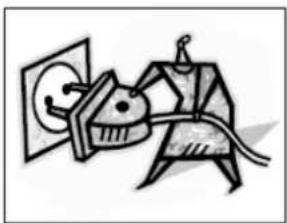
- Before maintenance or cleaning is carried out, the cooker hood should be disconnected from the mains power supply. Ensure that the cooker hood is switched off at the wall socket and the plug removed.
natural_image
Abstract line drawing of a stylized figure with a cat-like head and arrow, connected to a wall (no text or symbols)- External surfaces are susceptible to scratches and abrasions, so please follow the cleaning instructions to ensure the best possible result is achieved without damage.
GENERAL
Cleaning and maintenance should be carried out with the appliance cold especially when cleaning. Avoid leaving alkaline or acid substances (lemon juice, vinegar etc.) on the surfaces.
STAINLESS STEEL
The stainless steel must be cleaned regularly (e.g.weekly) to ensure a long life expectancy.Dry with a clean soft cloth. A specialized stainless steel cleaning fluid may
be used.
NOTE:
Ensure that wiping is done along with the grain of the stainless steel to prevent any unsightly crisscross scratching patterns from appearing.
CONTROL PANEL SURFACE
The inlay control panel can be cleaned using warm soapy water. Ensure the cloth is clean and well wrung before cleaning. Use a dry soft cloth to remove any excess moisture left after cleaning.
Important
Using neutral detergents and avoid using harsh cleaning chemicals, strong household detergents or products containing abrasives, as this will affect the appearance of the appliance and potentially remove any printing of artwork on the control panel and will void manufactures warrantee.
GREASE MESH FILTERS
The mesh filters can be cleaned by hand. Soak them for about 3 minutes in water with a mild detergent and then brush it gently with a soft brush. Do not apply too much pressure so as to avoid any damage to it . (Leave to dry naturally out of direct sun light) Filters should be washed separately to crockery and kitchen utensils. It is advisable not to use rinse aid.
natural_image
Technical line drawing of a mechanical assembly with no visible text or symbolsINSTALLING GREASE MESH FILTERS
• To install filters for the following four steps:
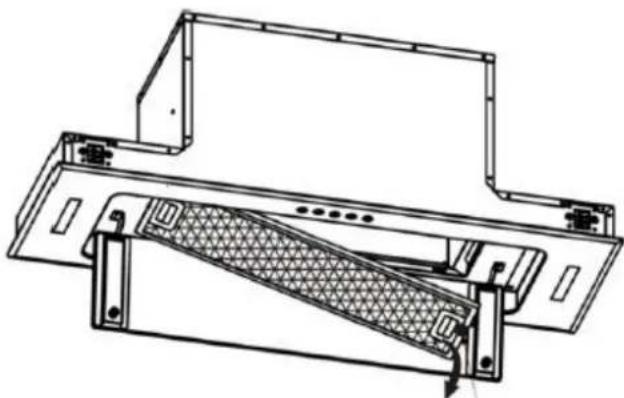
- Angle the filter into the slots at the back of the hood.
- Push the button on the handle of the filter.
- Release the handle once the filter fits into a resting position.
- Repeat to install all filters.
CARBON FILTER-not supplied
Activated carbon filter can be used to trap odors. Normally the activated carbon filter should be changed every 3 to 6 months according to your cooking habits. The installation procedure of activated carbon filter is as below:
- Before installing or replacing the carbon filters, please remove power to the unit.
-
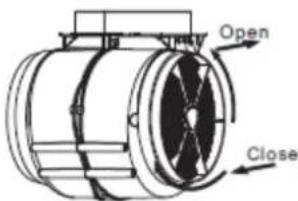
Press the filter lock and remove the mesh filter.
-
Turn the carbon filter on both side of the motor anti-clockwise. Replace the carbon filters with the new carbon filters.
- Place the mesh filter.
- Connect the power supply to the wall socket.
NOTE:
- Make sure the filter is securely locked. Otherwise, it would loosen and cause danger.
- When activated carbon filter attached, the suction power will be lowered.
BULB REPLACEMENT
Important :

The bulb must be replaced by the manufacturer, its service agent or similarly qualified persons.
Always switch off the electricity supply before carrying out any operations on the appliance. When handling bulb, make sure it has completely cooled down before any direct contact with hands.
When handling bulbs hold with a cloth or gloves to ensure perspiration does not come in contact with the bulb as this can reduce the life of the bulb.
Note:
- Before changing the lights, make sure that the appliance is turned off and unplugged.
- Protect against danger when changing lights, such as wearing gloves.
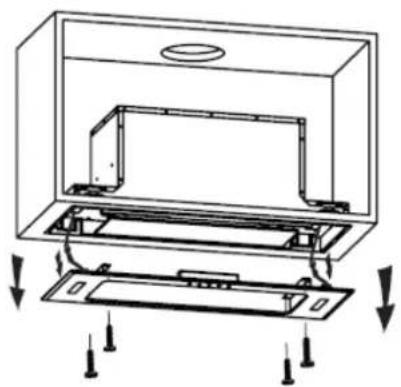
Changing the lights:
- Switch off the appliance and unplug it.
- Unscrew the 4 screws on the outer glass frame panel by screwdriver.
- Pull out the light wire and switch wire, take down the outer glass frame panel.
- Unscrew the screws on the light bracket and replace the lights.
- Apply the reverse procedure to install the light back.
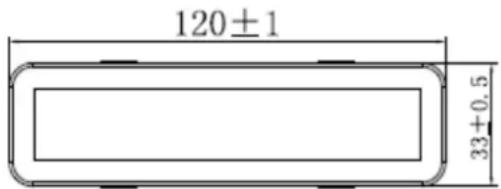
- ILCOS D code for this lamp is: DSS-1.5/65-S-120/33
- LED modules -rectangle LED lamp
- Max wattage: 2 × 1.5 ~W
– Voltage range: DC 12V - Dimensions:
natural_image
Technical diagram of an open refrigerator with internal compartments and mounting points (no text or symbols)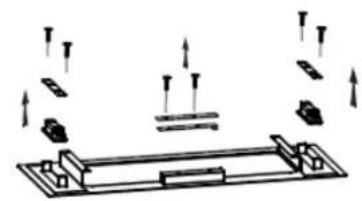
natural_image
Pure mechanical assembly diagram showing components and motion arrows without any text or symbolsENVIRONMENTAL PROTECTION:
natural_image
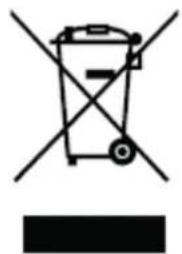
Symbol of a trash bin crossed with two crossed lines, no text or labels presentThis product is marked with the symbol on the selective sorting of waste electronic equipment. This means that this product must not be disposed of with household waste but must be supported by a system of selective collection in accordance with Directive 2012/19/EU. It will then be recycled or dismantled to minimize impacts on the environment, electrical and electronic products are potentially dangerous for the environment and human health due to the presence of hazardous substances. For more information, please contact your local or regional authorities.
NOTE:
The following shows how to reduce total environmental impact (e.g. energy use) of the cooking process).
(1) Install the cooker hood in a proper place where there is efficient ventilation.
(2) Clean the cooker hood regularly so as not to block the airway.
(3) Remember to switch off the cooker hood light after cooking.
(4) Remember to switch off the cooker hood after cooking.
INFORMATION FOR DISMANTLING
Do not dismantle the appliance in a way which is not shown in the user manual. The appliance could not be dismantled by user. At the end of life, the appliance should not be disposed of with household waste. Check with your Local Authority or retainer for recycling advice.
Please register the warranty for this product on www.Cookology.com
Cookology Limited
Ground floor, 71 Lower Baggot Street, Dublin 2, D02 P593
The Wright Buy Ltd
Unit 2 Piperell Way, Haverhill, Suffolk, CB9 8QW, United Kingdom
- Content
- SAFETY INSTRUCTIONS
- Never to do:
- Always to do:
- INSTALLATION (VENT OUTSIDE)
- MOUNTING OF THE V-FLAP
- INSTALLATION
- Put the hood into the
- Start Using Your Cooker Hood
- Touch control
- TROUBLESHOOTING
- NOTE:
- MAINTENANCE AND CLEANING
- Caution:
- GENERAL
- STAINLESS STEEL
- CONTROL PANEL SURFACE
- Important
- GREASE MESH FILTERS
- INSTALLING GREASE MESH FILTERS
- CARBON FILTER-not supplied
- BULB REPLACEMENT
- Changing the lights:
- ENVIRONMENTAL PROTECTION:
- INFORMATION FOR DISMANTLING
Brand : Cookology
Model : BUGL900WH/A+
Category : Range hood