
Aaira Mini AAE-30WB06 - Air purifier DH Lifelabs - Free user manual and instructions
Find the device manual for free Aaira Mini AAE-30WB06 DH Lifelabs in PDF.


| Product Type | Air Purifier |
| Model | Aaira Mini AAE-30WB06 |
| Brand | DH Lifelabs |
| Dimensions (W x H x D) | 7.8 x 14.2 x 7.8 inches (approx.) |
| Weight | 5.5 lbs (approx.) |
| Power Supply | AC 120V, 60Hz (North America) |
| Power Consumption | 30W (max) |
| Coverage Area | Up to 150 sq. ft. (approx.) |
| CADR (Smoke/Dust/Pollen) | 60 / 65 / 70 CFM (approx.) |
| Filter Type | True HEPA + Activated Carbon Pre-Filter |
| Filter Life | 6 months (approx., depends on usage) |
| Fan Speeds | 3 speeds (Low, Medium, High) |
| Noise Level | 25 - 45 dB (approx.) |
| Air Quality Sensor | Yes (PM2.5 sensor) |
| Auto Mode | Yes (adjusts fan speed based on air quality) |
| Timer | 2, 4, 8 hours |
| Filter Replacement Indicator | Yes |
| Energy Star Certified | Yes |
| Warranty | 2 years limited |
Frequently Asked Questions - Aaira Mini AAE-30WB06 DH Lifelabs
User questions about Aaira Mini AAE-30WB06 DH Lifelabs
0 question about this device. Answer the ones you know or ask your own.
Ask a new question about this device
Download the instructions for your Air purifier in PDF format for free! Find your manual Aaira Mini AAE-30WB06 - DH Lifelabs and take your electronic device back in hand. On this page are published all the documents necessary for the use of your device. Aaira Mini AAE-30WB06 by DH Lifelabs.
USER MANUAL Aaira Mini AAE-30WB06 DH Lifelabs
Thank you for your purchase. Now you can breathe easy.
The Aaira Mini is a comprehensive device used to remove the bacteria and viruses from the air you breathe. It generates hypochlorous acid (HOCl) to disinfect the air while incorporating a cold evaporation filter (CEF).
The Aaira Mini is available in several colors. The model number AAE-30XX06's XX is the product color code.
Color code: WN is white & navy blue WB is white & black
The cover's image is model: AAE-30WN06 and is only for display.
All the things you need to know are here.
Safety Instructions....1
Product Overview 3
How It Works....4
Unpacking and Setup 4
Getting Started....5
Control Panel....6
Operating Procedures. 7
Timer Operation....7
CEF Replacement 8
Troubleshooting 8
Product Specifications....9
Product Warranty 9
FCC Statement 10
Your safety is important to us.
Read all safety instructions before you use the device.

WARNING! TO REDUCE THE RISK OF FIRE, ELECTRIC SHOCK OR INJURY PLEASE ADHERE TO THE FOLLOWING:
! Use only as described in the instruction manual. Do not carry out any maintenance other than that shown in this guide or as advised by customer support. Any other use not recommended by the manufacturer may cause fire, electric shock or injury.
! Ensure the machine is fully assembled in accordance with the instructions before use.
! Do not move the machine while it is plugged in or powered on. Make sure the machine is powered off and unplugged before moving.
When moving the machine, hold it by the base of the water tank and please take care to avoid spilling the water inside the machine. If water is spilled while moving, wipe the machine dry with a clean cloth before use. If water is spilled inside the machine while moving, do not use and allow the water in the machine to dry completely before.
! THIS MACHINE IS NOT INTENDED FOR USE BY CHILDREN. Children shall not play with the appliance. Cleaning and user maintenance shall not be made by children. This appliance can be used by children 8 years and above if supervised.
This machine is not intended for use by persons with reduced physical, sensory or reasoning capabilities or lack of experience or knowledge unless they have been given supervision or instruction concerning the use of the machine by a person responsible for their safety.
! Do not use the machine on wet surfaces or outdoors. Do not use in bathrooms. Never operate the machine where it may fall in the bath or other water container. Do not use or store it where it may get wet or in the immediate surroundings of a bath, shower or swimming pool.
! Do not pour water into any openings except for the water tank. When refilling, only do so as described in this guide. DO NOT USE HOT WATER.
! DO NOT LOCATE DIRECTLY BELOW A MAIN ELECTRICITY SUPPLY SOCKET.
! This machine may have hot parts inside. Do not use in areas where fuel, paint or flammable liquids are present. Keep combustible materials away from the machine. DO NOT USE NEAR FURNACES, FIREPLACES, STOVES OR OTHER HIGH-TEMPERATURE HEAT SURFACES.
To reduce the risk of electric shock, this machine has a polarized plug. If the plug does not fit fully in the outlet, reverse the plug. If it still does not fit, contact a qualified electrician to install the proper outlet. Do not change the plug in any way. (Not applicable in UK).
1 Always plug directly into a wall socket. Never use the machine with an extension cord as overloading may result in the cord overheating or catching fire.
! Do not unplug by pulling the cord from the socket. To unplug, grasp the plug, not the cord.
! Do not handle any part of the plug with wet hands.
! Do not use the machine with a damaged cord or plug.
! Do not allow the area around the machine to become damp or wet. If dampness occurs, turn the output of the humidifier down or use intermittently. Do not allow absorbent materials, such as carpeting, curtains, drapes, or tablecloths, to become damp.
! If the machine is not working properly, has received a sharp blow, has been dropped or damaged, do not use the machine and contact customer support for repair.
Do not use the machine on a soft or unstable surface. ALWAYS PLACE THE MACHINE ON A FIRM, FLAT, LEVEL SURFACE.
! DO NOT COVER THE MACHINE WHILE IN USE.
Never leave water in the reservoir when not in use. Empty and clean before storage. Clean before next use.
! When removing the cold evaporation filter, take care to keep your fingers clear from in between the filter and the machine base.
! Turn off all controls before unplugging. Always unplug the machine if not in use and while filling or cleaning.
! For best performance, place the machine on the floor at least 3 feet from any wall or appliances.
! READ AND SAVE THESE INSTRUCTIONS.
THIS MACHINE IS INTENDED FOR HOUSEHOLD AND INDOOR USE ONLY.
Warning: Micro-organisms that may be present in the water or in the environment where the appliance is used or stored, can grow in the water reservoir and be blown in the air causing very serious health risks when the water is not renewed and the tank is not cleaned properly every 3 days.
Read all safety
instructions in the quick start guide, instruction manual, and on device.

Product Overview

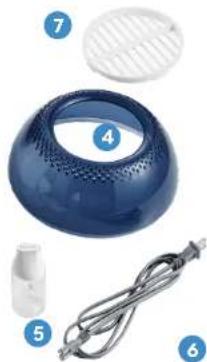
- Water Tank
- Cold Evaporation Filter (CEF)
- Cold Evaporation Filter Lid (CEF Lid)
- Top Cover
- Salt Bottle with 1 Gram Scoop
- Power Cord
- Pre-Filter
How It Works
The Aaira Mini has a two-stage cleaning system to disinfect the air. A fan draws air in through the pre-filter at the bottom of the purifier. Inside, the air passes through the Cold Evaporation Filter and exits through the top cover. The two stages to the purifier are:
STAGE 1: Pre-filter.
The pre-filter has a screen that captures large airborne particles.
STAGE 2: Cold Evaporation Filter (CEF).
The CEF absorbs the HOCl water generated in the water tank. The HOCl water is evaporated as air passes through the CEF. This disperses the HOCl molecules throughout the airspace in the room allowing it to destroy a variety of bacteria and viruses.
Unpacking and Setup
- Remove the air purifier from the box and check that all the items are included. It is a good idea to keep the packaging for storage or in the event it must be shipped back for service.
- Remove the top cover and make sure the CEF and CEF lid are securely in place.
- Place the Aaira Mini on a flat, solid surface in proximity to an AC electrical outlet.
- Connect the power cord to the Punter, and route the power cord to the outlet, but do not plug it in yet. Make sure that the power cord is out of the way and does not pose a tripping hazard, and is out of reach of children and pets.

Make sure the Cold Evaporation Filter (CEF) is secure and turn the CEF lid right to lock in place.


Fill salt bottle with non-iodized salt and place 2 scoops total (2 grams) on the top lid where indicated.


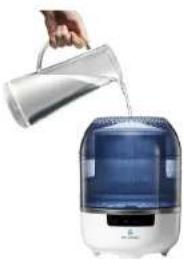
Close the top cover. Fill to MAX v
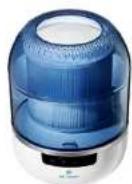

water line with water, washing all salt off the CEF lid.

Press the power button to turn on and select fan setting.

Control PanelGetting Started
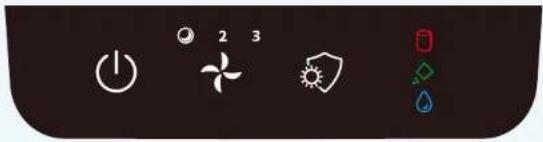

On/Off
Powers the unit on and off

Fan Speed
(Sleep/2/3) Three fan speeds, including an ultra-quiet sleep mode

Disinfect
On and flashing when generating HOCl.

CEF Replacement Indicator
Press Disinfect button for 3 seconds to reset the filter life countdown
Alerts

Low Salt Alert
Solid salt level indicator Solid blue light Sound alert

or or Low Water Alert
Solid water level indicator Flashing blue light
Sound alert

(FLASHING)(SOLID) (SOLID)
High Salt Alert
Flashing salt level indicator Flashing blue light Sound alert
What to do:
One process solves all alerts
- Power off device
- Empty water tank
- Rinse the CEF
- Add 2 scoops total (2 grams) of non-iodized salt
- Fill water to MAX line
Cleaning Your Aaira + Mini
The unit should be cleaned regularly. Clean the water tank with fresh water. Use a clean, dry cloth for the external surfaces of the machine. If water stays in the tank for 7 days follow the alert process.
Maintenance Alert
Flashing water level indicator Flashing salt level indicator Flashing blue light Sound alert
What to do:
- Power off device
- Empty water tank
- Rinse the CEF
- Add 2 scoops total (2 grams) of non-iodized salt
- Fill water to MAX line
Descaling
Lime scale builds up in the machine over time. To ensure the best performance, descale monthly.
What to do:
- Power off device
- Empty water tank
- Take out the CEF
- Add 50ml (2 oz) of 5% white vinegar; leave for 1 hour (do not turn device power on)
- Empty and clean water tank with fresh water
Storage
When the device is not used for an extended time, we recommend that you empty the water tank and remove the CEF to let it dry, then store it in a cool dry place. Do not store the device where it might be exposed to excessive moisture or direct sunlight. The device may not operate effectively in very low temperatures. The device can be damaged when exposed to sub-freezing temperatures.
Operating Procedures
- Press the On/Off button to turn the air purifier on. A start-up sound will play and all the indicators on the control panel will turn on for 3 seconds.
-
The On/Off button will be illuminated white, indicating that the purifier is in standby mode.
-
Press the On/Off button again to begin operation. The blue light in the water tank will turn on, the fan speed will default to level 2, and the Disinfect button will illuminate, indicating that the purifier is actively disinfecting the air in the room.
- Press the fan speed button to toggle the fan speed between sleep, 2, and 3 speeds. When sleep mode is selected, fan speed is reduced and the blue light inside the water tank will turn off.
- Press the power On/Off button again to turn the purifier off.
Timer Operation
Press the timer button to toggle through the options (2H-4H-BH-None). Once selected, an internal timer controls operation of the purifier for the selected duration. Once the timer expires the purifier enters standby mode.
NOTE: Do not use this option if you want the purifier to run continuously.
CEF Replacement
- Remove the CEF lid.
- Unscrew the CEF from the tank and discard. NOTE: Handle the new CEF by the end caps to avoid touching the element, this will prevent possible contamination of the filter element.
- Remove the replacement CEF from packaging and screw it into the bottom of the water tank. Plug in the power cord.
- Turn on the Purifier and press and hold the disinfect button for three seconds to reset the filter life countdown.
If you replace the filter before the accumulated life time is reached, the filter life timer cannot be reset. To purchase replacement filters, please visit: www.dhlifelabs.com
Troubleshooting
| Symptom Probable Cause/Solution | |
| Low air flow | Check that Pre-Filter and the air inlet are free from obstructions and not blocked by dust, trash, etc. Clean as necessary. |
| Emits a chlorine (disinfection) smell | Chlorine smell is normal. You can change to sleep mode to minimize the smell in the room. |
| Air from the Purifier smells bad | Check that water tank and CEF are clean. Clean water tank regularly and replace CEF as necessary. |
| The Purifier has been tipped over or fallen | Immediately unplug the power cord. Lift up the Purifier and wipe off any water on the surface of the machine. Allow the Purifier to completely dry before resuming operation. |
| Water added to Water Tank, but water level indicator is still flashing (Low water alert) | Water level sensor might be defect. Please discard all water in the tank and check again. If it still does not work, contact Customer Support. |
| Salt Level indicator displayed (Low salt alert) even after salt has been added | 1. It takes some time to dissolve the salt and monitor the actual concentration. If it still does not work after some time, please follow low salt alert procedure in the instruction to do. 2. If the alert keep popping out, it might be the time scale building up in the machine over time, please follow descaling alert procedure in the instruction to do. Noted that due to the different usage environments in different places, the scaling will be slightly different; if the alert has not been released after descaling procedure, please kindly longer the soaking time or repeat the descaling procedure one more time. If it still does not work after repeat action, contact Customer Support. |
| Salt Level indicator flashing (High salt alert) after salt has been added | Make sure amount of salt added is correct. Please follow high salt alert procedure in the instruction to do a new batch. |
For any issues not covered here, contact Customer Assistance.
Device Specifications
| Model Number AAE-30XX06 | |
| Power Consumption 21 Watts | |
| Input Voltage 120 VAC | , 60Hz |
| Fan Speed 3 levels (Sleep/ 2/3) | |
| Noise MAX. 43 dB | |
| Water Tank Capacity 1800 ml (60.87oz) | |
| HOCl Recipe | 2 scoops (2 grams) of non-iodized salt: 1800 ml(60.87 oz) of water |
| Material & Finish ABS, Glossy White & Silver belt | |
| Recommended Room Size 323 ft 2 (30 m 2 ) | |
| Reminder | - Filter Replacement Reminder: Coldevaporation filter- Salt Level Reminder- Water Level Reminder |
| Dimensions 11.8" h x 8.7" w (300 mm h x 222 mm w) | |
| Net Weight (without water) | 5.29 lbs (2.4 kg) |
Product Warranty
This 2 year limited warranty applies to repair or replacement of product found to be defective in material or workmanship. This warranty does not apply to damage resulting from commercial, abusive, unreasonable use or supplemental damage. Defects that are the result of normal wear and tear will not be considered manufacturing defects under this warranty.
DH Lifelabs IS NOT LIABLE FOR INCIDENTAL OR CONSEQUENTIAL DAMAGES OF ANY NATURE, ANY IMPLIED WARRANTY OF MERCHANTABILITY OR FITNESS FOR A PARTICULAR PURPOSE ON THIS PRODUCT IS LIMITED TO THE DURATION OF THIS WARRANTY.
Some jurisdictions do not allow the exclusion or limitation of incidental or consequential damages or limitations on how long an implied warranty lasts, so the above limitations or exclusions may not apply to you. This warranty gives you specific legal rights, and you also may have other rights which vary from jurisdiction to jurisdiction. This warranty applies only to the original purchaser of this product from the original date of purchase.
At its option, D&HLifelabs will repair or replace this product if it is found to be defective in material or workmanship.
This warranty does not cover damage resulting from any unauthorized attempts to repair or from any use not in accordance with the instruction manual.
This warranty does not cover the filter except for material or workmanship defects.
FCC Statement
Supplier's Declaration of Comformity:
Trade Name: DH Lifelabs
Models: AAE-30XX06
Responsible Party: Dernier & Hamlyn Inc.
Address: Demier & Hamlyn Inc., 720 Northgate Parkway, Wheeling, IL 60090
Telephone Number: 1-877-548-9722
This device complies with Part 15 of the FCC Rules. Operation is subject to the following two conditions: (1) this device may not cause harmful interference, and (2) this device must accept any interference received, including interference that may cause undesired operation.
Caution: The user is cautioned that changes or modifications not expressly approved by the party responsible for compliance could void the user's authority to operate the equipment. Note: This equipment has been tested and found to comply with the limits for a Class B digital device, pursuant to part 15 of the FCC Rules. These limits are designed to provide reasonable protection against harmful interference in a residential installation. This equipment generates uses and can radiate radio frequency energy and, if not installed and used in accordance with the instructions, may cause harmful interference to radio communications. However, there is no guarantee that interference will not occur in a particular installation. If this equipment does cause harmful interference to radio or television reception, which can be determined by turning the equipment off and on, the user is encouraged to try to correct the interference by one or more of the following measures:
- Reorient or relocate the receiving antenna.
- Increase the separation between the equipment and receiver.
- Connect the equipment into an outlet on a circuit different from that to which the receiver is connected.
- Consult the dealer or an experienced radio/TV technician for help.
Need Help?
1-877-548-9722
9 AM-6 PM, CST, Monday-Friday

FC IC
EPA EST NO. 99117-CHN-1 MADE IN CHINA
Dernier & Hamlyn Inc. 720 Northgate Parkway Wheeling, IL 60090
*The Azira Mini uses HOCl Technology that takes ingredients found in nature (water and non-iodized salt) and uses science (electrolysis) to create a powerful disinfectant.
**Dispose used products according to local regulations.


- THANK YOU FOR YOUR PURCHASE. NOW YOU CAN BREATHE EASY
- ALL THE THINGS YOU NEED TO KNOW ARE HERE
- YOUR SAFETY IS IMPORTANT TO US
- WARNING! TO REDUCE THE RISK OF FIRE, ELECTRIC SHOCK OR INJURY PLEASE ADHERE TO THE FOLLOWING
- READ ALL SAFETY
- PRODUCT OVERVIEW
- HOW IT WORKS
- UNPACKING AND SETUP
- CONTROL PANELGETTING STARTED
- ON/OFF
- FAN SPEED
- DISINFECT
- CEF REPLACEMENT INDICATOR
- ALERTS
- LOW SALT ALERT
- OR OR LOW WATER ALERT
- (FLASHING)(SOLID) (SOLID)
- HIGH SALT ALERT
- WHAT TO DO
- CLEANING YOUR AAIRA + MINI
- MAINTENANCE ALERT
- DESCALING
- STORAGE
- OPERATING PROCEDURES
- TIMER OPERATION
- CEF REPLACEMENT
- PRODUCT WARRANTY
- FCC STATEMENT
- SUPPLIER'S DECLARATION OF COMFORMITY
- NEED HELP
Brand : DH Lifelabs
Model : Aaira Mini AAE-30WB06
Category : Air purifier